6 Best Alternatives to the Zalman T6 ATX Mid-Tower Case (2026)
As an Amazon Associate we earn from qualifying purchases. Links on this page are affiliate links.
The Zalman T6 ATX Mid-Tower Case offers solid standard component clearance and legacy optical drive support. If you are looking for zalman t6 atx mid tower desktop PC case alternatives, you might want different specs or a different brand. This original model includes a 120mm fan and supports ATX, mATX, and mini-ITX motherboards. It also features a 5.25-inch external bay and powder-coated steel construction.
You may need something else if you require more preinstalled fans, larger graphics card clearance, or modern front panel ports. The alternatives listed here were chosen because their specs overlap with the original. Some options provide multiple included fans for better airflow. Others offer tempered glass side panels or Type-C connectivity. This list covers 6 practical choices that share the same mid-tower form factor. You can compare these models based on their published dimensions, supported motherboard sizes, and included cooling components. Each option addresses specific build needs that the T6 does not cover, such as RGB lighting or larger radiator support.
How these cases differ from the T6
Zalman S3 Compact ATX Mid-Tower Case
The Zalman S3 Compact ATX Mid-Tower Case provides three preinstalled 120mm fans compared to the T6’s single unit. This offers better immediate airflow for compact builds. It supports ATX motherboards and fits graphics cards up to 330mm long. You give up the external 5.25-inch optical drive bay found on the T6. The S3 is also slightly taller and deeper, measuring 17.8 inches in height. It weighs 8.38 pounds, which is marginally heavier than the T6. Pick this if you need more fans out of the box and do not require legacy optical drive support.
Zalman Compact ATX Mid-Tower with Dual Fans
The Zalman S4 Compact ATX Mid-Tower Case includes dual 120mm fans, offering double the cooling capacity of the T6’s single fan. It supports ATX motherboards and features a tinted window for visibility. The S4 is lighter at 7.9 pounds compared to the T6’s 8 pounds. It is slightly wider at 18 inches. You lose the external 5.25-inch drive bay present on the T6. The internal layout is designed for simple assembly. Choose this alternative if you want a lightweight chassis with better stock airflow and do not need an optical drive bay.
MOROVOL Mid-Tower Mesh ATX Case
The MOROVOL Mid-Tower Mesh ATX Case includes four RGB fans, significantly more than the T6’s single fan. It features a mesh front for improved airflow and a tempered glass side panel. The T6 uses a steel chassis with a mesh side. You must keep GPU lengths under 300mm and CPU cooler heights under 155mm, which are tighter limits than the T6’s standard clearance. It lacks the external 5.25-inch drive bay. Pick this if you want included RGB lighting and modern connectivity, accepting stricter component size limits and no optical drive support.
Apevia Aurora Mid Tower with Six 120mm Fans
The Apevia Aurora Mid Tower Case includes six pre-installed PWM ARGB fans, providing extensive airflow and lighting compared to the T6’s single fan. It supports ATX motherboards and offers clearance for large components. The chassis is white, unlike the T6’s black steel build. You give up the external 5.25-inch optical drive bay. The Aurora is taller at 18.5 inches and wider at 8.25 inches. It weighs more due to the additional fans and structure. Choose this if you want maximum out-of-the-box ARGB lighting and cooling without installing additional fans.
MUSETEX ATX Mid-Tower Dual Glass Case
The MUSETEX ATX Mid-Tower Dual Glass Case offers dual tempered glass panels and a dual-chamber design, unlike the T6’s steel construction. It includes a Type-C port, providing modern connectivity compared to the T6’s USB 3.0 and 2.0 ports. It supports 360mm radiators and fits graphics cards up to 400mm long. You lose the external 5.25-inch drive bay. The case is heavier at 16.9 pounds and wider at 11.6 inches. Pick this if you need updated front ports, spacious component clearance, and a modern aesthetic with glass panels.
GAMDIAS Mid-Tower Case with 4 ARGB Fans
The GAMDIAS Mid-Tower Case includes four pre-installed 120mm ARGB fans, offering more cooling and lighting than the T6’s single fan. It features a mesh front and a tempered glass side panel. The T6 has a steel side panel. You give up the external 5.25-inch optical drive bay. The GAMDIAS is taller at 17.7 inches and slightly narrower at 7.68 inches. It weighs 10.8 pounds. Choose this if you want a mesh-front design with included ARGB fans and a glass side panel for visibility, accepting the loss of legacy drive support.
Quick picks
Our 7 picks

Zalman T6 ATX Mid-Tower Case
Best for: standard builds needing an external optical bay
- Motherboard Support
- ATX, mATX, mini-ITX
- Case Type
- Mid Tower
- Included Fans
- 1x 120mm
- Dimensions
- 7.87 × 16.9 × 14.8 inches
- Weight
- 8 pounds
This mid-tower steel case supports ATX, mATX, and mini-ITX motherboards and features an external 5.25-inch optical drive bay. You get one preinstalled 120mm rear fan, room for up to four fans total, and storage mounts for four drives. Front connectivity includes one USB 3.0 and two USB 2.0 ports. It suits you if you need an external drive bay on a standard ATX chassis.
Pros
- External 5.25-inch drive bay for optical drives
- Supports ATX, mATX, and mini-ITX motherboards
- Mounts up to four total cooling fans
- Includes dedicated bays for two 2.5-inch and two 3.5-inch drives
Cons
- Incompatible with ATX motherboards using side-facing SATA ports
- Includes only one preinstalled 120mm fan
Good fit if
- You need an external 5.25-inch bay for an optical drive.
- You build with an ATX, mATX, or mini-ITX motherboard.
- You want a lightweight eight-pound steel chassis.
Skip if
- You use an ATX motherboard with side-facing SATA ports.
- You require more than four case fans.
Verdict: Zalman ATX Mid-Tower Case with Optical Drive Bay delivers standard component clearance and legacy optical drive support. It will not work if your motherboard uses side-facing SATA ports.
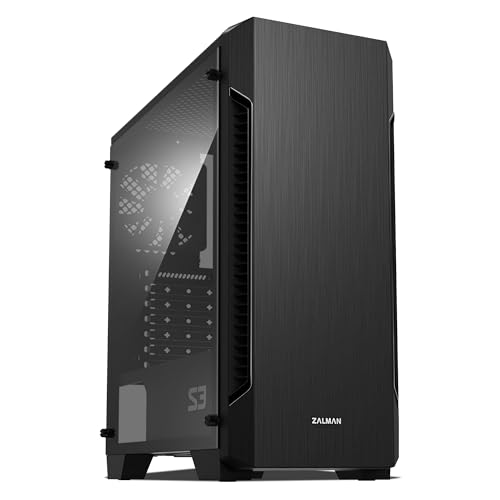
Zalman S3 Compact ATX Mid-Tower Case
Best for: compact ATX builds needing multiple included fans
- Motherboard Support
- ATX
- Case Type
- Mid-Tower
- Side Panel
- Acrylic
- Included Fans
- 3x 120mm
- Radiator Support
- 120mm
- Max GPU Length
- 330mm
The Zalman S3 is a compact ATX mid-tower case featuring an acrylic side window and three preinstalled 120mm fans. It accommodates graphics cards up to 330mm in length and supports ATX motherboards alongside top and bottom dust filters. You get mounting space for up to eight cooling fans. This enclosure suits you if you want ready-to-go air cooling and standard ATX component support in a compact footprint.
Pros
- Three preinstalled 120mm cooling fans
- Internal clearance for graphics cards up to 330mm
- Mounting positions for up to eight cooling fans
- Removable top and bottom dust filters
Cons
- Maximum radiator support limited to 120mm in the front
- Side panel constructed from acrylic rather than tempered glass
Good fit if
- You want multiple preinstalled fans for out-of-the-box airflow.
- You have a graphics card measuring up to 330mm.
- You build with a standard ATX motherboard in a compact footprint.
Skip if
- You require front radiator support larger than 120mm.
- You prefer a scratch-resistant tempered glass side window.
Verdict: Zalman S3 ATX Case with Three Fans provides practical cooling directly out of the box with three preinstalled fans and clearance for 330mm graphics cards. It is an effective compact ATX enclosure if you do not need liquid cooling radiators larger than 120mm.

Zalman Compact ATX Mid-Tower with Dual Fans
Best for: lightweight ATX builds needing dual pre-installed fans
- Motherboard Support
- ATX
- Case Type
- Mid Tower
- Side Panel
- Acrylic
- Included Fans
- 2x 120mm
- Dimensions
- 8.11 × 18 × 15 inches
- Weight
- 7.9 pounds
The Zalman S4 is a compact ATX mid-tower case equipped with two pre-installed 120mm fans and a tinted acrylic side panel. Measuring 18 by 15 by 8.11 inches and weighing 7.9 pounds, it houses a full ATX motherboard inside a lightweight frame. Dedicated front bezel airflow openings feed ventilation across your internal hardware. It suits you if you want a straightforward ATX setup with basic cooling components ready right out of the box.
Pros
- Includes two pre-installed 120mm fans
- Supports standard ATX motherboards
- Lightweight chassis at 7.9 pounds
- Full acrylic tinted side panel
Cons
- Uses an acrylic rather than tempered glass side panel
- Limited to two pre-installed fans from the factory
Good fit if
- You need a lightweight ATX mid-tower weighing under 8 pounds.
- You want an included two-fan cooling configuration out of the box.
- You prefer a full tinted acrylic side panel to display components.
Skip if
- You prefer a tempered glass side panel over acrylic.
- You need more than two pre-installed fans.
Verdict: Zalman S4 Compact ATX Mid-Tower Case provides standard ATX motherboard compatibility and dual 120mm cooling fans in a lightweight chassis. It delivers essential airflow openings and a tinted window for simple, practical system assembly.

MOROVOL Mid-Tower Mesh ATX Case
Best for: builders wanting included out-of-the-box RGB fans
- Motherboard Support
- ATX, Micro-ATX, Mini-ITX
- Case Type
- Mid Tower
- Side Panel
- Tempered Glass
- Included Fans
- 4x 120mm RGB
- Max GPU Length
- 300mm
- Use
- Gaming
The MOROVOL ATX Mid-Tower Case with 4 RGB Fans gives you airflow and illumination right out of the box. It features four pre-installed 120mm fans with fixed RGB lighting and a diamond-mesh front panel. The tempered glass side panel showcases your hardware, while the chassis accommodates ATX motherboards, graphics cards up to 300mm, and CPU coolers up to 155mm. It suits builders wanting full fan coverage without purchasing extra cooling.
Pros
- Four pre-installed 120mm RGB fans
- Diamond-shaped mesh front panel for airflow
- Removable tempered glass side panel
- Supports two 2.5-inch SSDs and two 3.5-inch HDDs
Cons
- RGB fan lighting is fixed and not addressable
- Graphics card clearance is limited to 300mm
- CPU cooler height is limited to 155mm
Good fit if
- You want multiple pre-installed RGB fans included directly with the chassis.
- You prefer a mesh front panel paired with a tempered glass side window.
- You use a graphics card measuring 300mm or less.
Skip if
- You need customizable or addressable ARGB lighting modes.
- You plan to install a CPU air cooler taller than 155mm.
- You use a graphics card longer than 300mm.
Verdict: MOROVOL ATX Mid-Tower Case with 4 RGB Fans delivers four included illuminated cooling fans and a mesh front for steady intake airflow. You need to keep GPU lengths within 300mm and CPU cooler heights under 155mm.

Apevia Aurora Mid Tower with Six 120mm Fans
Best for: Maximum out-of-the-box ARGB fan setups
- Case Type
- Mid Tower
- Side Panel
- Tempered Glass
- Included Fans
- 6x 120mm PWM ARGB
- Radiator Support
- 360mm
- Max GPU Length
- 360mm
- Motherboard Support
- ATX
The Apevia Aurora Mid Tower Case with 6 ARGB Fans provides a cooling setup equipped with six pre-installed 120mm PWM ARGB fans and an included eight-port hub. It accommodates graphics cards up to 360mm long, CPU coolers up to 165mm tall, and front radiators up to 360mm. It suits you if you want extensive lighting and speed control without buying extra case fans.
Pros
- Includes six 120mm PWM ARGB fans and an eight-port hub
- Clearance for 360mm graphics cards and 165mm CPU coolers
- Front radiator support up to 360mm and top support up to 240mm
- Magnetic swivel-open tempered glass side panel door
Cons
- No front-panel USB Type-C port
- Motherboard lighting sync requires a compatible 3-pin ARGB header
Good fit if
- You want six PWM ARGB fans and a hub included out of the box.
- You use a long graphics card measuring up to 360mm.
Skip if
- You need a front-panel USB-C connection for modern peripherals.
- You lack a 3-pin ARGB motherboard header and require software sync.
Verdict: Apevia Aurora Mid Tower Case with 6 ARGB Fans provides complete airflow and lighting coverage through six pre-installed PWM ARGB fans and clearance for large components.

MUSETEX ATX Mid-Tower Dual Glass Case
Best for: builders wanting front Type-C and dual-chamber space
- Motherboard Support
- ATX
- Case Type
- Mid Tower
- Side Panel
- Tempered Glass
- Included Fans
- 3x 120mm
- Radiator Support
- 360mm
- Max GPU Length
- 400mm
The MUSETEX ATX Mid-Tower Case is an alternative featuring modern front panel connectivity and a dual-chamber layout. It provides a front USB 3.2 Type-C port, dual tempered glass panels, and room for graphics cards up to 400mm long. With support for a 360mm top radiator and three pre-installed 120mm fans, it suits you if you need up-to-date I/O and clearance for large cooling components.
Pros
- Front I/O includes USB 3.2 Type-C and USB 3.0
- Supports graphics cards up to 400mm in length
- Accommodates top-mounted liquid radiators up to 360mm
- Comes with three pre-installed 120mm fans
Cons
- Dual-chamber layout results in a wide 11.61-inch width
- Liquid cooling support is limited to the top mount
Good fit if
- You need high-speed USB 3.2 Type-C access on the front panel.
- You plan to run a long GPU measuring up to 400mm.
- You want tool-free snap-on panels and dual tempered glass.
Skip if
- You have limited desk width and need a narrow tower under 11 inches wide.
- You plan to mount radiators in locations other than the top panel.
Verdict: MUSETEX ATX Mid-Tower Case with Type-C delivers modern external connectivity alongside clearance for 400mm graphics cards and 176mm CPU coolers. Its dual-chamber design and 270-degree glass make it a practical choice if you need updated front ports and spacious component clearances.

GAMDIAS Mid-Tower Case with 4 ARGB Fans
Best for: Pre-installed ARGB fans and glass side
- Motherboard Support
- ATX, Micro-ATX, Mini-ITX
- Case Type
- Mid Tower
- Side Panel
- Tempered Glass
- Included Fans
- 4x 120mm ARGB
- Radiator Support
- 360mm
- Max GPU Length
- 340mm
The GAMDIAS AURA GC1 Elite ARGB is an ATX mid-tower case featuring a mesh front panel and tempered glass side. It includes four 120mm ARGB fans for airflow and lighting. The case supports motherboards up to ATX size and radiators up to 360mm. It offers USB 3.0 and 2.0 ports on the front. This build suits gamers who want pre-installed fans and clear visibility of their components.
Pros
- Four 120mm ARGB fans pre-installed
- Tempered glass side panel
- Supports up to 360mm radiators
- Mesh front panel for airflow
Cons
- Heavier at 10.8 pounds
- No mention of top fan mounts
- Only one USB 3.0 port
Good fit if
- You want pre-installed ARGB fans
- You need a tempered glass side
- You use a 360mm radiator
Skip if
- You need multiple USB 3.0 ports
- You prefer a lighter case
- You want top fan mounts
Verdict: The GAMDIAS AURA GC1 Elite ARGB fits users who want a mesh-front mid-tower with four pre-installed 120mm ARGB fans and a tempered glass side panel for clear component visibility.
Specifications side by side
| Spec | Zalman T6 ATX Mid-Tower Case | Zalman S3 Compact ATX Mid-Tower Case | Zalman Compact ATX Mid-Tower with Dual Fans | MOROVOL Mid-Tower Mesh ATX Case | Apevia Aurora Mid Tower with Six 120mm Fans | MUSETEX ATX Mid-Tower Dual Glass Case | GAMDIAS Mid-Tower Case with 4 ARGB Fans |
|---|---|---|---|---|---|---|---|
| Motherboard Support | ATX, mATX, mini-ITX | ATX | ATX | ATX, Micro-ATX, Mini-ITX | not specified | ATX | ATX, Micro-ATX, Mini-ITX |
| Case Type | Mid Tower | Mid-Tower | Mid Tower | Mid Tower | Mid Tower | Mid Tower | Mid Tower |
| Side Panel | not specified | Acrylic | Acrylic | Tempered Glass | Tempered Glass | Tempered Glass | Tempered Glass |
| Included Fans | 1x 120mm | 3x 120mm | 2x 120mm | 4x 120mm RGB | 6x 120mm PWM ARGB | 3x 120mm | 4x 120mm ARGB |
| Radiator Support | not specified | 120mm | not specified | not specified | 360mm | 360mm | 360mm |
| Max GPU Length | not specified | 330mm | not specified | 300mm | 360mm | 400mm | 340mm |
| Tower Size | Mid-Tower | Mid-Tower | Mid-Tower | Mid-Tower | Mid-Tower | Mid-Tower | Mid-Tower |
| Fan Size | 120mm | 120mm | 120mm | not specified | 120mm | 120mm | 120mm |
| Use | not specified | not specified | not specified | Gaming | not specified | Gaming | Gaming |
| Lighting | not specified | not specified | not specified | RGB | ARGB | not specified | ARGB |
| Connectivity | not specified | USB 3.0 | not specified | USB 3.0 | not specified | Type-C | not specified |
| Compatible Device | not specified | not specified | not specified | not specified | not specified | not specified | Radiator, CPU Cooler |
| Dimensions | 7.87 × 16.9 × 14.8 inches | 16.2 × 7.44 × 17.8 inches | 8.11 × 18 × 15 inches | 14.6 × 7.28 × 16.7 inches | 16.3 × 8.25 × 18.5 inches | 16.5 × 11.6 × 14.5 inches | 15.6 × 7.68 × 17.7 inches |
| Weight | 8 pounds | 8.38 pounds | 7.9 pounds | not specified | not specified | 16.9 pounds | 10.8 pounds |
| Size | T6 | 16.22 x 7.44 x 17.76 inches | Mid Tower | Large Size | AURORA WHITE | 16.54"D x 11.61"W x 14.49"H | AURA GC1 E A |
| Color | Black | Acrylic | S4 | black | White | Black | Black |
| Model | T6 | not specified | S4 | 621 | AURORA-WH | Y6 | AURA GC1 ELITE ARGB |
If your build requires a new unit, verify clearance dimensions and wattage specs across the best ATX PC power supplies.
Frequently asked questions
Which case offers the best pre-installed fan count for airflow?
The Apevia Aurora Mid Tower includes six 120mm PWM ARGB fans. This setup provides complete airflow coverage right out of the box. It supports ATX motherboards and offers clearance for large components. You get maximum cooling potential without buying additional fans separately. The white finish and ARGB lighting add visual appeal to your build.
What is the maximum GPU length supported by these alternatives?
The MUSETEX ATX Mid-Tower Case supports graphics cards up to 400mm long. The MOROVOL Mid-Tower Mesh ATX Case limits GPU length to 300mm. The Zalman S3 Compact supports cards up to 330mm. Check your specific graphics card dimensions before purchasing. Larger cases like the MUSETEX provide more room for high-end hardware.
Do any of these cases include USB Type-C connectivity?
Yes, the MUSETEX ATX Mid-Tower Case features a front USB Type-C port. This provides modern external connectivity for newer devices. Most other listed cases, such as the Zalman T6 and S3, do not mention Type-C support in their specifications. If you need Type-C, the MUSETEX model is the clear choice among these options.
Which case is best for builders who want RGB lighting included?
The MOROVOL Mid-Tower Mesh ATX Case includes four RGB fans. The Apevia Aurora includes six ARGB fans. The GAMDIAS Mid-Tower Case also comes with four pre-installed ARGB fans. These options provide immediate lighting effects without extra purchases. The Zalman models focus on practical airflow rather than integrated illumination.
Can these cases fit large liquid cooling radiators?
The MUSETEX ATX Mid-Tower Case supports 360mm radiators. The Zalman S3 Compact ATX Case supports radiators up to 120mm. The GAMDIAS case is compatible with radiators and CPU coolers. Most other models do not specify large radiator support. If you plan to use a large AIO cooler, verify the mounting points and clearance in the case specifications.
Which case has the most spacious interior for component clearance?
The MUSETEX ATX Mid-Tower Case offers a dual-chamber design with 270-degree glass visibility. It supports 400mm GPUs and 176mm CPU coolers. The Apevia Aurora also provides clearance for large components. The Zalman T6 offers standard clearance. For maximum space, the MUSETEX and Apevia models are the most practical choices for bulky hardware.
Is there a lightweight option for smaller builds?
The Zalman Compact ATX Mid-Tower with Dual Fans weighs 7.9 pounds. It is a lightweight chassis that still supports ATX motherboards. The Zalman T6 weighs 8 pounds. The MOROVOL case does not list a weight. If you prefer a lighter case for easier transport or installation, the Zalman S4 is a solid, practical option.