15 Best PC Cases with Panoramic Glass, Compared
As an Amazon Associate we earn from qualifying purchases. Links on this page are affiliate links.
A PC case with panoramic glass gives you an unobstructed view of your components while organizing hardware layouts. We evaluated 15 models based strictly on the specifications published on their listings.
The HYTE Y60 Panoramic ATX Mid-Tower Case leads the group because it combines a three-piece glass design with an included PCIe 4.0 riser cable for vertical GPU builds. This guide helps you choose the right chassis for your motherboard size, cooling layout, and clearance requirements.
Quick picks
The best fit for you
- You want to mount your graphics card vertically HYTE Y60 Panoramic ATX Mid-Tower Case It includes a PCIe 4.0 riser cable alongside a three-piece panoramic glass design.
- You need a compact panoramic Micro-ATX gaming enclosure MOROVOL Micro-ATX Panoramic Glass PC Case It features a compact 12.44-inch height and supports Micro-ATX motherboards with three pre-installed fans.
- You plan to build with an E-ATX motherboard Fractal Design Pop 2 Vision RGB Case It offers dedicated E-ATX motherboard support and includes four reverse-blade RGB fans.
- You want a built-in screen for hardware monitoring Thermalright A70 Vision ATX Case It comes equipped with an integrated 9.16-inch display screen and supports 420mm graphics cards.
Our 15 picks

HYTE Y60 Panoramic ATX Mid-Tower Case
Best for: vertical GPU builds with panoramic glass viewing
- Side Panel
- Tempered Glass, Panoramic Glass
- Motherboard Support
- ATX
- Case Type
- Mid-Tower
- Use
- Gaming
- Dimensions
- 18 × 11.2 × 18.2 inches
- Weight
- 22 pounds
The HYTE Y60 is a dual-chamber ATX mid-tower case built around a three-piece panoramic tempered glass design with no corner pillars. You get dedicated basement venting for cooling and an included PCIe 4.0 riser cable designed exclusively for vertical graphics card mounting. This chassis suits you if you want a clean multi-angle view of your components while keeping cables routed neatly away in the rear chamber.
Pros
- Three-piece panoramic tempered glass design with no corner pillar
- Included PCIe 4.0 riser cable with protective shroud
- Dual-chamber construction separates cables from main components
- Cold floor lateral basement vents for intake airflow
Cons
- Restricted exclusively to vertical graphics card mounting
- Expansion slots behind the graphics card require half-height cards
- Chassis is heavy at 22 pounds unloaded
Good fit if
- You plan to mount your graphics card vertically using an included PCIe 4.0 riser.
- You want an unobstructed multi-angle panoramic view without corner pillars.
- You prefer a dual-chamber layout that isolates power supply and cable management.
Skip if
- You need a standard horizontal graphics card mounting configuration.
- You rely on multiple full-height PCIe add-in expansion cards.
- You need a lightweight computer case that is easy to move.
Verdict: HYTE Y60 Panoramic ATX Mid-Tower Case delivers an unobstructed three-piece glass view alongside dual-chamber cable organization. It provides a dedicated vertical GPU showcase with its included PCIe 4.0 riser cable.

NZXT H6 Flow RGB Mid-Tower Case
Best for: dual-chamber airflow builds with angled intake
- Side Panel
- Panoramic Glass
- Case Type
- Mid-Tower
- Included Fans
- 3x 120mm RGB
- Dimensions
- 16.3 × 11.3 × 17.1 inches
- Weight
- 20.7 pounds
The NZXT H6 Flow RGB Mid-Tower Case features wraparound glass panels with a seamless edge for panoramic internal viewing. Its compact dual-chamber layout separates core components, while three angled 120mm RGB fans come pre-installed for out-of-the-box cooling. Measuring 11.3 inches wide, 17.13 inches tall, and 16.34 inches long, this chassis suits you if you need wide cable channels and direct component visibility.
Pros
- Seamless wraparound panoramic glass panels
- Three pre-installed angled 120mm RGB intake fans
- Dual-chamber design with built-in channels and straps for cables
- Perforated top and side panels designed for airflow and dust filtration
Cons
- Footprint width of 11.3 inches requires extra desk clearance
- Chassis weighs 20.72 pounds before adding components
Good fit if
- You want seamless wraparound glass panels without a corner pillar.
- You want three angled 120mm RGB fans included from the factory.
- You prefer a dual-chamber layout with dedicated cable channels.
Skip if
- You need a narrower case profile than 11.3 inches.
- You want a lightweight chassis weighing under 20 pounds.
Verdict: NZXT H6 Flow RGB Mid-Tower Case pairs a seamless glass exterior with three angled intake fans and a dual-chamber frame. It keeps cables organized through wide routing channels while maintaining open component sightlines.

MOROVOL Micro-ATX Panoramic Glass PC Case
Best for: compact Micro-ATX panoramic gaming builds
- Side Panel
- Tempered Glass, Panoramic Glass
- Motherboard Support
- Micro-ATX
- Case Type
- Mid-Tower
- Included Fans
- 3
- Use
- Gaming
- Connectivity
- USB 3.0
The MOROVOL Micro-ATX Panoramic Glass PC Case gives you a compact chassis with a 270-degree view across three sides of tempered glass. It supports Micro-ATX motherboards and measures 13.39 inches deep, 10.87 inches wide, and 12.44 inches tall. With three pre-installed fans providing direct cooling out of the box and a dedicated front USB 3.0 port, this enclosure suits you if you want a small panoramic gaming desktop.
Pros
- 270-degree three-sided panoramic tempered glass panel
- Three pre-installed cooling fans included out of the box
- Front-panel USB 3.0 connectivity
- Compact dimensions of 13.39 by 10.87 by 12.44 inches
Cons
- Limited to Micro-ATX motherboards with no standard ATX support
- Front panel includes only one USB 3.0 port
Good fit if
- You build with a Micro-ATX motherboard.
- You want three pre-installed fans included with the chassis.
- You need a compact desktop footprint with three-sided glass.
Skip if
- You plan to install a full-size ATX motherboard.
- You require multiple front-panel USB ports.
Verdict: MOROVOL Micro-ATX Panoramic Glass PC Case provides a 270-degree three-sided view and three pre-installed fans in a compact frame. It delivers essential cooling and panoramic display specs for Micro-ATX builders.
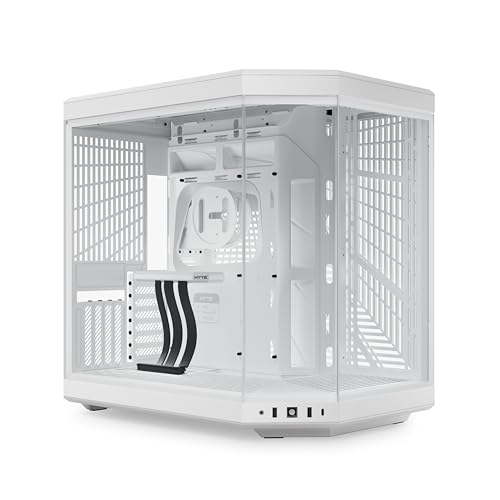
HYTE Y70 Panoramic Glass Mid-Tower
Best for: large vertical GPU and custom-loop builds
- Side Panel
- Panoramic Glass
- Case Type
- Mid-Tower
- Radiator Support
- 360mm
- Motherboard Support
- ATX
- Use
- Gaming
- Dimensions
- 18.5 × 12.5 × 18.5 inches
The HYTE Y70 is an ATX mid-tower chassis featuring a 3-piece panoramic glass setup and a dual-chamber layout. It accommodates 4-slot vertical graphics cards with an included PCIe 4.0 x16 riser cable. For liquid cooling, you get mounting space for up to two 360mm radiators on the side and top. This case suits you if you want a showcase enclosure built for oversized components and extensive cooling configurations.
Pros
- Includes PCIe 4.0 x16 riser cable for 4-slot vertical GPU mounting
- Supports two 360mm radiators on the side and top simultaneously
- Floor mounts fit three 120mm or two 140mm fans up to 32mm thick
- Tool-less panels and dedicated rear-chamber cable management
Cons
- Does not include pre-installed cooling fans
- Weighs 24.3 pounds before installing components
- Measures 12.5 inches wide, requiring significant desk space
Good fit if
- You plan to mount a thick 4-slot graphics card vertically.
- You want side and top support for 360mm liquid cooling radiators.
- You need a dual-chamber chassis with a 3-piece panoramic glass design.
Skip if
- You prefer a case that comes with factory-installed cooling fans.
- You have limited desk width to accommodate a 12.5-inch chassis.
- You want a lightweight enclosure that weighs under 20 pounds.
Verdict: HYTE Y70 Panoramic Glass Mid-Tower provides generous clearance for thick radiators, expansive cable routing, and an included PCIe 4.0 vertical riser. It serves as a sturdy foundation if you want an unobstructed panoramic hardware showcase.

Corsair iCUE Link 3500X RGB Mid-Tower
Best for: clean builds using reverse-connection motherboards
- Side Panel
- Tempered Glass, Panoramic Glass
- Motherboard Support
- Mini-ITX to EATX
- Case Type
- Mid-Tower
- Included Fans
- 3x RX120 RGB
- Dimensions
- 19.9 × 9.45 × 18.1 inches
- Weight
- 20.3 pounds
The Corsair iCUE Link 3500X RGB is a mid-tower case built with removable front and side panoramic tempered glass panels. It includes three RX120 RGB fans and an iCUE LINK System Hub to minimize interior wiring. With support for reverse-connection motherboards from Mini-ITX up to EATX and space for ten 120mm fans, it gives you a clear internal view and flexible cooling options for clean component layouts.
Pros
- Three pre-installed RX120 RGB fans and an iCUE LINK System Hub
- Compatible with reverse-connection motherboards including ASUS BTF and MSI Project Zero
- Mounting points accommodate up to ten 120mm fans
- Easily removable front and side tempered glass panels
Cons
- Only three fan mounts are filled out of ten available
- Case weight is over 20 pounds without components
Good fit if
- You use a reverse-connection motherboard from ASUS or MSI.
- You want an iCUE LINK ecosystem to reduce internal cabling.
- You plan to install up to ten 120mm cooling fans.
Skip if
- You need a lightweight chassis under 20 pounds.
- You want all ten fan slots pre-populated from the factory.
Verdict: Corsair iCUE Link 3500X RGB Mid-Tower delivers panoramic tempered glass views alongside hardware support for reverse-connection motherboards and single-cable fan setups. It provides an organized interior foundation if you want high cooling capacity without visible cable clutter.

Corsair 3500X Panoramic Glass Mid-Tower
Best for: reverse-connection motherboard builds with custom cooling
- Side Panel
- Tempered Glass, Panoramic Glass
- Motherboard Support
- Mini-ITX to EATX
- Case Type
- Mid-Tower
- Radiator Support
- 360mm
- Dimensions
- 19.9 × 9.45 × 18.1 inches
- Weight
- 19 pounds
The Corsair 3500X is a mid-tower case featuring wraparound panoramic tempered glass across the front and side. It supports motherboard sizes from Mini-ITX up to EATX, including reverse-connection motherboards from ASUS and MSI. With mounting space for up to ten 120mm fans and dual 360mm radiators in the roof and side, it suits builders who want an unobstructed interior view paired with high liquid cooling capacity.
Pros
- Removable front and side panoramic tempered glass panels
- Compatible with ASUS BTF and MSI Project Zero reverse-connection motherboards
- Mounts up to ten 120mm fans across side, roof, and PSU areas
- Supports 360mm radiators in both the roof and side positions
Cons
- Does not include pre-installed cooling fans
- Weighs nearly 19 pounds without components installed
Good fit if
- You plan to build with a reverse-connection motherboard like ASUS BTF or MSI Project Zero.
- You want dual 360mm radiator support alongside panoramic glass panels.
- You prefer to supply your own case fans.
Skip if
- You need a case that includes pre-installed intake or exhaust fans.
- You have limited desk depth for a chassis measuring nearly 20 inches long.
Verdict: Corsair 3500X Panoramic Glass Mid-Tower delivers clean cable management and extensive radiator support for setups using reverse-connector hardware. Its wraparound glass and ten-fan capacity make it a practical mid-tower for liquid-cooled configurations.

FOIFKIN Panoramic Dual-Chamber Mid-Tower
Best for: multi-radiator liquid cooling and high-airflow panoramic builds
- Side Panel
- Panoramic Glass
- Motherboard Support
- ATX, M-ATX, ITX
- Case Type
- Mid-Tower
- Included Fans
- 7x 120mm ARGB PWM
- Radiator Support
- 360mm
- Max GPU Length
- 400mm
The FOIFKIN Panoramic Dual-Chamber Mid-Tower is an ATX gaming chassis designed for high airflow and unobstructed visibility. It features a 270-degree panoramic tempered glass side panel and a dual-chamber layout that isolates the power supply. Inside, you get seven pre-installed PWM ARGB fans and clearance for graphics cards up to 400mm. It suits builders seeking extensive cooling flexibility, including simultaneous support for three 360mm radiators.
Pros
- Includes seven pre-installed 120mm PWM ARGB fans
- Supports three 360mm radiators simultaneously
- Accommodates graphics cards up to 400mm long
- Dual-chamber layout separates power supply and drive storage
Cons
- Drive capacity limited to one 3.5-inch drive and two 2.5-inch drives
- Width of 11.2 inches takes up significant desk space
Good fit if
- You want seven pre-installed ARGB fans ready to use.
- You plan to mount up to three 360mm radiators simultaneously.
- You use an extended graphics card up to 400mm in length.
Skip if
- You need internal mounts for multiple 3.5-inch hard drives.
- You need support for motherboards larger than standard ATX.
- You have a narrow workspace that cannot fit an 11.2-inch wide case.
Verdict: FOIFKIN Panoramic Dual-Chamber Mid-Tower delivers generous radiator clearance and seven pre-installed fans for cooling-heavy panoramic builds. Its wider dual-chamber footprint trades desk space for streamlined cable management and multi-radiator capability.

FOIFKIN Panoramic Glass Mid-Tower Case
Best for: clean panoramic builds without stock RGB lighting
- Side Panel
- Panoramic Glass
- Motherboard Support
- ATX, M-ATX, ITX
- Case Type
- Mid-Tower
- Included Fans
- 4x Non-LED
- Radiator Support
- 360mm
- Max GPU Length
- 400mm
This ATX mid-tower chassis features a 270-degree panoramic tempered glass view with a dual-chamber internal layout. It includes four pre-installed non-LED cooling fans and provides space for up to ten 120mm fans or three 360mm radiators. With clearance for 400mm graphics cards and 170mm CPU coolers, you get ample space for large components. It suits you if you want wide panoramic visibility without built-in lighting.
Pros
- Tool-free 270-degree panoramic tempered glass panels
- Supports up to three 360mm liquid coolers and ten 120mm fans
- Clearance for graphics cards up to 400mm and CPU coolers up to 170mm
- Front I/O features Type-C, USB 3.0, and USB 2.0 ports
Cons
- Pre-installed fans lack lighting
- Storage capped at three total drives with only one 3.5-inch mount
Good fit if
- You want panoramic glass panels without built-in fan lighting.
- You plan to run multiple 360mm liquid cooling radiators.
- You need clearance for an extra-long graphics card up to 400mm.
Skip if
- You want pre-installed RGB lighting out of the box.
- You need to install more than one 3.5-inch hard drive.
Verdict: FOIFKIN Panoramic Glass Mid-Tower Case delivers generous cooling capacity and wide hardware clearance behind a 270-degree glass enclosure. It is a practical option if you prefer unlit stock fans for your build.

SSUPD Xhuttle Dual-Chamber ATX Case
Best for: dual-orientation builds using 120mm cooling setups
- Side Panel
- Tempered Glass, Panoramic Glass
- Motherboard Support
- ATX
- Case Type
- Mid Tower
- Included Fans
- 3 x 120mm ARGB
- Radiator Support
- 360mm
- Max GPU Length
- 370mm
The SSUPD Xhuttle is a dual-chamber ATX mid-tower case featuring panoramic tempered glass panels. You get support for up to ten 120mm fans, dual 360mm radiators, and vertical or horizontal chassis orientation. It includes three 120mm ARGB fans, a built-in RGB strip, and an integrated lighting controller. This layout suits you if you want a flexible 120mm-focused cooling setup that accommodates 370mm GPUs and hidden-connector motherboards cleanly.
Pros
- Supports up to 10 120mm fans and dual 360mm radiators
- Allows either vertical or horizontal chassis orientation
- Includes 3 pre-installed 120mm ARGB fans, an RGB strip, and an ARGB controller
- Compatible with hidden-connector ATX motherboards and GPUs up to 370mm
Cons
- Fan mounts are limited to 120mm sizes without 140mm support listed
- Heavy empty chassis weight at 23.37 pounds
Good fit if
- You plan to run an extensive 120mm fan array or dual 360mm liquid radiators.
- You want the option to orient your chassis either horizontally or vertically.
- You use a hidden-connector ATX motherboard and a graphics card up to 370mm.
Skip if
- You plan to use 140mm cooling fans or 280mm/420mm radiators.
- You need a lightweight PC enclosure that is easy to move.
Verdict: SSUPD Xhuttle Dual-Chamber ATX Case delivers versatile dual-orientation placement alongside high-density 120mm cooling capacity. Its dual-chamber interior provides clean cable management and direct clearance for large graphics cards.

AeroCool Mid-Tower Dual-Chamber Panoramic Case
Best for: Extra-long graphics cards and dual-radiator builds
- Side Panel
- Tempered Glass, Panoramic Glass
- Case Type
- Mid-Tower
- Included Fans
- 2x 12cm ARGB, 1x 12cm ARGB
- Radiator Support
- 360mm
- Max GPU Length
- 450mm
- Use
- Gaming
View on Amazon: AeroCool Mid-Tower Dual-Chamber Panoramic Case
This dual-chamber mid-tower chassis gives you full front and side tempered glass panels for an unobstructed interior view. It includes three 120mm ARGB fans featuring infinity-mirror lighting, with two reverse-blade units positioned along the side. Inside, you get clearance for graphics cards up to 450mm long and dual 360mm radiator support across the top and bottom. It fits builders wanting broad component clearance with dedicated dual-chamber cable separation.
Pros
- Accommodates graphics cards up to 450mm in length
- Supports up to 360mm radiators on both top and bottom mounts
- Includes three 120mm ARGB fans with infinity mirror lighting
- Dual-chamber layout with nine total fan mounting slots
Cons
- Leaves six of the nine fan positions unfilled out of the box
- Glass front eliminates direct front-panel radiator and intake mounting
Good fit if
- You run an extra-long graphics card up to 450mm.
- You plan to install 360mm liquid cooling radiators at the top or bottom.
- You want pre-installed reverse-blade intake fans that show lighting without bracket obstructions.
Skip if
- You require pre-installed fans in all nine mounting locations.
- You prefer front-to-back straight airflow mesh panels over panoramic glass.
Verdict: AeroCool Dual Chamber Panoramic Mid-Tower delivers generous 450mm GPU clearance and dual 360mm radiator positions behind seamless glass panels. It gives you a clean showcase layout with three infinity-mirror ARGB fans already installed.

KEDIERS Dual Chamber Panoramic ATX Case
Best for: builders wanting maximum pre-installed fans and clearance
- Side Panel
- Panoramic Glass
- Motherboard Support
- ATX, Micro-ATX, Mini-ITX
- Case Type
- Mid Tower
- Included Fans
- 8x PWM ARGB
- Radiator Support
- 420mm
- Max GPU Length
- 460mm
The KEDIERS Dual Chamber Panoramic ATX Case gives you a 270-degree view of your hardware through front and side tempered glass panels. It comes equipped with eight pre-installed PWM ARGB fans, back-connect motherboard support, and space for GPUs up to 460 mm long. This chassis suits you if you want high-clearance component support and complete cooling without buying extra fans.
Pros
- Includes 8 pre-installed PWM ARGB fans with splitters
- Supports graphics cards up to 460 mm and radiators up to 420 mm
- Supports back-connect motherboards for cleaner cabling
- Front I/O includes USB 3.2 Gen 2 Type-C
Cons
- Wide 11.22-inch dual-chamber footprint requires substantial desk space
- Does not support motherboards larger than standard ATX
Good fit if
- You want eight pre-installed ARGB fans included directly in the chassis.
- You plan to mount an extra-long graphics card up to 460 mm.
- You use a back-connect ATX, Micro-ATX, or Mini-ITX motherboard.
Skip if
- You require compatibility with oversized E-ATX motherboards.
- You have limited surface space for a wide dual-chamber case.
Verdict: KEDIERS Dual Chamber Panoramic ATX Case provides comprehensive component clearance and multi-fan airflow behind a 270-degree glass view. It works well if you want complete out-of-the-box cooling and room for long graphics cards.

ANSAITE Mid-Tower Panoramic Case with 9 ARGB Fans
Best for: Builders wanting maximum pre-installed fans and GPU clearance
- Side Panel
- Tempered Glass, Panoramic Glass
- Motherboard Support
- ATX
- Case Type
- Mid-Tower
- Included Fans
- 9x 120mm PWM ARGB
- Radiator Support
- 420mm
- Max GPU Length
- 460mm
View on Amazon: ANSAITE Mid-Tower Panoramic Case with 9 ARGB Fans
This mid-tower case features a 270-degree panoramic tempered glass view and comes with nine pre-installed PWM ARGB fans, including six reverse-blade intake units. You get clearance for 460 mm graphics cards, 175 mm CPU coolers, and top radiators up to 420 mm. It also supports back-connect motherboards. It suits you if you want a complete, high-airflow cooling setup straight out of the box without purchasing additional case fans.
Pros
- Includes nine pre-installed PWM ARGB fans with six reverse-blade intakes
- Accommodates large graphics cards up to 460 mm in length
- Supports top-mounted liquid cooling radiators up to 420 mm
- Built with back-connect motherboard compatibility for hidden cabling
Cons
- Front I/O panel includes only one USB Type-A port
- No standalone hardware lighting controller included
Good fit if
- You want nine pre-installed ARGB fans without buying extra cooling.
- You plan to run an oversized graphics card up to 460 mm.
- You use a back-connect motherboard to keep cable runs hidden.
Skip if
- You need multiple front-panel USB Type-A ports.
- Your motherboard lacks a 5V ARGB header for lighting control.
Verdict: ANSAITE Mid-Tower Panoramic Case with 9 ARGB Fans provides generous internal clearances and extensive out-of-the-box airflow. Its pre-fitted fan configuration and back-connect readiness simplify assembling a high-power build.
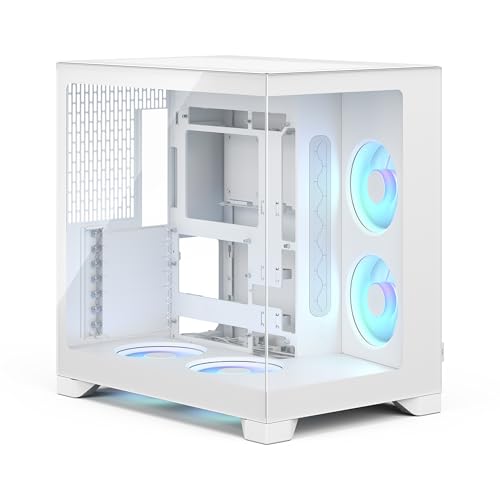
Fractal Design Pop 2 Vision RGB Case
Best for: large E-ATX builds needing high GPU clearance
- Side Panel
- Panoramic Glass
- Motherboard Support
- ATX, E-ATX, mATX, ITX
- Radiator Support
- Up to 360 mm
- Max GPU Length
- 412 mm
- Use
- Gaming
- Lighting
- RGB
The Fractal Design Pop 2 Vision RGB Case provides a dual-chamber panoramic chassis built for gaming setups. You get full support for large E-ATX motherboards along with room for graphics cards up to 412 mm. Cooling features include four pre-installed reverse-blade RGB fans and clearance for a top 360 mm radiator. This layout suits you if you want unhindered internal views alongside generous clearance for high-end components.
Pros
- Supports E-ATX motherboards and graphics cards up to 412 mm
- Comes with four pre-installed reverse-blade RGB fans
- Accommodates top-mounted radiators up to 360 mm
- Tool-free access with removable glass front and side panels
Cons
- Wide 11.69-inch dual-chamber profile requires substantial desk space
- Heavy empty chassis weight of 24.91 pounds
Good fit if
- You build with an E-ATX motherboard and a GPU up to 412 mm.
- You want panoramic glass panels paired with pre-installed reverse-blade fans.
- You plan to mount a 360 mm radiator in the top position.
Skip if
- You have limited horizontal desk space for an 11.69-inch wide case.
- You need a lightweight chassis that is easy to move.
Verdict: Fractal Design Pop 2 Vision RGB Case combines wide E-ATX motherboard clearance with four included reverse-blade fans inside a dual-chamber panoramic frame. It fits expansive hardware without cluttering your primary viewing compartment.

Vetroo CT3 Panoramic ATX Case
Best for: showcase builds using hidden-connector motherboards
- Side Panel
- Tempered Glass, Panoramic Glass
- Motherboard Support
- ATX, Micro-ATX, ITX
- Radiator Support
- 360mm
- Max GPU Length
- 410mm
- Use
- Gaming
- Dimensions
- 18.2 × 11.2 × 17.6 inches
The Vetroo CT3 is a mid-tower chassis featuring three sides of tempered glass for an uninterrupted panoramic view. You get clearance for graphics cards up to 410mm, support for hidden-connector ATX motherboards, and mounts for up to 11 120mm fans or a 360mm radiator. It suits you if you want a clean multi-angle display for large modern components without visible front-facing cables.
Pros
- Three sides of tempered glass provide a panoramic component view
- Supports up to 11 120mm fans or a 360mm radiator
- Accommodates graphics cards up to 410mm in length
- Supports hidden-connector motherboards for tidy cable management
- Front I/O includes a USB Type-C port and two USB 3.0 ports
Cons
- Does not list any pre-installed cooling fans
- Maximum CPU cooler height is limited to 160mm
- Internal drive capacity is limited to one 3.5-inch and two 2.5-inch drives
Good fit if
- You want three glass panels for a wide-angle view of your internal hardware.
- You build with a hidden-connector ATX, Micro-ATX, or ITX motherboard.
- You plan to install a long graphics card up to 410mm.
Skip if
- You need clearance for a CPU air cooler taller than 160mm.
- You want a case that includes pre-installed cooling fans.
- You require space for more than one 3.5-inch hard drive.
Verdict: Vetroo CT3 Panoramic ATX Case delivers expansive three-sided glass viewing and generous 410mm graphics card clearance. Its support for hidden-connector motherboards and up to 11 fans makes it a capable base for high-airflow showcase builds.

Thermalright A70 Vision ATX Case
Best for: Builders wanting an integrated secondary monitoring screen
- Side Panel
- Panoramic Glass
- Motherboard Support
- ATX, M-ATX, Mini-ITX
- Max GPU Length
- 420mm
- Use
- Gaming
- Connectivity
- Type-C
- Dimensions
- 17.7 × 11.4 × 18.8 inches
The Thermalright A70 Vision is an ATX gaming case featuring a panoramic glass panel and an integrated 9.16-inch secondary display with a 1920x480 resolution. It accommodates ATX, Micro-ATX, and Mini-ITX motherboards alongside graphics cards up to 420mm long. With eight 120mm fan mounts and front-panel 10Gbps USB Type-C connectivity, it suits you if you want seamless component visibility combined with dedicated hardware monitoring or media playback directly on your chassis.
Pros
- Integrated 9.16-inch magnetic display with 1920x480 resolution
- Supports graphics cards up to 420mm in length
- Eight 120mm cooling fan mounting locations
- Front-panel 10Gbps USB Type-C port
- Includes an adjustable anti-sag GPU support bracket
Cons
- No pre-installed cooling fans included in the chassis
- Fan mounts are restricted to 120mm sizes
Good fit if
- You want an integrated secondary screen for system monitoring or media display.
- You plan to install a large graphics card up to 420mm in length.
- You require a fast 10Gbps USB Type-C port on the front panel.
Skip if
- You prefer a chassis that comes with pre-installed cooling fans.
- You want support for larger 140mm case fans.
Verdict: Thermalright A70 Vision ATX Case pairs panoramic glass panels with a high-resolution 9.16-inch display for monitoring hardware. It provides generous clearance for 420mm graphics cards and up to eight 120mm cooling fans.
Specifications side by side
| Spec | HYTE Y60 Panoramic ATX Mid-Tower Case | NZXT H6 Flow RGB Mid-Tower Case | MOROVOL Micro-ATX Panoramic Glass PC Case | HYTE Y70 Panoramic Glass Mid-Tower | Corsair iCUE Link 3500X RGB Mid-Tower | Corsair 3500X Panoramic Glass Mid-Tower | FOIFKIN Panoramic Dual-Chamber Mid-Tower | FOIFKIN Panoramic Glass Mid-Tower Case | SSUPD Xhuttle Dual-Chamber ATX Case | AeroCool Mid-Tower Dual-Chamber Panoramic Case | KEDIERS Dual Chamber Panoramic ATX Case | ANSAITE Mid-Tower Panoramic Case with 9 ARGB Fans | Fractal Design Pop 2 Vision RGB Case | Vetroo CT3 Panoramic ATX Case | Thermalright A70 Vision ATX Case |
|---|---|---|---|---|---|---|---|---|---|---|---|---|---|---|---|
| Motherboard Support | ATX | not specified | Micro-ATX | not specified | Mini-ITX to EATX | Mini-ITX to EATX | ATX, M-ATX, ITX | ATX, M-ATX, ITX | ATX | not specified | ATX, Micro-ATX, Mini-ITX | ATX | ATX, E-ATX, mATX, ITX | ATX, Micro-ATX, ITX | ATX, M-ATX, Mini-ITX |
| Case Type | Mid-Tower | Mid-Tower | Mid-Tower | Mid-Tower | Mid-Tower | Mid-Tower | Mid-Tower | Mid-Tower | Mid Tower | Mid-Tower | Mid Tower | Mid-Tower | not specified | not specified | not specified |
| Side Panel | Tempered Glass | Glass | Tempered Glass | Panoramic Glass | Tempered Glass | Tempered Glass | Tempered Glass | Tempered Glass | Tempered Glass | Tempered Glass | Tempered Glass | Tempered Glass | Glass | Tempered Glass | Glass |
| Included Fans | not specified | 3x 120mm RGB | 3 | not specified | 3x RX120 RGB | not specified | 7x 120mm ARGB PWM | 4x Non-LED | 3 x 120mm ARGB | 2x 12cm ARGB, 1x 12cm ARGB | 8x PWM ARGB | 9x 120mm PWM ARGB | not specified | not specified | not specified |
| Radiator Support | not specified | not specified | not specified | 360mm | not specified | 360mm | 360mm | 360mm | 360mm | 360mm | 420mm | 420mm | Up to 360 mm | 360mm | not specified |
| Max GPU Length | not specified | not specified | not specified | not specified | not specified | not specified | 400mm | 400mm | 370mm | 450mm | 460mm | 460mm | 412 mm | 410mm | 420mm |
| Tower Size | Mid-Tower | Mid-Tower | not specified | Mid-Tower | Mid-Tower | Mid-Tower | Mid-Tower | Mid-Tower | Mid-Tower | Mid-Tower | not specified | Mid-Tower | not specified | not specified | not specified |
| Fan Size | not specified | not specified | not specified | not specified | not specified | not specified | not specified | not specified | 120mm | not specified | not specified | not specified | not specified | not specified | not specified |
| Use | Gaming | not specified | Gaming | Gaming | not specified | not specified | Gaming | Gaming | Gaming | Gaming | Gaming | Gaming | Gaming | Gaming | Gaming |
| Lighting | not specified | RGB | not specified | not specified | RGB | not specified | ARGB | RGB | ARGB | RGB | ARGB | ARGB | RGB | not specified | not specified |
| Connectivity | not specified | not specified | USB 3.0 | not specified | not specified | not specified | Type-C | Type-C | not specified | not specified | not specified | Type-C | not specified | not specified | Type-C |
| Compatible Device | not specified | not specified | not specified | not specified | not specified | not specified | not specified | not specified | not specified | Radiator | not specified | Radiator | not specified | not specified | not specified |
| Dimensions | 18 × 11.2 × 18.2 inches | 16.3 × 11.3 × 17.1 inches | 13.4 × 10.9 × 12.4 inches | 18.5 × 12.5 × 18.5 inches | 19.9 × 9.45 × 18.1 inches | 19.9 × 9.45 × 18.1 inches | 16.5 × 11.2 × 17.3 inches | 16.9 × 8.38 × 19.2 inches | 16.4 × 20 × 9.33 inches | not specified | 19.3 × 11.2 × 18.1 inches | 16.5 × 11.2 × 15.8 inches | 17.1 × 11.7 × 17.4 inches | 18.2 × 11.2 × 17.6 inches | 17.7 × 11.4 × 18.8 inches |
| Weight | 22 pounds | 20.7 pounds | 10.7 pounds | 24.3 pounds | 20.3 pounds | 19 pounds | not specified | not specified | 23.4 pounds | not specified | 14.2 pounds | 13.5 pounds | 24.9 pounds | not specified | not specified |
| Color | Snow White | Black | Black | Snow White | Black | White | Black | Black+ | Black | White | White | K9-black+9 PWM ARGB CASE Fans | White RGB | Pink | A70 VISION |
| Model | CS-HYTE-Y60-WW | CC-H61FB-R1 | V3 | CS-HYTE-Y70-WW | CC-9011280-WW | CC-9011277-WW | not specified | not specified | G99.XTAX.00 | P300C/P500C | K4 | H09 | FD-C-POV2A-03 | VT-CASE-CT3 | not specified |
| Size | not specified | H6 Flow RGB v1 | 13.39"D x 10.87"W x 12.44"H | not specified | iCUE LINK 3500X RGB | 3500X | F600 | F1 | not specified | not specified | K4 | not specified | not specified | not specified | not specified |
Is Panoramic Glass Worth It?
Panoramic glass panels change your case layout and viewing angles. Cases using wraparound or three-piece glass provide unobstructed 270-degree views of internal hardware without front corner pillars. Because front panels are solid glass, these enclosures relocate intake fans to angled side, bottom, or rear mounts. Many panoramic designs also use dual-chamber frames exceeding 11 inches in width. This design isolates power supplies and wiring behind the motherboard tray, exposing only primary hardware. You get complete hardware visibility, but you must accommodate a wider physical footprint on your desk.
Worth it if
- You want continuous 270-degree or multi-angle visibility of your internal components.
- You plan to build with a dual-chamber chassis that routes cabling and power supplies behind the motherboard.
- You use side-mounted radiators, angled intake fans, or vertical GPU mounts to showcase internal hardware.
Skip it if
- You have limited desk space and cannot fit a wide dual-chamber case measuring over 11 inches across.
- You prefer traditional front-panel mesh intakes rather than side or bottom fan mounting positions.
If you plan to match your panoramic case with your workspace, consider how a glass standing desk handles total system weight and surface dimensions.
How We Selected Panoramic Cases
To select the 15 PC cases in this guide, we identified models listing panoramic glass side panels in their published titles or feature specifications. We do not physically test hardware. All listed details come directly from manufacturer spec sheets. To keep your options clear, we include only one variant per product family.
Products in stock display first. We compare critical specifications, including motherboard form factor support, exterior case dimensions, and fan mounts. This direct comparison helps you find the right panoramic case for your hardware setup in 2026.
How to Choose a Panoramic PC Case
-
Match Radiator Mounting Locations
Check the radiator support specifications if you plan to install an all-in-one liquid cooler or custom loop. Panoramic cases eliminate standard front radiator mounts because front panels are solid glass. You must verify top, bottom, or side bracket dimensions instead. Look for support for 360mm radiators if you run high-wattage processors that demand expansive cooling surfaces. For instance, the AeroCool Mid-Tower Dual-Chamber Panoramic Case accommodates dual 360mm radiators. Always check these dedicated fan bracket measurements against your cooling hardware.
-
Verify Back-Connect Motherboard Support
Look for back-connect compatibility if you intend to hide power and data cabling completely from the panoramic glass viewing area. Reverse-connection motherboards route headers and power sockets through the back of the PCB. This configuration requires specific chassis tray cutouts aligned with the connector points. The Corsair iCUE Link 3500X RGB Mid-Tower provides dedicated cutouts engineered for these motherboards. If you purchase standard ATX boards with traditional front-facing connectors, this feature remains optional.
-
Count Pre-Installed Case Fans
Compare how many cooling fans arrive already mounted inside the chassis. Panoramic enclosures lack direct front mesh intakes, making airflow management depend heavily on side, bottom, and rear placements. Buying an option with factory-installed fans eliminates extra hardware installations. For example, the ANSAITE Mid-Tower Panoramic Case comes equipped with nine ARGB fans pre-fitted out of the box. Check whether included fans feature ARGB lighting or standard unlit blades so internal illumination matches your preferences.
-
Check Graphics Card Clearance
Measure the length of your dedicated graphics card and compare it against internal GPU clearance specs. Multi-fan graphics cards frequently measure between 300mm and 400mm, which can crowd glass panels or collide with side-mounted cooling components. The Vetroo CT3 Panoramic ATX Case lists 410mm of graphics card clearance, accommodating long triple-fan cards without spatial conflict. Confirm that your card length leaves sufficient buffer space beyond any side-mounted fans or radiators.
-
Confirm Front Panel Connectivity
Inspect the external I/O specifications to guarantee you have quick access to essential modern ports. Many cases provide older USB 3.0 Type-A ports, while others include a high-speed Type-C port on the front or top panel. The FOIFKIN Panoramic Dual-Chamber Mid-Tower includes a dedicated Type-C port directly on its I/O layout. Verify that your chosen motherboard provides the matching internal USB header to power this front port.
-
Review Case Footprint Dimensions
Evaluate the external chassis dimensions against your available desk area. Dual-chamber panoramic cases separate the power supply and storage behind the motherboard tray, which creates a wide footprint compared to traditional towers. For instance, the HYTE Y70 Panoramic Glass Mid-Tower measures 12.5 inches in width and 18.5 inches in length. Standard mid-towers often stay under 9 inches wide. Review the published width and depth figures so you plan sufficient desktop space.
Frequently asked questions
Which panoramic PC cases support reverse-connection motherboards?
Several panoramic models accommodate reverse-connection motherboards, including the Corsair iCUE Link 3500X, Corsair 3500X, Vetroo CT3, and ANSAITE Mid-Tower. These designs feature dedicated tray cutouts that allow you to attach power and data cables from behind the motherboard tray. This routing keeps internal wiring hidden from sight, ensuring clean views across your panoramic glass panels.
Can you get a panoramic PC case with an integrated display screen?
Yes, the Thermalright A70 Vision ATX Case includes an integrated 9.16-inch display screen alongside its panoramic glass panels. You can use this built-in high-resolution screen to monitor system hardware stats directly on the chassis. In addition to the display, this case provides clearance for graphics cards up to 420mm in length and supports up to eight 120mm fans.
How many pre-installed fans come included with panoramic cases?
Pre-installed fan counts vary widely across panoramic models. For example, the ANSAITE Mid-Tower includes nine PWM ARGB fans, and the FOIFKIN F600 comes equipped with seven pre-installed fans. Other cases, such as the Fractal Design Pop 2 Vision RGB and MOROVOL Micro-ATX, include four reverse-blade fans or three fans, while the FOIFKIN F1 supplies unlit stock fans out of the box.
Which panoramic PC cases offer front-panel USB Type-C ports?
You can get front-panel USB Type-C connectivity on models like the ANSAITE Mid-Tower, Thermalright A70 Vision, FOIFKIN F600, and FOIFKIN F1. These ports provide high-speed connections for modern peripherals and external drives directly on the case exterior. If front-panel Type-C connectivity is essential for your setup, verify the front I/O specifications before choosing your panoramic chassis.
What graphics card lengths can panoramic PC cases accommodate?
Many panoramic mid-towers offer generous clearance for long modern graphics cards. The AeroCool Dual Chamber Panoramic Case provides up to 450mm of GPU clearance, while the Thermalright A70 Vision accommodates graphics cards up to 420mm long. The Vetroo CT3 also supports cards up to 410mm in length, ensuring ample room inside the main viewing compartment for oversized gaming hardware.
What is the difference between RGB and ARGB lighting in panoramic cases?
The primary difference is lighting control and customization. Standard RGB lighting, found on cases like the NZXT H6 Flow RGB and Fractal Design Pop 2 Vision, changes all fan LEDs to the same color simultaneously. Addressable RGB (ARGB), featured on models like the ANSAITE Mid-Tower and KEDIERS Dual Chamber, lets you control individual LEDs for multi-color patterns and complex gradient effects.
Can a panoramic PC case be positioned horizontally?
Yes, certain panoramic enclosures support horizontal placement. The SSUPD Xhuttle Dual-Chamber ATX Case features a dual-orientation design that lets you set up the chassis vertically or horizontally. It provides high-density cooling capacity for 120mm fans along with dual-chamber cable management, making it adaptable if you need flexible desk placement without compromising component visibility through its tempered panoramic glass.