Best Case Fans with 30mm in 2026: 10 Picks Ranked by Specs
As an Amazon Associate we earn from qualifying purchases. Links on this page are affiliate links.
Finding the right case fan with 30mm dimensions helps you provide targeted airflow inside compact enclosures where standard coolers cannot fit. The WINSINN 30mm 12V Hydraulic Bearing Fan takes the top spot because its 30x10mm footprint and hydraulic bearing deliver reliable cooling for tight 12V installations.
We evaluated 10 products using the specifications published on their product listings. This guide helps you decide which operating voltage, bearing design, and frame dimensions match your hardware setup.
Quick picks
The best fit for you
- You need compact 12V cooling with hydraulic bearings. WINSINN 30mm 12V Hydraulic Bearing Fan Its 30x10mm size and 12V hydraulic bearing design fit small enclosures needing basic two-pin power.
- You need high rotational speed with low-voltage input. Yeah Racing 30mm Aluminum Fan The fan reaches 14,000 RPM with dual ball bearings, an aluminum frame, and an 8.4V maximum input.
- You want built-in RGB lighting for micro ventilation. WINSINN 30mm 5V RGB Fan 4-Pack This 30mm pack features 5V operation, 7500 RPM hydraulic bearings, and integrated RGB illumination.
- You need the thinnest fan profile for tight spaces. DAKKZA 30mm 5V Slim Brushless Fan Its 7mm slim thickness allows it to mount in low-voltage 5V enclosures where 10mm frames cannot fit.
Our 10 picks

WINSINN 30mm 12V Hydraulic Bearing Fan
Best for: compact 12V enclosures needing high-airflow multi-packs
- Fan Size
- 30mm (what this guide is about)
- Max Fan Speed
- 9000 RPM
- Max Airflow
- 3.46 CFM
- Static Pressure
- 0.23 in H₂O
- Noise Level
- 28dBA
- Connector Type
- XH2.54-2PIN
This 30x10mm cooling fan delivers 3.46 CFM of airflow and 0.23 in H₂O static pressure at 9000 RPM. It runs on 12V DC power using a 30cm wire with an XH2.54 2-pin connector. The hydraulic bearing operates at 28 dBA of noise. You get five units per pack. This setup suits you if you need compact, steady ventilation for small electronics enclosures without complex wiring.
Pros
- 9000 RPM operation providing 3.46 CFM airflow
- Hydraulic bearing rated for up to 35,000 hours
- Generates 0.23 in H₂O static pressure
- Includes five fans per pack
- 30cm cable with standard XH2.54-2PIN connector
Cons
- Fixed-speed 2-pin interface lacks PWM motherboard control
- Manufacturer recommends maximum 8 hours daily usage
- Generates 28 dBA noise at full speed
Good fit if
- You need a multi-fan pack for 12V compact enclosures.
- You require static pressure up to 0.23 in H₂O in a 30x10mm footprint.
- You connect directly to standard XH2.54 2-pin headers.
Skip if
- You need motherboard PWM speed modulation.
- You operate systems continuously 24/7 past 8 hours daily.
Verdict: WINSINN 30mm 12V Hydraulic Bearing Fan delivers solid static pressure and high airflow in a 30x10mm footprint for compact 12V builds. Its fixed 2-pin connection and daily runtime guideline limit continuous or variable-speed setups.
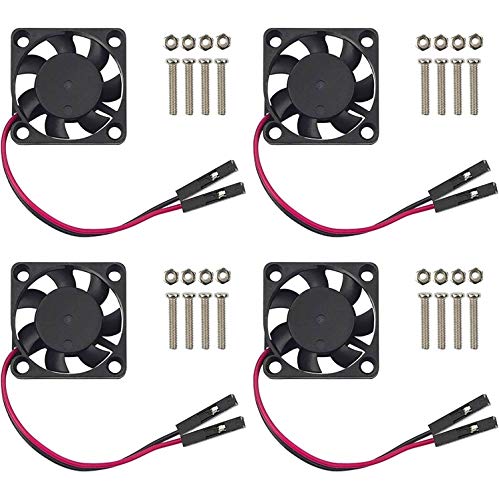
Easycargo 30mm Dual-Speed Fan
Best for: quiet cooling on low-voltage development boards
- Fan Size
- 30mm (what this guide is about)
- Noise Level
- 15.92dBA
- Connector Type
- One-to-Two wire
- Bearing Type
- Hypro sleeve
- Dimensions
- 1.18 × 1.18 × 0.3 inches
This 30mm cooling fan comes in a four-pack designed for compact builds. It features a Hypro sleeve bearing with an operational lifespan of 30,000 hours and a 15.92 dBA noise rating. A one-to-two wire connector allows you to select between 3.3V and 5V DC operation for dual-speed control. At under 0.3 inches thick, it suits Raspberry Pi boards, small robotics projects, and tight electronics enclosures.
Pros
- Low noise level rated at 15.92 dBA
- Dual-speed mode via 3.3V and 5V DC connector
- Hypro sleeve bearing rated for 30,000 hours
- Slim 0.295-inch profile fits low-clearance mounts
Cons
- Uses sleeve bearing technology instead of ball bearings
- Requires manual pin selection rather than PWM control
Good fit if
- You need a quiet 30mm fan rated at 15.92 dBA.
- You run low-voltage hardware operating on 3.3V or 5V DC.
- You need multiple compact fans for small development boards or robotics.
Skip if
- You need a 12V fan for standard PC fan headers.
- You require software-driven PWM speed control.
Verdict: Easycargo 30mm Dual-Speed Fan provides quiet 15.92 dBA operation with flexible 3.3V or 5V DC connectivity. Its slim frame and 30,000-hour rated lifespan make it a dependable choice for compact single-board computers.

Yeah Racing 30mm Aluminum Fan
Best for: high-speed spot cooling with JST power
- Fan Size
- 30mm (what this guide is about)
- Max Fan Speed
- 14000 R.P.M
- Connector Type
- JST
- Bearing Type
- Dual Ball Bearing
- Dimensions
- 6 × 4.5 × 1.5 inches
- Weight
- 1.6 ounces
The Yeah Racing 30mm Aluminum Fan is a compact 30mm cooling unit built with an aluminum frame and dual ball bearings. It delivers speeds up to 14,000 RPM at 8.4V, drawing 0.28A of current with a power rating of 1.40W. You get a 255mm wire terminated with a JST connector. This fan suits you if you need direct localized airflow for compact components like heatsinks.
Pros
- Dual ball bearing construction
- High rotational speed of 14,000 RPM
- Rigid aluminum casing
- 255mm wire length
Cons
- Uses JST connector instead of standard PC fan headers
- Limited to 8.4V maximum operating voltage
Good fit if
- You need rotational speeds up to 14,000 RPM for targeted cooling.
- You prefer an aluminum casing with dual ball bearings.
Skip if
- You require a standard 3-pin or 4-pin PC motherboard header.
- You intend to connect directly to a 12V power supply.
Verdict: Yeah Racing 30mm Aluminum Fan delivers 14,000 RPM performance with an aluminum case and dual ball bearings. It suits low-voltage setups needing high-speed cooling that can accommodate a JST plug and 8.4V maximum input.

WINSINN 30mm 5V RGB Fan 4-Pack
Best for: multi-fan 5V setups needing RGB lighting
- Fan Size
- 30mm (what this guide is about)
- Max Fan Speed
- 7500PRM
- Max Airflow
- 3.72CFM
- Static Pressure
- 4.75mmH₂O
- Noise Level
- 21dBA
- Connector Type
- XH2.54 2PIN
This four-pack gives you 30mm by 10mm micro cooling fans equipped with RGB lighting and hydraulic bearings. Each fan runs on 5V DC power, spinning up to 7500 RPM to deliver 3.72 CFM of airflow at 21 dBA of noise. They connect via 11.8-inch cables with 2-pin XH2.54 headers. If you need low-voltage multi-fan cooling for compact enclosures, DIY electronics, or mini PC chassis, these provide steady airflow.
Pros
- Four-pack bundle for multi-point cooling
- Hydraulic bearing rated for 35,000 hours of life
- Pushes 3.72 CFM and 4.75 mmH₂O static pressure at 21 dBA
- Integrated colorful RGB lighting
Cons
- Uses a 2-pin XH2.54 connector instead of standard 3-pin or 4-pin motherboard headers
- Fixed-speed 5V operation lacks PWM control
Good fit if
- You need several compact 30mm fans running on 5V power rails.
- You want integrated RGB illumination in micro cooling locations.
- You use enclosures with 2-pin XH2.54 power connections.
Skip if
- You require 12V power or standard PC motherboard fan headers.
- You need dynamic fan speed control through PWM.
Verdict: WINSINN 30mm 5V RGB Fan 4-Pack supplies four 7500 RPM hydraulic bearing fans designed for 5V micro ventilation. It suits compact electronic cases where quiet airflow and built-in lighting are needed across multiple spots.

WINSINN 30mm Dual Ball Bearing Fan
Best for: continuous 12V cooling in small electronics
- Fan Size
- 30mm (what this guide is about)
- Max Fan Speed
- 7500PRM
- Max Airflow
- 3.72CFM
- Static Pressure
- 4.75mmH₂O
- Noise Level
- 21dBA
- Connector Type
- 2PIN (XH2.54)
This dual pack from WINSINN gives you two 30mm by 10mm cooling fans built with dual ball bearings rated for 50,000 hours. Operating on DC 12V, each unit spins at 7500 RPM to deliver 3.72 CFM of airflow and 4.75 mmH₂O static pressure at 21 dBA. It suits you if you need compact continuous cooling for small PC cases, routers, or tight DIY electronics setups requiring standard two-pin XH2.54 connections.
Pros
- Dual ball bearings rated for 50,000 hours of continuous operation
- Produces 4.75 mmH₂O static pressure and 3.72 CFM airflow at 7500 RPM
- Includes two fans with 11.8-inch (300mm) XH2.54 wiring leads
Cons
- Fixed-speed 2-pin connector lacks PWM speed control or RPM tachometer output
- Requires a 12V DC power source rather than low-voltage 5V power
Good fit if
- You need high static pressure cooling for compact enclosures or DIY hardware.
- You want a 12V fan with dual ball bearings rated for 24/7 continuous operation.
- You require an 11.8-inch lead with an XH2.54 2-pin connector.
Skip if
- You need motherboard PWM fan speed regulation or a 3-pin tachometer signal.
- You are powering fans directly from a 5V header or USB port.
Verdict: WINSINN 30mm Dual Ball Bearing Fan delivers focused airflow and high static pressure in compact enclosures requiring 12V power. Its dual ball bearings make it a dependable choice for continuous operation when variable speed control is not needed.

DAKKZA 30mm 5V Slim Brushless Fan
Best for: compact 5V setups needing a 7mm thickness
- Fan Size
- 30mm (what this guide is about)
- Dimensions
- 1.18 × 0.28 × 1.18 inches
This is a compact 30mm brushless cooling fan from DAKKZA designed for tight hardware enclosures. It measures 30mm by 30mm with a slim 7mm depth, making it fit where standard 10mm fans cannot. It operates on 5V DC power with a rated current of 0.15A and includes an attached cable. This unit suits you if you need small-profile cooling for compact PC cases, adapters, or low-voltage components.
Pros
- Slim 7mm thickness fits shallow clearances
- Low power requirement of 5V DC at 0.15A
- Comes with an attached power cable
- Specified mounting hole pattern with 24.5mm parallel spacing
Cons
- Requires a 5V source rather than a typical 12V motherboard header
- Airflow and noise levels are not published
- Lacks PWM speed control
Good fit if
- You need a fan that fits within a 7mm thickness limit.
- You have a 5V DC power source available.
- You require 34mm diagonal mounting hole spacing.
Skip if
- You need a standard 12V PC fan connection.
- You require documented CFM airflow and dBA sound ratings.
- You want automatic speed regulation via PWM.
Verdict: DAKKZA 30mm 5V Slim Brushless Fan provides a 7mm thin profile and low 5V power consumption for tight installations. It fits specialized low-voltage enclosures where thicker 10mm fans cannot clear.

Thermaltake 200mm PWM Case Fan
Best for: cases with dedicated 200mm fan mounts
- Fan Size
- 200mm, 30mm (what this guide is about)
- Max Fan Speed
- 900 RPM
- Max Airflow
- 131.6 CFM
- Static Pressure
- 1.92mm-H20
- Connector Type
- 4-Pin PWM
- Bearing Type
- Hydraulic Bearing
The Thermaltake CT200 is a 200mm white case fan built with a 30mm profile and a hydraulic bearing. It operates between 500 and 900 RPM via PWM control, delivering up to 131.6 CFM of airflow and 1.92mm-H2O of static pressure across nine blades. This fan suits you if your PC case has 200mm mounts and you want high airflow with daisy-chainable 4-pin connectors to keep your cable routing tidy.
Pros
- Delivers up to 131.6 CFM of maximum airflow
- Generates up to 1.92mm-H2O static pressure
- Daisy-chainable 4-pin PWM connectors simplify cable management
- Hydraulic bearing operates between 500 and 900 RPM
Cons
- Large 200mm size requires specific case mounting support
- Maximum rotational speed is limited to 900 RPM
- Sold as a single-fan pack
Good fit if
- You have a PC chassis with dedicated 200mm fan mounting points.
- You want high airflow volume reaching up to 131.6 CFM.
- You prefer daisy-chainable PWM cables to link multiple fans together.
Skip if
- You need a fan that fits standard 120mm or 140mm mounts.
- You require fan speeds greater than 900 RPM.
Verdict: Thermaltake 200mm PWM Case Fan delivers high airflow up to 131.6 CFM for spacious computer cases with 200mm brackets. Its daisy-chainable 4-pin PWM setup and hydraulic bearing ensure straightforward installation and quiet lower-speed operation.

DORHEA 30mm Dual-Voltage Fan 6-Pack
Best for: cooling multiple Raspberry Pi projects
- Fan Size
- 30mm (what this guide is about)
- Dimensions
- 1.18 × 1.18 × 0.28 inches
The DORHEA 30mm Dual-Voltage Fan 6-Pack provides compact cooling for single-board computers and small electronics. Each unit measures 30 x 30 x 7 mm, offering a slim profile that fits tight enclosures like Raspberry Pi cases. The separable connector lets you switch between 3.3V and 5V DC operation depending on your cooling demands. This multi-pack suits you if you manage several small-form-factor builds.
Pros
- Dual-voltage support allows operation at 3.3V or 5V DC
- Slim 7mm thickness fits tight spaces and compact cases
- Includes mounting screws for each fan
- Comes in a pack of six units
Cons
- Does not list noise levels or RPM specifications
- Limited to 3.3V and 5V DC without 12V support
Good fit if
- You need multiple 30mm fans for Raspberry Pi or development boards.
- You want to choose between 3.3V quiet operation and 5V standard cooling.
- You require a slim 7mm depth to fit compact cases.
Skip if
- You need a standard 12V fan for a desktop PC motherboard.
- You require precise PWM fan speed control.
Verdict: DORHEA 30mm Dual-Voltage Fan 6-Pack delivers slim, low-voltage cooling tailored for Raspberry Pi boards and compact electronics. It gives you flexible 3.3V and 5V operation across multiple builds with included mounting hardware.

MECCANIXITY 30mm Fluid Bearing Fan
Best for: intermittent cooling in compact electronic devices
- Fan Size
- 30mm (what this guide is about)
- Connector Type
- 2 Pin
- Bearing Type
- Fluid
This MECCANIXITY 30mm cooling fan measures 10mm thick and runs on a 12V DC connection via a 2-pin connector. It features a brushless motor and a fluid-bearing system designed for smooth operation in tight spaces. You can use it to cool motherboard chipsets, network gear, storage enclosures, or compact electronics. It suits you if your setup needs targeted airflow from a compact 30mm frame without complex wiring.
Pros
- Fluid-bearing system for smooth operation
- Brushless motor design eliminates brush-related wear
- Compact 30mm x 10mm footprint fits tight clearances
- Simple 2-pin connector setup
Cons
- Manufacturer recommends operating no more than 10 hours per day
- 2-pin connector lacks PWM control and RPM monitoring
- Package contains only a single fan
Good fit if
- You need a compact 30mm by 10mm fan for small electronics or chipsets.
- You have a standard 2-pin 12V power connection.
- You run your equipment intermittently rather than round the clock.
Skip if
- You need a fan rated for continuous 24/7 operation.
- You require 4-pin PWM speed control.
Verdict: MECCANIXITY 30mm Fluid Bearing Fan provides straightforward cooling for tight electronic enclosures with its compact frame and simple 2-pin wiring. Its daily runtime guidance makes it better suited for intermittent gear rather than continuous operation.

Geometric Future Squama 120mm 30mm ARGB Fan
Best for: PC cases needing thick 120mm radiator fans
- Fan Size
- 120mm, 30mm (what this guide is about)
- Max Fan Speed
- 2300 RPM
- Max Airflow
- 84 CFM
- Static Pressure
- 2.93 mmH2O
- Connector Type
- 4-pin PWM
- Bearing Type
- Hydro Dynamic Bearing
The Geometric Future Squama 120mm 30mm ARGB Fan is a full-size PC cooling fan built with an extra-thick 30mm frame. While most fans on this list measure 30mm across, this model uses a 120mm diameter with a 30mm depth. It delivers up to 84 CFM airflow and 2.93 mmH2O static pressure across an 800 to 2300 RPM PWM range. It suits you if your chassis has space for thicker radiator or case cooling.
Pros
- Delivers up to 84 CFM airflow and 2.93 mmH2O static pressure
- Extra-thick 30mm frame enhances airflow guidance and pressure
- Wide 800 to 2300 RPM range via 4-pin PWM control
- Double-sided edge-lit ARGB connects to 5V 3-pin headers
Cons
- Requires 30mm clearance depth instead of standard 25mm thickness
- Full 120mm footprint does not fit micro 30mm fan mounts
Good fit if
- You have clearance for an extra-thick 30mm fan in your chassis
- You need high static pressure and up to 84 CFM airflow for radiators
- You want automatic 4-pin PWM adjustment up to 2300 RPM
Skip if
- You need a 30mm diameter micro fan for compact electronics
- You only have clearance depth for standard 25mm thick fans
Verdict: Geometric Future Squama 120mm 30mm ARGB Fan delivers high 84 CFM airflow and 2.93 mmH2O pressure using a deeper 30mm frame. It provides full-size cooling power for systems that have the clearance depth to fit it.
Specifications side by side
| Spec | WINSINN 30mm 12V Hydraulic Bearing Fan | Easycargo 30mm Dual-Speed Fan | Yeah Racing 30mm Aluminum Fan | WINSINN 30mm 5V RGB Fan 4-Pack | WINSINN 30mm Dual Ball Bearing Fan | DAKKZA 30mm 5V Slim Brushless Fan | Thermaltake 200mm PWM Case Fan | DORHEA 30mm Dual-Voltage Fan 6-Pack | MECCANIXITY 30mm Fluid Bearing Fan | Geometric Future Squama 120mm 30mm ARGB Fan |
|---|---|---|---|---|---|---|---|---|---|---|
| Fan Size | 30mm | 30mm | 30mm | 30mm | 30mm | 30mm | 200mm | 30mm | 30mm | 120mm |
| Max Fan Speed | 9000 RPM | not specified | 14000 R.P.M | 7500PRM | 7500PRM | not specified | 900 RPM | not specified | not specified | 2300 RPM |
| Max Airflow | 3.46 CFM | not specified | not specified | 3.72CFM | 3.72CFM | not specified | 131.6 CFM | not specified | not specified | 84 CFM |
| Static Pressure | 0.23 in H₂O | not specified | not specified | 4.75mmH₂O | 4.75mmH₂O | not specified | 1.92mm-H20 | not specified | not specified | 2.93 mmH2O |
| Noise Level | 28dBA | 15.92dBA | not specified | 21dBA | 21dBA | not specified | not specified | not specified | not specified | not specified |
| Connector Type | XH2.54-2PIN | One-to-Two wire | JST | XH2.54 2PIN | 2PIN (XH2.54) | not specified | 4-Pin PWM | not specified | 2 Pin | 4-pin PWM |
| Bearing Type | Hydraulic | Hypro sleeve | Dual Ball Bearing | Hydraulic | Dual Ball Bearing | not specified | Hydraulic Bearing | not specified | Fluid | Hydro Dynamic Bearing |
| Lighting Type | not specified | not specified | not specified | RGB | not specified | not specified | not specified | not specified | not specified | 5V 3-pin ARGB |
| Lighting | not specified | not specified | not specified | RGB | not specified | not specified | RGB | not specified | not specified | ARGB |
| Dimensions | 1.18 × 1.18 × 0.39 inches | 1.18 × 1.18 × 0.3 inches | 6 × 4.5 × 1.5 inches | 1.18 × 1.18 × 0.39 inches | not specified | 1.18 × 0.28 × 1.18 inches | 1.4 × 8.7 × 10.2 inches | 1.18 × 1.18 × 0.28 inches | not specified | 4.72 × 1.18 × 1.18 inches |
| Weight | 3.52 ounces | not specified | 1.6 ounces | not specified | not specified | not specified | not specified | not specified | not specified | not specified |
| Size | 30x10mm | not specified | not specified | 30mm | not specified | not specified | 200mm | not specified | 3010 | 120x30mm |
| Color | Black | Black (4-Set) | Multiple | Led Color - 3010 5V | not specified | not specified | White | Black-6pcs | not specified | Black |
| Model | FAN301012VH | NA | not specified | RGBFAN301012VH | 2PFAN301012D | 3007 | CT200 PWM Fan White | not specified | not specified | GEO-S3003B-12T |
How to Choose the Right 30mm Fan
-
Check Frame Depth Clearance
Check your physical clearance depth before you install a fan. Micro cooling fans vary in thickness, ranging from slim 7mm frames to standard 10mm depths. For instance, the DAKKZA 30mm 5V Slim Brushless Fan uses a 7mm profile to fit where standard 10mm casings cannot clear. Measure your mounting gap accurately. Standard PC frames also use 30mm thickness for 120mm fans, requiring extra clearance next to radiators. Choosing the proper thickness prevents mounting hardware interference and ensures unobstructed airflow through tight chassis compartments.
-
Distinguish Fan Width From Thickness
Verify whether the 30mm spec indicates the fan width or the frame depth. True micro fans measure 30mm in width and length to provide spot cooling for single-board computers or compact electronics. Conversely, models like the Geometric Future Squama 120mm 30mm ARGB Fan measure 120mm wide and use 30mm depth. Installing a full-sized fan requires dedicated PC chassis brackets, whereas small 30mm fans fit specialized electronic mounts. Always check both mounting dimensions against your chassis specifications to ensure you pick the correct fan scale.
-
Assess Continuous Operating Demands
Select bearing types based on how long your device runs each day. Dual ball bearing designs handle continuous, non-stop operation without premature wear. If your equipment stays powered 24/7, the WINSINN 30mm Dual Ball Bearing Fan provides the durability needed for constant heat dissipation. Alternatively, hydraulic or fluid bearing models suit intermittent or standard daily use where moderate operational runtimes are recommended. Checking your system uptime requirements helps you match the internal bearing mechanism to your real-world usage without risking unexpected fan failure.
-
Evaluate Speed Control Requirements
Determine if you need dynamic speed regulation or steady airflow. Fixed 2-pin fans operate at a constant speed, which suits dedicated cooling tasks that do not need motherboards to regulate airflow. If you require automatic thermal management, look for fans with 4-pin PWM connectivity. The Thermaltake 200mm PWM Case Fan uses a 4-pin PWM setup to adjust rotational speeds based on hardware temperature. Selecting PWM control lets you maintain quiet operation at idle, while fixed 2-pin models deliver consistent, full-speed airflow without complex setup.
-
Plan for Internal Lighting
Decide if your enclosure needs illuminated fans or stealthy unlit frames. Compact utility builds typically benefit from unlit black fans that blend into small electronics and require no extra lighting control. If you have a showcase enclosure with transparent side panels, integrated illumination adds visual visibility. The WINSINN 30mm 5V RGB Fan 4-Pack incorporates RGB lighting directly into a micro form factor. Verifying whether you need RGB, ARGB, or standard unlit housings ensures your fans align with your enclosure aesthetics and motherboard lighting headers.
-
Consider Multi-Fan Pack Quantities
Calculate the number of intake and exhaust positions your project requires. Small project enclosures and development boards often need multiple cooling fans to cool processors and peripheral chips simultaneously. Selecting multi-packs, such as the DORHEA 30mm Dual-Voltage Fan 6-Pack, gives you uniform cooling units and matching mounting screws across several installations. Buying the exact quantity needed ensures consistent airflow characteristics across all compartments. Check your total fan mounting points in advance so you can match the package count to your project scale.
Frequently asked questions
Does a 30mm fan refer to width or thickness?
A 30mm fan specification can describe either the frame width or the overall thickness. Most micro fans measure 30mm across the blade housing for small electronics. However, full-sized cooling options like the Geometric Future Squama use 30mm specifically for frame thickness on a 120mm fan. Always verify whether the 30mm specification denotes the outer fan diameter or the mounting depth before you install it in your chassis.
Can you connect a 2-pin 30mm fan to a standard motherboard fan header?
You can connect a 2-pin fan to a motherboard header if the pin pitch and operating voltage align. A 2-pin connector supplies constant power and ground without speed monitoring or PWM control. Models like the WINSINN 30mm 12V fan run at a fixed speed on 12V power. In contrast, standard chassis cooling fans like the Thermaltake 200mm model utilize dedicated 4-pin PWM connections for dynamic motherboard speed regulation.
What is the advantage of dual ball bearings over hydraulic bearings in 30mm fans?
Dual ball bearings provide better durability for continuous 24/7 operation compared to standard hydraulic designs. The WINSINN 30mm Dual Ball Bearing Fan is engineered for non-stop uptime in compact electronics without premature wear. Hydraulic bearing models, such as the MECCANIXITY 30mm fan, offer quiet rotational movement but come with daily runtime recommendations. If your equipment stays on constantly, dual ball bearing configurations provide a more reliable mechanical lifespan.
How noisy is a 30mm case fan during operation?
Noise levels depend heavily on fan speed, voltage, and blade design. Smaller micro fans can produce audible pitch at high speeds, but low-voltage models remain very quiet. For example, the Easycargo 30mm Dual-Speed Fan generates a low sound rating of 15.92 dBA while operating on low-voltage DC power. If you need silent cooling in a compact build, selecting a fan designed for lower rotational sound output prevents distracting background noise.
Can 30mm fans include integrated RGB lighting?
Yes, select 30mm fans include integrated lighting for compact visual customization. The WINSINN 30mm 5V RGB Fan 4-Pack incorporates built-in LEDs alongside a 7500 RPM hydraulic bearing motor. For larger radiator setups, thicker options like the Geometric Future Squama 120mm 30mm fan feature ARGB illumination. These options allow you to introduce interior lighting into micro electronics or liquid-cooling loops without needing separate illumination strips inside your enclosure.
What cooling benefits do 30mm thick 120mm fans offer over standard 25mm fans?
A 30mm frame depth accommodates deeper fan blades that generate higher airflow and static pressure. For instance, the Geometric Future Squama 120mm 30mm fan achieves 84 CFM of airflow and 2.93 mmH2O of static pressure. That extra 5mm of frame depth helps force air through dense water-cooling radiators or restrictive dust filters. You must ensure your computer case has sufficient clearance before mounting these thicker units.
How do dual-voltage 30mm fans work on single-board computers?
Dual-voltage 30mm fans let you choose between 3.3V and 5V pins on a development board to balance noise and airflow. Connecting models like the DORHEA 30mm Dual-Voltage Fan to a 3.3V pin provides slower, quieter blade rotation. Wiring it to a 5V pin delivers maximum cooling performance for heavy processing loads. This flexibility lets you adjust thermal management to your project requirements without needing an external speed controller.