Best MUSETEX PC Cases: 7 Models Compared
As an Amazon Associate we earn from qualifying purchases. Links on this page are affiliate links.
Finding the right MUSETEX PC case depends on your cooling needs and layout preferences. The lineup features ATX mid-tower and compact enclosures in standard and dual-chamber shapes, outfitted with tempered glass panels and ARGB or RGB lighting.
The MUSETEX ATX Mid-Tower with Magnetic Glass Door leads the list for airflow-focused ATX gaming builds needing bundled fans. To help you select the proper layout, this guide compares 7 models based strictly on the specifications published on the product listings.
Quick picks
Our 7 picks

MUSETEX ATX Mid-Tower with Magnetic Glass Door
Best for: airflow-focused ATX gaming builds needing bundled fans
- Motherboard Support
- ATX
- Case Type
- Mid-Tower
- Side Panel
- Tempered Glass
- Included Fans
- 6 PWM ARGB Fans
- Radiator Support
- 280
- Use
- Gaming
View on Amazon: MUSETEX ATX Mid-Tower with Magnetic Glass Door
This MUSETEX mid-tower case fits standard ATX motherboards and comes with six pre-installed PWM ARGB fans behind a mesh front panel. It features a magnetic swing-open tempered glass door for direct interior access and supports graphics cards mounted horizontally or vertically. You get room for a 280mm top radiator and up to six storage drives, making it a well-ventilated enclosure for your gaming hardware.
Pros
- Includes six pre-installed PWM ARGB case fans
- Hinged tempered glass side door with magnetic closure
- Mesh front panel facilitates intake airflow
- Supports vertical graphics card mounting orientations
Cons
- Top radiator clearance maxes out at 280mm
- Front panel lacks a USB Type-C port
- Motherboard must have a 3-pin ARGB header for light control
Good fit if
- You want a full set of six PWM ARGB fans included.
- You prefer tool-free interior access via a hinged glass panel.
- You want the option to mount your graphics card vertically.
Skip if
- You require a front I/O USB Type-C connection.
- You plan to install a 360mm liquid cooler at the top.
Verdict: MUSETEX Mesh ATX Mid-Tower with 6 PWM Fans delivers comprehensive out-of-the-box airflow and convenient hinged-panel access for ATX gaming builds. Its pre-configured fan array and vertical GPU support streamline assembly for air-cooled or 280mm liquid-cooled systems.

MUSETEX Dual Tempered Glass ATX Mid Tower
Best for: panoramic glass builds with pre-installed ARGB fans
- Motherboard Support
- ATX
- Case Type
- Mid Tower
- Side Panel
- Tempered Glass
- Included Fans
- 6 PWM ARGB
- Max GPU Length
- 420mm
- Use
- Gaming
This mid-tower ATX case features dual tempered glass panels giving you a 270-degree view of your components. It arrives with six pre-installed PWM ARGB fans and includes a front I/O panel with a Type-C port and two USB 3.0 ports. You get clearance for graphics cards up to 420mm and liquid cooling radiators up to 360mm on top. It suits builders who want extensive cooling and hardware visibility without buying extra fans.
Pros
- Six pre-installed PWM ARGB cooling fans
- Front I/O includes USB Type-C and two USB 3.0 ports
- Accommodates GPUs up to 420mm and CPU coolers up to 178mm
- Supports top-mounted liquid cooling radiators up to 360mm
Cons
- No front-panel radiator mounting options listed
- No support listed for larger E-ATX motherboards
Good fit if
- You want six pre-installed PWM ARGB fans.
- You need clearance for graphics cards up to 420mm.
- You plan to install a 360mm radiator at the top of the case.
Skip if
- You need a case that supports E-ATX motherboards.
- You want front-mounted liquid cooling radiator support.
Verdict: MUSETEX Mid-Tower Dual Tempered Glass Case provides extensive component clearances and six pre-installed ARGB fans for high-visibility builds. It gives you Type-C connectivity and top 360mm radiator support in a standard ATX layout.

MUSETEX Mid-Tower ATX Case with 6 ARGB Fans
Best for: panoramic showcase builds with large graphics cards
- Motherboard Support
- ATX
- Case Type
- Mid Tower
- Side Panel
- Tempered Glass
- Included Fans
- 6 PWM ARGB
- Radiator Support
- 360mm
- Max GPU Length
- 400mm
This white mid-tower ATX case features dual tempered glass panels that provide a 270-degree view of your internal components. It comes with six pre-installed PWM ARGB fans, including two reverse-blade side fans for air intake. You get clearance for graphics cards up to 400mm, CPU coolers up to 176mm, and top-mounted 360mm liquid radiators, along with a front-panel USB Type-C port for modern device connectivity.
Pros
- Six pre-installed PWM ARGB fans with reverse-blade side intakes
- Dual tempered glass panels offer a 270-degree view
- Generous clearance for GPUs up to 400mm and CPU coolers up to 176mm
- Front I/O features a USB 3.2 Type-C port
- Supports top-mounted liquid cooling radiators up to 360mm
Cons
- Wide 11.61-inch footprint occupies more desk space than standard towers
- Glass front panel eliminates traditional front-to-back intake fan placement
Good fit if
- You want a showcase chassis with 270-degree glass and six included ARGB fans.
- You plan to install large hardware, such as a 400mm GPU or a 176mm air cooler.
- You need top-panel USB Type-C connectivity for external gear.
Skip if
- You have limited desktop surface to fit an 11.61-inch wide enclosure.
- You prefer an all-mesh front panel for conventional direct front airflow.
Verdict: MUSETEX Dual Glass ATX Mid-Tower Case delivers extensive showcase views with its 270-degree glass layout and six pre-installed PWM ARGB fans. It provides ample interior room for 400mm GPUs, tall air coolers, and top-mounted 360mm radiators.

MUSETEX ATX Mid-Tower Dual Glass Case
Best for: dual-chamber builds needing long GPU clearance
- Motherboard Support
- ATX
- Case Type
- Mid Tower
- Side Panel
- Tempered Glass
- Included Fans
- 3x 120mm
- Radiator Support
- 360mm
- Max GPU Length
- 400mm
This mid-tower ATX case features a dual-chamber layout with two tempered glass panels providing a 270-degree view of your build. It includes three pre-installed 120mm fans, a front Type-C port, and magnetic dust filters. With room for graphics cards up to 400mm, CPU coolers up to 176mm, and a top-mounted 360mm liquid radiator, it suits you if you want a clean display case for large hardware components.
Pros
- Fits graphics cards up to 400mm and CPU coolers up to 176mm
- Dual-chamber design with 270-degree dual tempered glass panels
- Supports up to a 360mm liquid cooler radiator on top
- Includes front-panel USB 3.2 Type-C connectivity
- Tool-free snap-on panel removal
Cons
- Pre-installed fans do not include ARGB lighting
- Comes with three fans instead of six
- Chassis width of 11.61 inches requires extra desk space
Good fit if
- You want a dual-chamber panoramic glass layout for your hardware.
- You install an oversized graphics card measuring up to 400mm.
- You need native USB Type-C connectivity on the top panel.
Skip if
- You want pre-installed addressable RGB illumination out of the box.
- You have a narrow desk unable to accommodate an 11.61-inch wide footprint.
Verdict: MUSETEX Dual Tempered Glass ATX Mid-Tower Case provides broad component clearances and modern Type-C connectivity in a dual-chamber layout. It delivers an unobstructed hardware showcase with tool-free access.

MUSETEX Mid-Tower Case with Vertical GPU Mount
Best for: vertical GPU builds wanting panoramic glass
- Case Type
- ATX Mid-Tower
- Side Panel
- Tempered Glass
- Included Fans
- 5x PWM ARGB
- Radiator Support
- 360mm
- Max GPU Length
- 410mm
- Use
- Gaming
View on Amazon: MUSETEX Mid-Tower Case with Vertical GPU Mount
This ATX mid-tower chassis showcases your components through a three-sided, 270-degree tempered glass enclosure. It uses a vertical direct-insert GPU mount that connects straight to the motherboard without needing a PCIe riser cable. You get five pre-installed PWM ARGB fans, a front-panel Type-C port, and support for graphics cards up to 410mm long. It accommodates liquid cooling setups with up to a 360mm radiator mounted at the rear.
Pros
- Direct-insert vertical GPU mounting requires no PCIe riser cable
- Five pre-installed PWM ARGB fans with motherboard control
- Three-sided 270-degree tempered glass panoramic view
- Clearance for GPUs up to 410mm and CPU coolers up to 178mm
- Front I/O includes a dedicated Type-C port and two USB 3.0 ports
Cons
- Top radiator support is limited to 240mm
- Maximum power supply length is capped at 160mm
- Weighs 18.91 pounds before installing components
Good fit if
- You want to mount your graphics card vertically without buying an extra riser cable.
- You prefer a three-sided glass view with pre-installed ARGB cooling fans.
- You have large components, including a graphics card up to 410mm long.
Skip if
- You need top radiator mounting larger than 240mm.
- You use a power supply longer than 160mm.
- You want an ultra-lightweight PC case.
Verdict: MUSETEX Mid-Tower Case with Vertical GPU Mount stands out with its cable-free direct vertical graphics installation and panoramic three-sided glass panels. It offers spacious hardware clearances alongside five pre-installed PWM ARGB fans for immediate airflow.
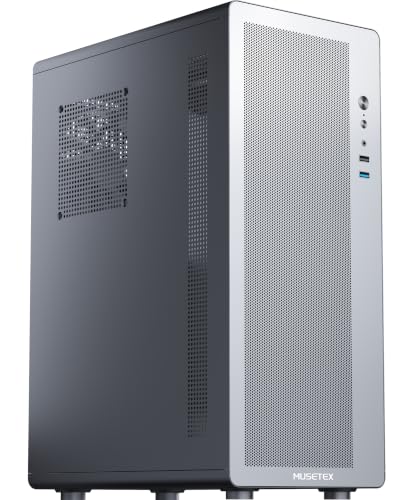
MUSETEX Compact ATX Air Cooling Case
Best for: compact air-cooled ATX desktop builds
- Motherboard Support
- ATX, Micro-ATX, Mini-ITX
- Included Fans
- 1x 120mm
- Max GPU Length
- 265mm
- Lighting
- RGB
- Dimensions
- 12 × 7.28 × 16.8 inches
This compact ATX enclosure measures 12 by 7.28 by 16.77 inches and focuses strictly on air cooling. You get support for standard ATX motherboards, graphics cards up to 265mm, and CPU air coolers up to 160mm. It includes one 120mm fan and features a dedicated side-panel vent. This chassis suits you if you need a space-saving desktop footprint for a standard ATX build without liquid cooling.
Pros
- Accommodates ATX, Micro-ATX, and Mini-ITX motherboards
- Dedicated side-panel vent directs intake to CPU coolers up to 160mm
- Compact exterior dimensions of 12 by 7.28 by 16.77 inches
- Includes a removable magnetic top dust filter
Cons
- Does not support liquid cooling radiators
- Maximum graphics card clearance is limited to 265mm
- Total fan capacity is capped at three 120mm fans
Good fit if
- You build with an air cooler measuring 160mm or shorter.
- You use a compact graphics card under 265mm in length.
- You want a full ATX motherboard in a reduced desk footprint.
Skip if
- You plan to install an AIO liquid cooler.
- You use a graphics card longer than 265mm.
- You need more than three system fans.
Verdict: MUSETEX Compact ATX Air Cooling Case provides a reduced footprint for air-cooled ATX systems with graphics cards under 265mm. Its dedicated side venting and 160mm cooler clearance deliver focused airflow without liquid cooling hardware.

MUSETEX Mid-Tower Dual-Chamber ATX Case
Best for: dual-chamber builds needing 400mm GPU clearance
- Motherboard Support
- ATX, Micro-ATX, Mini-ITX
- Case Type
- Mid Tower
- Side Panel
- Tempered Glass
- Included Fans
- 3 x 120mm Non-ARGB
- Radiator Support
- 360mm
- Use
- Gaming
This mid-tower chassis features a dual-chamber layout with 270-degree dual tempered glass panels. It accommodates ATX, Micro-ATX, and Mini-ITX motherboards, including back-connect designs. You get clearance for 400mm graphics cards, 176mm CPU coolers, and top-mounted 360mm liquid cooling radiators. With three pre-installed 120mm fans and a dedicated front USB Type-C port, it suits you if you want wide component visibility without sacrificing hardware clearance.
Pros
- Accommodates GPUs up to 400mm and CPU coolers up to 176mm
- Dual-chamber design with 270-degree pillarless tempered glass panels
- Supports back-connect motherboards and up to 360mm top radiators
- Front panel includes USB 3.2 Type-C connectivity
Cons
- Includes three pre-installed fans rather than six
- Wider 11.61-inch dual-chamber profile occupies more desk space
Good fit if
- You need clearance for large graphics cards up to 400mm long.
- You want an unobstructed 270-degree view of your internal components.
- You plan to install a back-connect motherboard or a top 360mm radiator.
Skip if
- You need a slim mid-tower for a space-constrained desk setup.
- You want pre-installed ARGB lighting fans included directly in the box.
Verdict: MUSETEX Panoramic Tempered Glass Mid-Tower Case delivers generous 400mm GPU clearance and back-connect board support behind a pillarless glass enclosure. It provides clean cable management and high-speed Type-C connectivity for modern multi-fan setups.
Specifications side by side
| Spec | MUSETEX ATX Mid-Tower with Magnetic Glass Door | MUSETEX Dual Tempered Glass ATX Mid Tower | MUSETEX Mid-Tower ATX Case with 6 ARGB Fans | MUSETEX ATX Mid-Tower Dual Glass Case | MUSETEX Mid-Tower Case with Vertical GPU Mount | MUSETEX Compact ATX Air Cooling Case | MUSETEX Mid-Tower Dual-Chamber ATX Case |
|---|---|---|---|---|---|---|---|
| Motherboard Support | ATX | ATX | ATX | ATX | not specified | ATX, Micro-ATX, Mini-ITX | ATX, Micro-ATX, Mini-ITX |
| Case Type | Mid-Tower | Mid Tower | Mid Tower | Mid Tower | ATX Mid-Tower | not specified | Mid Tower |
| Side Panel | Tempered Glass | Tempered Glass | Tempered Glass | Tempered Glass | Tempered Glass | not specified | Tempered Glass |
| Included Fans | 6 PWM ARGB Fans | 6 PWM ARGB | 6 PWM ARGB | 3x 120mm | 5x PWM ARGB | 1x 120mm | 3 x 120mm Non-ARGB |
| Radiator Support | 280 | not specified | 360mm | 360mm | 360mm | not specified | 360mm |
| Max GPU Length | not specified | 420mm | 400mm | 400mm | 410mm | 265mm | not specified |
| Tower Size | Mid-Tower | Mid-Tower | Mid-Tower | Mid-Tower | Mid-Tower | not specified | Mid-Tower |
| Fan Size | not specified | not specified | not specified | 120mm | not specified | 120mm | 120mm |
| Use | Gaming | Gaming | Gaming | Gaming | Gaming | not specified | Gaming |
| Lighting | ARGB | ARGB | ARGB | not specified | ARGB | RGB | ARGB |
| Connectivity | USB 3.0 | Type-C | Type-C | Type-C | Type-C | not specified | Type-C |
| Dimensions | 15.8 × 8.07 × 19 inches | 16.6 × 9.06 × 18.1 inches | 11.6 × 16.5 × 14.5 inches | 16.5 × 11.6 × 14.5 inches | 17.5 × 9.37 × 19.5 inches | 12 × 7.28 × 16.8 inches | 16.5 × 11.6 × 14.5 inches |
| Weight | 12.6 pounds | 17.6 pounds | not specified | 16.9 pounds | 18.9 pounds | not specified | 15 pounds |
| Size | 18.98" x 15.75" x 8.07" | 16.57"D x 9.06"W x 18.05"H | 16.54"D x 11.61"W x 14.49"H | 16.54"D x 11.61"W x 14.49"H | 17.48"D x 9.37"W x 19.48"H | 12 x 7.28 x 16.77 inches | 16.54"D x 11.61"W x 14.49"H |
| Color | Black | Black | White | Black | Black | Black | Black |
| Model | NN8 | K2 | Y6-N5-W | Y6 | not specified | not specified | Y6 |
Comparing the MUSETEX PC Case Lineup
Standard mid-towers focus on direct airflow and compact footprints. The MUSETEX ATX Mid-Tower with Magnetic Glass Door offers USB 3.0 connectivity and support for 280mm liquid coolers. For tighter spaces, the MUSETEX Compact ATX Air Cooling Case limits GPU length to 265mm with RGB lighting and dedicated air cooling. These enclosures suit you if you build standard air-cooled systems.
Showcase and dual-chamber mid-towers target liquid cooling and larger hardware. Options like the MUSETEX Mid-Tower ATX Case with 6 ARGB Fans and the MUSETEX Mid-Tower Case with Vertical GPU Mount provide front Type-C ports, top 360mm radiator support, and ARGB lighting. Choose these models if you plan to install 400mm graphics cards, vertical GPU mounts, or extensive liquid cooling.
Where the MUSETEX Range Fits
The MUSETEX range suits you if you are building an ATX system focused on pre-installed fans and showcase layouts. The selection spans from a compact 12-inch-long air-cooling case up to wide 11.61-inch dual-chamber designs and towers reaching 19.48 inches in height. Pre-installed illumination across the lineup includes standard RGB and ARGB setups.
Clear gaps exist across the 7 listed models. Every case is limited strictly to the ATX motherboard format, with no support listed for Mini-ITX, Micro-ATX, or Extended ATX boards. You also will not find full-tower enclosures or radiator support beyond 360mm.
If you need system memory that fits your component clearance specs, compare the best ddr5 RAMs for PC.
How to Choose the Best MUSETEX Case
-
Radiator Size and Placement
Check your liquid cooling requirements before selecting a chassis. If you run a high-heat processor with an all-in-one liquid cooler, verify top radiator mounting limits. Several models support up to 360mm radiators, while standard designs might top out at 280mm, and compact models omit liquid cooling mounts entirely. Choosing a model like the MUSETEX Dual Tempered Glass ATX Mid Tower gives you ceiling room for a 360mm radiator without colliding with your motherboard components.
-
Graphics Card Clearance
Match the internal clearance of the case against the total length of your graphics card. High-end modern video cards often require substantial horizontal space. Certain compact enclosures restrict GPU length to under 265mm, which limits your card options. In contrast, roomy dual-chamber layouts such as the MUSETEX Mid-Tower Dual-Chamber ATX Case accommodate graphics cards up to 400mm long. Always check your GPU dimensions to ensure it clears front fans and internal brackets cleanly.
-
Front Panel USB Connectivity
Examine the front I/O panel to ensure it matches the devices you use daily. If you connect modern external drives, high-speed peripherals, or smartphones, look for an integrated Type-C port on the chassis. Earlier designs or baseline options may only provide standard USB 3.0 ports. Selecting an option like the MUSETEX ATX Mid-Tower Dual Glass Case gives you high-speed Type-C access directly on the exterior panel, provided your motherboard includes the appropriate internal header.
-
Case Width and Footprint
Measure your available desk or floor space to accommodate the exterior dimensions of the chassis. Standard mid-towers feature widths between 8 and 9.4 inches, fitting easily into tight setups. Dual-chamber designs relocate the power supply behind the motherboard, which widens the frame to 11.61 inches. If you select a wide chassis like the MUSETEX Mid-Tower ATX Case with 6 ARGB Fans, ensure your desk has sufficient width to support the broader desktop profile.
-
Pre-Installed Fan Configurations
Check the included fan setup to determine if you need to purchase extra cooling hardware. Several options arrive with five or six factory-installed fans to establish immediate intake and exhaust airflow. You should also verify fan control and lighting types. Models equipped with PWM ARGB fans offer motherboard speed adjustment and addressable lighting synchronization. For example, the MUSETEX ATX Mid-Tower with Magnetic Glass Door includes six PWM fans directly out of the box.
-
GPU Mounting Orientation
Decide whether you want a traditional horizontal expansion slot layout or a vertical graphics card installation. Standard cases mount GPUs directly into the motherboard slots, which keeps assembly simple. If you want to showcase the face of your graphics card behind glass, look for dedicated vertical bracket hardware. The MUSETEX Mid-Tower Case with Vertical GPU Mount provides direct vertical installation provisions, allowing you to showcase modern cards behind panoramic tempered glass panels.
Frequently asked questions
Which MUSETEX cases support 400mm graphics cards?
The MUSETEX Mid-Tower ATX Case with 6 ARGB Fans (Y6-N5-W) and the MUSETEX Mid-Tower Dual-Chamber ATX Case (Y6) accommodate 400mm graphics cards. Both models feature dual-chamber layouts with tempered glass enclosures. These chassis also support ATX motherboards and top-mounted 360mm radiators, providing sufficient clearance for high-performance GPUs without crowding your build.
Do MUSETEX cases come with pre-installed fans?
Yes, several MUSETEX cases include pre-installed fans right out of the box. The MUSETEX ATX Mid-Tower with Magnetic Glass Door includes six PWM fans, while the Dual Tempered Glass ATX Mid Tower (K2) and Y6-N5-W models feature six pre-installed ARGB fans. Additionally, the vertical GPU model comes with five PWM ARGB fans, simplifying setup and establishing base airflow immediately.
Can you mount a graphics card vertically in a MUSETEX case?
Yes, specific models provide dedicated vertical graphics card mounting capabilities. The MUSETEX Mid-Tower Case with Vertical GPU Mount features cable-free direct vertical graphics installation paired with panoramic three-sided glass. The MUSETEX ATX Mid-Tower with Magnetic Glass Door also lists vertical GPU support in its mid-tower layout, allowing you to showcase your graphics card directly behind the tempered glass.
Which MUSETEX PC cases feature USB Type-C front panel ports?
Several modern MUSETEX models include a front Type-C port alongside standard connections. You will find Type-C connectivity on the Dual Tempered Glass ATX Mid Tower (K2), both Y6 dual-chamber variations, and the Mid-Tower Case with Vertical GPU Mount. If front-panel high-speed connectivity is important for your peripherals, verify the specific front I/O ports before selecting an enclosure.
What motherboard form factors fit inside MUSETEX gaming cases?
Standard ATX motherboards fit across all 7 MUSETEX models reviewed on this list. The lineup accommodates standard ATX boards across conventional mid-towers like the NN8 and K2, dual-chamber cases such as the Y6, and smaller enclosures like the Compact ATX Air Cooling Case. Certain dual-chamber variants also provide back-connect motherboard support to assist with neat rear cable routing.
What is the maximum CPU air cooler height for the MUSETEX Compact ATX case?
The MUSETEX Compact ATX Air Cooling Case supports CPU air coolers measuring up to 160mm in height. This model focuses strictly on air cooling within a smaller footprint measuring 12 inches long and 7.28 inches wide. It is tailored for systems that use dedicated side venting and graphics cards under 265mm rather than liquid cooling radiators.
Are MUSETEX PC cases available in colors other than black?
Yes, MUSETEX offers select chassis models in white as well as standard black. While most enclosures in the lineup come in black, the MUSETEX Mid-Tower ATX Case with 6 ARGB Fans (model Y6-N5-W) features a white exterior finish. It combines this white chassis with 270-degree tempered glass panels and pre-installed ARGB lighting for a light-toned showcase layout.