15 Best PC Cases with 120mm, Compared
As an Amazon Associate we earn from qualifying purchases. Links on this page are affiliate links.
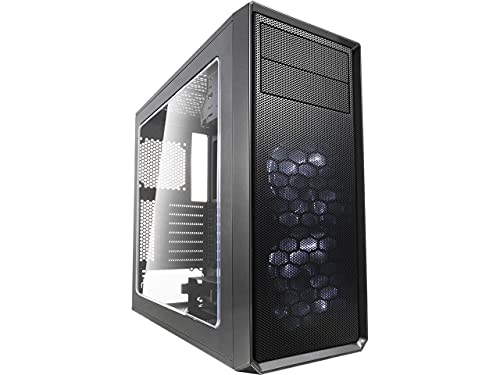
Choosing a PC case with 120mm fan mounts ensures your components receive consistent airflow while maintaining broad hardware compatibility. The Fractal Design Focus G ATX Mid Tower takes the top spot because its six fan mounts and filtered intakes deliver practical cooling expansion for standard ATX setups.
To help you find the right fit, we compared 15 models based strictly on the specifications published on their listings. This guide helps you assess fan capacities, chassis dimensions, and motherboard form factors so you can select the ideal enclosure for your build.
Quick picks
The best fit for you
- You need standard ATX airflow with flexible cooling mounts Fractal Design Focus G ATX Mid Tower This mid-tower chassis provides six 120mm fan mounts and filtered intakes for balanced airflow.
- You build a compact Mini-ITX system with integrated power Cooler Master NCORE 100 MAX Mini-ITX Case This small form factor chassis includes a built-in 850W power supply and a 120mm radiator.
- You need an external 5.25-inch optical drive bay Zalman T6 ATX Mid-Tower Case The ATX mid-tower includes a 5.25-inch external drive bay alongside 120mm cooling support.
- You want panoramic glass with dual-chamber angled cooling NZXT H6 Flow Panoramic Dual-Chamber Mid-Tower This mid-tower features seamless wraparound panoramic glass and dedicated mounts for angled 120mm cooling fans.
Our 15 picks
Fractal Design Focus G ATX Mid Tower
Best for: standard ATX builds needing flexible airflow options
- Fan Size
- 120mm
- Motherboard Support
- ATX
- Case Type
- Mid Tower
- Side Panel
- Window
- Included Fans
- 2x 120mm White LED
- Max GPU Length
- up to 380 mm
The Fractal Design Focus G is an ATX mid-tower case built around high airflow. You get two preinstalled 120mm white LED fans, with mounting space for up to six fans in total. It supports graphics cards up to 380 mm long and includes dust filters at the front, top, and base. This chassis suits you if you need straightforward cooling expandability and room for full-length graphics cards in a standard ATX layout.
Pros
- Includes two preinstalled 120mm white LED fans
- Supports up to six total 120mm fan positions
- Accommodates graphics cards up to 380 mm long
- Includes dust filters on the front, top, and base intakes
Cons
- Preinstalled fans feature static white lighting rather than addressable RGB
- Leaves four of the six fan mounts empty out of the box
Good fit if
- You need clearance for graphics cards up to 380 mm long.
- You want filtered air intakes on the front, top, and base.
- You plan to run a standard ATX motherboard with space for additional 120mm fans.
Skip if
- You require multi-color RGB lighting preinstalled.
- You want all fan positions fully populated from the factory.
Verdict: Fractal Design Focus G Mid-Tower ATX Case delivers balanced 120mm cooling capacity with clearance for long expansion cards. Its filtered intakes and six fan mounts provide practical thermal expansion for standard ATX builds.

iTek QBO 8 Evo Micro-ATX Cube Case
Best for: Micro-ATX builds needing built-in card readers
- Fan Size
- 120mm
- Motherboard Support
- Micro ATX
- Case Type
- Cube
- Lighting
- ARGB
- Dimensions
- 14.2 × 10.5 × 13.1 inches
- Weight
- 6.61 pounds
The iTek Micro-ATX Cube Case provides a compact cube form factor designed for Micro-ATX motherboards. It includes one 120mm ARGB fan alongside a larger 200mm ARGB fan for intake airflow. You get three transparent windows to display internal components, plus integrated USB 3.0 connectivity and a built-in memory card reader. This layout suits you if you need a desktop chassis with varied fan sizing and direct media card access.
Pros
- Includes one 120mm ARGB fan and one 200mm ARGB fan
- Built-in memory card reader and USB 3.0 port
- Three transparent viewing windows
- Compact cube layout measuring 14.17 inches long by 10.51 inches wide
Cons
- Limited to Micro-ATX motherboards with no standard ATX support
- Wide cube profile requires over 10.5 inches of horizontal desk clearance
Good fit if
- You build with a Micro-ATX motherboard.
- You need a built-in card reader on the chassis.
- You want pre-installed 120mm and 200mm ARGB fans.
Skip if
- You need to fit a full-size ATX motherboard.
- You prefer a slim vertical tower over a wide cube layout.
Verdict: iTek Micro-ATX Cube Case delivers dedicated 120mm and 200mm ARGB cooling in a desktop cube design. It suits compact Micro-ATX setups requiring front-panel card reading and multi-angle window visibility.
Zalman S3 Compact ATX Mid-Tower Case
Best for: air-cooled ATX builds using multiple 120mm fans
- Fan Size
- 120mm
- Motherboard Support
- ATX
- Case Type
- Mid Tower
- Side Panel
- Acrylic
- Included Fans
- 3x 120mm
- Radiator Support
- 120mm
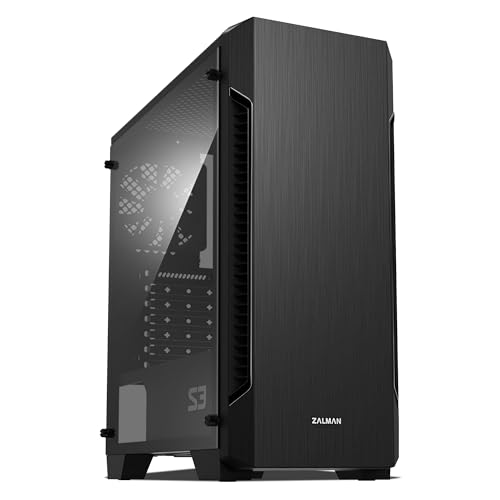
This mid-tower ATX case includes three 120mm fans and accommodates up to eight total fans for customized airflow. You get a full acrylic side panel, top and bottom dust filters, and support for graphics cards up to 330mm long. Front liquid cooling is restricted to a 120mm radiator. It suits you if you want a lightweight ATX enclosure with multiple stock 120mm fans pre-installed for standard air-cooled hardware setups.
Pros
- Includes three pre-installed 120mm cooling fans
- Supports up to eight total fans
- Equipped with top and bottom dust filters
- Accommodates graphics cards up to 330mm long
Cons
- Front radiator support limited to 120mm
- Side window uses acrylic instead of tempered glass
Good fit if
- You want three pre-installed 120mm fans with mounting room for up to eight
- You use an air cooler or a 120mm front radiator
- You need dedicated top and bottom dust filters
Skip if
- You plan to mount a 240mm or larger front radiator
- You require a tempered glass side panel
- You use a graphics card longer than 330mm
Verdict: Zalman ATX Mid-Tower with 3 120mm Fans delivers out-of-the-box airflow with three included fans and room for five more. Its 120mm radiator ceiling and acrylic panel keep it focused on standard air-cooled ATX builds.

Zalman T6 ATX Mid-Tower Case
Best for: builds needing an external optical disc drive
- Fan Size
- 120mm
- Motherboard Support
- ATX, mATX, mini-ITX
- Case Type
- Mid Tower
- Included Fans
- 1x 120mm
- Dimensions
- 7.87 × 16.9 × 14.8 inches
- Weight
- 8 pounds
The Zalman ATX Mid-Tower with 5.25-Inch Bay offers a compact steel chassis designed for standard ATX, micro-ATX, and mini-ITX motherboards. It includes one preinstalled 120mm rear exhaust fan and supports up to four 120mm fans total across the chassis and side panel. With dedicated mounting for an external 5.25-inch optical drive alongside four internal storage drives, this enclosure suits your needs if you maintain legacy media while building an everyday desktop.
Pros
- Dedicated external 5.25-inch bay for optical drives
- Preinstalled 120mm rear exhaust fan included
- Supports up to four 120mm cooling fans total
- Internal drive bays support up to four 2.5-inch or 3.5-inch storage drives
Cons
- Incompatible with ATX motherboards that have side-facing SATA ports
- Front I/O limited to a single USB 3.0 port alongside two USB 2.0 ports
- Includes only one fan out of four total supported positions
Good fit if
- You need an external 5.25-inch bay for an optical disc drive
- You plan to supply your own additional 120mm intake fans
- You use a motherboard with upward-facing SATA headers
Skip if
- You use an ATX motherboard with right-angle, side-facing SATA ports
- You require multiple front-panel USB 3.0 ports
- You want a case fully populated with fans out of the box
Verdict: Zalman ATX Mid-Tower with 5.25-Inch Bay delivers essential 120mm cooling capacity and rare optical drive support for standard PC configurations. Verify that your motherboard avoids side-facing SATA ports before building in this chassis.

SiyuXinyi PCI Slot Fan and GPU Bracket
Best for: auxiliary GPU cooling and sag prevention
- Fan Size
- 120mm, 140mm, 80mm
- Use
- Gaming
- Compatible Device
- Graphics Card
- Dimensions
- 4 × 6 × 0.3 inches
- Weight
- 3.53 ounces
The SiyuXinyi PCI Slot Fan Bracket is an adjustable black metal mount designed for graphics card support and targeted cooling. It lets you mount two 120mm fans—or alternative 80mm, 90mm, or 140mm fans—directly beneath your graphics card without restricting airflow. Measuring 4 by 6 inches and weighing 0.22 pounds, this bracket suits you if you need to reinforce a heavy GPU and add custom airflow to an existing chassis.
Pros
- Supports two 120mm, 140mm, 90mm, or 80mm cooling fans
- Adjustable design supports GPU weight and prevents motherboard sagging
- Rigid metal construction with black rust-proof finish
- Compact 6-inch by 4-inch footprint weighing 0.22 pounds
Cons
- Requires high computer knowledge and installation skill
- Fans are not included with the bracket
- Is a slot accessory rather than an enclosed PC case
Good fit if
- You want to mount two 120mm fans directly beneath your graphics card.
- You need an adjustable bracket to eliminate GPU sag on your motherboard.
Skip if
- You need a complete standalone PC enclosure.
- You lack advanced computer hardware assembly and installation skills.
Verdict: SiyuXinyi PCI Slot Fan Bracket adds directed 120mm cooling and structural GPU support inside an existing desktop setup. It provides a lightweight metal mounting solution for builders comfortable with manual component installation.

Zalman Compact ATX Mid-Tower with Dual Fans
Best for: lightweight ATX builds with 120mm fans
- Fan Size
- 120mm
- Motherboard Support
- ATX
- Case Type
- Mid Tower
- Side Panel
- Acrylic
- Included Fans
- 2x 120mm
- Dimensions
- 8.11 × 18 × 15 inches
This Zalman chassis is a compact mid-tower designed for standard ATX motherboards. It includes two pre-installed 120mm fans paired with an airflow-focused front bezel to circulate air through your components. You also get a full tinted acrylic side panel, a black-coated chassis weighing 7.9 pounds, and accessible I/O ports. It suits you if you need a lightweight ATX setup ready for 120mm cooling.
Pros
- Includes two pre-installed 120mm fans
- Fits standard ATX motherboards
- Full tinted acrylic side panel
- Lightweight chassis weighing 7.9 pounds
Cons
- Side panel uses acrylic rather than tempered glass
- Pre-installed fan count limited to two units
Good fit if
- You need a mid-tower case that fits standard ATX motherboards.
- You want pre-installed 120mm fans ready out of the box.
- You prefer a lightweight case weighing under 8 pounds.
Skip if
- You prefer tempered glass over an acrylic side window.
- You want a case with more than two factory-installed fans.
Verdict: Zalman Compact Mid-Tower with 120mm Fans provides ATX motherboard support and dual 120mm fans in a lightweight 7.9-pound frame. It is a practical mid-tower option if you want straightforward airflow and an acrylic side panel.
Bgears b-Voguish Plus Mid-Tower with 550W PSU
Best for: builders wanting included fans and power supply
- Fan Size
- 120mm
- Motherboard Support
- E-ATX, ATX, MicroATX, ITX
- Case Type
- Mid Tower
- Included Fans
- 6x 120mm ARGB
- Dimensions
- 15.9 × 8.07 × 19.4 inches
- Weight
- 18 pounds
View on Amazon: Bgears b-Voguish Plus Mid-Tower with 550W PSU
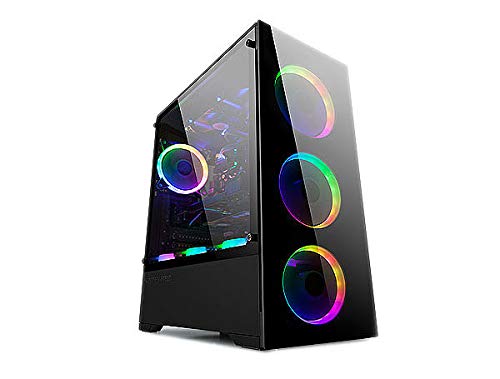
The Bgears b-Voguish Plus Mid Tower comes equipped with six 120mm ARGB fans and an integrated 550W power supply. It features a 10-channel fan hub with two LED strip headers, controlled by an included remote. The chassis accommodates E-ATX, ATX, MicroATX, and ITX motherboards within an 18-pound black frame. You get front connectivity with one USB 3.0 port and two USB 2.0 ports, making it suitable if you need extensive pre-installed cooling.
Pros
- Six pre-installed 120mm ARGB fans
- Ten-channel fan hub with two LED strip connections and remote control
- Includes a b-Vigor 550W power supply
- Supports E-ATX, ATX, MicroATX, and ITX motherboards
Cons
- Front panel includes only a single USB 3.0 port alongside two USB 2.0 ports
- Included power supply is fixed at 550W capacity
- Chassis weighs 18 pounds before system components are installed
Good fit if
- You want six pre-installed 120mm ARGB fans managed by an included hub and remote
- You plan to run an E-ATX, ATX, MicroATX, or ITX motherboard
- You need a chassis that includes a 550W power supply
Skip if
- You need multiple front-panel USB 3.0 ports
- You require a power supply with more than 550W capacity
Verdict: Bgears b-Voguish Plus Mid Tower provides six 120mm ARGB fans, a dedicated 10-channel hub, and a 550W power supply right out of the box. It offers wide motherboard compatibility across ITX up to E-ATX form factors.

NZXT H6 Flow Panoramic Dual-Chamber Mid-Tower
Best for: panoramic glass builds needing angled 120mm cooling
- Fan Size
- 120mm
- Case Type
- Mid-Tower
- Side Panel
- Glass
- Included Fans
- 3x 120mm
- Dimensions
- 16.3 × 11.3 × 17.1 inches
- Weight
- 20.7 pounds
View on Amazon: NZXT H6 Flow Panoramic Dual-Chamber Mid-Tower
The NZXT H6 Flow is a dual-chamber mid-tower case featuring wraparound panoramic glass panels. It comes equipped with three pre-installed 120mm fans angled for direct component airflow. Perforated top and side panels allow ventilation while filtering dust. You get built-in routing channels and straps for cable management. This layout suits builders who want an open interior view alongside dedicated 120mm fan cooling.
Pros
- Three pre-installed angled 120mm fans
- Seamless wraparound panoramic glass panels
- Dual-chamber layout separating core components
- Perforated top and side panels for airflow
Cons
- Wide 11.3-inch footprint takes extra desk space
- Unpopulated case weight exceeds 20 pounds
Good fit if
- You want an unobstructed panoramic view through seamless glass panels.
- You want factory-installed cooling via three angled 120mm fans.
- You prefer a dual-chamber setup with built-in cable management straps.
Skip if
- You need a narrower case than 11.3 inches wide.
- You want an empty case weighing less than 20 pounds.
Verdict: NZXT H6 Flow Panoramic Dual-Chamber Mid-Tower provides dedicated angled 120mm cooling and seamless wraparound glass inside a dual-chamber frame.

Apevia Phenom Micro-ATX Case with 3 ARGB Fans
Best for: Micro-ATX builds requiring pre-installed ARGB fans
- Fan Size
- 120mm
- Motherboard Support
- Micro-ATX
- Side Panel
- Tempered Glass
- Included Fans
- 3x 120mm ARGB
- Radiator Support
- 240mm
- Max GPU Length
- 340mm
View on Amazon: Apevia Phenom Micro-ATX Case with 3 ARGB Fans
The Apevia Phenom Micro-ATX case includes three pre-installed 120mm ARGB fans and supports up to five total cooling fans. It features dual tempered glass panels and front ventilation. Inside, you get clearance for graphics cards up to 340mm and CPU coolers up to 155mm. With support for front 240mm radiators, this chassis suits you if you build a compact Micro-ATX gaming setup.
Pros
- Three 120mm ARGB fans pre-installed
- Accommodates graphics cards up to 340mm
- Front 240mm radiator support
- Top and bottom magnetic dust filters
Cons
- Limits CPU cooler height to 155mm
- Restricted to Micro-ATX motherboards
- Supports a maximum of five fans
Good fit if
- You build with a Micro-ATX motherboard.
- You want three included 120mm ARGB fans with motherboard sync.
- You run a graphics card under 340mm in length.
Skip if
- You need clearance for standard ATX motherboards.
- You use CPU tower coolers taller than 155mm.
- You plan to install radiators larger than 240mm.
Verdict: Apevia Phenom Micro-ATX Case with 3 ARGB Fans delivers three factory-installed 120mm fans and clearance for 340mm graphics cards in a compact footprint. It fits mid-range gaming hardware cleanly as long as your air cooler stays under 155mm.

Apevia Aurora Mid Tower with Six 120mm Fans
Best for: ATX builds needing maximum pre-installed cooling fans
- Fan Size
- 120mm
- Case Type
- Mid Tower
- Side Panel
- Tempered Glass
- Included Fans
- 6x 120mm PWM ARGB
- Radiator Support
- 360mm
- Max GPU Length
- 360mm
This ATX mid-tower chassis comes equipped with six pre-installed 120mm PWM ARGB fans and an eight-port control hub. You get front radiator support up to 360mm, 165mm of CPU cooler clearance, and space for graphics cards up to 360mm long. The left side features a hinged tempered glass panel with magnetic closure. It suits you if you want high 120mm fan capacity without buying extra fans.
Pros
- Six pre-installed 120mm PWM ARGB fans with an 8-port hub
- Swivel-open magnetic tempered glass side door
- Clearance for 360mm graphics cards and 165mm CPU coolers
- Front radiator mounting support up to 360mm
Cons
- Top I/O panel lacks a USB Type-C port
- Top radiator mounting limited to 240mm
Good fit if
- You want six pre-installed 120mm PWM fans managed by an included hub.
- You use a long graphics card measuring up to 360mm.
- You prefer a tool-free magnetic swivel panel for quick interior access.
Skip if
- You need native USB Type-C connectivity on the top panel.
- You plan to mount a 280mm or 360mm radiator at the top.
Verdict: Apevia Aurora Mid Tower with Six 120mm Fans provides comprehensive air cooling straight out of the box with six pre-wired PWM ARGB fans and an included hub. It offers generous clearances for large GPUs and standard ATX motherboards behind a convenient magnetic glass door.

Cooler Master NCORE 100 MAX Mini-ITX Case
Best for: compact Mini-ITX builds with long graphics cards
- Fan Size
- 120mm
- Motherboard Support
- Mini-ITX
- Case Type
- SFF
- Radiator Support
- 120mm
- Max GPU Length
- 356mm
- Case Volume
- 15.7L
This Cooler Master NCORE 100 MAX is a 15.7-liter small form factor chassis designed strictly for Mini-ITX motherboards. For cooling, it integrates a 38mm-thick 120mm radiator to manage processor thermals. It also includes a pre-installed 850W Gold power supply and an expandable frame that widens from 155mm to 172mm to fit vertical GPUs up to 356mm long. It suits you if you want a compact footprint with bundled core hardware.
Pros
- Includes an 850W 80 Plus Gold ATX 3.0 power supply
- Pre-fitted with a 38mm-thick 120mm liquid cooling radiator
- Expandable frame widens from 155mm to 172mm to fit GPUs up to 356mm
- Small 15.7-liter desktop footprint
Cons
- Exclusively supports Mini-ITX motherboards
- Limited to vertical graphics card mounting
Good fit if
- You are building a compact system with a Mini-ITX motherboard.
- You want an integrated 850W power supply and 120mm radiator included.
- You plan to vertically install a graphics card up to 356mm in length.
Skip if
- You need a chassis that accommodates Micro-ATX or ATX motherboards.
- You want traditional horizontal expansion card slots.
Verdict: Cooler Master NCORE 100 MAX Mini-ITX Case delivers an integrated small form factor setup with a pre-installed 850W power supply and 120mm radiator. It is an efficient option if you need maximum component clearance within a 15.7-liter footprint.

MUSETEX ATX Mid-Tower Dual Glass Case
Best for: dual-chamber ATX builds with 360mm liquid cooling
- Fan Size
- 120mm
- Motherboard Support
- ATX
- Case Type
- Mid Tower
- Side Panel
- Tempered Glass
- Included Fans
- 3x 120mm
- Radiator Support
- 360mm
The MUSETEX Dual-Chamber Mid-Tower ATX Case gives you a wide-view layout featuring three pre-installed 120mm fans for baseline airflow. It provides clearance for graphics cards up to 400mm, CPU coolers up to 176mm, and top-mounted 360mm radiators. With its tool-free snap-on panels, dual-chamber separation, and USB 3.2 Type-C front port, this enclosure suits builders seeking room for large cooling setups alongside full ATX motherboards.
Pros
- Three 120mm cooling fans come pre-installed
- Supports top-mounted radiators up to 360mm
- Clearance for 400mm graphics cards and 176mm CPU coolers
- Equipped with front USB 3.2 Type-C and USB 3.0 connectivity
- Snap-on panels allow tool-free removal
Cons
- Wider 11.61-inch footprint requires extra desktop space
- Only lists compatibility for standard ATX motherboards
Good fit if
- You want to mount a 360mm liquid cooler at the top of your chassis.
- You need clearance for an extra-long graphics card up to 400mm.
- You need modern USB 3.2 Type-C connectivity on the front panel.
Skip if
- You have a narrow workspace that cannot fit an 11.61-inch wide dual-chamber case.
- You plan to build using smaller form-factor motherboards not confirmed in the specifications.
Verdict: MUSETEX Dual-Chamber Mid-Tower ATX Case pairs three 120mm fans with spacious clearances for 400mm graphics cards and 360mm radiators. Its tool-free snap-on panels and front USB-C connectivity make it a practical choice for component-heavy ATX systems.

Okinos Aqua 3 Panoramic Micro-ATX Case
Best for: Micro-ATX setups using 3-pin ARGB fans
- Fan Size
- 120mm
- Motherboard Support
- MATX, ITX
- Case Type
- Micro ATX
- Side Panel
- Tempered Glass
- Included Fans
- 3x 120mm ARGB
- Max GPU Length
- 320mm
The Okinos Aqua 3 is a compact Micro-ATX chassis designed for builds requiring direct airflow and clear visibility. You get three pre-installed 120mm 3-pin ARGB fans mounted at the top and rear, along with an integrated four-port ARGB controller. Its panoramic glass layout displays components clearly. It suits you if you build an mATX system with Type-C front access and pre-routed 120mm fans.
Pros
- Three pre-installed 120mm 3-pin ARGB fans
- Built-in 4-port ARGB lighting controller
- Front I/O with USB 3.2 Gen 2 Type-C (10Gbps)
- 270-degree panoramic tempered glass panels
Cons
- Motherboard support limited to Micro-ATX and Mini-ITX
- Pre-installed fans use 3-pin instead of 4-pin PWM headers
- Maximum graphics card length limited to 320mm
Good fit if
- You build with a Micro-ATX or Mini-ITX motherboard.
- You want three included 120mm ARGB fans and a lighting hub.
- You need a front-panel 10Gbps Type-C connection.
Skip if
- You plan to use a standard ATX motherboard.
- You require 4-pin PWM variable speed control on your case fans.
- You have a graphics card longer than 320mm.
Verdict: Okinos Aqua 3 Micro-ATX Case provides panoramic glass styling and three included 120mm ARGB fans for compact setups. It is a solid choice if you need 10Gbps USB-C connectivity and integrated lighting control within a Micro-ATX footprint.

MUSETEX Mid-Tower Dual-Chamber ATX Case
Best for: dual-chamber builds needing 360mm radiator support
- Fan Size
- 120mm
- Motherboard Support
- ATX, Micro-ATX, Mini-ITX
- Case Type
- Mid Tower
- Side Panel
- Tempered Glass
- Included Fans
- 3 x 120mm Non-ARGB
- Radiator Support
- 360mm
This mid-tower PC case features three pre-installed 120mm fans and a dual-chamber layout. It accommodates graphics cards up to 400mm, CPU coolers up to 176mm, and top-mounted 360mm radiators. The chassis supports standard ATX, Micro-ATX, and Mini-ITX motherboards along with back-connect designs. You also get front Type-C connectivity and dual tempered glass panels. It suits you if you need wide component clearance and dedicated cooling chambers.
Pros
- Includes three pre-installed 120mm cooling fans
- Supports radiators up to 360mm on top
- Accommodates GPUs up to 400mm and CPU coolers up to 176mm
- Front I/O panel includes USB Type-C and USB 3.0
- Dual-chamber design with magnetic top and bottom dust filters
Cons
- Pre-installed 120mm fans do not include ARGB lighting
- Case width exceeds 11.6 inches due to dual-chamber layout
Good fit if
- You build with a back-connect or standard ATX motherboard.
- You need space for a 360mm liquid cooler and long graphics card.
- You want dual-chamber cable routing with tool-free snap-on panels.
Skip if
- You want pre-installed fans with built-in ARGB lighting.
- You need a narrow chassis for a tight desk setup.
Verdict: MUSETEX Dual-Chamber ATX Mid-Tower Case provides generous component clearances and a dual-chamber layout with three pre-installed 120mm fans. It gives your build extensive cooling support and clean cable routing without complex assembly.

GAMDIAS Mid-Tower Case with 4 ARGB Fans
Best for: radiator setups needing four pre-installed fans
- Fan Size
- 120mm
- Motherboard Support
- ATX, Micro-ATX, Mini-ITX
- Case Type
- Mid Tower
- Side Panel
- Tempered Glass
- Included Fans
- 4x 120mm ARGB
- Radiator Support
- 360mm
This GAMDIAS mid-tower case comes equipped with four pre-installed 120mm ARGB fans behind a mesh front panel. It supports ATX, Micro-ATX, and Mini-ITX motherboards and offers seven expansion slots for multi-slot hardware. The chassis accommodates liquid cooling radiators alongside storage brackets for up to two 3.5-inch or 2.5-inch drives. You get tool-free tempered glass access and dedicated top-panel LED controls, making it a functional option for standard airflow-focused gaming builds.
Pros
- Includes four pre-installed 120mm ARGB fans
- Mesh front panel for direct intake ventilation
- Tool-free tempered glass side panel
- Seven expansion slots support ATX configurations
Cons
- Front I/O features only one USB 3.0 port alongside two USB 2.0 ports
- No front-panel USB Type-C port listed
Good fit if
- You want four included 120mm ARGB fans without buying extra cooling hardware.
- You build with a full ATX, Micro-ATX, or Mini-ITX motherboard and plan to use a radiator.
Skip if
- You require front-panel USB Type-C connectivity.
- You need internal drive mounting for more than two drives.
Verdict: GAMDIAS Mid-Tower Case with 4 ARGB Fans offers high stock airflow and radiator compatibility in a straightforward mid-tower chassis. It handles standard ATX builds cleanly with its four pre-installed 120mm fans and tool-free tempered glass panel.
Specifications side by side
| Spec | Fractal Design Focus G ATX Mid Tower | iTek QBO 8 Evo Micro-ATX Cube Case | Zalman S3 Compact ATX Mid-Tower Case | Zalman T6 ATX Mid-Tower Case | SiyuXinyi PCI Slot Fan and GPU Bracket | Zalman Compact ATX Mid-Tower with Dual Fans | Bgears b-Voguish Plus Mid-Tower with 550W PSU | NZXT H6 Flow Panoramic Dual-Chamber Mid-Tower | Apevia Phenom Micro-ATX Case with 3 ARGB Fans | Apevia Aurora Mid Tower with Six 120mm Fans | Cooler Master NCORE 100 MAX Mini-ITX Case | MUSETEX ATX Mid-Tower Dual Glass Case | Okinos Aqua 3 Panoramic Micro-ATX Case | MUSETEX Mid-Tower Dual-Chamber ATX Case | GAMDIAS Mid-Tower Case with 4 ARGB Fans |
|---|---|---|---|---|---|---|---|---|---|---|---|---|---|---|---|
| Motherboard Support | ATX | Micro ATX | ATX | ATX, mATX, mini-ITX | not specified | ATX | E-ATX, ATX, MicroATX, ITX | not specified | Micro-ATX | not specified | Mini-ITX | ATX | MATX, ITX | ATX, Micro-ATX, Mini-ITX | ATX, Micro-ATX, Mini-ITX |
| Case Type | Mid Tower | Cube | Mid Tower | Mid Tower | not specified | Mid Tower | Mid Tower | Mid-Tower | not specified | Mid Tower | SFF | Mid Tower | Micro ATX | Mid Tower | Mid Tower |
| Side Panel | Window | not specified | Acrylic | not specified | not specified | Acrylic | not specified | Glass | Tempered Glass | Tempered Glass | not specified | Tempered Glass | Tempered Glass | Tempered Glass | Tempered Glass |
| Included Fans | 2x 120mm White LED | not specified | 3x 120mm | 1x 120mm | not specified | 2x 120mm | 6x 120mm ARGB | 3x 120mm | 3x 120mm ARGB | 6x 120mm PWM ARGB | not specified | 3x 120mm | 3x 120mm ARGB | 3 x 120mm Non-ARGB | 4x 120mm ARGB |
| Radiator Support | not specified | not specified | 120mm | not specified | not specified | not specified | not specified | not specified | 240mm | 360mm | 120mm | 360mm | not specified | 360mm | 360mm |
| Max GPU Length | up to 380 mm | not specified | 330mm | not specified | not specified | not specified | not specified | not specified | 340mm | 360mm | 356mm | 400mm | 320mm | not specified | 340mm |
| Case Volume | not specified | not specified | not specified | not specified | not specified | not specified | not specified | not specified | not specified | not specified | 15.7L | not specified | not specified | not specified | not specified |
| Tower Size | Mid-Tower | not specified | Mid-Tower | Mid-Tower | not specified | Mid-Tower | Mid-Tower | Mid-Tower | not specified | Mid-Tower | Small Form Factor | Mid-Tower | not specified | Mid-Tower | Mid-Tower |
| Fan Size | 120mm | 120mm | 120mm | 120mm | 120mm, 140mm, 80mm | 120mm | 120mm | 120mm | 120mm | 120mm | 120mm | 120mm | 120mm | 120mm | 120mm |
| Use | not specified | not specified | not specified | not specified | Gaming | not specified | not specified | not specified | Gaming | not specified | not specified | Gaming | not specified | Gaming | Gaming |
| Lighting | LED | ARGB | not specified | not specified | not specified | not specified | ARGB | not specified | ARGB | ARGB | not specified | not specified | ARGB | ARGB | ARGB |
| Connectivity | USB 3.0 | not specified | not specified | not specified | not specified | not specified | not specified | not specified | not specified | not specified | not specified | Type-C | Type-C | Type-C | not specified |
| Connector Type | not specified | not specified | not specified | not specified | not specified | not specified | not specified | not specified | not specified | not specified | not specified | not specified | 3-Pin | not specified | not specified |
| Compatible Device | not specified | not specified | not specified | not specified | Graphics Card | not specified | not specified | not specified | not specified | not specified | not specified | not specified | not specified | not specified | Radiator, CPU Cooler |
| Dimensions | 18.3 × 8.07 × 17.5 inches | 14.2 × 10.5 × 13.1 inches | 16.2 × 7.44 × 17.8 inches | 7.87 × 16.9 × 14.8 inches | 4 × 6 × 0.3 inches | 8.11 × 18 × 15 inches | 15.9 × 8.07 × 19.4 inches | 16.3 × 11.3 × 17.1 inches | 15.4 × 7.87 × 15.2 inches | 16.3 × 8.25 × 18.5 inches | 6.1 × 18.9 × 8.35 inches | 16.5 × 11.6 × 14.5 inches | 13.8 × 8.27 × 15.4 inches | 16.5 × 11.6 × 14.5 inches | 15.6 × 7.68 × 17.7 inches |
| Weight | 9.92 pounds | 6.61 pounds | 8.38 pounds | 8 pounds | 3.53 ounces | 7.9 pounds | 18 pounds | 20.7 pounds | not specified | not specified | 13.9 pounds | 16.9 pounds | 9.19 pounds | 15 pounds | 10.8 pounds |
| Color | Gunmetal | Black | Acrylic | Black | Black | S4 | Black | Black | Pink | White | Dark Grey | Black | Black | Black | Black |
| Model | FD-CA-FOCUS-GY-W | ITGCAQBO30E | not specified | T6 | Ex:xq-060 | S4 | BG01671 | CC-H61FB-01 | PHENOM-PK | AURORA-WH | NR100-MNNN85-SL0 | Y6 | OKICC-AQUA3-MATXB-H3BA | Y6 | AURA GC1 ELITE ARGB |
| Size | not specified | not specified | 16.22 x 7.44 x 17.76 inches | T6 | not specified | Mid Tower | not specified | H6 Flow v1 | PHENOM PINK | AURORA WHITE | not specified | 16.54"D x 11.61"W x 14.49"H | not specified | 16.54"D x 11.61"W x 14.49"H | AURA GC1 E A |
Is a 120mm fan setup worth it for your PC build?
Standardizing on 120mm fan mounts gives you layout flexibility across Mini-ITX, Micro-ATX, and ATX cases. Multi-fan setups, such as configurations with three to six pre-installed fans or 360mm radiator support, direct airflow straight across internal components. This standard sizing fits tight chassis boundaries where wider components cannot clear drive cages or internal power supplies. Cases with this mount size also support varied electrical connections, including standard 3-pin headers and multi-channel PWM ARGB controller hubs.
Worth it if
- You want consistent cooling hardware compatibility across Mini-ITX, Micro-ATX, and ATX enclosures.
- You plan to mount multi-fan setups or liquid cooling radiators up to 360mm.
Skip it if
- You plan to rely primarily on large 200mm intake fans for airflow.
- You only need an auxiliary mounting bracket dedicated strictly to 80mm or 140mm hardware.
If you prefer a prebuilt compact system over building inside a standard enclosure, compare specifications for a mini PC under 1000 instead.
How We Picked 120mm Cases
We selected cases by identifying 120mm fan support in published Amazon listing titles and feature tables. Each entry represents a distinct product line, showing only one model variant or size. We compile all details strictly from published manufacturer specifications without physically unboxing or testing hardware.
This guide highlights 15 choices, ordered with products in stock first. Stock availability updates live on the page at least once daily. You can compare motherboard support, exterior dimensions, and cooling fan mounts directly from the published data to find the best match for your setup.
How to Choose the Right 120mm Case
-
Front Panel Connectivity
Inspect front panel ports before picking a case. Fast external storage drives and modern peripherals require matching ports on your chassis exterior. Some older cases feature only standard USB Type-A connections, while newer designs like the Okinos Aqua 3 Panoramic Micro-ATX Case include front USB Type-C connectivity. Check your motherboard specification sheet to confirm it has the correct internal header to power Type-C front ports. If your motherboard lacks that internal header, the front port remains inactive. Compare connector types to avoid mismatched front cables.
-
Side Panel Material
Inspect the side panel composition to balance durability, weight, and component visibility. Tempered glass panels provide clear interior views and scratch resistance. However, glass adds overall mass to your desk setup. Acrylic side panels reduce total system weight and resist shattering during transport. For example, the Zalman S3 Compact ATX Mid-Tower Case utilizes an acrylic side panel, keeping the empty chassis weight at 8.38 pounds. Choose acrylic if you move your system frequently. Choose tempered glass if you want rigid scratch resistance.
-
Pre-Installed Fan Count
Count the factory-installed fans to determine whether you need extra cooling hardware. Some enclosures include only one or two fans, requiring separate fan purchases. Others come fully equipped from the factory. The Apevia Aurora Mid Tower with Six 120mm Fans includes six pre-wired PWM ARGB fans alongside an integrated hub. Pre-installed fans simplify wiring and reduce assembly time. Check connector types on spec sheets, noting whether fans use standard motherboard headers or proprietary hubs. Verify your motherboard has enough headers for the included configuration.
-
External Drive Bay Needs
Check drive bay specifications if your build relies on physical media. Modern chassis layouts almost universally omit 5.25-inch external bays to maximize front intake airflow. If you require an optical disc drive for DVDs or Blu-ray discs, standard cases will not work. The Zalman T6 ATX Mid-Tower Case preserves a dedicated 5.25-inch bay while supporting 120mm cooling fans. When selecting a case with external bays, check internal clearance carefully. Make sure your optical drive does not block motherboard SATA connectors or long internal components during assembly.
-
Auxiliary GPU Cooling Brackets
Heavy graphics cards place physical stress on PCI expansion slots. In standard chassis, adding extra intake fans beneath a graphics card can prevent thermal throttling. When working with an existing case setup, auxiliary brackets offer targeted airflow. The SiyuXinyi PCI Slot Fan and GPU Bracket mounts inside expansion slots to hold 80mm, 120mm, or 140mm fans while bracing the card against physical sag. If your case lacks bottom fan mounts, evaluate bracket hardware. Compare available vertical expansion slots before buying to confirm your chassis has clearance for bracket installation.
-
Integrated Power Supply Inclusions
Evaluate whether you want bundled power delivery or independent component selection. Standalone cases require you to purchase, size, and cable a separate power supply unit. In contrast, bundled options like the Bgears b-Voguish Plus Mid-Tower with 550W PSU include a pre-fitted 550W unit alongside six 120mm fans. This pairing eliminates power supply dimension compatibility checks during assembly. Compare the included wattage rating against your graphics card and processor demands. If your build needs higher wattage, choose an unbundled case and source your own dedicated power supply.
Frequently asked questions
Which PC cases include six 120mm fans right out of the box?
The Apevia Aurora and Bgears b-Voguish Plus both supply six pre-installed 120mm fans. The Apevia Aurora includes six pre-wired PWM ARGB fans paired with an integrated hub. The Bgears b-Voguish Plus comes equipped with six 120mm ARGB fans and a dedicated 10-channel fan hub, alongside a 550W power supply that handles ITX up to E-ATX motherboards.
Can you install an external optical drive in a 120mm mid-tower case?
Yes, the Zalman T6 mid-tower case includes an external 5.25-inch bay specifically for an optical disc drive. This chassis supports standard ATX motherboards and utilizes 120mm fans for cooling. When planning your build in the T6, verify that your motherboard layout does not use side-facing SATA ports, which can interfere with components in this specific enclosure.
How do dual-chamber cases incorporate 120mm cooling fans?
Dual-chamber enclosures position 120mm fans in dedicated compartments to isolate heat from primary components. The NZXT H6 Flow uses an angled front-corner chamber that routes 120mm airflow directly across hardware behind panoramic glass. Similarly, the MUSETEX Y6 mid-tower chassis integrates three 120mm fans alongside broad cable-routing clearance and support for large 360mm radiators.
Which compact Micro-ATX cases support 120mm fan configurations?
Several compact models support standard 120mm fans, including the iTek QBO 8 Evo, Apevia Phenom, and Okinos Aqua 3. The iTek QBO 8 Evo desktop cube pairs 120mm and 200mm ARGB fans with front-panel card readers. The Apevia Phenom includes three factory-installed 120mm fans with room for 340mm graphics cards, while the Okinos Aqua 3 provides three 3-pin ARGB fans.
Can you add dedicated 120mm cooling to an existing GPU setup?
Yes, you can add targeted airflow using a PCI slot mounting bracket like the SiyuXinyi bracket. This lightweight metal accessory mounts into standard expansion slots beneath your graphics card. It supports 120mm, 140mm, or 80mm cooling fans, providing directed auxiliary cooling across your GPU while doubling as a physical brace to help prevent card sag.
What side panel materials are available on 120mm PC cases?
PC cases with 120mm fans typically feature either acrylic or tempered glass side panels. Models such as the Zalman S3 and Zalman S4 use lightweight acrylic window panels, which keep the overall chassis weight down to roughly eight pounds. Enclosures like the GAMDIAS AURA GC1 ELITE and MUSETEX Y6 utilize tempered glass panels, providing scratch resistance and full interior visibility.
How much graphics card clearance do 120mm mid-tower cases provide?
Clearance varies by internal chassis architecture, but mid-tower models accommodate standard to oversized graphics cards. The Apevia Phenom provides room for GPUs up to 340mm long, while the MUSETEX Y6 dual-chamber chassis accommodates cards up to 400mm. Cases like the Fractal Design Focus G provide open interiors designed to fit long expansion cards alongside front 120mm fan intakes.