Best darkFlash PC Cases: 12 Models Compared
As an Amazon Associate we earn from qualifying purchases. Links on this page are affiliate links.
Choosing the right darkFlash PC case depends on your preferred form factor and component layout. The lineup spans Micro-ATX, ATX, and Full-Tower sizes, featuring mesh airflow panels, angled or curved glass, and ARGB lighting.
The darkFlash ATX Mid-Tower Dual Glass Case leads the lineup for panoramic builds with its four pre-installed ARGB fans, Type-C connectivity, and 360mm radiator support. This guide compares 12 models strictly based on the specifications published on their listings. You can evaluate hardware clearances, cooling options, and chassis dimensions to find the right fit.
Quick picks
Our 12 picks

darkFlash ATX Mid-Tower Dual Glass Case
Best for: panoramic builds with pre-installed ARGB fans
- Case Type
- Mid-Tower
- Side Panel
- Tempered Glass
- Included Fans
- 4x PWM ARGB
- Radiator Support
- 360mm
- Motherboard Support
- ATX
- Use
- Gaming
This darkFlash mid-tower case fits standard ATX motherboards and features a 270-degree panoramic dual tempered glass layout. You get four pre-installed PWM ARGB fans, with total mounting space for up to ten fans and a 360mm radiator. Front connectivity includes both USB 3.0 and Type-C ports. Top magnetic and panel filters help manage dust. This case suits you if you want high component visibility alongside ready-to-run cooling hardware.
Pros
- Four pre-installed PWM ARGB cooling fans
- 270-degree panoramic dual tempered glass panels
- Front I/O panel includes a USB Type-C port
- Mounting support for up to 10 fans and a 360mm radiator
Cons
- Does not include an RGB hub controller
- Lacks support for larger E-ATX motherboards
Good fit if
- You want an ATX enclosure equipped with four pre-installed PWM ARGB fans.
- You plan to run a 360mm liquid cooling radiator.
- You need modern I/O access with a USB Type-C port.
Skip if
- You require an included hardware RGB hub controller.
- You plan to build with an E-ATX motherboard.
Verdict: darkFlash Panoramic Glass ATX Mid-Tower delivers wide dual-glass hardware visibility and four included PWM ARGB fans for complete out-of-the-box cooling. It provides straightforward component installation with room for a 360mm radiator and modern Type-C connectivity.

darkFlash Curved Glass ATX Mid-Tower
Best for: back-connect motherboard setups with panoramic views
- Case Type
- Mid-Tower
- Side Panel
- Tempered Glass
- Included Fans
- 4x ARGB
- Radiator Support
- 360mm
- Motherboard Support
- ATX
- Use
- Gaming
This ATX mid-tower chassis supports rear-connect BTF motherboards for hidden cable setups. It features a 270-degree curved tempered glass panel and includes four pre-installed ARGB fans. The chassis accommodates up to ten total fans, dual 360mm liquid cooling radiators, and graphics cards up to RTX 4090 dimensions. An integrated front Type-C port handles fast connectivity. It suits you if you want a clean view of large components with minimal visible interior wiring.
Pros
- Supports back plug-in BTF motherboards for hidden interior wiring
- Curved 270-degree panoramic tempered glass panel
- Comes with four pre-installed ARGB fans and fits up to ten total fans
- Accommodates dual 360mm radiators and GPUs up to RTX 4090 size
- Front I/O includes a dedicated USB Type-C port
Cons
- RGB hub controller is not included in the package
- Chassis width of 18.11 inches takes up significant horizontal desk space
Good fit if
- You plan to use a back-connect BTF motherboard to conceal internal cables.
- You need a curved glass enclosure that can house dual 360mm radiators.
- You require physical clearance for extra-large GPUs up to RTX 4090 sizing.
Skip if
- You need an included RGB lighting controller out of the box.
- You have limited desk depth and require a compact chassis width.
Verdict: darkFlash Curved Glass BTF ATX Mid-Tower Case provides clean 270-degree viewing angles alongside dual 360mm radiator support for back-connect motherboard layouts. You gain exceptional clearance for high-end GPUs, though you must supply your own RGB hub.
darkFlash Micro-ATX Panoramic Glass Case
Best for: Micro-ATX panoramic showcase builds
- Motherboard Support
- Micro ATX
- Side Panel
- Tempered Glass
- Included Fans
- 3 PWM ARGB fans
- Dimensions
- 8.58 × 13.1 × 15.8 inches
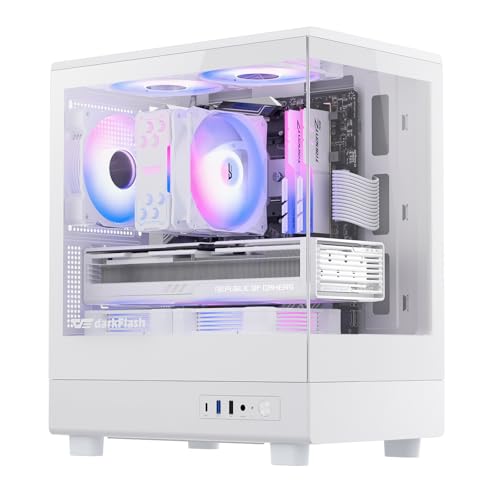
The darkFlash Micro-ATX Panoramic Glass Case gives you a 270-degree tempered glass view in a compact white chassis. It measures 15.75 inches tall and 8.58 inches long, built specifically for Micro-ATX motherboards. It includes three pre-installed PWM ARGB fans, dedicated fan mounts above the power supply for vertical airflow, and front-panel Type-C connectivity. It suits you if you want a showcase build without full-tower dimensions.
Pros
- Three pre-installed PWM ARGB fans
- 270-degree panoramic tempered glass panel
- Front I/O includes USB Type-C and USB 3.0
- Dual fan positions above power supply for vertical airflow
- Magnetic top dust filter and panel dust filter
Cons
- Does not include an RGB hub controller
- Limited to Micro-ATX motherboard form factor
Good fit if
- You use a Micro-ATX motherboard and want 270-degree visibility.
- You need pre-installed PWM ARGB cooling and front Type-C connectivity.
Skip if
- You plan to build with a full-size ATX or E-ATX motherboard.
- You require an included RGB hub controller out of the box.
Verdict: darkFlash Micro-ATX Panoramic Glass Case provides clear 270-degree component visibility paired with three pre-installed PWM ARGB fans and front Type-C access. It serves as an efficient showcase enclosure for dedicated Micro-ATX setups.

darkFlash Full-Tower ATX Case with Angled Glass
Best for: Dual-chamber builds with large graphics cards
- Motherboard Support
- ATX
- Case Type
- Full-Tower
- Included Fans
- 1x PWM ARGB
- Radiator Support
- 360mm
- Max GPU Length
- 410mm
- Use
- Gaming
View on Amazon: darkFlash Full-Tower ATX Case with Angled Glass
This full-tower chassis features a dual-chamber layout with top-angled glass panels for viewing your components. It supports standard ATX and back-mounted motherboards, graphics cards up to 410mm long, and dual 360mm radiators. With vertical GPU mounting options and snap-on panels, you get plenty of room to assemble high-end hardware. It suits you if you want a spacious dual-chamber showcase build with clearance for massive graphics cards and liquid cooling.
Pros
- Supports large graphics cards up to 410mm
- Accommodates dual 360mm liquid cooling radiators
- Compatible with back-mounted ATX motherboards
- Dual-chamber layout with vertical GPU mounting support
Cons
- RGB hub controller is not included
- Includes only one pre-installed cooling fan
Good fit if
- You plan to install dual 360mm liquid cooling radiators.
- You use a long graphics card up to 410mm.
- You want a back-connect ATX motherboard configuration.
Skip if
- You need a bundled RGB fan controller.
- You want multiple pre-installed fans out of the box.
Verdict: darkFlash Full-Tower Angled Glass ATX Case provides generous clearance for 410mm GPUs and dual 360mm radiators in a dual-chamber layout. You will need to supply your own RGB controller and extra fans to complete your cooling configuration.
darkFlash ATX Mid-Tower with Digital Display
Best for: builders wanting integrated hardware telemetry displays
- Motherboard Support
- ATX
- Case Type
- Mid-Tower
- Side Panel
- Glass
- Included Fans
- 4 PWM ARGB
- Radiator Support
- 360mm
- Max GPU Length
- 410mm
View on Amazon: darkFlash ATX Mid-Tower with Digital Display
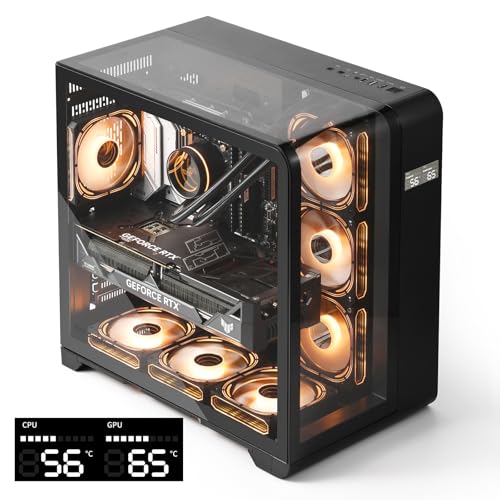
This darkFlash mid-tower chassis supports standard ATX motherboards and features a built-in digital display for monitoring CPU and GPU temperatures and usage in real time. It includes three-sided curved glass panels, front-panel Type-C connectivity, and clearance for graphics cards up to 410mm alongside 360mm radiators. It suits you if you want integrated hardware telemetry and space for up to three SSDs and two HDDs.
Pros
- Built-in digital display tracks CPU and GPU metrics in real time
- Accommodates graphics cards up to 410mm and 360mm radiators
- Internal drive mounting supports up to 3 SSDs and 2 HDDs
- Front panel includes modern Type-C connectivity
Cons
- RGB hub controller is not included
- Warranty coverage is limited to 1 year
Good fit if
- You want real-time CPU and GPU temperature readouts on your case.
- You use a large graphics card measuring up to 410mm.
- You require storage bays for up to five internal drives.
Skip if
- You require an included RGB hub controller for lighting management.
- You build with larger E-ATX motherboards.
Verdict: darkFlash ATX Mid-Tower with Digital Display delivers real-time component monitoring and room for 410mm graphics cards inside a three-sided curved glass chassis. It provides generous hardware clearance and storage capacity, though you need to supply your own RGB controller.

darkFlash ATX Mid-Tower with Walnut Accents
Best for: ATX builds needing airflow and wood styling
- Motherboard Support
- ATX
- Case Type
- Mid-Tower
- Side Panel
- Tempered Glass
- Included Fans
- 4x 120mm ARGB PWM
- Radiator Support
- 360mm
- Max GPU Length
- 425mm
The darkFlash ATX Mid-Tower with Walnut Accents is a standard mid-tower chassis featuring walnut front trim and a mesh panel for direct ventilation. It includes four pre-installed 120mm ARGB PWM fans, space for a 360mm radiator, and clearance for graphics cards up to 425mm. With front Type-C connectivity and 170mm CPU cooler clearance, this case suits you if you want wood styling alongside modern component clearance.
Pros
- Includes four pre-installed ARGB PWM fans
- Supports graphics cards up to 425mm long
- Front I/O features one USB Type-C and three USB 3.0 ports
- Accommodates CPU air coolers up to 170mm tall
Cons
- Storage mounts cap at two 3.5-inch and two 2.5-inch drives
- Motherboard compatibility tops out at standard ATX rather than E-ATX
Good fit if
- You need clearance for graphics cards up to 425mm in length.
- You want pre-installed ARGB PWM fans and front USB Type-C connectivity.
- You plan to install a 360mm liquid cooling radiator.
Skip if
- You run an E-ATX motherboard.
- You need more than two 3.5-inch hard drive bays.
Verdict: darkFlash ATX Mid-Tower with Walnut Accents delivers substantial 425mm GPU clearance and four pre-installed fans behind a ventilated wood-accented front panel. It provides modern front-panel connectivity and broad cooling room for standard ATX builds.
darkFlash AIR NOVA Full Tower Case
Best for: high-airflow E-ATX and back-connect builds
- Motherboard Support
- E-ATX, ATX, M-ATX
- Case Type
- Full Tower
- Included Fans
- 7x PWM ARGB
- Radiator Support
- 420mm
- Use
- Gaming
- Connectivity
- Type-C
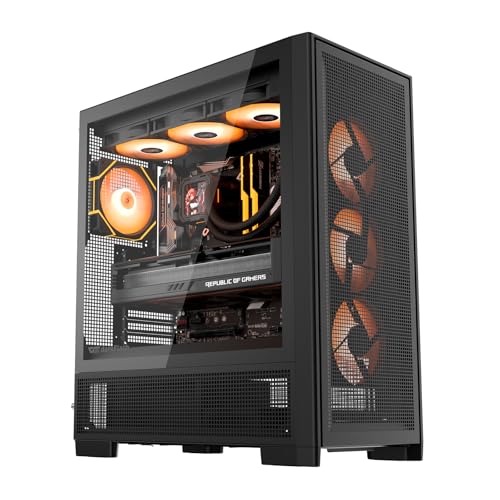
The darkFlash AIR NOVA Full Tower Case accommodates E-ATX motherboards and back-connect layouts inside a six-sided ventilated mesh chassis. You get support for dual 360 mm radiators alongside an included vertical GPU mount and metal bracket. With its adjustable HDD cage and enlarged power supply chamber, this chassis fits high-end hardware. It suits you if you need extensive airflow and space for larger motherboard form factors without glass panels.
Pros
- Supports E-ATX, ATX, and back-connect motherboards
- Six-sided ventilated mesh design for open airflow
- Accommodates dual 360 mm radiators simultaneously
- Includes vertical GPU mount and metal anti-sag bracket
Cons
- No pre-installed cooling fans included
- Full-mesh build excludes transparent glass side panels
Good fit if
- You plan to build with an E-ATX or back-connect motherboard.
- You want an all-mesh enclosure focused on cooling airflow.
- You need vertical GPU mounting hardware included out of the box.
Skip if
- You want a case that includes pre-installed cooling fans.
- You prefer tempered glass panels to display your components.
Verdict: darkFlash AIR NOVA Full Tower Case provides expansive space for E-ATX boards and dual radiators inside a fully ventilated chassis. It is an optimal choice if airflow performance matters more to you than glass display panels.
darkFlash Full Tower ATX Case with Panoramic Glass
Best for: BTF ATX builds with panoramic glass viewing
- Motherboard Support
- ATX
- Case Type
- Full Tower
- Side Panel
- Tempered Glass
- Included Fans
- 4x 120mm ARGB PWM
- Radiator Support
- 360mm
- Max GPU Length
- 400mm
View on Amazon: darkFlash Full Tower ATX Case with Panoramic Glass
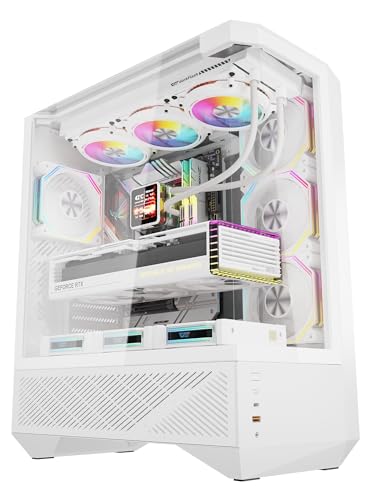
This full-tower chassis features triple tempered-glass panels providing a 330-degree panoramic view of your internal components. It supports standard and back-connect BTF ATX motherboards alongside graphics cards measuring up to 400mm in length. With four pre-installed 120mm ARGB PWM fans and clearance for up to ten fans or a 360mm top radiator, it suits you if you want a clean aesthetic with expansive hardware clearance.
Pros
- Accommodates back-connect BTF motherboards and graphics cards up to 400mm
- Includes four 120mm PWM ARGB fans with speed range of 0 to 1800 RPM
- Triple tempered-glass panels with tool-free quick-release removal
- Top I/O panel includes a 10Gbps USB-C port
Cons
- Front radiator support is limited to 240mm rather than 360mm
- Does not support larger E-ATX motherboard form factors
Good fit if
- You plan to use a back-connect BTF ATX motherboard for concealed wiring.
- You need clearance for an extra-long graphics card up to 400mm.
- You want out-of-the-box cooling with four pre-installed PWM fans.
Skip if
- You require an E-ATX motherboard for your build.
- You plan to mount a 360mm liquid cooler in the front position.
Verdict: darkFlash Full Tower ATX Case with Panoramic Glass delivers expansive component clearance, BTF motherboard compatibility, and strong cooling potential with four pre-installed ARGB fans. Its panoramic glass layout provides an unobstructed view of high-end hardware.

darkFlash Micro-ATX Mesh PC Case
Best for: airflow-focused Micro-ATX builds needing USB 3.0
- Motherboard Support
- Micro-ATX
- Included Fans
- 3x DR08 PWM ARGB
- Radiator Support
- 240mm
- Use
- Gaming
- Connectivity
- USB 3.0
- Dimensions
- 8.58 × 13.1 × 15.8 inches
This compact Micro-ATX chassis features a full mesh front panel, USB 3.0 connectivity, and three pre-installed DR08 PWM ARGB fans. It includes dedicated fan mounts above the power supply shroud for vertical airflow directly toward your graphics card, along with magnetic and panel dust filters. You get support for up to a 240mm radiator. It suits you if you want strong ventilation in a compact footprint.
Pros
- Includes three pre-installed DR08 PWM ARGB fans
- Full mesh front panel with magnetic top dust filter
- Dedicated vertical airflow fan mounts above the power supply
- USB 3.0 connectivity on the front panel
Cons
- RGB hub controller is not included
- Limited to Micro-ATX motherboards
- Radiator support tops out at 240mm
Good fit if
- You build with a Micro-ATX motherboard.
- You want pre-installed PWM ARGB cooling fans.
- You need front USB 3.0 ports.
Skip if
- You plan to install a full-size ATX motherboard.
- You need support for a 360mm radiator.
- You require an included RGB hub controller.
Verdict: darkFlash Micro-ATX Mesh PC Case delivers focused cooling with three pre-installed PWM ARGB fans and a full mesh front panel. It provides a solid Micro-ATX layout with USB 3.0 support and dual fan slots above the power supply.

darkFlash ATX Floating PC Case
Best for: showcase builds with vertical graphics cards
- Motherboard Support
- ATX, M-ATX, ITX
- Radiator Support
- 360mm
- Max GPU Length
- 415mm
- Dimensions
- 9.45 × 18.3 × 17.8 inches
This darkFlash mid-tower chassis features a floating layout that isolates the power supply to spotlight your main hardware. It accommodates ATX, Micro-ATX, or Mini-ITX motherboards, including back-connect options. You get room for graphics cards up to 415mm, CPU coolers up to 180mm, and up to 10 cooling fans alongside a 360mm radiator. It suits you if you want a panoramic display with dedicated vertical GPU mounting.
Pros
- Supports graphics cards up to 415mm and CPU coolers up to 180mm
- Holds up to 10 cooling fans and supports 360mm radiators
- Compatible with back-connect ATX, Micro-ATX, and ITX motherboards
- Built-in vertical GPU support and dedicated anti-sag bracket
Cons
- Does not include pre-installed cooling fans
- Front panel Type-A connections are limited to USB 2.0
Good fit if
- You want native vertical GPU mounting with an included support bracket
- You build with a back-connect motherboard to conceal wiring
- You need clearance for large components up to 415mm in length
Skip if
- You want a case with pre-installed cooling fans in the box
- You need front-panel USB 3.0 Type-A ports
- You are using an oversized E-ATX motherboard
Verdict: darkFlash ATX Floating PC Case offers generous 415mm component clearance and seamless back-connect motherboard support. Its multi-fan capacity and vertical mounting setup make it a practical panoramic chassis.

darkFlash Dual Glass ATX Mid-Tower
Best for: panoramic builds with long graphics cards
- Case Type
- Mid-Tower
- Side Panel
- Tempered Glass
- Included Fans
- 3x PWM ARGB
- Radiator Support
- 360mm
- Max GPU Length
- 400mm
- Motherboard Support
- ATX
This ATX mid-tower chassis features dual tempered glass panels on the front and side to showcase your hardware. It includes three pre-installed PWM ARGB fans, with total mounting room for up to nine fans and a 360mm liquid cooling radiator. You also get 400mm of clearance for long graphics cards and removable dust filters. It suits you if you want a clean display build with room for large hardware.
Pros
- Accommodates graphics cards up to 400mm long
- Includes three PWM ARGB fans with mounting for up to nine total
- Supports liquid cooling radiators up to 360mm
- Dual tempered glass panels on the front and side
Cons
- Supports ATX motherboards without listed E-ATX support
- Requires buying six extra fans to populate all nine mounts
Good fit if
- You run a long graphics card measuring up to 400mm
- You want dual glass panels to display internal components
- You plan to install a 360mm liquid cooling radiator
Skip if
- You require support for larger E-ATX motherboards
- You want all nine fan mounts filled out of the box
Verdict: darkFlash Dual Glass ATX Mid-Tower delivers generous clearance for 400mm graphics cards alongside dual panoramic glass panels. It provides solid cooling flexibility with three included PWM ARGB fans and room for a 360mm radiator.

darkFlash DS900 Panoramic ATX Mid-Tower
Best for: showcasing builds with long graphics cards
- Motherboard Support
- ATX, Micro-ATX, Mini-ITX
- Case Type
- Mid Tower
- Side Panel
- Tempered Glass
- Max GPU Length
- 425mm
This darkFlash mid-tower case features a pillar-free 270-degree panoramic tempered glass design to showcase your internal hardware. It supports ATX, Micro-ATX, and Mini-ITX motherboards, alongside graphics cards up to 425mm long. The chassis includes a front USB-C port, full dust filtration, and mounts for up to nine 120mm fans. It suits you if you want a clean view of long graphics cards and need straightforward tool-free maintenance.
Pros
- Pillar-free 270° panoramic tempered glass corner
- Clearance for graphics cards up to 425mm long
- Mounting positions for up to nine 120mm fans
- Front I/O panel equipped with a USB-C port
- Tool-free side panel access and full dust filtration
Cons
- Storage capped at three drives total
- Motherboard compatibility tops out at standard ATX with no E-ATX support
- Fan mounts are limited strictly to 120mm sizes
Good fit if
- You want an unobstructed 270° view of your components without a corner pillar.
- You use an extra-long graphics card measuring up to 425mm.
- You need modern front-panel connectivity including a USB-C port.
Skip if
- You plan to build with an oversized E-ATX motherboard.
- You need to install more than three storage drives.
- You prefer running larger 140mm cooling fans.
Verdict: darkFlash DS900 Panoramic ATX Mid-Tower delivers wide component visibility with its pillar-free glass panels and supports modern hardware up to 425mm GPUs. It offers a solid mid-tower layout if you want multi-fan airflow and front USB-C connectivity without stepping up to a full tower.
Specifications side by side
| Spec | darkFlash ATX Mid-Tower Dual Glass Case | darkFlash Curved Glass ATX Mid-Tower | darkFlash Micro-ATX Panoramic Glass Case | darkFlash Full-Tower ATX Case with Angled Glass | darkFlash ATX Mid-Tower with Digital Display | darkFlash ATX Mid-Tower with Walnut Accents | darkFlash AIR NOVA Full Tower Case | darkFlash Full Tower ATX Case with Panoramic Glass | darkFlash Micro-ATX Mesh PC Case | darkFlash ATX Floating PC Case | darkFlash Dual Glass ATX Mid-Tower | darkFlash DS900 Panoramic ATX Mid-Tower |
|---|---|---|---|---|---|---|---|---|---|---|---|---|
| Motherboard Support | not specified | not specified | Micro ATX | ATX | ATX | ATX | E-ATX, ATX, M-ATX | ATX | Micro-ATX | ATX, M-ATX, ITX | not specified | ATX, Micro-ATX, Mini-ITX |
| Case Type | Mid-Tower | Mid-Tower | not specified | Full-Tower | Mid-Tower | Mid-Tower | Full Tower | Full Tower | not specified | not specified | Mid-Tower | Mid Tower |
| Side Panel | Tempered Glass | Tempered Glass | Tempered Glass | not specified | Glass | Tempered Glass | not specified | Tempered Glass | not specified | not specified | Tempered Glass | Tempered Glass |
| Included Fans | 4x PWM ARGB | 4x ARGB | 3 PWM ARGB fans | 1x PWM ARGB | 4 PWM ARGB | 4x 120mm ARGB PWM | 7x PWM ARGB | 4x 120mm ARGB PWM | 3x DR08 PWM ARGB | not specified | 3x PWM ARGB | not specified |
| Radiator Support | 360mm | 360mm | not specified | 360mm | 360mm | 360mm | 420mm | 360mm | 240mm | 360mm | 360mm | not specified |
| Max GPU Length | not specified | not specified | not specified | 410mm | 410mm | 425mm | not specified | 400mm | not specified | 415mm | 400mm | 425mm |
| Tower Size | Mid-Tower | Mid-Tower | not specified | Full-Tower | Mid-Tower | Mid-Tower | Full-Tower | Full-Tower | not specified | not specified | Mid-Tower | not specified |
| Use | Gaming | Gaming | not specified | Gaming | Gaming | Gaming | Gaming | not specified | Gaming | not specified | Gaming | not specified |
| Lighting | ARGB | ARGB | ARGB | ARGB | ARGB | ARGB | ARGB | ARGB | ARGB | not specified | not specified | not specified |
| Connectivity | Type-C | Type-C | not specified | not specified | Type-C | Type-C | Type-C | not specified | USB 3.0 | not specified | not specified | not specified |
| Compatible Device | Radiator | not specified | not specified | not specified | not specified | not specified | Radiator | not specified | not specified | not specified | not specified | not specified |
| Dimensions | 8.6 × 17.8 × 17 inches | 11.2 × 18.1 × 15.6 inches | 8.58 × 13.1 × 15.8 inches | 18.7 × 11.8 × 19.6 inches | 11 × 16.2 × 16.3 inches | 8.6 × 17.8 × 17 inches | 15 × 9 × 18.1 inches | 9.37 × 17.8 × 19.9 inches | 8.58 × 13.1 × 15.8 inches | 9.45 × 18.3 × 17.8 inches | 17.7 × 18.3 × 8.74 inches | not specified |
| Weight | 15 pounds | 18.9 pounds | not specified | 22 pounds | 16.5 pounds | 13.8 pounds | 11.6 pounds | not specified | not specified | not specified | 15 pounds | not specified |
| Size | 17.1''L x 8.5''W x 17.8'H | not specified | not specified | 18.66''L x 11.77''W x 19.6''H | not specified | 18.5''L x 8.58''W x 17.87'H | not specified | ATX | not specified | not specified | 17.72''L x 8.74''W x 18.31''H | Mid Tower |
| Color | Black | White | White | Black | Black | Black | Black | White | White | Black and White | Black | Black |
| Model | DS900 | DPW90 | DB330M | DY470 | L280 | DS900WS | AIR NOVA | DY460 | DB330 MESH | FLOATRON F1 | DS950 | DS900A |
Comparing the darkFlash PC Case Lineup
If you want desk showcase builds, darkFlash offers Micro-ATX and mid-tower chassis focused on visibility. Models like the darkFlash Micro-ATX Panoramic Glass Case and darkFlash ATX Mid-Tower Dual Glass Case feature multi-panel tempered glass layouts with pre-installed ARGB fans. This group suits you if you prioritize interior viewing angles, component visibility, and 360mm radiator room for gaming setups.
For higher thermal requirements or larger hardware, the brand provides ventilated and full-tower options. The darkFlash AIR NOVA Full Tower Case supports E-ATX motherboards and dual radiators inside an airflow-focused frame. If you prefer a compact footprint with direct intake, the darkFlash Micro-ATX Mesh PC Case supplies front mesh ventilation and USB 3.0 connectivity.
Where the darkFlash Range Fits
The darkFlash lineup suits you if you want showcase aesthetics or focused airflow across Micro-ATX, ATX, or E-ATX motherboards. Physical sizes extend from compact Micro-ATX enclosures to full-tower chassis. Available shapes include dual-glass panoramic chambers, three-sided curved glass, angled glass panels, floating frames, walnut wood accents, and full-mesh front panels. Lighting options span from models with pre-installed PWM ARGB fans to versions without included lighting.
Notable gaps exist across the range. You will not find dedicated Mini-ITX cases, as Micro-ATX is the smallest form factor supported. Additionally, none of the models include integrated RGB control hubs.
When planning clearance for longer enclosures, pair your chassis specifications with compatible units from the best 850W PC power supplies.
How to Choose the Right darkFlash Case
-
Verify Motherboard Form Factor
Match your motherboard size directly to the chassis specification before buying. Standard sizes include Micro-ATX, ATX, and E-ATX. If you build with a compact board, a Micro-ATX enclosure keeps overall dimensions small. If you plan to use an E-ATX board, choose a full tower like the darkFlash AIR NOVA Full Tower Case. Also verify whether the chassis accommodates back-connect motherboards. Back-connect designs route cables through rear cutouts, which requires dedicated tray openings to align properly with rear headers.
-
Check Graphics Card Clearance
Compare your graphics card length against the maximum GPU clearance listed for the chassis. Modern graphics cards frequently exceed 300mm in length, and some require extra space if you install front radiators or thick fans. Choosing an enclosure with 400mm or more of clearance prevents physical collisions during assembly. For example, the darkFlash ATX Mid-Tower with Walnut Accents accommodates graphics cards up to 425mm long. Measuring your card before selecting a case ensures the card and power cables fit without straining connectors.
-
Evaluate Radiator Size Limits
Liquid cooling setups depend strictly on internal radiator mounting dimensions. If you intend to use an all-in-one liquid cooler, check whether the chassis supports 240mm or 360mm radiators, as well as where they mount. Compact models like the darkFlash Micro-ATX Mesh PC Case fit 240mm radiators, making them suitable for mid-tier processors. Larger full-tower or dual-chamber designs support dual 360mm radiators for cooling both the CPU and GPU. Always confirm radiator thickness and top clearance to avoid interference with tall motherboard memory heatspreaders.
-
Review Pre-Installed Cooling Fans
Examine the cooling hardware that comes inside the box to plan your setup. Some chassis include three or four pre-installed PWM ARGB fans, while others arrive without extra fans or lighting hardware. For instance, the darkFlash Full-Tower ATX Case with Angled Glass requires you to add your own fans and separate RGB controller. If you want a quick installation process, cases with bundled fans reduce assembly time. If you prefer customizing your fan curves and lighting ecosystem with specific aftermarket units, a bare chassis gives you complete control.
-
Check Front Panel Connectivity
Look closely at the I/O ports positioned on the exterior panel of the case. Modern motherboards offer internal headers for high-speed ports, so match your case ports to your motherboard capabilities. Cases like the darkFlash ATX Mid-Tower Dual Glass Case supply a front Type-C port alongside standard connections, enabling fast data transfers and easy peripheral plug-in. Other models feature USB 3.0 Type-A ports instead. Verify your motherboard headers support Type-C before selecting a Type-C enclosure, ensuring you can connect all front-panel ports without purchasing internal adapters.
-
Assess Hardware Monitoring Needs
Decide whether you want real-time system monitoring built into the chassis itself. Standard enclosures require running software overlays or secondary monitors to track internal temperatures and component utilization. Specialized models like the darkFlash ATX Mid-Tower with Digital Display integrate real-time digital screens directly into the exterior design. This feature lets you observe temperatures and operational stats at a glance without cluttering your main display workspace. If you run resource-heavy gaming or rendering workloads, a built-in display provides immediate operating status without demanding extra software setup.
Frequently asked questions
Which darkFlash case supports back-connect motherboards?
Several darkFlash models support back-connect motherboards, including the Curved Glass ATX Mid-Tower, the Full Tower ATX Case with Panoramic Glass, and the ATX Floating PC Case. These enclosures provide dedicated cutouts for rear-facing motherboard headers. This configuration routes power and data cables entirely behind the motherboard tray, keeping your main chamber clear of visible wiring while maintaining access for 360mm radiators or multi-fan setups.
What is the maximum GPU clearance available in darkFlash cases?
The highest graphics card clearance in the lineup is 425mm. You find this specification on the darkFlash ATX Mid-Tower with Walnut Accents and the DS900 Panoramic ATX Mid-Tower. Other spacious models include the ATX Floating PC Case with 415mm clearance, alongside the Full-Tower ATX Case with Angled Glass and the ATX Mid-Tower with Digital Display, both offering 410mm of room for long components.
Do darkFlash PC cases come with pre-installed fans?
Yes, several darkFlash models include pre-installed cooling fans directly out of the box. The ATX Mid-Tower Dual Glass Case, the ATX Mid-Tower with Walnut Accents, and the Full Tower ATX Case with Panoramic Glass each supply four ARGB fans. If you select Micro-ATX options like the DB330M or DB330 MESH, you receive three pre-installed PWM ARGB fans. However, chassis like the DY470 require you to supply separate cooling fans.
Which darkFlash models support dual 360mm radiators?
The darkFlash Curved Glass ATX Mid-Tower and the Full-Tower ATX Case with Angled Glass specifically accommodate dual 360mm radiators. The AIR NOVA Full Tower Case also provides capacity for dual radiators inside its ventilated chassis. Choosing these larger cases gives you the necessary mounting locations to run dedicated liquid cooling loops or paired all-in-one liquid coolers without crowding your graphics card or power supply chamber.
Can you install an E-ATX motherboard in a darkFlash case?
Yes, you can install an E-ATX board if you choose the darkFlash AIR NOVA Full Tower Case. It is specifically built for larger E-ATX dimensions and provides dual radiator mounting points alongside a fully ventilated layout. Most other darkFlash enclosures in the lineup are designed around standard ATX or Micro-ATX motherboards, so you must confirm chassis specifications before selecting oversized hardware.
Which darkFlash case includes an integrated digital display?
The darkFlash ATX Mid-Tower with Digital Display features an integrated telemetry screen on the chassis. This display provides real-time tracking for internal system temperatures and operational metrics. In addition to the monitoring screen, this chassis includes three-sided curved glass panels, front-panel Type-C connectivity, and clearance for graphics cards measuring up to 410mm. You must supply your own compatible RGB controller to manage internal lighting.
What connectivity ports are available on darkFlash front panels?
Front-panel connections vary by model, with modern Type-C ports featured on the ATX Mid-Tower Dual Glass Case, Curved Glass ATX Mid-Tower, Micro-ATX Panoramic Glass Case, and AIR NOVA Full Tower. Other models, such as the darkFlash Micro-ATX Mesh PC Case, provide standard USB 3.0 ports instead. Checking the front I/O specifications ensures the case matches the internal header cables available on your selected motherboard.