Best ATX PC Cases in 2026: 15 Picks Ranked by Specs
As an Amazon Associate we earn from qualifying purchases. Links on this page are affiliate links.
Choosing among the best ATX PC cases comes down to component clearance, cooling layout, and exterior dimensions. We compared 15 products using the specifications published on their official listings. The Thermaltake Versa H21 ATX Mid Tower takes the top position because its 8.2 by 16.9 by 18.7-inch mid-tower frame pairs perforated mesh ventilation with tool-free drive bays for standard ATX hardware.
This guide helps you identify the proper chassis size, fan configurations, and front-panel features to match your component footprint and airflow requirements.
Quick picks
The best fit for you
- You need a standard mid-tower with mesh ventilation Thermaltake Versa H21 ATX Mid Tower It offers perforated mesh airflow panels and tool-free drive maintenance in a standard ATX mid-tower frame.
- You want front panel USB-C connectivity for gaming NZXT H510 ATX Mid-Tower Case with USB-C This mid-tower features a dedicated front USB Type-C port and a tempered glass side panel.
- You need an external optical drive bay enclosure Zalman T6 ATX Mid-Tower Case The chassis includes an external 5.25-inch drive bay alongside standard ATX motherboard support.
Our 15 picks

Thermaltake Versa H21 ATX Mid Tower
Best for: standard ATX builds needing mesh ventilation
- Motherboard Support
- ATX (what this guide is about)
- Case Type
- Mid Tower
- Dimensions
- 18.7 × 8.2 × 16.9 inches
- Weight
- 9.3 pounds
The Thermaltake Versa H21 is an ATX mid-tower chassis designed to house standard ATX motherboards with dedicated mounting for long graphics cards and liquid cooling setups. Its exterior measures 8.2 inches wide, 16.9 inches high, and 18.7 inches long, featuring perforated front and top mesh panels alongside elevated feet for ventilation. If you need a straightforward mid-tower layout with tool-free drive installation and direct front-panel USB 3.0 access, this chassis fits your core build requirements.
Pros
- Perforated metal mesh front and top panels for intake and heat dissipation
- Tool-free drive installation mechanism
- Pre-drilled mounting holes for ATX motherboards and liquid cooling setups
- Front I/O equipped with a SuperSpeed USB 3.0 port and audio jacks
Cons
- Front I/O offers only one USB 3.0 port alongside one USB 2.0 port
- Lacks a front-panel USB Type-C port
Good fit if
- You build with a standard ATX motherboard and need clearance for long graphics cards.
- You want mesh exterior panels and elevated case feet to support airflow.
Skip if
- You require modern front-panel USB Type-C connectivity.
- You need more than one USB 3.0 port directly on the front panel.
Verdict: Thermaltake Versa H21 ATX Mid Tower Case provides essential ATX compatibility paired with perforated mesh airflow panels and tool-free drive maintenance. It serves as a practical, standard-footprint housing for conventional desktop builds using air or liquid cooling.

be quiet! Pure Base 600 ATX Mid Tower
Best for: flexible storage drives and quiet ATX cooling
- Motherboard Support
- ATX (what this guide is about)
- Case Type
- Midi Tower
- Included Fans
- 2x Pure Wings 2
- Radiator Support
- up to 360mm
- Dimensions
- 20.4 × 22.4 × 11.3 inches
- Weight
- 16.4 pounds
This ATX midi tower accommodates standard ATX motherboards and offers versatile interior modularity. You get two pre-installed Pure Wings 2 fans along with radiator support up to 360mm across the front, top, and rear positions. It features repositionable HDD slots, an adjustable top cover vent, and a removable ODD cage. This chassis suits you if you need flexible drive configurations and quiet operation for your ATX desktop build.
Pros
- Supports radiators up to 360mm in front, top, and rear
- Includes two Pure Wings 2 pre-installed cooling fans
- Repositionable HDD slots and removable ODD cage
- Adjustable top cover vent for airflow or radiator mounting
Cons
- Includes only two pre-installed cooling fans
- Solid side panel without a transparent window
Good fit if
- You need support for radiators up to 360mm.
- You want repositionable HDD slots and a removable ODD cage.
- You run a standard ATX motherboard configuration.
Skip if
- You want a case with more than two factory-installed fans.
- You require a pre-installed tempered glass side window.
Verdict: be quiet! Pure Base 600 ATX Mid Tower delivers broad 360mm radiator support and adaptable drive bays for ATX builds. It is a reliable choice when you want quiet operation and modular storage placement.
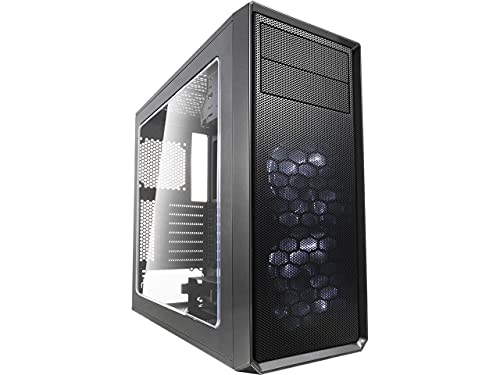
Fractal Design Focus G ATX Mid Tower
Best for: ATX builds wanting white LED illumination
- Motherboard Support
- ATX (what this guide is about)
- Case Type
- Mid Tower
- Side Panel
- Window
- Included Fans
- 2x 120mm White LED
- Max GPU Length
- up to 380 mm
- Connectivity
- USB 3.0
The Fractal Design Focus G ATX Mid Tower is a mid-tower case designed for standard ATX builds requiring direct airflow. It comes equipped with two pre-installed 120 mm white LED intake fans and supports graphics cards up to 380 mm long. With filtered front, top, and base intakes alongside a windowed side panel, this chassis suits you if you want visible components, integrated lighting, and dedicated mounting for standard storage drives.
Pros
- Two pre-installed 120 mm white LED fans included
- Accommodates graphics cards up to 380 mm long
- Filtered air intakes on the front, top, and base
- Six total fan mounting positions available
Cons
- Pre-installed lighting is limited to solid white LEDs
- Only three total dedicated internal drive mounting positions
Good fit if
- You want out-of-the-box white LED illumination with two pre-installed fans.
- You need clearance for long graphics cards up to 380 mm.
- You want dust filtration across the front, top, and base intakes.
Skip if
- You need multi-color RGB lighting controls instead of static white LEDs.
- You plan to mount more than three internal storage drives.
Verdict: Fractal Design Focus G ATX Mid Tower provides solid hardware clearance and dust filtration with two integrated white LED intake fans. It delivers practical cooling layout options for standard ATX configurations.

Phanteks Enthoo Pro Full Tower Tempered Glass
Best for: spacious ATX builds needing custom cooling support
- Motherboard Support
- ATX (what this guide is about)
- Case Type
- Full Tower
- Side Panel
- Tempered Glass
- Lighting
- RGB
- Dimensions
- 21.7 × 9.25 × 21.1 inches
- Weight
- 24.3 pounds
View on Amazon: Phanteks Enthoo Pro Full Tower Tempered Glass
The Phanteks Enthoo Pro Full Tower ATX Case gives you a large chassis built for ATX motherboards. It measures 21.1 inches high by 21.7 inches long and weighs 24.3 pounds. Key specs include a tempered glass side panel, front USB-C Gen 2, integrated RGB lighting, dedicated pump slots, and reservoir mounts. It suits you if you need a spacious full-tower setup with room for liquid cooling hardware and an optical drive bay.
Pros
- Front panel includes USB-C Gen 2 and two USB 3.0 ports
- Built-in reservoir mounts and pump slots for cooling loops
- Tempered glass side panel with integrated RGB lighting
- Includes optical drive bay and hidden PSU compartment
Cons
- Heavy empty chassis weight at 24.3 pounds
- Large full-tower dimensions require substantial desk clearance
Good fit if
- You need dedicated reservoir mounts and pump slots for liquid cooling.
- You want an optical drive bay along with modern front USB-C connectivity.
- You prefer an expansive full-tower layout with tempered glass.
Skip if
- You need a compact or lightweight chassis for tight spaces.
- You have limited clearance for a 21.7-inch long enclosure.
Verdict: Phanteks Enthoo Pro Full Tower ATX Case provides extensive hardware clearance, dedicated water-cooling mounts, and legacy optical drive support. It delivers robust expandability for stationary ATX configurations.

Fractal Design Meshify C ATX Mid Tower
Best for: compact ATX builds prioritizing direct airflow
- Motherboard Support
- ATX (what this guide is about)
- Case Type
- Mid Tower
- Included Fans
- 2x 120mm
- Connectivity
- USB 3.0
- Dimensions
- 16.1 × 8.35 × 17.8 inches
- Weight
- 13.6 pounds
The Fractal Design Meshify C is a compact mid-tower case built for standard ATX motherboards. It measures 17.8 inches high and 16.1 inches long, making it a space-saving option for your desk. You get two preinstalled 120mm Dynamic X2 GP-12 fans, an open layout, and 35 mm of cable routing space behind the tray. It fits builds needing high airflow and mounting for up to five drives.
Pros
- Includes two 120mm Dynamic X2 GP-12 fans
- Provides up to 35 mm of cable routing space
- Supports up to five storage drives with vibration-dampened trays
- Compact 16.1-inch length saves desk space
Cons
- External connectivity is limited to USB 3.0 without Type-C
- Short 16.1-inch total case length limits space for oversized components
Good fit if
- You want an ATX enclosure with a compact 16.1-inch exterior depth.
- You plan to install up to five hard drives or SSDs.
- You need generous cable management clearance up to 35 mm.
Skip if
- You require front-panel USB-C connectivity out of the box.
- You need a longer chassis to house exceptionally large hardware setups.
Verdict: Fractal Design Meshify C ATX Mid-Tower delivers solid airflow and generous cable routing space in a compact ATX enclosure. It provides a tight, practical layout for standard ATX hardware without taking up excess desk space.
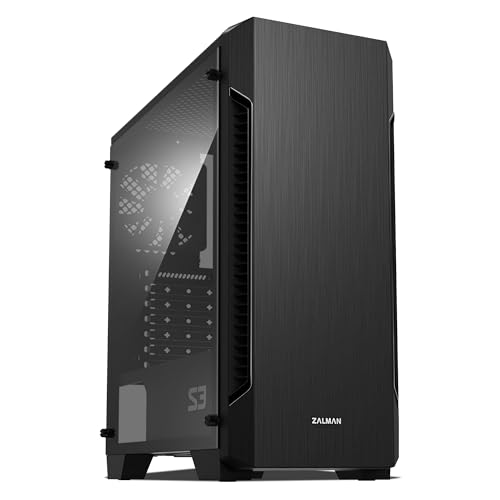
Zalman S3 Compact ATX Mid-Tower Case
Best for: air-cooled ATX builds using standard hardware
- Motherboard Support
- ATX (what this guide is about)
- Case Type
- Mid Tower
- Side Panel
- Acrylic
- Included Fans
- 3x 120mm
- Radiator Support
- 120mm
- Max GPU Length
- 330mm
The Zalman S3 is an ATX mid-tower chassis built for standard desktop configurations. You get three preinstalled 120mm fans right out of the box, with mounting capacity for up to eight fans total. It accommodates graphics cards up to 330mm long and includes top and bottom dust filters. Liquid cooling support caps at a 120mm front radiator, making this case best suited for your air-cooled ATX builds.
Pros
- Includes three preinstalled 120mm fans
- Supports up to eight total cooling fans
- Accommodates graphics cards up to 330mm
- Top and bottom dust filters included
Cons
- Front radiator support limited to 120mm
- Side panel uses acrylic rather than tempered glass
Good fit if
- You build with standard ATX motherboards and want multiple included fans.
- You use an air cooler or a compact 120mm front liquid radiator.
- You need room for a graphics card measuring up to 330mm.
Skip if
- You need support for 240mm or larger liquid cooling radiators.
- You prefer a tempered glass side panel over acrylic.
Verdict: Zalman S3 ATX Mid-Tower with 3 Fans delivers solid out-of-the-box airflow and room for 330mm GPUs. It serves standard air-cooled ATX systems well, provided you do not need radiators larger than 120mm.

Zalman T6 ATX Mid-Tower Case
Best for: builders needing an external optical drive bay
- Motherboard Support
- ATX (what this guide is about)
- Case Type
- Mid Tower
- Included Fans
- 1x 120mm
- Dimensions
- 7.87 × 16.9 × 14.8 inches
- Weight
- 8 pounds
The Zalman T6 ATX Mid-Tower Case is a steel chassis designed for standard ATX, micro-ATX, and mini-ITX motherboards. It includes one preinstalled 120mm rear fan, support for up to four fans total, and an external 5.25-inch drive bay. You also get two 2.5-inch and two 3.5-inch drive positions. It suits you if you need optical drive access and basic front USB connectivity.
Pros
- External 5.25-inch drive bay for optical drives
- Supports up to four fans including a side-panel mount
- Powder-coated steel chassis resists corrosion
- Front I/O panel includes USB 3.0 and dual USB 2.0 ports
Cons
- Incompatible with ATX motherboards using side-facing SATA ports
- Includes only one preinstalled 120mm rear fan
- Total cooling fan mounts capped at four units
Good fit if
- You need an external 5.25-inch drive bay for an optical drive.
- You use a motherboard with upward-facing SATA ports.
- You prefer a compact steel chassis weighing eight pounds.
Skip if
- You use an ATX motherboard with side-facing SATA ports.
- You require more than four case fans for cooling.
Verdict: Zalman T6 ATX Mid-Tower Case provides essential ATX component support and an external 5.25-inch drive bay for systems with standard motherboard layouts.
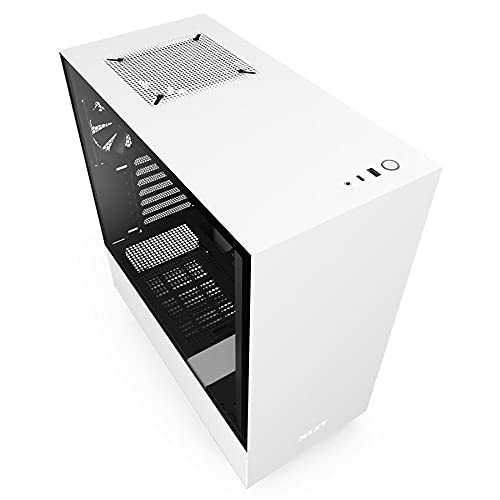
NZXT H510 ATX Mid-Tower Case with USB-C
Best for: clean ATX builds needing front USB-C
- Motherboard Support
- ATX (what this guide is about)
- Case Type
- Mid Tower
- Side Panel
- Tempered Glass
- Radiator Support
- 240mm
- Max GPU Length
- Up to 381mm
- Use
- Gaming
The NZXT H510 is a compact mid-tower case built for ATX, MicroATX, and Mini-ITX motherboards. You get front-panel USB Type-C connectivity, a tempered glass side panel, and two pre-installed 120mm fans for baseline airflow. It accommodates graphics cards up to 381mm long without a front radiator, or 325mm with one installed. Built-in cable routing channels with straps simplify clean builds for users prioritizing cable management.
Pros
- Front-panel USB Type-C port included
- GPU clearance up to 381mm without front radiator
- Pre-routed cable channels and straps with 19–23mm clearance
- Two Aer F120mm cooling fans included
Cons
- Liquid cooling radiator support limited to 240mm
- Front radiator installation reduces GPU clearance to 325mm
Good fit if
- You need front-panel USB Type-C connectivity for your accessories.
- You want integrated channels and straps to manage rear cables.
- You use an air cooler up to 165mm tall or a 240mm radiator.
Skip if
- You require space for radiators larger than 240mm.
- You plan to run a GPU longer than 325mm with a front radiator.
Verdict: NZXT H510 Compact ATX Mid-Tower Case delivers essential modern connectivity with a front USB Type-C port and dedicated cable routing channels. It serves builders who want a clean ATX enclosure supporting standard 240mm cooling configurations.

Zalman Compact ATX Mid-Tower with Dual Fans
Best for: lightweight ATX builds with pre-installed fans
- Motherboard Support
- ATX (what this guide is about)
- Case Type
- Mid Tower
- Side Panel
- Acrylic
- Included Fans
- 2x 120mm
- Dimensions
- 8.11 × 18 × 15 inches
- Weight
- 7.9 pounds
The Zalman S4 Compact ATX Mid-Tower gives you standard ATX motherboard support inside a lightweight 7.9-pound chassis. It comes equipped with two 120mm fans to move air past the front bezel, along with accessible I/O ports for your peripherals. You also get a tinted acrylic side panel to view your internal components. This enclosure suits you if you want a straightforward ATX layout with factory-installed cooling.
Pros
- Includes two 120mm cooling fans
- Full tinted acrylic side panel displays interior components
- Supports standard ATX motherboards
- Chassis weighs 7.9 pounds
Cons
- Uses an acrylic side window instead of tempered glass
- Specifications only list support for 120mm fan sizes
Good fit if
- You want an ATX case that includes two 120mm fans out of the box.
- You prefer a lightweight mid-tower under eight pounds.
- You want a tinted acrylic side panel to display your internal hardware.
Skip if
- You require a tempered glass side panel rather than acrylic.
- You plan to mount cooling fans larger than 120mm.
Verdict: Zalman S4 Compact ATX Mid-Tower delivers standard ATX motherboard compatibility and dual 120mm fans in a lightweight 7.9-pound frame. It is an effective option if you want built-in cooling and a tinted acrylic view of your components.
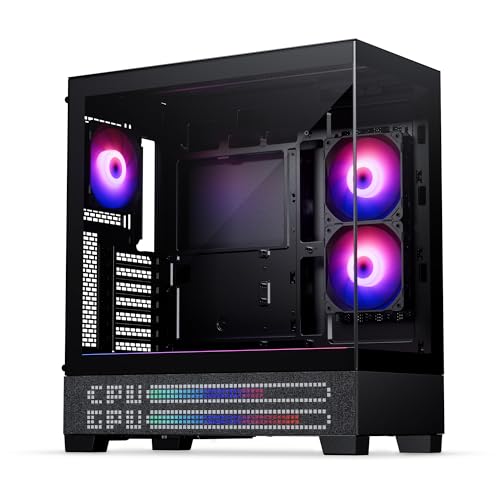
Phanteks XT View Matrix Mid-Tower Case
Best for: showcase builds with rear-connector ATX motherboards
- Motherboard Support
- ATX (what this guide is about)
- Case Type
- Mid-Tower
- Side Panel
- Tempered Glass
- Included Fans
- 3x M25-120mm D-RGB
- Radiator Support
- 360mm
- Use
- Gaming
The Phanteks XT View Matrix is a mid-tower chassis designed for ATX motherboards, including rear-connector models. It features dual tempered-glass panels and a built-in 600-LED front matrix display for system stats or animations. Cooling hardware includes three pre-installed 120mm D-RGB fans, space for up to nine 120mm fans total, and top clearance for a 360mm radiator. You will find it well suited for showcase builds that need cable-free layouts and direct lighting control.
Pros
- Built-in 600-LED matrix display for animations and system statistics
- Supports rear-connector ATX motherboards for hidden cable management
- Includes three pre-installed M25-120mm D-RGB fans
- Clearance for up to nine 120mm fans and a top 360mm radiator
Cons
- Weighs 21 pounds before installing components
- Dual tempered-glass panels eliminate traditional front mesh intake
Good fit if
- You plan to build with a rear-connector ATX motherboard.
- You want an integrated LED display for hardware stats and animations.
- You need room for a 360mm liquid-cooling radiator on the top panel.
Skip if
- You prefer a full front mesh intake instead of glass panels.
- You want a lightweight case that is easy to transport.
Verdict: Phanteks XT View Mid-Tower with LED Matrix delivers strong showcase aesthetics through its dual glass panels, rear-connector motherboard support, and integrated 600-LED display. It provides reliable cooling potential via three included 120mm D-RGB fans and room for a top-mounted 360mm radiator.
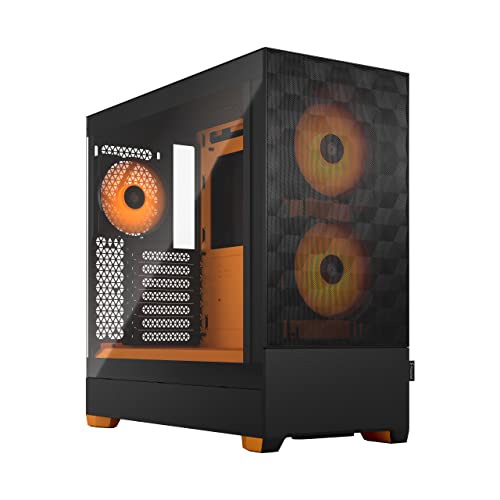
Fractal Design Pop Air RGB ATX Case
Best for: ATX builds needing pre-installed RGB fans
- Motherboard Support
- ATX (what this guide is about)
- Side Panel
- Tempered Glass
- Radiator Support
- 280 mm front, 240 mm top, 120 mm rear
- Lighting
- RGB
- Dimensions
- 18.6 × 8.46 × 17.9 inches
- Weight
- 19.2 pounds
The Fractal Design Pop Air RGB ATX Case supports ATX, mATX, and Mini ITX motherboards. It includes three 120 mm Aspect 12 RGB fans, with room for up to five fans total. Liquid cooling support accommodates radiators up to 280 mm in front and 240 mm on top. You also get space for up to three HDDs and six SSDs. This chassis suits you if you need bundled RGB cooling and flexible storage mounts.
Pros
- Includes three 120 mm Aspect 12 RGB fans
- Supports up to three HDDs and six SSDs
- Accommodates radiators up to 280 mm front and 240 mm top
- Tempered glass side panel showcases interior components
Cons
- Top radiator support maxes out at 240 mm
- Overall cooling setup capped at five total fans
- Using an optical bay reduces capacity to two HDDs and five SSDs
Good fit if
- You want three pre-installed 120 mm RGB fans included out of the box.
- You plan to mount up to three HDDs and six SSDs for storage.
- You use an ATX, mATX, or Mini ITX motherboard with up to a 280 mm front radiator.
Skip if
- You need top radiator clearance larger than 240 mm.
- You plan to run more than five case fans simultaneously.
Verdict: Fractal Design Pop Air RGB ATX Case delivers standard ATX motherboard compatibility, three included 120 mm RGB fans, and broad drive storage support. It provides straightforward component installation with clear tempered glass visibility.

Fractal Design Torrent Compact ATX Mid-Tower
Best for: high-airflow ATX air-cooled gaming builds
- Motherboard Support
- ATX (what this guide is about)
- Case Type
- Mid Tower
- Side Panel
- Tempered Glass
- Use
- Gaming
- Lighting
- RGB
- Connectivity
- Type-C
View on Amazon: Fractal Design Torrent Compact ATX Mid-Tower
This mid-tower ATX chassis is built for direct airflow through an open front grille. You get two pre-installed 180 by 38 mm Prisma ARGB PWM fans up front, light-tint tempered glass side panels, and integrated front Type-C connectivity. The layout moves the power supply shroud to the top to open base air intakes directly below your graphics card. It suits you if you want high-volume front-to-back air cooling for an ATX system.
Pros
- Dual 180 x 38 mm front ARGB PWM intake fans
- Open front grille design paired with base intake support
- Integrated front I/O USB Type-C port
- Top-mounted PSU shroud with integrated ARGB lighting
Cons
- Bottom fan configuration requires keeping the lowest PCI slot empty
- Heavier mid-tower profile at 20.9 pounds
Good fit if
- You want massive 180 mm front intake fans to push air across your ATX motherboard.
- You want tempered glass panels combined with integrated ARGB lighting accents.
- You plan to connect modern peripherals using a front USB Type-C port.
Skip if
- You need to populate your motherboard's bottom PCI slot alongside extra-large base fans.
- You need a lightweight chassis that is easy to move.
Verdict: Fractal Design Torrent Compact RGB ATX Case maximizes cooling via dual 180 mm intake fans and an open grille layout. It is a solid mid-tower choice if you want direct GPU and CPU airflow alongside built-in RGB lighting.

Open Frame ATX Test Bench Handle
Best for: carrying compatible open ATX test benches
- Motherboard Support
- ATX (what this guide is about)
- Dimensions
- 0.98 × 8.66 × 0.98 inches
- Weight
- 3.53 ounces
This accessory is an aluminum alloy handle designed for open-frame test platforms supporting ITX and ATX layouts. Measuring 8.66 inches wide, 0.98 inches high, and weighing 3.53 ounces, it attaches to an open chassis to let you lift and move your test hardware easily. If you run an open ATX bench setup and need an ergonomic carry grip made of thickened metal, this component fits your rig.
Pros
- Constructed from thickened aluminum alloy
- Weighs 3.53 ounces for portable transport
- Compatible with ITX and ATX open frame test platform setups
- Compact dimensions of 8.66 inches wide by 0.98 inches high
Cons
- Listed as suitable only for the manufacturer's specific test platform
- Requires matching open-frame bench rather than working as a standalone case
- Ships with random delivery of installation screws
Good fit if
- You own a compatible open-frame ATX test bench that needs a transport handle.
- You want a lightweight aluminum alloy grip weighing only 3.53 ounces.
Skip if
- You need a standard enclosed PC case with protective panels and fan mounts.
- You do not use the specific open test platform designed for this shell part.
Verdict: Aluminum Open Frame Test Bench Handle provides an ergonomic aluminum carrying grip for compatible open ATX test platforms. It offers a lightweight 3.53-ounce transport option if your open-air rig requires a dedicated top handle.

be quiet! Silent Base 802 Window ATX Midi Tower
Best for: quiet ATX builds needing modular airflow
- Motherboard Support
- ATX (what this guide is about)
- Case Type
- Midi Tower
- Included Fans
- 3x Pure Wings 2 140mm
- Use
- Gaming
- Dimensions
- 21.2 × 11.1 × 21.8 inches
- Weight
- 29.1 pounds
View on Amazon: be quiet! Silent Base 802 Window ATX Midi Tower
The be quiet! Silent Base 802 is a midi tower PC case built for ATX motherboards. It comes equipped with three 140mm Pure Wings 2 fans and includes interchangeable top and front panels for silent operation or airflow. You also get thick sound-insulation mats and a front USB 3.2 Gen. 2 Type-C port. This chassis suits you if you want a quiet ATX setup with the flexibility to swap panels or invert your layout.
Pros
- Three pre-installed Pure Wings 2 140mm fans
- Interchangeable top covers and front panels for silent operation or airflow
- Front I/O with integrated fan controller and USB 3.2 Gen. 2 Type-C
- Decoupled motherboard tray supports an inverted layout
Cons
- Heavy chassis weight at 29.1 pounds
- Wide desktop footprint measuring 11.1 inches across
Good fit if
- You want factory-installed 140mm cooling fans and built-in noise-insulation mats.
- You plan to invert your internal motherboard orientation.
- You need direct front-panel access to a fan controller and USB Type-C.
Skip if
- You need a lightweight PC chassis that is easy to move.
- You have tight desk space that cannot fit an 11.1-inch-wide case.
Verdict: be quiet! Silent Base 802 Window ATX Mid Tower Case delivers versatile acoustic dampening and high-airflow configurations alongside three 140mm fans. Its relocatable motherboard tray and front fan controller make it an adaptable choice for quiet ATX builds.

ZXFF Mid-Tower Glass ATX Case
Best for: ATX builds using custom cooling setups
- Motherboard Support
- ATX (what this guide is about)
- Case Type
- Mid-Tower
- Side Panel
- Transparent Glass
- Radiator Support
- 240mm
- Max GPU Length
- 310mm
- Connectivity
- USB 3.0
This mid-tower desktop chassis supports standard ATX, Micro-ATX, and ITX motherboards behind a transparent glass side panel. You get mounting clearance for CPU coolers up to 165mm tall, graphics cards up to 310mm long, and radiators up to 240mm. With capacity for six 120mm fans and dedicated routing space behind the tray, it suits you if you plan to install your own cooling hardware and run a standard ATX configuration.
Pros
- Supports standard ATX, Micro-ATX, and ITX motherboards
- Clearance for CPU coolers up to 165mm in height
- Mounting positions for up to six 120mm fans and a 240mm radiator
- Dedicated space behind motherboard tray for cable management
Cons
- Does not include any pre-installed cooling fans
- Maximum graphics card length limited to 310mm
- Provides only one 3.5-inch hard drive mounting bay
Good fit if
- You build with an ATX motherboard and a CPU cooler under 165mm.
- You supply your own 120mm fans or a 240mm liquid cooling radiator.
- You require dedicated bays for two 2.5-inch drives and one 3.5-inch drive.
Skip if
- You plan to install a graphics card longer than 310mm.
- You need pre-installed fans included out of the box.
- You use multiple 3.5-inch mechanical hard drives.
Verdict: ZXFF Mid-Tower ATX Case with Glass Window offers clear hardware viewing, standard ATX layout support, and room for six fans. Its 310mm graphics card ceiling and absence of bundled fans require planning your components accordingly.
Specifications side by side
| Spec | Thermaltake Versa H21 ATX Mid Tower | be quiet! Pure Base 600 ATX Mid Tower | Fractal Design Focus G ATX Mid Tower | Phanteks Enthoo Pro Full Tower Tempered Glass | Fractal Design Meshify C ATX Mid Tower | Zalman S3 Compact ATX Mid-Tower Case | Zalman T6 ATX Mid-Tower Case | NZXT H510 ATX Mid-Tower Case with USB-C | Zalman Compact ATX Mid-Tower with Dual Fans | Phanteks XT View Matrix Mid-Tower Case | Fractal Design Pop Air RGB ATX Case | Fractal Design Torrent Compact ATX Mid-Tower | Open Frame ATX Test Bench Handle | be quiet! Silent Base 802 Window ATX Midi Tower | ZXFF Mid-Tower Glass ATX Case |
|---|---|---|---|---|---|---|---|---|---|---|---|---|---|---|---|
| Motherboard Support | ATX | ATX | ATX | not specified | ATX | ATX | ATX, mATX, mini-ITX | Mini-ITX, MicroATX, ATX | ATX | ATX | ATX / mATX / Mini ITX | ATX | ITX & ATX | ATX | ATX, Micro-ATX, ITX |
| Case Type | Mid Tower | Midi Tower | Mid Tower | Full Tower | Mid Tower | Mid Tower | Mid Tower | Mid Tower | Mid Tower | Mid-Tower | not specified | Mid Tower | not specified | Midi Tower | Mid-Tower |
| Side Panel | not specified | not specified | Window | Tempered Glass | not specified | Acrylic | not specified | Tempered Glass | Acrylic | Tempered Glass | Tempered Glass | Tempered Glass | not specified | not specified | Transparent Glass |
| Included Fans | not specified | 2x Pure Wings 2 | 2x 120mm White LED | not specified | 2x 120mm | 3x 120mm | 1x 120mm | not specified | 2x 120mm | 3x M25-120mm D-RGB | not specified | not specified | not specified | 3x Pure Wings 2 140mm | not specified |
| Radiator Support | not specified | up to 360mm | not specified | not specified | not specified | 120mm | not specified | 240mm | not specified | 360mm | 280 mm front, 240 mm top, 120 mm rear | not specified | not specified | not specified | 240mm |
| Max GPU Length | not specified | not specified | up to 380 mm | not specified | not specified | 330mm | not specified | Up to 381mm | not specified | not specified | not specified | not specified | not specified | not specified | 310mm |
| Tower Size | Mid-Tower | not specified | Mid-Tower | not specified | Mid-Tower | Mid-Tower | Mid-Tower | Mid-Tower | Mid-Tower | Mid-Tower | not specified | Mid-Tower | not specified | not specified | Mid-Tower |
| Fan Size | not specified | not specified | 120mm | not specified | not specified | 120mm | 120mm | not specified | 120mm | not specified | not specified | not specified | not specified | not specified | not specified |
| Use | not specified | not specified | not specified | not specified | not specified | not specified | not specified | Gaming | not specified | Gaming | not specified | Gaming | not specified | Gaming | not specified |
| Lighting | not specified | not specified | LED | RGB | not specified | not specified | not specified | not specified | not specified | RGB | RGB | RGB | not specified | not specified | not specified |
| Connectivity | not specified | not specified | USB 3.0 | not specified | USB 3.0 | not specified | not specified | Type-C | not specified | not specified | not specified | Type-C | not specified | not specified | USB 3.0 |
| Dimensions | 18.7 × 8.2 × 16.9 inches | 20.4 × 22.4 × 11.3 inches | 18.3 × 8.07 × 17.5 inches | 21.7 × 9.25 × 21.1 inches | 16.1 × 8.35 × 17.8 inches | 16.2 × 7.44 × 17.8 inches | 7.87 × 16.9 × 14.8 inches | 16.9 × 8.27 × 18.1 inches | 8.11 × 18 × 15 inches | 17.3 × 9.06 × 19.7 inches | 18.6 × 8.46 × 17.9 inches | 17.7 × 8.74 × 18.4 inches | 0.98 × 8.66 × 0.98 inches | 21.2 × 11.1 × 21.8 inches | not specified |
| Weight | 9.3 pounds | 16.4 pounds | 9.92 pounds | 24.3 pounds | 13.6 pounds | 8.38 pounds | 8 pounds | 14.6 pounds | 7.9 pounds | 21 pounds | 19.2 pounds | 20.9 pounds | 3.53 ounces | 29.1 pounds | 12.1 pounds |
| Size | H21 | Black | not specified | Full Tower" | not specified | 16.22 x 7.44 x 17.76 inches | T6 | base | Mid Tower | not specified | ATX | ATX | not specified | 539 x 245 x 537 | not specified |
| Color | Black | Black | Gunmetal | Black | Black | Acrylic | Black | White | S4 | Charcoal Black | RGB Orange Core Tempered Glass Clear Tint | RGB Black - Light tint | Black,Random | Black | Transparent |
| Model | CA-1B2-00M1NN-00 | BG021 | FD-CA-FOCUS-GY-W | PH-ES614PTG_BK | FD-CA-MESH-C-BKO | not specified | T6 | CA-H510B-W1 | S4 | PH-XT523VM1_DBK01_MS | 7340172703020 | FD-C-TOR1C-02 | not specified | BGW39 | not specified |
Is an ATX Case Worth It?
ATX motherboard support gives you compatibility with standard desktop board layouts and standard component spacing. It allows you to house multi-drive setups, including 3.5-inch hard drives and external 5.25-inch optical drives. You also gain room for larger graphics cards up to 330mm and layouts with up to six cooling fans. However, choosing ATX requires accommodating larger enclosure footprints. Mid-towers in this category reach up to 21.8 inches in height and weigh nearly 30 pounds, requiring dedicated desk or rack space.
Worth it if
- You use a standard ATX or rear-connector motherboard that requires full-size chassis mounting.
- You need internal space for long graphics cards up to 330mm or setups with up to six fans.
- You plan to install dedicated 3.5-inch hard drives or an external 5.25-inch optical drive.
Skip it if
- You have minimal desk space and cannot accommodate cases measuring over 21 inches in height.
- You want a portable system and need to avoid enclosures weighing up to 29.1 pounds.
To verify maximum PSU length limits for your chosen chassis, you can compare dimensions across the best ATX PC power supplies.
How We Picked ATX Cases
To select enclosures for this guide, you see cases identified by published specifications that state ATX motherboard support in their titles or feature lists. Each listing must verify standard ATX compatibility to qualify. Only one variant from each product family appears on the list. All details come directly from the specifications and feature lists published on the listings, and products are not physically handled.
The list includes 15 selections for 2026, arranged with products in stock first. You can evaluate published case dimensions, fan sizes, and front connectivity ports to understand clearance and desktop fit. These specifications show you which chassis accommodates your cooling hardware, expansion cards, and cabling requirements.
How to Choose the Right ATX Case
-
Check Front Panel Connectivity
Review the external port specifications before selecting an ATX case. Modern motherboards often supply internal headers for high-speed ports, but the chassis determines physical access. If you connect external solid-state drives or smartphones directly to your desktop, look for a case with a front Type-C port, such as the NZXT H510 ATX Mid-Tower Case. Other enclosures provide standard USB 3.0 ports instead. Match the front connectivity to the peripherals you use daily and the headers present on your ATX motherboard.
-
Compare Side Panel Materials
Check the side panel material listed in the specifications to balance weight and clarity. Tempered glass panels provide a clean, scratch-resistant view of internal components, which suits showcase hardware. However, tempered glass adds significant weight to the chassis. If you prioritize portability or lower overall mass, look for an enclosure with an acrylic window, such as the Zalman S3 Compact ATX Mid-Tower Case. Acrylic panels keep the total case weight down to 8.38 pounds while still letting you inspect internal fans and components visually.
-
Check Intake Fan Sizes
Examine the fan sizes specified for intake ventilation. Standard ATX mid-towers commonly feature 120mm fan mounts, which offer broad compatibility for replacement fans and general airflow. If you require maximum airflow directly across your motherboard components, look for enclosures that install oversized intake fans, such as the Fractal Design Torrent Compact ATX Mid-Tower with its dual 180mm intake fans. Larger fan blades move substantial air volume through the chassis grille. Compare the included fan diameter against your cooling goals before deciding on an ATX case.
-
Verify Graphics Card Clearance
Check the maximum graphics card clearance listed in the case specifications before buying. Mid-tower enclosures vary in internal length, and long multi-fan graphics cards can collide with front fan mounts or drive brackets. For example, the ZXFF Mid-Tower Glass ATX Case specifies a 310mm graphics card ceiling. If you install a card that exceeds that length, it will not fit. Measure your card from bracket to shroud edge, then compare it against the published interior limits.
-
Support for External Drive Bays
Confirm whether you require external 5.25-inch drive bays for optical disc drives or legacy storage hardware. Most modern ATX enclosures omit external bays completely to dedicate the entire front panel to ventilation or radiators. If your setup requires a physical DVD or Blu-ray writer, select an ATX chassis engineered with an accessible front drive cutout, such as the Zalman T6 ATX Mid-Tower Case. Reviewing drive bay specifications ensures you do not purchase a modern closed-front chassis that blocks external optical media hardware.
-
Evaluate Enclosure Form Factors
Determine whether your ATX build belongs in an upright tower or a server cabinet. Standard ATX mid-towers stand vertically on desks or floors, accommodating standard air coolers and regular expansion cards. However, industrial and rack-based deployments require specific rack unit sizing. For rack installation, evaluate specialized chassis like the SilverStone 2U ATX Rackmount Server Chassis, which features a 3.48-inch height and dual 5.25-inch bays. Check the chassis form factor specifications to match your physical workspace, whether you need a conventional vertical desktop or horizontal rack mount.
Frequently asked questions
What is the difference between an ATX mid-tower and a full-tower case?
You will find that mid-towers balance interior space and desk footprint, whereas full towers offer larger frames. Most ATX cases on this list are mid-towers, such as the Fractal Design Meshify C measuring 17.8 inches tall. They fit standard ATX motherboards without occupying excess room. Full towers provide more expansion slots, but mid-towers satisfy most desktop component configurations.
Do all ATX PC cases come with pre-installed cooling fans?
No, pre-installed fan configurations vary by manufacturer. For example, the Fractal Design Pop Air RGB includes three 120mm RGB fans, and the Fractal Design Torrent Compact comes with two 180mm intake fans. In contrast, the ZXFF Mid-Tower provides mounts for up to six fans but includes no bundled fans, requiring you to source your own cooling.
Can you install an optical drive in a modern ATX case?
You can install an optical drive only if the case specifically provides an external 5.25-inch drive bay. Many modern layouts omit external bays, but models like the Zalman T6 include one external 5.25-inch bay for your disc drives. For server configurations, the SilverStone 2U Rackmount Chassis provides dual 5.25-inch drive bays alongside standard ATX motherboard support.
How much graphics card clearance do you need in an ATX case?
You should choose a case with clearance that exceeds the total length of your graphics card. Clearances vary among mid-towers; the Zalman S3 accommodates cards up to 330mm long, while the ZXFF Mid-Tower sets a maximum graphics card ceiling of 310mm. Always compare your card measurements against the published chassis limit before selecting your parts.
Are rear-connector motherboards supported in all ATX cases?
No, standard ATX chassis usually lack the specific motherboard tray cutouts needed for rear-facing plugs. The Phanteks XT View Mid-Tower provides dedicated support for rear-connector ATX motherboards, allowing you to route cables directly out of sight behind the tray. Most conventional cases, such as the Thermaltake Versa H21, only support standard front-facing motherboard connectors.
What features should you look for if you want quiet ATX operation?
You should check for built-in acoustic dampening materials and adjustable ventilation panels. Cases such as the be quiet! Silent Base 802 provide acoustic dampening alongside three 140mm fans and an integrated front fan controller. Larger fans move air at lower rotational speeds, helping keep noise levels low while maintaining steady system cooling across your standard ATX components.
How does side panel material affect an ATX PC build?
Side panel materials determine case durability, weight, and component visibility. Tempered glass panels, found on the NZXT H510 and Phanteks XT View, provide scratch resistance and clear visibility for internal hardware. In contrast, acrylic panels on models like the Zalman S4 keep the overall chassis lightweight at 7.9 pounds while still offering a tinted window into your build.