The Best NZXT PC Cases in 2026: 7 Picks
As an Amazon Associate we earn from qualifying purchases. Links on this page are affiliate links.
Finding the right NZXT PC case depends on your cooling requirements and component dimensions. The lineup covers Micro-ATX and Mid-Tower sizes, dual-chamber enclosures, tempered glass or panoramic panels, and integrated RGB lighting. The top pick is the NZXT H510 ATX Mid-Tower Case with USB-C, which leads for standard ATX builds with clean cable management and front Type-C connectivity.
This guide compares 7 models strictly using their published specifications to help you choose the right chassis for your hardware layout.
Quick picks
Our 7 picks
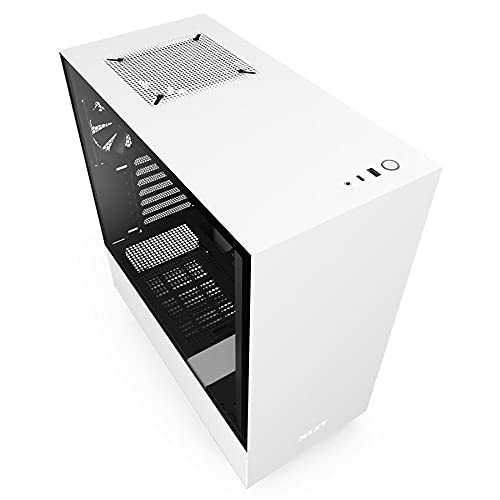
NZXT H510 ATX Mid-Tower Case with USB-C
Best for: standard ATX builds with clean cable management
- Motherboard Support
- Mini-ITX, MicroATX, ATX
- Case Type
- Mid Tower
- Side Panel
- Tempered Glass
- Radiator Support
- 240mm
- Max GPU Length
- Up to 381mm
- Use
- Gaming
The NZXT H510 is a compact ATX mid-tower case designed for standard builds. You get support for ATX, MicroATX, and Mini-ITX motherboards, along with a front USB Type-C port and a tempered glass side panel. It includes two Aer F120mm fans, a removable 240mm radiator bracket, and pre-installed cable routing channels with 19 to 23mm of clearance. This chassis suits you if you build standard air or liquid-cooled systems.
Pros
- Includes two Aer F120mm stock cooling fans
- Front I/O panel includes a USB Type-C port
- Removable bracket supports front radiators up to 240mm
- Accommodates GPUs up to 381mm without a front watercooler
- Built-in cable routing channels and straps with 19 to 23mm clearance
Cons
- Radiator bracket maxes out at 240mm, excluding 280mm or 360mm units
- GPU clearance drops to 325mm when a front watercooler is installed
Good fit if
- You build with an ATX, MicroATX, or Mini-ITX motherboard.
- You need front-panel USB Type-C connectivity.
- You plan to use a CPU air cooler up to 165mm tall.
Skip if
- You need front liquid cooling radiators larger than 240mm.
- You run a graphics card longer than 325mm with a front radiator installed.
Verdict: NZXT H510 Compact ATX Mid-Tower Case delivers essential ATX support, front USB Type-C connectivity, and two pre-installed fans in a streamlined frame. It provides solid clearance for standard hardware and organized wiring.

NZXT H5 Flow RGB Mid-Tower Case
Best for: ATX builds needing dedicated GPU airflow
- Case Type
- Compact ATX Mid-Tower
- Side Panel
- Tempered Glass
- Included Fans
- 2x F140 RGB Core, 1x 120mm
- Radiator Support
- 280mm
- Max GPU Length
- 400mm
- Use
- Gaming
The NZXT H5 Flow RGB Mid-Tower Case is a compact ATX enclosure built for airflow. It features perforated front and top panels, two pre-installed F140 RGB Core fans, and an angled 120mm bottom fan aimed directly at the graphics card. You get 400mm of GPU clearance and room for up to a 280mm front radiator. It suits you if you want integrated RGB lighting and focused graphics card cooling in an ATX chassis.
Pros
- Dedicated angled 120mm fan delivers direct airflow to the graphics card
- Includes two pre-installed F140 RGB Core fans compatible with 5V ARGB headers
- Accommodates graphics cards up to 400mm in standard horizontal layout
- Perforated front and top panels allow filtered airflow across components
Cons
- Front radiator capacity caps at 280mm
- Top radiator support is limited to 240mm
- Vertical GPU mounting kit is sold separately and drops clearance to 384mm
Good fit if
- You want dedicated bottom-up airflow aimed specifically at the graphics card.
- You run a long graphics card requiring up to 400mm of clearance.
- You want pre-installed 140mm RGB front intake fans.
Skip if
- You need support for a 360mm radiator.
- You require an included vertical GPU bracket in the box.
Verdict: NZXT H5 Flow RGB Mid-Tower Case provides focused graphics card airflow and standard 5V ARGB front lighting in a compact footprint. It fits large 400mm components cleanly if your build does not require 360mm radiator support.

NZXT H5 Flow RGB ATX Mid-Tower Case
Best for: clean ATX builds needing front RGB airflow
- Case Type
- Compact ATX Mid-Tower
- Side Panel
- Mesh
- Included Fans
- 1x F360 RGB Core, 1x F120Q
- Radiator Support
- 360mm
- Dimensions
- 16.9 × 8.86 × 18.3 inches
- Weight
- 16.5 pounds
This white mid-tower chassis supports standard ATX motherboards and prioritizes direct cooling with mesh top, front, and side panels. You get a pre-installed front F360 RGB Core unit and a rear 120mm exhaust fan straight out of the box. It accommodates up to a 360mm radiator in the front and a 240mm radiator up top. It suits you if you want integrated front lighting and compact liquid cooling support.
Pros
- Includes front F360 RGB Core fan and rear F120Q fan
- Supports up to 360mm front radiator and 240mm top radiator
- Ultra-fine mesh panels on top, front, and side for airflow
- Perforated PSU shroud enables two optional 120mm intake fans
Cons
- Lower PSU shroud fans are not included
- Pre-installed fans use 3-pin DC connectors rather than PWM
- Top radiator placement is limited to 240mm
Good fit if
- You want pre-installed front RGB fans right out of the box.
- You plan to mount a 360mm liquid cooler in the front mount.
- You use an ATX motherboard and need integrated cable channels.
Skip if
- You need 4-pin PWM speed control on included case fans.
- You plan to install a 280mm or 360mm radiator on the top panel.
Verdict: NZXT H5 Flow RGB ATX Mid-Tower Case provides pre-installed lighting and high ventilation through extensive mesh panels. It gives you targeted GPU airflow paths and front 360mm radiator compatibility in a standard mid-tower size.

NZXT H3 Flow Micro-ATX Case
Best for: compact micro-ATX high-airflow gaming builds
- Motherboard Support
- Micro-ATX
- Case Type
- Micro-ATX
- Side Panel
- Steel Mesh
- Radiator Support
- 280 mm
- Max GPU Length
- 377 mm
- Lighting
- RGB
The NZXT H3 Flow is a compact micro-ATX chassis built for high-airflow setups. It supports micro-ATX motherboards and fits graphics cards up to 377 mm long, or 352 mm with front fans installed. Cooling options include space for seven fans, a 280 mm front radiator, and a 240 mm top radiator. It suits you if you want a smaller desktop without sacrificing dual-radiator support or clearance for long graphics cards.
Pros
- Supports up to seven cooling fans
- Fits graphics cards up to 377 mm without front fans
- Accommodates up to a 280 mm front radiator and 240 mm top radiator
- Includes one pre-installed F120Q rear exhaust fan
Cons
- Limited to micro-ATX motherboards rather than full ATX
- Includes only a single pre-installed fan out of the box
- GPU clearance drops to 317 mm when using a front radiator and fans
Good fit if
- You plan to build around a micro-ATX motherboard.
- You want mounting space for up to seven fans or dual radiators in a compact chassis.
- You need room for graphics cards up to 352 mm alongside standard front intake fans.
Skip if
- You plan to use a standard ATX motherboard.
- You want multiple pre-installed intake fans included out of the box.
Verdict: NZXT H3 Flow Micro-ATX Case provides extensive cooling support and steel mesh ventilation in a smaller chassis format. It balances clearance for long graphics cards with dedicated space for up to seven fans.

NZXT H9 Flow Dual-Chamber ATX Case
Best for: dual-chamber builds needing 420mm radiator support
- Motherboard Support
- ATX
- Side Panel
- Tempered Glass
- Radiator Support
- 420mm
- Lighting
- RGB
- Dimensions
- 20.1 × 19.3 × 12.6 inches
- Weight
- 27.6 pounds
The NZXT H9 Flow is a dual-chamber ATX case designed for high-capacity cooling and component visibility. It accommodates up to ten fans, fits radiators up to 420mm on the top and front-right, and features wraparound tempered glass panels. You get four pre-installed 3-pin DC fans and support for back-connect motherboards. This chassis suits you if you plan a high-end ATX build needing maximum radiator clearance and clean cable management.
Pros
- Supports up to ten fans and dual 420mm radiators
- Compatible with ASUS BTF and MSI Project Zero back-connect motherboards
- Includes three 140mm fans and one 120mm exhaust fan
- Wraparound tempered glass provides an unobstructed panoramic view
Cons
- Pre-installed fans use 3-pin DC connectors without PWM control or RGB lighting
- Heavy chassis weighing over 27 pounds empty
Good fit if
- You want to mount a large 420mm radiator in the top or front-right location.
- You are building with a rear-connecting motherboard like ASUS BTF or MSI Project Zero.
- You need a dual-chamber layout with wide channels and straps for cable routing.
Skip if
- You want included PWM or RGB fans out of the box.
- You prefer a lighter enclosure that weighs less than 27 pounds.
Verdict: NZXT H9 Flow Dual-Chamber ATX Case delivers exceptional cooling capability with room for ten fans and dual 420mm radiators. It is an expansive enclosure engineered for showcasing hardware and managing complex cabling.

NZXT H6 Flow RGB Mid-Tower Case
Best for: panoramic glass builds needing angled airflow
- Case Type
- Mid-Tower
- Side Panel
- Glass
- Included Fans
- 3x 120mm RGB
- Dimensions
- 16.3 × 11.3 × 17.1 inches
- Weight
- 20.7 pounds
The NZXT H6 Flow RGB is a mid-tower PC case built with wraparound panoramic glass panels and a dual-chamber layout. It measures 11.3 inches wide and 17.13 inches tall, giving you wide cable routing channels and straps. Out of the box, you get three 120mm RGB intake fans positioned at an angle. It suits you if you want an unobstructed view of your interior components alongside dedicated chamber cooling.
Pros
- Seamless wraparound panoramic glass panels
- Three pre-installed 120mm RGB fans positioned at an angle
- Compact dual-chamber layout with wide cable channels and straps
- Perforated top and side panels for airflow and dust filtration
Cons
- Wide 11.3-inch footprint requires more desk width than standard mid-towers
- No rear exhaust fan included in the specifications
Good fit if
- You want an unobstructed panoramic view of your internal hardware.
- You prefer a dual-chamber layout with dedicated cable channels and straps.
- You want pre-installed angled 120mm RGB intake cooling.
Skip if
- You have limited desk width to accommodate an 11.3-inch wide frame.
- You need a lightweight chassis instead of a 20.7-pound build.
Verdict: NZXT H6 Flow RGB Mid-Tower Case combines wraparound panoramic glass with a compact dual-chamber design and three angled RGB intake fans. It delivers high hardware visibility and organized cable management for your setup.

NZXT H7 Flow ATX Mid-Tower Case
Best for: ATX builds needing large radiator support
- Motherboard Support
- ATX
- Case Type
- Mid-Tower
- Radiator Support
- 420mm
- Lighting
- RGB
- Dimensions
- 18.4 × 9.6 × 21.4 inches
- Weight
- 25 pounds
The NZXT H7 Flow ATX Mid-Tower Case provides high-airflow ventilation with mesh panels and three pre-installed 120mm front fans. It accommodates radiators up to 420mm in the front and 360mm up top, alongside mounts for three bottom 120mm fans directed at the GPU. You get wide channels and straps for cable routing. It suits your build if you need standard ATX motherboard support and expansive liquid-cooling space in a mid-tower chassis.
Pros
- Includes three front-mounted 120mm fans
- Supports up to a 420mm front radiator and 360mm top radiator
- Supports three bottom-mounted 120mm fans for dedicated GPU airflow
- Built-in cable routing channels, hooks, and straps
Cons
- Weighs 25.02 pounds without components installed
- Motherboard support limited to ATX without listed E-ATX support
- Height of 21.42 inches requires substantial vertical clearance
Good fit if
- You plan to mount a large 360mm or 420mm liquid cooling radiator.
- You want direct GPU cooling via three bottom fan mounts.
- You need three intake fans included out of the box.
Skip if
- You need a lightweight chassis under 25 pounds.
- You require explicit E-ATX motherboard clearance.
Verdict: NZXT H7 Flow ATX Mid-Tower Case delivers extensive radiator capacity and direct GPU fan mounts in a standard ATX form factor. Mesh panels and three included 120mm front fans supply direct intake airflow.
Specifications side by side
| Spec | NZXT H510 ATX Mid-Tower Case with USB-C | NZXT H5 Flow RGB Mid-Tower Case | NZXT H5 Flow RGB ATX Mid-Tower Case | NZXT H3 Flow Micro-ATX Case | NZXT H9 Flow Dual-Chamber ATX Case | NZXT H6 Flow RGB Mid-Tower Case | NZXT H7 Flow ATX Mid-Tower Case |
|---|---|---|---|---|---|---|---|
| Motherboard Support | Mini-ITX, MicroATX, ATX | not specified | not specified | Micro-ATX | ATX | not specified | ATX |
| Case Type | Mid Tower | Compact ATX Mid-Tower | Compact ATX Mid-Tower | Micro-ATX | not specified | Mid-Tower | Mid-Tower |
| Side Panel | Tempered Glass | Tempered Glass | Mesh | Steel Mesh | Tempered Glass | Glass | not specified |
| Included Fans | not specified | 2x F140 RGB Core, 1x 120mm | 1x F360 RGB Core, 1x F120Q | not specified | not specified | 3x 120mm RGB | not specified |
| Radiator Support | 240mm | 280mm | 360mm | 280 mm | 420mm | not specified | 420mm |
| Max GPU Length | Up to 381mm | 400mm | not specified | 377 mm | not specified | not specified | not specified |
| Tower Size | Mid-Tower | Mid-Tower | Mid-Tower | not specified | not specified | Mid-Tower | Mid-Tower |
| Use | Gaming | Gaming | not specified | not specified | not specified | not specified | not specified |
| Lighting | not specified | RGB | RGB | RGB | RGB | RGB | RGB |
| Connectivity | Type-C | not specified | not specified | not specified | not specified | not specified | not specified |
| Compatible Device | not specified | Radiator | not specified | not specified | not specified | not specified | not specified |
| Dimensions | 16.9 × 8.27 × 18.1 inches | 20.9 × 20 × 11.5 inches | 16.9 × 8.86 × 18.3 inches | 15.7 × 15.4 × 9.06 inches | 20.1 × 19.3 × 12.6 inches | 16.3 × 11.3 × 17.1 inches | 18.4 × 9.6 × 21.4 inches |
| Weight | 14.6 pounds | 2.2 pounds | 16.5 pounds | 10.6 pounds | 27.6 pounds | 20.7 pounds | 25 pounds |
| Size | base | H5 Flow RGB (Mid-Tower) | H5 Flow RGB (2024) | H3 Flow (2025) | Non RGB Fans | H6 Flow RGB v1 | H7 Flow 2024 |
| Color | White | White | White | Black | Black | Black | Black |
| Model | CA-H510B-W1 | CC-H51FW-R1 | CC-H52FW-R1 | CC-H31FB-01 | CM-H92FB-01 | CC-H61FB-R1 | CM-H72FB-01 |
Comparing the NZXT PC Case Lineup
Motherboard form factor splits the lineup first. For compact spaces, the NZXT H3 Flow Micro-ATX Case reduces desk footprint while fitting up to seven cooling fans. If you build with standard ATX motherboards, traditional mid-tower options offer simpler layouts. The NZXT H510 ATX Mid-Tower Case with USB-C targets basic builds with front Type-C connectivity and a single tempered glass side panel.
Internal chamber design and cooling capacity define the high-airflow tier. If your priority is viewing interior components, the dual-chamber NZXT H6 Flow RGB Mid-Tower Case provides panoramic glass alongside angled intake fans. For extensive liquid cooling configurations, the NZXT H9 Flow Dual-Chamber ATX Case supports dual 420mm radiators and ten total fans to handle high-heat hardware.
Where the NZXT Lineup Fits
This NZXT lineup suits builders prioritizing Micro-ATX and ATX form factors. Chassis sizes span from the compact H3 Flow up to the dual-chamber H9 Flow. You can select between standard single-chamber mid-towers and dual-chamber cases with panoramic glass panels. Lighting choices include plain setups without lighting and models with integrated RGB fans.
You should also note specific gaps. The selection does not include ultra-compact Mini-ITX enclosures or large full towers. Motherboard support is limited to Micro-ATX and ATX. Additionally, exterior colors are restricted entirely to black or white finishes.
To ensure proper top radiator clearance in your chassis, compare module heights against the best ddr5 RAMs for PC.
How to Choose the Right NZXT Case
-
Match Motherboard Form Factor
Check your motherboard size before choosing a case. Standard ATX motherboards require mid-tower frames with seven expansion slots, giving you space for full-sized boards and add-in cards. If you build with a smaller board, Micro-ATX cases provide a tighter enclosure that saves desk surface area without sacrificing clearance for long components. The NZXT H3 Flow Micro-ATX Case focuses strictly on Micro-ATX motherboards. Verify your motherboard specifications so you do not install a smaller board into an unnecessarily large enclosure or buy a chassis that cannot seat a standard ATX board.
-
Check Radiator Size Support
Verify the liquid cooling dimensions supported by the chassis before selecting your parts. AIO liquid coolers range from compact 240mm setups to heavy-duty configurations. If your build uses high-heat processors, look for enclosures that accommodate larger cooling radiators along the top or side mounts. The NZXT H9 Flow Dual-Chamber ATX Case supports dual 420mm radiators for extensive cooling loops. Always check whether a case tops out at 280mm or supports full 360mm and 420mm brackets. Proper clearance prevents your radiator and mounted fans from colliding with motherboard heatsinks or memory modules.
-
Verify Front Panel Connectivity
Review the front panel port selection to match your everyday peripherals. Having a high-speed connection directly on the front panel saves you from reaching behind the system to plug in external drives or modern accessories. The NZXT H510 ATX Mid-Tower Case with USB-C includes front-panel Type-C connectivity for quick access. Check that your chosen motherboard provides the corresponding internal header needed to power front-panel Type-C ports. Choosing a chassis with modern port standards ensures seamless device connectivity without requiring secondary adapters or extra rear-panel hubs for daily external drive access.
-
Evaluate Side Panel Glass
Decide how much internal hardware visibility you want from your primary viewing angle. Traditional enclosures use a single flat tempered glass side panel paired with a solid or perforated metal front panel. If you prefer an unobstructed view of internal components, dual-panel setups provide corner-to-corner sightlines. The NZXT H6 Flow RGB Mid-Tower Case uses wraparound panoramic glass to display your core build clearly. Choose standard glass panels if you prefer traditional front-to-back ventilation paths, or select panoramic enclosures when visual presentation across multiple viewing angles is your main priority.
-
Target Dedicated GPU Airflow
Examine how the chassis directs cool air across the graphics card. High-performance gaming cards generate significant heat and benefit from dedicated intake pathways directed straight into their cooling fans. Certain enclosures provide angled bottom fans or dedicated floor vents to push cool air upward directly into the card. The NZXT H5 Flow RGB Mid-Tower Case features focused GPU airflow alongside clearance for 400mm components. Confirm your card length and choose a chassis with dedicated lower intake mounts if you run large, multi-fan graphics cards that require steady fresh air supplies.
-
Review Pre-Installed Fan Counts
Check whether the chassis includes pre-installed cooling fans or requires you to purchase extras separately. Cases bundled with intake fans reduce your assembly time and provide baseline airflow immediately out of the box. The NZXT H7 Flow ATX Mid-Tower Case includes three 120mm front intake fans to supply direct airflow across your components. Note whether the included fans feature RGB lighting, and confirm your motherboard has matching 5V ARGB headers to control the lights. Factoring in included fans helps you determine if additional cooling hardware is needed before assembly.
Frequently asked questions
Which NZXT case is best for standard ATX builds?
The NZXT H510 ATX Mid-Tower Case with USB-C is the top choice for standard ATX builds. It features a tempered glass side panel and includes two pre-installed fans. The case supports clean cable management and offers front USB Type-C connectivity. Its compact frame provides solid clearance for standard hardware components.
Does NZXT offer cases for micro-ATX motherboards?
Yes, the NZXT H3 Flow Micro-ATX Case is designed for compact micro-ATX high-airflow gaming builds. It features steel mesh ventilation and balances clearance for long graphics cards. The chassis provides dedicated space for up to seven fans, ensuring effective cooling within a smaller footprint suitable for tight desk spaces.
Which NZXT case supports the largest radiators?
The NZXT H9 Flow Dual-Chamber ATX Case supports dual 420mm radiators for exceptional cooling capability. It is engineered for complex cabling and showcases hardware effectively. This expansive enclosure allows for up to ten fans, making it ideal for builders needing maximum radiator support and extensive airflow paths in a dual-chamber design.
What is the best NZXT case for panoramic glass?
The NZXT H6 Flow RGB Mid-Tower Case is the best option for panoramic glass builds. It combines wraparound panoramic glass with a compact dual-chamber design. The case includes three angled RGB intake fans and delivers high hardware visibility. It also features organized cable management for a clean setup appearance.
Are there NZXT cases with pre-installed RGB fans?
Several models include pre-installed RGB lighting. The NZXT H5 Flow RGB Mid-Tower Case provides standard 5V ARGB front lighting. The NZXT H5 Flow RGB ATX Mid-Tower Case offers pre-installed lighting with high ventilation through mesh panels. The H6 Flow RGB also includes three angled RGB intake fans for visual appeal.
Which NZXT case is best for GPU airflow?
The NZXT H5 Flow RGB Mid-Tower Case is best for builds needing dedicated GPU airflow. It provides focused graphics card airflow in a compact footprint. The NZXT H7 Flow ATX Mid-Tower Case also supports this with direct GPU fan mounts and mesh panels. Both options supply direct intake airflow for your graphics card.