Jungle Leopard Case Fans: 7 Picks Ranked by Specs
As an Amazon Associate we earn from qualifying purchases. Links on this page are affiliate links.
Choosing the right jungle leopard case fan depends on your case layout and cooling requirements. Jungle Leopard offers 120mm fans in black and white finishes, featuring forward or reverse airflow, ARGB infinity mirror lighting, and interlocking frames. The Jungle Leopard Interstellar V2 120mm Triple Pack takes the top spot for its balanced 68 CFM airflow and clean daisy-chain cable management.
This guide ranks 7 products based entirely on the specifications published on their listings. You can compare these dimensions, speeds, and connector types to find the right match for your setup.
Quick picks
Our 7 picks

Jungle Leopard Interstellar V2 120mm Triple Pack
Best for: clean cable management and balanced airflow
- Fan Size
- 120mm
- Max Fan Speed
- 2000 RPM
- Max Airflow
- 68 CFM
- Noise Level
- ≤29 dBA
- Connector Type
- 4-Pin PWM
- Lighting Type
- 5V 3-Pin ARGB
View on Amazon: Jungle Leopard Interstellar V2 120mm Triple Pack
This triple pack of Jungle Leopard Interstellar V2 120mm fans gives you modular cooling with slide-in pin-to-pin daisy chaining to minimize interior cabling. Each PWM fan runs from 800 to 2,000 RPM, pushing up to 68 CFM of airflow while keeping noise at or below 29 dBA with eight anti-vibration pads. It suits your build if you want balanced airflow, standard 5V ARGB lighting synchronization, and a clean, single-cable cluster setup.
Pros
- Pin-to-pin interlocking daisy chain requires only one cable per fan cluster
- PWM-controlled speed from 800 to 2,000 RPM delivering up to 68 CFM
- Operating noise rated at 29 dBA or less with eight damping pads
- Motherboard-synced 5V 3-pin ARGB with side infinity mirror effect
Cons
- No standalone hardware fan controller or remote included
- Reaches 29 dBA when running at maximum 2,000 RPM speed
Good fit if
- You want to connect three fans in a cluster using a single cable.
- You need PWM speed control providing up to 68 CFM of airflow.
- You have a motherboard with a standard 5V 3-pin ARGB header.
Skip if
- You need 140mm mounting sizes rather than 120mm dimensions.
- You prefer an included physical remote or dedicated control box.
Verdict: Jungle Leopard Interstellar V2 120mm Triple Pack provides balanced airflow up to 68 CFM and clean cable management through its interlocking daisy-chain design. It is a solid choice for builders wanting PWM speed control and infinity mirror lighting tied directly to standard motherboard headers.
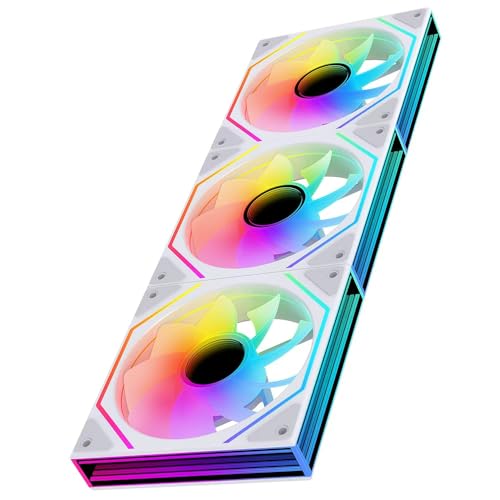
Jungle Leopard Prism 6 MAX 120mm ARGB Fans
Best for: reverse intake builds needing infinity mirror effects
- Fan Size
- 120mm
- Max Fan Speed
- 1850±10% RPM
- Noise Level
- ≤29 dBA
- Connector Type
- 4-Pin PWM
- Bearing Type
- Hydraulic
- Lighting Type
- 5V 3-Pin ARGB
The Jungle Leopard Prism 6 MAX is a triple pack of 120mm reverse-blade ARGB case fans in white. You get an operating range of 800 to 1600 RPM with noise rated up to 29 dBA, alongside hydraulic bearings and silicone anti-vibration pads. These fans use 4-pin power and 5V 3-pin headers. They fit your build if you want reverse-airflow intake fans with three-sided infinity mirror lighting without sacrificing standard speed control.
Pros
- Hydraulic bearing with magnetic base stabilization
- Operating speed range from 800 to 1600 RPM
- Three-sided infinity mirror lighting on sides and central axis
- Double-sided silicone pads reduce resonance vibration
Cons
- Requires a separate control box if the motherboard lacks a 5V 3-pin header
- Peak noise reaches 29 dBA at full 1600 RPM
Good fit if
- You need white reverse-flow 120mm fans for intake mounting.
- You have motherboard headers for 4-pin power and 5V 3-pin ARGB.
- You want geometric infinity mirror accents on both the frame and axis.
Skip if
- You lack a 5V 3-pin ARGB header and do not want to buy an external controller.
- You require fans rated below 25 dBA at peak speeds.
Verdict: Jungle Leopard Prism 6 MAX 120mm ARGB Fans provide reverse-blade intake airflow paired with 800 to 1600 RPM operating speeds and multi-surface infinity lighting. They deliver reliable hydraulic bearing operation for cases requiring clean intake aesthetics.

Jungle Leopard Interstellar V2 120mm Daisy-Chain Fans
Best for: clean cable management and high airflow builds
- Fan Size
- 120mm
- Max Airflow
- 68CFM
- Noise Level
- ≤29dBA
- Lighting Type
- ARGB
- Blade Direction
- Forward
- Dimensions
- 4.72 × 4.72 × 0.98 inches
View on Amazon: Jungle Leopard Interstellar V2 120mm Daisy-Chain Fans
This triple pack of Jungle Leopard Interstellar V2 120mm fans provides modular cooling with side infinity mirror ARGB lighting. Each fan moves up to 68 CFM of air while keeping operating noise at or below 29 dBA with eight damping pads. The pin-to-pin interlocking daisy-chain design allows you to run an entire cluster using a single nylon-sleeved cable. It suits builders seeking neat cable management and balanced airflow.
Pros
- Slide-in pin-to-pin daisy-chain system connects a cluster with one cable
- Airflow rating reaches up to 68 CFM per fan
- Maximum noise level is rated at or below 29 dBA
- Includes eight integrated pads to reduce vibration resonance
Cons
- Static pressure rating is not provided in the specifications
- Fan speed RPM range is not listed
Good fit if
- You want to connect multiple fans with a single cable to minimize clutter.
- You need fan airflow up to 68 CFM with built-in vibration dampening.
Skip if
- You need verified static pressure ratings for radiator mounting.
- You require published fan speed RPM ranges for precise PWM curves.
Verdict: Jungle Leopard Interstellar V2 120mm Daisy-Chain Fans simplify installation with modular pin-to-pin connections and provide strong 68 CFM airflow. It is a solid choice if you want clean cabling and quiet operation under 29 dBA.

Jungle Leopard Interstellar V3 120mm Fan 3-Pack
Best for: reversible airflow setups with minimal cabling
- Fan Size
- 120mm
- Max Fan Speed
- 2000 RPM
- Max Airflow
- 68.5 CFM
- Noise Level
- ≤29 dBA
- Connector Type
- PWM
- Lighting Type
- ARGB
View on Amazon: Jungle Leopard Interstellar V3 120mm Fan 3-Pack
The Jungle Leopard Interstellar V3 is a 120mm triple-pack fan set featuring pin-to-pin daisy-chaining and an in-line airflow direction switch. In forward mode, it runs at 800 to 2000 RPM delivering up to 68.5 CFM. In reverse mode, it tops out at 1850 RPM and 64 CFM with noise capped at 29 dBA. This set suits you if you want reversible airflow and clean cable runs with infinity mirror ARGB lighting.
Pros
- In-line cable button switches airflow direction between forward and reverse
- Slide-in pin-to-pin interlocking mechanism uses one cable per cluster
- Delivers up to 68.5 CFM airflow at 2000 RPM in forward mode
- Noise level is rated at or below 29 dBA in reverse mode
Cons
- Maximum speed and airflow decrease to 1850 RPM and 64 CFM in reverse mode
- Only available in standard 120mm dimensions
Good fit if
- You want to switch fan airflow direction without physically unmounting the hardware.
- You prefer modular pin-to-pin fans to minimize chassis cable clutter.
- You want infinity mirror ARGB lighting alongside high airflow performance.
Skip if
- You need fan sizes larger than 120mm for your case mounts.
- You require identical 2000 RPM peak speeds in both rotational directions.
Verdict: Jungle Leopard Interstellar V3 120mm Fan 3-Pack delivers strong 68.5 CFM airflow and interlocking modular connections, backed by an electronic switch for on-the-fly airflow reversal.

Jungle Leopard 120mm ARGB Reverse Fan 3-Pack
Best for: standard 5V 3-pin ARGB motherboard setups
- Fan Size
- 120mm
- Max Fan Speed
- 1600 RPM
- Max Airflow
- 58.36 CFM
- Noise Level
- 29 dBA
- Connector Type
- 4-pin
- Bearing Type
- Hydraulic
View on Amazon: Jungle Leopard 120mm ARGB Reverse Fan 3-Pack
The Jungle Leopard Galaxy SE is a 120mm case fan pack built with infinity mirror ARGB lighting. It delivers up to 58.36 CFM airflow and 2.07 static pressure with an operating speed reaching 1600 RPM. A hydraulic bearing and double-sided silicone pads keep sound levels at or below 29 dBA. You will find it suits your build if you want standard 5V 3-pin motherboard lighting control and balanced cooling performance.
Pros
- 58.36 CFM maximum airflow and 2.07 fan pressure
- Standard 5V 3-pin ARGB header synchronization
- Hydraulic bearing with bottom magnetic stabilization
- Double-sided silicone pads to dampen chassis resonance
Cons
- Requires a separate control box if your motherboard lacks a 5V 3-pin header
- Maximum noise level reaches 29 dBA under peak load
Good fit if
- You have a motherboard equipped with a standard 5V 3-pin ARGB header.
- You want 120mm fans that balance 58.36 CFM airflow with 2.07 pressure.
- You need pre-installed silicone pads to prevent mounting vibration.
Skip if
- You lack a 5V 3-pin ARGB motherboard header and do not own an external hub.
- You require ultra-low acoustic profiles below 29 dBA at full speed.
Verdict: Jungle Leopard Galaxy SE 120mm ARGB Fan delivers balanced 58.36 CFM airflow with dual-track infinity mirror illumination. It operates smoothly via standard 5V 3-pin motherboard headers.

Jungle Leopard 120mm ARGB White Fan 3-Pack
Best for: white builds needing high static pressure
- Fan Size
- 120mm
- Max Fan Speed
- 1850 RPM
- Max Airflow
- 58.36 CFM
- Static Pressure
- 2.07 mm H₂O
- Noise Level
- 29.2 dB(A)
- Connector Type
- 4-pin PWM
This Jungle Leopard three-pack delivers 120mm white fans built for intake or exhaust duties. You get PWM speed control ranging from 800 to 1850 RPM, generating up to 58.36 CFM of airflow and 2.07 mm H₂O static pressure. The units link via daisy-chain connectors and include multi-layer infinity mirror ARGB lighting. They suit your build if you want high-pressure fans for radiators or mesh panels with simplified cable management.
Pros
- 2.07 mm H₂O static pressure for radiators and dust filters
- Daisy-chain connection system reduces cable clutter
- 4-pin PWM control across an 800 to 1850 RPM range
- Hydraulic bearing with silicone pads and magnetic stabilization
Cons
- Peak noise reaches 29.2 dB(A) at maximum 1850 RPM
- Minimum operating speed starts at 800 RPM with no zero-RPM mode
Good fit if
- You need static pressure up to 2.07 mm H₂O for radiators or filters.
- You want daisy-chain cable setups to minimize case clutter.
- You plan an all-white case build with addressable RGB synchronization.
Skip if
- You require sub-25 dB(A) acoustic output at maximum speeds.
- You want fans capable of stopping completely below 800 RPM.
Verdict: Jungle Leopard 120mm ARGB White Fan 3-Pack delivers 2.07 mm H₂O pressure and clean daisy-chain cable management for white PC cases. It balances functional cooling up to 1850 RPM with reflective infinity mirror lighting.

Jungle Leopard Interstellar V2 120mm White Triple Pack
Best for: clean white builds needing simplified fan cabling
- Fan Size
- 120mm
- Max Fan Speed
- 1850 RPM
- Max Airflow
- 68 CFM
- Noise Level
- ≤29 dB(A)
- Connector Type
- 4-pin PWM
- Bearing Type
- HDB
View on Amazon: Jungle Leopard Interstellar V2 120mm White Triple Pack
This triple pack gives you three 120mm white fans built with an interlocking pin-to-pin slide-in design, letting you link them using a single cable. Operating via 4-pin PWM, speeds scale from 950 to 1850 RPM to deliver up to 68 CFM of airflow against radiators or filters. Integrated HDB bearings and rubber pads cap sound at 29 dB(A). It suits you if you want tidy white cooling.
Pros
- PIN-to-PIN interlocking daisy-chain setup requires only one cable
- Broad 950 to 1850 RPM range with 4-pin PWM control
- Delivers up to 68 CFM airflow with HDB bearing design
- Maximum operational noise capped at 29 dB(A)
Cons
- Minimum speed stays at 950 RPM with no zero-RPM mode listed
- No standalone hardware lighting controller included in specifications
Good fit if
- You want interlocking white fans that daisy-chain through a single connection.
- You need up to 68 CFM of airflow for radiators or mesh case intakes.
- You manage lighting through standard motherboard ARGB sync headers.
Skip if
- You need fans capable of stopping completely below 950 RPM during idle.
- You want reverse-pitch blades to conceal frame struts on intake mounts.
Verdict: Jungle Leopard Interstellar V2 120mm White Triple Pack streamlines multi-fan cable routing with its interlocking daisy-chain structure while delivering solid 68 CFM airflow. It is a dependable choice for clean, white-themed builds requiring synced ARGB lighting.
Specifications side by side
| Spec | Jungle Leopard Interstellar V2 120mm Triple Pack | Jungle Leopard Prism 6 MAX 120mm ARGB Fans | Jungle Leopard Interstellar V2 120mm Daisy-Chain Fans | Jungle Leopard Interstellar V3 120mm Fan 3-Pack | Jungle Leopard 120mm ARGB Reverse Fan 3-Pack | Jungle Leopard 120mm ARGB White Fan 3-Pack | Jungle Leopard Interstellar V2 120mm White Triple Pack |
|---|---|---|---|---|---|---|---|
| Fan Size | 120mm | 120mm | 120mm | 120mm | 120mm | 120mm | 120mm |
| Max Fan Speed | 2000 RPM | 1850±10% RPM | not specified | 2000 RPM | 1600 RPM | 1850 RPM | 1850 RPM |
| Max Airflow | 68 CFM | not specified | 68CFM | 68.5 CFM | 58.36 CFM | 58.36 CFM | 68 CFM |
| Static Pressure | not specified | not specified | not specified | not specified | not specified | 2.07 mm H₂O | not specified |
| Noise Level | ≤29 dBA | ≤29 dBA | ≤29dBA | ≤29 dBA | 29 dBA | 29.2 dB(A) | ≤29 dB(A) |
| Connector Type | 4-Pin PWM | 4-Pin PWM | not specified | PWM | 4-pin | 4-pin PWM | 4-pin PWM |
| Bearing Type | not specified | Hydraulic | not specified | not specified | Hydraulic | Hydraulic | HDB |
| Lighting Type | 5V 3-Pin ARGB | 5V 3-Pin ARGB | ARGB | ARGB | 5V 3-pin ARGB | ARGB | ARGB |
| Blade Direction | not specified | Reverse | Forward | Forward / Reverse | Reverse | Forward | Forward |
| Lighting | not specified | ARGB | ARGB | RGB | ARGB | ARGB | ARGB |
| Dimensions | 4.72 × 4.72 × 0.98 inches | 4.72 × 4.72 × 0.98 inches | 4.72 × 4.72 × 0.98 inches | 4.72 × 4.72 × 0.98 inches | 4.72 × 0.98 × 4.72 inches | 4.72 × 0.98 × 4.72 inches | 4.72 × 0.98 × 4.72 inches |
| Weight | not specified | 4.94 ounces | not specified | 1.37 pounds | 15.9 ounces | 4.23 ounces | 4.23 ounces |
| Size | 3 x 120mm | 6Max_Reverse_3Pack | Interstellar V2-3Pack | Interstellar V3-3Pack | Galaxy SE_Reverse_3Pack | 4RS_Forward_3Packs | InterstellarV2 Forward |
| Color | Black | White | V2 Black Forward-3Pack | White Forward | White | White | White |
| Model | JM-V2 3IN1 | prism 6 MAX 3IN1 | JL-V2 3IN1 BK | JL-V3 3IN1 WH | Galaxy SE | not specified | not specified |
Jungle Leopard Lineup at a Glance
Connectivity and airflow direction divide the 7 options across this lineup. If you want streamlined wiring, choose modular daisy-chain models like the Jungle Leopard Interstellar V2 120mm Triple Pack or the Jungle Leopard Interstellar V3 120mm Fan 3-Pack. These units use interlocking pin-to-pin connections to run multiple fans from single headers, with the V3 adding an electronic switch for airflow reversal alongside its 68.5 CFM rating.
For dedicated intake locations, reverse-blade units suit your case layout. The Jungle Leopard Prism 6 MAX 120mm ARGB Fans run between 800 and 1600 RPM on hydraulic bearings, while the Jungle Leopard 120mm ARGB Reverse Fan 3-Pack provides 58.36 CFM across standard 5V 3-pin motherboard headers. Pick these reverse models to maintain intake airflow without exposing rear frame supports.
Who Jungle Leopard Fans Suit
Jungle Leopard focuses exclusively on 120mm triple packs. All 7 models measure 4.72 inches by 4.72 inches and 0.98 inches thick. The lineup offers black or white housings paired with ARGB or RGB infinity mirror lighting. Functional options span standard forward airflow, dedicated reverse blades, and electronic switchable-direction blades, with airflow reaching 68.5 CFM.
Key gaps exist across the catalog. You will not find 140mm or larger frames, unlit models without LEDs, or single fan packages. The selection suits your build if you need multi-fan 120mm intake or exhaust setups featuring illuminated accents.
If you need outdoor play equipment, you can compare specifications for the best climbers with jungle by frame dimensions.
How to Choose Jungle Leopard Case Fans
-
Evaluating Noise Level Specs
Check the noise output rating if you want a quiet workspace or low-distraction desktop build. Fan noise increases when fan blades spin at peak RPM to move air through restricted cases. If silent operation is your priority, look for models engineered to remain under 29 dBA during active operation. The Jungle Leopard Interstellar V2 120mm Daisy-Chain Fans specify acoustic levels below 29 dBA while maintaining 68 CFM airflow. Comparing decibel ratings ensures you select cooling that matches your room volume tolerance.
-
Checking Static Pressure Ratings
Assess static pressure ratings when mounting fans against radiators, liquid cooling setups, or dense mesh dust filters. Standard airflow fans push air across open spaces, but resistance requires higher directional force measured in millimeters of water. If your chassis features restrictive front panels or thick liquid radiators, verify the pressure spec directly. The Jungle Leopard 120mm ARGB White Fan 3-Pack generates 2.07 mm H₂O pressure alongside speeds reaching 1850 RPM. Matching static pressure to intake resistance prevents hot air accumulation inside tight chassis compartments.
-
Matching Motherboard Header Types
Verify your motherboard pinout before choosing fans to ensure full control over rotational speed and lighting synchronization. Standard 5V 3-pin addressable RGB headers transmit individual diode data, whereas mismatching headers can cause lighting or power failure. Inspect your board specs to confirm if it accepts standard 3-pin connectors without needing proprietary adapters. The Jungle Leopard 120mm ARGB Reverse Fan 3-Pack uses a standard 3-Pin connector compatible with 5V 3-pin motherboard headers. Selecting matching pinouts allows you to control illumination patterns directly through your existing motherboard software suite.
-
Inspecting Fan Bearing Type
Examine the internal bearing construction to determine long-term operational durability and mechanical stability. Sleeve bearings can wear down prematurely when mounted horizontally, whereas hydraulic bearings maintain internal fluid lubrication across variable orientations. If you plan to install your cooling fans horizontally along the top or bottom chassis panels, verify the bearing specification. The Jungle Leopard Prism 6 MAX 120mm ARGB Fans incorporate a hydraulic bearing structure with speeds operating between 800 and 1600 RPM. Choosing hydraulic bearings helps prevent shaft wobble and mechanical wear over continuous daily operation.
-
Comparing Airflow CFM Ratings
Review cubic feet per minute ratings to match fan exhaust capacity with your hardware thermal load. CFM defines the total volume of air moved per minute, which directly impacts internal component temperatures. High-heat graphics cards and processors require higher CFM output to expel warm air quickly from the chassis interior. The Jungle Leopard Interstellar V3 120mm Fan 3-Pack delivers 68.5 CFM of airflow to maintain rapid heat exhaustion. Evaluating CFM specifications ensures you select an airflow volume that balances heat dissipation requirements against overall chassis ventilation.
-
Verifying Fan Speed Regulation
Check whether a fan model includes pulse-width modulation control before finalizing your cooling layout. PWM functionality allows your motherboard to automatically adjust fan RPM based on component temperature curves rather than running constantly at full speed. This reduces acoustic output during light computing tasks while reserving full rotational cooling for gaming sessions. The Jungle Leopard Interstellar V2 120mm Triple Pack features PWM speed control tied directly to motherboard headers alongside balanced 68 CFM airflow. Checking for PWM capability guarantees dynamic thermal management without manual controller adjustments.
Frequently asked questions
What is the difference between Jungle Leopard forward and reverse blade fans?
Reverse-blade fans draw air inward across the face while keeping the decorative side of the fan visible to you. Models like the Jungle Leopard Prism 6 MAX and Galaxy SE Reverse pull air in without exposing rear support brackets. Standard forward fans push air out through the frame back. This design preserves unobstructed infinity mirror lighting on bottom or side intake mounts.
What maximum airflow rating do Jungle Leopard fans deliver?
The highest rated airflow in this lineup reaches 68.5 CFM on the Jungle Leopard Interstellar V3 120mm Fan 3-Pack. Other models, including the Interstellar V2 packs, supply up to 68 CFM, while the Galaxy SE provides 58.36 CFM. These volumetric airflow specs tell you how much air volume the blades push through open case environments at maximum rotational speed.
How does the Jungle Leopard Interstellar V3 switch airflow direction?
The Jungle Leopard Interstellar V3 utilizes an integrated electronic switch to reverse airflow direction on the fly. Rather than physically detaching and rotating the frame, you flip the switch to alternate between forward exhaust and reverse intake flow. This feature works alongside the fan pack's modular interlocking contacts to simplify reconfiguring your chassis airflow paths without reworking cable runs.
Which Jungle Leopard fan pack provides the highest static pressure?
The Jungle Leopard 120mm ARGB White Fan 3-Pack offers the highest static pressure spec in the lineup at 2.07 mm H₂O. Static pressure indicates how well a fan pushes air against resistance, such as dense radiator fins or fine mesh dust filters. This model pairs that pressure rating with rotational speeds reaching up to 1850 RPM.
What motherboard headers are required to connect Jungle Leopard ARGB fans?
You need standard 5V 3-pin ARGB headers alongside 4-pin PWM or 3-pin power connections on your motherboard. Options like the Jungle Leopard Galaxy SE rely specifically on 5V 3-pin connectors for lighting synchronization. PWM-compatible models plug into 4-pin fan headers, allowing your motherboard BIOS to vary operational fan speeds automatically according to system temperature sensors.
What operating speed range do Jungle Leopard Prism 6 MAX fans support?
Jungle Leopard Prism 6 MAX 120mm ARGB Fans run across an operating speed range of 800 to 1600 RPM. These fans rely on hydraulic bearings for stable blade rotation. The lower 800 RPM floor supports low-speed idling, while the 1600 RPM ceiling provides higher air intake through the reverse blades when internal hardware generates heavier thermal loads.
How do modular daisy-chain Jungle Leopard fans connect to each other?
Modular Jungle Leopard fans connect using physical pin-to-pin contact points built into the sides of the frames. Models such as the Interstellar V2 slide together to bridge power and lighting connections directly between adjacent units. This interlocking structure lets you power a row of three fans using a single motherboard lead, reducing internal cable clutter significantly.