Best PC Cases for Gaming: 15 Spec-Based Picks
As an Amazon Associate we earn from qualifying purchases. Links on this page are affiliate links.
Selecting the right PC case for gaming directly impacts your component clearance, thermal management, and available desk space. The Montech XR Panoramic ATX Mid-Tower Case earns the top spot by providing 420 mm of graphics card clearance and built-in ARGB cooling inside an ATX mid-tower chassis.
This guide evaluates 15 products strictly using the specifications published on the listings. It helps you decide which tower size, motherboard form factor, and cooling support match your specific hardware configuration.
Quick picks
The best fit for you
- You need maximum clearance for an extra-long graphics card Montech XR Panoramic ATX Mid-Tower Case This ATX mid-tower gives you 420 mm of GPU clearance and preinstalled ARGB lighting.
- You want a compact liquid-cooled Micro-ATX gaming chassis Thermaltake Versa H18 Tempered Glass Micro-ATX Case It fits Micro-ATX motherboards and supports liquid cooling radiators up to 280mm.
- You plan a heavy liquid-cooled build on E-ATX ASUS TUF Gaming E-ATX Full-Tower Case This full-tower chassis supports E-ATX motherboards, dual 360mm radiator placements, and four preinstalled fans.
- You want front USB-C connectivity on standard ATX NZXT H510 ATX Mid-Tower Case with USB-C It provides front Type-C connectivity and fits graphics cards up to 381mm long.
Our 15 picks

Montech XR Panoramic ATX Mid-Tower Case
Best for: clean panoramic builds with long graphics cards
- Use
- Gaming (what this guide is about)
- Motherboard Support
- ATX
- Case Type
- Mid Tower
- Side Panel
- Tempered Glass
- Included Fans
- 3x 120mm ARGB PWM
- Radiator Support
- 360mm
The Montech XR Panoramic ATX Mid-Tower Case is a gaming chassis designed for component visibility and hardware clearance. It accommodates graphics cards up to 420 mm long, CPU coolers up to 175 mm tall, and power supplies up to 230 mm deep. You get three pre-installed 120 mm ARGB PWM fans, space for up to nine fans, and top 360 mm radiator support. It suits you if you want wide component support with panoramic glass.
Pros
- 420 mm GPU clearance fits large graphics cards
- Three pre-installed 120 mm ARGB PWM fans with reverse-blade side intakes
- Top mounting support for up to a 360 mm radiator
- Front I/O features one USB-C and two USB 3.0 ports
Cons
- Motherboard support maxes out at standard ATX size
- Front panel uses solid tempered glass rather than mesh ventilation
Good fit if
- You need 420 mm of clearance for a long graphics card.
- You want pre-installed reverse-blade fans that show lighted faces toward the interior.
- You plan to mount a 360 mm liquid cooling radiator in the top position.
Skip if
- You require support for E-ATX motherboards.
- You prefer a direct front-to-back mesh airflow configuration.
Verdict: Montech XR Panoramic ATX Mid-Tower Case delivers generous 420 mm GPU clearance and ready ARGB cooling in a dual-glass chassis. It gives you ample build room and clean visual presentation for modern gaming components.

Thermaltake Versa H18 Tempered Glass Micro-ATX Case
Best for: compact Micro-ATX liquid-cooled gaming builds
- Use
- Gaming (what this guide is about)
- Motherboard Support
- Micro ATX
- Side Panel
- Tempered Glass
- Radiator Support
- 280mm
- Dimensions
- 15.4 × 8.07 × 15 inches
- Weight
- 10.2 pounds
View on Amazon: Thermaltake Versa H18 Tempered Glass Micro-ATX Case
The Thermaltake Versa H18 Micro-ATX Case is a compact gaming chassis designed for Micro-ATX motherboards. It features a mesh front panel with an integrated blue LED strip, a tempered glass side panel, and support for 240mm or 280mm AIO liquid coolers. Inside, you get a full-length PSU cover and four hidden drive bays. It suits you if you want a compact build with liquid cooling support.
Pros
- Supports 240mm and 280mm AIO liquid radiators
- Mesh front panel with built-in blue LED strip
- Tempered glass side panel and full-length PSU cover
- Accommodates two 2.5-inch and two 3.5-inch hidden drives
Cons
- Supports only Micro-ATX motherboards, not full ATX
- Front I/O provides USB 3.0 and USB 2.0 but lacks Type-C
Good fit if
- You build with a Micro-ATX motherboard.
- You plan to mount a 240mm or 280mm liquid cooling radiator.
- You want a mesh front intake paired with a tempered glass side.
Skip if
- You use a standard ATX or E-ATX motherboard.
- You require a native front-panel USB Type-C port.
Verdict: Thermaltake Versa H18 Micro-ATX Case pairs Micro-ATX sizing with support for up to 280mm radiators and a tempered glass panel. It delivers straightforward drive mounting and clean cable masking via a full-length PSU cover.
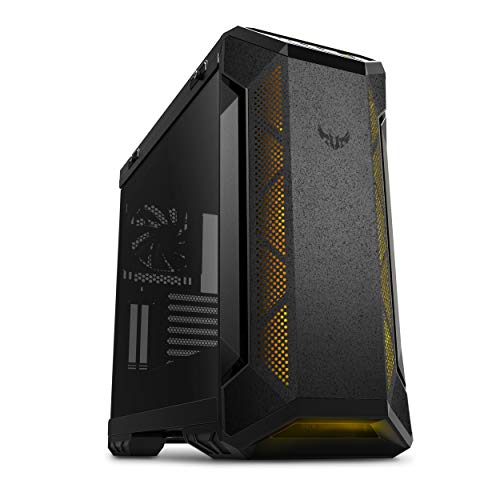
ASUS TUF Gaming E-ATX Full-Tower Case
Best for: Heavy-duty E-ATX liquid-cooled gaming builds
- Use
- Gaming (what this guide is about)
- Motherboard Support
- E-ATX
- Case Type
- Full-Tower
- Side Panel
- Tempered Glass
- Radiator Support
- 360mm
- Dimensions
- 215 × 98.8 × 217 inches
The ASUS TUF Gaming GT501 Full-Tower Case supports motherboards up to E-ATX and comes equipped with four pre-installed fans: three 120mm RGB front fans and one 140mm rear PWM fan. It accommodates dual 360mm radiators at the top and front, alongside pre-drilled liquid cooling pump mounts. Built-in woven-cotton handles support up to 65 pounds, making this chassis suitable for heavy, high-end liquid-cooled gaming rigs.
Pros
- Includes three 120mm Aura Sync RGB fans and one 140mm PWM rear fan
- Supports up to 360mm radiators in the top and front positions
- Integrated woven-cotton handles rated to carry up to 65 pounds
- Features a vertical GPU expansion slot alongside seven standard slots
Cons
- Heavy empty chassis weight of 26.24 pounds
- Rear radiator support is limited to 140mm
Good fit if
- You need out-of-the-box cooling with four included fans.
- You plan to run top or front 360mm liquid cooling setups on an E-ATX board.
- You want top-mounted handles to transport a heavy gaming build.
Skip if
- You want an ultra-lightweight empty frame under 25 pounds.
- You plan to mount radiators larger than 140mm in the rear position.
Verdict: ASUS TUF Gaming GT501 Full-Tower Case delivers extensive E-ATX motherboard accommodation, four factory-installed fans, and dual 360mm radiator positions. Built-in carry handles and pre-drilled cooling mounts make it a dependable foundation for high-demand gaming hardware.
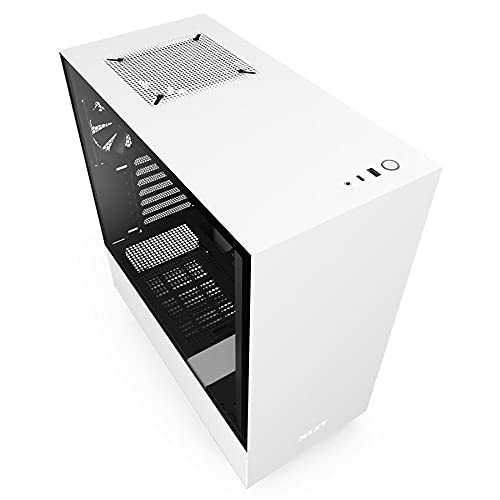
NZXT H510 ATX Mid-Tower Case with USB-C
Best for: clean ATX builds needing front USB-C
- Use
- Gaming (what this guide is about)
- Motherboard Support
- Mini-ITX, MicroATX, ATX
- Case Type
- Mid Tower
- Side Panel
- Tempered Glass
- Radiator Support
- 240mm
- Max GPU Length
- Up to 381mm
The NZXT H510 is a compact mid-tower gaming case built for standard ATX, MicroATX, or Mini-ITX motherboards. It includes two Aer F 120mm fans and a front USB Type-C port. You get up to 381mm of GPU clearance without a front cooler, alongside 165mm of CPU cooler height. A dedicated bracket holds radiators up to 240mm. This case suits you if you want tidy cable routing and essential modern connectivity.
Pros
- Front I/O includes a USB Type-C port
- Comes with two Aer F 120mm fans included
- Pre-installed cable routing kit with 19mm to 23mm of clearance
- Accommodates graphics cards up to 381mm long without front radiator
- Removable bracket supports radiators up to 240mm
Cons
- Front radiator support is limited to 240mm
- GPU clearance drops to 325mm with a front radiator installed
- Does not support E-ATX motherboards
Good fit if
- You need a front-panel USB Type-C connection.
- You build with an ATX, MicroATX, or Mini-ITX motherboard.
- You want built-in channels and straps for clean wiring.
Skip if
- You plan to mount a 280mm or 360mm liquid cooling radiator.
- You require an E-ATX motherboard form factor.
Verdict: NZXT H510 Compact Mid-Tower Case provides clean cable management and front USB-C connectivity for standard ATX gaming builds. It handles graphics cards up to 381mm while maintaining a compact mid-tower footprint.
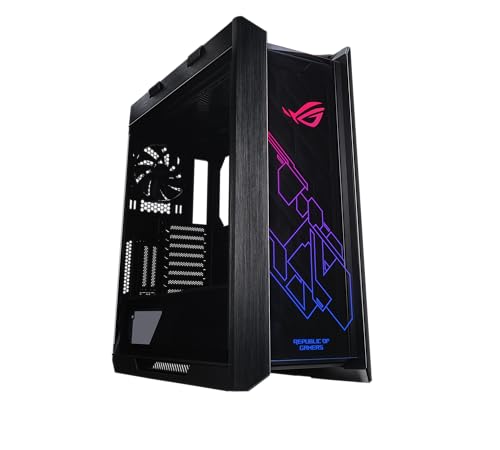
ASUS ROG Strix Helios RGB Mid-Tower Case
Best for: heavy E-ATX custom liquid-cooled gaming builds
- Use
- Gaming (what this guide is about)
- Motherboard Support
- EATX
- Case Type
- Mid Tower
- Side Panel
- Tempered Glass
- Included Fans
- 4x 140mm
- Radiator Support
- 420mm
The ASUS ROG Strix Helios E-ATX Mid-Tower Case is a gaming chassis built for large hardware configurations. You get factory support for E-ATX motherboards, four included 140mm fans with an integrated fan hub, and clearance for radiators up to 420mm long and 90mm thick. It fits builders planning custom liquid loops or multi-GPU setups who need nine drive bays, integrated GPU support brackets, and heavy construction.
Pros
- Includes four 140mm cooling fans and built-in fan hub
- Supports liquid cooling radiators up to 420mm long and 90mm thick
- Accommodates up to nine storage drives and E-ATX motherboards
- Includes integrated GPU support brackets with dual vertical mount options
Cons
- Weighs nearly 40 pounds before installing components
- Large footprint exceeding 23 inches in height and 22 inches in length
Good fit if
- You plan to run a 420mm radiator setup.
- You need mounting capacity for up to nine storage drives.
- You install an E-ATX motherboard with multiple graphics cards.
Skip if
- You require a lightweight case that is easy to transport.
- You have tight desk space with under 24 inches of vertical clearance.
Verdict: ASUS ROG Strix Helios E-ATX Mid-Tower Case delivers expansive component clearance, substantial 420mm radiator capacity, and four stock 140mm fans. It provides a rigid platform if you require extensive liquid cooling and multi-drive storage in a heavy-duty chassis.

Bgears b-Voguish E-ATX Tempered Glass Case
Best for: builders installing custom fans on E-ATX boards
- Use
- Gaming (what this guide is about)
- Motherboard Support
- E-ATX, ATX, Micro-ATX, mini-ITX
- Side Panel
- Tempered Glass
- Radiator Support
- 240mm
- Max GPU Length
- 370mm
- Connectivity
- USB 3.0
The Bgears b-Voguish is an E-ATX gaming chassis featuring USB 3.0 connectivity and a hinged 5mm tempered glass side panel. It accommodates graphics cards up to 370mm long and CPU coolers up to 160mm tall. Liquid cooling support covers 240mm radiators in the front and top. If you want to supply your own cooling setup across a large motherboard layout, this case gives you direct hardware access via magnetic filtering and swing-door glass.
Pros
- Supports E-ATX, ATX, Micro-ATX, and Mini-ITX motherboards
- Hinged 5mm tempered glass swing-open side panel
- Accommodates graphics cards up to 370mm in length
- Dual 240mm liquid cooling radiator support on front and top
Cons
- Does not include any pre-installed cooling fans
- CPU cooler height is limited to 160mm
- Lacks support for 360mm radiators
Good fit if
- You plan to supply and install your own case fans.
- You run a full-sized E-ATX or ATX motherboard.
- You need clearance for graphics cards up to 370mm long.
Skip if
- You want cooling fans included in the box.
- You use a 360mm liquid cooling radiator.
- You need clearance for CPU air coolers taller than 160mm.
Verdict: Bgears b-Voguish E-ATX Gaming Case provides wide board support, USB 3.0 access, and thick hinged glass for custom fan setups. It handles graphics cards up to 370mm but caps radiator sizes at 240mm.

SiyuXinyi PCI Slot Fan and GPU Bracket
Best for: GPU anti-sag support and targeted fan mounting
- Use
- Gaming (what this guide is about)
- Fan Size
- 120mm, 140mm, 80mm
- Compatible Device
- Graphics Card
- Dimensions
- 4 × 6 × 0.3 inches
- Weight
- 3.53 ounces
This is an internal PCI slot accessory rather than a standalone computer case. It mounts inside your chassis to support a graphics card and hold auxiliary cooling. You can attach two 80mm, 90mm, 120mm, or 140mm fans. The metal frame measures 4 inches long by 6 inches wide and weighs 0.22 pounds. It suits you if you need to eliminate GPU sag and target extra airflow directly at your expansion cards.
Pros
- Supports dual 80mm, 90mm, 120mm, or 140mm cooling fans
- Adjustable design accommodates different graphics card sizes and weights
- Rigid metal build with black rust-proof coating
Cons
- Bracket accessory only, not a standalone PC case
- Manufacturer states it requires advanced computer installation knowledge
Good fit if
- You need an internal bracket to brace a heavy graphics card against motherboard sag.
- You want to mount auxiliary 80mm, 90mm, 120mm, or 140mm fans beneath your GPU.
Skip if
- You need a complete PC chassis to house a full gaming system build.
- You lack advanced computer hardware assembly and installation skills.
Verdict: SiyuXinyi PCI Slot Fan and GPU Bracket is an internal metal mounting bracket designed to prevent graphics card sag while holding two cooling fans. It serves as an add-on cooling and support accessory rather than an enclosed PC gaming case.

Anidees AI Crystal XL Full Tower
Best for: massive multi-radiator liquid-cooled gaming builds
- Use
- Gaming (what this guide is about)
- Motherboard Support
- HPTX, XL-ATX, E-ATX, ATX, m-ATX
- Case Type
- Full Tower
- Radiator Support
- 480 mm
- Max GPU Length
- 530 mm
- Side Panel
- Tempered Glass
The Anidees AI Crystal XL Full Tower Case is an expansive chassis built for massive hardware configurations. It accommodates motherboards up to HPTX format, graphics cards up to 530 mm long, and CPU coolers up to 190 mm tall. You get interchangeable mesh and tempered glass front panels along with space for up to twenty 120 mm fans and dual 480 mm radiators. This case suits you if you plan an extreme liquid-cooled build.
Pros
- Fits large motherboards up to HPTX and graphics cards up to 530 mm
- Includes both mesh and tempered glass front panels
- Supports up to twenty 120 mm fans and 480 mm radiators
- Holds up to 12 storage drives or optical drives
Cons
- Heavy chassis weighing over 44 pounds empty
- Large footprint measuring over 23 inches tall and 24 inches long
- Vertical GPU thickness is limited to 49 mm
Good fit if
- You need mounting space for large radiators up to 480 mm.
- You run oversized components like HPTX motherboards or long graphics cards.
- You want to swap between mesh and tempered glass front panels.
Skip if
- You have limited desk or floor space for a 24-inch long chassis.
- You want a lightweight case that is easy to move.
Verdict: Anidees AI Crystal XL Full Tower Case delivers massive internal volume and cooling support for oversized components and multi-radiator gaming setups. Its high weight and physical footprint make it best reserved for dedicated, stationary spaces.

FSP Open Frame Dual Chamber Case
Best for: dual-radiator open-frame Mini-ITX gaming setups
- Use
- Gaming (what this guide is about)
- Motherboard Support
- EATX, ATX, Mini-ITX
- Case Type
- Open Frame
- Radiator Support
- 360 mm
- Width
- 455 millimeters
- Height
- 530 millimeters
This open-frame chassis from FSP features an aluminum structure paired with two tempered glass panels and a red finish. You get a dual-chamber layout engineered to fit dual 360mm radiators alongside your Mini-ITX setup. It includes a dedicated center compartment for cable routing, integrated ARGB lighting control, and front USB Type-C support. It suits you if you want an open, liquid-cooling showcase measuring 455 mm wide and 530 mm high.
Pros
- Supports dual 360mm radiators across two chambers
- Aluminum frame paired with two tempered glass panels
- Dedicated center compartment for routing internal cables
- Front panel includes USB Type-C connectivity
Cons
- Open frame layout offers no sealed dust filtration
- Wide 455 mm footprint requires substantial desk space
Good fit if
- You plan to run dual 360mm liquid-cooling radiators in an open layout.
- You want an aluminum and tempered glass frame in red for a Mini-ITX build.
- You need direct front-panel access to a USB Type-C port.
Skip if
- You want a fully enclosed chassis to block ambient dust.
- You need a compact case that fits into tight or narrow desk spaces.
Verdict: FSP Open Frame Dual Chamber Case provides extensive cooling capacity with dual 360mm radiator mounts and open aluminum framing for Mini-ITX hardware. Its exposed design and 455 mm width require dedicated space and regular maintenance.

Phanteks XT Pro Silent Mid-Tower Case
Best for: Quiet gaming setups prioritizing acoustic dampening
- Use
- Gaming (what this guide is about)
- Case Type
- Mid-Tower
- Included Fans
- 3x M25-120
- Radiator Support
- 360mm
- Dimensions
- 17.7 × 9.05 × 19.7 inches
- Weight
- 16.8 pounds
The Phanteks XT Pro Silent is a black mid-tower chassis configured for quiet gaming builds. It features sound-dampening foam across the front, left, and right closed panels to reduce noise. You get three pre-installed M25-120 black fans, clearance for up to seven 120mm fans, and room for a 360mm top radiator. It also supports rear-side connector motherboards. This chassis suits you if you prioritize acoustic control over internal visibility.
Pros
- Sound-dampening foam installed on front, left, and right panels
- Includes three M25-120 black fans
- Dedicated unrestricted 360mm radiator support in the top
- Support for rear-side connector motherboards
Cons
- Closed solid panels offer no interior component visibility
- Fan locations limited to 120mm sizes with no 140mm mounts listed
Good fit if
- You want sound-dampening foam to lower operational noise.
- You use a motherboard with rear-side cable connectors.
- You plan to mount a 360mm radiator in the top position.
Skip if
- You prefer a tempered glass panel to display your internal hardware.
- You plan to install 140mm case fans.
Verdict: Phanteks XT Pro Silent Mid-Tower Case provides heavy acoustic dampening and rear-connector motherboard support for clean, quiet gaming setups. It maintains full clearance for large graphics cards and top 360mm radiators without using display glass.
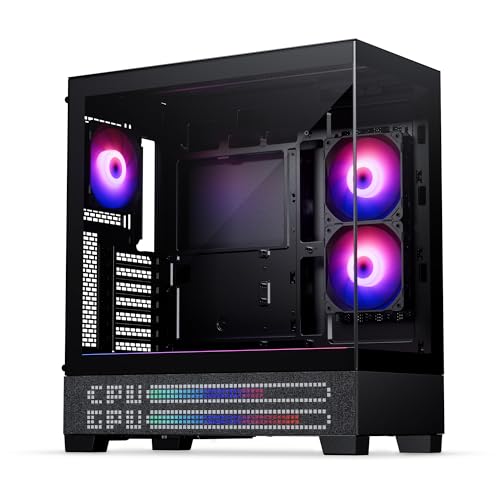
Phanteks XT View Matrix Mid-Tower Case
Best for: showcase builds with rear-connector ATX motherboards
- Use
- Gaming (what this guide is about)
- Motherboard Support
- ATX
- Case Type
- Mid-Tower
- Side Panel
- Tempered Glass
- Included Fans
- 3x M25-120mm D-RGB
- Radiator Support
- 360mm
This ATX mid-tower chassis features dual tempered glass panels and an integrated 600-LED matrix display for stats and animations. You get three pre-installed M25-120mm D-RGB fans with room for up to nine 120mm fans total, plus top clearance for a 360mm radiator. It supports rear-connector ATX motherboards and full-size graphics cards. It suits you if you want visible internal hardware alongside customizable panel readouts.
Pros
- Integrated 600-LED matrix display shows system stats and lighting
- Pre-installed with three M25-120mm D-RGB fans
- Supports rear-connector ATX motherboards for hidden cabling
- Houses up to nine 120mm fans and top 360mm radiator
Cons
- Weighs 21 pounds without internal components installed
- Motherboard support listing specifies ATX without smaller form-factor details
Good fit if
- You plan to install a rear-connector ATX motherboard.
- You want dual tempered glass panels with a built-in LED matrix display.
- You run a 360mm liquid cooler mounted at the top.
Skip if
- You want a lightweight case under 20 pounds.
- You prefer a solid or mesh front panel over glass.
Verdict: Phanteks XT View Matrix Mid-Tower Case provides dual-panel glass viewing, rear-connector motherboard support, and an exterior 600-LED matrix display. It accommodates full-size GPUs, top-mounted 360mm radiators, and includes three 120mm D-RGB fans.
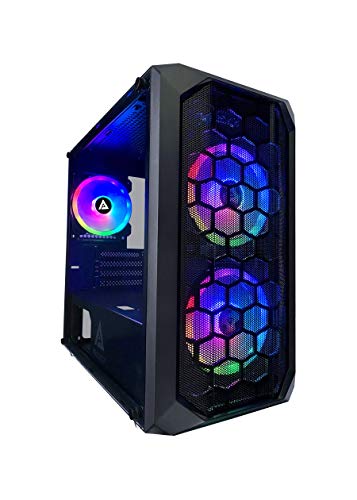
Apevia Prodigy Micro-ATX Case
Best for: compact Micro-ATX builds needing long GPU clearance
- Use
- Gaming (what this guide is about)
- Motherboard Support
- Micro-ATX, Mini-ITX
- Case Type
- Micro-ATX
- Side Panel
- Tempered Glass
- Included Fans
- 3x RGB
- Radiator Support
- 120mm
This compact Micro-ATX gaming chassis pairs a mesh front panel with three preinstalled RGB fans and a left tempered glass window. Inside, you get clearance for graphics cards up to 350mm long and CPU air coolers up to 165mm tall. It supports both Micro-ATX and Mini-ITX motherboards with space for up to six 120mm fans. It suits you if you want a compact build with high component clearance.
Pros
- Supports graphics cards up to 350mm long
- Fits CPU air coolers up to 165mm tall
- Includes three preinstalled RGB fans with top-panel LED control
- Room for up to six 120mm fans across the chassis
Cons
- Radiator support limited to 120mm on the rear
- Fans use proprietary connectors
- Does not support full-size ATX motherboards
Good fit if
- You build with a Micro-ATX or Mini-ITX motherboard.
- You run a long graphics card up to 350mm in a compact chassis.
- You want built-in push-button RGB controls without motherboard software.
Skip if
- You need liquid cooling radiators larger than 120mm.
- You use a standard ATX motherboard.
Verdict: Apevia Prodigy Micro-ATX Case with 3 RGB Fans delivers strong component clearance and preinstalled airflow fans in a smaller desktop footprint. It handles tall air coolers and long GPUs well, provided you do not require multi-fan liquid cooling radiators.

Apevia Genesis Pro Mid Tower with 6 ARGB Fans
Best for: builders wanting maximum preinstalled ARGB fans
- Use
- Gaming (what this guide is about)
- Motherboard Support
- ATX, Micro-ATX, Mini-ITX
- Case Type
- Mid Tower
- Side Panel
- Tempered Glass
- Included Fans
- 6x ARGB
- Radiator Support
- 240mm
View on Amazon: Apevia Genesis Pro Mid Tower with 6 ARGB Fans
The Apevia Genesis Pro is a mid-tower gaming case equipped with two tempered glass panels and six preinstalled ARGB fans. It accommodates standard ATX, Micro-ATX, and Mini-ITX motherboards, with clearance for graphics cards up to 350mm and CPU coolers up to 160mm. For liquid cooling, you get support for 240mm radiators in the top and front. It suits you if you want a complete cooling setup right out of the box.
Pros
- Includes six preinstalled 120mm ARGB fans
- Dual tempered glass panels on the front and left side
- Supports graphics cards up to 350mm in length
- Accommodates up to 240mm radiators in top and front positions
Cons
- Uses proprietary fans designed specifically for this chassis
- Radiator mounting is limited to 240mm with no 360mm support
- CPU cooler height is capped at 160mm
Good fit if
- You want a fully populated setup with six included ARGB fans.
- You are installing a graphics card up to 350mm in length.
- You plan to use standard ATX, Micro-ATX, or Mini-ITX motherboards.
Skip if
- You require space for a 280mm or 360mm liquid cooling radiator.
- You use a CPU tower cooler taller than 160mm.
- You prefer using standard third-party fans instead of proprietary connections.
Verdict: Apevia Genesis Pro Mid-Tower with 6 ARGB Fans delivers complete out-of-the-box lighting and cooling through its six preinstalled fans and dual glass panels. It accommodates standard gaming hardware comfortably, provided your parts stay within the 350mm GPU and 160mm CPU cooler limits.

Fractal Design Torrent Compact ATX Mid-Tower
Best for: High-airflow ATX gaming builds
- Use
- Gaming (what this guide is about)
- Motherboard Support
- ATX
- Case Type
- Mid Tower
- Side Panel
- Tempered Glass
- Lighting
- RGB
- Connectivity
- Type-C
View on Amazon: Fractal Design Torrent Compact ATX Mid-Tower
Fractal Design Torrent Compact ATX Mid-Tower is a gaming chassis designed for directed airflow. You get thick 180 x 38 mm Prisma ARGB PWM front fans, an open front grille, and a top-mounted PSU shroud with integrated lighting. Its layout supports ATX motherboards and features expansive base intakes for GPU cooling. You should choose this mid-tower if you want dedicated front-to-back airflow and built-in Type-C connectivity.
Pros
- Included 180 x 38 mm Prisma ARGB PWM front fans
- Expansive base intakes with dedicated bottom fan support
- Front I/O features Type-C connectivity
- Top-mounted PSU shroud with integrated ARGB lighting
Cons
- Motherboard compatibility lists up to ATX without larger format support
- Bottom intake fan installation requires leaving the lowest PCI slot free
- Chassis weighs 20.94 pounds unfilled
Good fit if
- You want high front-intake airflow driven by 180 mm fans.
- You plan to build a gaming system around a standard ATX motherboard.
- You need modern front Type-C connectivity and tempered glass panels.
Skip if
- You require support for larger E-ATX or XL-ATX motherboards.
- You need to populate the bottom PCI slot while using bottom intake fans.
Verdict: Fractal Design Torrent Compact ATX Mid-Tower provides targeted airflow via 180 mm front fans and open base intakes for gaming rigs. It delivers standard ATX support and Type-C connectivity inside a compact mid-tower footprint.

be quiet! Silent Base 802 Window ATX Midi Tower
Best for: silent-or-performance modular gaming builds
- Use
- Gaming (what this guide is about)
- Motherboard Support
- ATX
- Case Type
- Midi Tower
- Included Fans
- 3x Pure Wings 2 140mm
- Dimensions
- 21.2 × 11.1 × 21.8 inches
- Weight
- 29.1 pounds
View on Amazon: be quiet! Silent Base 802 Window ATX Midi Tower
The be quiet! Silent Base 802 is an ATX mid-tower case built for flexible gaming setups. You get three pre-installed Pure Wings 2 140mm fans and interchangeable panels for either high airflow or sound insulation. It also features a decoupled, relocatable motherboard tray for inverted layouts and a front I/O with USB 3.2 Gen 2 Type-C. This case suits you if you want customizable acoustics and component orientation.
Pros
- Includes three 140mm Pure Wings 2 fans
- Interchangeable front and top panels for airflow or silence
- Decoupled motherboard tray supports inverted layouts
- Front I/O features USB 3.2 Gen 2 Type-C and integrated fan controller
Cons
- Heavier chassis at over 29 pounds empty
- Large footprint exceeding 21 inches in both height and length
Good fit if
- You want to switch between maximum airflow and acoustic dampening.
- You need an inverted motherboard layout for your desk orientation.
- You prefer large 140mm cooling fans included out of the box.
Skip if
- You need a lightweight or compact chassis for easy transport.
- You plan to install a motherboard form factor larger than ATX.
Verdict: be quiet! Silent Base 802 ATX Mid Tower delivers versatile acoustic options and an inverted tray layout for customizable gaming builds.
Specifications side by side
| Spec | Montech XR Panoramic ATX Mid-Tower Case | Thermaltake Versa H18 Tempered Glass Micro-ATX Case | ASUS TUF Gaming E-ATX Full-Tower Case | NZXT H510 ATX Mid-Tower Case with USB-C | ASUS ROG Strix Helios RGB Mid-Tower Case | Bgears b-Voguish E-ATX Tempered Glass Case | SiyuXinyi PCI Slot Fan and GPU Bracket | Anidees AI Crystal XL Full Tower | FSP Open Frame Dual Chamber Case | Phanteks XT Pro Silent Mid-Tower Case | Phanteks XT View Matrix Mid-Tower Case | Apevia Prodigy Micro-ATX Case | Apevia Genesis Pro Mid Tower with 6 ARGB Fans | Fractal Design Torrent Compact ATX Mid-Tower | be quiet! Silent Base 802 Window ATX Midi Tower |
|---|---|---|---|---|---|---|---|---|---|---|---|---|---|---|---|
| Motherboard Support | ATX | Micro ATX | E-ATX | Mini-ITX, MicroATX, ATX | EATX | E-ATX, ATX, Micro-ATX, mini-ITX | not specified | HPTX, XL-ATX, E-ATX, ATX, m-ATX | EATX, ATX, Mini-ITX | not specified | ATX | Micro-ATX, Mini-ITX | ATX, Micro-ATX, Mini-ITX | ATX | ATX |
| Case Type | Mid Tower | not specified | Full-Tower | Mid Tower | Mid Tower | not specified | not specified | Full Tower | Open Frame | Mid-Tower | Mid-Tower | Micro-ATX | Mid Tower | Mid Tower | Midi Tower |
| Side Panel | Tempered Glass | Tempered Glass | Tempered Glass | Tempered Glass | Tempered Glass | Tempered Glass | not specified | not specified | not specified | not specified | Tempered Glass | Tempered Glass | Tempered Glass | Tempered Glass | not specified |
| Included Fans | 3x 120mm ARGB PWM | not specified | not specified | not specified | 4x 140mm | not specified | not specified | not specified | not specified | 3x M25-120 | 3x M25-120mm D-RGB | 3x RGB | 6x ARGB | not specified | 3x Pure Wings 2 140mm |
| Radiator Support | 360mm | 280mm | 360mm | 240mm | 420mm | 240mm | not specified | 480 mm | 360 mm | 360mm | 360mm | 120mm | 240mm | not specified | not specified |
| Max GPU Length | 420mm | not specified | not specified | Up to 381mm | not specified | 370mm | not specified | 530 mm | not specified | not specified | not specified | 350mm | 350mm | not specified | not specified |
| Tower Size | Mid-Tower | not specified | Full-Tower | Mid-Tower | Mid-Tower | not specified | not specified | Full-Tower | not specified | Mid-Tower | Mid-Tower | not specified | Mid-Tower | Mid-Tower | not specified |
| Fan Size | not specified | not specified | not specified | not specified | not specified | not specified | 120mm, 140mm, 80mm | not specified | not specified | not specified | not specified | not specified | not specified | not specified | not specified |
| Use | Gaming | Gaming | Gaming | Gaming | Gaming | Gaming | Gaming | Gaming | Gaming | Gaming | Gaming | Gaming | Gaming | Gaming | Gaming |
| Lighting | ARGB | not specified | not specified | not specified | RGB | not specified | not specified | not specified | not specified | not specified | RGB | RGB | ARGB | RGB | not specified |
| Connectivity | not specified | not specified | not specified | Type-C | not specified | USB 3.0 | not specified | not specified | not specified | not specified | not specified | not specified | not specified | Type-C | not specified |
| Compatible Device | not specified | not specified | not specified | not specified | not specified | not specified | Graphics Card | Radiator | not specified | not specified | not specified | not specified | not specified | not specified | not specified |
| Dimensions | 17.1 × 9 × 17.7 inches | 15.4 × 8.07 × 15 inches | 215 × 98.8 × 217 inches | 16.9 × 8.27 × 18.1 inches | 22.2 × 9.8 × 23.3 inches | 8.07 × 15.9 × 19.4 inches | 4 × 6 × 0.3 inches | 24.4 × 9.25 × 23.4 inches | not specified | 17.7 × 9.05 × 19.7 inches | 17.3 × 9.06 × 19.7 inches | 16.1 × 7.95 × 15.6 inches | 15.9 × 7.91 × 17.1 inches | 17.7 × 8.74 × 18.4 inches | 21.2 × 11.1 × 21.8 inches |
| Weight | 14.5 pounds | 10.2 pounds | 26.2 pounds | 14.6 pounds | 39.7 pounds | 11 pounds | 3.53 ounces | 44.1 pounds | not specified | 16.8 pounds | 21 pounds | 13 pounds | 16 pounds | 20.9 pounds | 29.1 pounds |
| Width | not specified | not specified | not specified | not specified | not specified | not specified | not specified | not specified | 455 millimeters | not specified | not specified | not specified | not specified | not specified | not specified |
| Height | not specified | not specified | not specified | not specified | not specified | not specified | not specified | not specified | 530 millimeters | not specified | not specified | not specified | not specified | not specified | not specified |
| Size | XR | H18 | EATX | base | GX601|Black | large | not specified | not specified | not specified | Mid-Tower" | not specified | PRODIGY BLACK | GENESIS PRO BLACK | ATX | 539 x 245 x 537 |
| Color | Black | Black | GT501|Grey | White | Helios GX601|Black | Black | Black | Black | Red | Black | Charcoal Black | Black | Black | RGB Black - Light tint | Black |
| Model | XR-B | CA-1J4-00S1WN-01 | GT501/GRY/WITH HANDLE | CA-H510B-W1 | 90DC0020-B39000 | BG01893 | Ex:xq-060 | AI-XL-PRO-LITE | CMT710RED | PH-XT523PSC_BK01 | PH-XT523VM1_DBK01_MS | PRODIGY-BK | G-PRO-BK | FD-C-TOR1C-02 | BGW39 |
Is a Gaming PC Case Worth It?
Cases built for gaming prioritize high-draw hardware configurations across their internal layouts. In practice, choosing an enclosure tailored for gaming gives you dedicated mounts for liquid cooling radiators, multi-fan airflow setups with up to six preinstalled fans, and interior clearance for discrete graphics hardware. You also gain visual features like tempered glass side panels, ARGB lighting hardware, and specialized support for rear-connector motherboards. These chassis designs trade away minimal footprints to house active cooling assemblies and dedicated expansion components.
Worth it if
- You need mounting space for multiple chassis fans or liquid cooling radiators.
- You run a discrete graphics card requiring dedicated clearance or anti-sag bracket support.
- You want tempered glass panels and integrated ARGB lighting hardware.
Skip it if
- You use basic office hardware with integrated graphics and no add-in expansion cards.
- You do not need mounting points for aftermarket liquid radiators or auxiliary case fans.
- You prefer a solid exterior panel without tempered glass windows or lighting displays.
To verify clearance for your selected case, compare the best msi PC power supplies for gaming against your internal dimension constraints.
How We Picked Gaming Cases
Each case is selected when its listing specifies gaming in the title or published feature list. Only one size or variant per product family is included to give you distinct choices. Every detail comes strictly from manufacturer specifications and technical sheets rather than physical product handling or unboxing.
To help you evaluate available options, the 15 products are ordered with products in stock first, then by Amazon sales rank (better-selling products first). Live pricing and stock update at least daily on the page, keeping the focus entirely on verified hardware dimensions and cooling compatibility.
How to Choose the Right Gaming Case
-
Check Front Panel Port Connectivity
Check front panel ports before purchasing your case. Modern motherboards often supply internal Type-C headers, requiring a matching port on your chassis front panel. Cases like the NZXT H510 ATX Mid-Tower Case include native Type-C connectivity for quick transfers to external drives and peripherals. If your motherboard lacks a Type-C header, standard USB 3.0 ports remain sufficient. Verify which front header plugs your motherboard supports so you do not leave front ports disconnected on your completed gaming build.
-
Choose Panel Material for Acoustics
Decide whether visual presentation or silent operation matters more for your gaming space. Tempered glass side panels showcase internal hardware and lighting but reflect operating sounds into your room. If you prioritize low noise over aesthetics, look for chassis models built with dedicated acoustic dampening panels instead of glass. The Phanteks XT Pro Silent Mid-Tower Case uses closed, sound-damped side panels to mute fan whir and coil whine. Select solid insulated panels if you run high-rpm fans under load.
-
Evaluate Open Versus Enclosed Chassis
Examine your desk environment before choosing an open-frame chassis. Open enclosures offer unrestricted airflow access and unique display layouts, but they lack dust filtration and leave internal components exposed to room debris. The FSP Open Frame Dual Chamber Case uses an open aluminum frame that demands routine cleaning to prevent dust buildup on heatsinks and fans. If you keep your computer on carpet or have pets, an enclosed chassis with standard intake filters reduces upkeep. Open frames suit clean, elevated desk positions best.
-
Verify Physical Dimensions and Weight
Measure your desk surface area and check weight ratings before buying an extra-large chassis. Full-tower enclosures deliver generous internal space for components, but their empty mass can be substantial. The Anidees AI Crystal XL Full Tower weighs over 44 pounds before installing your power supply, cooling gear, and motherboard. Heavy cases are difficult to move for maintenance and can strain lightweight desks. Select a compact mid-tower if you relocate your setup frequently, and reserve heavy full towers for permanent stationary workstations.
-
Distinguish Enclosures from Internal Brackets
Review product specifications carefully to confirm whether an item is a full chassis or an internal add-on. Some gaming hardware listings feature internal accessories like the SiyuXinyi PCI Slot Fan and GPU Bracket, which fits into expansion slots to support heavy graphics cards and direct airflow. These mounting brackets do not enclose components or replace an actual computer case. Verify you are buying a complete frame with motherboard standoffs, drive trays, and front I/O if you need an entire enclosure for your gaming assembly.
-
Inspect Preinstalled Fan Counts
Count preinstalled fans to determine if you need to buy extra cooling out of the box. Some cases include several factory fans, while others provide bare frames intended for custom setups. The Apevia Genesis Pro Mid Tower includes six preinstalled ARGB fans, eliminating the need to purchase separate case fans or splitters immediately. Check whether preinstalled fans use proprietary connectors, standard 4-pin PWM headers, or dedicated 3-pin 5V ARGB plugs so your motherboard or fan controller can properly regulate their speed and illumination.
Frequently asked questions
Can an E-ATX gaming case fit standard ATX motherboards?
Yes, cases designed for E-ATX motherboards accommodate standard ATX boards. Full-tower options such as the ASUS TUF Gaming GT501 or Anidees AI Crystal XL Full Tower provide the necessary standoff locations and internal room for standard ATX hardware. Selecting an E-ATX enclosure provides expanded chassis volume for your components, though it increases overall footprint and weight, with models like the Anidees reaching over 44 pounds.
How does fan size affect PC gaming case airflow?
Larger case fans move more air at lower rotational speeds, reducing operating noise in your gaming setup. Standard cases often utilize 120mm fans, but models like the Fractal Design Torrent Compact include dual 180 mm front intake fans to supply high airflow across internal components. Similarly, the ASUS ROG Strix Helios includes four 140mm fans, providing substantial airflow coverage for high-power graphics cards and motherboards.
What is the purpose of a dedicated GPU bracket in a gaming build?
A dedicated GPU bracket supports heavy graphics cards to prevent physical sagging and motherboard slot stress. Modern graphics cards carry massive cooling heatsinks that exert substantial weight on PCIe slots. Specialized accessories like the SiyuXinyi PCI Slot Fan and GPU Bracket anchor directly to expansion slots to brace your card while supplying mounting points for 80mm, 120mm, or 140mm fans for targeted cooling.
Are open frame gaming cases suitable for everyday desktop use?
Open frame cases work well for daily use but leave your core components exposed to ambient dust and airborne debris. Enclosures like the FSP Open Frame Dual Chamber Case feature exposed aluminum structures and support dual 360mm radiators for Mini-ITX builds. Because they omit sealed side panels and mesh filtration, you must maintain a regular cleaning schedule to keep your cooling fins and board clear of buildup.
What should you consider before choosing an acoustically dampened gaming case?
You should evaluate component clearances and ventilation pathways to ensure sound absorption does not restrict cooling. Acoustically focused enclosures, such as the Phanteks XT Pro Silent Mid-Tower Case, incorporate sound-dampening materials on solid panels instead of tempered glass. While this suppresses mechanical fan noise, you must confirm the chassis still maintains adequate airflow paths, graphics card clearance, and top radiator mounts for demanding components.
How do rear-connector motherboards impact your choice of gaming case?
Rear-connector motherboards require a chassis featuring specific motherboard tray cutouts to access reverse-facing power and data headers. Standard chassis lack these dedicated openings, blocking cable installation entirely. Models like the Phanteks XT View Matrix feature cutouts designed for rear-connector boards, allowing you to route main power, fan wiring, and front-panel leads into the cable compartment while keeping the main viewing chamber clean and completely free of clutter.