Best Thermaltake Case Fans: 7 Models Compared
As an Amazon Associate we earn from qualifying purchases. Links on this page are affiliate links.
Choosing the right Thermaltake case fan setup depends on your chassis clearance and cooling requirements. Thermaltake offers 140mm and 200mm fans in black or white finishes, with ARGB, standard RGB, or non-illuminated frames, alongside multi-port hubs and hardware controllers. The Thermaltake Pure 20 200mm Case Fan holds the top spot for large cases needing silent 200mm airflow.
This guide compares 7 products based strictly on the specifications published on their listings. You can examine dimensions, bearing types, and connectors to match your cooling layout.
Quick picks
Our 7 picks
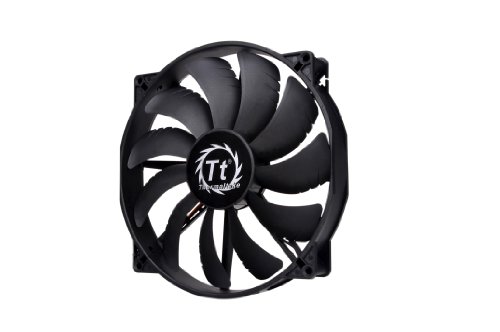
Thermaltake Pure 20 200mm Case Fan
Best for: large cases needing silent 200mm airflow
- Fan Size
- 200mm
- Bearing Type
- Long Life Sleeve Bearing
- Dimensions
- 11.4 × 10 × 12.6 inches
- Weight
- 15 ounces
You get a 200mm intake or exhaust fan built with a 30mm-thick profile. This model uses a long-life sleeve bearing and features a shaved frame designed for broader chassis fitment, specifically Thermaltake enclosures. The blades focus airflow while dampening operational noise. It suits you if you need a large-format, non-LED replacement fan that moves high volumes of air across your chassis.
Pros
- Large 200mm diameter with 30mm thickness for high airflow
- Shaved frame eases installation in compatible chassis
- Includes long-life sleeve bearing and anti-vibration mounting
Cons
- 30mm depth requires more clearance than standard 25mm fans
- Base black model includes no integrated LED lighting
Good fit if
- You have a PC case with dedicated 200mm fan mounts.
- You need a 30mm-thick fan with a shaved frame for chassis clearance.
- You prefer an all-black fan without LED illumination.
Skip if
- You need standard 120mm or 140mm fan mounting.
- You have less than 30mm of fan depth clearance in your PC case.
Verdict: Thermaltake Pure 20 200mm Case Fan provides large-format cooling for cases that accommodate its 30mm thickness. Its shaved frame and sleeve bearing offer reliable airflow without excess noise.

Thermaltake Commander FT Touch Panel Fan Controller
Best for: touchscreen hardware fan control
View on Amazon: Thermaltake Commander FT Touch Panel Fan Controller
The Thermaltake Commander FT is a dedicated fan controller built for your PC cooling setup. This unit features an integrated pressure-sensitive touch panel that lets you interact directly with your cooling fans. If you need hardware-based control directly from your chassis using an onboard interface instead of background desktop software, this touch-operated controller manages your configuration.
Pros
- Integrated pressure-sensitive touch panel
- Hardware-based fan controller
- Direct physical interface for case cooling
Cons
- No cooling fans included in the package
- Requires dedicated chassis bay space for installation
Good fit if
- You want a pressure-sensitive touch panel to operate case fans.
- You prefer dedicated hardware fan control over software utilities.
Skip if
- You need a bundle that includes actual cooling fans.
- You prefer controlling fan speeds solely via motherboard software.
Verdict: Thermaltake Commander FT Touch Panel Fan Controller provides an onboard pressure-sensitive touch screen for direct hardware fan management. It is a focused choice if you want physical chassis-level control over your cooling configuration.

Thermaltake Commander F6 6-Channel Fan Controller
Best for: manual hardware fan and temperature control
- Lighting
- RGB
- Dimensions
- 7 × 4.5 × 3 inches
View on Amazon: Thermaltake Commander F6 6-Channel Fan Controller
The Thermaltake Commander F6 6-Channel Fan Controller fits into a single 5.25-inch drive bay to provide direct hardware control over your cooling setup. It features an RGB LCD screen, six dedicated voltage control knobs, and six temperature sensors for monitoring your chassis thermal zones. It also supports up to two Lumi LED strips and includes short circuit protection with a warning alarm, making it suitable if you need physical dials.
Pros
- Six dedicated voltage control knobs
- Six included temperature sensors for monitoring
- RGB LCD display for speed and temperature readouts
- Built-in warning alarm and short circuit protection
- Supports up to two Lumi LED strips
Cons
- Requires a chassis with an external 5.25-inch drive bay
- Includes a 1-year warranty
Good fit if
- You have a PC case equipped with an external 5.25-inch bay.
- You want tactile knobs to manually regulate up to six fan channels.
- You need six thermal probes to monitor specific areas inside your case.
Skip if
- You use a chassis that lacks an external 5.25-inch drive bay.
- You prefer motherboard BIOS or desktop software fan curves over manual dials.
Verdict: Thermaltake Commander F6 6-Channel Fan Controller delivers tactile hardware adjustments, six thermal probes, and an RGB display for chassis with optical bays. It provides direct, physical control over your cooling performance without requiring desktop software.

Thermaltake Commander FP 10-Port Fan Hub
Best for: centralized multi-fan PWM power management
- Connector Type
- 4-Pin
- Dimensions
- 3.2 × 1.7 × 0.7 inches
The Thermaltake Commander FP 10-Port Fan Hub distributes PWM signals to up to 10 4-pin fans across your build. It draws power directly through a SATA connection to run your fans from the power supply rather than overloading motherboard headers. Measuring 3.2 by 1.7 by 0.7 inches, this compact unit suits you if you need to run multiple chassis fans while keeping your internal cable layout organized using the included ties.
Pros
- Supports up to 10 independent 4-pin PWM fans
- Direct SATA power input powers fans directly from the PSU
- Compact dimensions of 3.2 by 1.7 by 0.7 inches
- Includes 5 beaded cable ties, 2 Velcro tabs, and a PWM signal cable
Cons
- Does not include any cooling fans
- No RGB or ARGB lighting headers included
Good fit if
- You need to connect and control up to 10 4-pin PWM fans from a single hub.
- You want SATA power delivery to protect your motherboard fan headers from heavy electrical loads.
- You want installation accessories like reusable cable ties and Velcro tabs bundled together.
Skip if
- You need actual case fans included in the package.
- You require an integrated hub that also handles RGB lighting connections.
Verdict: Thermaltake Commander FP 10-Port Fan Hub expands your chassis cooling layout by routing PWM signals to 10 fans through a dedicated SATA power connection. It gives you a compact, organized solution for managing high fan counts in 2026.

Thermaltake SWAFAN EX14 RGB White 140mm Fan 3-Pack
Best for: white PC builds needing three 140mm fans
- Fan Size
- 140mm
- Lighting Type
- RGB
- Dimensions
- 19.7 × 19.7 × 11 inches
- Weight
- 3.17 pounds
View on Amazon: Thermaltake SWAFAN EX14 RGB White 140mm Fan 3-Pack
This three-fan pack includes 140mm Thermaltake fans finished in white with built-in RGB lighting. You get three matching 140mm fans in one set, making it practical for cases with multiple large intake or exhaust mounts. The white housing suits light-colored builds, and the standard 140mm sizing provides broad mount coverage. If you need a triple set of white 140mm RGB fans for your setup, this package covers that requirement.
Pros
- Three 140mm fans included in the pack
- Built-in RGB lighting
- White colorway for light-themed builds
Cons
- Requires chassis clearance for 140mm fan mounts
- Bundled as a three-pack rather than a single fan
Good fit if
- You need three 140mm cooling fans in a single purchase.
- You are building a white PC case setup with RGB lighting.
Skip if
- You need 120mm or 200mm mounting sizes instead.
- You only need a single fan for your chassis.
Verdict: Thermaltake SWAFAN EX14 RGB White 3-Pack provides three 140mm RGB fans suited for white-themed chassis configurations. It supplies multiple large fans in a single package for cases with compatible 140mm mounts.

Thermaltake CT140 ARGB White 140mm Fan 2-Pack
Best for: white chassis builds needing dual 140mm ARGB fans
- Fan Size
- 140mm
- Max Fan Speed
- 1500 RPM
- Bearing Type
- Hydraulic Bearing
- Lighting Type
- ARGB
- Compatible Device
- Radiator
- Dimensions
- 5.51 × 0.98 × 5.51 inches
View on Amazon: Thermaltake CT140 ARGB White 140mm Fan 2-Pack
The Thermaltake CT140 ARGB Sync comes as a pair of 140mm white fans engineered for case intake or radiator cooling. You get PWM speed control up to 1500 RPM, hydraulic bearings, and a 7-blade design. Nine addressable LEDs sync via a 5V motherboard header without proprietary hardware. Daisy-chain cabling links both units together on fewer motherboard ports. This pack suits you if you want addressable lighting and simplified routing in a 140mm chassis.
Pros
- Daisy-chain cable setup simplifies connections across fewer ports
- PWM control allows adjustable speeds up to 1500 RPM
- Nine addressable LEDs sync directly with 5V motherboard software
- Hydraulic bearing includes an anti-vibration mounting frame
Cons
- Maximum rotational speed tops out at 1500 RPM
- Requires 140mm mounting clearance rather than standard 120mm spacing
Good fit if
- You need a pair of white 140mm fans with 5V ARGB lighting.
- You want daisy-chain connections to reduce cable clutter across headers.
Skip if
- You need standard 120mm or oversized 200mm mounting points.
- You prefer a stealth setup without RGB illumination.
Verdict: Thermaltake CT140 ARGB White 2-Pack delivers PWM speeds up to 1500 RPM with integrated 5V motherboard lighting sync. Its daisy-chain wiring simplifies dual-fan setups in cases supporting 140mm mounts.

Thermaltake CT200 200mm PWM Fan
Best for: 200mm fan mounts requiring daisy-chain cabling
- Fan Size
- 200mm
- Max Fan Speed
- 900 RPM
- Connector Type
- PWM
- Dimensions
- 7.87 × 7.87 × 1.18 inches
The Thermaltake CT200 is a 200mm black PC case fan designed for large intake or exhaust mounts. It features PWM control with speeds up to 900 RPM and includes integrated vibration-reducing rubber pads to limit vibration noise. Daisy-chain capability simplifies your cable routing across multiple units. This single-pack fan suits your build if you need a low-speed, large-format cooling fan to fit 200mm case mounts without complex wiring.
Pros
- PWM speed control reaching up to 900 RPM
- Daisy-chain support simplifies cable routing
- Built-in vibration-reducing rubber pads
- Large 200mm diameter for high air movement
Cons
- No integrated RGB or LED lighting
- Pack includes only a single fan
- Large 200mm footprint requires compatible case mounts
Good fit if
- You have a PC chassis with dedicated 200mm fan brackets.
- You want daisy-chain connections to reduce fan wiring.
- You need a basic black fan running up to 900 RPM with rubber pads.
Skip if
- You require RGB lighting in your cooling setup.
- You need 120mm or 140mm mounting dimensions.
- You need a multi-fan bundle in a single package.
Verdict: Thermaltake CT200 200mm PWM Fan delivers 900 RPM cooling and daisy-chain cabling for compatible large-format PC cases. It is a practical, non-illuminated option when you need to populate 200mm fan mounts.
Specifications side by side
| Spec | Thermaltake Pure 20 200mm Case Fan | Thermaltake Commander FT Touch Panel Fan Controller | Thermaltake Commander F6 6-Channel Fan Controller | Thermaltake Commander FP 10-Port Fan Hub | Thermaltake SWAFAN EX14 RGB White 140mm Fan 3-Pack | Thermaltake CT140 ARGB White 140mm Fan 2-Pack | Thermaltake CT200 200mm PWM Fan |
|---|---|---|---|---|---|---|---|
| Fan Size | 200mm | not specified | not specified | not specified | 140mm | 140mm | 200mm |
| Max Fan Speed | not specified | not specified | not specified | not specified | not specified | 1500 RPM | 900 RPM |
| Connector Type | not specified | not specified | not specified | not specified | not specified | not specified | PWM |
| Bearing Type | Long Life Sleeve Bearing | not specified | not specified | not specified | not specified | Hydraulic Bearing | not specified |
| Lighting Type | not specified | not specified | not specified | not specified | RGB | ARGB | not specified |
| Lighting | not specified | not specified | RGB | not specified | RGB | ARGB | not specified |
| Compatible Device | not specified | not specified | not specified | not specified | not specified | Radiator | not specified |
| Dimensions | 11.4 × 10 × 12.6 inches | not specified | 7 × 4.5 × 3 inches | 3.2 × 1.7 × 0.7 inches | 19.7 × 19.7 × 11 inches | 5.51 × 0.98 × 5.51 inches | 7.87 × 7.87 × 1.18 inches |
| Weight | 15 ounces | not specified | not specified | not specified | 3.17 pounds | 1 pounds | not specified |
| Size | 200mm | not specified | not specified | not specified | 140mm | 140mm | 20cm |
| Color | Black | not specified | multicolored | not specified | white | White | black |
| Model | CL-F015-PL20BL-A | AC-010-B51NAN-A1 | AC-024-BN1NAN-A1 | AC-023-AN1NAN-A1 | CL-F162-PL14SW-A | CL-F154-PL14SW-A | CL-F177-PL20BL-A |
Thermaltake Case Fan Lineup Overview
For airflow, you can pick standard 140mm frames or oversized 200mm fans. The Thermaltake CT140 ARGB White 2-Pack suits builds that need radiator compatibility, 1500 RPM speeds, and addressable lighting. If your chassis accommodates large intake mounts, the Thermaltake CT200 delivers 900 RPM cooling with daisy-chain cabling to keep wires organized.
For power distribution and regulation, the catalog divides into hubs and hardware bay modules. The Thermaltake Commander FP 10-Port Fan Hub routes PWM signals to up to 10 fans using SATA power, making it practical for high-density setups. If you prefer direct physical adjustments, the Thermaltake Commander F6 6-Channel Fan Controller provides tactile hardware controls and six thermal probes.
Where Thermaltake Fan Hardware Fits
This selection suits you if you build inside chassis requiring 140mm or 200mm fans. The range spans from 140mm frames up to 200mm sizes, offering non-illuminated models alongside RGB and ARGB variants. You also get physical support through standalone hardware controllers and a 10-port PWM hub.
Notable gaps exist across these listed models. You will not find standard 120mm fans or compact 80mm options. Black frames are absent among the 140mm offerings, while the 200mm fans exclude lighting entirely. Additionally, all listed fan controls rely solely on physical chassis-mounted hardware rather than desktop software suites.
If you need ventilation for a workspace rather than a chassis, you can review the best fans for shop.
How to Choose Thermaltake Cooling Hardware
-
Check Fan Thickness and Clearance
Chassis fan brackets support standard widths, but large-format fans vary in depth. Standard mounts usually take 25mm frames, whereas 200mm models can measure 30mm thick. You must measure the clearance between your case panel, drive cages, and mounting bracket before purchasing. The Thermaltake Pure 20 200mm Case Fan requires a 30mm depth profile inside your chassis. If your case lacks this internal clearance, the fan blades or frame will press against surrounding components or block your outer panels.
-
Assess Motherboard Header Capacity
Count the 4-pin PWM headers on your motherboard before deciding how to connect your cooling fans. Mid-range boards often provide only three or four chassis headers. If you intend to run numerous fans without overloading motherboard circuits, look for a dedicated distribution hub. The Thermaltake Commander FP 10-Port Fan Hub connects up to ten 4-pin fans to a single motherboard PWM signal while drawing direct power from a SATA cable. This configuration prevents motherboard header strain and synchronizes fan speeds across the chassis.
-
Select Dedicated Hardware Monitoring
Decide whether you want software-based fan curves or independent chassis hardware control. If your case includes accessible front drive bays, a dedicated multi-channel controller lets you manage speeds manually. The Thermaltake Commander F6 6-Channel Fan Controller features six rotary dials, six individual thermal probes, and an integrated RGB display. You place the temperature sensors directly onto target zones inside the case to monitor thermal levels in real time. This setup suits builders who want direct tactile adjustments without running background software utilities on their operating system.
-
Verify Lighting Header Compatibility
Illumination specifications must align with your motherboard headers to ensure proper synchronization. Addressable RGB fans require a 3-pin 5V header, which differs electrically from standard 4-pin 12V RGB headers. Plugging 5V lighting into a 12V header causes irreversible damage to LEDs. The Thermaltake CT140 ARGB White 2-Pack specifies 5V motherboard lighting sync alongside its 1500 RPM hydraulic bearing motor. Check your motherboard manual to confirm it provides 5V ARGB headers. If your board only features legacy 12V connections, select non-illuminated fans or verify hardware controller support instead.
-
Plan Daisy Chain Cable Routing
Cable routing becomes complicated when you install multiple intake and exhaust fans throughout a chassis. Standard fan setups require individual cables running from every fan location back to your motherboard or fan hub. Daisy-chain cabling links adjacent fans together sequentially, requiring only a single cable run to the control header. The Thermaltake CT200 200mm PWM Fan incorporates daisy-chain wiring to simplify installation across large fan mounts. Choosing fans with linked cabling reduces clutter behind your motherboard tray and saves space in compact cable routing channels.
-
Match Fan Quantity to Layouts
Map out your intake and exhaust mounting positions before purchasing single fans or multi-packs. Many modern mid-tower and full-tower chassis provide dedicated brackets for three 140mm fans along the front or top panel. Purchasing bundled packages ensures matching motor specifications, aesthetic uniformity, and sufficient fans to fill intake banks. The Thermaltake SWAFAN EX14 RGB White 3-Pack supplies three 140mm units designed for white-themed chassis builds. Calculating your required fan count beforehand avoids mismatched fan speeds, uneven static pressure, and the need to place separate component orders later.
Frequently asked questions
How do you power multiple PWM fans with the Thermaltake Commander FP hub?
You connect your chassis fans directly into the hub's 10 4-pin ports and power the unit using a dedicated SATA power connection from your power supply. The hub receives a PWM signal from your motherboard and distributes it across all connected fans. This setup lets you run high fan counts while keeping cabling organized inside your chassis.
What is the difference between the Thermaltake Commander FT and Commander F6 controllers?
The Commander FT uses a pressure-sensitive touch screen for fan adjustments, whereas the Commander F6 uses tactile hardware knobs. The Commander F6 also includes six separate thermal probes to monitor temperatures, an RGB display, and installs into an optical bay. Both provide direct chassis-level hardware management without requiring desktop operating system software.
What bearing type is used in the Thermaltake CT140 ARGB fans?
The Thermaltake CT140 ARGB fans utilize a hydraulic bearing design. This internal bearing helps ensure stable operation when the blades spin up to their maximum 1500 RPM speed. In addition to the hydraulic bearing, these 140mm fans feature daisy-chain wiring and 5V motherboard lighting synchronization, making them suitable for case intake or liquid cooling radiators.
Can you daisy-chain Thermaltake CT200 fans together?
Yes, the Thermaltake CT200 200mm PWM fan features integrated daisy-chain cabling. This design allows you to link adjacent fans together to streamline cable management across larger chassis brackets. The fan operates at speeds up to 900 RPM and provides a clean, non-illuminated black finish for builds that do not require RGB or ARGB lighting.
How many fans come included in the Thermaltake SWAFAN EX14 RGB pack?
The Thermaltake SWAFAN EX14 RGB package includes three 140mm fans. This multi-pack gives you enough cooling units to populate standard intake or exhaust arrays in compatible chassis. The fans feature a white color scheme and built-in RGB lighting, making them suitable if you are assembling an all-white system build that requires coordinated illumination.
What bearing mechanism does the Thermaltake Pure 20 200mm fan use?
The Thermaltake Pure 20 200mm fan operates using a sleeve bearing. This bearing design is paired with a shaved outer frame to deliver steady airflow across large mounting spaces. If you install this 200mm fan, ensure your computer case has adequate depth to accommodate its 30mm frame profile and large-diameter fan mounts.
How do you control the lighting on Thermaltake CT140 ARGB fans?
You connect the lighting cables from the CT140 ARGB fans directly to a 5V addressable RGB motherboard header. This allows your motherboard software to manage lighting effects and colors directly. The fans also support daisy-chain connections, which minimizes the number of individual lighting cables you need to route back to the system board.