Best PC Cases for CPU Cooler: 8 Spec-Based Picks
As an Amazon Associate we earn from qualifying purchases. Links on this page are affiliate links.
Choosing the right PC case for CPU Cooler support depends on cooler height clearances, motherboard dimensions, and chassis ventilation. We compared 8 models based on the specifications published on their product listings. The Jonsbo Compact Micro-ATX Mesh Case leads the list because its compact all-mesh frame fits CPU coolers up to 75 mm while housing standard Micro-ATX motherboards and ATX power supplies.
This guide helps you decide which case dimensions, clearance limits, and fan layouts match your cooling requirements.
Quick picks
The best fit for you
- You want a compact Micro-ATX case for low-profile coolers Jonsbo Compact Micro-ATX Mesh Case All-mesh panels accommodate CPU coolers up to 75 mm alongside standard ATX power supplies and Micro-ATX motherboards.
- You want an ATX build with pre-installed ARGB fans GAMDIAS Mid-Tower Case with 4 ARGB Fans Four included 120mm ARGB fans and a mesh front panel supply airflow for your CPU cooler out of the box.
- You want a portable Micro-ATX case with a carry handle SOEYi U320 Micro-ATX Portable Case with Handle A built-in handle pairs with clearance for 135mm CPU coolers and graphics cards up to 310mm long.
- You need built-in liquid cooling for Mini-ITX hardware Cooler Master Sneaker X Mini-ITX Case Bundle This case integrates an 850W SFX power supply and a 360mm liquid CPU cooler into a Mini-ITX layout.
Our 8 picks

Jonsbo Compact Micro-ATX Mesh Case
Best for: compact Micro-ATX builds with low-profile coolers
- Compatible Device
- CPU Cooler (what this guide is about)
- Motherboard Support
- ITX, M-ATX
- Side Panel
- Mesh
- Max GPU Length
- 200-255mm
- Dimensions
- 10.5 × 8 × 11.6 inches
The Jonsbo C6 Micro ATX Mesh Case is a compact desktop chassis designed with all-mesh outer panels for airflow. For your processor cooling, it provides up to 75 mm of CPU cooler height clearance. You can install either an ITX or Micro-ATX motherboard alongside a standard ATX power supply up to 185 mm long. It suits your build if you run a low-profile cooler and want tool-free panel access in a smaller desk footprint.
Pros
- Supports CPU cooler heights up to 75 mm
- Tool-free upper cover and side panels
- All-mesh exterior panels across front, top, and sides
- Accommodates ATX power supplies up to 185 mm
- Front panel provides Type-C and USB 3.0 connectivity
Cons
- CPU cooler clearance limited to 75 mm
- Graphics card length restricted to 255 mm
- Front 120 mm fan space shared with hard drive mount
Good fit if
- You use a CPU cooler under 75 mm tall.
- You want a compact Micro-ATX case with full mesh panels.
- You need tool-free access to internal components.
Skip if
- You need clearance for a CPU cooler taller than 75 mm.
- You plan to install a graphics card longer than 255 mm.
Verdict: Jonsbo C6 Micro ATX Mesh Case provides a compact footprint with all-mesh ventilation for CPU coolers up to 75 mm. It balances small dimensions with space for standard ATX power supplies and Micro-ATX boards.

GAMDIAS Mid-Tower Case with 4 ARGB Fans
Best for: airflow-focused ATX builds needing included ARGB fans
- Compatible Device
- Radiator, CPU Cooler (what this guide is about)
- Motherboard Support
- ATX, Micro-ATX, Mini-ITX
- Case Type
- Mid Tower
- Side Panel
- Tempered Glass
- Included Fans
- 4x 120mm ARGB
- Radiator Support
- 360mm
This mid-tower gaming chassis accommodates ATX, Micro-ATX, and Mini-ITX motherboards while supporting dedicated CPU coolers and radiators. You get four pre-installed 120mm ARGB fans behind a mesh front panel to promote intake airflow, paired with a tool-free tempered glass side panel to show your components. With seven expansion slots, an integrated LED control button, and mounting space for up to two storage drives, it suits standard desktop builds focused on integrated lighting.
Pros
- Includes four pre-installed 120mm ARGB cooling fans
- Mesh front panel designed for direct air intake
- Tool-free tempered glass side panel
- Supports ATX, Micro-ATX, and Mini-ITX motherboards
Cons
- Front I/O panel lacks a USB Type-C port
- Internal drive mounting limited to two storage drives
Good fit if
- You want pre-installed ARGB fans without buying extra cooling units.
- You plan to build with a full-size ATX motherboard and up to seven PCIe expansion cards.
- You prefer a mesh front intake paired with a tempered glass viewing window.
Skip if
- You require front-panel USB Type-C connectivity.
- You need internal bays for more than two storage drives.
Verdict: GAMDIAS Aura Mid Tower ARGB Case delivers ready-to-use illumination and ventilation through four pre-installed ARGB fans and a mesh front. It provides a straightforward mid-tower layout compatible with CPU coolers, liquid radiators, and full ATX motherboards.

SOEYi U320 Micro-ATX Portable Case with Handle
Best for: portable Micro-ATX builds with compact air coolers
- Compatible Device
- CPU Cooler (what this guide is about)
- Motherboard Support
- Micro-ATX, Mini-ITX
- Case Type
- Micro-ATX
- Max GPU Length
- 310mm
- Dimensions
- 10.4 × 6.5 × 12.2 inches
View on Amazon: SOEYi U320 Micro-ATX Portable Case with Handle
The SOEYi U320 is a compact Micro-ATX and Mini-ITX chassis fitted with carrying handles. For your cooling setup, it accommodates CPU coolers up to 135mm tall alongside mounts for 8cm or 9cm case fans. It fits graphics cards up to 310mm long and supports both ATX and SFX power supplies using an included bracket. This suits you if you need a transportable desktop with compact air cooling.
Pros
- Supports CPU coolers up to 135mm in height
- Accommodates graphics cards up to 310mm in length
- Includes dual-mode bracket for ATX and SFX power supplies
- Built-in handles facilitate easy transport
Cons
- Fan mounts are restricted to 8cm or 9cm sizes
- CPU cooler height capped at 135mm, excluding large dual-tower coolers
- Tight interior can make component installation difficult
Good fit if
- You use a compact CPU cooler measuring 135mm or shorter.
- You need a portable Micro-ATX or ITX chassis with built-in handles.
- You want the option to install either an SFX or a standard ATX power supply.
Skip if
- You require standard 120mm or 140mm case fan mounts.
- You plan to install a tall tower CPU cooler over 135mm.
- You use a full-size ATX motherboard.
Verdict: SOEYi U320 Micro-ATX Portable Case with Handle provides dedicated room for 135mm CPU coolers and 310mm graphics cards in a compact, carry-friendly frame. It offers versatile power supply support, though case fan options remain restricted to smaller sizes.
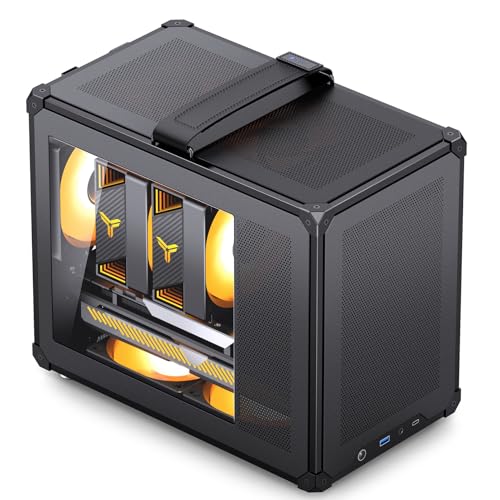
Jonsbo C6 MAX Mesh Micro ATX Case
Best for: portable Micro-ATX builds needing all-around airflow
- Compatible Device
- CPU Cooler (what this guide is about)
- Motherboard Support
- Micro-ATX, ITX
- Case Type
- Mini Tower
- Side Panel
- Mesh
- Max GPU Length
- 300-335mm
- Dimensions
- 13.7 × 7.95 × 11.6 inches
The Jonsbo C6 MAX is a compact Micro ATX mini-tower featuring mesh panels on all sides for direct ventilation to your CPU cooler. It accommodates Micro-ATX or Mini-ITX motherboards and offers four fan mounting spots across the top, rear, and bottom. With tool-free panel removal and a built-in top carrying handle, this chassis suits builders who want a portable, ventilated desktop footprint that still fits standard ATX power supplies.
Pros
- All-mesh panels on exterior surfaces for direct ventilation
- Tool-free removal for front, top cover, and side panels
- Integrated top handle for transport
- Supports graphics cards up to 335 mm long
Cons
- Cooling fans are optional and not listed as pre-installed
- Bottom fan positions share clearance with 3.5-inch hard drive mounting
- Graphics card length choices limit ATX power supply clearance to 140 mm or 160 mm
Good fit if
- You want an all-mesh compact chassis with a top handle for transport.
- You plan to build with a Micro-ATX or Mini-ITX motherboard.
- You prefer quick, tool-free access to your internal hardware.
Skip if
- You need pre-installed case fans included in the box.
- You plan to install a standard full-size ATX motherboard.
- You need room for more than one 3.5-inch storage drive.
Verdict: Jonsbo C6 MAX Micro ATX Mesh Case delivers compact portability with all-mesh airflow and tool-free panel access. It pairs small-footprint component support with dedicated fan locations around your CPU cooler and core hardware.

Cooler Master Sneaker X Mini-ITX Case Bundle
Best for: Mini-ITX builds needing integrated 360mm liquid cooling
- Compatible Device
- CPU Cooler (what this guide is about)
- Motherboard Support
- Mini-ITX
- Radiator Support
- 360mm
- Max GPU Length
- 300mm
- Use
- Gaming
- Dimensions
- 25.6 × 12 × 25.6 inches
View on Amazon: Cooler Master Sneaker X Mini-ITX Case Bundle
The Cooler Master Sneaker X is a dedicated Mini-ITX gaming chassis shaped like a sneaker. For CPU cooling, it includes an integrated 360mm Flux liquid cooler configured to handle high-draw processors like AMD Ryzen 9 and Intel Ultra i9 chips. You also get a pre-installed 850W SFX power supply and room for 3-slot graphics cards up to 300mm in length. It suits you if you want an all-in-one compact cooling setup.
Pros
- Includes a custom 360mm Flux liquid CPU cooler
- Pre-installed 850W SFX Gold ATX 3.0 power supply
- Supports 3-slot graphics cards up to 300mm
- Short custom cables reduce internal cable clutter
Cons
- Exclusively supports Mini-ITX motherboards
- Maximum graphics card length capped at 300mm
- Large footprint measuring over 25 inches tall and weighing 28.29 pounds
Good fit if
- You want an included 360mm AIO cooler sized for high-tier processors.
- You plan to build using a Mini-ITX motherboard and want a pre-fitted SFX PSU.
- You use a 3-slot graphics card that is 300mm or shorter.
Skip if
- You plan to install a Micro-ATX or full ATX motherboard.
- You own a graphics card longer than 300mm.
- You need a lightweight chassis under 28 pounds.
Verdict: Cooler Master Sneaker X Mini-ITX Case integrates a 360mm liquid cooler and 850W SFX power supply into a dedicated Mini-ITX frame. It supplies ready-made high-wattage cooling as long as your GPU stays within the 300mm limit.

JOYJOM 14.6L Micro ATX Case with RGB Fans
Best for: compact setups needing built-in RGB cooling
- Compatible Device
- CPU Cooler (what this guide is about)
- Motherboard Support
- Micro-ATX, Mini-ITX
- Side Panel
- Tempered Glass
- Included Fans
- 2x 90mm RGB
- Max GPU Length
- 310mm
- Case Volume
- 14.6L
This compact 14.6L Micro-ATX chassis comes with two pre-installed 90mm RGB fans and a panoramic tempered glass panel. For your processor cooling setup, it accommodates CPU coolers up to 135mm in height alongside room for up to six total case fans. It fits standard ATX power supplies and graphics cards up to 310mm long, making it a functional option if you want small-footprint desktop cooling with built-in illumination.
Pros
- Includes two pre-installed 90mm RGB cooling fans
- Accommodates CPU coolers up to 135mm tall
- Supports standard ATX power supplies up to 1000W
- Front I/O includes USB Type-C and dual USB 3.0 ports
Cons
- Maximum CPU cooler clearance limited to 135mm
- Power supplies longer than 150mm reduce GPU length clearance to 220mm
- Installing bottom case fans restricts drive mounts to a single SSD
Good fit if
- You use a CPU cooler with a height of 135mm or less.
- You want factory-installed RGB fans in a compact 14.6L Micro-ATX frame.
- You plan to install a standard ATX power supply.
Skip if
- You plan to run a tall tower CPU cooler over 135mm in height.
- You require multiple 3.5-inch hard drives while utilizing bottom intake fans.
- You use a power supply longer than 150mm paired with a graphics card exceeding 220mm.
Verdict: JOYJOM 14.6L Compact Micro-ATX Case with RGB Fans delivers dual pre-installed illumination fans and 135mm CPU cooler clearance within a 14.6L tempered glass frame. It suits builders seeking small-form-factor desktop cooling without abandoning standard ATX power supplies.

Iesooy Micro ATX Compact Case
Best for: compact builds with 140mm CPU coolers
- Compatible Device
- CPU Cooler (what this guide is about)
- Motherboard Support
- Micro ATX, ITX
- Side Panel
- Acrylic
- Max GPU Length
- 250mm
- Fan Size
- 140mm, 80mm
- Connectivity
- USB 3.0
This compact black desktop chassis from Iesooy accommodates both Micro ATX and Mini-ITX motherboards in a space-saving footprint. For cooling, you get clearance for a CPU cooler up to 140mm tall alongside room for two 120mm front intake fans. It also houses graphics cards up to 250mm long and an SFX power supply. You will find it well suited for building a modest desktop rig with moderate-height air cooling.
Pros
- Fits CPU coolers up to 140mm tall
- Supports both Micro ATX and Mini-ITX motherboards
- Mounts two 120mm cooling fans behind the front mesh
- Accommodates one 3.5-inch HDD and two 2.5-inch SSDs
Cons
- Dedicated cable management space is only usable with ITX boards
- Front panel must be detached to install intake fans
- Maximum graphics card length is limited to 250mm
Good fit if
- You plan to run a CPU cooler that measures 140mm or shorter.
- You use an SFX power supply and a graphics card under 250mm.
- You need a compact desktop case that fits a Micro ATX board.
Skip if
- You plan to install a tall tower CPU cooler exceeding 140mm.
- You require cable routing space while using a full Micro ATX motherboard.
- You have a graphics card longer than 250mm.
Verdict: Iesooy Micro ATX Compact PC Case provides a tight footprint for builders running a 140mm CPU cooler and an SFX power supply. It handles basic small-form-factor setups cleanly if your graphics card stays within 250mm.

Rosewill Mid-Tower ATX Case with Mesh Front
Best for: ATX builds needing pre-installed PWM intake fans
- Compatible Device
- Radiator, CPU Cooler (what this guide is about)
- Motherboard Support
- ATX, Micro-ATX, Mini-ITX
- Case Type
- ATX Mid Tower
- Side Panel
- Tempered Glass
- Included Fans
- 4x 120mm PWM
- Radiator Support
- 360mm
This mid-tower chassis supports ATX, Micro-ATX, and Mini-ITX boards while targeting cooling hardware like CPU coolers and radiators. You get a high-airflow front mesh panel paired with four pre-installed 120mm PWM fans to keep system components ventilated. A tool-free tempered glass side panel displays internal hardware alongside seven PCIe slots for expansion cards. It suits you if you want an ATX airflow build ready out of the box without sourcing extra case fans.
Pros
- Includes four pre-installed 120mm PWM fans
- Airflow-focused mesh front panel for direct intake
- Tool-free tempered glass side panel
- Supports ATX, Micro-ATX, and Mini-ITX motherboards
Cons
- Front panel lacks a USB Type-C port
- Front I/O features only one USB 3.0 port alongside two USB 2.0 ports
Good fit if
- You want four pre-installed 120mm PWM fans for CPU cooling airflow.
- You use a standard ATX, Micro-ATX, or Mini-ITX motherboard.
- You prefer tool-free access through a tempered glass side panel.
Skip if
- You require modern front-panel USB Type-C connectivity.
- You need to install more than two 3.5-inch storage drives.
Verdict: Rosewill Mid-Tower ATX Case with Mesh Front provides four included 120mm PWM fans and a breathable mesh front for steady CPU cooler airflow. It is a dependable mid-tower option for standard ATX gaming systems requiring simple hardware access.
Specifications side by side
| Spec | Jonsbo Compact Micro-ATX Mesh Case | GAMDIAS Mid-Tower Case with 4 ARGB Fans | SOEYi U320 Micro-ATX Portable Case with Handle | Jonsbo C6 MAX Mesh Micro ATX Case | Cooler Master Sneaker X Mini-ITX Case Bundle | JOYJOM 14.6L Micro ATX Case with RGB Fans | Iesooy Micro ATX Compact Case | Rosewill Mid-Tower ATX Case with Mesh Front |
|---|---|---|---|---|---|---|---|---|
| Motherboard Support | ITX, M-ATX | ATX, Micro-ATX, Mini-ITX | Micro-ATX, Mini-ITX | Micro-ATX, ITX | Mini-ITX | Micro-ATX, Mini-ITX | Micro ATX, ITX | ATX, Micro-ATX, Mini-ITX |
| Case Type | not specified | Mid Tower | Micro-ATX | Mini Tower | not specified | not specified | not specified | ATX Mid Tower |
| Side Panel | Mesh | Tempered Glass | not specified | Mesh | not specified | Tempered Glass | Acrylic | Tempered Glass |
| Included Fans | not specified | 4x 120mm ARGB | not specified | not specified | not specified | 2x 90mm RGB | not specified | 4x 120mm PWM |
| Radiator Support | not specified | 360mm | not specified | not specified | 360mm | not specified | not specified | 360mm |
| Max GPU Length | 200-255mm | 340mm | 310mm | 300-335mm | 300mm | 310mm | 250mm | 340mm |
| Case Volume | not specified | not specified | not specified | not specified | not specified | 14.6L | not specified | not specified |
| Tower Size | not specified | Mid-Tower | not specified | not specified | not specified | not specified | not specified | Mid-Tower |
| Fan Size | not specified | 120mm | not specified | not specified | not specified | not specified | 140mm, 80mm | 120mm |
| Use | not specified | Gaming | not specified | not specified | Gaming | not specified | not specified | Gaming |
| Lighting | not specified | ARGB | not specified | not specified | not specified | RGB | not specified | not specified |
| Connectivity | not specified | not specified | not specified | not specified | not specified | Type-C, USB 3.0 | USB 3.0 | not specified |
| Compatible Device | CPU Cooler | Radiator, CPU Cooler | CPU Cooler | CPU Cooler | CPU Cooler | CPU Cooler | CPU Cooler | Radiator, CPU Cooler |
| Dimensions | 10.5 × 8 × 11.6 inches | 15.6 × 7.68 × 17.7 inches | 10.4 × 6.5 × 12.2 inches | 13.7 × 7.95 × 11.6 inches | 25.6 × 12 × 25.6 inches | 6.5 × 10.4 × 13.8 inches | not specified | 15.5 × 7.67 × 17.7 inches |
| Weight | not specified | 10.8 pounds | not specified | not specified | 28.3 pounds | not specified | not specified | 10.3 pounds |
| Color | BLACK | Black | Black | balck | Red | Black | Black | Black |
| Size | not specified | AURA GC1 E A | not specified | not specified | Medium | 14.6L | not specified | not specified |
| Model | not specified | AURA GC1 ELITE ARGB | not specified | not specified | not specified | PS091 | PS096 | RWGC1 |
Is Matching Your Case to Your CPU Cooler Worth It?
Chassis clearance dictates the specific thermal hardware you can install without physical interference. Compact Micro-ATX frames limit cooler heights to 75 mm, 135 mm, or 140 mm, restricting you to low-profile heatsinks or compact air towers. Mid-tower layouts offer standard clearances alongside room for 120mm fans or liquid radiators, while specialized Mini-ITX designs incorporate built-in 360mm liquid cooling loops. Matching these enclosure boundaries prevents chassis closure issues and ensures dedicated airflow paths around your processor during daily operation.
Worth it if
- You plan to run tall tower heatsinks between 135 mm and 140 mm in a compact Micro-ATX enclosure.
- You need integrated 360mm liquid cooling hardware pre-installed in a Mini-ITX frame.
- You require a mid-tower layout with direct 120mm fan ventilation across your heatsink.
Skip it if
- You build in ultra-compact enclosures restricted to 75 mm low-profile coolers.
- You use graphics cards exceeding 250 mm or 300 mm that restrict space in smaller layouts.
You can match your case height clearance against the best active CPU coolers to confirm heatsink compatibility before buying.
How We Picked These Cases
You find cases here by matching published specifications for CPU cooler compatibility. Each selection comes from listings that state CPU cooler support in the product title or feature list. When a product family offers multiple sizes or color variations, you see only a single representative model.
The list presents products in stock first. All details come directly from published manufacturer specifications, covering case dimensions, motherboard form factor support, and fan sizing. Products are not physically handled, ensuring you receive objective spec comparisons based strictly on published data to match your hardware requirements.
How to Choose the Right Case
-
Select Motherboard Form Factor
You must match your motherboard footprint to your chassis specifications before checking cooler clearance. Standard ATX mid-towers support full-size ATX, Micro-ATX, and Mini-ITX motherboards, giving you extra expansion slots. If you want a smaller desktop footprint, choose a Micro-ATX or Mini-ITX chassis. Compact cases restrict board size completely to save space. The Cooler Master Sneaker X Mini-ITX Case Bundle supports only Mini-ITX boards. Verify your board dimensions first to avoid installation conflicts before you mount your CPU cooler.
-
Check Liquid Radiator Support
Decide whether your setup relies on an air heatsink or an all-in-one liquid radiator. Standard air cooler builds require specific vertical millimeter clearance from the motherboard socket. Liquid cooling setups require dedicated radiator mounting positions along the front, top, or side panels. Some compact frames include integrated liquid systems, while traditional mid-towers offer mounting rails for separate components. The GAMDIAS Mid-Tower Case with 4 ARGB Fans explicitly lists compatibility for both liquid radiators and standard CPU coolers. Check radiator dimensions if you plan to install liquid cooling.
-
Review Included Fan Configurations
Chassis airflow directly impacts your CPU cooler efficiency. Cases that include pre-installed intake and exhaust fans save setup time and ensure airflow right out of the box. Check the fan size and control type listed in the specifications. Standard 120mm fans offer predictable airflow profiles, and pulse-width modulation (PWM) headers let your motherboard regulate speeds automatically based on component temperatures. The Rosewill Mid-Tower ATX Case with Mesh Front provides four pre-installed 120mm PWM fans to feed steady ambient air across your CPU cooler heatsink.
-
Inspect Front Port Connectivity
Look at the front input and output ports to match your daily peripherals and motherboard headers. Basic cases provide standard USB 3.0 Type-A ports, which handle common flash drives and input peripherals. If you transfer high-speed data or connect modern external devices, look for a case that includes a front-panel USB Type-C connector. The JOYJOM 14.6L Micro ATX Case with RGB Fans features both Type-C and USB 3.0 connections. Confirm that your chosen motherboard has the matching internal headers to power every exterior case port.
-
Compare Side Panel Materials
Side panel design influences both hardware visibility and intake ventilation for your CPU cooler. Tempered glass side panels provide an unobstructed view of internal lighting, cooler heatsinks, and components, but they require designated front or top vents to channel airflow. In contrast, all-mesh steel panels allow air to pass directly through the side of the chassis right into your cooler fan. The Jonsbo C6 MAX Mesh Micro ATX Case uses breathable mesh panels to provide ventilation across the entire hardware enclosure without blocking airflow.
-
Verify Power Supply Compatibility
Your power supply form factor dictates how much internal room remains around the CPU socket. Mid-tower cases readily accommodate standard ATX power supplies with ample room for cabling. Compact chassis often require small-form-factor (SFX) units to clear internal components and keep overall case volume low. Installing an oversized power supply in a tight case can crowd your CPU cooler fan or block airflow paths entirely. The Iesooy Micro ATX Compact Case specifies an SFX power supply to maintain compact exterior dimensions while fitting your hardware.
Frequently asked questions
Which PC cases include pre-installed fans to assist CPU coolers?
Mid-tower models often provide pre-installed cooling fans directly out of the box. The GAMDIAS Aura Mid Tower supplies four 120mm ARGB fans behind a mesh front to feed ambient air to your processor heatsink. Similarly, the Rosewill Mid-Tower includes four 120mm PWM fans alongside a tempered glass side panel. These factory fans establish immediate front-to-back chassis airflow without requiring separate fan purchases.
Can you install an all-in-one liquid CPU cooler in a Mini-ITX case?
Yes, certain Mini-ITX chassis come specifically engineered around closed-loop liquid cooling setups. The Cooler Master Sneaker X Mini-ITX Case features an integrated 360mm liquid cooler alongside an included 850W SFX power supply. When planning this type of build, you must verify your graphics card length remains within the chassis limit, which caps GPU dimensions at 300mm in that specific enclosure.
What CPU cooler clearance do portable Micro-ATX cases provide?
Portable Micro-ATX cases typically accommodate air coolers measuring between 75mm and 135mm in height. For instance, the SOEYi U320 features a top carrying handle and reserves internal space for a 135mm CPU cooler alongside a 310mm graphics card. If you choose an even flatter layout like the Jonsbo C6, cooler height tops out at 75mm to preserve a compact footprint.
How does power supply size affect CPU cooler clearance in small cases?
Power supply form factors directly dictate how much interior volume remains for your motherboard and CPU cooler. Compact enclosures like the JOYJOM 14.6L balance standard ATX power supplies with 135mm cooler clearance and dual RGB fans. Meanwhile, the Iesooy Micro ATX Compact Case mandates a smaller SFX power supply, allowing space for a 140mm CPU cooler while restricting your graphics card length to 250mm.
What are the advantages of mesh panels for CPU cooling?
Mesh panels maximize passive and active ventilation by eliminating solid barriers in front of heatsink fans. Cases like the Jonsbo C6 MAX utilize all-around mesh panels with tool-free access to supply steady ambient air directly to your core components. This unrestricted exterior perforation lets CPU cooler intake fans draw fresh air immediately from outside the chassis rather than pulling pre-heated air trapped inside.
Can mid-tower PC cases fit both air coolers and liquid radiators?
Standard mid-tower enclosures support both cooling formats by offering broad interior clearances and versatile bracket mounts. The GAMDIAS Aura GC1 Elite ARGB and Rosewill Mid-Tower cases both list compatibility for traditional CPU coolers as well as liquid cooling radiators. Their ATX dimensions provide overhead and front mounting space so you can run multi-fan radiators or standard air-cooling heatsinks without motherboard contact.
What front panel ports are common on compact Micro-ATX cases?
Modern compact cases integrate updated peripheral ports directly on the exterior frame for convenient access. The JOYJOM 14.6L Micro ATX Case includes both Type-C and USB 3.0 ports on its chassis. Other small-form-factor designs, such as the Iesooy Micro ATX Compact PC Case, offer standard USB 3.0 connectivity. These front-panel connections let you connect external storage and accessories without reaching behind the case.