Best PC Cases Under $50 in 2026: 15 Picks Ranked by Specs
As an Amazon Associate we earn from qualifying purchases. Links on this page are affiliate links.
Finding the best PC cases under $50 requires looking strictly at published specifications. We compared 15 options to help you choose based on data, not marketing. The Thermaltake Versa H21 ATX Mid Tower leads this list because it offers essential mesh ventilation for standard ATX builds. Its dimensions and weight provide a reliable foundation for direct USB 3.0 access without complex setup. Each pick is ranked by measurable specs like motherboard support and included fans. Use this guide to decide which chassis fits your component list and budget constraints.
Quick picks
The best fit for you
- You want the best overall mid-tower with mesh Thermaltake Versa H21 ATX Mid Tower It features ATX support and essential mesh ventilation for reliable airflow.
- You need a Mini-ITX case that is ultra-compact Goodisory 3.8L Mini-ITX Case This 3.8-liter steel enclosure is tailored for Mini-ITX motherboards.
- You want a Micro-ATX case with panoramic glass MOROVOL Micro-ATX Panoramic Glass PC Case It provides a 270-degree multi-side view with three included fans.
- You need an ATX case with Type-C ports DARKROCK EC2 ATX Mid Tower It offers Type-C connectivity and space for 360mm radiators.
Our 15 picks
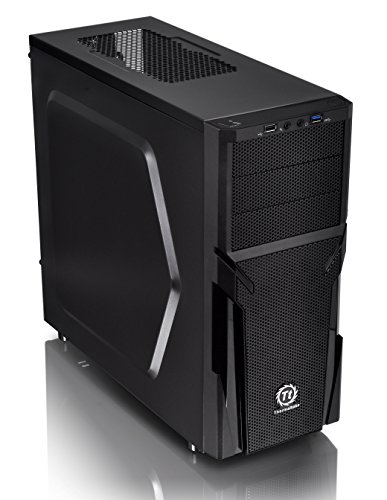
Thermaltake Versa H21 ATX Mid Tower
Best for: Standard ATX builds needing mesh ventilation
- Motherboard Support
- ATX
- Case Type
- Mid Tower
- Dimensions
- 18.7 × 8.2 × 16.9 inches
- Weight
- 9.3 pounds
View on Amazon: Thermaltake Versa H21 ATX Mid Tower Affiliate link
The Thermaltake Versa H21 is an ATX mid-tower chassis designed for straightforward builds. It features a perforated metal mesh front and top panel for optimized ventilation. The case includes pre-mounted holes for standard ATX motherboards and supports long graphics cards. You get direct access to USB 3.0, USB 2.0, and audio jacks. Tool-free installation simplifies component mounting. This case suits users who prioritize airflow and basic connectivity in a standard tower form factor.
Pros
- Perforated mesh front and top panels for rapid air intake
- Supports standard ATX motherboards and long graphics cards
- Includes USB 3.0 and USB 2.0 ports with audio jacks
- Tool-free installation design
- Heightened foot stands enhance bottom airflow
Cons
- Fixed height of 16.9 inches limits compatibility with larger components
- No pre-installed case fans included in the base specification
- Weight of 9.3 pounds adds bulk compared to lighter alternatives
Good fit if
- You need a standard ATX mid-tower with mesh ventilation
- You prefer tool-free installation for quick assembly
- You require direct front-panel USB 3.0 access
Skip if
- You require pre-installed case fans for immediate airflow
- You need support for larger E-ATX motherboards
- You prefer a lighter chassis for frequent moving
Verdict: Thermaltake Versa H21 ATX Mid-Tower provides essential mesh ventilation and tool-free assembly for standard ATX builds. It fits users who want direct USB 3.0 access and reliable airflow without complex setup.
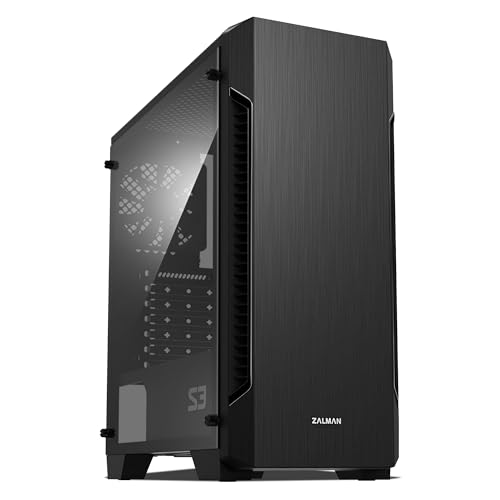
Zalman S3 Compact ATX Mid-Tower Case
Best for: ATX builds needing three included fans
- Motherboard Support
- ATX
- Case Type
- Mid-Tower
- Side Panel
- Acrylic
- Included Fans
- 3x 120mm
- Radiator Support
- 120mm
- Max GPU Length
- 330mm
View on Amazon: Zalman S3 Compact ATX Mid-Tower Case Affiliate link
This Zalman chassis is a compact mid-tower designed for standard ATX motherboards. It includes three 120mm cooling fans out of the box and supports graphics cards up to 330mm long. With mounts for up to eight fans plus top and bottom dust filters, it suits you if you want full ATX motherboard support and ready-to-run airflow without buying extra fans.
Pros
- Includes three 120mm cooling fans
- Fits graphics cards up to 330mm long
- Supports standard ATX motherboards
- Mounting positions for up to eight fans
Cons
- Front radiator support maxes out at 120mm
- Acrylic side window instead of tempered glass
Good fit if
- You need an ATX chassis that includes three 120mm fans out of the box.
- You use a graphics card up to 330mm in length.
- You want top and bottom dust filters included.
Skip if
- You plan to mount a 240mm or larger liquid cooling radiator.
- You require a tempered glass side panel rather than acrylic.
Verdict: Zalman Compact ATX Mid-Tower with 3 Fans provides ATX motherboard clearance, three included 120mm fans, and room for 330mm graphics cards. It is an effective mid-tower option when you want complete baseline cooling included.
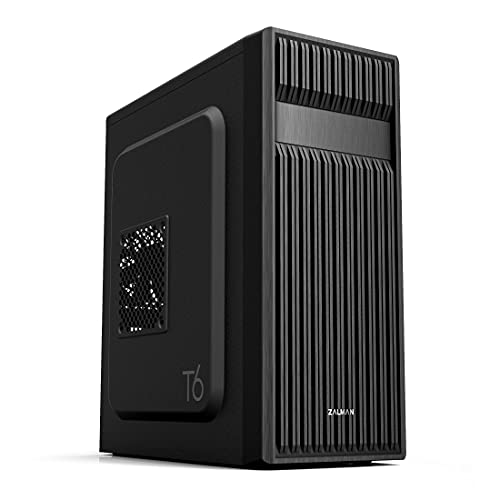
Zalman T6 ATX Mid-Tower Case
Best for: standard desktop builds needing an optical drive
- Motherboard Support
- ATX, mATX, Mini-ITX
- Case Type
- Mid-Tower
- Side Panel
- Mesh
- Included Fans
- 1x 120mm
- Use
- Gaming
- Connectivity
- USB 3.0
View on Amazon: Zalman T6 ATX Mid-Tower Case Affiliate link
The Zalman ATX Mid-Tower with Optical Drive Bay provides a powder-coated steel chassis built for standard ATX, micro-ATX, or mini-ITX builds. You get one preinstalled 120mm rear exhaust fan, mounting space for three additional cooling fans, and a dedicated 5.25-inch external bay for optical media drives. This enclosure suits you if you need traditional storage bays alongside legacy drive support in a standard desk footprint.
Pros
- Dedicated external 5.25-inch drive bay
- Preinstalled 120mm rear exhaust fan
- Supports up to four total cooling fans
- Accommodates ATX, micro-ATX, and mini-ITX motherboards
- Internal bays for two 2.5-inch and two 3.5-inch drives
Cons
- Incompatible with ATX motherboards using side-facing SATA ports
- Includes only one USB 3.0 front port
- Limited to four total cooling fans
Good fit if
- You require an external 5.25-inch bay for an optical drive
- You use a motherboard with top-facing SATA ports
- You need internal space for up to four storage drives
Skip if
- You use an ATX motherboard with side-facing SATA ports
- You need more than one front USB 3.0 port
- You want more than four cooling fans installed
Verdict: Zalman ATX Mid-Tower with Optical Drive Bay provides essential component compatibility and legacy drive support for standard desktop systems. It delivers straightforward steel housing with room for up to four drives and four cooling fans.
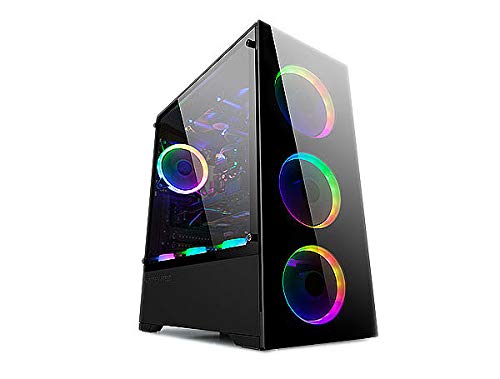
Bgears b-Voguish ATX Case with 6 ARGB Fans
Best for: maximum pre-installed fans and large motherboard support
- Motherboard Support
- E-ATX, ATX, MicroATX, ITX
- Case Type
- ATX
- Included Fans
- 6x 120mm ARGB
- Max GPU Length
- 380mm
- Use
- Gaming
- Connectivity
- USB 3.0
View on Amazon: Bgears b-Voguish ATX Case with 6 ARGB Fans Affiliate link
The Bgears b-Voguish is an ATX chassis built for airflow and large components. It comes equipped with six pre-installed 120mm ARGB fans and a 10-channel hub with remote control. You get room for graphics cards up to 380mm and support for motherboards ranging from Mini-ITX up to E-ATX. This setup suits you if you want extensive cooling hardware included from the start.
Pros
- Includes six 120mm ARGB fans
- 10-channel fan hub with remote control included
- Supports motherboards up to E-ATX
- Accommodates graphics cards up to 380mm long
Cons
- Motherboard sync cable must be purchased separately
- Front panel includes only one USB 3.0 port alongside two USB 2.0 ports
Good fit if
- You want six pre-installed ARGB fans with a dedicated controller hub.
- You are building with an E-ATX motherboard or a long GPU up to 380mm.
Skip if
- You need motherboard ARGB software sync straight out of the box.
- You require multiple front-panel USB 3.0 ports.
Verdict: Bgears b-Voguish ATX Case with 6 ARGB Fans provides complete cooling coverage and generous clearance for E-ATX motherboards and long graphics cards. Its bundled 10-port hub and remote handle fan speed and lighting control without requiring extra controller hardware.
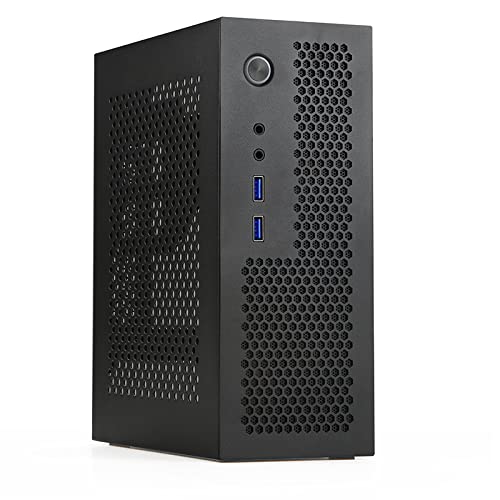
Goodisory 3.8L Mini-ITX Case
Best for: ultra-portable Mini-ITX desktop builds
- Motherboard Support
- Mini-ITX
- Case Volume
- 3.8L
- Dimensions
- 7.4 × 3.5 × 9 inches
- Weight
- 2.6 pounds
View on Amazon: Goodisory 3.8L Mini-ITX Case Affiliate link
The Goodisory Mini-ITX 3.8L Compact PC Case is a small-form-factor chassis measuring 9 by 7.4 by 3.5 inches and weighing 2.6 pounds. It accommodates a Mini-ITX motherboard and a compact Flex power supply. Front panel ports include two USB 3.0 ports and HD audio jacks. Depending on your top drive selection, CPU cooler clearance ranges from 45mm to 75mm. This setup suits you if you need a portable desktop for travel or tight spaces.
Pros
- Compact 3.8-liter volume and lightweight 2.6-pound frame
- Front I/O features two USB 3.0 ports and HD audio
- Built-in cutouts for two Wi-Fi antenna mounts
- Ventilation holes across panels including the front
Cons
- Requires a Flex power supply rather than standard ATX
- Limited to a single PCIe expansion slot
- CPU cooler clearance restricted to a maximum of 75mm
Good fit if
- You build with a Mini-ITX board and a Flex power supply.
- You want a 3.8-liter enclosure you can pack into luggage or a backpack.
- You use low-profile CPU coolers under 75mm.
Skip if
- You plan to use a standard ATX power supply.
- You require more than one PCIe expansion card.
- You need a CPU cooler taller than 75mm.
Verdict: Goodisory Mini-ITX 3.8L Compact PC Case provides an ultra-dense 3.8-liter steel enclosure tailored for Mini-ITX motherboards and Flex power supplies. It delivers essential front connectivity and ventilation holes for ultra-compact desktop builds.

Apevia Phenom Micro-ATX Case with 3 ARGB Fans
Best for: Micro-ATX builders wanting synchronized ARGB lighting
- Case Type
- Micro-ATX
- Side Panel
- Tempered Glass
- Included Fans
- 3x 120mm ARGB
- Radiator Support
- 240mm
- Max GPU Length
- 340mm
- Use
- Gaming
View on Amazon: Apevia Phenom Micro-ATX Case with 3 ARGB Fans Affiliate link
The Apevia Phenom is a Micro-ATX mini-tower designed for compact setups that need addressable lighting out of the box. You get three pre-installed 120mm ARGB fans controllable via a top-panel button or a 3-pin motherboard header. Dual tempered glass panels showcase your components, while the interior accommodates graphics cards up to 340mm long and CPU coolers up to 155mm tall. It suits builders wanting integrated ARGB and modern front-panel connectivity.
Pros
- Three pre-installed 120mm ARGB fans with 3-pin motherboard sync
- Supports graphics cards up to 340mm in length
- Dual tempered glass front and side panels
- Front support for a 240mm liquid cooling radiator
Cons
- Maximum CPU cooler height is limited to 155mm
- Does not support standard ATX motherboards
Good fit if
- You want out-of-the-box ARGB fans with motherboard sync support.
- You plan to build with a Micro-ATX motherboard and a long GPU up to 340mm.
- You prefer dual tempered glass panels for viewing internal hardware.
Skip if
- You are building with a full-size ATX motherboard.
- You plan to install a CPU air cooler taller than 155mm.
Verdict: Apevia Phenom Micro-ATX Case with 3 ARGB Fans provides solid component clearance and triple addressable lighting fans for Micro-ATX builds. It balances dual-glass styling with room for a 240mm radiator and up to 340mm graphics cards.

MOROVOL Micro-ATX Panoramic Glass PC Case
Best for: Micro-ATX builds needing panoramic glass views
- Motherboard Support
- Micro-ATX
- Case Type
- Mid-Tower
- Side Panel
- Tempered Glass
- Included Fans
- 3 Fans
- Use
- Gaming
- Connectivity
- USB 3.0
View on Amazon: MOROVOL Micro-ATX Panoramic Glass PC Case Affiliate link
The MOROVOL Micro-ATX Panoramic Glass Case gives you a three-sided 270-degree tempered glass view of your internal hardware. It supports Micro-ATX motherboards and measures 13.39 inches deep, 10.87 inches wide, and 12.44 inches high. Three pre-installed fans provide ready cooling straight from the box, alongside a front-panel USB 3.0 port. This chassis suits you if you want a compact desktop showcase with immediate multi-fan airflow.
Pros
- 270-degree three-sided panoramic tempered glass panel
- Three pre-installed fans included out of the box
- Front-panel USB 3.0 port for peripheral connectivity
Cons
- Supports Micro-ATX motherboards only, excluding full ATX boards
- Lists only a single USB 3.0 port on the front panel
Good fit if
- You want a three-sided panoramic glass enclosure for your hardware.
- You build with a Micro-ATX motherboard and want pre-installed fans.
Skip if
- You need compatibility with a standard full-size ATX motherboard.
- You require multiple front-panel USB 3.0 ports.
Verdict: MOROVOL Micro-ATX Panoramic Glass Case provides a wide 270-degree multi-side view with three cooling fans ready out of the box. It gives Micro-ATX builders a dedicated display chassis without requiring separate fan purchases.

Egowz Open Frame PC Case
Best for: DIY test benches and compact builds
- Motherboard Support
- Micro-ATX, Mini-ITX
- Case Type
- Open Air Frame
- Radiator Support
- 120mm, 240mm
- Dimensions
- 18 × 13.4 × 8.83 inches
View on Amazon: Egowz Open Frame PC Case Affiliate link
The Egowz open frame case supports Micro-ATX and Mini-ITX motherboards with a compact footprint of 11.8 × 7.9 × 11 inches. It accommodates 120mm or 240mm liquid cooling radiators and air cooling. The aluminum alloy construction allows direct heat dissipation. You get flexible storage for two HDDs and one SSD. This chassis suits builders who prioritize easy access and hardware testing over enclosed protection.
Pros
- Supports Micro-ATX and Mini-ITX motherboards
- Compatible with 120mm or 240mm radiators
- Aluminum alloy open-frame construction
- Holds up to 2 HDDs and 1 SSD
Cons
- Only supports Micro-ATX and Mini-ITX sizes, excluding standard ATX
- Vertical GPU mounting requires a separate PCIe riser cable
- Open design offers no dust or noise insulation
Good fit if
- You need easy access for frequent hardware upgrades
- You are testing components on a workbench
- You prefer open-air cooling for high-performance builds
Skip if
- You require a fully enclosed case for dust protection
- You plan to install a standard ATX motherboard
- You want a quiet, noise-dampening environment
Verdict: The Egowz Open Frame PC Case fits DIY enthusiasts who value accessibility and cooling efficiency over a traditional enclosed chassis. It is ideal for test benches and compact Micro-ATX or Mini-ITX builds.

DARKROCK EC2 ATX Mid Tower
Best for: ATX builds needing Type-C and large GPU space
- Motherboard Support
- ATX, Micro-ATX, Mini-ITX
- Case Type
- Mid Tower
- Side Panel
- Tempered Glass
- Included Fans
- 1x Pre-Installed
- Radiator Support
- 360mm
- Max GPU Length
- 340 mm
View on Amazon: DARKROCK EC2 ATX Mid Tower Affiliate link
The DARKROCK EC2 is an ATX mid-tower case with a mesh front panel and tempered glass side. It supports up to 340 mm GPUs and 360 mm radiators. The chassis includes one pre-installed fan and Type-C connectivity. Magnetic dust filters are mounted on the top and bottom. This case suits builders who need modern ports and robust cooling options for high-end components.
Pros
- Type-C connectivity on the front panel
- Supports GPUs up to 340 mm in length
- Accepts up to 360 mm front radiators
- Mesh front panel for efficient airflow
- Magnetic dust filters on top and bottom
Cons
- Includes only one pre-installed fan
- Max GPU length is 340 mm
Good fit if
- You need Type-C connectivity for peripherals
- You plan to use a large graphics card
- You want a mesh front for cooling
Skip if
- You require multiple pre-installed fans
- You need support for GPUs longer than 340 mm
- You prefer a closed front panel design
Verdict: The DARKROCK EC2 ATX Mid Tower fits users who prioritize Type-C ports and strong cooling potential. It is a solid choice for mid-tower builds that require space for large GPUs and radiators.

Trunab ATX PC Tower Carrying Bag
Best for: Transporting ATX desktop towers safely
- Motherboard Support
- ATX
- Dimensions
- 20.5 × 9.8 × 19 inches
- Weight
- 2.89 pounds
View on Amazon: Trunab ATX PC Tower Carrying Bag Affiliate link
This is a mobile carrier for ATX and M-ATX desktop towers. It features a main compartment measuring 20 by 9 by 18.5 inches. The design includes multiple accessory pockets for cables and drives. Thickened PE foam padding provides all-around protection. The unit weighs 2.89 pounds and uses a padded shoulder strap for transport. It suits users who move their heavy PC towers regularly.
Pros
- Compatible with ATX and M-ATX chassis
- Includes accessory pockets for cables and drives
- Thickened PE foam inner padding for protection
- Adjustable padded shoulder strap and top handle
Cons
- No internal mounting rails or brackets for the tower
- Main compartment is not water-resistant
- Requires manual measurement to verify fit
Good fit if
- You need to transport a desktop tower frequently
- You want to store cables in the same bag
- You have an ATX or M-ATX case under 20 inches wide
Skip if
- You need a permanent desktop stand
- You want built-in cable management
- Your tower exceeds the internal dimensions
Verdict: Trunab ATX PC Carrying Case is a protective bag for moving heavy desktop towers. It fits users who travel with their PC hardware and need extra storage for peripherals.

DALAIBUKESI DIY Aluminum Open Frame Chassis
Best for: open-air server setups and hardware test benches
- Motherboard Support
- ITX, M-ATX, ATX, E-ATX
- Case Type
- Test Bench
- Max GPU Length
- Unlimited
- Use
- Server
- Dimensions
- 7.9 × 11.8 × 11 inches
- Weight
- 4.41 pounds
View on Amazon: DALAIBUKESI DIY Aluminum Open Frame Chassis Affiliate link
This DALAIBUKESI open-frame aluminum chassis serves as an open test bench or server frame. Measuring 11.8 by 11 by 7.9 inches and weighing 4.4 pounds, it accommodates graphics cards of unlimited length. You get broad component versatility with support for ATX, SFX, and 1U power supplies, alongside air or water CPU cooling. It suits you if you need accessible hardware mounting for server builds or regular component swaps.
Pros
- Accommodates graphics cards of unlimited length
- Supports ATX, SFX, and 1U power supplies
- Supports both water and air cooling setups
- Weighs 4.41 pounds with an open aluminum structure
Cons
- Requires DIY manual assembly
- Open frame provides no dust filtration or enclosed side panels
- No pre-installed cooling fans or front-panel ports listed
Good fit if
- You need an open-frame server chassis with unlimited graphics card clearance.
- You use an ATX, SFX, or 1U power supply in your build.
- You want an open test bench that supports water or air CPU cooling.
Skip if
- You want an enclosed PC case with pre-installed intake fans and dust filters.
- You prefer a pre-assembled chassis ready out of the box.
Verdict: DALAIBUKESI DIY Aluminum Open Frame Chassis delivers versatile power supply support and unrestricted GPU length for open-air server builds. It provides a lightweight aluminum layout if you need accessible hardware testing without panel constraints.

AKOZLIN ATX Mid-Tower Travel Case
Best for: Transporting ATX PCs safely
- Motherboard Support
- ATX
- Tower Size
- Full-Tower
- Dimensions
- 19.7 × 9.5 × 20 inches
- Weight
- 3.5 pounds
View on Amazon: AKOZLIN ATX Mid-Tower Travel Case Affiliate link
This is a padded carrying case for ATX mid-tower desktops. It measures 19.7 by 9.5 by 20 inches and weighs 3.5 pounds. The build uses water-resistant nylon with thick padding. It includes a main compartment and side pockets for accessories. A luggage strap allows attachment to suitcases. It suits users who move their systems frequently.
Pros
- Water-resistant nylon exterior
- Thick padded lining
- Luggage strap for transport
- Side pockets for accessories
Cons
- No internal mounting rails
- No included fans
- No RGB lighting
Good fit if
- You need to transport a PC often
- You want protection for travel
- You have an ATX mid-tower
Skip if
- You need a permanent desktop case
- You want pre-installed fans
- You need internal drive bays
Verdict: AKOZLIN ATX Mid-Tower Travel Case fits users who move their PC towers regularly. It keeps your hardware safe during transit.

SOEYi U320 Micro-ATX Portable Case with Handle
Best for: compact, portable Micro-ATX desktop builds
- Motherboard Support
- Micro-ATX, Mini-ITX
- Case Type
- Micro-ATX
- Max GPU Length
- 310mm
- Compatible Device
- CPU Cooler
- Dimensions
- 10.4 × 6.5 × 12.2 inches
View on Amazon: SOEYi U320 Micro-ATX Portable Case with Handle Affiliate link
The SOEYi Portable Micro-ATX Case is a compact chassis featuring a carrying handle, measuring 6.5 inches wide, 10.4 inches long, and 12.2 inches high. It supports Micro-ATX and Mini-ITX motherboards up to 245 by 245 mm. You get clearance for 310 mm graphics cards and 135 mm CPU coolers, plus mounting for either ATX or SFX power supplies. This chassis suits you if you need a transportable build with standard hardware support.
Pros
- Supports graphics cards up to 310 mm long
- Clearance for CPU coolers up to 135 mm in height
- Dual-mode bracket supports ATX and SFX power supplies
- Integrated carry handle for portability
Cons
- Fan mounts restricted to 8 cm or 9 cm sizes
- Tight layout creates component installation difficulties
Good fit if
- You need a portable Micro-ATX setup with an integrated handle.
- You use a graphics card under 310 mm and a CPU cooler under 135 mm.
- You want the option to use either an ATX or SFX power supply.
Skip if
- You plan to use standard 120 mm case fans.
- You require support for full-size ATX motherboards.
Verdict: SOEYi Portable Micro-ATX Case with Handle delivers compact mobility with clearance for a 310 mm GPU and 135 mm CPU cooler. It provides flexible power supply compatibility in an enclosure under 13 inches tall.

T.F.SKYWINDINTL Micro-ATX Mini-Tower with Handle
Best for: Compact portable Mini-ITX builds
- Motherboard Support
- Micro-ATX, Mini-ITX
- Case Type
- SFF Mini-Tower
- Side Panel
- Tempered Glass
- Radiator Support
- 180mm
- Max GPU Length
- 335mm
- Dimensions
- 13.6 × 6.22 × 11 inches
View on Amazon: T.F.SKYWINDINTL Micro-ATX Mini-Tower with Handle Affiliate link
This is a compact Mini-Tower chassis designed for Micro-ATX and Mini-ITX motherboards. It measures 345 by 158 by 280 millimeters, offering a small footprint. The build includes a removable tempered glass side panel and an orange carrying handle. You get one USB 3.0 port, one Type-C port, and audio jacks on the front. It supports a maximum GPU length of 335 millimeters and a 180mm radiator.
Pros
- Supports Micro-ATX and Mini-ITX motherboards
- Removable 3mm tempered glass side panel
- Built-in orange carrying handle for portability
- Front I/O includes USB 3.0 and Type-C
Cons
- Maximum GPU length is limited to 335mm
- Radiator support maxes out at 180mm
- Case width is only 158mm
Good fit if
- You need a small form factor build
- You want easy portability with a handle
- You use Mini-ITX or Micro-ATX components
Skip if
- You require ATX motherboard support
- You need a GPU longer than 335mm
- You want a 240mm or larger radiator
Verdict: T.F.SKYWINDINTL X2-B Mini-ITX Case fits users who prioritize a compact footprint and portable design for small form factor builds. It is ideal for those using Mini-ITX or Micro-ATX boards who do not need large graphics cards or extensive liquid cooling.

AeroCool Mid-Tower Dual-Chamber Panoramic Case
Best for: RGB-focused mid-tower builds
- Case Type
- Mid-Tower
- Side Panel
- Tempered Glass
- Included Fans
- 2x 12cm ARGB, 1x 12cm ARGB
- Radiator Support
- 360mm
- Max GPU Length
- 450mm
- Use
- Gaming
View on Amazon: AeroCool Mid-Tower Dual-Chamber Panoramic Case Affiliate link
The AeroCool P300C is a white mid-tower case with a dual-chamber layout. It includes three 12cm ARGB fans with infinity mirror effects. The design features full tempered glass on the front and side. You get support for 360mm radiators and GPUs up to 450mm long. This case suits builders who want high airflow and visible RGB lighting in a compact footprint.
Pros
- Three pre-installed 12cm ARGB fans with mirroring effects
- Full tempered glass front and side panels
- Supports up to 360mm radiators
- GPU clearance up to 450mm
Cons
- Mid-tower form factor limits total fan slots compared to larger towers
- Only includes three fans despite having nine total slots
Good fit if
- You want pre-installed ARGB lighting without extra purchases
- You need clearance for graphics cards up to 450mm
- You prefer a white dual-chamber aesthetic
Skip if
- You require a full-tower chassis for maximum expansion
- You plan to use more than three case fans
- You prefer a black color scheme over white
Verdict: AeroCool P300C White Mid-Tower delivers strong airflow and RGB visibility for mid-size builds. It fits users who prioritize GPU length and pre-installed lighting in a dual-chamber design.
Specifications side by side
| Spec | Thermaltake Versa H21 ATX Mid Tower | Zalman S3 Compact ATX Mid-Tower Case | Zalman T6 ATX Mid-Tower Case | Bgears b-Voguish ATX Case with 6 ARGB Fans | Goodisory 3.8L Mini-ITX Case | Apevia Phenom Micro-ATX Case with 3 ARGB Fans | MOROVOL Micro-ATX Panoramic Glass PC Case | Egowz Open Frame PC Case | DARKROCK EC2 ATX Mid Tower | Trunab ATX PC Tower Carrying Bag | DALAIBUKESI DIY Aluminum Open Frame Chassis | AKOZLIN ATX Mid-Tower Travel Case | SOEYi U320 Micro-ATX Portable Case with Handle | T.F.SKYWINDINTL Micro-ATX Mini-Tower with Handle | AeroCool Mid-Tower Dual-Chamber Panoramic Case |
|---|---|---|---|---|---|---|---|---|---|---|---|---|---|---|---|
| Motherboard Support | ATX | ATX | ATX, mATX, Mini-ITX | E-ATX, ATX, MicroATX, ITX | Mini-ITX | not stated | Micro-ATX | Micro-ATX, Mini-ITX | ATX, Micro-ATX, Mini-ITX | not stated | ITX, M-ATX, ATX, E-ATX | not stated | Micro-ATX, Mini-ITX | Micro-ATX, Mini-ITX | not stated |
| Case Type | Mid Tower | Mid-Tower | Mid-Tower | ATX | not stated | Micro-ATX | Mid-Tower | Open Air Frame | Mid Tower | not stated | Test Bench | not stated | Micro-ATX | SFF Mini-Tower | Mid-Tower |
| Side Panel | not stated | Acrylic | Mesh | not stated | not stated | Tempered Glass | Tempered Glass | not stated | Tempered Glass | not stated | not stated | not stated | not stated | Tempered Glass | Tempered Glass |
| Included Fans | not stated | 3x 120mm | 1x 120mm | 6x 120mm ARGB | not stated | 3x 120mm ARGB | 3 Fans | not stated | 1x Pre-Installed | not stated | not stated | not stated | not stated | not stated | 2x 12cm ARGB, 1x 12cm ARGB |
| Radiator Support | not stated | 120mm | not stated | not stated | not stated | 240mm | not stated | 120mm, 240mm | 360mm | not stated | not stated | not stated | not stated | 180mm | 360mm |
| Max GPU Length | not stated | 330mm | not stated | 380mm | not stated | 340mm | not stated | not stated | 340 mm | not stated | Unlimited | not stated | 310mm | 335mm | 450mm |
| Case Volume | not stated | not stated | not stated | not stated | 3.8L | not stated | not stated | not stated | not stated | not stated | not stated | not stated | not stated | not stated | not stated |
| Tower Size | Mid-Tower | Mid-Tower | Mid-Tower | not stated | not stated | not stated | not stated | not stated | Mid-Tower | not stated | not stated | Full-Tower | not stated | Mini-Tower | Mid-Tower |
| Fan Size | not stated | 120mm | 120mm | 120mm | not stated | 120mm | not stated | not stated | 120mm | not stated | not stated | not stated | not stated | not stated | not stated |
| Use | not stated | not stated | Gaming | Gaming | not stated | Gaming | Gaming | not stated | Gaming | not stated | Server | not stated | not stated | not stated | Gaming |
| Lighting | not stated | not stated | not stated | ARGB | not stated | ARGB | not stated | not stated | not stated | not stated | not stated | not stated | not stated | not stated | RGB |
| Connectivity | not stated | USB 3.0 | USB 3.0 | USB 3.0 | not stated | not stated | USB 3.0 | not stated | Type-C | not stated | not stated | not stated | not stated | not stated | not stated |
| Compatible Device | not stated | not stated | not stated | not stated | not stated | not stated | not stated | not stated | Radiator | not stated | not stated | not stated | CPU Cooler | not stated | Radiator |
| Dimensions | 18.7 × 8.2 × 16.9 inches | 16.2 × 7.44 × 17.8 inches | 7.87 × 16.9 × 14.8 inches | 15.9 × 8.07 × 19.4 inches | 7.4 × 3.5 × 9 inches | 15.4 × 7.87 × 15.2 inches | 13.4 × 10.9 × 12.4 inches | 18 × 13.4 × 8.83 inches | 17.6 × 8.6 × 15.2 inches | 20.5 × 9.8 × 19 inches | 7.9 × 11.8 × 11 inches | 19.7 × 9.5 × 20 inches | 10.4 × 6.5 × 12.2 inches | 13.6 × 6.22 × 11 inches | not stated |
| Weight | 9.3 pounds | 8.38 pounds | 8 pounds | not stated | 2.6 pounds | 11.6 pounds | 10.7 pounds | not stated | not stated | 2.89 pounds | 4.41 pounds | 3.5 pounds | not stated | not stated | not stated |
| Size | H21 | 16.22 x 7.44 x 17.76 inches | T6 | not stated | not stated | PHENOM BLACK | 13.39"D x 10.87"W x 12.44"H | M-ATX | ATX/Micro-ATX/Mini-ITX | 20.5" L x 20" W x 19" H | 2.M-ATX | L19.7"xW9.5"xH19" | not stated | 345*158*280mm | not stated |
| Color | Black | Acrylic | Black | Black | Black | Black | Black | Black | Black | Black | Black | Black | Black | black | White |
| Model | CA-1B2-00M1NN-00 | not stated | T6 | BG01725 | not stated | PHENOM-BK | V3 | MATX | not stated | 1 | not stated | ZhuJiBagAK-BK-5024 | not stated | X2-B | P300C/P500C |
What you give up at this price
Cases under $50 focus on essential component support and baseline cooling. You get standard ATX or Micro-ATX compatibility with included fans. However, the data shows modest build materials. Most use steel frames without premium finishes. Side panels are often acrylic or basic tempered glass. Connectivity is limited to USB 3.0 ports. You sacrifice advanced cable management, dust filtration depth, and high-end airflow optimization. Radiator support is restricted to smaller sizes, limiting liquid cooling options for high-performance builds.
- Most cases use steel frames with basic acrylic or tempered glass side panels rather than premium materials.
- Included fans are typically 120mm, limiting airflow potential compared to larger 140mm or 200mm options.
- Radiator support is restricted to smaller sizes, preventing installation of large liquid cooling loops.
- Connectivity is limited to USB 3.0 ports, lacking advanced features like USB-C or high-speed data transfers.
When your chosen chassis lacks preinstalled cooling, you can compare specifications for a fan under 50 to match its mount sizes and CFM ratings.
How We Selected Cases
We scan Amazon listings for products under $50. We only show one size or variant per product family. This keeps the list clean and focused on distinct options. We order items by availability first. Then we use overall rating weighted by count. Finally, we check how many specs meet your needs.
All details come from published listing specifications. We do not handle the cases. Prices and stock are live on the page and refresh daily. A product stays in this guide only while its price remains under $50. The list changes as prices shift. You can trust the specs to guide your choice.
Check Tower Size and Dimensions
-
Verify Tower Dimensions
Measure your desk space before buying. The Zalman S3 Compact ATX Mid-Tower Case measures 16.22 x 7.44 x 17.76 inches. This size fits standard desks. Smaller cases like the Goodisory 3.8L Mini-ITX Case are only 3.5 inches wide. They suit tight spaces. Larger cases need more room. Check the width, height, and length specs. Ensure the case fits your intended location. Do not guess the size. Use the exact dimensions provided in the product data.
-
Match Motherboard Support
Your case must support your motherboard size. The Bgears b-Voguish ATX Case supports E-ATX boards. It is wide enough for larger boards. The Apevia Phenom Micro-ATX Case fits Micro-ATX boards only. It is too small for ATX. The Goodisory case fits Mini-ITX boards. Check the attributes list for this spec. Buying the wrong size means your board will not fit. Always compare your motherboard form factor to the case support list. This is the most critical fit check.
-
Check Graphics Card Clearance
Long graphics cards need space. The Zalman S3 Compact ATX Mid-Tower Case holds cards up to 330mm. The Apevia Phenom supports up to 340mm. The MOROVOL Mid-Tower Mesh Case limits cards to 300mm. If your GPU is longer than the spec, it will not fit. Check the length clearance in the specs. Measure your current GPU or planned GPU. Compare it to the case limit. Do not assume all mid-towers fit long cards. Verify the exact millimeter limit in the data.
-
Count Included Fans
Included fans save you money and time. The Zalman S3 Compact ATX Mid-Tower Case includes three 120mm fans. The Bgears b-Voguish ATX Case includes six ARGB fans. The MOROVOL Mid-Tower Mesh Case has four RGB fans. These fans provide immediate airflow. You do not need to buy extras. Check the fan count in the attributes. More fans mean better cooling potential. Look for 120mm or 140mm fan sizes. They are standard and efficient. Verify the size matches your needs.
-
Assess Side Panel Type
Side panels affect visibility and airflow. The Apevia Phenom Micro-ATX Case has dual glass panels. It shows off your build. The MOROVOL Mid-Tower Mesh Case has a tempered glass side. The DALAIBUKESI Mini-ITX Open Frame Chassis has no side panel. It is an open bench style. Glass panels look nice but may not offer the best airflow. Mesh or open frames offer better air circulation. Choose based on whether you want to see your parts or prioritize cooling.
-
Check Connectivity Ports
Front ports matter for daily use. The Bgears b-Voguish ATX Case has USB 3.0. The MOROVOL Mid-Tower Mesh Case also includes USB 3.0. The DALAIBUKESI Mini-ITX Open Frame Chassis offers Type-C connectivity. Type-C is faster and reversible. Check the connectivity attributes. USB 3.0 is standard for data transfer. Type-C is modern and convenient. Ensure the case has the ports you need. Rear ports are on the motherboard. Front ports are on the case. You use front ports often.
Frequently asked questions
Which case supports the largest motherboards?
The Bgears b-Voguish ATX Case supports E-ATX motherboards, which are larger than standard ATX boards. It also includes six pre-installed 120mm fans and a 10-port hub for lighting control. The case measures 15.9 inches in length and 19.4 inches in height, providing ample space for large components and extensive cooling setups.
What is the smallest case on this list?
The Goodisory 3.8L Mini-ITX Case is the most compact option, measuring only 3.5 inches wide and 9 inches tall. It is designed specifically for Mini-ITX motherboards and Flex power supplies. This 2.6-pound steel enclosure is ideal for users who need an ultra-portable desktop build with minimal footprint.
Do any cases include pre-installed fans?
Yes, several cases include fans to improve airflow immediately. The Zalman S3 Compact ATX Mid-Tower Case comes with three 120mm fans. The Bgears b-Voguish includes six 120mm ARGB fans. The MOROVOL Micro-ATX Panoramic Glass Case also ships with three cooling fans ready for installation.
Which case offers the best port selection?
The DARKROCK EC2 ATX Mid Tower stands out with Type-C connectivity alongside standard USB 3.0 ports. This modern interface allows for faster data transfer and video output. Other cases like the Thermaltake Versa H21 and Zalman S3 offer USB 3.0 access but do not list Type-C support in their specifications.
Are there open-frame cases for testing?
Yes, the Egowz Open Frame PC Case and DALAIBUKESI DIY Aluminum Open Frame Chassis are designed for test benches. The Egowz model supports E-ATX boards and offers easy accessibility. The DALAIBUKESI chassis provides a lightweight aluminum layout for unrestricted GPU length, making it suitable for open-air server or hardware testing environments.
Which case has the most glass panels?
The MOROVOL Micro-ATX Panoramic Glass Case features a 270-degree multi-side view with both tempered and panoramic glass panels. The AeroCool Mid-Tower Dual-Chamber also uses tempered and panoramic glass for wide visibility. These designs prioritize aesthetic display, allowing you to view your internal components from multiple angles.
Can I carry these cases easily?
Several options include handles for portability. The SOEYi U320 Micro-ATX Portable Case has a built-in handle and fits a 310 mm GPU. The T.F.SKYWINDINTL Mini-Tower also includes a handle for compact mobility. These designs allow you to transport your desktop setup safely without needing external carrying bags.