The Best Cooler Master Case Fans in 2026: 8 Picks
As an Amazon Associate we earn from qualifying purchases. Links on this page are affiliate links.
Finding the right cooler master case fan depends on the mounting dimensions and airflow needs of your chassis. Cooler Master offers 120mm, 140mm, and 200mm models in black and white finishes, featuring options like dual-ring addressable RGB illumination or non-illuminated static pressure designs.
The Cooler Master MF200R 200mm ARGB Fan leads our list because it provides high-coverage airflow, motherboard ARGB synchronization, and jam detection for large cases requiring 200mm mounts. We compared 8 models strictly using the specifications published on the listings to help you match the right fan size, speed range, and lighting design to your build.
Quick picks
Our 8 picks

Cooler Master MF200R 200mm ARGB Fan
Best for: large cases requiring 200mm ARGB cooling
- Fan Size
- 200 mm
- Lighting Type
- ARGB
- Dimensions
- 7.87 × 7.87 × 0.98 inches
- Weight
- 8.96 ounces
The Cooler Master MasterFan MF200R is a large 200mm intake or exhaust fan built for PC cases with oversized mounts. You get addressable RGB lighting that connects with standard motherboard systems, along with integrated sound-absorbing rubber pads to lower vibration noise. Its hybrid blade design balances static pressure and airflow, while an onboard smart sensor prevents cable snag damage. It suits you if your chassis accommodates 200mm cooling mounts.
Pros
- Addressable RGB certified with Asus Aura, ASRock RGB, and MSI RGB
- Sound-absorbing rubber pads to reduce operational noise
- Smart fan sensor provides jam protection against snagged cables
- Hybrid blade design balances static pressure and airflow
Cons
- Large 200mm frame does not fit standard 120mm or 140mm mounts
- No standalone hardware RGB controller listed in specifications
Good fit if
- You have a PC case that supports 200mm fan mounts.
- You use an Asus Aura, ASRock RGB, or MSI RGB motherboard setup for lighting sync.
- You want built-in jam protection to prevent snagged cable damage.
Skip if
- You only have mounting positions for standard 120mm or 140mm fans.
- You require an included standalone LED controller for lighting control.
Verdict: Cooler Master MasterFan MF200R 200mm ARGB Fan delivers high-coverage airflow with ARGB motherboard synchronization for compatible 200mm case mounts. Integrated rubber dampening and jam detection ensure quiet, snag-free operation.

Cooler Master MF120 Halo Dual-Ring ARGB Fan
Best for: balanced 120mm dual-ring ARGB case cooling
- Fan Size
- 120 mm
- Max Airflow
- 47.2 CFM ± 10%
- Static Pressure
- 1.6 mmH2O ± 10%
- Noise Level
- 30 dBA
- Lighting Type
- Addressable RGB
- Dimensions
- 4.72 × 4.72 × 0.98 inches
The Cooler Master MasterFan MF120 Halo is a 120mm case fan designed for balanced ventilation and customizable aesthetics. It delivers 47.2 CFM of airflow and 1.6 mmH2O of air pressure, operating at noise levels between 6 and 30 dBA. With 24 addressable RGB LEDs split across two rings, it suits you if you need standard-sized intake or exhaust cooling with motherboard-controlled dual-zone lighting.
Pros
- Dual-loop design with 24 individually controlled ARGB LEDs
- Hybrid blade delivers 47.2 CFM airflow and 1.6 mmH2O air pressure
- Includes smart jam protection sensor to prevent cable damage
- Comes with addressable RGB connector clips for secure motherboard connections
Cons
- Maximum noise reaches 30 dBA at full speed
- Airflow is limited to 47.2 CFM
Good fit if
- You want dual-loop ARGB lighting with 24 addressable LEDs.
- You need a standard 120mm fan for intake or exhaust with jam protection.
Skip if
- You need higher airflow than 47.2 CFM for high-heat enclosures.
- You want maximum noise levels capped below 30 dBA.
Verdict: Cooler Master MF120 Halo Dual-Ring ARGB Fan balances 47.2 CFM airflow with 1.6 mmH2O pressure and 24-LED dual-ring illumination. It provides dependable cooling and standard 120mm case mounting.

Cooler Master SickleFlow 200mm ARGB Fan
Best for: large cases requiring quiet 200mm ARGB cooling
- Fan Size
- 200mm
- Max Fan Speed
- 800 RPM
- Connector Type
- 4-pin PWM
- Lighting Type
- aRGB Gen2
- Dimensions
- 4.72 × 4.72 × 1 inches
- Weight
- 1.1 pounds
This is a 200mm PC case fan featuring addressable RGB Gen2 lighting and a 4-pin PWM header. Its dynamic speed ranges from 0 to 800 RPM, allowing silent idle operation. The unit incorporates frosted blades for light diffusion and a two-tier sealed bearing to block dust and oil leaks. It suits you if your chassis has 200mm fan mounts and you need low-noise airflow with synchronized lighting.
Pros
- Dynamic 4-pin PWM control ranging from 0 to 800 RPM
- Addressable Gen2 RGB illumination with frosted light-diffusing blades
- Two-tier bearing seal engineered to prevent dust intrusion and oil leakage
- Hybrid frame with anti-resonance mounting to curb vibration
Cons
- Maximum rotational speed is limited to 800 RPM
- Requires a PC chassis with dedicated 200mm fan mounts
Good fit if
- You have a PC chassis built to accommodate 200mm cooling fans.
- You want a zero-RPM idle capability via 4-pin PWM control.
- You use addressable Gen2 RGB lighting setups.
Skip if
- You only have standard 120mm or 140mm mounting locations.
- You need fan speeds higher than 800 RPM.
Verdict: Cooler Master SickleFlow 200 ARGB Fan delivers quiet airflow through a broad 0 to 800 RPM range and an anti-resonance frame. It provides large-case systems with controllable Gen2 addressable lighting and sealed bearing hardware.

Cooler Master MasterFan Halo2 140mm ARGB Fan
Best for: 140mm PC case mounts needing ARGB lighting
- Fan Size
- 140mm
- Lighting Type
- ARGB Gen2
- Dimensions
- 5.51 × 5.51 × 0.98 inches
View on Amazon: Cooler Master MasterFan Halo2 140mm ARGB Fan
This Cooler Master MasterFan MF140 Halo2 is a 140mm black case fan built with ARGB lighting. Its frame measures 5.51 inches long, 5.51 inches wide, and roughly 0.98 inches thick. You get a larger 140mm footprint compared to 120mm alternatives, providing coverage for standard 140mm mounts. It suits your build if you have compatible 140mm fan brackets and want addressable RGB lighting in a black frame.
Pros
- Standard 140mm mounting profile
- Integrated ARGB lighting
- Standard 0.98-inch frame thickness
Cons
- Requires chassis mounts sized for 140mm fans
- Airflow and noise level ratings are unlisted
Good fit if
- You have chassis brackets designed for 140mm fans.
- You want addressable RGB lighting with a black frame.
Skip if
- You need a smaller 120mm fan for limited mounts.
- You require a white fan to match your setup.
Verdict: Cooler Master MasterFan MF140 Halo2 ARGB Fan delivers addressable RGB lighting in a standard 140mm black casing. It is an ideal fit if your PC case supports 140mm mounting locations.

Cooler Master MF140 Halo² 140mm ARGB Fan
Best for: 140mm mounts needing dual-loop ARGB lighting
- Fan Size
- 140mm
- Max Fan Speed
- 2,050 RPM
- Lighting Type
- ARGB
- Dimensions
- 5.8 × 7.9 × 1.3 inches
- Weight
- 9.6 ounces
The Cooler Master MF140 Halo² 140mm ARGB Fan is a case and cooler fan built for 140mm mounts. It features dual-loop ARGB rings, dynamic PWM control, and enlarged fan blades housed in a hybrid frame design. You also get an upgraded driver IC to manage noise levels. This fan suits you if you want customizable lighting alongside standard 140mm liquid cooler or case ventilation.
Pros
- Dual-loop ARGB ring lighting
- Dynamic PWM speed control
- Enlarged fan blades with hybrid frame structure
- Upgraded driver IC designed to reduce fan noise
Cons
- Airflow CFM and decibel ratings are not provided
- Requires 140mm mounting space and will not fit 120mm brackets
Good fit if
- You want dual-loop ARGB illumination in a 140mm form factor.
- You require dynamic PWM speed regulation for cooling.
- You have a PC case or radiator with dedicated 140mm fan mounts.
Skip if
- You need a standard 120mm fan for your chassis.
- You want a non-RGB fan focused purely on utility.
Verdict: Cooler Master MF140 Halo² 140mm ARGB Fan combines dual-loop ARGB rings with dynamic PWM control for 140mm mounts. It provides balanced airflow and lighting for compatible chassis and liquid coolers.

Cooler Master MF120 Lite 120mm ARGB Fan 3-Pack
Best for: multi-fan case airflow with daisy-chained lighting
- Fan Size
- 120mm
- Max Fan Speed
- 1,750 RPM
- Connector Type
- 4-pin PWM
- Lighting Type
- ARGB
- Dimensions
- 4.7 × 4.7 × 1 inches
- Weight
- 4.8 ounces
View on Amazon: Cooler Master MF120 Lite 120mm ARGB Fan 3-Pack
This package provides three 120mm Cooler Master cooling fans equipped with addressable RGB lighting. Each fan features a 4-pin PWM header supporting speeds from 650 to 1,750 RPM, giving you precise control over your system's airflow and sound output. Frosted blades disperse the internal lighting across the frame. Daisy-chain ARGB connectors let you link lighting directly to your motherboard, making this pack suitable if you need multi-fan case ventilation.
Pros
- PWM 4-pin header supports a speed range of 650 to 1,750 RPM
- ARGB header extender allows daisy-chaining directly to a motherboard or splitter
- Frosted curved blades disperse lighting across the frame
Cons
- Maximum rotational speed tops out at 1,750 RPM
- No standalone hardware lighting controller listed in the specs
Good fit if
- You need three matching 120mm PWM fans to populate intake or exhaust slots
- You want daisy-chainable ARGB connections to simplify cable routing to your motherboard
Skip if
- You require larger 140mm or 200mm fan mounting points
- You need fan speeds exceeding 1,750 RPM for high-resistance cooling tasks
Verdict: Cooler Master MF120 Lite 120mm ARGB Fan 3-Pack delivers standard 120mm airflow with a 650 to 1,750 RPM range and easy daisy-chain lighting. It gives you three coordinated PWM fans designed for direct motherboard control.

Cooler Master MasterFan M120 Static Pressure Fan
Best for: dense radiators and restrictive heatsink setups
- Bearing Type
- Magnetic Dynamic Bearing
- Dimensions
- 4.7 × 4.7 × 1.18 inches
- Weight
- 8.8 ounces
View on Amazon: Cooler Master MasterFan M120 Static Pressure Fan
The Cooler Master MasterFan M120 is a 120mm black case fan built for high static pressure setups. It features liquid crystal polymer blades designed to resist flexing at speed, an aluminum frame for structural rigidity, and a magnetic dynamic bearing for smooth rotation. Measuring 1.18 inches thick, it suits you if you need a sturdy fan to push air through dense heatsinks, liquid cooling radiators, or restrictive intake panels.
Pros
- Liquid crystal polymer blades prevent flex under pressure
- Rigid aluminum frame provides structural stability
- Magnetic dynamic bearing reduces rotor friction
- Engineered for high static pressure through radiators and heatsinks
Cons
- No integrated RGB or LED lighting
- Requires 1.18 inches of mounting depth clearance
Good fit if
- You need high static pressure to push air through radiators or dense heatsinks.
- You want durable construction featuring an aluminum frame and liquid crystal polymer blades.
- You have at least 1.18 inches of clearance for fan mounting depth.
Skip if
- You want addressable RGB lighting for your build.
- You have slim mounting locations that cannot accommodate a 1.18-inch thick fan.
Verdict: Cooler Master MasterFan M120 Static Pressure Fan delivers rigid aluminum construction and flex-resistant blades for demanding heatsinks and radiators. It provides a focused, non-illuminated cooling option for enclosures with sufficient depth clearance.
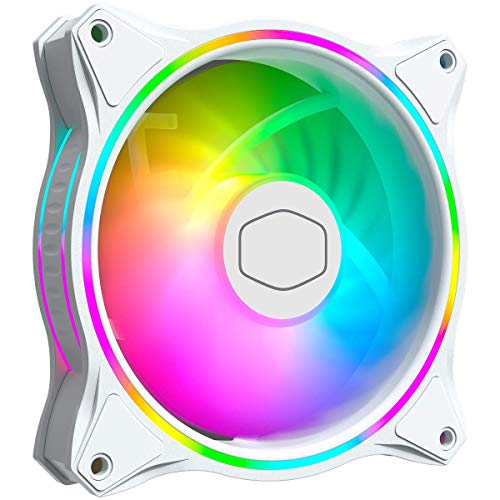
Cooler Master MasterFan MF120 Halo White 120mm ARGB Fan
Best for: white PC builds needing dual-ring ARGB
- Fan Size
- 120mm
- Max Fan Speed
- 1,800 rpm
- Connector Type
- PWM
- Lighting Type
- ARGB
- Dimensions
- 5.1 × 1.1 × 8.2 inches
View on Amazon: Cooler Master MasterFan MF120 Halo White 120mm ARGB Fan
The Cooler Master MF120 Halo White 120mm ARGB Fan is an all-white case fan built for standard 120mm mounts. You get dual-ring ARGB lighting with 24 addressable LEDs, hybrid static pressure blades, and a PWM speed range spanning 650 RPM to 1,800 RPM. It suits you if you want customizable lighting, wide motherboard sync support, and balanced airflow for mesh panels or liquid cooling radiators in a white PC build.
Pros
- Duo-ring ARGB lighting featuring 24 individually controlled LEDs
- Dynamic PWM speed control ranging from 650 RPM to 1,800 RPM
- Hybrid static pressure blade design built for radiators and mesh chassis
- Sound-absorbing materials and noise reduction construction
- Direct compatibility with Aura, Mystic Light, and Polychrome Sync
Cons
- Top rotational speed stops at 1,800 RPM
- Minimum operating speed starts at 650 RPM with no zero-RPM setting
Good fit if
- You want an all-white 120mm fan with 24 addressable LEDs across two rings.
- You sync illumination via Aura, Mystic Light, or Polychrome Sync headers.
- You need PWM regulation between 650 RPM and 1,800 RPM for radiators or mesh intake.
Skip if
- You need a larger 140mm or 200mm mounting format.
- You require cooling speeds higher than 1,800 RPM for heavy thermal loads.
- You prefer an all-black frame to blend into a dark case interior.
Verdict: Cooler Master MF120 Halo White 120mm ARGB Fan delivers balanced static pressure airflow and distinct dual-ring lighting for white setups. It operates reliably between 650 RPM and 1,800 RPM with broad motherboard RGB synchronization.
Specifications side by side
| Spec | Cooler Master MF200R 200mm ARGB Fan | Cooler Master MF120 Halo Dual-Ring ARGB Fan | Cooler Master SickleFlow 200mm ARGB Fan | Cooler Master MasterFan Halo2 140mm ARGB Fan | Cooler Master MF140 Halo² 140mm ARGB Fan | Cooler Master MF120 Lite 120mm ARGB Fan 3-Pack | Cooler Master MasterFan M120 Static Pressure Fan | Cooler Master MasterFan MF120 Halo White 120mm ARGB Fan |
|---|---|---|---|---|---|---|---|---|
| Fan Size | 200 mm | 120 mm | 200mm | 140mm | 140mm | 120mm | not specified | 120mm |
| Max Fan Speed | not specified | not specified | 800 RPM | not specified | 2,050 RPM | 1,750 RPM | not specified | 1,800 rpm |
| Max Airflow | not specified | 47.2 CFM ± 10% | not specified | not specified | not specified | not specified | not specified | not specified |
| Static Pressure | not specified | 1.6 mmH2O ± 10% | not specified | not specified | not specified | not specified | not specified | not specified |
| Noise Level | not specified | 30 dBA | not specified | not specified | not specified | not specified | not specified | not specified |
| Connector Type | not specified | not specified | 4-pin PWM | not specified | not specified | 4-pin PWM | not specified | PWM |
| Bearing Type | not specified | not specified | not specified | not specified | not specified | not specified | Magnetic Dynamic Bearing | not specified |
| Lighting Type | ARGB | Addressable RGB | aRGB Gen2 | ARGB Gen2 | ARGB | ARGB | not specified | ARGB |
| Lighting | ARGB | ARGB | ARGB | ARGB | ARGB | ARGB | not specified | ARGB |
| Dimensions | 7.87 × 7.87 × 0.98 inches | 4.72 × 4.72 × 0.98 inches | 4.72 × 4.72 × 1 inches | 5.51 × 5.51 × 0.98 inches | 5.8 × 7.9 × 1.3 inches | 4.7 × 4.7 × 1 inches | 4.7 × 4.7 × 1.18 inches | 5.1 × 1.1 × 8.2 inches |
| Weight | 8.96 ounces | 6.35 ounces | 1.1 pounds | not specified | 9.6 ounces | 4.8 ounces | 8.8 ounces | not specified |
| Color | ARGB | ARGB | 200mm | Black | Black | Black | Black | White |
| Model | R4-200R-08FA-R1 | MFL-B2DN-18NPA-R1 | MFX-B3DN-08NP2-R1 | MFL-B4DN-16NP2-R2 | MFL-B4DW-16NP2-R2 | MFW-B2DN-17NPA-R1 | MFZ-P2DM-20NP2-R1 | MFL-B2DW-18NPA-R1 |
| Size | not specified | 120 | not specified | 140mm | 140mm ARGB | Large | MasterFan M120 | 120mm ARGB |
Cooler Master Fan Lineup at a Glance
For standard ventilation, the lineup divides into 120mm, 140mm, and 200mm sizes with addressable RGB illumination. You should choose the Cooler Master MF120 Halo Dual-Ring ARGB Fan or the Cooler Master MasterFan Halo2 140mm ARGB Fan if you need balanced airflow for everyday case mounts. If your chassis features oversize front intake brackets, the Cooler Master MF200R 200mm ARGB Fan provides broad airflow coverage.
For dense radiators and heatsinks rather than open case mounts, static pressure takes priority over lighting. The Cooler Master MasterFan M120 Static Pressure Fan suits systems requiring focused airflow through restrictive cooling fins, utilizing a non-illuminated design built with rigid aluminum framing.
Cooler Master Fan Coverage and Gaps
This selection suits PC builders needing 120mm, 140mm, or large 200mm cooling mounts. You can choose between dual-loop addressable RGB frames, standard illuminated blades, and a non-illuminated aluminum static-pressure model. Packaging options include single fans and a 120mm triple pack.
You should also account for clear gaps in this lineup. Compact form factors such as 80mm and 92mm fans are absent. Unlit options are limited strictly to 120mm, leaving no non-RGB options for 140mm or 200mm intakes. Additionally, white colorways and multi-fan kits are missing from the 140mm and 200mm sizes.
Key Specifications for Choosing Cooler Master Fans
-
Check Fan Frame Thickness
Depth clearance is critical when planning your cooling layout. Most standard case fans measure around 0.98 to 1.0 inch thick, fitting easily into front panels and roof brackets. However, specialized high-pressure fans can feature thicker profiles. For example, the Cooler Master MasterFan M120 Static Pressure Fan has a height of 1.18 inches due to its aluminum construction. You must measure the clearance between your case mounting brackets, motherboard heatsinks, and RAM before selecting a fan that exceeds standard depth dimensions.
-
Evaluate Operating RPM Range
You should examine the minimum and maximum rotation speeds to match your thermal needs and sound requirements. Fans with low minimum speeds can remain silent during idle computer usage. For instance, the Cooler Master SickleFlow 200mm ARGB Fan operates across a 0 to 800 RPM range, allowing the fan to stop spinning completely under light system loads. In contrast, standard 120mm units often spin from 650 up to 1,800 RPM. Choose wide ranges if you want aggressive airflow during heavy tasks.
-
Simplify Multi Fan Wiring
Installing multiple addressable RGB fans requires sufficient motherboard headers or dedicated hub ports. When you plan to fill several chassis mounts at once, look for fans that support integrated daisy-chain connections. The Cooler Master MF120 Lite 120mm ARGB Fan 3-Pack includes daisy-chain lighting connections, which link three fans directly to a single addressable RGB header. This reduces internal cable clutter and eliminates the need for separate splitters. Check your motherboard specs to confirm it provides a compatible 3-pin ARGB header.
-
Match Pressure and Airflow
You must choose between high-airflow fans for unrestricted ventilation and static-pressure fans for pushing air through tight obstacles. Unrestricted case exhaust requires high airflow measured in CFM. In contrast, mounting against liquid cooling radiators or dense dust filters requires static pressure measured in mmH2O. The Cooler Master MF120 Halo Dual-Ring ARGB Fan balances both roles by delivering 47.2 CFM of airflow alongside 1.6 mmH2O of static pressure. Check your case intake filters to determine whether you need specialized pressure ratings or standard case flow.
-
Look for Jam Protection
Large fan blades spinning inside tight cases risk snagging loose power cables or zip ties. When installing high-diameter cooling in cramped compartments, look for protective hardware safeguards. The Cooler Master MF200R 200mm ARGB Fan includes smart jam sensor detection alongside integrated rubber dampening pads. The sensor stops the motor automatically if an obstruction enters the blade path, preventing motor burnout and wire damage. The rubber corners absorb mechanical vibration before it transfers into the steel chassis panels, ensuring quieter overall system operation.
-
Match Frame Color Themes
You should verify the exterior frame color against your computer case interior to maintain visual consistency. Black fan frames blend into standard dark enclosures, but they can look mismatched inside all-white configurations. If you are building inside a white chassis, select a model specifically manufactured with a white housing and matching white blade materials. The Cooler Master MasterFan MF120 Halo White 120mm ARGB Fan provides a clean white housing that complements white case interiors while reflecting addressable RGB illumination evenly across the dual-ring lighting loops.
Frequently asked questions
What speed range does the Cooler Master SickleFlow 200mm ARGB fan support?
The Cooler Master SickleFlow 200mm ARGB fan operates across a range of 0 to 800 RPM. This wide range allows you to stop fan rotation completely or run at lower speeds during light use. The design also incorporates an anti-resonance frame and sealed bearing hardware to maintain quiet airflow across large chassis openings.
What airflow and static pressure does the Cooler Master MF120 Halo produce?
The Cooler Master MF120 Halo dual-ring ARGB fan delivers 47.2 CFM of airflow and 1.6 mmH2O of static pressure. You get balanced ventilation suitable for standard 120mm mounts. It pairs these airflow specifications with twenty-four LEDs arranged across dual lighting rings, providing targeted cooling along with illumination inside your enclosure.
How does the Cooler Master MF200R protect against cable snags?
The Cooler Master MF200R 200mm ARGB fan features integrated jam detection sensors to protect against snags. If foreign objects or loose cables touch the blades, the motor stops automatically to avoid blade breakage. It also includes integrated rubber dampening at the corners, which reduces vibration noise when installed on compatible 200mm mounts.
What is the operational speed range of the Cooler Master MF120 Halo White?
The Cooler Master MasterFan MF120 Halo White runs between 650 RPM and 1,800 RPM. This operational span provides reliable static pressure airflow adjustments for your system. The fan matches white PC cases and hardware while supporting addressable RGB synchronization across broad motherboard lighting interfaces using its integrated dual-ring LED arrangement.
What makes the Cooler Master MasterFan M120 suitable for dense heatsinks?
The Cooler Master MasterFan M120 utilizes rigid aluminum construction paired with flex-resistant blades. These materials prevent the fan structure from warping when pushing air through dense radiator fins or compact heatsinks. It provides dedicated static pressure cooling without lighting, making it a functional option if you have adequate clearance for its 1.18-inch frame height.
Can you connect multiple Cooler Master MF120 Lite fans together?
Yes, the Cooler Master MF120 Lite 3-pack supports daisy-chained lighting connections. You can link the addressable RGB cables together to control all three units directly through your motherboard header. The pack operates through PWM speed control spanning 650 to 1,750 RPM, letting you regulate thermal output and noise evenly across all installed 120mm mounts.