Case Fans Buying Guide (2026): What Matters and 8 Picks
As an Amazon Associate we earn from qualifying purchases. Links on this page are affiliate links.
This case fan buying guide helps you select the right cooling hardware for your PC build. Choosing the proper fans maintains steady airflow, balances intake against exhaust, and prevents component thermal throttling. After reading this guide, you will be able to decide which fan dimensions, power connection interfaces, and mounting brackets fit your chassis layout.
The guide walks through key hardware decisions, including standard versus slim frame thicknesses, 4-pin PWM speed control, bearing designs, and centralized hub power distribution. You will determine whether your case requires standard 120mm or 140mm mounts, compact 80mm server frames, or large 180mm intake designs. The 8 recommended picks for 2026 were chosen strictly from their published specifications. You can examine factory measurements, RPM ranges, and bracket compatibility to establish balanced cooling for your internal components.
Our top pick: Noctua 8-Port Magnetic PWM Fan Hub.
Key Factors for Choosing Case Fans
Fan Frame Diameter and Mounts
Fan frame size determines whether a fan fits your PC chassis mounting rails. Standard PC cases commonly accept 120mm and 140mm fans, while server racks or compact enclosures require 80mm models. Unconventional enclosures can even take specialized 180mm designs. Larger fans push more volume at lower rotational speeds, which keeps your build running quietly during high workloads. Smaller fans fit constrained spaces but must spin faster to deliver sufficient airflow for demanding components. When you choose fan sizes, check your case manual for exact mounting locations on the front, top, and rear panels. Some chassis support multiple sizes on a single bracket, while others offer fixed screw spacings. For instance, the Noctua 140mm Chromax PWM Fan requires a dedicated 140mm mount and does not fit standard 120mm rails without an adapter. Choosing the largest size your frame supports maximizes cooling area, but selecting mismatched dimensions prevents proper installation.
- Chassis mounting points supporting 80mm, 120mm, 140mm, or 180mm fans
- Case rail spacing matching your intended fan diameter
Frame Thickness and Clearance
Fan depth directly impacts internal clearance near motherboards, memory modules, graphics cards, and liquid radiators. Standard PC case fans feature a 25mm thickness, which balances blade surface area and frame rigidity. Small form factor builds and dense enclosures often have minimal space between components, requiring slim fans measuring 15mm thick. Conversely, enterprise or specialized industrial cooling units can reach 32mm or 38mm in thickness to house larger motors. Slim fans allow installation in compact Mini-ITX cases where standard models block power supply cables or motherboard heat sinks. However, reduced depth means smaller fan blades, which can decrease static pressure compared to thicker alternatives. If you build in tight spaces, measure clearance above components carefully before choosing standard or slim profiles. For example, the Noctua 120mm Slim PWM Fan uses a 15mm frame to clear narrow gaps in space-constrained PC cases.
- Standard 25mm depth for typical case mounts
- Slim 15mm depth for compact builds with tight component clearances
Speed Control and RPM Range
Rotational speed, measured in revolutions per minute, dictates how fast fan blades move air through your case. Broad RPM ranges give you fine control over cooling performance and system acoustics. Modern fans typically connect to 4-pin motherboard headers using pulse-width modulation signals, allowing automated speed adjustments based on hardware temperatures. Some designs even support zero-RPM modes to halt the blades completely under light thermal loads. High-RPM options provide maximum cooling through high-resistance dust filters or dense server bays, but they generate substantial noise at peak speeds. Slower speeds prioritize quiet operation but may struggle to exhaust heat during prolonged heavy computing tasks. Balancing baseline idle speeds against peak ceiling speeds ensures your system stays cool without unnecessary noise. The ARCTIC 80mm High-Speed Server Fan, for instance, spans from 500 to 10,000 RPM to handle extreme thermal resistance in enterprise environments.
- 4-pin PWM control for dynamic speed adjustments
- Wide speed ranges or zero-RPM support for quiet idle performance
Bearing Type and Operational Life
Bearing design dictates fan longevity, rotational friction, and operational orientation inside your PC case. Common bearing mechanisms include sleeve bearings, dual ball bearings, and fluid dynamic bearings. Dual ball bearings resist high temperatures and operate reliably in continuous industrial or enterprise setups, though they exhibit audible motor hum at higher speeds. Fluid dynamic bearings utilize pressurized lubricant to minimize metal-on-metal contact. This design reduces mechanical noise and delivers exceptional operational life spans across horizontal and vertical mounting orientations. Basic sleeve bearings wear out quickly when mounted horizontally, whereas fluid dynamic and ball bearings maintain stability regardless of orientation. Choosing the right bearing depends on your hardware environment and runtime expectations. For instance, the Scythe Wonder Tornado 120 Slim Fan features a fluid dynamic bearing rated for 120,000 hours of continuous operation, providing dependable long-term cooling in tight desktop enclosures.
- Fluid dynamic bearings for quiet operation and flexible mounting angles
- Dual ball bearings for sustained high-temperature or continuous workloads
Power Distribution and Fan Hubs
Motherboards typically provide only three to five fan headers, which can restrict systems needing extensive case ventilation. Connecting multiple fans to a single motherboard header without external power risks exceeding the header's typical one-amp electrical rating. Dedicated fan hubs solve this by drawing direct power from the power supply unit via SATA connections while splitting a single motherboard control signal across all ports. This setup lets you synchronize multiple fans across intake and exhaust zones simultaneously. The trade-off involves routing additional power cabling and finding space inside the chassis to mount the distribution hub securely. Magnetic backing or adhesive pads simplify hub installation on steel case panels. For example, the Noctua 8-Port Magnetic PWM Fan Hub powers up to eight fans with a 54W SATA connection while maintaining central PWM speed control from one header.
- SATA power connections to prevent overloading motherboard headers
- Magnetic or adhesive mounting for clean chassis placement
Mounting Brackets and Case Adaptability
Chassis configurations do not always align with your desired fan placements, especially when retrofitting older enclosures or building custom layouts. Mounting brackets bridge the gap between non-standard case points and standard cooling hardware. Steel multi-size brackets enable the installation of 80mm, 92mm, or 120mm fans in locations lacking pre-drilled chassis holes. These accessories help you aim supplemental airflow toward specific components like graphics cards, storage drives, or voltage regulator modules. However, adding auxiliary brackets consumes expansion slots and requires adequate internal clearance to avoid physical conflicts with add-in cards. You must also verify that the bracket material provides sufficient rigidity to eliminate vibration against the chassis frame. For example, the SUNGOOYUE Steel Fan Mounting Bracket uses stainless steel with multiple mounting holes to secure 80mm, 92mm, or 120mm fans directly inside custom setups.
- Multi-hole spacing supporting 80mm, 92mm, and 120mm fans
- Rigid steel construction to prevent vibration against internal case panels
Common Types of Case Fans
Standard 140mm Case Fans
Standard 140mm case fans provide balanced cooling for cases with dedicated 140mm mounts and radiators. Models like the Noctua 140mm Chromax PWM Fan use a square 140mm profile measuring roughly 5.51 inches across and 0.98 inches thick. These fans run at rotational speeds up to 1500 RPM using 4-pin motherboard speed control. You get broad surface coverage that pushes air efficiently across radiators and internal hardware. This size suits you if your chassis includes native 140mm mounting rails. The main trade-off is frame clearance. These units cannot fit into smaller 80mm or 120mm mounting locations, requiring you to verify chassis rail spacing beforehand.
Slim 120mm Case Fans
Slim 120mm fans reduce frame thickness to approximately 15mm, or 0.59 inches, compared to standard 25mm designs. Examples like the Noctua 120mm Slim PWM Fan and Scythe Wonder Tornado 120 Slim Fan fit 120mm chassis positions where motherboard parts or small enclosures restrict depth. They deliver speeds up to 2000 RPM, support 4-pin PWM control, and can include fluid dynamic bearings or zero-RPM stop modes. This type suits you if you build inside compact, small-form-factor cases with limited component clearance. The primary trade-off is reduced frame depth. The thinner profile provides less overall blade surface than deeper designs, requiring higher RPMs to move comparable airflow through restricted spaces.
Compact 80mm Chassis Fans
Compact 80mm fans measure roughly 3.15 inches on each side, targeting smaller chassis mount locations and 2U server racks. Options range from standard-depth units like the Kingwin 80mm Black Cooling Fan to specialized enterprise units like the ARCTIC 80mm High-Speed Server Fan. These units can feature dual ball bearings and wide speed adjustments spanning 500 to 10,000 RPM for dense enterprise environments. This format suits you if you maintain compact desktop cases, server chassis, or targeted CPU cooler assemblies that lack space for larger fans. The main trade-off is air distribution area. Because 80mm frames have smaller blade diameters, high airflow demands extreme rotational speeds.
Extra-Large 180mm Intake Fans
Extra-large 180mm fans are built specifically for chassis designed with oversized cooling mounts. Models like the SilverStone 180mm Air Channeling Fan feature a thick 32mm frame and an integrated grille that directs focused airflow deep into the enclosure, reaching up to 100.27 CFM. This high-displacement design suits you if your enclosure features dedicated 180mm intake brackets and needs vast amounts of air moved across internal components. The primary trade-off is strict case compatibility. A 180mm frame exceeds standard 120mm and 140mm rail configurations, and the thicker 32mm housing requires considerable clearance, making these fans unusable in conventional, multi-purpose computer cases.
Common Case Fan Mistakes to Avoid
Choosing high-airflow fans for dense dust filters or radiators.
Airflow-optimized fans lose volume and effectiveness against resistance. Thick dust filters, tight mesh panels, and radiators block their output. Static-pressure-optimized fans push air through these obstructions better. Check the millimeter-of-water spec before buying intake fans for filtered vents. Use high static pressure specs for intakes and high-airflow ratings strictly for unobstructed exhaust mounts.
Connecting 3-pin and 4-pin fans to the same splitter cable.
Motherboard headers read tachometer signals from one fan on a splitter. Mixing 3-pin voltage-regulated fans with 4-pin pulse-width-modulation fans leads to erratic speed curves. The 3-pin fans often run at full speed constantly. Match your fan pin types across shared splitters and hubs. Verify whether your motherboard BIOS header is set to DC mode or PWM mode.
Assuming all case fans share standard 25mm frame thickness.
Standard case fans measure 25mm thick, but high-performance options reach 28mm or 30mm, while slim models measure 15mm. Extra thickness causes clearance conflicts with tall motherboard VRM heatsinks, memory modules, or thick graphics cards. Measure internal clearances between chassis rails and components before selecting thick fan profiles. Choose slim fans when clearance falls below 25mm.
Installing more exhaust fans than intake fans in filtered cases.
Having higher exhaust capacity than intake capacity creates negative air pressure inside your chassis. This imbalance draws unfiltered air and dust through every unsealed seam, bracket gap, and rear perforation. Configure your fan speeds and counts so filtered intake airflow exceeds exhaust airflow. Slightly positive pressure forces air outward through chassis cracks and keeps internal components clean.
Daisy-chaining too many fans onto a single motherboard header.
Most standard motherboard fan headers supply a maximum of 1.0 amp. High-speed fans draw significant startup and operating amperage. Connecting multiple fans to a single header via unpowered splitters can overload the circuit and damage header traces. Check total amperage draw against motherboard ratings. Use a dedicated SATA-powered fan hub when powering multiple fans from one speed signal.
Quick picks
Our 8 picks

Noctua 8-Port Magnetic PWM Fan Hub
Best for: managing multiple fans from one motherboard header
- Dimensions
- 1.69 × 0.49 × 3.66 inches
- Weight
- 1.09 ounces
This Noctua 8-port fan splitter lets you power and control up to eight PWM fans from a single motherboard header. It delivers up to 54W across its ports via a SATA power connection, or 24W through standard 4-pin power. Integrated safety fuses protect against short circuits, while four internal magnets attach it to steel panels. It suits builds needing centralized speed control for multiple intake and exhaust fans.
Pros
- Controls and powers up to 8 PWM fans simultaneously
- Provides up to 54W total power using SATA power input
- Integrated safety fuses guard against overcurrent and short circuits
- Mounts to steel panels using four integrated magnets
Cons
- Power delivery limited to 24W when using only the 4-pin input
- SATA input is restricted to 12V fans
- Magnetic attachment requires a steel chassis surface
Good fit if
- You need to run up to eight PWM fans from a single motherboard header.
- You want SATA power delivery up to 54W with built-in fuse protection.
- You have a steel case interior for quick magnetic mounting.
Skip if
- You need independent speed curves for each individual connected fan.
- You require more than 54W of total power draw across your fans.
Verdict: Noctua 8-Port PWM Magnetic Fan Hub provides safe, centralized distribution for up to eight cooling fans using a single PWM control signal. Its magnetic base and 54W SATA capacity make multi-fan cable routing straightforward in steel PC enclosures.

ARCTIC 80mm High-Speed Server Fan
Best for: 2U server chassis and high-resistance cooling
- Fan Size
- 80 mm
- Max Fan Speed
- 10000 rpm
- Max Airflow
- 173.30 m³/h
- Static Pressure
- 51 mmH₂O
- Connector Type
- 4-pin
- Bearing Type
- two ball bearings
The ARCTIC 80mm High-Speed Server Fan is an 80 mm by 38 mm cooling unit built for high-demand server and rack environments. It delivers up to 10,000 RPM, producing 51 mmH₂O of static pressure and 173.30 m³/h maximum airflow. Dual ball bearings handle dust and heat, while the 4-pin PWM connection also supports 2-pin and 3-pin headers. You will find it fits standard 2U server chassis for ventilation or radiator cooling.
Pros
- Delivers up to 51 mmH₂O static pressure and 173.30 m³/h airflow
- Wide operating range of 500 to 10,000 RPM via PWM or voltage control
- Dual ball bearings resist wear from heat and dust exposure
- Supports 4-pin, 3-pin, and 2-pin fan headers with a 30 cm cable
Cons
- 38 mm depth exceeds standard 25 mm consumer fan clearance
- 80 mm frame does not fit standard 120 mm or 140 mm fan mounts
Good fit if
- You need high static pressure cooling inside a 2U server chassis.
- You require an 80 mm fan capable of reaching 10,000 RPM.
- You operate in warm or dusty conditions requiring dual ball bearings.
Skip if
- You only have clearance for slim or standard 25 mm thick fans.
- You need mounting spacing for standard 120 mm or 140 mm PC cases.
Verdict: ARCTIC 80mm High-Speed Server Fan provides extreme static pressure and airflow for compact 2U server racks. Its dual ball bearings and wide 500 to 10,000 RPM control range make it a dedicated solution for dense enterprise hardware.

Noctua 140mm Chromax PWM Fan
Best for: 140mm case mounts and radiator cooling
- Fan Size
- 140mm
- Max Fan Speed
- 1500 RPM
- Noise Level
- 24.6 dB(A)
- Connector Type
- 4-pin PWM
- Dimensions
- 5.51 × 5.51 × 0.98 inches
- Weight
- 6.88 ounces
This 140mm cooling fan features a standard 25mm thickness, a 4-pin PWM connector, and a top rotational speed of 1500 RPM. It operates at an acoustic noise ceiling of 24.6 dB(A) and uses a square frame suitable for case mounts or water cooling radiators. It suits you if you need a standard 140mm intake or exhaust fan with swappable colored anti-vibration pads and automatic motherboard speed control.
Pros
- Max rotational speed of 1500 RPM with 4-pin PWM control
- Square 140mm frame fits cases and liquid cooling radiators
- Swappable anti-vibration pads in six colors
- Rated for more than 150,000 hours MTTF
Cons
- Requires a 140mm mounting position instead of standard 120mm mounts
- Maximum sound level reaches 24.6 dB(A) at full speed
Good fit if
- You have case mounts or radiators built for 140mm x 25mm fans.
- You want 4-pin PWM automatic speed control up to 1500 RPM.
- You want customizable corner pad accents in red, black, white, blue, yellow, or green.
Skip if
- You have a PC chassis restricted to 80mm or 120mm fan brackets.
- You need a slim profile thinner than standard 25mm thickness.
Verdict: Noctua 140mm PWM Black Fan delivers up to 1500 RPM with 4-pin motherboard speed control and interchangeable corner pads. Its square 140mm profile fits standard chassis mounts and radiators.

SUNGOOYUE Steel Fan Mounting Bracket
Best for: custom mounting of 80mm to 120mm fans
- Fan Size
- 120mm, 80mm
- Dimensions
- 4.72 × 1.97 × 1.97 inches
This SUNGOOYUE bracket is a stainless steel mounting accessory designed to hold 80mm, 92mm, or 120mm computer case fans. Measuring roughly 4.72 inches long by 1.97 inches wide and high, it features a rust-resistant baking paint finish and multiple hole patterns. It includes twelve screws across three types for installation. This suits you if you need to secure a cooling fan into custom positions inside your PC case.
Pros
- Supports 80mm, 92mm, and 120mm fan sizes
- Thickened stainless steel construction with baking paint finish
- Includes four long screws, four short screws, and four hex screws
- Multiple screw hole patterns for fan positioning
Cons
- Bracket only, does not include a cooling fan
- Does not support 140mm or larger fan sizes
Good fit if
- You need to mount an 80mm, 92mm, or 120mm fan in a non-standard location.
- You want a steel mounting bracket with included installation hardware.
Skip if
- You need an actual powered case fan rather than a mounting bracket.
- You are using 140mm or larger fans.
Verdict: SUNGOOYUE Steel Multi-Size Fan Mounting Bracket provides a solid stainless steel base for mounting 80mm, 92mm, or 120mm cooling fans. It offers multi-hole versatility and included hardware if your PC case setup requires custom fan placement.

Noctua 120mm Slim PWM Fan
Best for: slim clearance and small form factor builds
- Fan Size
- 120mm
- Max Fan Speed
- 1850 RPM
- Noise Level
- 23.9 dB(A)
- Connector Type
- 4-pin PWM
- Dimensions
- 4.72 × 4.72 × 0.59 inches
- Weight
- 9.52 ounces
This 120mm case fan features a slim 15mm thickness designed for compact enclosures, low-profile CPU coolers, and ITX setups where standard 25mm fans do not fit. It connects through a 4-pin PWM header, operating between 450 and 1850 RPM with a 0% PWM stop mode for silent operation. If you need quiet airflow in tight clearances without exceeding 23.9 dB(A) acoustic output, this unit meets those layout constraints directly.
Pros
- Slim 15mm depth fits compact spaces in ITX and HTPC enclosures
- Supports 0% PWM shutoff for semi-passive operation
- Wide operating range between 450 and 1850 RPM
- Includes interchangeable anti-vibration pads in six colors
Cons
- No integrated RGB or LED lighting included
- Maximum rotational speed is limited to 1850 RPM
Good fit if
- You have limited case clearance that requires a 15mm slim profile.
- You want a fan that stops spinning completely at 0% PWM signal.
- You want interchangeable colored corner pads to match your build accent.
Skip if
- You need integrated RGB lighting for your chassis cooling.
- You have adequate clearance to mount standard 25mm thick fans.
Verdict: Noctua 120mm Slim PWM Fan delivers quiet cooling for space-constrained cases where standard thickness fans cannot fit. Its wide speed range and zero-RPM stop support make it a precise solution for low-profile setups.

Scythe Wonder Tornado 120 Slim Fan
Best for: clearance-limited PC builds needing slim airflow
- Fan Size
- 120mm
- Max Fan Speed
- 2000RPM
- Connector Type
- 4-Pin PWM
- Bearing Type
- Fluid Dynamic Bearing
- Dimensions
- 4.72 × 0.59 × 4.72 inches
The Scythe Wonder Tornado is a low-profile 120mm case fan measuring 15mm thick. It uses a 4-pin PWM connector and spins up to 2000 RPM across nine curved blades. Inside, a fluid dynamic bearing with a metal shaft provides up to 120,000 hours of operation. You get standard 120mm mounting with half the standard depth. This suits you if you need intake or exhaust cooling inside clearance-constrained builds.
Pros
- Slim 15mm profile fits tight clearances
- Fluid dynamic bearing rated up to 120,000 hours
- 4-pin PWM connector supports speeds up to 2000 RPM
- Nine-blade layout structured for static pressure
Cons
- No integrated RGB or LED lighting
- No fan hub or adapter accessories listed
Good fit if
- You need a 120mm fan for a clearance-limited case.
- You want 4-pin PWM speed control up to 2000 RPM.
- You require a high-durability fluid dynamic bearing.
Skip if
- You prefer integrated RGB lighting on your case fans.
- You have room for standard 25mm thick cooling fans.
Verdict: Scythe Wonder Tornado 120mm Slim PWM Fan delivers 2000 RPM airflow in a space-saving 15mm frame. Its 120,000-hour fluid dynamic bearing makes it a durable choice for tight PC enclosures.
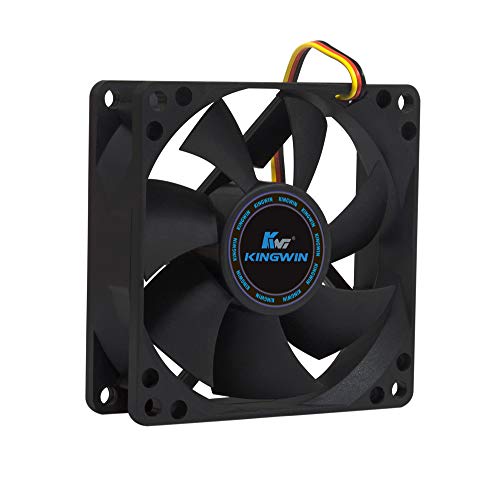
Kingwin 80mm Black Cooling Fan
Best for: compact cases requiring standard 80mm cooling fans
- Fan Size
- 80mm
- Bearing Type
- Long Life Bearing
- Compatible Device
- CPU Cooler
- Dimensions
- 0.98 × 3.15 × 3.15 inches
- Weight
- 2.43 ounces
The Kingwin 80mm Silent Case Fan gives you a compact cooling option for smaller chassis slots. Measuring 3.15 by 3.15 inches with a standard 0.98-inch depth, it fits legacy case brackets and 80mm CPU cooler mounts. Built with a long life bearing inside a black frame, this unit suits you if you need basic airflow in compact enclosures, small home servers, or multi-GPU mining rigs that utilize 80mm mounting patterns.
Pros
- Standard 80mm mount dimensions (3.15 x 3.15 x 0.98 inches)
- Long life bearing designed for extended operational life
- Fits standard PC chassis mounts, CPU coolers, and mining rigs
Cons
- Airflow CFM and RPM speed metrics omitted from specifications
- Lacks PWM speed control documentation
Good fit if
- You need a direct replacement fan for an 80mm bracket on a PC case or CPU cooler.
- You configure compact server enclosures or mining frames using 80mm fan spacing.
- You want a simple black fan equipped with a long life bearing.
Skip if
- You require standard 120mm or 140mm fan mounts for modern chassis layouts.
- You need precise PWM motherboard speed regulation based on thermal curves.
Verdict: Kingwin 80mm Silent Case Fan provides straightforward cooling for enclosures with standard 80mm mounts. Its compact frame and long life bearing make it a functional replacement for smaller chassis and server setups.
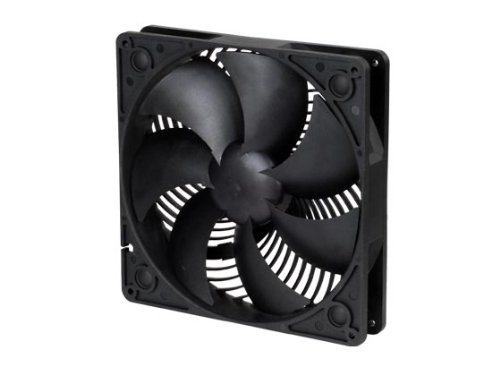
SilverStone 180mm Air Channeling Fan
Best for: Cases with 180 mm cooling fan mounts
- Fan Size
- 180mm
- Max Fan Speed
- 1200rpm
- Max Airflow
- 100.27 CFM
- Noise Level
- 30 decibels
- Dimensions
- 9 × 8 × 2 inches
- Weight
- 1 pounds
The SilverStone 180mm Air Channeling Case Fan is an oversized cooling fan designed for cases that support large mounts. It measures 180 by 180 by 32 mm and runs at speeds of 700 or 1200 RPM. It delivers up to 100.27 CFM of airflow at a 30-decibel noise rating. The built-in channeling grille acts as a fan guard to direct intake air directly toward your components.
Pros
- High airflow rating of 100.27 CFM
- Integrated grille acts as an air channel and fan guard
- Dual-speed operation at 700 RPM and 1200 RPM
- Wide fan blades designed to reduce air resistance
Cons
- Large 180 mm frame does not fit standard 120 mm or 140 mm fan mounts
- Thickness of 32 mm exceeds standard 25 mm fan clearances
- Noise level reaches 30 decibels at top speed
Good fit if
- You have a PC chassis equipped with dedicated 180 mm fan mounts.
- You want directional airflow up to 100.27 CFM pushed through an integrated grille.
Skip if
- You need a fan sized for standard 120 mm or 140 mm mount locations.
- You lack the chassis depth required for a 32 mm thick fan.
Verdict: SilverStone 180mm Air Channeling Case Fan provides focused airflow and up to 100.27 CFM for cases built specifically for 180 mm mounts. Its 32 mm thickness and integrated grille direct cooling directly to internal hardware.
Specifications side by side
| Spec | Noctua 8-Port Magnetic PWM Fan Hub | ARCTIC 80mm High-Speed Server Fan | Noctua 140mm Chromax PWM Fan | SUNGOOYUE Steel Fan Mounting Bracket | Noctua 120mm Slim PWM Fan | Scythe Wonder Tornado 120 Slim Fan | Kingwin 80mm Black Cooling Fan | SilverStone 180mm Air Channeling Fan |
|---|---|---|---|---|---|---|---|---|
| Fan Size | not specified | 80 mm | 140mm | not specified | 120mm | 120mm | 80mm | 180mm |
| Max Fan Speed | not specified | 10000 rpm | 1500 RPM | not specified | 1850 RPM | 2000RPM | not specified | 1200rpm |
| Max Airflow | not specified | 173.30 m³/h | not specified | not specified | not specified | not specified | not specified | 100.27 CFM |
| Static Pressure | not specified | 51 mmH₂O | not specified | not specified | not specified | not specified | not specified | not specified |
| Noise Level | not specified | not specified | 24.6 dB(A) | not specified | 23.9 dB(A) | not specified | not specified | 30 decibels |
| Connector Type | not specified | 4-pin | 4-pin PWM | not specified | 4-pin PWM | 4-Pin PWM | not specified | not specified |
| Bearing Type | not specified | two ball bearings | not specified | not specified | not specified | Fluid Dynamic Bearing | Long Life Bearing | not specified |
| Use | not specified | Server | not specified | not specified | not specified | not specified | not specified | not specified |
| Compatible Device | not specified | not specified | not specified | not specified | not specified | not specified | CPU Cooler | not specified |
| Dimensions | 1.69 × 0.49 × 3.66 inches | 3.15 × 1.5 × 3.15 inches | 5.51 × 5.51 × 0.98 inches | 4.72 × 1.97 × 1.97 inches | 4.72 × 4.72 × 0.59 inches | 4.72 × 0.59 × 4.72 inches | 0.98 × 3.15 × 3.15 inches | 9 × 8 × 2 inches |
| Weight | 1.09 ounces | 5.33 ounces | 6.88 ounces | not specified | 9.52 ounces | not specified | 2.43 ounces | 1 pounds |
| Color | Black | black | black | not specified | Black | not specified | Black | BLACK |
| Model | NA-FH1 | ACFAN00279A | NF-A14 PWM CH.BK.S | SUNGOOYUEoegt1q7hkd-11 | NF-A12x15 PWM CH.BK.S | WT1215FD20-P | CF-08LB | AP181 |
| Size | not specified | S8038-10K | pack of 1 | not specified | not specified | 2000RPM | 1 Count (Pack of 1) | not specified |
If you also need CPU cooling dimensions, our heatsink buying guide covers socket clearance specifications.
Frequently asked questions
How do you control multiple fans with one motherboard header?
You use a fan hub to centralize power and control signals. The Noctua 8-Port Magnetic PWM Fan Hub distributes up to eight fans from a single PWM signal. It includes a magnetic base for easy installation and draws 54W from a SATA connector. This simplifies cable routing in steel enclosures while maintaining synchronized speed control.
Which fan size is best for a 2U server chassis?
An 80mm high-speed server fan is ideal for 2U racks. The ARCTIC 80mm model delivers extreme static pressure for dense hardware. It features dual ball bearings and a wide speed range from 500 to 10,000 RPM. This dedicated solution ensures reliable cooling in compact enterprise environments with high air resistance.
What makes a slim fan suitable for tight builds?
Slim fans offer low thickness for space-constrained cases. The Noctua 120mm Slim PWM Fan measures only 0.59 inches thick. It supports zero-RPM stop and a wide speed range for quiet operation. This precise solution fits where standard thickness fans cannot, making it essential for small form factor builds.
Can I mount different fan sizes on a single bracket?
Yes, multi-size mounting brackets provide versatile installation options. The SUNGOOYUE Steel Bracket supports 80mm, 92mm, and 120mm fans. It offers a solid stainless steel base with multiple mounting holes. This hardware allows you to customize fan placement in setups that require non-standard or mixed-size cooling configurations.
How long do fluid dynamic bearing fans last?
Fluid dynamic bearings provide extended durability for continuous operation. The Scythe Wonder Tornado 120 Slim Fan features a bearing rated for 120,000 hours. It delivers 2000 RPM airflow in a slim 15mm frame. This long lifespan makes it a reliable choice for tight PC enclosures needing sustained performance.
What is the benefit of an air channeling fan?
Air channeling fans direct focused airflow to specific components. The SilverStone 180mm model provides up to 100.27 CFM with a 32mm thickness. Its integrated grille directs cooling directly to internal hardware. This design is optimized for cases with 180mm mounts, ensuring efficient heat removal for high-performance builds.
Which fan is best for replacing older 80mm mounts?
A standard 80mm fan works well for compact cases. The Kingwin 80mm Silent Case Fan provides straightforward cooling for standard mounts. It features a compact frame and long-life bearings. This functional replacement suits smaller chassis and server setups, offering reliable airflow without complex installation requirements.
Do interchangeable corner pads help with fan vibration?
Interchangeable corner pads can reduce vibration and noise transmission. The Noctua 140mm Chromax PWM Fan includes these pads for customizable mounting. It delivers up to 1500 RPM with 4-pin motherboard control. This feature allows you to adjust installation for better stability in standard chassis mounts and radiators.