Best Zalman PC Cases: 9 Models Compared
As an Amazon Associate we earn from qualifying purchases. Links on this page are affiliate links.
Choosing the right zalman PC case lineup option depends on your motherboard form factor and cooling needs. Zalman offers ATX mid-towers, compact Micro-ATX mini-towers, and accessories featuring ARGB or RGB lighting. The Zalman 4-Port ARGB Controller Hub ranks as the top pick for managing four 3-pin ARGB lighting devices.
We compared 9 products using only their published specifications to show you key hardware limits, dimensions, and fan mounts. Use these verified specs to find the best fit for your build.
Quick picks
Our 9 picks

Zalman 4-Port ARGB Controller Hub
Best for: managing four 3-pin ARGB lighting devices
- Lighting
- ARGB
- Connector Type
- 3-Pin
- Dimensions
- 1.77 × 1.14 × 0.55 inches
This Zalman ARGB controller hub gives you centralized lighting management for your chassis setup. It provides four 3-pin 5V ARGB ports and draws power via a SATA connection. Measuring 1.77 by 1.14 by 0.55 inches, the black unit mounts anywhere on steel panels using a magnetic base. You can switch patterns manually using your case reset button or synchronize directly with your motherboard. It suits you if you need expanded lighting headers.
Pros
- Provides four 5V 3-pin ARGB output headers
- Supports both standalone manual control and motherboard synchronization
- Magnetic base mounts directly onto steel case surfaces
- Connects to a 2-pin chassis reset or LED switch for pattern switching
Cons
- Controls lighting only with no fan speed or PWM power ports
- Limited to four 3-pin ARGB device connections
Good fit if
- You need to add four 3-pin ARGB connections to a PC case
- You lack an ARGB motherboard header and want manual button control via your case switch
- You want magnetic mounting inside a steel chassis
Skip if
- You need a controller that regulates fan speed and fan power
- You have more than four ARGB devices to connect
Verdict: Zalman 4-Port 3-Pin ARGB Fan Controller Hub expands your chassis lighting options by linking up to four 5V ARGB devices via SATA power. Its magnetic base and dual control options make it a straightforward lighting addition for your build.
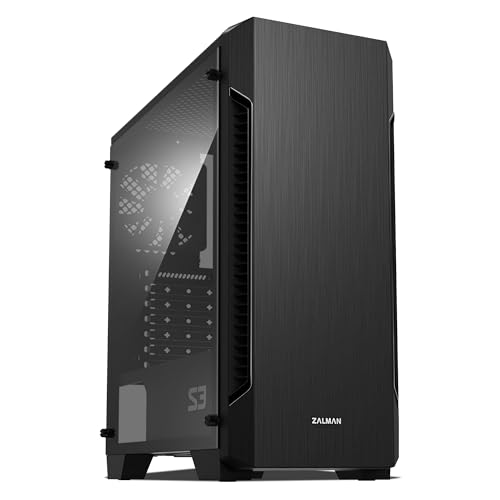
Zalman S3 Compact ATX Mid-Tower Case
Best for: air-cooled ATX systems needing multi-fan expansion
- Motherboard Support
- ATX
- Case Type
- Mid Tower
- Side Panel
- Acrylic
- Included Fans
- 3x 120mm
- Radiator Support
- 120mm
- Max GPU Length
- 330mm
The Zalman Compact ATX Mid-Tower with 3 Fans is an ATX chassis built for standard builds. You get three preinstalled 120mm fans out of the box, with mounting capacity for up to eight fans total. The interior accepts graphics cards up to 330mm in length. It suits you if you want a lightweight ATX enclosure with built-in airflow, dual dust filters, and a full acrylic side panel to display your components.
Pros
- Includes three 120mm fans
- Accommodates up to eight cooling fans
- Supports graphics cards up to 330mm long
- Includes top and bottom dust filters
Cons
- Front radiator clearance capped at 120mm
- Side window is acrylic instead of tempered glass
Good fit if
- You run a graphics card measuring 330mm or less.
- You need an ATX case configured with three included fans.
- You want removable dust filters on the top and bottom panels.
Skip if
- You plan to mount liquid cooling radiators larger than 120mm in front.
- You prefer a tempered glass side panel.
Verdict: Zalman Compact ATX Mid-Tower with 3 Fans provides three preinstalled fans and clearance for 330mm graphics cards. It gives you flexible air-cooling mounting options inside an ATX footprint.

Zalman T6 ATX Mid-Tower Case
Best for: standard builds requiring an optical drive bay
- Motherboard Support
- ATX, mATX, mini-ITX
- Case Type
- Mid Tower
- Included Fans
- 1x 120mm
- Dimensions
- 7.87 × 16.9 × 14.8 inches
- Weight
- 8 pounds
This Zalman chassis is a steel mid-tower case built for standard ATX, micro-ATX, and mini-ITX motherboards. It includes one preinstalled 120mm rear fan and offers space for up to four fans total, using mesh intake sections on the front and side panel. You get an external 5.25-inch optical drive bay alongside four internal drive mounts. It suits you if you need a basic workstation or everyday desktop housing standard components.
Pros
- External 5.25-inch bay supports an optical drive
- Fits ATX, micro-ATX, and mini-ITX motherboards
- Preinstalled 120mm rear exhaust fan
- Four total internal drive mounts for 2.5-inch and 3.5-inch storage
Cons
- Does not fit ATX motherboards with side-facing SATA ports
- Includes only one preinstalled fan out of four fan mounts
Good fit if
- You need an external 5.25-inch bay for an optical disc drive.
- You build with an ATX, micro-ATX, or mini-ITX motherboard that lacks side-facing SATA ports.
- You want support for up to four internal storage drives.
Skip if
- You use an ATX motherboard with side-facing SATA ports.
- You require multiple preinstalled cooling fans straight from the box.
Verdict: Zalman ATX Mid-Tower with Optical Drive Bay delivers essential workstation compatibility with dedicated space for optical media. It provides basic cooling expansion and multiple drive mounts for standard everyday builds.

Zalman Compact ATX Mid-Tower with Dual Fans
Best for: lightweight ATX builds with acrylic side panels
- Motherboard Support
- ATX
- Case Type
- Mid Tower
- Side Panel
- Acrylic
- Included Fans
- 2x 120mm
- Dimensions
- 8.11 × 18 × 15 inches
- Weight
- 7.9 pounds
This Zalman ATX mid-tower chassis comes with two preinstalled 120mm fans and a tinted acrylic side panel. Measuring 14.96 inches high, 18.03 inches wide, and 8.11 inches deep, it weighs 7.9 pounds and fits standard ATX motherboards. You get a vented front bezel and accessible case I/O ports. It suits you if you need a lightweight ATX enclosure with basic cooling and a window.
Pros
- Includes two preinstalled 120mm fans
- Tinted full acrylic side panel
- Lightweight frame at 7.9 pounds
- Standard ATX motherboard support
Cons
- Acrylic side panel rather than tempered glass
- Limited to two preinstalled fans out of the box
Good fit if
- You want an ATX chassis that includes two 120mm fans.
- You prefer a tinted acrylic side window.
- You need a mid-tower case that weighs under 8 pounds.
Skip if
- You require a tempered glass side panel.
- You want more than two preinstalled fans included.
Verdict: Zalman ATX Mid-Tower with Dual 120mm Fans provides standard ATX motherboard support and basic stock airflow in a lightweight frame. It is a practical pick if you want an acrylic window build without extra chassis weight.
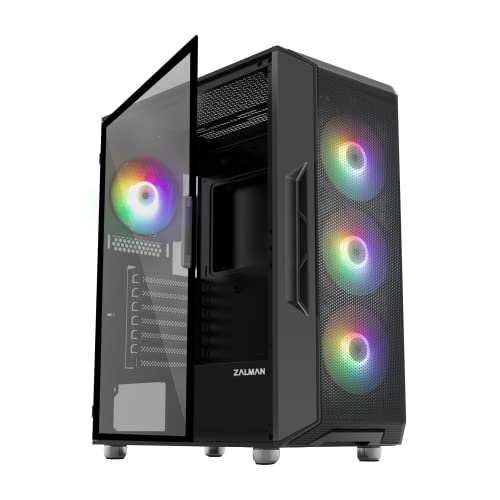
Zalman Mid-Tower ATX RGB Case
Best for: ATX builds needing multi-radiator liquid cooling support
- Case Type
- Mid-Tower
- Included Fans
- 4x Static LED
- Radiator Support
- 360mm
- Motherboard Support
- ATX
- Use
- Gaming
- Lighting
- RGB
The Zalman i3 Neo is an ATX mid-tower chassis designed for standard desktop builds. It comes equipped with four pre-installed static rainbow LED fans and supports radiators up to 360mm in front and 240mm up top. Top connectivity includes two USB 3.0 ports alongside standard audio jacks and magnetic filtration. It suits you if you want ready-to-run cooling and multi-radiator support in an ATX layout.
Pros
- Includes four pre-installed static rainbow LED fans
- Accommodates up to a 360mm radiator in front and 240mm on top
- Top magnetic dust filter paired with detachable bottom filter
- Front I/O features two USB 3.0 ports and dedicated audio jacks
Cons
- Fans use static rainbow lighting without addressable RGB control
- Top I/O panel lacks a USB Type-C port
Good fit if
- You want four pre-installed fans included out of the box.
- You plan to install a 240mm or 360mm liquid cooling radiator.
- You build using a standard ATX motherboard.
Skip if
- You require customizable or software-controlled ARGB illumination.
- You need a native USB Type-C port on the front panel.
Verdict: Zalman i3 Neo ATX Mid-Tower Case provides generous liquid cooling room and four included fans for ATX systems. It serves high-airflow setups well if you do not need adjustable fan lighting.

Zalman FIT Compact ATX Mid-Tower Case
Best for: compact ATX builds needing four ARGB fans
- Motherboard Support
- ATX, mATX, Mini-ITX
- Case Type
- Mid-Tower
- Included Fans
- 4x ARGB
- Radiator Support
- 360mm
- Max GPU Length
- 325mm
- Use
- Gaming
The Zalman FIT is a compact ATX mid-tower desktop chassis designed for standard hardware. It comes equipped with four pre-installed ARGB fans and a perforated front panel for cooling. Inside, you get clearance for graphics cards up to 325mm, CPU coolers up to 160mm, and front radiators up to 360mm. It suits you if you want out-of-the-box lighting and standard ATX component support in a 14.57-inch-deep footprint.
Pros
- Four pre-installed ARGB fans
- Perforated front panel for airflow
- Front radiator support up to 360mm
- Fits graphics cards up to 325mm
Cons
- Power supply length limited to 160mm
- CPU cooler height capped at 160mm
- Gigabyte boards need BIOS ErP enabled to prevent fan spin after shutdown
Good fit if
- You want four pre-installed ARGB fans.
- You plan to install a front 360mm liquid radiator.
- You use a standard ATX, micro-ATX, or Mini-ITX motherboard.
Skip if
- You use a graphics card longer than 325mm.
- You have a power supply longer than 160mm.
- You need clearance for a CPU cooler exceeding 160mm.
Verdict: Zalman FIT Compact ATX Mid-Tower Case delivers solid standard ATX compatibility with four pre-installed ARGB fans and front 360mm radiator support. Its compact depth makes it a straightforward choice for standard gaming builds.

Zalman CUBIX Compact Micro-ATX Case
Best for: compact Micro-ATX builds with ATX power supplies
- Motherboard Support
- Micro-ATX, Mini ITX
- Included Fans
- 1x 80mm
- Max GPU Length
- 260mm
- Case Volume
- 17.1 L
- Dimensions
- 12 × 6.29 × 13.9 inches
- Weight
- 5.73 pounds
The Zalman CUBIX Compact Micro-ATX Case is a small chassis with a 17.1-liter volume and 0.8T steel construction. It includes a pre-installed 80mm fan and a perforated front panel for cooling. Inside, you get room for standard ATX power supplies, graphics cards up to 260mm in length, and CPU coolers up to 137mm in height. This setup suits you if you want a space-saving build that fits Micro-ATX hardware.
Pros
- Compact 17.1-liter volume with 0.8T steel frame
- Pre-installed 80mm cooling fan included
- Supports standard ATX power supplies
- Perforated front panel for airflow
Cons
- GPU clearance limited to 260mm
- CPU cooler height capped at 137mm
- Front I/O panel lacks USB-C
Good fit if
- You want a compact 17.1-liter enclosure made from 0.8T steel.
- You use a standard ATX power supply with a Micro-ATX or Mini ITX board.
- You have a graphics card measuring 260mm or shorter.
Skip if
- You need clearance for graphics cards longer than 260mm.
- You plan to use a CPU cooler taller than 137mm.
- You require support for full-size ATX motherboards.
Verdict: Zalman CUBIX Compact Micro-ATX Case offers a 17.1-liter steel chassis with an included 80mm fan and support for standard ATX power supplies. It gives you a space-efficient layout as long as your GPU and CPU cooler meet the interior dimensions.

Zalman RAVN Compact ATX Mid-Tower Case
Best for: compact ATX builds with modest component sizes
- Motherboard Support
- ATX
- Case Type
- Mid-Tower
- Side Panel
- Tinted Tempered Glass
- Radiator Support
- 240mm Front, 120mm Rear
- Max GPU Length
- 295mm
- Use
- Gaming
This black compact mid-tower chassis houses standard ATX motherboards within a 15.63-inch length. You get a tinted tempered glass side panel, an integrated front spectrum RGB strip with an I/O control button, and one pre-installed 120mm quiet rear fan. It accommodates graphics cards up to 295mm and CPU coolers up to 150mm tall. It suits you if you need standard ATX compatibility in a space-saving desktop footprint.
Pros
- Supports full-size ATX motherboards in a compact footprint
- Front spectrum RGB strip with built-in I/O control button
- Tinted tempered glass side panel
- Includes one pre-installed 120mm quiet rear fan
- Supports up to a 240mm radiator in the front
Cons
- CPU cooler clearance limited to 150mm
- Maximum graphics card length capped at 295mm
- Includes only a single rear fan
Good fit if
- You need standard ATX motherboard support in a smaller mid-tower frame.
- You use a graphics card measuring 295mm or less.
- You want manual front I/O button control over your RGB lighting strip.
Skip if
- You plan to install a CPU tower cooler taller than 150mm.
- You own a graphics card longer than 295mm.
- You require multiple pre-installed case fans right out of the box.
Verdict: Zalman RAVN Compact ATX Mid-Tower Case provides full ATX support and built-in RGB lighting in a space-efficient chassis. Its 150mm cooler ceiling and 295mm GPU limit require precise component planning.
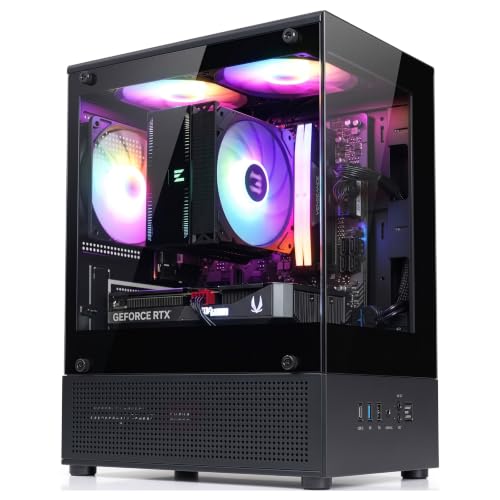
Zalman Compact Micro-ATX Mini Tower
Best for: compact Micro-ATX builds needing USB Type-C
- Motherboard Support
- Micro-ATX
- Case Type
- Mini Tower
- Included Fans
- 3x FRGB (3-pin DC)
- Max GPU Length
- 280mm
- Use
- Gaming
- Dimensions
- 11.4 × 7.87 × 15.6 inches
The Zalman Cubix Micro-ATX Mini-Tower is a compact desktop chassis engineered for Micro-ATX motherboards. It includes three preinstalled fixed RGB fans, a modern front I/O panel with USB Type-C, and support for graphics cards up to 280mm in length. It suits you if you want a space-saving desktop footprint without sacrificing front panel connectivity, standard ATX power supply compatibility up to 140mm, or multi-drive storage options.
Pros
- Three preinstalled 3-pin FRGB cooling fans
- Front I/O panel includes USB Type-C and USB 3.0
- Mounting support for up to four drives (3 x 2.5-inch and 1 x 3.5-inch)
- Compact dimensions under 16 inches tall and 12 inches deep
Cons
- Maximum graphics card clearance is limited to 280mm
- ATX power supply clearance is restricted to 140mm
- Included cooling fans have fixed RGB rather than addressable lighting
Good fit if
- You need a compact Micro-ATX case featuring front-panel USB Type-C.
- You run a graphics card measuring 280mm or shorter.
- You want preinstalled airflow fans ready out of the box.
Skip if
- You need to install a full-size ATX motherboard.
- You have a GPU longer than 280mm or a CPU cooler taller than 155mm.
- You require addressable RGB software control for your fans.
Verdict: Zalman Cubix Micro-ATX Mini-Tower delivers space-efficient housing with front USB Type-C and three preinstalled fans. It works well if your GPU and power supply meet its 280mm and 140mm clearance limits.
Specifications side by side
| Spec | Zalman 4-Port ARGB Controller Hub | Zalman S3 Compact ATX Mid-Tower Case | Zalman T6 ATX Mid-Tower Case | Zalman Compact ATX Mid-Tower with Dual Fans | Zalman Mid-Tower ATX RGB Case | Zalman FIT Compact ATX Mid-Tower Case | Zalman CUBIX Compact Micro-ATX Case | Zalman RAVN Compact ATX Mid-Tower Case | Zalman Compact Micro-ATX Mini Tower |
|---|---|---|---|---|---|---|---|---|---|
| Motherboard Support | not specified | ATX | ATX, mATX, mini-ITX | ATX | not specified | ATX, mATX, Mini-ITX | Micro-ATX, Mini ITX | ATX | Micro-ATX |
| Case Type | not specified | Mid Tower | Mid Tower | Mid Tower | Mid-Tower | Mid-Tower | not specified | Mid-Tower | Mini Tower |
| Side Panel | not specified | Acrylic | not specified | Acrylic | not specified | not specified | not specified | Tinted Tempered Glass | not specified |
| Included Fans | not specified | 3x 120mm | 1x 120mm | 2x 120mm | 4x Static LED | 4x ARGB | 1x 80mm | not specified | 3x FRGB (3-pin DC) |
| Radiator Support | not specified | 120mm | not specified | not specified | 360mm | 360mm | not specified | 240mm Front, 120mm Rear | not specified |
| Max GPU Length | not specified | 330mm | not specified | not specified | not specified | 325mm | 260mm | 295mm | 280mm |
| Case Volume | not specified | not specified | not specified | not specified | not specified | not specified | 17.1 L | not specified | not specified |
| Tower Size | not specified | Mid-Tower | Mid-Tower | Mid-Tower | Mid-Tower | Mid-Tower | not specified | Mid-Tower | Mini-Tower |
| Fan Size | not specified | 120mm | 120mm | 120mm | not specified | not specified | 80mm | not specified | not specified |
| Use | not specified | not specified | not specified | not specified | Gaming | Gaming | not specified | Gaming | Gaming |
| Lighting | ARGB | not specified | not specified | not specified | RGB | ARGB | not specified | RGB | not specified |
| Connector Type | 3-Pin | not specified | not specified | not specified | not specified | not specified | not specified | not specified | not specified |
| Dimensions | 1.77 × 1.14 × 0.55 inches | 16.2 × 7.44 × 17.8 inches | 7.87 × 16.9 × 14.8 inches | 8.11 × 18 × 15 inches | 16.6 × 8.62 × 19.1 inches | 14.6 × 7.87 × 17.9 inches | 12 × 6.29 × 13.9 inches | 15.6 × 7.76 × 16.7 inches | 11.4 × 7.87 × 15.6 inches |
| Weight | not specified | 8.38 pounds | 8 pounds | 7.9 pounds | 12.5 pounds | 9.7 pounds | 5.73 pounds | 7.05 pounds | 7.05 pounds |
| Color | Black | Acrylic | Black | S4 | Black | Black | Black | Black | Cubix-G Black |
| Model | ZM-4PALC | not specified | T6 | S4 | not specified | not specified | not specified | not specified | not specified |
| Size | not specified | 16.22 x 7.44 x 17.76 inches | T6 | Mid Tower | not specified | not specified | Small | Mid Tower | not specified |
Comparing the Zalman Case Lineup
ATX mid-towers focus on component clearance and high airflow. If you build a gaming setup requiring front 360mm radiator mounting and pre-installed illumination, the Zalman FIT Compact ATX Mid-Tower Case provides four ARGB fans. For office workstations requiring legacy media support, the Zalman T6 ATX Mid-Tower Case supplies a dedicated optical drive bay alongside standard 120mm cooling expansion.
Micro-ATX enclosures cater to smaller desk spaces. The Zalman CUBIX Compact Micro-ATX Case offers a 17.1-liter frame that retains standard ATX power supply compatibility with an 80mm fan. If you prioritize modern front-panel connectivity, the Zalman Compact Micro-ATX Mini Tower includes front USB Type-C and three preinstalled cooling fans.
Where Zalman Fits Your Build
The Zalman selection scales from 5.73-pound Micro-ATX chassis to 12.5-pound ATX mid-towers. Case shapes cover compact mini-towers and standard mid-towers equipped with acrylic panels or legacy optical bays. Illumination ranges from non-lit frames to multi-fan RGB and 3-pin ARGB hardware managed by SATA controller hubs.
Specific form factors remain absent. You find no Mini-ITX cases for small-form-factor builds and no full towers accommodating E-ATX motherboards. The catalog excludes dual-chamber layouts, pre-installed liquid loops, and integrated power supplies. Choose this lineup for basic ATX or Micro-ATX systems needing traditional air cooling or standard radiator clearance.
How to Choose a Zalman Case
-
Check Motherboard Form Factor
Check your motherboard dimensions before picking a chassis. Full ATX boards require mid-tower enclosures, while Micro-ATX motherboards fit inside smaller cases to save desk space. If you build a compact workstation, a chassis like the Zalman CUBIX Compact Micro-ATX Case offers a 17.1-liter footprint designed specifically for Micro-ATX hardware while retaining standard power supply compatibility. Make sure your motherboard size matches the stated support specifications of the case. Installing an ATX board into a frame built only for Micro-ATX is impossible because the mounting points will not align.
-
Verify Graphics Card Clearance
Graphics card lengths differ greatly across performance tiers, making clearance an essential spec to verify. If you intend to install a multi-fan graphics card, confirm that the chassis internal length accommodates it without striking preinstalled front fans. A mid-tower such as the Zalman S3 Compact ATX Mid-Tower Case supports graphics cards up to 330mm long. Always check the exact card length listed by your graphics card manufacturer against the case limits. Selecting a chassis with adequate space ensures smooth installation and preserves unobstructed airflow toward your components.
-
Plan Optical Drive Needs
Most modern PC enclosures omit external drive bays entirely in favor of solid or mesh front panels. If your workflow requires an internal DVD or Blu-ray drive, you must look specifically for cases with dedicated 5.25-inch external bays. The Zalman T6 ATX Mid-Tower Case features an optical drive bay along with standard internal drive mounts for everyday storage expansion. Choosing a chassis with this physical opening saves you from using external USB drives. Review your media requirements before purchasing so you do not lose necessary legacy drive capability.
-
Check Lighting Header Types
Check whether your lighting setup uses standard RGB or addressable ARGB connections. Standard RGB uses 12V 4-pin connections, while addressable ARGB relies on 5V 3-pin connections. Motherboards often have limited headers, restricting the number of illuminated fans you can plug in directly. Adding a standalone accessory like the Zalman 4-Port ARGB Controller Hub lets you connect four 3-pin ARGB devices using SATA power and a magnetic mounting base. Verify your fan connector types before assembly to prevent mismatched voltage connections that could damage your lighting equipment.
-
Check CPU Cooler Height
CPU tower air coolers require sufficient chassis width to clear the side panel. Compact mid-towers restrict clearance to keep chassis dimensions trim. For instance, the Zalman RAVN Compact ATX Mid-Tower Case specifies a maximum CPU cooler ceiling of 150mm alongside a 295mm GPU length restriction. If you choose an air cooler that exceeds the case width limit, the side panel will not close properly. Always check your cooler height against the chassis interior clearance spec before purchasing your cooling hardware to guarantee a secure, hassle-free fit.
-
Match Power Supply Length
Power supply length dictates whether modular cables have sufficient clearance inside compact frames. Mini-tower layouts position storage cages or internal panels near the power supply chamber. When building in space-efficient models like the Zalman Compact Micro-ATX Mini Tower, you must observe tight boundaries such as its 140mm power supply limit and 280mm graphics card allowance. Exceeding the listed power supply depth can block cable routing or press cables against the chassis frame. Measure your power unit before installation to make sure your wiring fits comfortably into the designated space.
Frequently asked questions
Which Zalman PC cases support an internal optical drive?
You can install an internal 5.25-inch optical disc drive using the Zalman T6 ATX Mid-Tower Case. Most modern enclosures omit external bays entirely to prioritize front airflow fans. The T6 retains dedicated space for an optical media drive while supporting standard ATX motherboards, 120mm cooling fans, and multiple internal drive mounts for traditional workstation storage setups.
Can you install an ATX power supply in a compact Zalman Micro-ATX case?
Yes, compact models like the Zalman CUBIX Compact Micro-ATX Case accommodate standard ATX power supplies inside a 17.1-liter steel chassis. However, you must check specific unit lengths across models. For example, the Zalman Cubix Micro-ATX Mini Tower restricts power supply length to 140mm, requiring you to select a shorter power unit to prevent cable crowding and clearance conflicts.
What graphics card length fits inside Zalman compact cases?
Maximum graphics card clearance ranges from 280mm up to 330mm across the Zalman lineup. The Zalman S3 Compact ATX Mid-Tower accommodates graphics cards up to 330mm long. In contrast, smaller frames require tighter planning: the Zalman RAVN Compact ATX Mid-Tower limits cards to 295mm, while the Zalman Cubix Micro-ATX Mini Tower supports cards up to 280mm.
How does the Zalman 4-Port ARGB Controller Hub work?
The Zalman 4-Port ARGB Controller Hub connects up to four 5V 3-pin ARGB devices and draws direct power through a SATA connection. It features a magnetic base that adheres directly to steel chassis surfaces for clean cable routing. You can manage connected illumination via dual control options, letting you coordinate lighting patterns across multiple case accessories without overloading your motherboard headers.
What CPU cooler height limits should you plan for in Zalman ATX cases?
Cooler clearance depends on the chassis model, with compact designs limiting heatsink height to 150mm. Specifically, the Zalman RAVN Compact ATX Mid-Tower enforces a strict 150mm CPU cooler ceiling, requiring low-profile or compact tower heatsinks. If you intend to run taller tower coolers, check the chassis width specification or consider models designed around liquid cooling radiator mounts instead.
Do Zalman cases come with preinstalled cooling fans?
Yes, most Zalman PC cases include preinstalled cooling fans right out of the box. The Zalman S3 arrives with three 120mm fans, the S4 includes dual 120mm fans, and the i3 Neo and FIT models feature four preinstalled fans. For smaller setups, the CUBIX includes an 80mm exhaust fan, while the Cubix Micro-ATX Mini Tower includes three stock fans.
Which Zalman chassis provides front-panel USB Type-C connectivity?
The Zalman Compact Micro-ATX Mini Tower provides front-panel USB Type-C connectivity alongside three preinstalled fans. This interface allows you to plug in modern high-speed peripherals and external solid-state drives directly to the front of your computer. Just verify that your chosen Micro-ATX motherboard includes the matching internal header necessary to enable this front Type-C connection.