Best PC Cases with USB 3.0 in 2026: 15 Picks Ranked by Specs
As an Amazon Associate we earn from qualifying purchases. Links on this page are affiliate links.
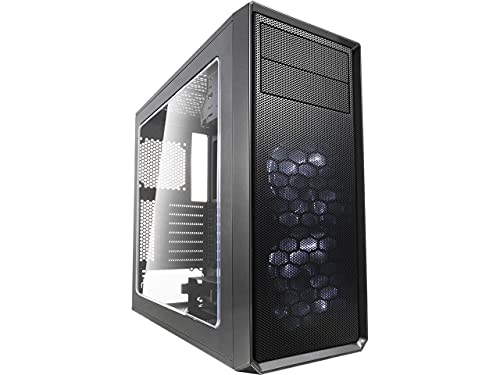
Finding the right PC case with USB 30 connectivity ensures convenient front-panel data transfer speeds for your desktop build. The Fractal Design Focus G ATX Mid Tower earns the top spot with its dual preinstalled 120mm fans and component clearance reaching up to 380mm.
This guide evaluates 15 models strictly using the specifications published on their product listings. You will compare form factors ranging from Mini-ITX to E-ATX, internal dimensions, and cooling layouts to decide which chassis matches your hardware clearance and expansion needs.
Quick picks
The best fit for you
- You want a standard ATX case with preinstalled fans Fractal Design Focus G ATX Mid Tower It includes dual preinstalled 120mm intake fans, 380mm component clearance, and front USB 3.0 connectivity.
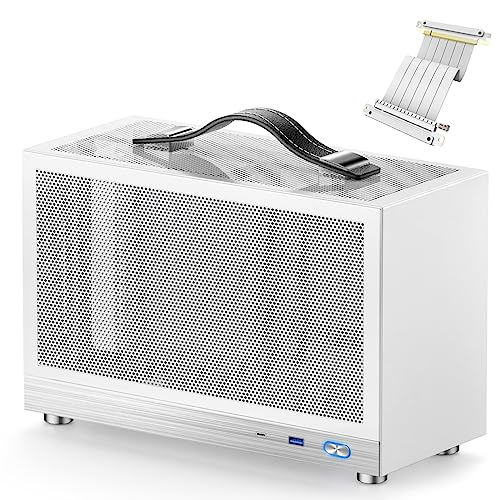
- You need an ultra-compact portable Mini-ITX chassis KXRORS Portable Mini-ITX Case Its compact 8.1-liter chassis houses Mini-ITX boards and 305mm graphics cards with front USB 3.0.
- You need to fit a large E-ATX motherboard Bgears b-Voguish E-ATX Tempered Glass Case It supports full E-ATX motherboards and includes tempered glass alongside front-panel USB 3.0 connectivity.
- You want maximum pre-installed cooling out of the box MUSETEX ATX Mid-Tower with Magnetic Glass Door It features six pre-installed ARGB PWM fans, a hinged tempered glass panel, and dual USB 3.0 ports.
Our 15 picks
Fractal Design Focus G ATX Mid Tower
Best for: standard ATX builds needing high airflow
- Connectivity
- USB 3.0
- Motherboard Support
- ATX
- Case Type
- Mid Tower
- Side Panel
- Window
- Included Fans
- 2x 120mm White LED
- Max GPU Length
- up to 380 mm
The Fractal Design Focus G is an ATX mid-tower case featuring USB 3.0 connectivity and high airflow. It comes equipped with two 120mm Silent Series LL white LED fans and provides six total fan mounting positions. You get clearance for graphics cards up to 380mm and dedicated vibration-dampened drive mounts. This case suits builders who need straightforward cooling, dust filtration on three sides, and dedicated space for standard storage drives.
Pros
- Two preinstalled 120mm white LED intake fans
- Supports graphics cards up to 380mm long
- Filtered front, top, and base air intakes
- Six total 120mm fan mounting positions
Cons
- No front-panel USB-C port listed
- Preinstalled fan lighting limited to solid white
Good fit if
- You want an ATX mid-tower with USB 3.0 connectivity and out-of-the-box dual fan cooling.
- You need clearance for a long graphics card up to 380mm.
- You want filtered air intakes across the top, front, and base.
Skip if
- You require a front-panel USB Type-C port.
- You plan to build with a motherboard larger than standard ATX.
Verdict: Fractal Design Focus G ATX Mid Tower delivers USB 3.0 connectivity, component clearance up to 380mm, and dual preinstalled intake fans. It provides reliable airflow and filtration for standard ATX configurations.

Fractal Design Meshify C ATX Mid Tower
Best for: compact ATX builds needing high airflow
- Connectivity
- USB 3.0
- Motherboard Support
- ATX
- Case Type
- Mid Tower
- Included Fans
- 2x 120mm
- Dimensions
- 16.1 × 8.35 × 17.8 inches
- Weight
- 13.6 pounds
The Fractal Design Meshify C is an ATX mid-tower chassis featuring USB 3.0 connectivity for your external devices. Its compact footprint measures 17.83 inches tall and 16.10 inches long, yet it fits full-size ATX motherboards and up to five storage drives. With two included 120mm fans and 35mm of cable routing clearance behind the motherboard plate, you get efficient cooling and straightforward cable management for a streamlined daily build.
Pros
- Two preinstalled 120mm Fractal Design Dynamic X2 GP-12 fans
- Up to 35mm of cable management space behind the motherboard plate
- Steel drive trays accommodate up to five storage drives with rubber grommets
- Full-length power supply shroud conceals cabling and drive cages
Cons
- Includes only two preinstalled fans
- Front connectivity limited to USB 3.0 without USB Type-C listed
Good fit if
- You need an ATX chassis equipped with USB 3.0 connectivity.
- You want 35mm of rear depth for organizing internal cables.
- You plan to install up to five hard drives or SSDs.
Skip if
- You need more than two cooling fans included out of the box.
- You require built-in front-panel USB Type-C support.
Verdict: Fractal Design Meshify C Mid-Tower Case delivers essential USB 3.0 connectivity, open airflow, and ATX component support within a compact footprint. It provides practical cable routing and multi-drive storage options for standard desktop setups.

Bgears b-Voguish E-ATX Tempered Glass Case
Best for: E-ATX builds using custom cooling configurations
- Connectivity
- USB 3.0
- Motherboard Support
- E-ATX, ATX, Micro-ATX, mini-ITX
- Side Panel
- Tempered Glass
- Radiator Support
- 240mm
- Max GPU Length
- 370mm
- Use
- Gaming
The Bgears b-Voguish is a large gaming chassis equipped with front USB 3.0 connectivity and broad motherboard support from mini-ITX up to E-ATX. It accommodates graphics cards up to 370 mm long and CPU coolers up to 160 mm tall. Featuring a hinged 5 mm tempered glass door and dual 240 mm radiator mounts, it suits you if you plan to supply your own cooling hardware.
Pros
- Supports motherboards up to E-ATX
- Hinged 5 mm thick tempered glass side panel
- Accommodates graphics cards up to 370 mm long
- Dual 240 mm radiator support at the front and top
Cons
- Does not include any cooling fans
- Limits CPU cooler height to 160 mm
Good fit if
- You need USB 3.0 connectivity with an E-ATX motherboard build.
- You plan to install your own fans or liquid cooling radiators.
- You want a hinged 5 mm tempered glass door for quick interior access.
Skip if
- You need a chassis that includes pre-installed cooling fans.
- You plan to use a CPU air cooler taller than 160 mm.
Verdict: Bgears b-Voguish E-ATX Tempered Glass Case provides spacious component clearance and USB 3.0 access for builds where you supply your own cooling.

Zalman ATX Mid-Tower with Tempered Glass
Best for: standard ATX builds needing multiple stock fans
- Connectivity
- USB 3.0
- Motherboard Support
- ATX
- Case Type
- Mid-Tower
- Side Panel
- Tempered Glass
- Included Fans
- 3x 120mm
- Max GPU Length
- 330mm
This mid-tower ATX case from Zalman gives you front panel connectivity via one USB 3.0 port alongside two USB 2.0 ports. It includes three pre-installed 120mm fans, with two at the front and one at the rear, and supports up to eight fans total. The chassis features a tempered glass side panel, dedicated power supply chamber, and seven expansion slots, making it a practical choice for your standard ATX build.
Pros
- Includes three pre-installed 120mm fans with mounts for up to eight
- Front I/O panel includes one USB 3.0 and two USB 2.0 ports
- Full tempered glass side panel displays internal hardware
- Top and bottom magnetic dust filters included
Cons
- Provides only one USB 3.0 port on the front panel
- No USB Type-C connectivity listed
Good fit if
- You need a standard ATX mid-tower with front USB 3.0 access.
- You want multiple pre-installed 120mm fans out of the box.
- You plan to show your components through a tempered glass side panel.
Skip if
- You require multiple front-panel USB 3.0 ports or a USB-C port.
- You use a motherboard form factor larger than standard ATX.
Verdict: Zalman ATX Mid-Tower with Tempered Glass delivers essential USB 3.0 access and reliable cooling potential with three included 120mm fans. It offers clean ATX component mounting and magnetic filtration without unnecessary bulk.

ZXFF Mid-Tower Glass ATX Case
Best for: custom fan setups needing USB 3.0
- Connectivity
- USB 3.0
- Motherboard Support
- ATX, Micro-ATX, ITX
- Case Type
- Mid-Tower
- Side Panel
- Transparent Glass
- Radiator Support
- 240mm
- Max GPU Length
- 310mm
This ZXFF mid-tower chassis supports standard ATX, Micro-ATX, and Mini-ITX motherboards. For top connectivity, you get front-panel USB 3.0, USB 2.0, and HD audio ports. The interior accommodates graphics cards up to 310mm long, CPU coolers up to 165mm tall, and a 240mm liquid cooling radiator. It suits you if you want a glass side panel and plan to supply your own cooling fans.
Pros
- Top panel includes USB 3.0 and USB 2.0 ports
- Fits CPU coolers up to 165mm tall
- Mounts up to six 120mm fans and a 240mm radiator
- Transparent glass side window displays hardware
Cons
- No cooling fans included with chassis
- Maximum graphics card length capped at 310mm
- Limited to one 3.5-inch hard drive bay
Good fit if
- You already own or plan to purchase custom 120mm cooling fans.
- You need front-panel USB 3.0 along with legacy USB 2.0 connectivity.
- You use a graphics card measuring 310mm or less.
Skip if
- You need pre-installed case fans included in the box.
- You plan to install multiple 3.5-inch storage drives.
Verdict: ZXFF Mid-Tower ATX Case with Glass Window delivers essential USB 3.0 connectivity and 165mm CPU clearance, but requires you to provide your own cooling fans.

MUSETEX ATX Mid-Tower with Magnetic Glass Door
Best for: out-of-the-box airflow with dual USB 3.0 connectivity
- Connectivity
- USB 3.0
- Motherboard Support
- ATX
- Case Type
- Mid-Tower
- Side Panel
- Tempered Glass
- Included Fans
- 6 PWM ARGB Fans
- Radiator Support
- 280
View on Amazon: MUSETEX ATX Mid-Tower with Magnetic Glass Door
The MUSETEX Mid-Tower Case with 6 ARGB Fans gives you two front USB 3.0 ports for external drives and devices. It arrives with six PWM ARGB fans pre-installed and uses a polygonal mesh front panel for airflow. A magnetic hinged tempered glass door provides access to your ATX hardware without tools. This chassis suits you if you want a complete cooling setup out of the box with standard high-speed USB connectivity.
Pros
- Two front I/O USB 3.0 ports for data transfers
- Six pre-installed PWM ARGB fans with speed and lighting control
- Magnetic hinged tempered glass door with pull ring
- Top clearance accommodates a 280mm radiator without hitting RAM
- Drive storage mounts support up to five SSDs and one HDD
Cons
- Lacks front-panel USB Type-C connectivity
- Requires a 3-pin 5V motherboard header to control fan lighting
Good fit if
- You want two USB 3.0 ports on the front panel
- You want six included PWM ARGB fans without purchasing extras
- You prefer a magnetic hinged glass door for component access
Skip if
- You need an integrated front-panel USB Type-C port
- You have a motherboard without a 3-pin addressable RGB header
Verdict: MUSETEX Mid-Tower Case with 6 ARGB Fans combines dual USB 3.0 connectivity with six pre-installed PWM fans and a hinged glass side panel. It delivers straightforward ATX component clearance and high airflow directly from the factory.
KXRORS Portable Mini-ITX Case
Best for: portable small-form-factor Mini-ITX builds
- Connectivity
- Type-C, USB 3.0
- Motherboard Support
- Mini-ITX
- Side Panel
- Mesh
- Max GPU Length
- ≤ 305mm
- Case Volume
- 8.1L
- Use
- Gaming
The KXRORS Portable Mini-ITX Case is an 8.1-liter small-form-factor chassis designed for compact builds. It features front I/O connectivity with both a USB 3.0 and a Type-C port. The chassis accommodates standard 170 by 170 mm Mini-ITX motherboards, SFX or SFX-L power supplies up to 130 mm, and graphics cards up to 305 mm using the included PCIe 3.0 riser cable. It suits you if you need portable desktop gaming.
Pros
- Front I/O includes USB 3.0 and Type-C ports
- Compact 8.1-liter volume with an integrated top leather handle
- Includes a PCIe 3.0 16X riser cable
- Three-sided mesh panels for airflow exchange
- Supports GPUs up to 305 mm in length
Cons
- CPU cooler clearance limited to 60 mm
- Requires BIOS PCIe speed configured to Gen 3 for the riser cable
- Supports only Mini-ITX motherboards and SFX or SFX-L power supplies
Good fit if
- You want front USB 3.0 and Type-C ports on a compact 8.1-liter chassis.
- You plan to build with a standard 170 by 170 mm Mini-ITX motherboard.
- You need a portable PC case with an integrated top handle.
Skip if
- You require support for standard ATX motherboards or power supplies.
- You plan to install a CPU cooler taller than 60 mm.
- You need graphics card clearance beyond 305 mm in length.
Verdict: KXRORS Portable Mini-ITX Case delivers front USB 3.0 connectivity in an 8.1-liter footprint. It fits graphics cards up to 305 mm while relying on mesh ventilation to manage airflow.

MOROVOL Mid-Tower Mesh ATX Case
Best for: ATX builds wanting pre-installed RGB fans
- Connectivity
- USB 3.0
- Motherboard Support
- ATX, Micro-ATX, Mini-ITX
- Case Type
- Mid Tower
- Side Panel
- Tempered Glass
- Included Fans
- 4x 120mm RGB
- Max GPU Length
- 300mm
This mid-tower ATX case gives you one top USB 3.0 port alongside two USB 2.0 ports for your peripherals. It includes four pre-installed 120mm RGB fans behind a diamond-mesh front panel to move air past your components. You get support for standard ATX motherboards, graphics cards up to 300mm long, and CPU air coolers up to 155mm tall. It suits you if you want factory-fitted lighting and mesh airflow in an ATX chassis.
Pros
- Four pre-installed 120mm RGB case fans
- Diamond-shaped mesh front panel for intake airflow
- Top I/O panel includes one USB 3.0 and two USB 2.0 ports
- Storage layout holds two 2.5-inch SSDs and two 3.5-inch HDDs
Cons
- Fan lighting is fixed and not addressable
- GPU length clearance is limited to 300mm
- Maximum CPU cooler height is capped at 155mm
Good fit if
- You want a case with four pre-installed RGB fans included.
- You use standard USB 3.0 devices on your front I/O panel.
- Your graphics card is 300mm long or less.
Skip if
- You need addressable RGB fans with customizable lighting modes.
- You plan to install a graphics card longer than 300mm.
- Your CPU air cooler exceeds 155mm in height.
Verdict: MOROVOL Mid-Tower ATX Case with RGB Fans delivers four static RGB fans and front USB 3.0 connectivity in an airflow-focused layout. It provides a tempered glass display for mainstream hardware, provided your components match its clearance limits.

MOROVOL Micro-ATX Panoramic Glass PC Case
Best for: Micro-ATX builds needing panoramic glass views
- Connectivity
- USB 3.0
- Motherboard Support
- Micro-ATX
- Case Type
- Mid-Tower
- Side Panel
- Tempered Glass
- Included Fans
- 3
- Use
- Gaming
The MOROVOL Micro-ATX Panoramic Glass PC Case features a 270-degree three-sided tempered glass design paired with a front-panel USB 3.0 port for fast data connections. It supports Micro-ATX motherboards and arrives with three pre-installed fans to provide immediate cooling out of the box. Measuring 13.39 inches deep, 10.87 inches wide, and 12.44 inches high, it suits you if you want a compact black chassis that showcases internal components.
Pros
- 270-degree panoramic tempered glass on three sides
- Three pre-installed fans included out of the box
- Front-panel USB 3.0 port for external connectivity
- Compact footprint measuring 13.39 by 10.87 by 12.44 inches
Cons
- Motherboard compatibility limited to Micro-ATX without ATX support
- Only one front-panel USB 3.0 port listed in specifications
Good fit if
- You build with a Micro-ATX motherboard.
- You want a three-sided 270-degree panoramic view of your components.
- You need three pre-installed fans ready upon assembly.
Skip if
- You plan to use a standard ATX motherboard.
- You require multiple front-panel USB ports.
Verdict: MOROVOL Micro-ATX Panoramic Glass PC Case combines 270-degree three-sided tempered glass with front-panel USB 3.0 connectivity and three included fans. It serves as a practical, display-focused housing for compact Micro-ATX builds.

JOYJOM Compact Micro-ATX Case
Best for: compact Micro-ATX builds using ATX power supplies
- Connectivity
- USB 3.0
- Motherboard Support
- Micro ATX, DTX, ITX
- Case Type
- Micro ATX
- Max GPU Length
- 250mm
- Dimensions
- 10.4 × 6.3 × 13.9 inches
- Weight
- 4.85 pounds
The JOYJOM Compact Micro-ATX Case gives you a compact steel enclosure with essential connectivity. Its front panel features one USB 3.0 port and one USB 2.0 port alongside dedicated audio jacks. Inside, it accommodates Micro-ATX or ITX motherboards and fits standard ATX power supplies despite its small footprint. This chassis suits you if you need a space-saving desktop setup that maintains standard hardware compatibility without excess desk bulk.
Pros
- Dedicated front-panel USB 3.0 and USB 2.0 ports
- Supports standard ATX power supplies up to 150 x 140 x 86 mm
- Compact footprint measuring 10.4 inches long by 6.3 inches wide
- Houses up to three 3.5-inch drives and one 2.5-inch drive
Cons
- No pre-installed cooling fans included
- Limits graphics card length to 250 mm, or 225 mm with front fans
- Restricts CPU cooler height to 135 mm
Good fit if
- You want a compact Micro-ATX desktop with front USB 3.0 access.
- You plan to reuse a standard ATX power supply in a smaller build.
- You need multiple 3.5-inch internal drive bays in a small chassis.
Skip if
- You run a graphics card longer than 250 mm.
- You use a tower CPU cooler taller than 135 mm.
- You want factory-installed case fans out of the box.
Verdict: JOYJOM Compact Micro-ATX Case delivers front USB 3.0 access and standard ATX power supply compatibility in an ultra-compact footprint. It offers a straightforward layout for modest Micro-ATX builds if your graphics card and CPU cooler fit its size limits.

ARrase Tempered Glass Micro-ATX PC Case
Best for: builders supplying their own cooling fans
- Connectivity
- USB 3.0
- Motherboard Support
- ITX / M-ATX
- Side Panel
- Tempered Glass
- Weight
- 13.7 pounds
The ARrase Tempered Glass Micro-ATX PC Case is a steel enclosure designed for compact and mid-sized desktop builds. For peripheral connectivity, the top I/O panel includes one USB 3.0 port alongside two USB 2.0 ports and HD audio jacks. The chassis supports Micro-ATX and Mini-ITX motherboards, provides mounts for up to six 120mm fans, and accommodates liquid cooling setups. It suits you if you want clear component visibility with accessible top-panel ports.
Pros
- Top I/O panel includes one USB 3.0 and two USB 2.0 ports
- Tempered glass side panel for interior component visibility
- Mounting space for up to six 120mm cooling fans
- Supports water cooling configurations
Cons
- Does not include pre-installed cooling fans
- Provides only a single USB 3.0 port on the I/O panel
Good fit if
- You need top-panel access to a USB 3.0 port and audio jacks.
- You plan to supply your own 120mm cooling fans or liquid cooling.
- You are assembling a system with a Micro-ATX or Mini-ITX motherboard.
Skip if
- You need a case that comes with fans pre-installed out of the box.
- You require multiple USB 3.0 ports on the front panel.
Verdict: ARrase Tempered Glass Micro-ATX PC Case provides essential top-panel USB 3.0 connectivity and flexible cooling mount options for compact builds. It works well if you already have cooling fans and want a clean tempered glass side view.

ARrase E-ATX Mid-Tower Case
Best for: E-ATX builds with separate fan setups
- Connectivity
- USB 3.0
- Motherboard Support
- E-ATX/ATX/MATX/ITX
- Case Type
- Mid-Tower
- Side Panel
- Tempered Glass
- Use
- Gaming
- Weight
- 11.5 pounds
The ARrase E-ATX Mid-Tower Case provides a steel frame with a tempered glass side panel and an external I/O layout featuring one USB 3.0 port. It accommodates motherboards ranging from Mini-ITX up to large E-ATX options. Mounting points support up to six 120mm fans, though none come pre-installed. It suits builders who already own cooling fans and need flexible motherboard support.
Pros
- Supports motherboards from Mini-ITX up to E-ATX
- Tempered glass side panel for component visibility
- Mounting space for up to six 120mm fans
- Top I/O panel includes a USB 3.0 connection
Cons
- Does not include any pre-installed cooling fans
- Secondary front I/O ports use older USB 1.1 standards
Good fit if
- You plan to mount an E-ATX or standard ATX motherboard.
- You have your own 120mm cooling fans ready to install.
Skip if
- You want a case that includes pre-installed cooling fans.
- You need multiple USB 3.0 ports or a USB Type-C port on the front panel.
Verdict: ARrase E-ATX Mid-Tower Case delivers broad motherboard compatibility and clear glass viewing, but requires you to provide your own cooling fans.

ARrase Mid-Tower M-ATX Case
Best for: compact Micro-ATX builds needing USB 3.0
- Connectivity
- USB 3.0
- Motherboard Support
- M-ATX, ITX
- Case Type
- Mid-Tower
- Use
- Gaming
- Weight
- 12.3 pounds
The ARrase Mid-Tower M-ATX Case is a steel-frame chassis built for compact Micro-ATX and Mini-ITX motherboards. It equips your setup with a front I/O cluster featuring one USB 3.0 port, two USB 2.0 ports, and HD audio jacks. Cooling relies on an 80mm fan mount in the power supply compartment. If you need a straightforward desktop enclosure with legacy peripheral connections alongside modern USB transfer speeds, this case fits your desk.
Pros
- Front panel includes a dedicated USB 3.0 port alongside two USB 2.0 ports
- Steel front panel and main frame construction
- Supports both Micro-ATX and Mini-ITX motherboard layouts
- Available in five distinct style color options
Cons
- Front I/O provides only a single USB 3.0 port
- Chassis utilizes smaller 80mm cooling fan sizing
Good fit if
- You use a Micro-ATX or Mini-ITX motherboard.
- You need a mix of USB 3.0 and USB 2.0 front ports.
- You prefer an all-steel exterior structure.
Skip if
- You need multiple front-facing USB 3.0 ports.
- You plan to build with a standard ATX motherboard.
- You require 120mm or larger fan mounts for case airflow.
Verdict: ARrase Mid-Tower M-ATX Case provides essential USB 3.0 data connectivity and solid steel construction for compact motherboard builds. It serves smaller desktop setups that do not demand extensive high-speed ports or large fan arrays.
darkFlash Micro-ATX Curved Glass PC Case
Best for: Micro-ATX builds needing dual 360mm radiator support
- Connectivity
- USB 3.0
- Motherboard Support
- Micro-ATX
- Case Type
- Micro-ATX
- Side Panel
- Tempered Glass
- Included Fans
- 3x 120mm ARGB
- Radiator Support
- 360mm
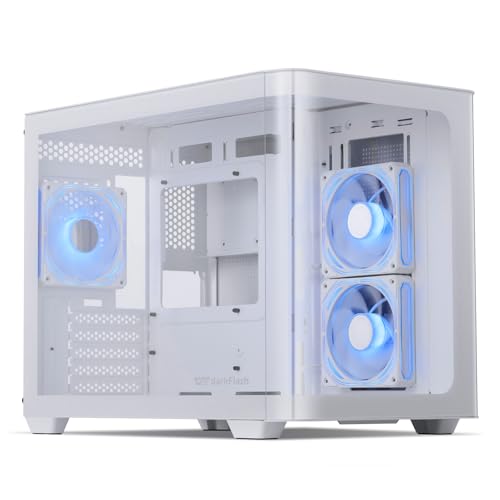
This darkFlash Micro-ATX case gives you a curved 270-degree panoramic glass design alongside front I/O USB 3.0 connectivity. It includes three 120mm ARGB fans out of the box and supports up to nine 120mm fans with room for dual 360mm radiators. It fits large graphics cards up to RTX 4090 dimensions. This enclosure suits you if you want a compact build with high cooling capacity and clear component visibility.
Pros
- Includes three 120mm ARGB fans
- Front I/O USB 3.0 port for external devices
- Supports dual 360mm radiators and up to nine 120mm fans
- Accommodates graphics cards up to RTX 4090 size
- Curved 270-degree panoramic tempered glass exterior
Cons
- RGB hub controller not included
- Limited to Micro-ATX motherboard support
Good fit if
- You need USB 3.0 connectivity alongside a 270-degree panoramic glass view.
- You plan to run a Micro-ATX board with up to a 4090 GPU and liquid cooling.
- You want pre-installed 120mm ARGB fans for immediate airflow.
Skip if
- You need support for full-size standard ATX motherboards.
- You want an included RGB hub controller to manage fan lighting.
Verdict: darkFlash Micro-ATX Curved Glass PC Case delivers quick USB 3.0 connectivity, wide hardware clearance up to 4090 GPUs, and dual 360mm radiator support. It balances compact Micro-ATX dimensions with substantial liquid-cooling headroom.

Iesooy Micro-ATX Steel Mini Case
Best for: compact Micro-ATX builds using SFX power supplies
- Connectivity
- USB 3.0
- Motherboard Support
- Micro-ATX, ITX
- Max GPU Length
- 280mm
- Dimensions
- 11.4 × 5.7 × 13 inches
- Weight
- 6.15 pounds
This compact chassis accommodates Micro-ATX and Mini-ITX motherboards inside a 5.7-inch-wide steel frame. Front panel connectivity includes one USB 3.0 port and one USB 2.0 port alongside standard audio jacks. You get mounting space for up to two HDDs and two SSDs, plus clearance for graphics cards up to 280 mm. It suits you if you plan a low-profile build using an SFX power supply.
Pros
- Front I/O features dedicated USB 3.0 and USB 2.0 ports
- Supports up to four storage drives with two HDDs and two SSDs
- Compact footprint at 5.7 inches wide and 11.41 inches long
- Chassis constructed from 0.8mm-thick ventilated steel
Cons
- Requires an SFX power supply and does not support standard ATX units
- CPU cooler clearance is restricted to 120 mm
- Ships without included cooling fans or additional accessories
Good fit if
- You build with an SFX power supply and a Micro-ATX or ITX board
- You need front-panel USB 3.0 access in a narrow desktop space
- You use a graphics card measuring 280 mm or less
Skip if
- You already own a standard ATX power supply
- You require clearance for CPU coolers taller than 120 mm
- You plan to install a graphics card longer than 280 mm
Verdict: Iesooy Micro-ATX Steel Mini Case delivers front USB 3.0 access and quad-drive capacity in a slim, ventilated steel chassis. Its tight internal clearances require an SFX power supply and compact cooling hardware.
Specifications side by side
| Spec | Fractal Design Focus G ATX Mid Tower | Fractal Design Meshify C ATX Mid Tower | Bgears b-Voguish E-ATX Tempered Glass Case | Zalman ATX Mid-Tower with Tempered Glass | ZXFF Mid-Tower Glass ATX Case | MUSETEX ATX Mid-Tower with Magnetic Glass Door | KXRORS Portable Mini-ITX Case | MOROVOL Mid-Tower Mesh ATX Case | MOROVOL Micro-ATX Panoramic Glass PC Case | JOYJOM Compact Micro-ATX Case | ARrase Tempered Glass Micro-ATX PC Case | ARrase E-ATX Mid-Tower Case | ARrase Mid-Tower M-ATX Case | darkFlash Micro-ATX Curved Glass PC Case | Iesooy Micro-ATX Steel Mini Case |
|---|---|---|---|---|---|---|---|---|---|---|---|---|---|---|---|
| Motherboard Support | ATX | ATX | E-ATX, ATX, Micro-ATX, mini-ITX | ATX | ATX, Micro-ATX, ITX | ATX | Mini-ITX | ATX, Micro-ATX, Mini-ITX | Micro-ATX | Micro ATX, DTX, ITX | ITX / M-ATX | E-ATX/ATX/MATX/ITX | M-ATX, ITX | Micro-ATX | Micro-ATX, ITX |
| Case Type | Mid Tower | Mid Tower | not specified | Mid-Tower | Mid-Tower | Mid-Tower | not specified | Mid Tower | Mid-Tower | Micro ATX | not specified | Mid-Tower | Mid-Tower | Micro-ATX | not specified |
| Side Panel | Window | not specified | Tempered Glass | Tempered Glass | Transparent Glass | Tempered Glass | Mesh | Tempered Glass | Tempered Glass | not specified | Tempered Glass | Tempered Glass | not specified | Tempered Glass | not specified |
| Included Fans | 2x 120mm White LED | 2x 120mm | not specified | 3x 120mm | not specified | 6 PWM ARGB Fans | not specified | 4x 120mm RGB | 3 | not specified | not specified | not specified | not specified | 3x 120mm ARGB | not specified |
| Radiator Support | not specified | not specified | 240mm | not specified | 240mm | 280 | not specified | not specified | not specified | not specified | not specified | not specified | not specified | 360mm | not specified |
| Max GPU Length | up to 380 mm | not specified | 370mm | 330mm | 310mm | not specified | ≤ 305mm | 300mm | not specified | 250mm | not specified | not specified | not specified | not specified | 280mm |
| Case Volume | not specified | not specified | not specified | not specified | not specified | not specified | 8.1L | not specified | not specified | not specified | not specified | not specified | not specified | not specified | not specified |
| Tower Size | Mid-Tower | Mid-Tower | not specified | Mid-Tower | Mid-Tower | Mid-Tower | not specified | Mid-Tower | not specified | not specified | not specified | Mid-Tower | Mid-Tower | not specified | not specified |
| Fan Size | 120mm | not specified | not specified | 120mm | not specified | not specified | not specified | not specified | not specified | not specified | not specified | not specified | not specified | 120mm | not specified |
| Use | not specified | not specified | Gaming | not specified | not specified | Gaming | Gaming | Gaming | Gaming | not specified | not specified | Gaming | Gaming | Gaming | not specified |
| Lighting | LED | not specified | not specified | not specified | not specified | ARGB | not specified | RGB | not specified | not specified | not specified | not specified | not specified | ARGB | not specified |
| Connectivity | USB 3.0 | USB 3.0 | USB 3.0 | USB 3.0 | USB 3.0 | USB 3.0 | Type-C, USB 3.0 | USB 3.0 | USB 3.0 | USB 3.0 | USB 3.0 | USB 3.0 | USB 3.0 | USB 3.0 | USB 3.0 |
| Dimensions | 18.3 × 8.07 × 17.5 inches | 16.1 × 8.35 × 17.8 inches | 8.07 × 15.9 × 19.4 inches | 16.5 × 7.48 × 18.1 inches | not specified | 15.8 × 8.07 × 19 inches | 5.31 × 12.3 × 7.6 inches | 14.6 × 7.28 × 16.7 inches | 13.4 × 10.9 × 12.4 inches | 10.4 × 6.3 × 13.9 inches | not specified | not specified | not specified | 11.2 × 18.1 × 15.6 inches | 11.4 × 5.7 × 13 inches |
| Weight | 9.92 pounds | 13.6 pounds | 11 pounds | 11 pounds | 12.1 pounds | 12.6 pounds | 4.41 pounds | not specified | 10.7 pounds | 4.85 pounds | 13.7 pounds | 11.5 pounds | 12.3 pounds | 15.6 pounds | 6.15 pounds |
| Color | Gunmetal | Black | Black | Tempered Glass | Transparent | Black | S300 White | black | Black | Black | Style 1 | Style 3 | Style 1 | White | Black |
| Model | FD-CA-FOCUS-GY-W | FD-CA-MESH-C-BKO | BG01893 | S3 TG | not specified | NN8 | not specified | 621 | V3 | Micro ATX Case | 18648 | 18648 | 18648 | DWP90M | not specified |
| Size | not specified | not specified | large | not specified | not specified | 18.98" x 15.75" x 8.07" | not specified | Large Size | 13.39"D x 10.87"W x 12.44"H | not specified | One Size | One Size | One Size | not specified | not specified |
Is USB 3.0 Worth It for Your PC Case?
USB 3.0 ports mounted on your case front or top panel change how you interact with your system. Instead of reaching behind the chassis to access rear motherboard ports, this interface provides accessible plug-in points for peripherals and external storage. Across all 15 cases, front-facing USB 3.0 provides standard plug-in capability for your daily hardware. Selected enclosures also pair USB 3.0 with Type-C or provide dual ports, delivering straightforward cable access on the front exterior.
Worth it if
- You regularly plug external storage drives or input peripherals directly into the front or top panel of your PC case.
- You want quick chassis-level access alongside optional secondary ports like Type-C or dual USB 3.0 connections.
Skip it if
- You plug all of your peripherals exclusively into the rear ports on your motherboard I/O panel.
- You do not need front-panel chassis ports for data transfer or external devices.
When planning your build dimensions and wattage requirements, pairing a chassis with a PC power supply under 30 ensures proper component clearance and connector compatibility.
How We Selected These Cases
To build this 2026 guide, we identified 15 PC cases with USB 3.0 connectivity. A product qualifies when its listing states USB 3.0 in the title or feature list. We do not physically handle or test the hardware. Instead, you get direct comparisons taken strictly from published specifications. We show only one size or variant per product family.
You see products in stock first. We compare published specifications including motherboard form factor support, fan sizes, and exterior dimensions. This helps you balance front-panel connectivity with your cooling and component clearance needs.
How to Choose the Best PC Case
-
Verify Power Supply Compatibility
Check power supply unit form factor specs before selecting your chassis. Small enclosures often restrict power supply dimensions to save internal volume. For example, the Iesooy Micro-ATX Steel Mini Case requires an SFX power supply, while other compact models accept full-sized standard ATX units. Buying an incompatible power supply size prevents installation or blocks cable routing. Compare the chassis power supply mounting specifications against your existing unit. Look for SFX or ATX designations in the spec sheet.
-
Check Preinstalled Fan Counts
Evaluate how many stock fans arrive installed inside the chassis. Some options include full cooling setups out of the box, whereas others arrive empty and require separate fan purchases. The MUSETEX ATX Mid-Tower includes six pre-installed ARGB fans for immediate airflow, while other models leave fan mounts completely open. If you want a quick build process without buying extra parts, choose a case with pre-installed intake and exhaust fans. Check the spec sheet for included fan quantities, fan sizes such as 120mm, and whether lighting like ARGB is built in.
-
Inspect Liquid Cooling Radiator Clearance
Confirm radiator mounting specifications if you plan to install an all-in-one liquid cooler or custom loop. Cases differ significantly in radiator capacity based on their internal frame dimensions. For instance, the darkFlash Micro-ATX Curved Glass PC Case accommodates dual 360mm radiators, offering substantial surface area for cooling high-demand hardware. Compact enclosures, by contrast, frequently limit liquid cooling or lack radiator brackets entirely. Check the chassis specifications for maximum supported radiator sizes at the top, front, and side positions before choosing your parts.
-
Review Secondary Front Panel Ports
Examine what secondary input ports accompany the standard USB 3.0 connections. While every chassis in this category provides USB 3.0 access, additional front connections vary. For instance, the KXRORS Portable Mini-ITX Case pairs front USB 3.0 with a Type-C port, granting direct hookups for modern peripherals and external storage. If your devices use reversible Type-C cables, prioritize cases that explicitly list front-panel Type-C alongside USB 3.0. Always verify your motherboard contains matching internal headers for both port types.
-
Assess Side Panel Materials
Determine whether you prefer display visibility or full ventilation for your hardware. Cases equipped with tempered glass highlight internal components and RGB lighting. For broader viewing angles, the MOROVOL Micro-ATX Panoramic Glass PC Case provides a 270-degree three-sided tempered glass layout. In contrast, solid metal or mesh panels conceal cable runs and prioritize continuous airflow over internal presentation. Review the chassis spec sheet to identify panel materials. If you select glass, look for convenient mounting styles like hinged doors.
Frequently asked questions
How do you connect front-panel USB 3.0 ports to a motherboard?
You plug the case's internal 19-pin USB 3.0 cable directly into your motherboard's internal header. This cable routes data from the front panel interface on enclosures like the Fractal Design Meshify C. If your motherboard does not have a matching 19-pin header, front-panel ports will not work without an add-in card or adapter.
Do all PC cases with USB 3.0 include pre-installed case fans?
No, cooling configurations vary widely by model. The MUSETEX ATX Mid-Tower includes six ARGB PWM fans straight out of the box, and the Zalman Mid-Tower includes three 120mm fans. Conversely, options like the Bgears b-Voguish, ARrase E-ATX Mid-Tower, and ZXFF Mid-Tower include no fans, requiring you to install your own.
Can a Micro-ATX case fit high-end graphics cards alongside USB 3.0 connectivity?
Yes, several compact enclosures support high-end GPUs while providing front USB 3.0 ports. For example, the darkFlash Micro-ATX Curved Glass PC Case accommodates large graphics cards up to RTX 4090 dimensions and supports dual 360mm radiators. Always check the published GPU length clearance of your chosen chassis against your card's exact physical measurements.
Which PC cases feature USB Type-C in addition to standard USB 3.0?
Most models in this category feature USB 3.0 Type-A ports, but select options provide modern Type-C ports as well. The KXRORS Portable Mini-ITX Case includes both Type-C and USB 3.0 front connections within its compact frame. Choosing a case with both connection types ensures you can attach legacy USB devices and newer mobile hardware without adapters.
What CPU cooler clearance do mid-tower cases with USB 3.0 offer?
Mid-tower cases generally provide between 160mm and 170mm of vertical CPU cooler clearance. For example, the ZXFF Mid-Tower Glass ATX Case specifies 165mm of CPU cooler height clearance alongside its USB 3.0 ports. You should verify your tower cooler's height before assembling hardware so the cooler does not press against the tempered glass side panel.
What side panel materials are available on USB 3.0 PC cases?
Tempered glass and solid ventilated steel are the two primary side panel materials. The MOROVOL Micro-ATX chassis features a 270-degree panoramic glass design, while the MUSETEX Mid-Tower uses a hinged magnetic tempered glass door. In contrast, compact chassis like the Iesooy Micro-ATX Mini Case utilize perforated steel side panels designed specifically to maximize passive ventilation.
Can you install an E-ATX motherboard in a mid-tower USB 3.0 case?
Yes, certain mid-tower chassis accommodate larger E-ATX motherboards alongside front USB 3.0 connectivity. The ARrase E-ATX Mid-Tower Case and Bgears b-Voguish both list E-ATX motherboard support despite standard desktop footprints. However, you must verify interior cable cutouts and drive bay placement, as oversized boards can sometimes cover rubber grommets or block adjacent cable management paths.