Best Thermaltake Mid-Tower PC Cases: 8 Spec-Based Picks
As an Amazon Associate we earn from qualifying purchases. Links on this page are affiliate links.
Finding the right thermaltake mid tower PC case depends on your motherboard form factor, cooling configuration, and component dimensions. We compared 8 models strictly using the specifications published on their product listings. The Thermaltake Versa H21 ATX Mid Tower takes the top pick because its standard ATX motherboard support and ventilated mesh panels provide dependable airflow for everyday hardware.
This guide helps you decide which mid-tower chassis fits your specific motherboard size, graphics card clearance, and cooling radiator setup.
Quick picks
The best fit for you
- You want a standard ATX case with mesh panels Thermaltake Versa H21 ATX Mid Tower Tool-free drive bays and ventilated mesh panels fit basic standard ATX builds directly.
- You need panoramic glass with long GPU clearance Thermaltake View 270 Plus TG ARGB Mid-Tower Pillarless tempered glass pairs with 420mm GPU clearance and 360mm top radiator support.
- You plan to install a large 420mm radiator Thermaltake Tower 600 Mid-Tower ATX Case The chassis supports 420mm radiators and motherboards with rear-facing hidden connectors.
- You need maximum clearance for extra long graphics cards Thermaltake View 290 Curved Glass Mid-Tower It delivers 450mm graphics card clearance and mounts for 200mm cooling fans.
Our 8 picks

Thermaltake Versa H21 ATX Mid Tower
Best for: standard ATX builds needing ventilated mesh panels
- Tower Size
- Mid-Tower (what this guide is about)
- Motherboard Support
- ATX
- Case Type
- Mid Tower
- Dimensions
- 18.7 × 8.2 × 16.9 inches
- Weight
- 9.3 pounds
The Thermaltake Versa H21 is a black mid-tower chassis built for standard ATX motherboards. It measures 16.9 inches tall, 8.2 inches wide, and 18.7 inches long, weighing 9.3 pounds. The exterior features perforated metal mesh on the front and top panels alongside elevated foot stands for ventilation. You also get tool-free drive installation and top I/O ports. This chassis suits you if you need a straightforward ATX enclosure with high airflow panels.
Pros
- Perforated metal mesh front and top panels for ventilation
- Tool-free drive installation design
- Supports standard ATX motherboards and liquid cooling setups
- Front-top I/O includes USB 3.0, USB 2.0, and audio jacks
Cons
- No USB Type-C front port listed
- No pre-installed case fans listed in specifications
- Motherboard support maxes out at standard ATX
Good fit if
- You need a standard ATX mid-tower chassis with mesh ventilation.
- You want tool-free drive bays for quick component setup.
- You require legacy USB 2.0 alongside a USB 3.0 front connection.
Skip if
- You need front-panel USB-C connectivity.
- You plan to build with an E-ATX motherboard.
- You require pre-installed cooling fans out of the box.
Verdict: Thermaltake Versa H21 ATX Mid-Tower Case provides standard ATX compatibility with ventilated mesh panels and tool-free drive bays. It delivers essential chassis connectivity and cable management routing for standard builds.

Thermaltake View 270 Plus TG ARGB Mid-Tower
Best for: panoramic glass builds with long graphics cards
- Tower Size
- Mid-Tower (what this guide is about)
- Motherboard Support
- E-ATX
- Case Type
- Mid Tower
- Side Panel
- Tempered Glass
- Included Fans
- 3x 120mm ARGB
- Radiator Support
- 360mm
The Thermaltake View 270 Plus TG is a mid-tower case featuring a pillarless front and side tempered glass layout. You get three pre-installed 120mm ARGB fans and clearance for graphics cards up to 420mm long. It supports E-ATX motherboards and mounts up to a 360mm radiator at the top. This chassis suits you if you want a panoramic display build with modern USB Type-C connectivity and room for large hardware.
Pros
- Supports graphics cards up to 420mm in length
- Includes three pre-installed 120mm ARGB fans
- Accommodates up to a 360mm radiator at the top
- Front I/O provides a USB 3.2 Gen 2 Type-C port
- Fits motherboards up to E-ATX size
Cons
- Front glass panel eliminates front intake fan locations
- Radiator mounting support is limited to the top
Good fit if
- You want a pillarless dual-glass view with pre-installed lighting.
- You plan to install a long graphics card up to 420mm.
- You need an E-ATX mid-tower with top 360mm radiator support.
Skip if
- You want mesh front panel intake airflow.
- You plan to mount radiators in the front of the chassis.
Verdict: Thermaltake View 270 Plus TG Mid-Tower Case delivers a pillarless dual-glass view, 420mm graphics card clearance, and three ARGB fans directly out of the box. It accommodates large E-ATX motherboards while supporting a 360mm radiator at the top.

Thermaltake Tower 600 Mid-Tower ATX Case
Best for: hidden-connector builds needing 420mm radiator support
- Tower Size
- Mid-Tower (what this guide is about)
- Motherboard Support
- ATX
- Case Type
- Mid-Tower
- Side Panel
- Tempered Glass
- Radiator Support
- 420mm
- Dimensions
- 11.3 × 16.5 × 21.7 inches
The Thermaltake Tower 600 is an ATX mid-tower case featuring an octagonal design with three tool-free tempered glass panels. It supports hidden-connector motherboards, including ASUS BTF, MSI Project Zero, and Gigabyte Project Stealth. Cooling accommodates up to nine fans and radiators up to 420mm. It suits you if you plan a build with large radiators, rear-connector cable routing, and flexible graphics card mounting.
Pros
- Supports radiators up to 420mm and up to nine cooling fans
- Compatible with ASUS BTF, MSI Project Zero, and Gigabyte Project Stealth motherboards
- Three tool-free tempered glass panels on an octagonal frame
- Three-way GPU mounting using rotational PCIe slots and floating bracket
Cons
- Weighs 21.39 pounds without components installed
- Horizontal display stand requires purchasing an optional kit
- Large desk footprint at 16.54 inches wide and 21.65 inches tall
Good fit if
- You plan to build with a hidden-connector ATX motherboard.
- You need clearance for a 420mm liquid cooling radiator.
- You want three tempered glass viewing panels with tool-free removal.
Skip if
- You need a compact or lightweight case under 20 pounds.
- You want horizontal display hardware included in the package.
Verdict: Thermaltake Tower 600 ATX Mid-Tower Case delivers 420mm radiator clearance and dedicated hidden-connector motherboard compatibility. Its three-panel octagonal structure provides flexible internal GPU mounting options for complex cooling setups.

Thermaltake View 380 TG Dual-Chamber Mid Tower
Best for: hidden-connector builds needing high fan capacity
- Tower Size
- Mid-Tower (what this guide is about)
- Motherboard Support
- ATX
- Case Type
- Mid Tower
- Side Panel
- Tempered Glass
- Included Fans
- 4x 120mm ARGB Lite
- Radiator Support
- 360mm
View on Amazon: Thermaltake View 380 TG Dual-Chamber Mid Tower
The Thermaltake View 380 TG ARGB is a mid-tower case featuring a dual-chamber layout with tempered glass and mesh panels. It comes equipped with four preinstalled 120mm ARGB Lite fans and supports up to ten fans total, alongside 360mm radiator positions at the top and bottom. Dedicated cutouts also support hidden-connector motherboards. This chassis suits you if you want an open display build with straightforward cable management.
Pros
- Includes four 120mm ARGB Lite fans preinstalled
- Supports up to ten 120mm fans and dual 360mm radiators
- Compatible with hidden-connector motherboards like ASUS BTF and MSI Project Zero
- Dual-chamber design isolates storage and cabling
Cons
- Fan mounting specifications list only 120mm fan sizes
- Radiator mounting is limited to 360mm sizes without 420mm support
Good fit if
- You plan to build with a hidden-connector motherboard.
- You want four ARGB fans included out of the box.
- You require radiator mounting support at both the top and bottom.
Skip if
- You intend to use 140mm cooling fans.
- You need a front-mounted radiator setup.
Verdict: Thermaltake View 380 TG ARGB Mid-Tower provides extensive 120mm cooling capacity, dual-chamber cable separation, and cutouts tailored for hidden-connector motherboards.

Thermaltake View 290 Curved Glass Mid-Tower
Best for: hidden-connector builds with long graphics cards
- Tower Size
- Mid-Tower (what this guide is about)
- Motherboard Support
- mATX, ATX
- Case Type
- Mid Tower
- Included Fans
- 3x 120mm ARGB Lite
- Radiator Support
- 360mm
- Max GPU Length
- 450mm
The Thermaltake View 290 is a mid-tower chassis featuring a curved tempered glass front panel and room for large components. You get support for 360mm radiators, graphics cards up to 450mm long, and CPU air coolers up to 180mm tall. Extra cutouts provide compatibility with back-connect motherboards from ASUS, MSI, and Gigabyte. It suits you if you want a clean view of high-clearance hardware with three preinstalled 120mm ARGB Lite fans.
Pros
- Supports graphics cards up to 450mm in length
- Curved tempered glass front panel for wide component visibility
- Cutouts for ASUS BTF, MSI Project Zero, and Gigabyte Project Stealth motherboards
- Includes three 120mm ARGB Lite fans preinstalled
Cons
- Vertical GPU riser cable is sold separately
- Accommodates up to three 140mm fans compared to nine 120mm fans
Good fit if
- You plan to build with a hidden-connector ATX or mATX motherboard.
- You need 450mm of clearance for an extra-long graphics card.
- You want curved tempered glass with preinstalled ARGB fans.
Skip if
- You plan to mount your GPU vertically without purchasing an extra riser cable.
- You want a case configuration that fits more than three 140mm fans.
Verdict: Thermaltake View 290 Curved Glass Mid-Tower pairs expansive 450mm GPU clearance and hidden-connector motherboard support with a panoramic curved glass design. It delivers flexible fan and radiator layouts for modern, clean component arrangements.

Thermaltake View 380 XL Mid-Tower with Wood Trim
Best for: showcase builds using hidden-connector motherboards
- Tower Size
- Mid-Tower (what this guide is about)
- Motherboard Support
- ATX, mATX, mITX
- Case Type
- Mid Tower
- Side Panel
- Tempered Glass, Mesh
- Included Fans
- 4x 120mm ARGB Lite
- Radiator Support
- 360mm
View on Amazon: Thermaltake View 380 XL Mid-Tower with Wood Trim
The Thermaltake View 380 XL is a mid-tower case featuring side wood trim and 4mm tempered glass. It includes four 120mm ARGB Lite fans, supports graphics cards up to 420mm, and fits up to ten 120mm fans with 360mm radiator mounts on the top and side. It also supports hidden-connector motherboards. This chassis suits you if you want a clean showcase build with wood styling and high cooling capacity.
Pros
- Includes four preinstalled 120mm ARGB Lite fans
- Supports top and side 360mm radiators and up to ten fans
- Accommodates graphics cards up to 420mm in length
- Cutouts support ATX hidden-connector motherboards
Cons
- Heavy chassis at 24.7 pounds
- Wide 11.3-inch footprint requires extra desk space
Good fit if
- You want stained wood side accents alongside tempered glass.
- You build with an ATX hidden-connector motherboard.
- You need clearance for large GPUs measuring up to 420mm.
Skip if
- You have limited desk width for an 11.3-inch wide case.
- You want a lightweight enclosure that weighs under 24.7 pounds.
Verdict: Thermaltake View 380 XL Mid-Tower with Wood Trim delivers spacious cooling options, preinstalled ARGB fans, and cutouts for hidden-connector motherboards. Its wood trim and glass panels make it a distinct showcase for hardware.
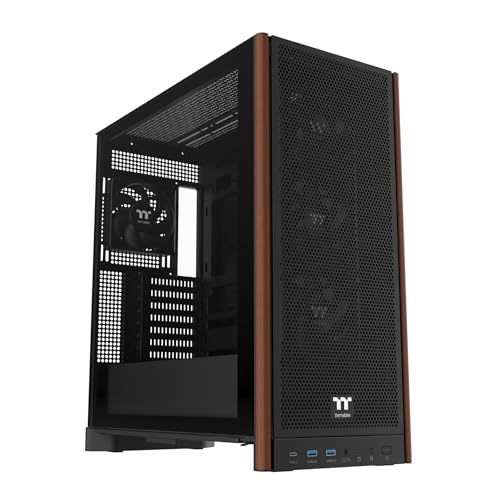
Thermaltake S370 WS Mid Tower with Wood Trim
Best for: hidden-connector builds wanting front wood accents
- Tower Size
- Mid-Tower (what this guide is about)
- Motherboard Support
- Up to E-ATX
- Case Type
- Mid Tower
- Side Panel
- 4mm Tempered Glass
- Included Fans
- 4x 120mm CT120 PWM
- Radiator Support
- Up to 360mm
View on Amazon: Thermaltake S370 WS Mid Tower with Wood Trim
The Thermaltake S370 WS is a mid-tower case featuring front mesh framed by wood trim. You get four preinstalled CT120 PWM fans, clearance for graphics cards up to 410mm, and support for CPU coolers up to 175mm tall. Cutouts accommodate rear-connecting ATX and mATX motherboards, alongside standard boards up to E-ATX. This chassis fits your needs if you want built-in cooling, wood accents, and cable-free aesthetics.
Pros
- Four preinstalled 120mm CT120 PWM fans
- Supports rear-connecting ATX and mATX motherboards
- Generous clearance for 410mm GPUs and 175mm CPU coolers
- Accommodates up to an E-ATX motherboard and 360mm radiator
Cons
- Preinstalled CT120 PWM fans lack RGB lighting
- Heavy empty chassis weight at 23 pounds
Good fit if
- You plan to build with an ASUS BTF, MSI Project Zero, or Gigabyte Project Stealth motherboard.
- You want front wood accents and four PWM fans straight out of the box.
- You need room for large graphics cards up to 410mm long.
Skip if
- You prefer built-in ARGB lighting on your chassis fans.
- You need a lightweight case for frequent transport.
Verdict: Thermaltake S370 WS Mid-Tower Wood Trim Case pairs front wood accents with four PWM fans and 410mm GPU clearance. Dedicated cutouts provide ready support for rear-connecting motherboards.

Thermaltake View 370 TG ARGB Mid Tower
Best for: hidden-connector builds and long graphics cards
- Tower Size
- Mid-Tower (what this guide is about)
- Motherboard Support
- ATX, mATX
- Case Type
- Mid Tower
- Included Fans
- 1x 360mm, 1x 120mm ARGB PWM
- Radiator Support
- 360mm
- Max GPU Length
- 420mm
The Thermaltake View 370 is a mid-tower case built around mesh and tempered glass panels. It accommodates graphics cards up to 420mm in length, power supplies up to 279mm, and CPU air coolers up to 165mm. You get cutouts designed for rear-connector motherboards, including ATX and Micro-ATX formats. It comes with one 360mm and one 120mm ARGB PWM fan installed, with mounting space for up to ten 120mm fans or dual 360mm radiators.
Pros
- Includes one 360mm and one 120mm ARGB PWM fan
- Supports hidden-connector ATX and Micro-ATX motherboards
- Clearance for graphics cards up to 420mm long
- Mounting positions for up to ten 120mm fans
Cons
- Vertical GPU orientation requires purchasing a riser cable separately
- CPU air cooler height is limited to 165mm
Good fit if
- You use an ASUS BTF, MSI Project Zero, or Gigabyte Project Stealth motherboard.
- You need room for a graphics card up to 420mm in length.
- You want top or side mounting options for a 360mm radiator.
Skip if
- You want a vertical GPU mount with the riser cable included in the box.
- You plan to use a CPU air cooler taller than 165mm.
Verdict: Thermaltake View 370 Mid-Tower Case gives you expansive clearance for 420mm GPUs, broad cooling flexibility with 360mm radiator support, and dedicated cutouts for hidden-connector motherboards.
Specifications side by side
| Spec | Thermaltake Versa H21 ATX Mid Tower | Thermaltake View 270 Plus TG ARGB Mid-Tower | Thermaltake Tower 600 Mid-Tower ATX Case | Thermaltake View 380 TG Dual-Chamber Mid Tower | Thermaltake View 290 Curved Glass Mid-Tower | Thermaltake View 380 XL Mid-Tower with Wood Trim | Thermaltake S370 WS Mid Tower with Wood Trim | Thermaltake View 370 TG ARGB Mid Tower |
|---|---|---|---|---|---|---|---|---|
| Motherboard Support | ATX | E-ATX | ATX | ATX | mATX, ATX | ATX, mATX, mITX | Up to E-ATX | ATX, mATX |
| Case Type | Mid Tower | Mid Tower | Mid-Tower | Mid Tower | Mid Tower | Mid Tower | Mid Tower | Mid Tower |
| Side Panel | not specified | Tempered Glass | Tempered Glass | Tempered Glass | not specified | Tempered Glass, Mesh | 4mm Tempered Glass | not specified |
| Included Fans | not specified | 3x 120mm ARGB | not specified | 4x 120mm ARGB Lite | 3x 120mm ARGB Lite | 4x 120mm ARGB Lite | 4x 120mm CT120 PWM | 1x 360mm, 1x 120mm ARGB PWM |
| Radiator Support | not specified | 360mm | 420mm | 360mm | 360mm | 360mm | Up to 360mm | 360mm |
| Max GPU Length | not specified | 420mm | not specified | 415mm | 450mm | 420mm | 410mm | 420mm |
| Tower Size | Mid-Tower | Mid-Tower | Mid-Tower | Mid-Tower | Mid-Tower | Mid-Tower | Mid-Tower | Mid-Tower |
| Fan Size | not specified | not specified | not specified | not specified | 200mm | not specified | not specified | not specified |
| Lighting | not specified | ARGB | not specified | ARGB | not specified | ARGB | not specified | ARGB |
| Compatible Device | not specified | Radiator | not specified | Radiator | Radiator | not specified | not specified | not specified |
| Dimensions | 18.7 × 8.2 × 16.9 inches | 8.1 × 22 × 18 inches | 11.3 × 16.5 × 21.7 inches | 14.8 × 19.3 × 20.1 inches | not specified | 18.6 × 11.3 × 18.5 inches | not specified | 18.9 × 9.3 × 19.4 inches |
| Weight | 9.3 pounds | 14 pounds | 21.4 pounds | not specified | 21.1 pounds | 24.7 pounds | 23 pounds | 22.9 pounds |
| Size | H21 | ARGB | Tower 600 | ARGB | not specified | 18.5" x 11.3" x 18.6" | not specified | 19.4" x 9.3" x 18.9" |
| Color | Black | Black | Black | Bubble Pink | White | Wood White | Black | White |
| Model | CA-1B2-00M1NN-00 | CA-1Y7-00M1WN-01 | CA-1Z1-00M1WN-00 | CA-1Z2-00MAWN-00 | CA-11G-00M6WN-00 | CA-11E-00M6WN-WS | CA-11J-00M1WN-00 | CA-11N-00M6WN-00 |
You should also check the best thermaltake PC power supplies when building your system.
How to Choose a Thermaltake Case
-
Check Graphics Card Clearance
You need to check your graphics card length against the published clearance of the chassis before you decide. Modern graphics cards vary in length, and choosing a chassis without sufficient space will block installation. If you plan to install an unusually long card, examine maximum length limits carefully. The Thermaltake View 290 Curved Glass Mid-Tower provides 450mm of GPU clearance to fit oversized components. Always measure your graphics card from bracket to edge to confirm it fits inside the enclosure cleanly.
-
Inspect Motherboard Tray Cutouts
You must verify tray compatibility if you use a motherboard with rear-facing plugs. Standard chassis only accommodate traditional motherboards where cables connect to the front surface. Rear-connecting motherboards require specialized cutouts along the tray perimeter to access power and data headers from the rear. The Thermaltake S370 WS Mid Tower with Wood Trim features dedicated cutouts tailored specifically for rear-connecting motherboards. Confirm that your motherboard header locations line up directly with the case cutouts before completing your component selection.
-
Evaluate Maximum Radiator Support
You should review the maximum radiator dimensions supported by the frame if you plan to install liquid cooling. While many mid-tower models accommodate standard 360mm radiators, larger custom loops or high-capacity coolers require 420mm mounting brackets. Choosing an enclosure without the correct bracket positions forces you to downsize your cooling hardware. The Thermaltake Tower 600 Mid-Tower ATX Case delivers 420mm radiator clearance for expanded liquid cooling setups. Always check the radiator specification sheet to ensure your intended radiator length and mounting position match.
-
Compare Fan Mount Sizing
You need to inspect the supported fan diameters across the chassis intake and exhaust mounts. Mid-tower cases often standardize on 120mm fan configurations or accommodate larger 200mm fans depending on front and side bracket design. If you already own case fans or plan a multi-fan layout, confirm the frame matches those exact dimensions. The Thermaltake View 380 TG Dual-Chamber Mid Tower provides extensive 120mm cooling capacity across its chassis. Verify your fan collection matches the mounting locations specified on the chassis before you build.
-
Review Drive Bay Mechanisms
You should evaluate the drive mounting system and exterior panel ventilation when selecting a practical chassis. Traditional builds relying on multiple storage drives benefit from dedicated bays that simplify assembly without extra hardware. Ventilated mesh panels also promote passive airflow across internal bays and components compared to solid glass exterior surfaces. The Thermaltake Versa H21 ATX Mid Tower features tool-free drive bays alongside ventilated mesh panels for simple component installation. Check your storage drive count against the chassis bay specifications to ensure proper fitment.
-
Check Chassis Weight Specifications
You must evaluate the total weight and external dimensions of the mid-tower if desk space or portability is a priority. Chassis weights in this category range from under 10 pounds up to nearly 25 pounds before installing power supplies and graphics cards. Heavier enclosures provide stability but are difficult to reposition once fully assembled. The Thermaltake View 380 XL Mid-Tower with Wood Trim weighs 24.7 pounds, requiring a sturdy surface. Always review the published weight and footprint dimensions to ensure your workspace accommodates the chassis safely.
Frequently asked questions
Which Thermaltake mid-tower cases support hidden-connector motherboards?
You can use hidden-connector motherboards in several chassis models in this lineup. The Thermaltake Tower 600, View 380 TG Dual-Chamber, View 290 Curved Glass, View 380 XL, S370 WS, and View 370 TG ARGB all feature dedicated tray cutouts. These openings route power cables directly behind the tray, helping you keep the main interior compartment completely clear of visible wiring harnesses.
What is the largest liquid cooling radiator a Thermaltake mid-tower case can hold?
The largest supported radiator among these models is 420mm on the Thermaltake Tower 600. Other liquid-cooling options like the View 270 Plus TG ARGB, View 380 TG Dual-Chamber, View 290 Curved Glass, and View 370 TG ARGB accommodate up to 360mm radiators. If you run high-wattage processors requiring expanded surface area, verify whether your target case accepts 420mm or caps liquid setups at 360mm.
Which Thermaltake mid-tower case offers the maximum graphics card clearance?
The Thermaltake View 290 Curved Glass provides the longest graphics card clearance at 450mm. If you need slightly less clearance, both the View 270 Plus TG ARGB and View 370 TG ARGB support cards up to 420mm. The S370 WS provides 410mm of clearance. You should confirm your graphics card length before assembly so that front fans or radiators do not obstruct the card.
Do any Thermaltake mid-tower cases feature wood accent panels?
Yes, you can choose between two models with real wood elements. The Thermaltake View 380 XL Mid-Tower features wood trim in a Wood White finish, while the Thermaltake S370 WS comes in Black with front wood accents. Both cases combine these natural materials with modern layout cutouts designed for rear-connecting motherboards, blending distinctive furniture-inspired aesthetics with structured cable management.
Which Thermaltake mid-tower case comes with preinstalled 200mm fan support?
The Thermaltake View 290 Curved Glass specifically lists 200mm fan compatibility. Larger fans move substantial volumes of air across internal components at lower rotation speeds compared to standard 120mm units. If you prefer high airflow with less mechanical high-frequency noise, picking a chassis engineered around 200mm intake fan sizes gives you that exact thermal footprint straight from the published specifications.
Can you install an E-ATX motherboard in a Thermaltake mid-tower?
Yes, you can install an E-ATX motherboard in select models like the Thermaltake View 270 Plus TG ARGB and the Thermaltake S370 WS. Many mid-tower cases only accommodate standard ATX or Micro-ATX boards. Checking the motherboard support specification ensures your wider board will line up properly with the pre-drilled chassis standoffs and won't block the built-in rubber grommets or cable routing pass-throughs.
What is the advantage of a dual-chamber PC case design?
A dual-chamber chassis like the Thermaltake View 380 TG physically separates your power supply and storage drives from the primary motherboard chamber. This layout gives you dedicated room behind the tray to tuck excess cables away from viewing angles. It also isolates power supply heat, leaving the main chamber clear for unimpeded airflow across your graphics card, processor, and 120mm cooling fans.