Best Case Fans for Radiator: 15 Spec-Based Picks
As an Amazon Associate we earn from qualifying purchases. Links on this page are affiliate links.
Choosing the right case fan for radiator cooling requires matching frame size, mounting clearance, and connector types to your system. We compared 15 products strictly using specifications published on the listings. The DS leddess 120mm 6-Pack RGB Fans leads the lineup because it supplies six 120mm fans with integrated vibration damping and bundled remote lighting.
Our comparison outlines dimensions, mounting hardware, bearing designs, and power interfaces across each choice. It helps you decide which fan size, bracket configuration, and header connection fit your radiator cooling requirements.
Quick picks
The best fit for you
- You need six 120mm RGB fans for your radiator DS leddess 120mm 6-Pack RGB Fans The six-pack provides 120mm fans with integrated vibration damping and RGB remote lighting control.
- You need high-speed 80mm fans for a small radiator DORHEA 80mm 2-Pin DC Fans (2-Pack) These 80mm fans deliver 41 CFM airflow at 4500 RPM using 2-pin power headers.
- You want 140mm ARGB fans using hydraulic bearings Thermaltake CT140 ARGB White 140mm Fan 2-Pack This two-pack features 140mm sizing, hydraulic bearings, and 1500 RPM PWM speed control.
- You prefer unlit 120mm fans with magnetic levitation bearings ASUS ROG Strix XF120 120mm PWM Fan 2-Pack The 4-pin PWM design features a 400,000-hour MagLev bearing and a 250 to 1800 RPM speed range.
Our 15 picks

DS leddess 120mm 6-Pack RGB Fans
Best for: multi-fan radiator setups needing bundled remote lighting
- Compatible Device
- Radiator, CPU Cooler (what this guide is about)
- Fan Size
- 120mm
- Connector Type
- 6-pin
- Lighting Type
- RGB
- Dimensions
- 4.72 × 4.72 × 0.98 inches
The DS leddess 120mm RGB Radiator Fans 6-Pack provides standard 120mm cooling units designed for radiators and CPU coolers. You get six 25mm-thick fans equipped with eight silicone shock-absorbing pads to limit frame vibration against metal radiator surfaces. The setup relies on dedicated 6-pin connectors and includes an RF wireless remote to adjust RGB lighting patterns and speeds directly. This pack suits you if you need multiple matching fans for large radiator installations.
Pros
- Includes six 120mm fans compatible with radiators and CPU coolers
- Eight silicone pads on each fan frame minimize vibration noise
- RF wireless remote control adjusts lighting colors, patterns, and speeds
- Standard 25mm thickness fits standard radiator brackets
Cons
- Requires a 6-pin connector and cannot run independently
- Restricted to compatible 6-fan or 3-fan plus 2-strip fan kits
Good fit if
- You need six matching 120mm fans for comprehensive radiator coverage.
- You want remote-controlled RGB lighting without relying on motherboard software.
- You want silicone padding pre-installed on both sides of the fan frames.
Skip if
- You require standard 3-pin or 4-pin motherboard fan headers.
- You need standalone fans that operate without a dedicated kit hub.
Verdict: DS leddess 120mm RGB Radiator Fans 6-Pack delivers a complete multi-fan setup with integrated vibration damping and remote control for radiator cooling. Its proprietary 6-pin requirement means you must use it alongside compatible kit hardware.

Maxmoral Triple 80mm PCI Fan Mount Bracket
Best for: mounting three compact fans near radiators
- Compatible Device
- Radiator, Graphics Card (what this guide is about)
- Fan Size
- 80mm
- Dimensions
- 0.98 × 3.15 × 0.98 inches
- Weight
- 0.32 ounces
If you need to direct airflow across a radiator or add auxiliary cooling, this metal PCI bracket allows you to mount up to three 80mm or 90mm fans. The set includes one PCI slot brace, four fan connectors, and fixing screw fasteners finished in black stoving varnish. It suits your build if you want dedicated radiator or GPU ventilation without permanent chassis modifications.
Pros
- Mounts up to three 80mm or 90mm fans in a single bracket
- Metal construction with corrosion-resistant black stoving varnish
- Includes four fan connectors and matching screw fasteners
- Compatible with radiator and graphics card setups
Cons
- Does not include cooling fans
- Does not support 120mm or 140mm fan sizes
- Requires an open PCI slot inside your chassis
Good fit if
- You want to mount three 80mm or 90mm fans adjacent to your radiator.
- You have an open PCI expansion slot available in your case.
- You need mounting hardware and connectors included in the package.
Skip if
- You need a bracket compatible with standard 120mm or 140mm fans.
- You want an all-in-one kit that already includes cooling fans.
- You have a compact case with no free PCI slots.
Verdict: Maxmoral Triple 80mm 90mm PCI Fan Bracket provides a sturdy metal base to position up to three compact cooling fans near your radiator. It gives you targeted airflow using an open PCI slot.

DORHEA 80mm 2-Pin DC Fans (2-Pack)
Best for: compact radiators requiring 2-pin 80mm fans
- Compatible Device
- Radiator, CPU Cooler (what this guide is about)
- Fan Size
- 80mm
- Max Fan Speed
- 4500RPM
- Max Airflow
- 41CFM
- Noise Level
- 37.9dBA
- Connector Type
- 2pin-ph2.5
The DORHEA 80mm 2-Pin DC Fan set includes two 80mm by 25mm brushless fans designed for compact radiators and CPU coolers. Each fan operates at a fixed 4500 RPM speed, delivering 41 CFM of airflow at 37.9 dBA of noise. Power runs through a two-pin PH2.5 connector on a 12V DC line. This pair suits you if you need direct replacement fans for small electronics or compact cooling radiators.
Pros
- Delivers 41 CFM airflow at 4500 RPM
- Rated lifespan of 50,000 hours at 25 degrees
- Includes two 80mm x 80mm x 25mm fans
- Standard 12V DC operation
Cons
- Uses a 2-pin PH2.5 connector without PWM speed control
- Produces 37.9 dBA noise at full operating speed
Good fit if
- You need high-RPM 80mm fans for small radiator setups.
- You have hardware compatible with 2-pin PH2.5 power connections.
Skip if
- You require 4-pin PWM headers for dynamic motherboard fan control.
- You want silent operation below 37.9 dBA.
Verdict: DORHEA 80mm 2-Pin DC Fans (2-Pack) provide 41 CFM of high-speed airflow for small radiators with 2-pin power headers. They deliver constant 4500 RPM performance where standard 120mm or PWM fans will not fit.

E-outstanding Dual 120mm/140mm PCI Fan Bracket
Best for: Mounting dual radiator fans in PCI slots
- Compatible Device
- Radiator, Graphics Card (what this guide is about)
- Weight
- 0.32 ounces
View on Amazon: E-outstanding Dual 120mm/140mm PCI Fan Bracket
This mounting set lets you secure two cooling fans directly over a radiator or graphics card via your expansion slots. You get one black painted metal PCI slot bracket, two fan connectors, and fixed screw fasteners. It supports standard 12cm and 14cm fan sizes. At 0.02 pounds, it provides a lightweight mounting solution when you need targeted dual-fan radiator airflow inside your PC case without modifying chassis frames.
Pros
- Supports both 12cm and 14cm cooling fans
- Metal construction with black rust-resistant painted finish
- Includes fixed screw fasteners and two fan connectors
- Weighs 0.02 pounds
Cons
- Fans are not included in the package
- Occupies space across PCI expansion slots
Good fit if
- You need to mount dual 12cm or 14cm fans using a PCI slot
- You want metal mounting brackets with matching screw fasteners included
- You target extra airflow directly toward a radiator or graphics card
Skip if
- You need fans bundled with your mounting hardware
- You do not have free PCI expansion slots in your case
Verdict: E-outstanding Dual 120mm/140mm PCI Fan Bracket provides the metal hardware needed to install two cooling fans across an expansion slot. It delivers flexible positioning for 12cm and 14cm fans aiming air at radiators or graphics cards.

Shaking Tank MasterFan Halo 120mm ARGB Fans
Best for: white radiator builds needing dual-ring ARGB
- Compatible Device
- Radiator (what this guide is about)
- Fan Size
- 120mm
- Lighting Type
- Addressable Gen 2 RGB
- Dimensions
- 4.72 × 4.72 × 0.98 inches
This three-pack of 120mm white fans is designed for radiators and standard cases. It features a hybrid blade profile built to deliver static air pressure against radiator fins, along with dual-loop Addressable Gen 2 RGB lighting housing 24 individual LEDs across two rings. Built-in sound-absorbing materials reduce operational noise, while jam-protection sensors stop the motor if cables snag. It suits you if you need illuminated radiator cooling.
Pros
- Dual-loop Addressable Gen 2 RGB with 24 individual LEDs
- Hybrid blade design built for static air pressure
- Integrated jam-protection sensor stops the fan if obstructed
- Sound-absorbing materials integrated for noise reduction
- Certified compatibility with Asus Aura, ASRock RGB, and MSI RGB
Cons
- Airflow volume and decibel ratings are not specified
- No standalone physical remote control included
Good fit if
- You need 120mm fans engineered for radiator static pressure.
- You use an Asus Aura, ASRock, or MSI motherboard RGB system.
- You want dual-ring Addressable Gen 2 lighting in an all-white design.
Skip if
- You require black fans to match a dark chassis interior.
- You prefer models with published CFM and decibel metrics.
- You need 140mm mounting dimensions for your radiator.
Verdict: Shaking Tank MF120 Halo 120mm 3-Pack Fans balances dual-loop addressable RGB lighting with hybrid pressure blades for liquid cooling setups. It delivers reliable jam protection and broad motherboard sync compatibility.

Maxmoral Dual Fan PCI Slot Mount Rack
Best for: PCI-slot fan mounting for custom radiator cooling
- Compatible Device
- Radiator, Graphics Card (what this guide is about)
- Fan Size
- 80mm
- Weight
- 3.53 ounces
This Maxmoral kit provides two metal dual-fan PCI slot brackets designed to mount auxiliary cooling across PCI slots. It supports multiple fan size pairings, including 80mm, 90mm, 120mm, and 140mm fans alongside your radiator or graphics card. The package includes fixed screws and expansion connecting buckles for installation. It suits you if you need to position standard PC fans directly beside system expansion cards or radiator setups.
Pros
- Metal construction with black baking paint
- Supports 8cm, 9cm, 12cm, and 14cm fan configurations
- Includes two expansion connecting buckles and mounting screws
- Compatible with radiators and graphics cards
Cons
- Fans are not included in the package
- Requires free PCI expansion slot space
Good fit if
- You need to mount 80mm, 90mm, 120mm, or 140mm fans near a radiator or GPU
- You want metal mounting brackets that include the required installation screws
Skip if
- You need an all-in-one package that includes functional fans
- You do not have free PCI slots available inside your PC case
Verdict: Maxmoral Dual Fan PCI Slot Mount Rack provides a sturdy metal bracket solution for securing multi-size auxiliary fans over PCI expansion slots. It adds targeted airflow to your radiator or graphics card using your existing hardware.

Maxmoral Four Fan Mounting Rack 2-Pack
Best for: mounting multiple spare fans to radiators
- Compatible Device
- Radiator, Graphics Card (what this guide is about)
- Weight
- 3.53 ounces
This metal bracket set lets you mount four cooling fans in a single frame. Each unit supports standard 120mm and 140mm fan sizes. It includes fixing screws, fasteners, and expansion connection buckles. You can attach it to radiators, graphics cards, or external electronics like routers. This suits you if you need to repurpose spare fans into a custom cooling array without custom fabrication.
Pros
- Fits standard 12cm and 14cm fans
- Includes 2 metal mounting frames and installation screws
- Expansion connection buckles allow linking multiple fans
- Compatible with radiators and graphics card positions
Cons
- Does not include cooling fans
- Assembly required using separate mounting hardware
Good fit if
- You need a metal bracket to mount 120mm or 140mm fans to a radiator.
- You have spare cooling fans you want to assemble into an array.
- You want a multi-frame kit that includes fasteners and screws.
Skip if
- You need actual cooling fans rather than empty mounting brackets.
- You use fan sizes other than 12cm or 14cm.
Verdict: Maxmoral Four Fan Mounting Rack 2-Pack provides the metal hardware needed to link 120mm or 140mm fans onto radiators or open brackets. It is a straightforward hardware kit if you already own idle cooling fans.
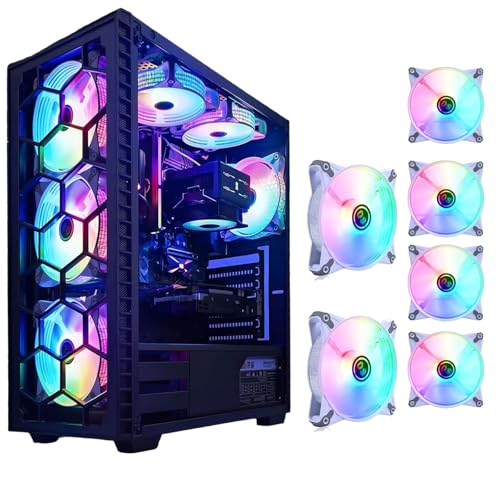
DS leddess 120mm Static RGB Case Fans (6-Pack)
Best for: multi-fan radiator builds using direct Molex power
- Compatible Device
- Radiator, CPU Cooler (what this guide is about)
- Fan Size
- 120mm
- Connector Type
- Molex
- Lighting Type
- Static RGB LED
- Dimensions
- 4.72 × 0.98 × 4.72 inches
View on Amazon: DS leddess 120mm Static RGB Case Fans (6-Pack)
This package equips you with six 120mm cooling fans designed for PC radiators, CPU coolers, and cases. Each fan measures 25mm thick and integrates eight static RGB LEDs for fixed multi-color illumination. Power runs directly from your power supply via standard Molex connectors rather than motherboard headers. If you need to populate multiple radiator mounts across a mid-tower or full-tower chassis with matched white fans, this multi-pack provides direct hardware coverage.
Pros
- Includes six 120mm fans in a single kit
- Equipped with eight static RGB LEDs per fan
- Compatible with PC radiators and CPU coolers
- Connects directly to power supply via Molex connectors
Cons
- Uses Molex connectors instead of PWM motherboard headers
- Static lighting cannot be controlled or synchronized
Good fit if
- You need six white 120mm fans to cover multiple radiator or chassis mounts.
- You prefer connecting fans directly to your power supply via Molex.
- You want fixed RGB illumination without extra controller hardware.
Skip if
- You need PWM speed control managed through motherboard fan headers.
- You require addressable RGB lighting synchronized with other components.
Verdict: DS leddess 120mm Static RGB Fan 6-Pack delivers six white 120mm radiator-ready fans featuring integrated eight-LED lighting and direct Molex connectivity. It serves builders needing multi-fan radiator setups without relying on motherboard header connections.

Thermaltake CT140 ARGB White 140mm Fan 2-Pack
Best for: white 140mm radiator setups with ARGB sync
- Compatible Device
- Radiator (what this guide is about)
- Fan Size
- 140mm
- Max Fan Speed
- 1500 RPM
- Bearing Type
- Hydraulic Bearing
- Lighting Type
- ARGB
- Dimensions
- 5.51 × 0.98 × 5.51 inches
View on Amazon: Thermaltake CT140 ARGB White 140mm Fan 2-Pack
This two-pack features 140mm fans tailored for radiator cooling, using a hydraulic bearing and a 7-blade design built for airflow and pressure. You get PWM control that scales up to 1500 RPM, paired with integrated anti-vibration mounts to dampen vibration against your radiator frame. It suits your build if you want daisy-chainable white 140mm fans with 5V addressable RGB lighting that connects straight to your motherboard.
Pros
- Hydraulic bearing construction
- Daisy-chain cable design for simpler routing
- PWM fan speed control reaching up to 1500 RPM
- Nine addressable LEDs compatible with 5V motherboard sync
- Integrated anti-vibration mounting system
Cons
- Requires 140mm mounting points rather than 120mm spacing
- Relies on a 5V motherboard header without a standalone controller included
Good fit if
- You need 140mm fans specifically sized for a radiator setup.
- You want daisy-chain wiring to minimize cable clutter.
- You run a motherboard with 5V addressable RGB support.
Skip if
- You have a radiator limited to 120mm fan mounts.
- You need hardware with an included standalone remote control.
Verdict: Thermaltake CT140 ARGB 140mm Fan 2-Pack provides hydraulic bearing operation, 1500 RPM PWM control, and clean daisy-chained wiring for compatible radiators.

RIIEYOCA Multi-Size Dual Fan Radiator Bracket
Best for: mounting custom dual fans near radiators or GPUs
- Compatible Device
- Radiator, Graphics Card (what this guide is about)
- Fan Size
- 120mm, 140mm, 80mm
View on Amazon: RIIEYOCA Multi-Size Dual Fan Radiator Bracket
This set provides four thickened metal brackets with sixteen mounting screws to position two cooling fans over a radiator or graphics card. You can configure it with 80mm, 90mm, 120mm, or 140mm fans using vertical PCI slots or mounting points under your video card. It suits system builders who need dedicated hardware to mount auxiliary cooling fans near components without built-in fan rails.
Pros
- Supports 80mm, 90mm, 120mm, and 140mm fan sizes
- Includes four metal brackets and 16 mounting screws
- Thickened metal build with black rust-resistant coating
- Mounts in vertical slots or beneath graphics cards
Cons
- Includes mounting brackets only with no fans supplied
- Requires manual screw assembly across multiple pieces
Good fit if
- You need mounting brackets for 80mm, 90mm, 120mm, or 140mm fans.
- You want to mount auxiliary cooling fans under a GPU or over a radiator.
Skip if
- You need actual case fans included in the package.
- You lack available vertical expansion slots in your chassis.
Verdict: RIIEYOCA Multi-Size Dual Fan Radiator Bracket supplies the hardware and screws required to position two fans over radiators or expansion slots. It functions strictly as a mounting adapter, so you must supply the cooling fans separately.
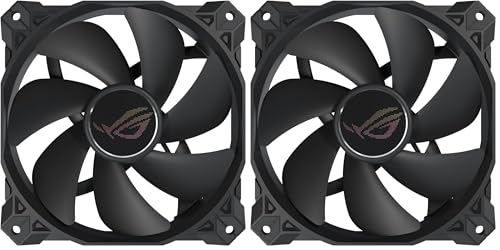
ASUS ROG Strix XF120 120mm PWM Fan 2-Pack
Best for: quiet 120mm radiator cooling setups
- Compatible Device
- Radiator, CPU Cooler (what this guide is about)
- Fan Size
- 120mm
- Max Fan Speed
- 1800 RPM
- Noise Level
- 22.5 dB(A)
- Connector Type
- 4-pin PWM
- Bearing Type
- MagLev
The ASUS ROG Strix XF120 120mm PWM Fan 2-Pack gives you magnetic levitation cooling built for radiators and CPU coolers. It operates across an adjustable range from 250 to 1800 RPM using a standard 4-pin PWM connector, stopping entirely at zero percent utilization. With an acoustic rating of 22.5 dB(A) and integrated anti-vibration pads, this pair suits you if you want steady radiator airflow with low operational noise.
Pros
- Wide 250 to 1800 RPM range with shutoff at 0% PWM
- MagLev bearing rated for a 400,000-hour lifespan
- Low maximum sound profile rated at 22.5 dB(A)
- Built-in anti-vibration pads and mounts
- Includes a 5-year warranty
Cons
- Lacks integrated RGB or LED lighting
- No remote control hardware included
Good fit if
- You need 120mm 4-pin PWM fans designed for radiator cooling mounts.
- You want fans capable of stopping completely during 0% PWM loads.
- You prefer long-life MagLev bearings over traditional sleeve bearings.
Skip if
- You want addressable RGB lighting zones inside your PC case.
- You need 140mm fan mounting dimensions for your radiator.
Verdict: ASUS ROG Strix XF120 120mm PWM Fan 2-Pack delivers dependable radiator airflow with its 400,000-hour MagLev bearing and flexible 250 to 1800 RPM range. It provides quiet thermal control without adding extra lighting hardware to your build.

LTC 120mm Daisy-Chain ARGB Fan
Best for: clean radiator cable management with ARGB
- Compatible Device
- Radiator (what this guide is about)
- Fan Size
- 120mm
- Max Fan Speed
- 1800 RPM
- Max Airflow
- 70CFM
- Static Pressure
- 2.23mm-H2O
- Noise Level
- 30.4dB(A)
This 120mm PWM fan from LTC is designed for radiator mounting, delivering up to 2.23 mm-H2O of static pressure and 70 CFM of airflow. Its slide-in, pin-to-pin interlocking system lets you daisy-chain multiple fans using a single cable per cluster. Running from 800 to 1800 RPM with noise levels up to 30.4 dB(A), it suits you if you want addressable RGB lighting and reduced cable clutter across your liquid cooling setup.
Pros
- Delivers 2.23 mm-H2O static pressure and up to 70 CFM airflow
- Slide-in pin-to-pin daisy-chain system requires one cable per cluster
- 4-pin PWM variable speed range between 800 and 1800 RPM
- Dual illumination featuring central lighting and side strip accents
Cons
- Reaches up to 30.4 dB(A) at maximum speed
- Requires a 5V 3-pin ARGB motherboard header or an extra controller
Good fit if
- You want to link radiator fans together using a single cable cluster.
- You need at least 2.23 mm-H2O static pressure to push air through radiator fins.
- You use a motherboard with standard 5V 3-pin ARGB headers.
Skip if
- You need fans that run below 30 dB(A) at full operating speed.
- You only have 12V 4-pin RGB headers on your motherboard.
Verdict: LTC 120mm Daisy-Chain ARGB Fan delivers solid static pressure for radiators alongside convenient interlocking wiring. It balances 70 CFM airflow with dual-zone addressable lighting for clean cooling setups.

Hilitand 80mm ARGB PWM Fan
Best for: compact radiators requiring 80mm PWM cooling
- Compatible Device
- Radiator, CPU Cooler (what this guide is about)
- Fan Size
- 80mm
- Max Fan Speed
- 2500 RPM
- Max Airflow
- 26.5 CFM
- Noise Level
- 25.5 dBA
- Bearing Type
- MFDB Fluid Dynamic
The Hilitand 80mm ARGB fan provides targeted cooling for compact radiators and CPU coolers. It runs from 800 to 2,500 RPM via PWM control, delivering up to 26.5 CFM of airflow with a peak noise rating of 25.5 dBA. Equipped with a fluid dynamic bearing, seven blades, and 72mm hole spacing, it suits you if you need addressable lighting and variable speed for small setups.
Pros
- Wide PWM speed range of 800 to 2,500 RPM
- Maximum noise output of 25.5 dBA with corner silicone pads
- 5V addressable RGB synchronization support
- Fluid dynamic bearing rated for over 10,000 hours
Cons
- Maximum airflow tops out at 26.5 CFM
- 80mm frame size does not fit standard 120mm or 140mm mounts
- Bearing life rating of 10,000 hours is relatively short
Good fit if
- You need an 80mm fan with 72mm hole spacing for a compact radiator.
- You want 5V motherboard-synced ARGB lighting on a small cooler.
- You require PWM speed regulation between 800 and 2,500 RPM.
Skip if
- You use standard 120mm or 140mm liquid cooling radiators.
- You need higher airflow volume than 26.5 CFM.
Verdict: Hilitand 80mm ARGB PWM Radiator Fan delivers flexible speed control and RGB lighting for setups requiring an 80mm footprint. Its 26.5 CFM airflow and 25.5 dBA noise profile make it a practical choice for small radiators and CPU coolers.

Thermalright 120mm Non-RGB PWM Fan 5-Pack
Best for: unlit multi-fan radiator cooling setups
- Compatible Device
- Radiator, CPU Cooler (what this guide is about)
- Fan Size
- 120mm
- Max Fan Speed
- 1550RPM
- Max Airflow
- 66.17CFM
- Static Pressure
- 1.53mm H2O
- Noise Level
- 25.6dBA
This Thermalright five-pack provides 120mm non-RGB cooling fans designed for PC cases, CPU coolers, and liquid cooling radiators. Each fan delivers up to 66.17 CFM of airflow and 1.53 mm H2O of static air pressure at 1550 RPM, keeping noise output at 25.6 dBA. Equipped with 55cm 4-pin PWM series cables, this set suits you if you want multi-fan radiator airflow without decorative lighting.
Pros
- Delivers up to 66.17 CFM airflow and 1.53 mm H2O static pressure
- Uses S-FDB bearings to reduce blade vibration during operation
- Includes 55 cm cable configured for PWM series daisy-chaining
- Operates at a moderate 25.6 dBA maximum noise level
Cons
- Features no integrated LED or RGB illumination
- Top rotational speed is limited to 1550 RPM
Good fit if
- You need several 120 mm fans to populate a multi-fan radiator.
- You prefer an all-black, lightless build without RGB cables.
- You want automatic motherboard fan speed adjustments via 4-pin PWM.
Skip if
- You want illuminated RGB or ARGB fan lighting.
- You require high-speed fans that operate beyond 1550 RPM.
Verdict: Thermalright 120mm Non-RGB PWM Fan 5-Pack delivers balanced airflow, solid static pressure, and quiet S-FDB bearings across five unlit units. It is a practical multi-fan cooling choice for standard 120 mm radiators.
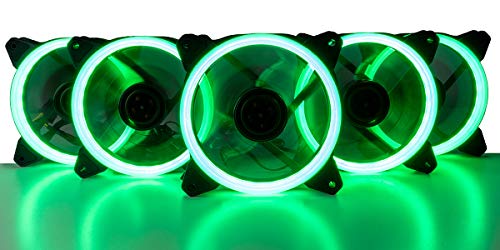
Empowered PC Mantis 120mm Green LED Fans (5-Pack)
Best for: multi-fan radiators needing fixed green LED accents
- Compatible Device
- Radiator, CPU Cooler (what this guide is about)
- Fan Size
- 120mm
- Max Fan Speed
- 1500 RPM
- Max Airflow
- 45 CFM
- Connector Type
- 3-pin and 4-pin
- Lighting Type
- Green LED
View on Amazon: Empowered PC Mantis 120mm Green LED Fans (5-Pack)
This 5-pack gives you 120mm cooling fans fitted with 30-LED green halo rings. Each fan operates at 1500 RPM to push 45 CFM of airflow through your radiator or case, producing up to 37 dBA of noise. Dual 3-pin and 4-pin connectors let you power them via motherboard headers or directly from your power supply. Integrated rubber pads dampen vibration transfer. It suits you if you want dedicated green illumination across multiple radiator mounts.
Pros
- Delivers 45 CFM airflow at 1500 RPM
- Features a 30-LED single-color green halo ring
- Includes both 3-pin and 4-pin power connectors
- Equipped with integrated anti-vibration rubber pads
Cons
- Fixed green LED color without RGB or ARGB switching
- 37 dBA noise rating is relatively loud
Good fit if
- You need a multi-fan bundle for full radiator coverage
- You want a static green ring accent with 30 LEDs
- You need flexible 3-pin or 4-pin power connection options
Skip if
- You need addressable RGB color customization
- You require ultra-quiet radiator fans under 30 dBA
Verdict: Empowered PC Mantis 120mm Green LED Fans (5-Pack) delivers 45 CFM at 1500 RPM with bright 30-LED green accents for multi-fan radiator setups. Its 37 dBA output means higher noise in exchange for consistent static-color illumination.
Specifications side by side
| Spec | DS leddess 120mm 6-Pack RGB Fans | Maxmoral Triple 80mm PCI Fan Mount Bracket | DORHEA 80mm 2-Pin DC Fans (2-Pack) | E-outstanding Dual 120mm/140mm PCI Fan Bracket | Shaking Tank MasterFan Halo 120mm ARGB Fans | Maxmoral Dual Fan PCI Slot Mount Rack | Maxmoral Four Fan Mounting Rack 2-Pack | DS leddess 120mm Static RGB Case Fans (6-Pack) | Thermaltake CT140 ARGB White 140mm Fan 2-Pack | RIIEYOCA Multi-Size Dual Fan Radiator Bracket | ASUS ROG Strix XF120 120mm PWM Fan 2-Pack | LTC 120mm Daisy-Chain ARGB Fan | Hilitand 80mm ARGB PWM Fan | Thermalright 120mm Non-RGB PWM Fan 5-Pack | Empowered PC Mantis 120mm Green LED Fans (5-Pack) |
|---|---|---|---|---|---|---|---|---|---|---|---|---|---|---|---|
| Fan Size | 120mm | not specified | 80mm | not specified | 120mm | not specified | not specified | 120mm | 140mm | not specified | 120mm | 120mm | 80mm | 120mm | 120mm |
| Max Fan Speed | not specified | not specified | 4500RPM | not specified | not specified | not specified | not specified | not specified | 1500 RPM | not specified | 1800 RPM | 1800 RPM | 2500 RPM | 1550RPM | 1500 RPM |
| Max Airflow | not specified | not specified | 41CFM | not specified | not specified | not specified | not specified | not specified | not specified | not specified | not specified | 70CFM | 26.5 CFM | 66.17CFM | 45 CFM |
| Static Pressure | not specified | not specified | not specified | not specified | not specified | not specified | not specified | not specified | not specified | not specified | not specified | 2.23mm-H2O | not specified | 1.53mm H2O | not specified |
| Noise Level | not specified | not specified | 37.9dBA | not specified | not specified | not specified | not specified | not specified | not specified | not specified | 22.5 dB(A) | 30.4dB(A) | 25.5 dBA | 25.6dBA | not specified |
| Connector Type | 6-pin | not specified | 2pin-ph2.5 | not specified | not specified | not specified | not specified | Molex | not specified | not specified | 4-pin PWM | 4 Pin PWM | not specified | 4pin pwm | 3-pin and 4-pin |
| Bearing Type | not specified | not specified | not specified | not specified | not specified | not specified | not specified | not specified | Hydraulic Bearing | not specified | MagLev | HDB | MFDB Fluid Dynamic | S-FDB | not specified |
| Lighting Type | RGB | not specified | not specified | not specified | Addressable Gen 2 RGB | not specified | not specified | Static RGB LED | ARGB | not specified | not specified | 5V 3Pin ARGB | 5V ARGB | not specified | Green LED |
| Blade Direction | not specified | not specified | not specified | not specified | not specified | not specified | not specified | not specified | not specified | not specified | not specified | Forward | not specified | not specified | not specified |
| Lighting | RGB | not specified | not specified | not specified | RGB | not specified | not specified | RGB | ARGB | not specified | not specified | ARGB | RGB | not specified | LED |
| Compatible Device | Radiator, CPU Cooler | Radiator, Graphics Card | Radiator, CPU Cooler | Radiator, Graphics Card | Radiator | Radiator, Graphics Card | Radiator, Graphics Card | Radiator, CPU Cooler | Radiator | Radiator, Graphics Card | Radiator, CPU Cooler | Radiator | Radiator, CPU Cooler | Radiator, CPU Cooler | Radiator, CPU Cooler |
| Dimensions | 4.72 × 4.72 × 0.98 inches | 0.98 × 3.15 × 0.98 inches | not specified | not specified | 4.72 × 4.72 × 0.98 inches | not specified | not specified | 4.72 × 0.98 × 4.72 inches | 5.51 × 0.98 × 5.51 inches | not specified | 4.7 × 4.7 × 0.9 inches | 4.72 × 4.72 × 0.98 inches | 3.15 × 0.98 × 3.15 inches | 4.72 × 0.98 × 4.72 inches | not specified |
| Weight | not specified | 0.32 ounces | not specified | 0.32 ounces | not specified | 3.53 ounces | 3.53 ounces | not specified | 1 pounds | not specified | 14.1 ounces | not specified | not specified | not specified | 2 pounds |
| Width | not specified | not specified | 0.98 inches | not specified | not specified | not specified | not specified | not specified | not specified | not specified | not specified | not specified | not specified | not specified | not specified |
| Height | not specified | not specified | 3.15 inches | not specified | not specified | not specified | not specified | not specified | not specified | not specified | not specified | not specified | not specified | not specified | not specified |
| Color | Ring | not specified | 2pcs 12V 2pin | Black | coolermaster halo white | not specified | not specified | White | White | not specified | ROG Strix XF120/XF120A1/BK// | White | not specified | not specified | not specified |
| Model | A06 | 3FAN-BRACE-89 | D15779-1 | DFMRCRH-1 | MFL-B4DN-15NPA-R1 | DFMRPSB-B2 | FMRSBRGC-B2 | DS-E06 | CL-F154-PL14SW-A | RIIE374 | 90DA0010-B09000 | CF-121D | Serounder475ztrsgvd | TL-C12C X5 | B0G73G7KYZ |
| Size | not specified | For 3x 8/9cm Fans | not specified | not specified | 120×120×2mm | not specified | not specified | not specified | 140mm | not specified | 120mm (2 Pack) | Forward | not specified | not specified | 5pk |
If your setup focuses on desk cooling rather than radiator static pressure, specifications for best fans with bladeless show alternative airflow delivery methods.
How to Choose Radiator Cooling Fans
-
Examine Fan Bearing Types
Bearing architecture determines operational lifespan under continuous heat. Standard sleeve bearings wear out quickly when mounted horizontally against liquid radiators. Look for advanced designs if you run high-duty systems for extended periods. For example, the ASUS ROG Strix XF120 features a magnetic levitation bearing rated for 400,000 hours of use. Checking bearing specifications ensures your radiator cooling hardware maintains steady rotation without premature friction failures or unexpected mechanical breakdown in demanding multi-fan setups.
-
Prioritize Daisy Chain Cabling
Radiators often require two or three fans side by side. Managing separate power and lighting lines for every unit clutters small PC enclosures and impedes internal airflow. Choosing fans with interlocking connectors drastically simplifies your installation. The LTC 120mm Daisy-Chain ARGB Fan uses linking connections that pass signals directly between adjacent units. Review the wiring layout specifications to see if the hardware links together. This cuts excess cabling down to a single pair running to your motherboard.
-
Distinguish Brackets from Fans
Pay close attention to product contents when shopping for radiator cooling gear. Certain listings supply only metal mounting hardware rather than motorized cooling units. A bracket like the Maxmoral Triple 80mm PCI Fan Mount Bracket provides a physical metal frame to hold cooling gear near your hardware, but contains no fans. Verify whether the listing includes active fans or passive frames. If you select a bare bracket, you must supply your own compatible cooling fans to move air.
-
Check Power Connector Requirements
Check how each cooling fan draws electrical power before connecting it to your system. Motherboard headers offer regulated speed curves, but older or specialized hardware might connect directly to your power supply unit. The DS leddess 120mm Static RGB Case Fans use direct Molex connections rather than standard system board pins. This setup bypasses motherboard limits, but fans run at constant full speed without software control. Verify your power supply has available cables to match the fan connector.
-
Compare Noise Output Ratings
Dense radiator fins resist airflow, causing specific blade profiles to generate audible turbulence. Always check the published decibel ratings before choosing fans for quiet environments. For example, the Empowered PC Mantis 120mm Green LED Fans operate at 37 dBA to deliver 45 CFM of airflow. Higher decibel numbers mean noticeably louder performance during sustained cooling cycles. If you prefer low noise, compare published dBA metrics against airflow volume to find the right acoustic balance for your build.
-
Verify PWM Speed Control
Radiator workloads shift depending on whether your processor is idle or rendering complex tasks. Four-pin pulse-width modulation headers let your motherboard adjust fan speeds dynamically based on heat sensors. The Hilitand 80mm ARGB PWM Fan supports variable speed operation, allowing it to produce 25.5 dBA under normal cooling demands. Without PWM support, fans spin at maximum speeds constantly, increasing overall noise and wear. Check for 4-pin PWM specifications if you require automated thermal adjustments.
Frequently asked questions
Can you mount radiator fans using PCI expansion slots?
Yes, you can use dedicated PCI slot brackets to position fans near radiators when standard case mounts are full. Hardware options like the E-outstanding Dual bracket support 120mm and 140mm fans across expansion slots. Similarly, Maxmoral brackets hold dual or triple fans to supply targeted auxiliary airflow directly toward graphics card coolers and radiator fins.
What is the benefit of daisy-chain fan cables on a liquid cooling radiator?
Daisy-chain connections allow you to link multiple radiator fans together sequentially using interlocking connectors or shared wiring headers. This design reduces cable clutter across your radiator frame. Models like the LTC 120mm Daisy-Chain ARGB fan combine interlocking wiring with 70 CFM airflow, while the Thermaltake CT140 uses daisy-chained wiring to streamline cable routing back to your controller.
How does magnetic levitation bearing technology help radiator cooling fans?
Magnetic levitation bearings replace mechanical contact surfaces with magnetic fields to stabilize the fan rotor during continuous operation. This reduces internal friction and wear during high-speed spinning. The ASUS ROG Strix XF120 utilizes this MagLev bearing design to achieve an operational rating of 400,000 hours, supporting sustained speeds between 250 and 1800 RPM across liquid radiators.
Can you power radiator cooling fans directly from a Molex connector?
Yes, fans equipped with direct Molex connectors plug straight into your power supply unit rather than relying on motherboard fan headers. The DS leddess 120mm Static RGB 6-pack uses direct Molex connections to supply constant power to its eight-LED arrays. This configuration provides continuous airflow for multi-fan radiator builds without occupying motherboard 4-pin or 3-pin headers.
What should you check when choosing between PWM and fixed-speed radiator fans?
Check whether your system requires variable thermal regulation or constant airflow output. Pulse-width modulation (PWM) 4-pin fans, such as the ASUS ROG Strix XF120 or Hilitand 80mm ARGB fan, automatically adjust their speeds based on cooling demands. Fixed-speed fans like the Empowered PC Mantis run at a static rate, operating at 1500 RPM to deliver consistent 45 CFM cooling.
Are compact 80mm fans suitable for liquid cooling radiators?
Compact 80mm fans work well for small-form-factor builds and specialized cooling blocks that lack clearance for 120mm frames. Units like the Hilitand 80mm ARGB PWM fan provide 26.5 CFM of airflow at 25.5 dBA, giving you regulated thermal control within tighter chassis spaces where full-sized radiator fans will physically not fit against the chassis frame.
What is the purpose of hybrid pressure fan blades on a radiator?
Hybrid pressure fan blades combine standard airflow fin curvature with static pressure blade designs to force air through dense radiator fins. The Shaking Tank MasterFan Halo 120mm utilizes hybrid pressure blades specifically engineered to overcome liquid cooling resistance. This design maintains steady through-core ventilation while also incorporating built-in jam protection to prevent motor stall during operation.