Best Noctua Case Fans with 4-Pin in 2026: 8 Picks
As an Amazon Associate we earn from qualifying purchases. Links on this page are affiliate links.
Choosing the right noctua case fan with 4-Pin control lets you balance thermal performance and noise through precise pulse-width modulation. We compared 8 models based on the specifications published on the listings.
The Noctua 80mm PWM Case Fan leads the group because its 17.7 dB(A) acoustic ceiling and compact 80mm frame deliver controlled cooling for space-constrained enclosures. This guide helps you determine the right fan size, speed profile, and package count for your specific system setup.
Quick picks
The best fit for you
- You need quiet cooling for a compact ITX case Noctua 80mm PWM Case Fan Its 80mm frame and 17.7 dB(A) noise ceiling provide low-noise ventilation for tight chassis.
- You want cooling for low-voltage USB-powered gear Noctua 40mm 5V PWM Fan Two-Pack Its 40mm frame and 5V operating rating match low-voltage custom hardware.
- You require heavy-duty airflow for high-resistance radiators Noctua 120mm Industrial High-Speed Fan 2-Pack A 3,000 RPM maximum speed and IP52 water-and-dust rating suit high-resistance thermal loads.
- You need multiple black fans for a large chassis Noctua 140mm Black PWM Fan 3-Pack This three-pack provides 140mm black fans operating up to 1500 RPM.
Our 8 picks

Noctua 80mm PWM Case Fan
Best for: compact ITX cases and NAS drive enclosures
- Connector Type
- 4-Pin (what this guide is about)
- Fan Size
- 80mm
- Max Fan Speed
- 2200 RPM
- Noise Level
- 17.7 dB(A)
- Dimensions
- 3.15 × 0.98 × 3.15 inches
- Weight
- 8 ounces
This 80mm cooling fan connects via a standard 4-pin PWM header to regulate speeds between 450 and 2200 RPM. It reaches a maximum noise output of 17.7 dB(A) at full tilt, or 1750 RPM when you attach the included low-noise adapter. If you need targeted airflow for compact enclosures like ITX cases, HTPCs, or NAS chassis, this unit gives you precise speed management without excessive acoustic output.
Pros
- Wide operating range of 450 to 2200 RPM via 4-pin PWM control
- Maximum rated acoustic output of 17.7 dB(A)
- Bundled with low-noise adapter, extension cable, y-cable, and anti-vibration mounts
- Long operational life rating over 150,000 hours MTTF
Cons
- 80mm frame does not fit standard 120mm or 140mm mounts
- Color option limited to the signature brown design
Good fit if
- You need an 80mm fan for a compact ITX, HTPC, or NAS chassis.
- You want automatic 4-pin PWM motherboard control over fan speed.
- You need included extras like vibration dampers, an extension cable, or a y-splitter.
Skip if
- You need 120mm or 140mm fan mounting points.
- You prefer an all-black build without brown accents.
Verdict: Noctua 80mm PWM Quiet Fan delivers precise thermal regulation for small-form-factor builds with its 4-pin control and 17.7 dB(A) noise ceiling. It comes fully equipped with splitters and dampening mounts to simplify installation in compact setups.

Noctua 40mm 5V PWM Fan Two-Pack
Best for: compact 5V gear and USB-powered electronics
- Connector Type
- 4-Pin (what this guide is about)
- Fan Size
- 40mm
- Max Fan Speed
- 5000 RPM
- Noise Level
- 19.6 dB(A)
- Dimensions
- 1.57 × 0.39 × 1.57 inches
- Weight
- 5.64 ounces
This set gives you two compact 40mm fans built for tight enclosures and low-voltage hardware. Each unit runs on 5V power with 4-pin PWM speed control reaching up to 5000 RPM while staying under 19.6 dB(A) acoustic noise. The included USB power adapter and OmniJoin set let you power them from USB ports or custom headers. You get a targeted cooling solution suited for small network gear and compact electronics.
Pros
- Runs on 5V power via 4-pin PWM or included USB adapter cable
- Compact 40x40x10 mm footprint fits tight spaces
- Acoustic noise rated at a maximum of 19.6 dB(A)
- Includes OmniJoin adaptor set, extension cable, and anti-vibration mounts
Cons
- Operates strictly at 5V and cannot run on standard 12V PC fan headers
- Small 40mm frame moves less air volume than standard 120mm fans
Good fit if
- You need small cooling fans for 5V hardware or USB-powered devices.
- You require 4-pin PWM speed control inside an enclosure with only 10mm depth clearance.
Skip if
- You need fans powered by standard 12V PC motherboard fan headers.
- You have space to fit standard 80mm, 120mm, or 140mm PC case fans.
Verdict: Noctua 40mm 5V PWM Fan 2-Pack provides quiet, low-voltage ventilation for tight enclosures and custom devices. Its 5V operating rating and USB connectivity make it unsuitable for standard 12V PC case headers but ideal for specialized low-power electronics.

Noctua 60mm PWM Quiet Fans (3-Pack)
Best for: small enclosures, NAS devices, and 3D printers
- Connector Type
- 4-Pin (what this guide is about)
- Fan Size
- 60mm
- Max Fan Speed
- 3000 RPM
- Noise Level
- 19.3 dB(A)
- Dimensions
- 8.5 × 1.5 × 6 inches
- Weight
- 4.34 ounces
This three-pack gives you 60x60x25mm cooling fans built with 4-pin PWM headers. Each fan operates across a 550 to 3000 RPM range, dropping to a 2300 RPM ceiling with the included Low-Noise Adaptor. At full tilt, noise reaches 19.3 dB(A). You receive mounting screws, anti-vibration mounts, extension cables, and y-cables in the box. It suits you if you need compact, quiet cooling for network gear, NAS enclosures, or 3D printers.
Pros
- Wide 550 to 3000 RPM operating range via 4-pin PWM
- Low maximum acoustic noise rating of 19.3 dB(A)
- Rated MTTF of more than 150,000 hours
- Bundled with y-cables, extension cables, and Low-Noise Adaptors
Cons
- Compact 60mm size does not fit standard 120mm or 140mm fan locations
- Available only in brown
- 25mm thickness exceeds clearances designed for slim sub-20mm fans
Good fit if
- You need 60mm replacement fans for a NAS, network switch, or 3D printer.
- You want automatic 4-pin PWM speed regulation with low acoustic output.
- You plan to run two fans off one motherboard header using included y-cables.
Skip if
- You need standard 120mm or 140mm intake or exhaust fans for a typical PC case.
- You require ultra-slim fans under 25mm in depth for tight clearances.
Verdict: Noctua 60mm PWM Fan 3-Pack provides controlled, low-noise airflow for compact enclosures that take 60mm cooling fans. It equips you with three 4-pin fans and all necessary splitters and adapters right in the box.

Noctua 140mm Brown Fan 3-Pack
Best for: multi-fan 140mm case and radiator cooling
- Connector Type
- 4-Pin (what this guide is about)
- Fan Size
- 140mm
- Max Fan Speed
- 1500 RPM
- Noise Level
- 24.6 dB(A)
- Dimensions
- 8.5 × 1.5 × 6 inches
- Weight
- 1.32 pounds
This triple pack provides three 140mm case fans with 4-pin PWM connectors for automated speed control. Each fan runs from 300 to 1500 RPM, reaching a maximum noise level of 24.6 dB(A), or 1200 RPM when you attach the included Low-Noise Adaptor. It suits your build if you have 140mm mounting points on radiators or chassis panels and want low-noise airflow with bundled splitters and extension cables.
Pros
- 300 to 1500 RPM speed range with 4-pin PWM control
- Includes Low-Noise Adaptors, extension cables, and y-cables
- Rated for over 150,000 hours MTTF
- Square frame design fits PC cases and liquid cooling radiators
Cons
- Fixed brown color scheme
- 140mm footprint does not fit standard 120mm-only fan mounts
Good fit if
- You need three 140mm fans for case intake, exhaust, or radiator setups.
- You want broad PWM speed control between 300 and 1500 RPM.
- You want included y-cables to run multiple fans from a single header.
Skip if
- You have a case that only supports 120mm or smaller fans.
- You prefer an all-black or RGB aesthetic over brown frames.
Verdict: Noctua 140mm PWM Fan 3-Pack delivers three 140mm 4-pin fans with a wide 300 to 1500 RPM range and comprehensive cable accessories. It is a solid choice when you need quiet, reliable cooling for large case intakes or radiators.

Noctua 140mm Black PWM Fan 3-Pack
Best for: all-black multi-fan 140mm PC builds
- Connector Type
- 4-Pin (what this guide is about)
- Fan Size
- 140mm
- Max Fan Speed
- 1500 RPM
- Noise Level
- 24.6 dB(A)
- Dimensions
- 5.51 × 5.51 × 0.98 inches
- Weight
- 1.29 pounds
This three-pack includes 140mm PWM case fans designed for cooling PC cases or radiators. Each unit features a square frame measuring 140x140x25mm and operates via a standard 4-pin PWM connection with a top speed of 1500 RPM. They generate a maximum noise level of 24.6 dB(A) and provide swappable colored anti-vibration pads. You will appreciate this set if you need multiple all-black fans with customizable accents.
Pros
- Maximum speed of 1500 RPM with 4-pin PWM control
- Peak sound output limited to 24.6 dB(A)
- Includes swappable anti-vibration pads in six colors
- Mean time to failure exceeds 150,000 hours
Cons
- Requires 140mm fan mounts rather than smaller 120mm slots
- 25mm frame thickness prevents installation in ultra-slim clearance spaces
Good fit if
- You need a matched set of three 140mm PWM fans.
- You want an all-black frame with swappable colored anti-vibration pads.
- You are mounting cooling directly onto 140mm liquid radiators or case brackets.
Skip if
- You have a PC chassis limited to 120mm fan mounts.
- You require low-profile fans thinner than 25mm.
Verdict: Noctua NF-A14 140mm Black Fan 3-Pack delivers 1500 RPM airflow and flexible color accents across three square-frame units. It provides reliable 140mm coverage for full chassis or radiator configurations.

Noctua 120mm Industrial High-Speed Fan 2-Pack
Best for: high-resistance radiators and heavy-duty cooling setups
- Connector Type
- 4-Pin (what this guide is about)
- Fan Size
- 120mm
- Max Fan Speed
- 3000 RPM
- Noise Level
- 43.5 dB(A)
- Dimensions
- 4.72 × 4.72 × 0.98 inches
- Weight
- 12.8 kilograms
View on Amazon: Noctua 120mm Industrial High-Speed Fan 2-Pack
This two-pack features 120mm cooling fans equipped with a 4-pin PWM header for automated motherboard control. Operating from 750 to 3,000 RPM, each unit moves air across radiators or through restrictive case openings using a Focused Flow frame. You get IP52 water and dust protection alongside a 43.5 dB(A) maximum acoustic profile. It suits you if your setup prioritizes high static pressure and heavy-duty airflow over ultra-quiet running.
Pros
- 3,000 RPM maximum rotational speed
- IP52 certified dust and water protection
- Fiber-glass reinforced polyamide frame
- Broad 750 to 3,000 RPM PWM operating range
Cons
- 43.5 dB(A) maximum noise level
- 750 RPM minimum speed is higher than standard low-noise models
Good fit if
- You need high static pressure cooling for restrictive cases or radiators.
- You require IP52 water and dust resistance for demanding environments.
- You want a matched two-pack of high-RPM 120mm fans.
Skip if
- You prioritize ultra-quiet operation below 40 dB(A) under full load.
- You need fans that throttle down below 750 RPM for silent idling.
Verdict: Noctua 120mm Heavy Duty 4-Pin Fan 2-Pack delivers rugged IP52-rated construction and speeds up to 3,000 RPM for heavy-duty thermal loads. The trade-off is a 43.5 dB(A) acoustic ceiling that favors maximum performance over silence.

Noctua 80mm Redux PWM Fan 2-Pack
Best for: dual 80mm compact case or NAS cooling
- Connector Type
- 4-Pin (what this guide is about)
- Fan Size
- 80mm
- Max Fan Speed
- 1800 RPM
- Noise Level
- 17.1 dB(A)
- Dimensions
- 3.15 × 3.15 × 0.98 inches
- Weight
- 9.6 ounces
This two-pack includes 80mm fans designed for compact case ventilation and NAS setups. You get a 4-pin PWM connector that lets your motherboard manage rotational speeds up to 1800 RPM. Operating at 12V, each fan maintains noise levels under 17.1 dB(A) with an MTTF exceeding 150,000 hours. The standard 25mm thickness fits regular 80mm mounts, making this set practical if you need two matching grey fans for small enclosure airflow.
Pros
- Includes two 80x80x25mm grey cooling fans
- 4-pin PWM header enables automatic motherboard speed control
- Acoustic noise ceiling rated at 17.1 dB(A)
- Rated operational lifespan exceeds 150,000 hours MTTF
Cons
- Accessories like anti-vibration mounts and y-splitters are optional
- 80mm diameter is incompatible with standard 120mm mounts
Good fit if
- You need two 80mm fans for a small form factor PC or NAS chassis.
- You want 4-pin PWM speed regulation up to 1800 RPM.
Skip if
- You require standard 120mm or 140mm mounting points.
- You want bundled extension cables or anti-vibration mounts in the box.
Verdict: Noctua 80mm Redux PWM Fan 2-Pack provides two 4-pin 80mm cooling fans rated up to 1800 RPM with quiet 17.1 dB(A) acoustics. It is a solid choice if you need twin fans for small cases or NAS units without bundled extras.
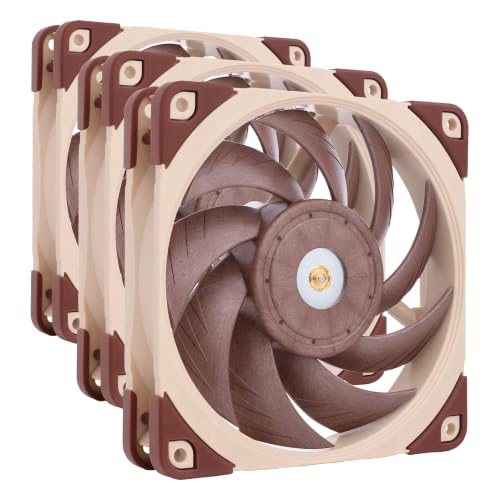
Noctua 120mm Quiet Fan 3-Pack
Best for: multi-fan chassis cooling and radiator setups
- Connector Type
- 4-Pin (what this guide is about)
- Fan Size
- 120mm
- Max Fan Speed
- 2000 RPM
- Noise Level
- 22.6 dB(A)
- Dimensions
- 4.72 × 4.72 × 0.98 inches
- Weight
- 2.38 pounds
This three-pack gives you 120mm cooling fans fitted with 4-pin PWM connectors for motherboard control. Each unit reaches up to 2000 RPM with a maximum sound rating of 22.6 dB(A), and the included low-noise adaptors can reduce speeds to 1700 RPM. Built from Sterrox liquid-crystal polymer, these fans suit you if you need balanced airflow and static pressure across radiators, CPU coolers, or general PC case intakes.
Pros
- Maximum sound rating of 22.6 dB(A)
- Up to 2000 RPM speed with 1700 RPM low-noise adaptors
- Includes radiator gaskets, anti-vibration mounts, and y-cables
- Pack of three 120mm fans
Cons
- Brown color scheme only
- No integrated lighting
Good fit if
- You need three 120mm PWM fans for case airflow or radiators.
- You want quiet operation up to 22.6 dB(A) with optional speed reduction.
- You require included y-cables to run multiple fans from single headers.
Skip if
- You require 140mm mounting points or smaller fan sizes.
- You prefer an all-black or RGB aesthetic for your build.
Verdict: Noctua 120mm Quiet Fan 3-Pack delivers 2000 RPM cooling with bundled low-noise adaptors and radiator mounting hardware. It provides balanced static pressure and airflow across your chassis.
Specifications side by side
| Spec | Noctua 80mm PWM Case Fan | Noctua 40mm 5V PWM Fan Two-Pack | Noctua 60mm PWM Quiet Fans (3-Pack) | Noctua 140mm Brown Fan 3-Pack | Noctua 140mm Black PWM Fan 3-Pack | Noctua 120mm Industrial High-Speed Fan 2-Pack | Noctua 80mm Redux PWM Fan 2-Pack | Noctua 120mm Quiet Fan 3-Pack |
|---|---|---|---|---|---|---|---|---|
| Fan Size | 80mm | 40mm | 60mm | 140mm | 140mm | 120mm | 80mm | 120mm |
| Max Fan Speed | 2200 RPM | 5000 RPM | 3000 RPM | 1500 RPM | 1500 RPM | 3000 RPM | 1800 RPM | 2000 RPM |
| Noise Level | 17.7 dB(A) | 19.6 dB(A) | 19.3 dB(A) | 24.6 dB(A) | 24.6 dB(A) | 43.5 dB(A) | 17.1 dB(A) | 22.6 dB(A) |
| Connector Type | 4-pin PWM | 4-pin PWM | 4-pin PWM | 4-pin PWM | 4-pin PWM | 4-pin PWM | 4-pin PWM | 4-pin PWM |
| Dimensions | 3.15 × 0.98 × 3.15 inches | 1.57 × 0.39 × 1.57 inches | 8.5 × 1.5 × 6 inches | 8.5 × 1.5 × 6 inches | 5.51 × 5.51 × 0.98 inches | 4.72 × 4.72 × 0.98 inches | 3.15 × 3.15 × 0.98 inches | 4.72 × 4.72 × 0.98 inches |
| Weight | 8 ounces | 5.64 ounces | 4.34 ounces | 1.32 pounds | 1.29 pounds | 12.8 kilograms | 9.6 ounces | 2.38 pounds |
| Size | 1 Count (Pack of 1) | 40x40x10 mm (Pack of 2) | 60x60x25mm (Pack of 3) | 140x140x25 mm (Pack of 3) | pack of 3 | 120x120x25 mm (Pack of 2) | 80x80x25 mm (Pack of 2) | 120x120x25mm (Pack of 3) |
| Color | Brown | brown | Brown | Brown | Black | Black | Grey | Brown |
| Model | NF-A8 PWM | NF-A4X10 5V PWM | NF-A6x25 PWM | NF-A14 PWM | NF-A14 PWM CH.BK.S | NF-F12 iPPC 3000 PWM | NF-R8 redux-1800 PWM | NF-A12x25PWM |
You can explore the best fans with 4 Speeds for more detailed comparisons.
Choosing the Right Noctua 4-Pin Fan
-
Maximum Rotational Speed
Check the maximum and minimum RPM listed for the fan model. Higher rotation speeds push more air through restrictive chassis grilles or heatsinks, but they increase acoustic output. A wide operating band allows your motherboard to drop fan speeds during idle desktop use. For instance, the Noctua 140mm Brown Fan 3-Pack spans from 300 to 1500 RPM. This gives you silent idling alongside sufficient airflow when component temperatures climb under sustained system workloads. Compare published RPM specifications to match your exact cooling demands.
-
Noise Level Limits
Look closely at the maximum acoustic ceiling measured in decibels. If you position your PC case directly on your desk, acoustic ratings determine your working comfort. Fans rated below 20 dB(A) remain near-silent during operation. For example, the Noctua 80mm Redux PWM Fan 2-Pack generates a top noise level of 17.1 dB(A) at 1800 RPM. In contrast, heavy-duty designs generate significantly higher sound pressure. Review the published dB(A) spec to verify that full-speed fan acoustics stay within your personal comfort threshold.
-
Ingress Protection Ratings
Check whether your build environment requires ingress protection against dust or moisture. Standard PC cases kept in clean rooms do not need specialized sealing. However, workshop systems, server racks, or open-frame enclosures benefit from industrial environmental protection. The Noctua 120mm Industrial High-Speed Fan 2-Pack carries an IP52 rating. This certified rating ensures protection from airborne dust particles and light dripping water while running at high speeds. Verify the ingress rating if you operate equipment in demanding, dusty, or unconditioned physical spaces.
-
Color Scheme Options
Select a color finish that matches your interior chassis styling if your case features a transparent window panel. Noctua manufactures models in classic brown and tan, neutral grey, and uniform black. The Noctua 140mm Black PWM Fan 3-Pack provides an all-black square frame accompanied by swappable color accents. This design integrates smoothly into monochrome or themed builds without clashing. If appearance inside the chassis matters for your setup, verify the specific color line before ordering so all cooling fans visually coordinate.
-
Bundled Installation Hardware
Examine what installation hardware comes inside the package. Some fans ship as bare units without extras, while others include dedicated mounting accessories and acoustic adapters. The Noctua 120mm Quiet Fan 3-Pack bundles low-noise adaptors alongside specialized radiator mounting hardware. These parts let you secure fans directly to water-cooling radiators or mechanically drop maximum speeds without extra software adjustments. Reviewing the included accessory list ensures you have the necessary screws, gaskets, and extension leads ready for your specific chassis or liquid radiator installation.
-
Multi-Unit Pack Counts
Count your chassis fan mounts and motherboard headers before deciding between single units and multi-packs. Outfitting multiple mounting spots with individual units requires buying extra splitters if your motherboard has limited 4-pin headers. The Noctua 60mm PWM Quiet Fans (3-Pack) provides three cooling fans along with bundled splitters and adapters in a single package. This setup supplies enough hardware to populate small enclosures or 3D printers at once. Check the pack count specification to ensure you obtain enough units and cabling for your build.
Frequently asked questions
What is the difference between Noctua brown and chromax black 140mm fans?
The primary differences are the color scheme and included accessories. The standard NF-A14 PWM features the traditional brown colorway and includes cable accessories, operating from 300 to 1500 RPM. The NF-A14 PWM CH.BK.S comes in an all-black square frame and includes flexible color accents. Both models share a 140mm size, 4-pin connectors, and a top rotational speed of 1500 RPM.
How do Noctua IndustrialPPC 120mm fans compare to standard quiet fans?
Noctua industrial fans focus on heavy-duty performance over silent operation. The 120mm NF-F12 iPPC reaches up to 3000 RPM and carries an IP52 water and dust protection rating, producing up to 43.5 dB(A) of sound. In contrast, the standard 120mm NF-A12x25 operates at a lower 2000 RPM maximum and comes with low-noise adaptors to keep acoustic levels down.
Can you connect the Noctua 40mm 5V PWM fan to a motherboard fan header?
You cannot safely plug this fan directly into a standard 12V PC motherboard header. The NF-A4X10 5V PWM is engineered specifically for 5V operating environments and USB-powered equipment. Connecting a 5V fan to a standard 12V motherboard header will supply excessive voltage that can damage the fan motor. Use standard 12V 4-pin fans for regular PC chassis cooling.
What is the difference between standard Noctua fans and Redux models?
Standard Noctua fans include bundled mounting and cabling accessories, while Redux models strip out the extras. For example, the brown NF-A8 PWM comes packed with cable splitters and anti-vibration dampening mounts. The grey NF-R8 redux-1800 PWM provides just the bare fan units without bundled hardware, offering a streamlined package that runs up to 1800 RPM with a 17.1 dB(A) acoustic profile.
Why should you choose a 4-pin Noctua fan over a 3-pin model?
A 4-pin connector enables pulse-width modulation control directly from your motherboard. This setup gives you precise speed regulation across a wide operating range, such as 300 to 1500 RPM on the NF-A14 PWM. A 4-pin connection allows the system to lower fan speeds during idle periods to reduce noise, then automatically ramp up speeds when components face heavy thermal demands.
Which Noctua 4-pin fan sizes fit compact NAS enclosures?
Compact NAS enclosures typically take 60mm or 80mm cooling fans. The 80mm NF-A8 PWM and NF-R8 redux models fit dual or single 80mm drive bays, keeping sound levels around 17.1 to 17.7 dB(A). If your compact NAS requires smaller ventilation ports, the 60mm NF-A6x25 PWM 3-pack provides three compact 4-pin fans complete with splitters and adapters for multi-drive thermal regulation.
Are Noctua 120mm 4-pin fans suitable for liquid cooling radiators?
Yes, Noctua 120mm 4-pin fans work well on radiators due to their static pressure designs. The NF-A12x25 PWM includes dedicated radiator mounting hardware and low-noise adaptors for balanced cooling at 2000 RPM. If your system features dense, high-resistance radiators, the heavy-duty NF-F12 industrial model delivers up to 3000 RPM with IP52 dust and water protection to push air through thick fins.