8 Best Corsair ATX PC Cases, Compared
As an Amazon Associate we earn from qualifying purchases. Links on this page are affiliate links.
Finding the right Corsair ATX PC case depends on your cooling hardware, component clearances, and desk space. This guide compares 8 options strictly by the specifications published on the product listings.
The Corsair 7000D Airflow Full-Tower Case takes the top ranking because its full-tower dimensions provide mounting space for up to 12 fans and large 140mm cooling configurations. This comparison helps you decide which frame size, panel design, and fan layout fit your motherboard and cooling plan.
Quick picks
The best fit for you
- You need maximum space for multi-radiator liquid cooling Corsair 7000D Airflow Full-Tower Case This full-tower chassis accommodates up to 12 fans alongside expansive room for multi-radiator cooling setups.
- You want panoramic glass with built-in RGB lighting Corsair iCUE Link 3500X RGB Mid-Tower It features panoramic tempered glass panels, integrated RGB lighting, and clearance for up to ten fans.
- You want natural wood styling for your build Corsair Frame 5000D Wood Mid-Tower This mid-tower model incorporates walnut wood construction while maintaining capacity for multiple fan configurations.
- You want the lightest and most compact mid-tower Corsair 4000D Airflow Mid-Tower Case It measures 17.83 inches long and weighs 17.31 pounds with a steel airflow front panel.
Our 8 picks

Corsair 7000D Airflow Full-Tower Case
Best for: large multi-radiator liquid-cooled builds
- Motherboard Support
- ATX (what this guide is about)
- Case Type
- Full-Tower
- Included Fans
- 3x 140mm
- Radiator Support
- 420mm
- Dimensions
- 21.7 × 9.76 × 23.6 inches
- Weight
- 41.2 pounds
The Corsair 7000D Airflow is a full-tower ATX case built for large cooling setups. Measuring over 23 inches tall and weighing 41.23 pounds, it accommodates up to 12 120mm fans or multiple radiators, including three 360mm units at once. Corsair includes three 140mm AirGuide fans and a PWM repeater. This case suits you if you plan an extensive liquid cooling setup with substantial interior room.
Pros
- Accommodates up to 12 120mm fans or seven 140mm fans
- Fits up to three simultaneous 360mm radiators or two 420mm radiators
- Includes three 140mm AirGuide fans and a PWM repeater
- Provides 30mm of cable routing space behind a hinged door
Cons
- Heavy chassis weighing 41.23 pounds empty
- Large physical footprint measuring 23.62 inches high and 21.65 inches long
Good fit if
- You need clearance for multiple 360mm or 420mm radiators.
- You want 30mm of space behind the motherboard tray for cable management.
- You plan to mount up to 12 cooling fans.
Skip if
- You prefer a compact chassis that takes up less desk space.
- You need a lightweight build that is easy to move.
Verdict: Corsair 7000D Airflow Full-Tower Case delivers immense interior clearance for complex custom cooling and up to 12 fans. It provides the radiator capacity and cable routing space required for large hardware setups.

Corsair iCUE Link 3500X RGB Mid-Tower
Best for: panoramic builds using reverse-connection motherboards
- Motherboard Support
- ATX (what this guide is about)
- Case Type
- Mid-Tower
- Side Panel
- Tempered Glass
- Included Fans
- 3x RX120 RGB
- Dimensions
- 19.9 × 9.45 × 18.1 inches
- Weight
- 20.3 pounds
The Corsair iCUE Link 3500X RGB Mid-Tower is an ATX case built with removable wraparound tempered glass panels for an unobstructed view of your components. It includes three pre-installed RX120 RGB fans, an iCUE LINK System Hub, and support for up to ten 120mm fans. It also supports reverse-connection motherboards like ASUS BTF and MSI Project Zero, making it ideal if you want a clean interior layout with hidden cables.
Pros
- Includes three RX120 RGB fans and an iCUE LINK System Hub
- Compatible with reverse-connection ASUS BTF and MSI Project Zero motherboards
- Accommodates up to ten 120mm fans across side, roof, and PSU mounts
- Removable front and side tempered glass panels
Cons
- Specifications list support for 120mm fan sizes only
- Heavy empty weight at 20.35 pounds
Good fit if
- You plan to use an ASUS BTF or MSI Project Zero reverse-connection motherboard.
- You want panoramic glass with pre-installed iCUE LINK fans and an included hub.
- You want mounting capacity for up to ten 120mm cooling fans.
Skip if
- You want to mount 140mm cooling fans.
- You prefer a lightweight chassis rather than a 20-pound steel-and-glass case.
Verdict: Corsair iCUE Link 3500X RGB Mid-Tower combines panoramic glass with dedicated support for reverse-connection motherboards and an integrated iCUE LINK ecosystem. It gives you space for up to ten fans while keeping all internal wiring tucked away.

Corsair 3500X Panoramic Glass Mid-Tower
Best for: panoramic builds using reverse-connection motherboards
- Motherboard Support
- ATX (what this guide is about)
- Case Type
- Mid-Tower
- Side Panel
- Tempered Glass
- Radiator Support
- 360mm
- Dimensions
- 19.9 × 9.45 × 18.1 inches
- Weight
- 19 pounds
The Corsair 3500X is a mid-tower case built with removable front and side panoramic tempered glass panels. It accommodates motherboards from Mini-ITX up to EATX, including reverse-connection ASUS BTF and MSI Project Zero boards. For cooling, you get mounting support for up to ten 120mm fans and dual 360mm radiators in the roof and side. It suits builders who want a clean internal layout with full hardware visibility.
Pros
- Fits up to ten 120mm fans across side, roof, and PSU mounts
- Supports 360mm radiators on both the side and roof
- Validated for ASUS BTF and MSI Project Zero reverse-connection motherboards
- Removable front and side tempered glass panels
Cons
- Does not list any included pre-installed cooling fans
- Deep footprint at nearly 20 inches in length
Good fit if
- You plan to use a reverse-connection motherboard for hidden cabling.
- You want panoramic glass panels without front pillar obstruction.
- You bring your own fans to configure up to ten 120mm mounts.
Skip if
- You want a case that includes stock fans out of the box.
- You have limited desk depth for a 19.92-inch long chassis.
Verdict: Corsair 3500X Panoramic Glass Mid-Tower delivers wraparound glass views and broad liquid-cooling clearance for builds using standard or reverse-connection motherboards.

Corsair 4000D RS ARGB Frame Modular
Best for: Customizable modular mid-tower builds
- Motherboard Support
- ATX (what this guide is about)
- Tower Size
- Mid-Tower
- Lighting
- ARGB
- Dimensions
- 19.2 × 9.41 × 19.1 inches
- Weight
- 22.7 pounds
This mid-tower ATX case uses a modular frame system for customization. It includes three pre-installed RS ARGB fans with zero RPM mode. The InfiniRail mounting system allows flexible fan placement up to 200mm. The steel front panel features a 3D Y-pattern for high airflow. You get clean cable management or side-mounted cooling options. It measures 9.41 by 19.1 by 19.2 inches.
Pros
- FRAME Modular Case System for customization
- 3x RS ARGB PWM Fans pre-installed
- InfiniRail Fan Mounting System for flexibility
- 3D Y-Pattern Airflow Panel for high airflow
Cons
- Heavier at 22.7 pounds than many competitors
- Limited to two color options
- No mention of included RGB controller
Good fit if
- You want to customize the front I/O panel
- You need flexible fan mounting positions
- You prefer pre-installed ARGB fans
Skip if
- You need a full-tower chassis
- You require a built-in display panel
- You want a lightweight build under 15 pounds
Verdict: Corsair 4000D RS ARGB Frame Modular suits builders who value modularity and airflow. It fits those who want to swap panels or add side fans easily.

Corsair 5000T LX RGB Mid-Tower Case
Best for: Reverse-connector ATX builds with extensive RGB lighting
- Motherboard Support
- ATX (what this guide is about)
- Case Type
- Mid-Tower
- Included Fans
- 3x LX120 RGB
- Dimensions
- 20.8 × 9.92 × 22 inches
- Weight
- 31 pounds
The Corsair iCUE Link 5000T LX RGB is an ATX mid-tower case featuring three pre-installed LX120 RGB fans and an included iCUE LINK System Hub. It supports reverse-connection motherboards to route wiring behind the tray, and includes integrated Aurora RGB strips along the chassis. Measuring 22.05 inches tall and weighing nearly 31 pounds, it suits you if you want integrated lighting and high-airflow mesh panels.
Pros
- Includes three pre-installed LX120 RGB fans and an iCUE LINK System Hub
- Supports reverse-connection motherboards from ASUS, MSI, and Gigabyte
- Removable front and roof mesh panels for direct airflow
- Integrated Aurora RGB light strips built directly into the chassis
Cons
- Heavy chassis weight at nearly 31 pounds
- Large footprint standing over 22 inches tall and 20 inches deep
Good fit if
- You plan to use a reverse-connector ATX motherboard from ASUS, MSI, or Gigabyte.
- You want pre-installed iCUE LINK cooling hardware with an included hub.
- You prefer built-in accent lighting alongside removable airflow mesh panels.
Skip if
- You need a lightweight or compact case for a small desk.
- You prefer a build without pre-integrated RGB accent strips.
Verdict: Corsair iCUE Link 5000T LX RGB Mid-Tower Case combines built-in accent strips with three modular LX120 fans and rear-connector motherboard support. It provides high-volume airflow mesh and integrated cable management hubs for advanced ATX builds.

Corsair Frame 4000X RS Mid-Tower Case
Best for: modular builds needing flexible fan rail mounting
- Motherboard Support
- ATX (what this guide is about)
- Case Type
- Mid-Tower
- Included Fans
- 4x 120mm PWM
- Dimensions
- 19.2 × 9.41 × 19.1 inches
- Weight
- 20.9 pounds
This mid-tower ATX case features a modular frame system paired with a ventilated RGB front panel. It includes four pre-installed RS120 PWM fans and an adjustable steel InfiniRail mounting system that accommodates fans up to 200 mm in the front and 140 mm in the roof. If you need flexible fan placement and modular component swapping for your ATX motherboard build, this enclosure provides a configurable layout in standard mid-tower dimensions.
Pros
- Includes four daisy-chainable RS120 PWM fans with Zero RPM mode support
- InfiniRail system supports sliding fan mounts up to 200 mm front and 140 mm roof
- Modular FRAME design allows swapping panels, PSU shrouds, and motherboard trays
- Ventilated RGB front panel combined with an ARGB illuminated power button
Cons
- Roof fan mounting is limited to 140 mm sizes
- Chassis weighs over 20 pounds when empty
Good fit if
- You want four included PWM fans with daisy-chain capability.
- You plan to adjust fan positions along sliding rails for targeted airflow.
- You want modular replacement options for the chassis panels and tray.
Skip if
- You need support for 200 mm cooling fans in the roof position.
- You prefer a lightweight chassis under 20 pounds.
Verdict: Corsair Frame 4000X RS Mid-Tower Case delivers flexible cooling alignment via sliding rail mounts and includes four daisy-chainable PWM fans. Its modular chassis structure makes it an adaptable choice for custom ATX builds.

Corsair Frame 5000D Wood Mid-Tower
Best for: large liquid cooling and natural wood styling
- Motherboard Support
- ATX (what this guide is about)
- Case Type
- Mid Tower
- Included Fans
- 3x
- Radiator Support
- 420mm
- Dimensions
- 21.9 × 9.84 × 21.3 inches
This mid-tower ATX case features a real FSC-certified solid wood front panel paired with high-airflow cooling support. You get three pre-installed fans, space for up to eleven 120mm or ten 140mm fans, and clearance for a 420mm radiator in the roof. Measuring over 21 inches tall and long, it suits your build if you want furniture-friendly styling alongside high-end liquid cooling capacity for ATX motherboards.
Pros
- FSC-certified solid wood front panel cut from a single piece
- Supports up to a 420mm radiator in the roof
- Mounts up to eleven 120mm or ten 140mm fans
- Includes three pre-installed fans
Cons
- Large mid-tower footprint at 21.89 inches long and 21.34 inches tall
- Limited to two exterior color configurations
Good fit if
- You want real wood accents instead of all-metal or plastic panels
- You plan to mount a 420mm liquid cooling radiator in the roof
- You need high fan capacity supporting up to 11 mounts
Skip if
- You have limited desk depth for a 21.89-inch long chassis
- You prefer an all-metal or glass front intake
Verdict: Corsair Frame 5000D Wood Mid-Tower pairs solid wood construction with extensive cooling room for large radiators and multiple fan configurations. It gives your ATX build high airflow capacity without standard gaming-case styling.
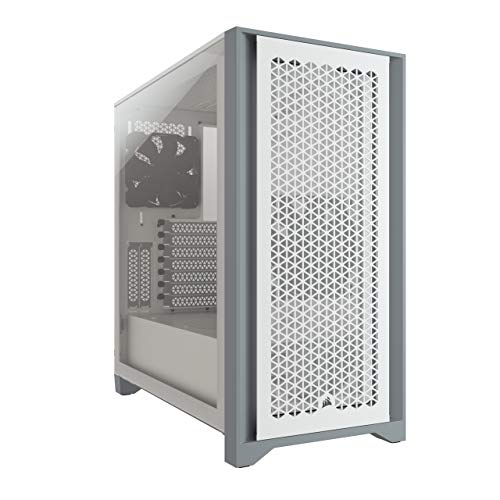
Corsair 4000D Airflow Mid-Tower Case
Best for: clean ATX builds needing direct airflow
- Motherboard Support
- ATX (what this guide is about)
- Case Type
- Mid-Tower
- Side Panel
- Tempered Glass
- Radiator Support
- 360mm
- Dimensions
- 17.8 × 9.06 × 18.4 inches
- Weight
- 17.3 pounds
The Corsair 4000D Airflow is a mid-tower ATX case featuring a steel airflow front panel and a tempered glass side panel. It includes two 120mm AirGuide fans and provides 25mm of cable routing space behind the motherboard tray. You can install up to six 120mm fans and radiators up to 360mm. This setup suits you if you want direct component ventilation and clean cable routing.
Pros
- High-airflow steel front panel
- RapidRoute cable system with 25mm behind the motherboard
- Includes two 120mm AirGuide fans with anti-vortex vanes
- Fits up to six 120mm fans and a 360mm front radiator
Cons
- Top 280mm radiator clearance depends on RAM height
- Includes only two pre-installed fans out of six mounts
Good fit if
- You need 25mm of dedicated clearance for motherboard cable management.
- You plan to mount a 360mm radiator in the front intake.
Skip if
- You use tall RAM modules alongside a roof-mounted 280mm liquid cooler.
- You want more than two cooling fans included in the box.
Verdict: Corsair 4000D Airflow Mid-Tower Case delivers structured cable routing and ample fan capacity for standard ATX hardware. Its steel front panel and 360mm radiator support keep components cool without excess bulk.
Specifications side by side
| Spec | Corsair 7000D Airflow Full-Tower Case | Corsair iCUE Link 3500X RGB Mid-Tower | Corsair 3500X Panoramic Glass Mid-Tower | Corsair 4000D RS ARGB Frame Modular | Corsair 5000T LX RGB Mid-Tower Case | Corsair Frame 4000X RS Mid-Tower Case | Corsair Frame 5000D Wood Mid-Tower | Corsair 4000D Airflow Mid-Tower Case |
|---|---|---|---|---|---|---|---|---|
| Motherboard Support | ATX | Mini-ITX to EATX | Mini-ITX to EATX | not specified | ATX | ATX | ATX | ATX |
| Case Type | Full-Tower | Mid-Tower | Mid-Tower | not specified | Mid-Tower | Mid-Tower | Mid Tower | Mid-Tower |
| Side Panel | not specified | Tempered Glass | Tempered Glass | not specified | not specified | not specified | not specified | Tempered Glass |
| Included Fans | 3x 140mm | 3x RX120 RGB | not specified | not specified | 3x LX120 RGB | 4x 120mm PWM | 3x | not specified |
| Radiator Support | 420mm | not specified | 360mm | not specified | not specified | not specified | 420mm | 360mm |
| Tower Size | Full-Tower | Mid-Tower | Mid-Tower | Mid-Tower | Mid-Tower | Mid-Tower | Mid-Tower | Mid-Tower |
| Fan Size | 140mm | not specified | not specified | not specified | not specified | not specified | not specified | not specified |
| Lighting | not specified | RGB | not specified | ARGB | RGB | not specified | not specified | not specified |
| Dimensions | 21.7 × 9.76 × 23.6 inches | 19.9 × 9.45 × 18.1 inches | 19.9 × 9.45 × 18.1 inches | 19.2 × 9.41 × 19.1 inches | 20.8 × 9.92 × 22 inches | 19.2 × 9.41 × 19.1 inches | 21.9 × 9.84 × 21.3 inches | 17.8 × 9.06 × 18.4 inches |
| Weight | 41.2 pounds | 20.3 pounds | 19 pounds | 22.7 pounds | 31 pounds | 20.9 pounds | not specified | 17.3 pounds |
| Size | 7000 Series | iCUE LINK 3500X RGB | 3500X | Pack of 1 | not specified | Mid-Tower | not specified | 4000 Series |
| Color | Black | Black | White | White | White | Black | Black/Walnut | White |
| Model | CC-9011218-WW | CC-9011280-WW | CC-9011277-WW | CC-9011297-WW | CC-9011299-WW | CC-9011302-WW | CC-9011353-WW | CC-9011201-WW |
Choosing the Right Corsair ATX PC Case
-
Tower Size and Desk Footprint
Chassis dimensions directly dictate desk clearance and physical footprint. Full-tower options like the Corsair 7000D Airflow Full-Tower Case measure 23.62 inches tall and weigh 41.23 pounds, demanding dedicated floor or sturdy bench space. In contrast, standard mid-tower enclosures stay under 20 inches in height and hover near 18 to 21 pounds. You should measure your available desk depth, height under shelves, and support surface limits before buying. Heavy cases offer expansive interiors, but compact mid-towers make relocation, basic maintenance, and everyday desk placement much simpler.
-
Fan Mounting Adjustability
Internal fan brackets influence how accurately you can direct airflow across critical components like graphics cards and processor coolers. Enclosures such as the Corsair Frame 4000X RS Mid-Tower Case use sliding rail mounting systems that allow smooth repositioning of cooling fans along the chassis frame. Fixed mounting holes limit fans to predefined factory slots, which might misalign with tall heat sinks or long expansion cards. If your hardware configuration requires targeted cooling paths, prioritize cases with adjustable sliding rails to fine-tune intake angles without extra brackets.
-
Lighting Control Configurations
Chassis lighting specifications determine how components synchronize and how many cables you need to route. The Corsair 4000D RS ARGB Mid-Tower includes integrated ARGB lighting, which lets you control individual LED colors across dynamic patterns. Standard RGB models illuminate all diodes in a single uniform color at any given moment. If you prefer a clean setup without illumination software or extra lighting controllers, choose a model without built-in lights. When planning a lit build, verify whether your motherboard header matches the three-pin ARGB or four-pin standard RGB requirements.
-
Side Panel Visibility
Side panel construction defines internal component visibility and cable exposure. Models like the Corsair 3500X Panoramic Glass Mid-Tower feature wraparound panoramic glass panels that eliminate corner pillar obstructions. This layout provides an uninterrupted look at your graphics card and liquid-cooling loops from multiple viewing angles. Standard single-pane tempered glass enclosures provide a side window while maintaining solid metal front or corner structures. If your desk puts the front corner of the computer on display, panoramic panels offer broader viewports, while solid corner designs conceal side-mounted wiring runs more naturally.
-
Exterior Materials and Styling
Chassis exterior materials influence your room aesthetic without altering basic ATX compatibility. While most PC enclosures utilize steel panels and mesh grilles, the Corsair Frame 5000D Wood Mid-Tower integrates natural wood construction alongside its metal frame. This design suits home offices or living spaces where standard industrial plastic and steel finishes might clash with furniture. When choosing specialized materials like wood, confirm that overall chassis ventilation channels and internal radiator clearance remain uncompromised. Select exterior styling that fits your workspace while providing open paths for intake airflow.
-
Pre-Installed Cooling and Fan Sizes
Chassis fan specifications determine initial cooling potential and airflow volume. The Corsair 5000T LX RGB Mid-Tower Case includes three modular LX120 fans that clip together, reducing messy wiring while supplying active cooling immediately. Other enclosures ship without fans or rely on standard standalone fans that require individual power connections. Larger 140mm fans move more air at lower rotational speeds, while 120mm fans provide wider mounting flexibility across smaller radiator brackets. Examine the included fan count and sizes to ensure your setup meets baseline thermal needs right away.
Frequently asked questions
Which Corsair ATX cases support reverse-connection motherboards?
The Corsair iCUE Link 3500X RGB, Corsair 3500X Panoramic Glass, and Corsair 5000T LX RGB all support reverse-connection motherboards. These models feature dedicated cutouts on the motherboard tray so you can plug cables directly into rear-facing headers. This keeps power and data lines completely out of the front chamber for cleaner views through glass panels.
How much larger is the Corsair 7000D Airflow than standard mid-tower cases?
The Corsair 7000D Airflow is significantly larger than typical mid-towers, measuring 23.62 inches tall, 21.65 inches long, and weighing 41.23 pounds. In comparison, a mid-tower like the Corsair 4000D Airflow stands 18.35 inches tall and weighs 17.31 pounds. The full-tower chassis gives you extra volume to mount up to 12 fans and large multi-radiator liquid cooling setups.
What is the advantage of Corsair sliding fan rails?
Sliding fan rails allow you to adjust cooling fan placement precisely along the chassis frame rather than relying on fixed screw holes. The Corsair 4000D RS ARGB uses an InfiniRail system to target airflow directly at specific components. Similarly, the Corsair Frame 4000X RS provides sliding rail mounts along with four included daisy-chainable PWM fans to simplify custom airflow setups.
Which Corsair cases include fans straight out of the box?
The Corsair Frame 4000X RS comes equipped with four daisy-chainable PWM fans right out of the box. If you prefer illuminated fans, the Corsair 5000T LX RGB includes three modular LX120 fans alongside built-in RGB accent strips. Other models, such as the base 3500X Panoramic Glass, give you an empty frame to choose your own cooling fans.
What materials are used in the Corsair Frame 5000D Wood?
The Corsair Frame 5000D Wood incorporates solid walnut wood into its construction, paired with a black mid-tower chassis. Measuring 21.89 inches long and 21.34 inches tall, it provides broad clearance for large radiators and multiple fan configurations. It delivers high airflow performance while offering an alternative look to standard steel and glass gaming cases.
What size liquid cooling radiator fits in the Corsair 4000D Airflow?
The Corsair 4000D Airflow supports up to a 360mm radiator for liquid-cooled builds. Measuring 17.83 inches long and 18.35 inches tall, this mid-tower case pairs that radiator clearance with a steel front panel and tempered glass side panel. The layout provides structured cable routing channels to keep tubing and wiring organized within a compact footprint.
What is the difference between the Corsair 3500X and iCUE Link 3500X RGB?
Both models share the same mid-tower frame, measuring 19.92 inches long and 18.11 inches tall, featuring panoramic tempered glass and space for up to ten fans. The Corsair iCUE Link 3500X RGB includes integrated RGB lighting and support for the iCUE LINK cable ecosystem. The standard 3500X comes in white without pre-configured lighting, leaving component selection up to you.