15 Best Case Fans Under $100, Compared
As an Amazon Associate we earn from qualifying purchases. Links on this page are affiliate links.
Finding the best case fans under $100 requires balancing airflow volume, static pressure, and connector standards. We compared 15 options strictly using the specifications published on their product listings. The Lian Li UNI Fan SL-Infinity 120mm White 3-Pack takes the top position because it pairs durable fluid dynamic bearings with a bundled controller to simplify multi-fan cable routing.
This comparison helps you choose the right fan diameter, frame thickness, and motor design to match your chassis airflow layout and radiator clearance requirements.
Our top pick: NZXT 280mm Single-Frame RGB Fan.
Quick picks
The best fit for you
- You want unified dual-fan mounting on 280mm radiators NZXT 280mm Single-Frame RGB Fan The unified 11-inch frame installs dual cooling zones across a single 280mm mounting location.
- You need reverse intake fans for radiator setups Phanteks D30 120mm Reverse ARGB Fans 3-Pack A 1.18-inch thick frame paired with reverse ARGB blades supports unobstructed intake airflow.
- You want unlit 140mm cooling with standard headers Noctua 140mm Black PWM Fan 3-Pack Three black 140mm fans provide low-noise airflow using standard 4-pin PWM connectors.
- You want built-in display screens for hardware telemetry Lian Li UNI Fan SL 120 LCD 3-Pack Each 120mm fan features an integrated LCD screen for on-hub telemetry readouts.
Our 15 picks

NZXT 280mm Single-Frame RGB Fan
Best for: unified 280mm radiator and case mounting
- Fan Size
- 280mm
- Connector Type
- PWM
- Bearing Type
- Magnetic levitation, fluid dynamic
- Lighting Type
- RGB
- Dimensions
- 11 × 5.53 × 1.18 inches
- Weight
- 1.26 pounds
The NZXT F280X is a single-frame 280mm PWM cooling unit with integrated RGB lighting. Built with liquid-crystal polymer blades, it utilizes a 3-phase, 6-pole motor alongside a hybrid magnetic levitation and fluid dynamic bearing. Measuring 11 inches long and 1.18 inches thick, it replaces two separate 140mm units. You will find this setup ideal if you want rigid construction and streamlined mounting inside a compatible 280mm radiator or case slot.
Pros
- Liquid-crystal polymer blade and frame construction
- Hybrid magnetic levitation and fluid dynamic bearing
- 3-phase, 6-pole motor with reinforced metal core
- Single-frame design eliminates gaps across 280mm mounts
Cons
- Single-frame housing cannot be split into separate 140mm fans
- 1.18-inch thickness exceeds standard 25mm fan clearance
Good fit if
- You have a 280mm mounting location with clearance for a 1.18-inch thick fan.
- You want durable liquid-crystal polymer blades paired with hybrid magnetic bearings.
- You prefer installing one unified unit instead of two separate 140mm frames.
Skip if
- You need individual 140mm fans positioned in different areas of your case.
- You have strict clearance limits that only accept standard 25mm thick fans.
Verdict: NZXT F280X 280mm Single-Frame RGB Fan delivers rigid liquid-crystal polymer construction and hybrid magnetic bearings in a unified frame. It suits builders wanting streamlined dual-fan installation across a 280mm radiator or bracket.

Lian Li UNI Fan SL-Infinity 120mm White 3-Pack
Best for: white builds wanting ARGB infinity lighting
- Fan Size
- 120mm
- Bearing Type
- Fluid Dynamic Bearing
- Lighting Type
- ARGB
- Dimensions
- 4.72 × 0.98 × 4.81 inches
View on Amazon: Lian Li UNI Fan SL-Infinity 120mm White 3-Pack
The Lian Li UNI Fan SL-INF 120 ARGB White 3-Pack gives you three 120mm case fans and an included controller for your PC build. Each fan features ARGB lighting with an infinity mirror style and fluid dynamic bearings. Measuring 4.72 by 4.81 inches with a 0.98-inch depth, these units fit standard 120mm mounts. This kit suits you if you plan an all-white setup that requires centralized ARGB control and matching cooling hardware.
Pros
- Fluid Dynamic Bearing design
- Pack includes dedicated fan controller
- Integrated ARGB lighting with infinity mirror
- Three matching 120mm fans included
Cons
- No airflow CFM or RPM ratings provided in published specs
- White colorway only
Good fit if
- You need a three-pack of 120mm fans with an included controller.
- You build in a white case and want ARGB infinity mirror lighting.
- You prefer fluid dynamic bearings for fan operation.
Skip if
- You need 140mm mounting points instead of 120mm.
- You require black fans to match your enclosure.
Verdict: Lian Li UNI Fan SL-INF 120 ARGB White 3-Pack delivers three 120mm ARGB fans with fluid dynamic bearings and a bundled controller. It provides a standardized lighting and cooling setup for white chassis builds.

Phanteks D30 120mm Reverse ARGB Fans 3-Pack
Best for: intake radiator setups requiring high static pressure
- Fan Size
- 120mm
- Lighting Type
- ARGB
- Blade Direction
- Reverse
- Dimensions
- 4.72 × 1.18 × 4.72 inches
- Weight
- 14.1 ounces
The Phanteks D30 120mm Reverse ARGB Fan 3-Pack gives you three 120mm PWM fans with reverse blades designed for intake airflow. Each fan features a thicker 30mm frame for high static pressure against radiators and dust filters. Interlocking bridge connectors and screw cover plates link the units together to reduce cable clutter. This set suits you if you want intake lighting without exposed rear frame brackets.
Pros
- 30mm thick frame provides high static pressure on radiators and filters
- Reverse airflow design keeps lighting unobstructed when used as intake
- Bridge connectors and screw cover plates link fans with minimal cabling
- D-RGB illumination visible from all frame sides
Cons
- 30mm frame thickness requires more clearance than standard 25mm fans
- Fans are reverse airflow only rather than swappable blade models
Good fit if
- You need intake fans without support struts blocking your ARGB lighting.
- You mount fans onto radiators or restrictive dust mesh requiring extra pressure.
- You want daisy-chained fan connections to reduce interior case wiring.
Skip if
- You have tight clearance limits that only support standard 25mm fans.
- You need standard airflow fans for rear or top case exhaust.
Verdict: Phanteks D30 120mm Reverse ARGB Fan 3-Pack delivers strong static pressure and clean cable routing through its interlocking 30mm design. It provides unblocked intake lighting across radiator surfaces and mesh intakes.

Corsair iCUE Link QX120 RGB 120mm Triple Pack
Best for: cable-free daisy chaining and high static pressure
- Fan Size
- 120mm
- Max Fan Speed
- 2,400 RPM
- Max Airflow
- 63.1 CFM
- Static Pressure
- 3.8mm-H2O
- Bearing Type
- Magnetic Dome
- Lighting Type
- RGB
View on Amazon: Corsair iCUE Link QX120 RGB 120mm Triple Pack
This triple-fan kit gives you three 120mm PWM fans and the iCUE LINK System Hub. Each fan delivers up to 63.1 CFM of airflow and 3.8mm-H2O static pressure, spinning from 480 to 2,400 RPM with support for Zero RPM mode. Magnetic Dome bearings reduce friction at low speeds. With 34 RGB LEDs per fan, this setup suits you if you want clean single-cable connectivity and high static pressure.
Pros
- Delivers up to 3.8mm-H2O static pressure and 63.1 CFM airflow
- Wide PWM speed range of 480 to 2,400 RPM with Zero RPM support
- Includes iCUE LINK System Hub and bridge connectors for cable-free chaining
- Equipped with 34 RGB LEDs across two distinct lighting zones per fan
Cons
- Requires the proprietary iCUE LINK System Hub to operate
- Airflow peaks at 63.1 CFM, which is lower than larger 140mm alternatives
Good fit if
- You want to link fans directly together with bridge connectors to reduce wire clutter.
- You need high static pressure reaching 3.8mm-H2O for radiators or restricted intake.
- You want silent operation at low loads via Zero RPM PWM mode.
Skip if
- You prefer connecting fans directly to standard motherboard headers without a hub.
- You need 140mm fans for maximum raw CFM airflow in your case.
Verdict: Corsair iCUE Link QX120 RGB Triple Pack provides strong 3.8mm-H2O static pressure and streamlined cable management via its included iCUE LINK hub. It offers precise PWM control up to 2,400 RPM along with 34 individual RGB LEDs per unit.

Thermaltake SWAFAN EX 140mm ARGB Fans
Best for: reversible airflow setups with magnetic connections
- Fan Size
- 120mm
- Max Fan Speed
- 2000 RPM
- Lighting Type
- ARGB
- Blade Direction
- Reversable
- Dimensions
- 7.99 × 5.87 × 6.65 inches
- Weight
- 2.84 pounds
The Thermaltake SWAFAN EX 12 ARGB 3-Pack gives you three 120mm case fans with interchangeable, reversible fan blades and magnetic connections. Operating between 500 and 2000 RPM, these fans allow you to reverse airflow direction without flipping the frame. You get built-in ARGB lighting for your setup. This kit suits you if you want flexible airflow configurations and clean cable management inside your chassis.
Pros
- Interchangeable, reversible fan blades
- Magnetic interlocking connection
- Speed range from 500 to 2000 RPM
- Integrated ARGB lighting
Cons
- No wireless connectivity listed
- No standalone fan controller specified
Good fit if
- You want reversible blades to easily switch intake and exhaust orientation.
- You prefer magnetic connections to minimize cable clutter between fans.
- You need rotational speeds reaching up to 2000 RPM.
Skip if
- You want wireless signal management for your fan curves.
- You prefer fans without ARGB illumination.
Verdict: Thermaltake SWAFAN EX 12 ARGB 3-Pack provides versatile cooling with swappable blades, magnetic link connectors, and speeds up to 2000 RPM. It keeps cabling minimal while providing customizable airflow directions and ARGB lighting.

Corsair iCUE Link RX140 RGB 140mm Dual Pack
Best for: 140mm radiator cooling with single-cable routing
- Fan Size
- 140mm
- Max Fan Speed
- 2,100 RPM
- Max Airflow
- 74.2 CFM
- Static Pressure
- 4.38mm-H2O
- Bearing Type
- Magnetic Dome
- Lighting Type
- RGB
This dual pack provides two 140mm PWM fans alongside an iCUE Link System Hub. You get up to 74.2 CFM of airflow and 4.38mm-H2O of static pressure with speeds topping out at 2,100 RPM. Bridge connectors allow you to link both fans together directly using a single cable to the hub. It suits you if you need focused radiator airflow, magnetic dome bearings, and unified cable routing in a white build.
Pros
- High static pressure of 4.38mm-H2O for radiators and heatsinks
- Delivers up to 74.2 CFM of airflow at 2,100 RPM
- Includes iCUE Link System Hub and bridge connectors for single-cable connection
- Anti-vortex AirGuide vanes direct airflow directly toward hardware
Cons
- Pack contains only two fans rather than three
- Requires Corsair iCUE Link ecosystem for connectivity
Good fit if
- You want high static pressure fans designed for 140mm radiator mounts.
- You prefer connecting multiple fans together using a single cable to a central hub.
- You need 140mm white fans with anti-vortex directional vanes.
Skip if
- You need standard 120mm fan mounts instead of 140mm.
- You run standard motherboard PWM headers without an external system hub.
Verdict: Corsair iCUE Link RX140 RGB 140mm Dual Pack delivers robust 4.38mm-H2O static pressure and streamlined single-cable wiring through its included hub. It is an effective two-fan option for high-resistance cooling setups.

Corsair iCUE LINK LX120 RGB Triple Pack
Best for: High-pressure radiator cooling with simplified cable setups
- Fan Size
- 120mm
- Max Fan Speed
- 2,400 RPM
- Max Airflow
- 69.9 CFM
- Static Pressure
- 5.22mmH2O
- Bearing Type
- Magnetic Dome
- Lighting Type
- RGB
This package provides three 120mm PWM fans alongside an included iCUE LINK System Hub. Each unit produces up to 69.9 CFM of airflow and 5.22 mmH2O of static pressure at speeds reaching 2,400 RPM. Bridge connectors link the units directly with a single cable to the hub. It suits you if you want high static pressure for radiators paired with dual-loop lighting across 18 LEDs per fan.
Pros
- Delivers up to 5.22 mmH2O static pressure for radiator mounting
- Pushes up to 69.9 CFM airflow at maximum 2,400 RPM
- Includes iCUE LINK System Hub and direct bridge connectors
- Magnetic Dome bearing engineered to reduce friction and noise
Cons
- Requires the proprietary iCUE LINK hub system for operation
- Uses standard airflow orientation rather than reverse-flow blades
Good fit if
- You need high static pressure fans for liquid cooling radiators.
- You want simplified single-cable management across linked fan clusters.
Skip if
- You prefer standard 4-pin PWM headers without proprietary hub hardware.
- You want reverse-pitch fans for unobstructed intake viewing.
Verdict: Corsair iCUE LINK LX120 120mm Triple Pack delivers strong 5.22 mmH2O static pressure alongside simplified single-cable connectivity. It serves as an effective setup for radiator cooling if you use Corsair's linked ecosystem.
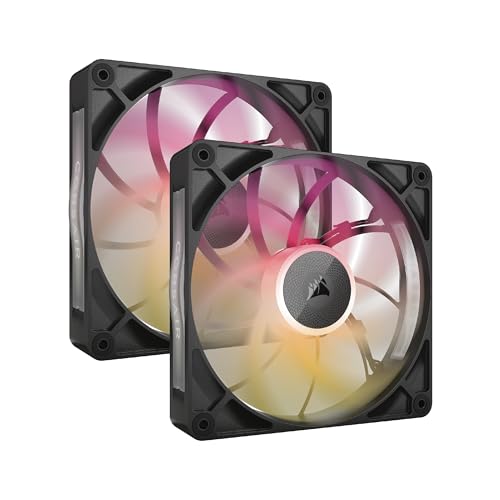
Corsair iCUE Link RX140 MAX RGB 140mm Fans
Best for: radiators requiring high pressure and simplified cabling
- Fan Size
- 140mm
- Max Fan Speed
- 1,600 RPM
- Max Airflow
- 102.9 CFM
- Static Pressure
- 2.38mm-H2O
- Bearing Type
- Magnetic Dome Bearing
- Lighting Type
- RGB
The Corsair iCUE Link RX140 MAX RGB is a dual-pack of 140mm PWM fans built with an expanded 30mm depth. This extra 5mm thickness allows the magnetic dome blades to push up to 102.9 CFM and 2.38mm-H2O of static pressure at 1,600 RPM. These fans connect together using bridge clips into a single cable link. They suit you if you need high radiator airflow and use the Corsair ecosystem.
Pros
- Delivers up to 102.9 CFM airflow and 2.38mm-H2O static pressure
- Thicker 30mm profile moves more air across radiator fins
- iCUE LINK bridge connectors chain fans with a single cable to the hub
- Magnetic dome bearing engineered for lower friction
Cons
- Thicker 30mm frame reduces clearance in tight PC cases
- Requires Corsair iCUE LINK System Hub connection
- Carries only eight RGB LEDs per fan
Good fit if
- You have clearance for 30mm (1.18-inch) thick 140mm fan mounts.
- You run high-density liquid cooling radiators that need static pressure.
- You want simplified single-cable cable routing via iCUE LINK.
Skip if
- You need standard 25mm fan thickness for strict case clearances.
- You prefer standard motherboard 4-pin PWM headers without proprietary hubs.
Verdict: Corsair iCUE Link RX140 MAX RGB 140mm Fans deliver 102.9 CFM airflow and solid static pressure using a thicker 30mm frame. They are ideal for radiators when your chassis allows extra depth clearance.

Noctua 140mm Dual Fan Pack
Best for: quiet dual 140mm radiator and intake cooling
- Fan Size
- 140mm
- Connector Type
- PWM
- Bearing Type
- SSO2
- Dimensions
- 5.51 × 5.51 × 0.98 inches
- Weight
- 1.5 pounds
This two-pack includes two 140mm PWM fans constructed from Sterrox liquid-crystal polymer and equipped with SSO2 bearings rated for over 150,000 hours. The fans feature an intentional 25 RPM speed offset to prevent acoustic harmonic resonance when installed adjacent to each other. Noctua includes radiator gaskets, low-noise adaptors, and a y-cable. You get a focused cooling solution tailored for 280mm radiators or dual case mounts where airflow and low noise matter.
Pros
- Offset fan speeds (+/- 25 RPM) reduce acoustic interaction
- SSO2 bearings rated for over 150,000 hours MTTF
- Constructed from Sterrox liquid-crystal polymer with AAO frames
- Includes anti-vibration radiator gaskets, low-noise adaptors, and y-cable
Cons
- Contains two fans instead of a three-fan pack
- No integrated RGB or lighting components
Good fit if
- You need dual 140mm fans operating side by side on a 280mm radiator or case intake.
- You want durable SSO2 bearings and bundled low-noise accessories without lighting.
Skip if
- You have a PC case restricted to 120mm fan mounts.
- You want integrated RGB lighting for your system aesthetic.
Verdict: Noctua 140mm Dual PWM Case Fans deliver rigid Sterrox construction and an acoustic-offset design tailored for side-by-side mounting. They prioritize long-life SSO2 bearings and functional installation hardware over visual lighting features.

Corsair iCUE Link LX120-R Reverse 120mm Triple Pack
Best for: visible intake positions on radiators and cases
- Fan Size
- 120mm
- Max Fan Speed
- 2,400 RPM
- Max Airflow
- 66.7 CFM
- Static Pressure
- 4.72mm H2O
- Bearing Type
- Magnetic Dome
- Lighting Type
- RGB
View on Amazon: Corsair iCUE Link LX120-R Reverse 120mm Triple Pack
This triple pack includes 120mm reverse-rotor fans designed for intake placement. You get static pressure reaching 4.72mm H2O and airflow up to 66.7 CFM at 2,400 RPM. Each fan features 18 RGB LEDs across dual loops and Corsair Magnetic Dome bearings. The iCUE LINK bridge connectors let you link the units together with a single cable to a hub, making this kit suitable for high-airflow or radiator intake setups.
Pros
- High static pressure rated at 4.72mm H2O
- Reversed rotor displays lighting loops when used as intake
- iCUE LINK bridge connectors eliminate individual fan cable runs
- 18 customizable RGB LEDs per fan in dual lighting loops
Cons
- Requires iCUE LINK ecosystem and hub for operation
- Reverse-blade design is specialized primarily for intake orientation
Good fit if
- You need reverse-blade intake fans that keep the front frame visible
- You mount fans on water-cooling radiators needing high static pressure
- You want to chain multiple fans together using Corsair iCUE LINK
Skip if
- You need standard airflow fans for exhaust positions
- You do not use Corsair iCUE LINK hardware
Verdict: Corsair iCUE Link LX120-R RGB Reverse Fans provide high static pressure and clean cable management for intake positions. Their reverse blades ensure unobstructed RGB presentation without sacrificing cooling performance.

Lian Li UNI Fan SL 120 LCD 3-Pack
Best for: custom LCD telemetry and clean cable management
- Fan Size
- 120mm
- Lighting Type
- RGB
- Dimensions
- 5 × 5 × 6 inches
This three-pack of 120mm case fans provides wireless 2.4 GHz control, interlocking daisy-chain installation, and an integrated 1.6-inch LCD screen on the hub. With a 400x400 display resolution, you can track hardware temperatures or show custom animations directly on your fan cluster. It suits you if you want customizable digital readouts, 40 addressable LEDs per unit, and reduced cable clutter through slide-in interlocking frames and software-managed fan clusters.
Pros
- Integrated 1.6-inch 400x400 LCD screen displays custom graphics and system telemetry
- Slide-in interlocking mechanism reduces fan wiring
- Includes 2.4 GHz wireless controller and PWM 1-to-3 cable
- 40 customizable RGB LEDs built into each fan
Cons
- Requires proprietary L-Connect 3 software and wireless controller to run
- Airflow CFM and noise level decibel ratings are omitted from the specifications
Good fit if
- You want on-fan 1.6-inch LCD screens to monitor CPU and GPU temperatures.
- You need interlocking slide-in fans to minimize case wiring.
- You plan to display custom GIF, MP4, or image files inside your case.
Skip if
- You want standard fans without proprietary software requirements.
- You prefer 140mm mounting setups instead of 120mm frames.
Verdict: Lian Li UNI Fan SL 120 LCD 3-Pack delivers customizable LCD readouts and wireless fan control with a tidy daisy-chained layout. It gives you detailed on-hub hardware monitoring and 40 LEDs per fan without multi-wire clutter.

Lian Li UNI Fan TL Wireless 120mm Triple Pack
Best for: wireless dual-zone RGB setups
- Fan Size
- 120mm
- Lighting Type
- RGB
- Dimensions
- 6.3 × 4.33 × 5.91 inches
- Weight
- 15.9 ounces
View on Amazon: Lian Li UNI Fan TL Wireless 120mm Triple Pack
This triple pack of 120mm black fans provides customizable RGB illumination alongside 2.4 GHz wireless control. You link the units using daisy-chain hardware, which reduces cable runs across your case. The blades use Liquid Crystal Polymer construction, and the pack includes the required wireless controller and a PWM 1-to-3 cable. It suits you if you want synchronized dual-zone LED effects managed through L-Connect 3 software without traditional 5V ARGB wiring.
Pros
- Includes dedicated wireless controller and PWM 1-to-3 cable
- 2.4 GHz wireless control for fan speed and dual-zone lighting
- Liquid Crystal Polymer (LCP) blade construction
- Daisy-chain interlocking minimizes chassis cable clutter
Cons
- Requires the proprietary wireless controller to operate
- Settings adjustments depend on L-Connect 3 software
Good fit if
- You want 2.4 GHz wireless management for lighting and fan speeds.
- You prefer interlocking daisy-chain fans to cut down on wiring.
- You plan to configure dual-zone RGB presets via L-Connect 3.
Skip if
- You prefer standard direct 5V ARGB motherboard header connections.
- You require 140mm mounting points instead of 120mm.
Verdict: Lian Li UNI Fan TL Wireless 120mm 3-Pack delivers cable-free lighting sync and fan speed adjustments through a dedicated 2.4 GHz controller. Liquid Crystal Polymer blades and daisy-chain assembly streamline multi-fan setups inside your chassis.
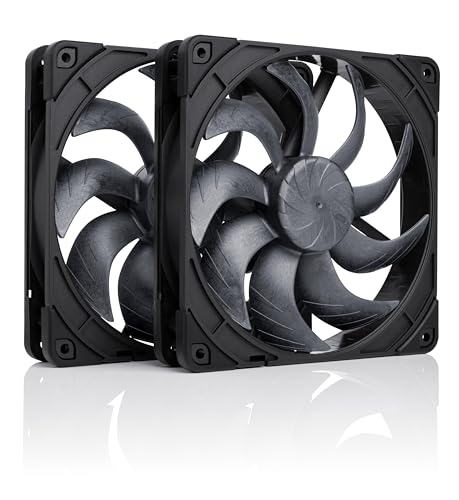
Noctua 140mm Dual All-Black Fan Set
Best for: dual 140mm radiator and intake setups
- Fan Size
- 140mm
- Bearing Type
- SSO2
- Dimensions
- 5.51 × 5.51 × 0.98 inches
- Weight
- 1.12 pounds
This Noctua package gives you two 140mm PWM fans built with Sterrox liquid-crystal polymer and durable SSO2 bearings rated for 150,000 hours MTTF. Both units feature an offset speed tuning of roughly 25 RPM to eliminate acoustic resonance when running side by side. It suits you if you need quiet airflow for 280mm radiators or dual case mounts using all-black hardware.
Pros
- Dual-fan pack with +/- 25 RPM speed offset to prevent acoustic interference
- SSO2 bearings with rated MTTF over 150,000 hours
- Sterrox LCP construction with Centrifugal Turbulator and tight tip clearance
- Includes 140mm anti-vibration radiator gaskets, Low-Noise Adaptors, and splitter cable
Cons
- No RGB or LED lighting features
- Includes two fans rather than a triple pack
- Requires 140mm mounts and does not fit 120mm spacing
Good fit if
- You need a pair of 140mm fans for a 280mm radiator or case intake.
- You prefer an all-black design without RGB lighting.
- You want acoustic offset tuning to eliminate motor resonance between side-by-side fans.
Skip if
- You need 120mm fan mounts for your case or cooler.
- You want integrated RGB lighting loops.
- You need three fans in a single purchase.
Verdict: Noctua 140mm PWM Black Fan Pair delivers precision-tuned dual-fan airflow for 280mm radiators and intake panels. Its acoustic offset design and all-black accessory bundle make it a focused choice for quiet, unlit builds.

Noctua 140mm Black PWM Fan 3-Pack
Best for: quiet non-RGB 140mm airflow setups
- Fan Size
- 140mm
- Max Fan Speed
- 1500 RPM
- Noise Level
- 24.6 dB(A)
- Connector Type
- 4-pin PWM
- Dimensions
- 5.51 × 5.51 × 0.98 inches
- Weight
- 1.29 pounds
This three-pack provides 140mm cooling fans featuring 4-pin PWM connectors for automatic motherboard speed control. Each fan runs up to 1500 RPM while producing a maximum noise level of 24.6 dB(A). The square frame fits standard case mounts and water-cooling radiators. Swappable anti-vibration pads come in six colors for subtle customization. This kit suits you if you need reliable, quiet 140mm airflow across multiple case slots without integrated RGB lighting.
Pros
- Maximum noise level rated at 24.6 dB(A)
- Automatic speed control up to 1500 RPM via 4-pin PWM headers
- Square frame design fits PC cases and water-cooling radiators
- Includes swappable anti-vibration pads in six colors
- Mean time to failure exceeds 150,000 hours
Cons
- No integrated RGB or LED lighting included
- Requires 140mm mounting locations rather than standard 120mm spacing
Good fit if
- You want a three-pack of quiet 140mm fans with 4-pin PWM speed control.
- You prefer an all-black design with swappable colored anti-vibration corner pads.
- You need square-frame fans designed for radiators or standard case airflow.
Skip if
- You want built-in RGB lighting for your PC build.
- You have a PC chassis restricted entirely to 120mm fan mounts.
Verdict: Noctua NF-A14 140mm PWM Fans (3-Pack) delivers low-noise airflow through standard 4-pin PWM control across three 140mm locations. It provides a straightforward, non-RGB cooling solution with customizable corner pads.

Lian Li UNI Fan TL Flex 120 White 3-Pack
Best for: high-pressure radiator and white case setups
- Fan Size
- 120mm
- Max Fan Speed
- 2600 RPM
- Max Airflow
- 90.1 CFM
- Static Pressure
- 3.97mmH2O
- Bearing Type
- FDB
- Lighting Type
- 5V 3-Pin ARGB
This package gives you three white 120mm normal-blade fans with an included controller. Each fan reaches speeds up to 2600 RPM, delivering up to 90.1 CFM of airflow and 3.97mmH2O static pressure through liquid crystal polymer blades. You can control lighting via standard 5V 3-pin ARGB motherboard software and manage fan speeds through PWM or L-Connect 3. It suits you if you need high-airflow case cooling or radiator ventilation.
Pros
- Delivers up to 90.1 CFM airflow and 3.97mmH2O static pressure
- Fluid dynamic bearing with copper shielding runs up to 2600 RPM
- Includes a dedicated fan controller in the box
- Uses rigid liquid crystal polymer blades with a 0.6mm frame gap
Cons
- Uses standard airflow direction rather than reverse blades
- Does not include integrated LCD screens
Good fit if
- You need high static pressure for radiators or tight fan mounts.
- You want three white 120mm fans bundled with a controller.
- You prefer standard 5V 3-pin ARGB motherboard lighting control.
Skip if
- You need reverse-blade fans to hide motor brackets on intake mounts.
- You want fan hubs with embedded LCD screens.
Verdict: Lian Li UNI Fan TL Flex 120 White 3-Pack delivers strong 90.1 CFM airflow and 3.97mmH2O static pressure alongside an included controller. It gives you capable cooling performance with flexible PWM and wireless control options.
Specifications side by side
| Spec | NZXT 280mm Single-Frame RGB Fan | Lian Li UNI Fan SL-Infinity 120mm White 3-Pack | Phanteks D30 120mm Reverse ARGB Fans 3-Pack | Corsair iCUE Link QX120 RGB 120mm Triple Pack | Thermaltake SWAFAN EX 140mm ARGB Fans | Corsair iCUE Link RX140 RGB 140mm Dual Pack | Corsair iCUE LINK LX120 RGB Triple Pack | Corsair iCUE Link RX140 MAX RGB 140mm Fans | Noctua 140mm Dual Fan Pack | Corsair iCUE Link LX120-R Reverse 120mm Triple Pack | Lian Li UNI Fan SL 120 LCD 3-Pack | Lian Li UNI Fan TL Wireless 120mm Triple Pack | Noctua 140mm Dual All-Black Fan Set | Noctua 140mm Black PWM Fan 3-Pack | Lian Li UNI Fan TL Flex 120 White 3-Pack |
|---|---|---|---|---|---|---|---|---|---|---|---|---|---|---|---|
| Fan Size | 280mm | 120mm | 120mm | 120mm | 120mm | 140mm | 120mm | 140mm | 140mm | 120mm | 120mm | 120mm | 140mm | 140mm | 120mm |
| Max Fan Speed | not specified | not specified | not specified | 2,400 RPM | 2000 RPM | 2,100 RPM | 2,400 RPM | 1,600 RPM | not specified | 2,400 RPM | not specified | not specified | not specified | 1500 RPM | 2600 RPM |
| Max Airflow | not specified | not specified | not specified | 63.1 CFM | not specified | 74.2 CFM | 69.9 CFM | 102.9 CFM | not specified | 66.7 CFM | not specified | not specified | not specified | not specified | 90.1 CFM |
| Static Pressure | not specified | not specified | not specified | 3.8mm-H2O | not specified | 4.38mm-H2O | 5.22mmH2O | 2.38mm-H2O | not specified | 4.72mm H2O | not specified | not specified | not specified | not specified | 3.97mmH2O |
| Noise Level | not specified | not specified | not specified | not specified | not specified | not specified | not specified | not specified | not specified | not specified | not specified | not specified | not specified | 24.6 dB(A) | not specified |
| Connector Type | PWM | not specified | not specified | not specified | not specified | not specified | not specified | not specified | PWM | not specified | not specified | not specified | not specified | 4-pin PWM | not specified |
| Bearing Type | Magnetic levitation, fluid dynamic | Fluid Dynamic Bearing | not specified | Magnetic Dome | not specified | Magnetic Dome | Magnetic Dome | Magnetic Dome Bearing | SSO2 | Magnetic Dome | not specified | not specified | SSO2 | not specified | FDB |
| Lighting Type | RGB | ARGB | ARGB | RGB | ARGB | RGB | RGB | RGB | not specified | RGB | RGB | RGB | not specified | not specified | 5V 3-Pin ARGB |
| Blade Direction | not specified | not specified | Reverse | not specified | Reversable | not specified | not specified | not specified | not specified | Reverse | not specified | not specified | not specified | not specified | Normal Blade |
| Lighting | RGB | ARGB | ARGB | RGB | ARGB | RGB | RGB | RGB | not specified | RGB | not specified | LED | not specified | not specified | ARGB |
| Dimensions | 11 × 5.53 × 1.18 inches | 4.72 × 0.98 × 4.81 inches | 4.72 × 1.18 × 4.72 inches | 4.72 × 4.72 × 0.1 inches | 7.99 × 5.87 × 6.65 inches | 5.51 × 5.51 × 0.98 inches | 4.72 × 4.72 × 0.98 inches | 5.51 × 5.51 × 1.18 inches | 5.51 × 5.51 × 0.98 inches | 4.72 × 4.72 × 0.98 inches | 5 × 5 × 6 inches | 6.3 × 4.33 × 5.91 inches | 5.51 × 5.51 × 0.98 inches | 5.51 × 5.51 × 0.98 inches | 4.33 × 6.22 × 5.24 inches |
| Weight | 1.26 pounds | not specified | 14.1 ounces | 1.42 pounds | 2.84 pounds | 13.4 ounces | 1.14 pounds | 1.06 pounds | 1.5 pounds | 1.14 pounds | not specified | 15.9 ounces | 1.12 pounds | 1.29 pounds | 1.84 pounds |
| Size | 280mm | not specified | 120.0mm | Triple (120mm) | 140MM | 2 x 140mm | 3 x 120mm | 2 x 140mm | not specified | 3 x 120mm | 3 x 120mm, Black | 3 x 120mm,Black | not specified | pack of 3 | 3 x 120mm |
| Color | White | not specified | BLACK | White | BLACK | White | White | Black | not specified | Black | Black | Black | not specified | Black | White |
| Model | RF-U28PN-W1 | 12SL-IN-3W.00 | PH-F120D30R_DRGB_PWM_BK01_3P | CO-9051006-WW | CL-F168-PL14SW-A | CO-9051024-WW | CO-9051030-WW | CO-9051036-WW | NF-A14x25 G2 PWM Sx2-PP | CO-9051050-WW | 12SLLCD1W3B | 12TL1W3B | NF-A14x25 G2 PWM Sx2-PP chromax.black | NF-A14 PWM CH.BK.S | 12TL1F3W |
You can compare airflow ratings and noise levels across additional hardware specifications in the guide to the best fans under 100.
How to Choose the Right Case Fans
-
Matching Fan Diameter to Mounts
Check your chassis specification sheet for supported fan locations before choosing between 120mm and 140mm sizes. While 120mm mounts remain the baseline standard across most cases, 140mm positions move more volume at lower rotational speeds. For example, the Corsair iCUE Link LX140 RGB delivers 84.6 CFM of airflow across its 140mm frame. If your case brackets only accept 120mm fans, forcing a larger unit will not work. Verify whether your intake, top, and rear slots accommodate 140mm rails before purchasing your fan multipack.
-
Assessing Static Pressure for Resistance
Examine static pressure ratings if you plan to install fans against liquid cooling radiators or dense dust filters. Static pressure is measured in millimeters of water, written as mmH2O. Higher numbers mean the fan blades can force air through tight obstructions without stalling. The Corsair iCUE Link RX140 RGB provides 4.38mm-H2O of static pressure, making it well suited for finned radiators. If you only need ambient airflow through an open exhaust grill, high CFM ratings matter more than peak static pressure values.
-
Selecting Blade Orientation for Intakes
Inspect your planned airflow path to decide between standard and reverse-pitch blades. Standard fans push air past their rear support struts, leaving the motor bracket exposed when installed as intake fans on side or bottom panels. Reverse models change blade angle to invert airflow direction. The Corsair iCUE Link LX120-R Reverse pulls air inside while keeping the front face visible to your chassis interior. Choose standard blades for rear exhaust positions, and select reverse fans when you want unobstructed front lighting on visible intakes.
-
Evaluating Bearing Type for Longevity
Review the internal bearing design to determine operating stability and component lifespan. Fluid dynamic bearings use pressurized liquid to prevent metal contact, while specialized variations provide targeted stability for specific orientations. For instance, the Noctua 140mm Dual Fan Pack features SSO2 bearings that use back magnets to self-stabilize the rotor axis. This design reduces mechanical wear during continuous operation. Check the listed bearing specification if you mount fans horizontally on top or bottom rails, where standard sleeve bearings suffer from premature wear under gravity.
-
Choosing Between Wireless and Hubs
Look at the connection method to understand how the fans receive power and data signals inside your chassis. Traditional setups require separate PWM and lighting cables for every individual fan, which creates wire clutter behind the motherboard tray. Newer designs use proprietary linking hubs or wireless signal transmitters. The Lian Li UNI Fan TL Wireless 120mm Triple Pack uses a dedicated 2.4 GHz controller to send fan speed and lighting commands wirelessly. Choose wireless or daisy-chain hardware if you want to minimize cable routing runs.
-
Balancing Lighting and Cable Overhead
Decide whether your build requires addressable lighting or pure thermal cooling before selecting a fan pack. ARGB and RGB setups require compatible motherboard headers or specialized software hubs to control illumination patterns. In contrast, unlit fans avoid extra lighting software and connector bulk entirely. The Noctua 140mm Dual All-Black Fan Set omits LEDs entirely to focus on quiet dual-fan airflow through standard PWM connections. If you prefer a clean workspace without background lighting utilities, unlit models simplify both hardware installation and software upkeep.
Frequently asked questions
What is the advantage of reverse-blade case fans?
Reverse-blade fans draw air inward while keeping the finished, decorative front of the hub and blades visible. Standard fans expose rear frame struts and wiring when set as intakes. For example, the Corsair iCUE Link LX120-R and Phanteks D30 reverse models maintain unobstructed lighting presentation on radiator surfaces and chassis intake mounts without flipping the fan housing around.
How does static pressure affect PC radiator cooling performance?
Static pressure measures how effectively a fan forces air through restrictive barriers like dense radiator fins and tight mesh filters. Higher pressure ratings prevent airflow bottlenecks. In this guide, models like the Corsair iCUE LINK LX120 reach 5.22 mmH2O and the RX140 delivers 4.38 mm-H2O, allowing them to push air through radiator resistance more efficiently than low-pressure airflow-focused case fans.
What are the benefits of daisy-chain fan connection systems?
Daisy-chain systems link multiple fans directly together using interlocking physical pins or proprietary bridge connectors, eliminating individual power and lighting cables for every unit. Models such as the Lian Li UNI Fan SL-Infinity and Corsair iCUE Link series route power and control through a single centralized hub cable, simplifying cable management and reducing clutter behind your motherboard tray during installation.
Why choose non-RGB fans for a computer build?
Non-RGB fans focus purely on thermal performance, acoustic stability, and mechanical durability without drawing extra power for lighting. Models like the Noctua NF-A14 PWM utilize standard 4-pin PWM headers, Sterrox construction, and SSO2 bearings. These unlit options suit stealth enclosures, workstation builds, or setups where you prioritize lower background noise and simpler wiring over complex lighting controllers.
When should you choose a 140mm fan over a 120mm fan?
You should choose 140mm fans when your chassis mounts support them and you need higher airflow volume at lower rotational speeds. A larger fan blade moves more cubic feet of air per minute with less turbulence. For instance, the Corsair RX140 MAX delivers up to 102.9 CFM of airflow, which provides strong heat dissipation across wider radiator panels and intake bays.
What is the purpose of swappable fan blades?
Swappable fan blades let you switch airflow direction without reversing the physical outer housing. In the Thermaltake SWAFAN EX series, you can detach the default blades and click in reverse blades while keeping the front intake appearance consistent. This design keeps cable routing neat, preserves uniform ARGB lighting across all visible brackets, and simplifies intake or exhaust orientation adjustments.
How do unified single-frame fans differ from individual modular fans?
Unified single-frame fans integrate two or more impellers into one continuous structure rather than joining separate standalone units. The NZXT 280mm Single-Frame RGB Fan uses an 11-inch housing covering a dual 140mm radiator mount. This setup speeds up mounting because you align and fasten a single rigid frame instead of handling multiple individual frames, loose corner brackets, and inter-fan connector links.