Thermalright 92mm Slim PWM Fan vs Thermalright 120mm Slim ARGB Fan (2026): Key Differences
As an Amazon Associate we earn from qualifying purchases. Links on this page are affiliate links.
This comparison examines the thermalright tl 9015 CPU fan vs c12015w s CPU fan computer. Both are 15mm slim fans from Thermalright designed for CPU coolers and cases. They share 4-pin PWM connectors and low-noise liquid bearings. The main difference is size. The TL-9015 is 92mm, while the C12015W-S is 120mm. The 120mm model also adds ARGB lighting. This affects airflow and compatibility with your hardware.
Key differences
| Aspect | Thermalright 92mm Slim PWM Fan | Thermalright 120mm Slim ARGB Fan |
|---|---|---|
| Fan Size | 92mm | 120mm |
| Max Airflow | 42.58 CFM | 52 CFM |
| Max Speed | 2700 RPM | 1500 RPM |
| Static Pressure | 1.33 mm H2O | 1.24 mm H2O |
| Lighting | None | ARGB |
| Noise Level | ≤22.4 dBA | ≤24.1 dBA |
Which one should you choose?
Choose Thermalright 92mm Slim PWM Fan if
- You need a fan for a compact 92mm slot or specific cooler.
- You prioritize higher static pressure for dense radiators.
- You want the quietest possible operation at max speed.
Choose Thermalright 120mm Slim ARGB Fan if
- You have a standard 120mm mounting space available.
- You want customizable ARGB lighting effects.
- You need higher total airflow volume.
Verdict: Choose the TL-9015 if your case or cooler requires a 92mm footprint or you need maximum static pressure. Pick the C12015W-S if you have 120mm slots and want ARGB lighting. Both provide reliable cooling for their respective sizes.
Thermalright Slim Fan Comparison
Fan Size and Fit
The Thermalright 92mm Slim PWM Fan measures 92 by 92 by 15mm. This compact form factor fits smaller cases or specific CPU coolers with limited clearance. The Thermalright 120mm Slim ARGB Fan is larger, measuring 120 by 120 by 15mm. This standard size works with most mid-tower cases and larger radiators. You must check your case specifications to ensure the correct footprint. The 120mm model offers broader compatibility for standard builds, while the 92mm model is better for tight spaces.
Airflow Performance
Airflow determines how much air the fan moves. The 92mm fan delivers a maximum of 42.58 CFM. The 120mm fan moves more air, reaching 52 CFM at its maximum speed. Larger fans generally move more air at lower speeds. This makes the 120mm model more effective for cooling large components or filling a case with air. If you need maximum air volume, the 120mm fan has the advantage. The 92mm fan provides less airflow due to its smaller blade area.
Static Pressure
Static pressure measures how well a fan pushes air through dense materials like radiators or filters. The 92mm fan generates 1.33 mm H2O of static pressure. The 120mm fan produces 1.24 mm H2O. Higher static pressure is crucial for CPU coolers with tight fins. The 92mm fan has a slight edge in this metric. It can push air through resistance more effectively than the 120mm model. This makes the 92mm fan potentially better for high-density CPU coolers.
Speed and Noise
Fan speed affects both cooling and noise. The 92mm fan spins up to 2700 RPM. It maintains a noise level of 22.4 dBA. The 120mm fan runs slower, at 1500 RPM, but is slightly louder at 24.1 dBA. The 92mm fan reaches higher speeds for more aggressive cooling but stays quieter. The 120mm fan moves more air but operates at a higher decibel level. You might prefer the 92mm fan for a quieter system, or the 120mm for balanced performance.
Lighting Features
Lighting adds visual appeal to your build. The 92mm fan has no lighting features mentioned. It is a functional fan for cooling only. The 120mm fan includes ARGB lighting. It supports up to 17 lighting modes. You can synchronize the colors with your motherboard. If you want a customized look, the 120mm fan is the clear choice. The 92mm fan is best if you prefer a clean, non-lit look or hide the fan behind other components.
Which thermalright slim fan suits you
User with limited cooler clearance
The 92mm fan measures 92 by 92 by 15mm, fitting tight spaces. It reaches 2700RPM for strong cooling in restricted areas. Its 42.58CFM airflow handles small radiators well. The slim profile ensures compatibility with compact builds where larger fans cannot mount.
User wanting RGB lighting effects
This 120mm fan includes ARGB lighting with up to 17 modes. You can synchronize colors via the motherboard port. It delivers 52CFM airflow at 1500RPM. The visual appeal suits enthusiasts who want visible lighting without sacrificing the 15mm slim form factor for their case.
User prioritizing airflow volume
The 120mm model moves 52CFM of air, exceeding the 92mm version. It operates at 1500RPM with noise up to 24.1dBA. The larger blade area provides higher volume for standard cases. This makes it ideal for exhaust or intake roles where maximum air movement is key.
The products compared

Thermalright 92mm Slim PWM Fan
Best for: low-profile CPU cooler installation
- Fan Size
- 92mm
- Max Fan Speed
- 2700RPM
- Max Airflow
- 42.58CFM
- Static Pressure
- 1.33mm H2O
- Noise Level
- ≤22.4dBA
- Connector Type
- 4-pin PWM
View on Amazon: Thermalright 92mm Slim PWM Fan Affiliate link
This 92mm fan measures just 15mm thick, making it ideal for tight spaces like low-profile CPU coolers. It runs at up to 2700 RPM with 42.58 CFM airflow. The liquid bearing helps keep noise below 22.4 dBA. You get a 4-pin PWM connector for automatic speed control based on motherboard temperature. It is a practical option for compact builds.
Pros
- Ultra-thin 15mm profile fits low-profile coolers
- 4-pin PWM allows automatic speed adjustment
- Liquid bearing reduces vibration and noise
- Max airflow reaches 42.58 CFM
Cons
- Smaller 92mm size limits total airflow compared to 120mm fans
- No ARGB lighting included in this model
- Static pressure is moderate at 1.33 mm H2O
Good fit if
- You need a fan for a low-profile CPU cooler
- You prefer silent operation under 22.4 dBA
- You want automatic speed control via PWM
Skip if
- You require RGB lighting effects
- You need high static pressure for thick radiators
- You want a larger 120mm fan size
Verdict: Thermalright TL-9015 92mm Slim Fan is a compact cooling solution for tight CPU coolers. You should choose it if you prioritize low noise and slim dimensions over maximum airflow.
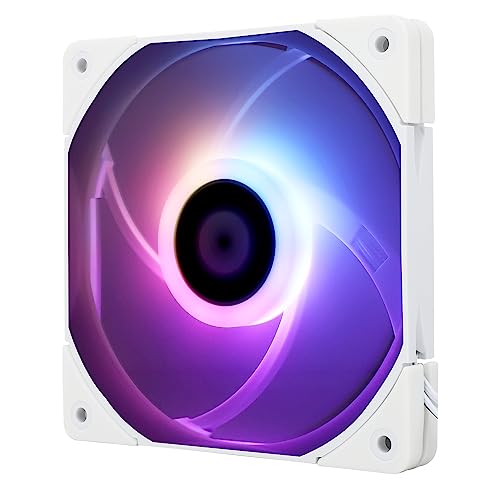
Thermalright 120mm Slim ARGB Fan
Best for: Quiet CPU cooling with ARGB lighting
- Fan Size
- 120mm
- Max Fan Speed
- 1500RPM
- Max Airflow
- 52CFM
- Static Pressure
- 1.24mm H2O
- Noise Level
- ≤24.1dBA
- Connector Type
- 4-pin PWM
View on Amazon: Thermalright 120mm Slim ARGB Fan Affiliate link
This Thermalright 120mm fan offers quiet operation with a maximum speed of 1500 RPM and noise levels at or below 24.1 dBA. It delivers 52 CFM of airflow and 1.24 mm H2O of static pressure. The 15mm slim profile fits tight spaces. ARGB lighting syncs with your motherboard. It works well as a case or CPU cooler fan.
Pros
- Max speed of 1500 RPM for automatic cooling control
- Quiet operation with noise levels under 24.1 dBA
- High airflow of 52 CFM for effective heat removal
- ARGB lighting with up to 17 modes for visual customization
Cons
- Lower static pressure than standard 25mm fans
- Requires motherboard ARGB header for lighting control
- Slim 15mm design limits compatibility with thick radiators
Good fit if
- You need a quiet fan for a CPU cooler
- You want ARGB lighting that syncs with your build
- You have limited space for a 120mm fan
Skip if
- You require high static pressure for thick radiators
- You prefer fans without RGB lighting effects
- You need a standard 25mm thick fan
Verdict: Thermalright 120mm Slim ARGB Fan suits builders who prioritize quiet operation and visual sync in tight spaces. It is ideal for CPU coolers where low noise and slim profile matter most.
Specifications side by side
| Spec | Thermalright 92mm Slim PWM Fan | Thermalright 120mm Slim ARGB Fan |
|---|---|---|
| Fan Size | 92mm | 120mm |
| Max Fan Speed | 2700RPM | 1500RPM |
| Max Airflow | 42.58CFM | 52CFM |
| Static Pressure | 1.33mm H2O | 1.24mm H2O |
| Noise Level | ≤22.4dBA | ≤24.1dBA |
| Connector Type | 4-pin PWM | 4-pin PWM |
| Bearing Type | Liquid | not stated |
| Lighting Type | not stated | ARGB |
| Lighting | not stated | ARGB |
| Compatible Device | CPU Cooler | CPU Cooler |
| Dimensions | 3.62 × 0.59 × 3.62 inches | 0.59 × 4.72 × 4.72 inches |
| Weight | 1.6 ounces | 3.53 ounces |
| Size | 92x92x15mm | not stated |
| Color | Grey | not stated |
| Model | TL-9015 | TL-C12015W-S |
Frequently asked questions
Can the Thermalright 92mm Slim PWM Fan fit standard 120mm mounts?
No, it cannot fit standard 120mm mounts. This fan measures 92 by 92 by 15mm. It is designed specifically for tight spaces or smaller CPU coolers. You must verify your cooler’s mounting holes match its 92mm square frame. It will not align with 120mm screw patterns.
Does the 120mm Slim ARGB Fan require a special controller?
It depends on your motherboard. This fan features ARGB lighting. You need a motherboard or controller that supports 5V 3-pin ARGB headers. The fan also uses a 4-pin PWM connector for speed control. Ensure your case has the necessary ARGB wiring available.
What is the thickness of these Thermalright slim fans?
Both fans share the same 15mm thickness. The 92mm model is 15mm thick. The 120mm ARGB model is also 15mm thick. This slim profile helps them fit in low-clearance CPU coolers. It allows installation where standard 25mm fans would not fit.
Is the 92mm fan compatible with standard PWM headers?
Yes, it uses a standard 4-pin connector. This allows direct connection to motherboard PWM headers. You can control fan speed via your BIOS or software. It does not require a separate hub for speed management. This makes installation straightforward for most builds.
Which fan is heavier?
The 120mm Slim ARGB Fan is heavier. It weighs 3.53 ounces. The 92mm Slim PWM Fan weighs 1.6 ounces. The larger size and ARGB components add mass. This difference is minor but relevant for delicate cooler mounts.
Can I use the 120mm fan for case intake?
Yes, you can use it for case intake. It measures 120 by 120 by 15mm. This fits standard 120mm case fan mounts. The slim profile is suitable for tight cases. The ARGB lighting adds visual appeal to your build.
Do both fans use liquid bearings?
The guide states both use low-noise liquid bearings. This detail is in the comparison section. Liquid bearings help reduce noise and extend lifespan. This applies to both the 92mm and 120mm models. It ensures smooth operation for CPU cooling.