Best DS leddess Case Fans: 2 Models Compared
As an Amazon Associate we earn from qualifying purchases. Links on this page are affiliate links.
This guide compares the best DS leddess case fans available today. We evaluated 2 models to help you choose the right hardware for your build. DS leddess offers 120mm fans with RGB or static lighting, designed for radiators and CPU coolers. The DS leddess 120mm 6-Pack RGB Fans take the top spot because they provide uniform lighting and vibration dampening for full case setups. Our picks rely strictly on the specifications published on the product listings. We focus on practical details like connector types and physical dimensions to ensure you get the right fit.
Quick picks
| # | Product | Best for | Price |
|---|---|---|---|
| 1 | DS leddess 120mm 6-Pack RGB Fans Best overall | Full case RGB lighting setups with 6-pin headers | Check price of DS leddess 120mm 6-Pack RGB Fans on Amazon |
| 2 | DS leddess 120mm Static RGB Case Fans (6-Pack) Best budget | basic static lighting setups | Check price of DS leddess 120mm Static RGB Case Fans (6-Pack) on Amazon |
Our 2 picks

DS leddess 120mm 6-Pack RGB Fans
Best for: Full case RGB lighting setups with 6-pin headers
- Fan Size
- 120mm
- Connector Type
- 6-pin
- Lighting Type
- RGB
- Compatible Device
- Radiator, CPU Cooler
- Dimensions
- 4.72 × 4.72 × 0.98 inches
View on Amazon: DS leddess 120mm 6-Pack RGB Fans Affiliate link
This is a 6-pack of 120mm RGB case fans designed for PC cooling and lighting. It uses a 6-pin connector and includes an RF wireless remote for color and pattern control. The frame features eight silicone pads to reduce vibration noise. It fits standard cases, radiators, and CPU coolers. You get consistent lighting effects across multiple fans.
Pros
- Includes six 120mm fans for full case coverage
- RF wireless remote controls color speed and patterns
- Eight silicone pads minimize motor vibration noise
- 6-pin connector for power and lighting
Cons
- Requires a 6-fan kit or 3-fan plus 2 LED strip setup
- Cannot be used as a single independent fan
- Limited to RF remote control without app support
Good fit if
- You want synchronized RGB lighting across multiple fans
- You need a 6-pin connector for your system
- You prefer wireless remote control for fan settings
Skip if
- You only need a single fan for one spot
- Your motherboard lacks a 6-pin fan header
- You want to control fans via software or app
Verdict: DS leddess 120mm RGB Fan 6-Pack is a solid choice for builders who want uniform RGB lighting and vibration dampening across a full set of case fans. It suits those who have the required 6-pin connector and prefer remote control over software.
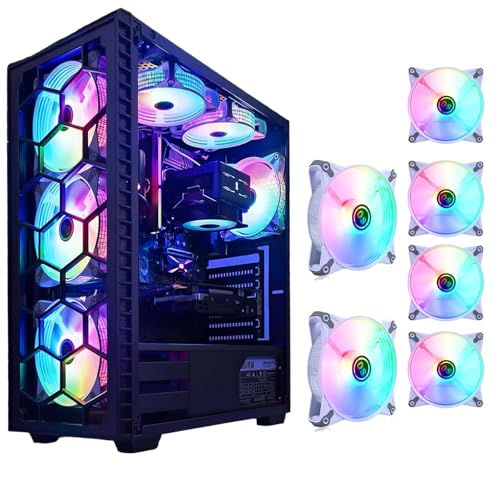
DS leddess 120mm Static RGB Case Fans (6-Pack)
Best for: basic static lighting setups
- Fan Size
- 120mm
- Connector Type
- Molex
- Lighting Type
- Static RGB LED
- Compatible Device
- Radiator, CPU Cooler
- Dimensions
- 4.72 × 0.98 × 4.72 inches
View on Amazon: DS leddess 120mm Static RGB Case Fans (6-Pack) Affiliate link
This DS leddess fan uses a 120mm frame and white housing with eight static RGB LEDs. It connects via a Molex plug, which fits most power supplies without needing extra adapters. The design targets low-noise operation while maintaining airflow for mid-tower or full-tower cases. You get a six-pack kit for consistent lighting across your build. It works with radiators and CPU coolers.
Pros
- 120mm size fits standard chassis
- Molex connector for easy power
- Eight static RGB LEDs per fan
- Six-pack kit for full builds
- Optimized for low-noise operation
Cons
- Static RGB only, no color changing
- Molex connector lacks speed control
- No remote or software included
Good fit if
- You want simple plug-and-play lighting
- You need a six-pack for a full build
- Your case supports 120mm fans
Skip if
- You need dynamic color effects
- You want fan speed control
- You prefer PWM connectors
Verdict: DS leddess 120mm Static RGB Fan offers basic lighting and easy Molex power for users who want a simple, uniform look without complex controls.
Specifications side by side
| Spec | DS leddess 120mm 6-Pack RGB Fans | DS leddess 120mm Static RGB Case Fans (6-Pack) |
|---|---|---|
| Fan Size | 120mm | 120mm |
| Connector Type | 6-pin | Molex |
| Lighting Type | RGB | Static RGB LED |
| Lighting | RGB | RGB |
| Compatible Device | Radiator, CPU Cooler | Radiator, CPU Cooler |
| Dimensions | 4.72 × 4.72 × 0.98 inches | 4.72 × 0.98 × 4.72 inches |
| Color | Ring | White |
| Model | A06 | DS-E06 |
DS leddess Case Fan Options
The lineup splits into two distinct groups based on lighting control and power. The first group features the DS leddess 120mm 6-Pack RGB Fans. This model uses a 6-pin header for remote control. It fits builders who want uniform lighting and vibration dampening. The second group includes the DS leddess 120mm Static RGB Case Fans. These fans use Molex power for a simple, static look. They suit users who prefer basic setups without complex controls.
Both options share the same 120mm size. They are compatible with radiators and CPU coolers. The RGB pack offers dynamic color changes. The static version provides a consistent white light. You should choose the RGB pack if you have the required 6-pin header. Pick the static model if you want easy installation and a uniform appearance. Both are designed for full case lighting setups.
Where DS leddess fits your build
DS leddess focuses on 120mm fans for radiators and CPU coolers. You get two main paths. The top pick uses 6-pin headers for remote-controlled RGB effects. The second option offers static lighting via Molex power for simpler setups. Both models provide uniform illumination. The range is narrow. You will not find larger or smaller fan sizes here. There are no ARGB options or software-controlled models in this list. If you need 140mm fans or silent-only operation without lights, this brand does not cover those needs. Stick with these if you want basic 120mm RGB or static lighting.
How to Choose the Right Fan
-
Check Your Motherboard Headers
You must verify that your motherboard has the correct headers for your chosen fan. The top pick uses a 6-pin header for remote control. This setup allows you to adjust RGB effects without relying on software. If your board lacks this specific connector, you may need an adapter. The second option uses Molex power, which is simpler but offers less control. Ensure your case has available headers or power connectors before buying. Matching your hardware prevents connectivity issues during assembly.
-
Match Fan Size to Case
Both models in this guide are 120mm fans. You need to confirm your case supports 120mm mounts. Most mid-tower and full-tower cases accept this size. Check your case manual for supported dimensions. The fans measure 4.72 inches by 4.72 inches. Their height is 0.98 inches. Ensure your radiator or CPU cooler also fits 120mm fans. Using the wrong size will prevent installation. Verify all mounting points in your case before proceeding.
-
Decide on Lighting Style
Choose between dynamic RGB and static lighting based on your preference. The first model provides ring-style RGB effects. You can change colors using the included remote. The second model offers static white lighting. This option is best if you want a uniform, simple look. Static lighting requires no software or remote. It connects via Molex for constant illumination. Pick the style that matches your build aesthetic. RGB allows customization, while static offers consistency.
-
Consider Noise and Vibration
Look for fans with vibration dampening features. The top pick is noted for its vibration dampening capabilities. This reduces noise and improves airflow stability. Check the fan specifications for mounting rubber grommets. These help isolate the fan from the case. Lower vibration often means quieter operation. Ensure the fan speed is suitable for your needs. Higher speeds increase cooling but also noise. Balance performance with acoustic comfort for your build.
-
Verify Power Connection Type
Check the power source for each fan. The RGB model uses a 6-pin header. This connects to a dedicated controller. The static model uses Molex power. This plugs directly into the power supply. Molex is common but uses more pins. Ensure you have the required connectors available. Some cases may lack Molex connectors. You might need adapters for certain setups. Verify your power supply has enough free connectors. Proper power connection ensures stable fan operation.
Frequently asked questions
Do DS leddess fans work with standard 3-pin PWM headers?
The top-rated model uses a 6-pin header for remote control, not standard PWM. You need a motherboard with this specific connector or a compatible controller. The static RGB option uses Molex power instead of fan headers. Check your board’s available connectors before buying to ensure compatibility with your system.
What is the difference between RGB and static RGB fans?
RGB fans allow you to cycle through colors and effects using a remote. Static RGB fans provide a single, uniform color, such as white. The RGB model suits builders wanting dynamic lighting. The static model offers a simple, consistent look without complex control software. Choose based on your desired visual style.
Are these fans suitable for liquid cooling radiators?
Yes, both models are designed for radiators and CPU coolers. Their 120mm size fits standard 120mm radiator slots. The static RGB fans use Molex power, which is reliable for constant operation. The RGB fans use a 6-pin header for control. Both options provide adequate airflow for cooling components effectively.
How do I control the lighting on the RGB fans?
You control the lighting using the included remote control. The fans connect via a 6-pin header that powers the remote interface. This method avoids needing motherboard software. You can adjust patterns and colors directly with the remote. This setup is ideal for users who prefer physical controls over digital interfaces.
What size are the DS leddess case fans?
All listed models are 120mm fans. The dimensions are approximately 4.72 inches by 4.72 inches with a thickness of 0.98 inches. This is the standard size for most mid-tower and full-tower cases. They fit standard 120mm mounting positions on case frames and radiators. Verify your case supports 120mm fans before installation.
Do I need to install software to use these fans?
No software installation is required for the RGB model. It uses a hardware remote for control via the 6-pin header. The static RGB fans use Molex power and have fixed lighting. Neither model relies on software for basic operation. This makes setup simpler for users who want plug-and-play functionality without driver conflicts.