Best Thermalright Case Fans: 15 Models Compared
As an Amazon Associate we earn from qualifying purchases. Links on this page are affiliate links.
Finding the right Thermalright case fan depends on your enclosure and clearance needs. The brand provides 80mm, 92mm, 120mm, and 140mm sizes across standard 25mm depths, slim 15mm profiles, reverse-blade airflow designs, ARGB illumination, and multi-port control hubs.
The Thermalright 92mm Slim PWM Fan leads this lineup because its 15mm thickness fits compact PC cases and low-profile coolers where standard fans do not fit. This guide compares 15 products based on the specifications published on the listings so you can find the right match for your setup.
Quick picks
Our 15 picks

Thermalright 92mm Slim PWM Fan
Best for: compact PC cases and low-profile coolers
- Fan Size
- 92mm
- Max Fan Speed
- 2700RPM
- Max Airflow
- 42.58CFM
- Static Pressure
- 1.33mm H2O
- Noise Level
- ≤22.4dBA
- Connector Type
- 4-pin PWM
The Thermalright 92mm Slim PWM Fan is a compact cooling fan designed for small cases and low-profile coolers. At 15mm thick, it delivers up to 42.58 CFM of airflow and 1.33 mm H2O of static pressure at speeds up to 2700 RPM. A 4-pin PWM connection provides automatic motherboard speed control, while integrated vibration damping pads keep noise under 22.4 dBA. It suits you if you need compact airflow.
Pros
- Slim 15mm thickness fits low-clearance locations
- Delivers up to 42.58 CFM airflow and 2700 RPM
- Supports automatic motherboard control via 4-pin PWM
- Four corner vibration damping pads reduce operating noise
Cons
- Lacks integrated RGB or ARGB lighting
- Produces less airflow than full-size 120mm case fans
Good fit if
- You need a thin 15mm fan for a space-constrained build.
- You want 4-pin PWM speed control from your motherboard.
- You require a 92mm fan mount for a small chassis or CPU cooler.
Skip if
- You want integrated lighting or ARGB headers.
- You have space for larger standard 120mm or 140mm fans.
Verdict: Thermalright 92mm Slim PWM Fan delivers reliable cooling and PWM control in tight clearances where standard 25mm fans will not fit. Its 15mm depth and vibration pads make it a balanced pick for compact builds.
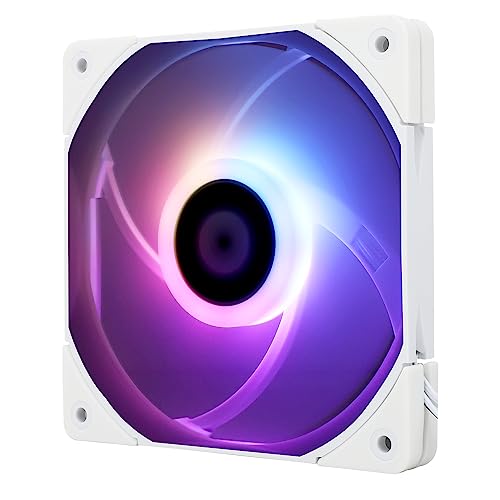
Thermalright 120mm Slim ARGB Fan
Best for: compact PC cases with tight fan clearance
- Fan Size
- 120mm
- Max Fan Speed
- 1500RPM
- Max Airflow
- 52CFM
- Static Pressure
- 1.24mm H2O
- Noise Level
- ≤24.1dBA
- Connector Type
- 4-pin PWM
This Thermalright 120mm fan features a slim 15mm profile designed for tight PC cases and compact coolers. It operates up to 1500 RPM through a 4-pin PWM header, pushing up to 52 CFM of airflow with 1.24 mm H2O static pressure. Integrated ARGB lighting offers 17 effects synchronized through your motherboard. It suits you if you need a standard 120mm mount with restricted clearance.
Pros
- Slim 15mm depth fits low-clearance spaces
- Maximum noise level rated at 24.1 dBA
- 4-pin PWM interface allows automatic speed control up to 1500 RPM
- Four integrated vibration-damping corner pads
Cons
- Maximum airflow tops out at 52 CFM
- Static pressure is limited to 1.24 mm H2O
Good fit if
- You need a 120mm fan that fits within a 15mm depth limit.
- You want addressable lighting synchronized by motherboard headers.
- You require automatic motherboard speed adjustments via 4-pin PWM.
Skip if
- You have standard clearance for 25mm fans with higher airflow.
- You prefer a plain black or non-illuminated fan.
Verdict: Thermalright 120mm Slim ARGB Fan delivers capable cooling and lighting in a reduced 15mm profile. It solves clearance restrictions in compact PC enclosures while keeping standard 120mm mount compatibility.

Thermalright 3-Pin 5V ARGB Fan Hub
Best for: adding multiple 5V 3-pin ARGB devices
- Lighting
- ARGB
- Connector Type
- 3-Pin
- Dimensions
- 3.54 × 1.81 × 0.63 inches
This Thermalright device is a dedicated 3-pin 5V ARGB lighting hub designed to expand your motherboard lighting headers. Powered directly via a SATA connection, it distributes lighting signals to multiple ARGB fans or LED light strips without overloading motherboard pins. It mounts to your PC chassis using included double-sided adhesive tape. This hub suits you if your motherboard lacks enough 5V 3-pin headers for your build.
Pros
- Connects to standard 5V 3-pin ARGB motherboard headers
- Direct SATA power input maintains stable lighting output under load
- Compact 90 x 46 x 16 mm plastic enclosure
- Includes double-sided adhesive stickers for mounting
Cons
- Does not support 12V 4-pin RGB hardware
- Requires a separate SATA power cable not included in the package
- Does not provide standalone color control without motherboard software
Good fit if
- You need to synchronize multiple 5V 3-pin ARGB fans through one motherboard header.
- You have an available SATA power connector from your power supply.
Skip if
- You use legacy 12V 4-pin RGB components.
- You want standalone hardware buttons to change lighting colors directly.
Verdict: Thermalright 8-Port 3-Pin ARGB Fan Hub centralizes multiple 5V 3-pin lighting connections into a compact SATA-powered distribution point. It is a practical solution when your PC build exceeds your motherboard's native ARGB headers.

Thermalright 8-Port ARGB Fan Hub
Best for: managing multiple PWM fans and ARGB cables
- Lighting
- ARGB
- Connector Type
- 4-Pin
- Dimensions
- 5.51 × 0.63 × 2.52 inches
- Weight
- 3.53 ounces
This Thermalright 8-Port ARGB Fan Hub lets you power and sync up to eight 4-pin PWM fans alongside eight 5V 3-pin ARGB devices. Measuring 5.51 by 2.52 inches, it mounts to your chassis with included double-sided tape and draws dedicated SATA power to keep signal delivery stable. It suits you if you run multiple case fans and need clean cable consolidation through your motherboard rather than a standalone controller.
Pros
- Supports eight 4-pin PWM fans and eight 5V 3-pin ARGB devices
- Direct SATA power input provides stable output under high load
- Pre-installed double-sided adhesive enables chassis mounting
- Compact profile measuring 5.51 inches long and 0.63 inches thick
Cons
- Does not independently adjust speed or lighting without motherboard control
- Reports RPM speed readings only from the single red port
- Incompatible with 12V 4-pin RGB components
Good fit if
- You need to distribute PWM and ARGB signals across up to eight fans.
- You have a spare SATA power connection from your power supply.
- You want adhesive mounting inside your chassis.
Skip if
- You use components requiring 12V 4-pin RGB headers.
- You require individual RPM monitoring for every connected fan.
- You want manual dial or remote lighting controls.
Verdict: Thermalright 8-Port ARGB Fan Hub expands motherboard headers to power up to eight PWM fans and 5V ARGB devices via SATA power. It consolidates multi-cable setups while relying on your motherboard for speed and color control.

Thermalright 120mm White ARGB Fan 3-Pack
Best for: white PC builds needing balanced ARGB airflow
- Fan Size
- 120mm
- Max Fan Speed
- 1550RPM
- Max Airflow
- 66.17CFM
- Static Pressure
- 1.53mm H2O
- Noise Level
- 25.6dBA
- Connector Type
- 4pin PWM
This three-pack gives you 120mm white cooling fans equipped with addressable RGB lighting and fluid dynamic bearings. Each fan delivers up to 66.17 CFM of airflow and 1.53 mm H2O static pressure at a maximum speed of 1550 RPM, keeping sound output at 25.6 dBA. You will find them suitable if you need balanced airflow for intake, exhaust, or heatsink cooling across a clean white PC build.
Pros
- Airflow reaches up to 66.17 CFM at 1550 RPM
- Fluid dynamic bearing reduces vibration and noise to 25.6 dBA
- Configured with 55cm cable for PWM daisy-chain control
- Addressable RGB syncs directly through motherboard headers
Cons
- Static pressure caps at 1.53 mm H2O
- Maximum rotational speed is limited to 1550 RPM
- No standalone hardware fan controller included
Good fit if
- You need three matching 120mm white fans for intake or exhaust.
- You want daisy-chain PWM cables to streamline motherboard fan header connections.
- You prioritize fluid dynamic bearings with noise levels under 26 dBA.
Skip if
- You require 140mm mounting dimensions rather than standard 120mm frames.
- You need high static pressure exceeding 1.53 mm H2O for dense radiator fins.
Verdict: Thermalright 120mm White ARGB Fan 3-Pack balances 66.17 CFM airflow with 25.6 dBA noise levels for standard chassis setups. It gives you synchronized lighting and daisy-chain PWM wiring tailored for white-themed builds.

Thermalright 120mm ARGB Case Fan
Best for: quiet ARGB airflow in standard chassis setups
- Fan Size
- 120mm
- Max Fan Speed
- 1550RPM
- Max Airflow
- 66.17CFM
- Static Pressure
- 1.53mm H2O
- Noise Level
- ≤ 25.6dBA
- Connector Type
- 4pin PWM
This Thermalright 120mm model combines addressable RGB illumination with practical case-cooling performance. It runs up to 1550 RPM, pushing 66.17 CFM of airflow while keeping sound levels at or below 25.6 dBA. An S-FDB bearing stabilizes the blades, and the 55 cm cable allows daisy-chain PWM series control. It suits you if you want synchronized lighting and balanced airflow across your chassis.
Pros
- Delivers up to 66.17 CFM maximum airflow
- Fluid dynamic S-FDB bearing stabilizes blade rotation
- Low peak noise rating of 25.6 dBA
- Generous 55 cm cable supports PWM daisy chaining
Cons
- Moderate static pressure rating of 1.53 mm H2O
- Top rotational speed caps at 1550 RPM
Good fit if
- You want quiet case ventilation rated under 26 dBA.
- You plan to daisy-chain multiple PWM fans using a single long cable.
Skip if
- You need higher static pressure than 1.53 mm H2O for thick radiators.
- You require fan speeds beyond 1550 RPM for aggressive cooling.
Verdict: Thermalright 120mm ARGB Case Fan delivers solid 66.17 CFM airflow and low-noise operation for everyday chassis cooling. Its integrated daisy-chain cabling keeps lighting and fan connections clean.

Thermalright 120mm PWM Case Fan
Best for: quiet, no-frills standard case cooling
- Fan Size
- 120mm
- Max Fan Speed
- 1550RPM
- Max Airflow
- 66.17CFM
- Static Pressure
- 1.53mm H2O
- Noise Level
- ≤ 25.6dBA
- Connector Type
- 4pin PWM
This 120mm cooling fan delivers up to 66.17 CFM of airflow and 1.53 mm H2O of static pressure using a 4-pin PWM connector. Its S-FDB fluid dynamic bearing and silicone corner pads keep maximum operational noise down to 25.6 dBA at 1550 RPM. You also get a 55cm cable for daisy-chaining multiple PWM units. It suits you if you need standard chassis airflow without lighting.
Pros
- Airflow rated up to 66.17 CFM
- 4-pin PWM motherboard control up to 1550 RPM
- Fluid dynamic bearing with silicone corner pads for vibration reduction
- 55cm cable supports series PWM connection
Cons
- No integrated LED or ARGB lighting
- Static pressure limited to 1.53 mm H2O
Good fit if
- You need a standard 120mm PWM fan for basic case ventilation or CPU cooling.
- You want low noise levels under 25.6 dBA with vibration-damping pads.
- You plan to link fan cables across a 55cm reach.
Skip if
- You want built-in RGB or ARGB accent lights for your setup.
- You need higher static pressure for restrictive liquid radiators.
Verdict: Thermalright 120mm PWM Case Fan provides reliable 66.17 CFM airflow and quiet S-FDB bearing operation without extra aesthetic features. It gives you standard thermal management for cases and air coolers through straightforward 4-pin motherboard control.

Thermalright 120mm ARGB PWM Fan
Best for: quiet case cooling with addressable RGB lighting
- Fan Size
- 120mm
- Max Fan Speed
- 1500RPM
- Max Airflow
- 66.17CFM
- Static Pressure
- 1.53mm H2O
- Noise Level
- ≤ 25.6dBA
- Connector Type
- 4PIN PWM
This Thermalright 120mm ARGB PWM fan is designed for case ventilation and cooler airflow. You get up to 1500 RPM of variable speed through a standard 4-pin PWM header, pushing 66.17 CFM of air at 1.53 mm H2O static pressure. The S-FDB fluid dynamic bearing keeps noise capped at 25.6 dBA. It suits you if you need addressable lighting and balanced airflow for standard case mounts.
Pros
- Fluid dynamic S-FDB bearing engineered for smooth operation
- Airflow rating of 66.17 CFM at 1500 RPM
- Maximum acoustic output capped at 25.6 dBA
- Generous 55 cm cable configured for series PWM connection
- 3-pin 5V ARGB connector for motherboard lighting sync
Cons
- Moderate static pressure rating of 1.53 mm H2O
- No standalone physical lighting remote included
Good fit if
- You want a quiet 120mm intake or exhaust fan that runs under 26 dBA.
- You plan to daisy-chain fans using the integrated 55 cm series cable.
- You have a motherboard with a standard 3-pin ARGB header.
Skip if
- You require static pressure higher than 1.53 mm H2O for dense radiators.
- You only have older 12V 4-pin RGB motherboard headers.
Verdict: Thermalright 120mm ARGB PWM Fan delivers solid 66.17 CFM airflow and quiet S-FDB operation with standard motherboard-controlled ARGB lighting. It offers a dependable balance of cooling output and low noise for any 120mm fan mount.

Thermalright 80mm PWM Case Fan
Best for: compact cases and small CPU heatsinks
- Fan Size
- 80mm
- Max Fan Speed
- 2200RPM
- Max Airflow
- 34CFM
- Static Pressure
- 2.7mm H2O
- Noise Level
- ≤24dBA
- Connector Type
- 4pin pwm
This compact 80mm fan provides targeted cooling for compact PC cases and heatsinks. You connect it using a standard 4-pin PWM header for automated speed control up to 2200 RPM. It delivers up to 34 CFM of airflow and 2.7 mm H2O of static pressure at noise levels up to 24 dBA. Corner vibration damping pads and an S-FDB V2 bearing keep operation stable in tight spaces where standard fans cannot fit.
Pros
- Delivers up to 2.7 mm H2O static pressure for restricted airflow paths
- S-FDB V2 bearing designed for reduced blade vibration and low noise
- Four integrated corner pads to dampen frame vibration
- 4-pin PWM connection with automatic speed adjustment up to 2200 RPM
Cons
- Airflow tops out at 34 CFM due to the smaller 80mm frame size
- No integrated ARGB or lighting elements listed
- Standard 25mm depth will not fit brackets requiring 15mm slim fans
Good fit if
- You need an 80mm cooling fan for a compact chassis or downward CPU cooler.
- You want high static pressure up to 2.7 mm H2O in a small fan format.
- You prefer automatic motherboard speed control through a standard 4-pin PWM header.
Skip if
- You have standard 120mm or 140mm mounting points available.
- You require built-in lighting features for your build.
- You need an ultra-thin 15mm fan to fit extreme low-profile clearances.
Verdict: Thermalright 80mm PWM Case Fan delivers solid static pressure and PWM control in a compact footprint. It gives you dependable cooling for tight cases and CPU heatsinks that cannot accommodate larger fans.

Thermalright 140mm PWM Case Fan
Best for: 140mm mounts needing airflow without lighting
- Fan Size
- 140mm
- Max Fan Speed
- 1500RPM
- Max Airflow
- 74.3CFM
- Static Pressure
- 2.0mm H2O
- Noise Level
- ≤26.6DBA
- Connector Type
- 4-pin PWM
This Thermalright 140mm fan provides case ventilation using a 4-pin PWM connection and a fluid dynamic bearing. It reaches speeds up to 1500 RPM, delivering up to 74.3 CFM of airflow and 2.0 mm H2O of static pressure at noise levels up to 26.6 dBA. You will find this fan well suited if you need high-volume airflow through 140mm mounts without lighting features.
Pros
- Delivers up to 74.3 CFM maximum airflow
- Generates up to 2.0 mm H2O static pressure
- Fluid dynamic bearing for smooth operation
- Controlled via standard 4-pin PWM up to 1500 RPM
Cons
- No integrated RGB or ARGB lighting
- Thickness measures 26mm instead of standard 25mm
Good fit if
- You need high airflow for a dedicated 140mm case mount.
- You prefer a fan with PWM speed control and fluid dynamic bearings.
- You want cooling without any LED or ARGB illumination.
Skip if
- You have a PC chassis restricted to 120mm or smaller fan mounts.
- You want built-in lighting effects for your build.
Verdict: Thermalright 140mm PWM Case Fan delivers balanced airflow and static pressure for 140mm mounting locations without visual distractions. Its fluid dynamic bearing and PWM control provide dependable cooling for performance-focused cases.

Thermalright 80mm Slim PWM Fan
Best for: compact cases needing slim 80mm cooling
- Fan Size
- 80mm
- Max Fan Speed
- 2200 RPM
- Max Airflow
- 28.4 CFM
- Static Pressure
- 1.25 mmH2O
- Noise Level
- ≤23.3 dBA
- Connector Type
- 4-pin PWM
This Thermalright 80mm fan features a slim 15mm profile designed for tight clearances where standard 25mm fans cannot fit. You get up to 2,200 RPM of PWM-controlled speed, delivering up to 28.4 CFM airflow and 1.25 mm H2O static pressure. Operating at noise levels up to 23.3 dBA on an S-FDB V2 bearing, it suits your compact PC builds, low-profile CPU heatsinks, or small case mounts.
Pros
- Slim 15mm depth fits tight clearances
- 4-pin PWM control up to 2,200 RPM
- S-FDB V2 bearing with rated noise under 23.3 dBA
- Four integrated vibration damping pads
Cons
- Airflow tops out at 28.4 CFM
- No integrated RGB or LED lighting
- Static pressure limited to 1.25 mm H2O
Good fit if
- You need a low-profile 15mm thick fan for tight spaces.
- You require an 80mm fan with 4-pin PWM motherboard control.
- You want vibration-damped operation rated at 23.3 dBA or lower.
Skip if
- You have clearance for standard 120mm or 140mm case fans.
- You want addressable RGB lighting for your build.
- You need airflow higher than 28.4 CFM.
Verdict: Thermalright 80mm Slim PWM Fan gives you a compact 15mm profile with PWM speed control up to 2,200 RPM. It provides quiet operation and vibration damping for space-constrained cases and low-profile coolers.

Thermalright 80mm PWM Cooling Fan
Best for: compact PC cases needing high static pressure
- Fan Size
- 80mm
- Max Fan Speed
- 2200 RPM
- Max Airflow
- 34 CFM
- Static Pressure
- 2.7 mmH2O
- Noise Level
- ≤24 dBA
- Connector Type
- 4-pin PWM
This Thermalright 80mm cooling fan delivers directed airflow for compact PC enclosures and small CPU heatsinks. It operates up to 2200 RPM via a 4-pin PWM header, generating 34 CFM of airflow and 2.7 mm H2O of static pressure while keeping noise at or below 24 dBA. Equipped with S-FDB V2 bearings and corner rubber dampening pads, it suits you if you need focused pressure in tight mounting locations.
Pros
- Static pressure rated at 2.7 mm H2O
- S-FDB V2 bearing designed for stable operation
- Four integrated vibration damping pads
- 4-pin PWM speed control reaching up to 2200 RPM
Cons
- No integrated RGB or ARGB lighting listed
- Lower maximum airflow of 34 CFM compared to larger fan formats
Good fit if
- You require an 80mm fan for compact case mounts or small CPU coolers.
- You need high static pressure up to 2.7 mm H2O to push air through restricted spaces.
- You want PWM fan speed control that adjusts automatically based on motherboard temperatures.
Skip if
- You need standard 120mm or 140mm mounting dimensions for your chassis.
- You want built-in ARGB lighting to illuminate your system build.
Verdict: Thermalright 80mm PWM Cooling Fan provides strong static pressure and automated PWM speed control in an 80mm by 25mm form factor. Its compact footprint and S-FDB V2 bearing make it a dependable choice for space-constrained PC builds.

Thermalright 120mm Reverse Airflow ARGB Fan
Best for: visible intake positions needing reverse blade orientation
- Fan Size
- 120mm
- Max Fan Speed
- 1500 RPM
- Max Airflow
- 47.6 CFM
- Static Pressure
- 1.31mm H2O
- Noise Level
- ≤ 23.2dBA
- Connector Type
- 4-pin PWM
This 120mm case fan features a reverse airflow design, letting you draw intake air while keeping the clean front side of the ARGB blades visible. It runs up to 1500 RPM via a 4-pin PWM connector, pushing 47.6 CFM of airflow and 1.31 mm H2O static pressure at noise levels up to 23.2 dBA. It suits you if you need bottom or side intake cooling without showing rear frame struts.
Pros
- Reverse blade design directs airflow toward the front face
- Maximum noise rating of 23.2 dBA
- 55cm cable supports PWM series daisy-chaining
- Fluid dynamic bearing mechanism
Cons
- Peak airflow limited to 47.6 CFM
- Static pressure tops out at 1.31 mm H2O
Good fit if
- You want intake airflow without displaying rear motor brackets.
- You need a 55cm PWM cable to connect fans in series across your case.
- You run system cooling requiring noise levels at or below 23.2 dBA.
Skip if
- You need airflow ratings higher than 47.6 CFM.
- You require static pressure over 1.31 mm H2O for dense radiator cooling.
Verdict: Thermalright 120mm Reverse Airflow ARGB Fan delivers intake ventilation and customizable lighting while keeping rear mounting struts out of sight. Its 1500 RPM top speed and 23.2 dBA limit provide quiet, direct intake airflow.

Thermalright 120mm Reverse ARGB Case Fan
Best for: intake mounts requiring reverse-blade aesthetics
- Fan Size
- 120mm
- Max Fan Speed
- 1500 RPM
- Connector Type
- 4-pin PWM
- Bearing Type
- S-FDB
- Lighting Type
- ARGB
- Blade Direction
- Reverse
This 120mm case fan features a reverse airflow design paired with ARGB aperture lighting. It uses an S-FDB bearing and a 4-pin PWM connection that supports automatic speed control up to 1500 RPM. You also get a 55cm cable configured for series connection. It suits you if you want intake airflow without showing structural supports.
Pros
- Reverse-blade design directs airflow forward across the blade face
- S-FDB bearing stabilizes rotation to limit noise and vibration
- 4-pin PWM connection enables automated speed adjustments up to 1500 RPM
- 55cm cable supports series chaining across your chassis
Cons
- Maximum speed is limited to 1500 RPM
- Single-unit package requires separate purchases for multiple fan slots
Good fit if
- You want reverse airflow to keep visible rear frame brackets hidden on intake mounts
- You need a 120mm PWM fan with ARGB lighting for a case or heatsink
- You plan to daisy-chain fan cables across longer distances using a 55cm lead
Skip if
- You need standard forward airflow for conventional rear or top exhaust slots
- You prefer higher maximum rotational speeds beyond 1500 RPM
Verdict: Thermalright 120mm Reverse ARGB Case Fan delivers clean intake aesthetics with its reverse-blade layout and ARGB aperture. Its 1500 RPM PWM control and S-FDB bearing make it a dependable option for chassis and radiator cooling.

Thermalright 120mm Reverse ARGB Fan
Best for: unobstructed ARGB intake airflow in PC cases
- Fan Size
- 120mm
- Max Fan Speed
- 1500 RPM
- Max Airflow
- 58FM
- Static Pressure
- 1.31mm H2O
- Noise Level
- ≤ 23.2dBA
- Connector Type
- 4-pin PWM
The Thermalright 120mm Reverse ARGB Fan is a reverse-airflow case fan designed to pull air inward while keeping the illuminated side visible. It spins up to 1500 RPM via a 4-pin PWM connector, producing 1.31 mm H2O static pressure with noise rated at 23.2 dBA or lower. It features an S-FDB bearing and motherboard-controlled lighting, making it a practical choice if you need clean intake cooling in your PC chassis.
Pros
- Reverse fan blade design provides intake airflow without visible rear bracket frames
- S-FDB fluid dynamic bearing reduces blade vibration and extends operating life
- Quiet operation with maximum noise rated at or below 23.2 dBA
- Addressable RGB lighting syncs through standard motherboard ports across 17 modes
- PWM 4-pin connection allows precise speed management up to 1500 RPM
Cons
- Static pressure is limited to 1.31 mm H2O
- Requires a compatible motherboard ARGB header because no physical controller is included
Good fit if
- You want an intake case fan with illuminated blades facing forward without bracket obstruction.
- You have a motherboard with available 4-pin PWM and ARGB headers.
- You need a quiet 120mm cooling fan rated at 23.2 dBA or less.
Skip if
- You require high static pressure above 1.31 mm H2O for thick liquid cooling radiators.
- You lack an addressable RGB header on your motherboard.
- You need a 140mm fan mounting size rather than standard 120mm spacing.
Verdict: Thermalright 120mm Reverse ARGB Fan delivers quiet, PWM-regulated intake cooling with motherboard-controlled lighting and a clean front-facing blade orientation. It is an ideal pick if you want intake airflow without displaying rear motor supports.
Specifications side by side
| Spec | Thermalright 92mm Slim PWM Fan | Thermalright 120mm Slim ARGB Fan | Thermalright 3-Pin 5V ARGB Fan Hub | Thermalright 8-Port ARGB Fan Hub | Thermalright 120mm White ARGB Fan 3-Pack | Thermalright 120mm ARGB Case Fan | Thermalright 120mm PWM Case Fan | Thermalright 120mm ARGB PWM Fan | Thermalright 80mm PWM Case Fan | Thermalright 140mm PWM Case Fan | Thermalright 80mm Slim PWM Fan | Thermalright 80mm PWM Cooling Fan | Thermalright 120mm Reverse Airflow ARGB Fan | Thermalright 120mm Reverse ARGB Case Fan | Thermalright 120mm Reverse ARGB Fan |
|---|---|---|---|---|---|---|---|---|---|---|---|---|---|---|---|
| Fan Size | 92mm | 120mm | not specified | not specified | 120mm | 120mm | 120mm | 120mm | 80mm | 140mm | 80mm | 80mm | 120mm | 120mm | 120mm |
| Max Fan Speed | 2700RPM | 1500RPM | not specified | not specified | 1550RPM | 1550RPM | 1550RPM | 1500RPM | 2200RPM | 1500RPM | 2200 RPM | 2200 RPM | 1500 RPM | 1500 RPM | 1500 RPM |
| Max Airflow | 42.58CFM | 52CFM | not specified | not specified | 66.17CFM | 66.17CFM | 66.17CFM | 66.17CFM | 34CFM | 74.3CFM | 28.4 CFM | 34 CFM | 47.6 CFM | not specified | 58FM |
| Static Pressure | 1.33mm H2O | 1.24mm H2O | not specified | not specified | 1.53mm H2O | 1.53mm H2O | 1.53mm H2O | 1.53mm H2O | 2.7mm H2O | 2.0mm H2O | 1.25 mmH2O | 2.7 mmH2O | 1.31mm H2O | not specified | 1.31mm H2O |
| Noise Level | ≤22.4dBA | ≤24.1dBA | not specified | not specified | 25.6dBA | ≤ 25.6dBA | ≤ 25.6dBA | ≤ 25.6dBA | ≤24dBA | ≤26.6DBA | ≤23.3 dBA | ≤24 dBA | ≤ 23.2dBA | not specified | ≤ 23.2dBA |
| Connector Type | 4-pin PWM | 4-pin PWM | not specified | not specified | 4pin PWM | 4pin PWM | 4pin PWM | 4PIN PWM | 4pin pwm | 4-pin PWM | 4-pin PWM | 4-pin PWM | 4-pin PWM | 4-pin PWM | 4-pin PWM |
| Bearing Type | Liquid | not specified | not specified | not specified | S-FDB | S-FDB | S-FDB | S-FDB | S-FDB V2 | S-FDB | S-FDB V2 | S-FDB V2 | S-FDB | S-FDB | S-FDB |
| Lighting Type | not specified | ARGB | not specified | not specified | ARGB | ARGB | not specified | 3PIN ARGB | not specified | not specified | not specified | not specified | ARGB | ARGB | ARGB |
| Blade Direction | not specified | not specified | not specified | not specified | not specified | not specified | not specified | not specified | not specified | not specified | not specified | not specified | Reverse | Reverse | Reverse |
| Lighting | not specified | ARGB | ARGB | ARGB | ARGB | ARGB | not specified | ARGB | not specified | not specified | not specified | not specified | ARGB | ARGB | ARGB |
| Compatible Device | CPU Cooler | CPU Cooler | not specified | not specified | not specified | not specified | not specified | not specified | CPU Cooler | not specified | CPU Cooler | CPU Cooler | not specified | not specified | not specified |
| Dimensions | 3.62 × 0.59 × 3.62 inches | 0.59 × 4.72 × 4.72 inches | 3.54 × 1.81 × 0.63 inches | 5.51 × 0.63 × 2.52 inches | 4.72 × 4.72 × 0.98 inches | 4.72 × 0.98 × 4.72 inches | 4.72 × 0.98 × 4.72 inches | 4.72 × 0.98 × 4.72 inches | 3.15 × 0.98 × 3.15 inches | 2 × 1 × 2 inches | 3.15 × 0.98 × 3.14 inches | 0.98 × 3.15 × 3.15 inches | 4.72 × 0.98 × 4.72 inches | 4.72 × 4.72 × 0.98 inches | 4.72 × 0.98 × 4.72 inches |
| Weight | 1.6 ounces | 3.53 ounces | not specified | 3.53 ounces | 3.53 ounces | not specified | 3.53 ounces | 3.53 ounces | not specified | 3.53 ounces | 3.53 ounces | 3.53 ounces | not specified | not specified | 3.53 ounces |
| Size | 92x92x15mm | not specified | not specified | for case fan interface and ARGB light interface | not specified | 120*120*25mm | not specified | not specified | not specified | not specified | not specified | not specified | not specified | not specified | C12RB-S V2-D2 |
| Color | Grey | not specified | FAN-ARGB HUB | ARGB FAN HUB 8 ports | not specified | TL-C12CW-S X3 | not specified | TL-C12C-S X3 | TL-B9W | not specified | not specified | not specified | TLC12RW-S V2 | not specified | BLACK |
| Model | TL-9015 | TL-C12015W-S | FAN-ARGB HUB-Controller REV.A-D6 | ARGB FAN HUB×8-d2 | TL-C12CW-S X3 D6 | TL-C12CW-S X3 | TL-C12C | TL-C12C-S X3 | TL-B8W | TL-C14 | TL-8015 | TL-B8 | C12RW-S V2 | C12RB-S V2 D6 | C12RB-S V2 |
Thermalright Case Fan Lineup Overview
Thermalright divides its fans by chassis clearance, airflow direction, and connectivity. If you build in compact enclosures or need CPU cooler clearance, slim 15mm models like the Thermalright 92mm Slim PWM Fan fit where standard 25mm fans collide with components. For standard mounts, full-thickness options like the Thermalright 120mm PWM Case Fan provide traditional ventilation with fluid dynamic bearings across 80mm, 120mm, and 140mm frames.
Shoppers prioritizing case display aesthetics can choose reverse-blade options such as the Thermalright 120mm Reverse Airflow ARGB Fan, which hides rear frame struts on intake mounts. If your motherboard lacks sufficient headers for multiple cooling units, hardware like the Thermalright 8-Port ARGB Fan Hub consolidates power and lighting into a single SATA-fed point.
Where the Thermalright Lineup Fits Best
Thermalright covers compact setups and standard towers with fan sizes running from 80mm and 92mm up to 120mm and 140mm. You can pick between standard 25mm frames and thin 15mm profiles, alongside forward blades or reverse-intake designs. Lighting spans non-lit hardware and 5V ARGB options supported by dedicated eight-port hubs.
Gaps remain if you need ultra-large airflow or wider lighting selections. The catalog has no 180mm or 200mm chassis fans. Reverse blades and slim variants stop at 120mm, leaving the 140mm category without reverse airflow or ARGB illumination. Control relies entirely on motherboard headers rather than proprietary software.
How to Choose the Right Thermalright Fan
-
Check Fan Frame Depth
Standard case fans measure 25mm in depth, but compact chassis mounts or low-profile CPU coolers often lack that space. If your build has cramped clearance between the side panel, memory modules, or heatsink fins, you should choose a 15mm profile. The Thermalright 92mm Slim PWM Fan provides cooling in a compact frame designed specifically for tight spaces. If you have unrestricted space, a standard 25mm fan moves more air at lower speeds. Measure your enclosure clearance before you decide.
-
Match Enclosure Mount Sizes
Computer cases provide specific mounting patterns for 80mm, 92mm, 120mm, or 140mm fans. You must check your chassis specifications before purchasing to ensure the screw holes align properly. Larger fans like the Thermalright 140mm PWM Case Fan cover broader surface areas, which allows them to move substantial air volume through standard intake or exhaust positions. Smaller 80mm mounting slots appear mainly in compact cases or older frames. Selecting the largest diameter your case supports helps optimize total system ventilation.
-
Select Proper Airflow Direction
Standard fans blow air across their rear motor support struts, which means intake positions expose structural brackets to your view. If you use a panoramic or glass-sided case, look at reverse-blade options. The Thermalright 120mm Reverse Airflow ARGB Fan pulls air into your chassis while presenting an unobstructed blade face toward the interior. For standard rear or top exhaust placements, traditional forward-blade models remain the right choice. Aligning blade design with placement keeps your interior clean without sacrificing directional airflow.
-
Assess Motherboard Header Capacity
Motherboards typically feature only two to four fan headers and limited lighting connectors. If you plan to install six or eight fans in your setup, you risk overloading your board headers or running short on ports. Using an accessory like the Thermalright 8-Port ARGB Fan Hub lets you power multiple 4-pin PWM fans and 5V ARGB cables from a single SATA power lead. Check your motherboard layout to determine whether you need a dedicated hub for clean cable distribution.
-
Choose Lighting or Stealth
You should evaluate whether addressable RGB lighting matches your aesthetic goals or if you prefer an unlit, functional build. ARGB fans require an extra 3-pin 5V connection per fan, which adds wiring complexity inside your chassis. If you prefer a simpler setup without extra light cables, the Thermalright 120mm PWM Case Fan provides 66.17 CFM of airflow while operating purely through standard 4-pin motherboard control. Non-RGB models eliminate extra cable management and keep your build focused purely on cooling performance.
-
Consider Bearing Longevity
Fan bearing construction dictates acoustic characteristics and long-term durability under continuous operation. Thermalright equips many of its models with Fluid Dynamic Bearings or S-FDB variations, which use a thin fluid layer to minimize internal mechanical friction. The Thermalright 80mm PWM Cooling Fan uses an S-FDB V2 bearing to maintain stable rotation inside small chassis mounts. If you plan to mount fans horizontally or want low mechanical hum over thousands of operating hours, prioritizing fluid dynamic bearings is essential.
Frequently asked questions
What is the benefit of a Thermalright reverse airflow fan?
A reverse airflow fan pulls air in through the front while keeping the rear motor frame hidden from view. Models such as the Thermalright 120mm Reverse Airflow ARGB Fan run up to 1500 RPM at 23.2 dBA. This design allows you to install intake fans on visible case panels without exposing mounting brackets or wiring.
How do Thermalright fan hubs handle power and lighting?
Thermalright fan hubs draw dedicated power from your power supply using SATA connections to protect motherboard headers. The Thermalright 8-Port ARGB Fan Hub connects up to eight 4-pin PWM fans and 5V ARGB devices simultaneously. It sends speed signals and lighting commands from the motherboard to all connected components without overloading a single header.
Can you control fan speeds on Thermalright 4-pin PWM fans?
Yes, you can control fan speeds automatically through your motherboard BIOS or software curves using 4-pin PWM connections. Models like the Thermalright 80mm Slim PWM Fan support dynamic adjustment up to 2,200 RPM depending on thermal load. This 4-pin regulation ensures your system increases cooling output during heavy workloads and drops speeds during light usage.
What airflow performance do Thermalright 120mm fans provide?
Standard Thermalright 120mm fans deliver up to 66.17 CFM of airflow for chassis ventilation. For example, the Thermalright 120mm White ARGB Fan 3-Pack pairs this 66.17 CFM output with a 25.6 dBA noise rating and fluid dynamic bearings. You get sufficient air movement through front mesh panels or radiators while maintaining quiet acoustics inside your room.
What type of bearing do Thermalright case fans use?
Thermalright case fans primarily use Fluid Dynamic Bearings or S-FDB variations. Models like the TL-C12C and the TL-B8 utilize S-FDB or S-FDB V2 bearings to maintain smooth internal rotation. These fluid-based designs reduce metal-to-metal friction during operation, which helps minimize operational noise and supports steady cooling performance over long periods in your chassis or on CPU coolers.
How do you connect multiple Thermalright ARGB fans without extra hubs?
You can connect multiple fans directly together if they feature integrated daisy-chain cabling. The Thermalright 120mm ARGB Case Fan includes built-in daisy-chain connectors for both lighting and fan wiring. This feature allows you to link adjacent fans in a series before plugging into a single motherboard header, reducing cable clutter behind your motherboard tray.
What is the difference between 3-pin and 8-port Thermalright ARGB hubs?
The 3-Pin 5V ARGB Fan Hub focuses specifically on lighting distribution, while the 8-Port ARGB Fan Hub manages both fan power and lighting. The 8-port unit accepts both 4-pin PWM fan headers and 5V ARGB connections under SATA power. In contrast, the dedicated 3-pin hub connects only lighting cables when you simply need to expand motherboard ARGB capacity.