Best Thermalright Case Fans with ARGB in 2026: 15 Picks
As an Amazon Associate we earn from qualifying purchases. Links on this page are affiliate links.
Choosing the right Thermalright case fan with ARGB requires balancing frame thickness, airflow ratings, and connector types. We compared 15 models, and our picks are based on the specifications published on the listings.
The Thermalright 120mm Slim ARGB Fan earns the top spot by delivering 52 CFM of airflow and 1.24 mm H2O static pressure within a 15mm frame. This guide helps you decide which fan size, blade orientation, and header design match your case layout and cooling needs.
Quick picks
The best fit for you
- You need a slim fan for tight clearance spaces Thermalright 120mm Slim ARGB Fan Its 15mm thickness fits narrow enclosures while providing 52 CFM of airflow.
- You need an ARGB fan for 140mm mounting slots Thermalright 140mm ARGB Case Fan The 140mm form factor fits larger case brackets and reaches up to 1500 RPM.
- You need to run multiple fans from one header Thermalright 8-Port ARGB Fan Hub It provides eight ports to distribute PWM signals and ARGB lighting using SATA power.
- You want intake ventilation with an unobstructed front face Thermalright 120mm Reverse Airflow ARGB Fan The reverse blade configuration draws intake air without displaying rear support brackets.
Our 15 picks
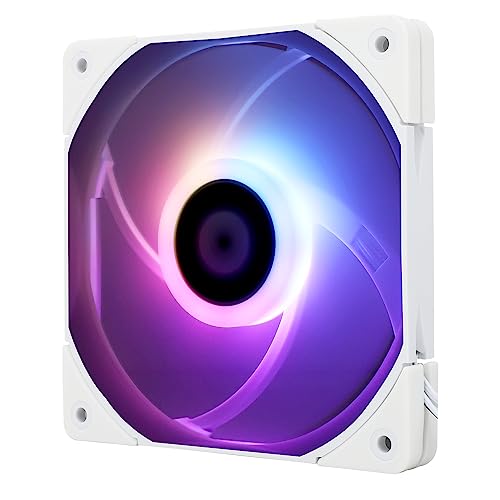
Thermalright 120mm Slim ARGB Fan
Best for: compact PC cases needing slim ARGB cooling
- Lighting
- ARGB (what this guide is about)
- Fan Size
- 120mm
- Max Fan Speed
- 1500RPM
- Max Airflow
- 52CFM
- Static Pressure
- 1.24mm H2O
- Noise Level
- ≤24.1dBA
This 120mm slim ARGB fan gives you a low-profile 15mm thickness for tight spaces inside your PC case or on CPU coolers. It runs on a 4-pin PWM connector at speeds up to 1500 RPM, delivering up to 52 CFM of airflow and 1.24 mm H2O static pressure at 24.1 dBA. It suits you if you need compact clearance without losing addressable lighting.
Pros
- Slim 15mm thickness fits low-clearance chassis and coolers
- Generates up to 52 CFM airflow and 1.24 mm H2O static pressure
- Maximum noise level rated at 24.1 dBA
- Four built-in vibration damping pads reduce operational friction
Cons
- Maximum airflow is 52 CFM, lower than standard 25mm fans
- Top rotational speed is limited to 1500 RPM
Good fit if
- You need a 15mm slim profile to clear memory modules or compact case brackets.
- You want motherboard-managed 4-pin PWM fan speed control with ARGB lighting synchronization.
Skip if
- You require airflow higher than 52 CFM for dense water-cooling setups.
- You have standard clearance for 25mm thick or 140mm wide cooling fans.
Verdict: Thermalright 120mm Slim ARGB Fan delivers balanced 52 CFM airflow and 1.24 mm H2O static pressure within a 15mm frame. It offers effective cooling, quiet 24.1 dBA operation, and addressable lighting for space-constrained systems.

Thermalright 3-Pin 5V ARGB Fan Hub
Best for: expanding 5V 3-pin ARGB motherboard headers
- Lighting
- ARGB (what this guide is about)
- Connector Type
- 3-Pin
- Dimensions
- 3.54 × 1.81 × 0.63 inches
This device is an ARGB lighting hub designed to expand your motherboard lighting connections. It provides 3-pin 5V ARGB ports powered directly via a SATA connection to maintain stable output across multiple devices. The hub measures 90 by 46 by 16 millimeters and mounts inside your chassis with double-sided tape. It suits you if you run multiple ARGB fans and lack enough 3-pin headers on your motherboard.
Pros
- Connects to 5V 3-pin ARGB headers for motherboard sync
- Direct SATA power input stabilizes lighting output
- Compact 90 x 46 x 16 mm footprint fits tight spaces
- Includes double-sided adhesive tape for case mounting
Cons
- Does not support 12V 4-pin RGB hardware
- Does not include required SATA power cable
- Lacks standalone color control hardware
Good fit if
- You need to connect multiple 5V 3-pin ARGB devices to a single motherboard header.
- You want SATA-powered distribution for lighting signals across your case.
Skip if
- You use standard 12V 4-pin RGB lighting components.
- You need an independent lighting controller with onboard color adjustments.
Verdict: Thermalright 8-Port 3-Pin ARGB Fan Hub centralizes multiple 5V 3-pin lighting connections onto one motherboard header with dedicated SATA power. It keeps cabling clean when your build exceeds your board's native ARGB headers.

Thermalright 8-Port ARGB Fan Hub
Best for: managing multiple ARGB fans from one header
- Lighting
- ARGB (what this guide is about)
- Connector Type
- 4-Pin
- Dimensions
- 5.51 × 0.63 × 2.52 inches
- Weight
- 3.53 ounces
This Thermalright hub connects up to eight 4-pin PWM fans and eight 5V 3-pin ARGB devices to your motherboard through a single hub. It draws power directly from a SATA connection to maintain stable output across all ports. Fan speed reporting reads exclusively from the red port. This device suits your build if you need to clean up cabling and expand limited motherboard headers for multiple ARGB fans.
Pros
- Supports up to 8 PWM fans and 8 ARGB devices
- Dedicated SATA power connection prevents motherboard header overload
- Mounts using pre-applied double-sided tape
- Synchronizes 5V 3-pin ARGB lighting
Cons
- Incompatible with 12V 4-pin RGB hardware
- RPM speed readout only tracks the fan on the red port
- Does not provide standalone speed or lighting controls without a motherboard connection
Good fit if
- You need to power and sync up to eight 5V 3-pin ARGB fans.
- You have limited fan and lighting headers on your motherboard.
- You want SATA power delivery for multi-fan setups.
Skip if
- You use legacy 12V 4-pin RGB components.
- You need individual speed readouts for every connected fan.
- You want onboard manual speed knobs or lighting buttons.
Verdict: Thermalright 8-Port ARGB and PWM Fan Hub centralizes power and lighting synchronization for up to eight fans through SATA power and your motherboard headers. It is a dependable utility for complex cooling setups that need expanded port capacity.

Thermalright 120mm White ARGB Fan 3-Pack
Best for: white PC builds needing three ARGB fans
- Lighting
- ARGB (what this guide is about)
- Fan Size
- 120mm
- Max Fan Speed
- 1550RPM
- Max Airflow
- 66.17CFM
- Static Pressure
- 1.53mm H2O
- Noise Level
- 25.6dBA
This three-pack gives you 120mm white ARGB fans designed for chassis airflow or heatsink mounting. Each fan runs up to 1550 RPM via 4-pin PWM control, delivering up to 66.17 CFM of airflow and 1.53 mm H2O static pressure at 25.6 dBA. The included 55cm daisy-chain cabling and S-FDB bearings simplify setup if you are building an all-white PC.
Pros
- Delivers up to 66.17 CFM airflow at 1550 RPM
- S-FDB bearings keep rated noise level down to 25.6 dBA
- 55cm PWM series cable supports daisy-chain connectivity
- Translucent atomizing blades support 17 motherboard-controlled ARGB modes
Cons
- Peak static pressure is moderate at 1.53 mm H2O
- No standalone hardware LED controller included in package
- White frame and blades do not match dark interior themes
Good fit if
- You are building a white PC case that needs intake or exhaust fans.
- You want 55cm daisy-chain PWM cables to reduce header clutter.
- You have an ARGB motherboard header to control lighting modes.
Skip if
- You need black fans to match a dark chassis theme.
- You need higher static pressure for dense water-cooling radiators.
Verdict: Thermalright 120mm White ARGB Fan 3-Pack delivers 66.17 CFM airflow with PWM series cabling for clean cable routing. It is a practical set of fluid dynamic bearing fans tailored for white PC enclosures.

Thermalright 120mm ARGB Case Fan
Best for: quiet ARGB case airflow and series cabling
- Lighting
- ARGB (what this guide is about)
- Fan Size
- 120mm
- Max Fan Speed
- 1550RPM
- Max Airflow
- 66.17CFM
- Static Pressure
- 1.53mm H2O
- Noise Level
- ≤ 25.6dBA
This 120mm case fan from Thermalright combines addressable RGB lighting with 4-pin PWM control. It delivers up to 66.17 CFM of airflow and 1.53 mm H2O static pressure at a maximum speed of 1550 RPM, keeping noise at or below 25.6 dBA. An S-FDB bearing stabilizes the blades, while 55cm cables support series connections. You will appreciate this balanced cooling and lighting unit for standard chassis airflow.
Pros
- Delivers up to 66.17 CFM airflow at 1550 RPM
- Fluid dynamic S-FDB bearing minimizes blade vibration
- 55cm cable length allows PWM series fan connection
- Noise output rated at 25.6 dBA or less
Cons
- Static pressure tops out at 1.53 mm H2O
- Maximum rotational speed capped at 1550 RPM
Good fit if
- You need 120mm PWM fans that operate under 26 dBA.
- You want motherboard-synchronized ARGB lighting across multiple headers.
- You require long 55cm fan cables for series daisy-chaining.
Skip if
- You need high static pressure beyond 1.53 mm H2O for dense radiators.
- You want fan speeds higher than 1550 RPM for extreme cooling.
Verdict: Thermalright 120mm ARGB PWM Case Fan provides reliable 66.17 CFM airflow and quiet operation for everyday PC ventilation. Its integrated S-FDB bearing and 55cm series cable make setup straightforward in standard cases.

Thermalright 120mm ARGB PWM Fan
Best for: balanced airflow and standard motherboard ARGB sync
- Lighting
- ARGB (what this guide is about)
- Fan Size
- 120mm
- Max Fan Speed
- 1500RPM
- Max Airflow
- 66.17CFM
- Static Pressure
- 1.53mm H2O
- Noise Level
- ≤ 25.6dBA
This 120mm case fan features addressable RGB lighting, a fluid dynamic S-FDB bearing, and PWM speed control up to 1500 RPM. It delivers up to 66.17 CFM of airflow and 1.53 mm H2O static pressure, keeping maximum noise at 25.6 dBA or lower. With a 55 cm series-capable PWM cable and a 3-pin ARGB motherboard connector, you get balanced chassis ventilation and synchronized illumination.
Pros
- Pushes up to 66.17 CFM of airflow at 1500 RPM
- Maximum rated operational noise stays at or below 25.6 dBA
- Configured with 55 cm cable for PWM series daisy chaining
- S-FDB bearing engineered to reduce blade vibration
Cons
- Static pressure is limited to 1.53 mm H2O
- Requires a motherboard header supporting 3-pin ARGB
Good fit if
- You need a 120mm fan with 4-pin PWM speed regulation and 3-pin ARGB lighting.
- You want to daisy-chain PWM cables across a 55 cm run.
- You want airflow up to 66.17 CFM with noise rated under 26 dBA.
Skip if
- You need higher static pressure than 1.53 mm H2O for high-resistance radiators.
- You lack a 3-pin ARGB connector on your motherboard.
Verdict: Thermalright 120mm ARGB PWM Case Fan delivers balanced 66.17 CFM airflow and quiet 25.6 dBA operation using standard 4-pin PWM and 3-pin ARGB headers. It provides dependable case ventilation and synchronized lighting without proprietary controller hubs.

Thermalright 120mm ARGB PWM Case Fan
Best for: single-fan additions and basic case airflow
- Lighting
- ARGB (what this guide is about)
- Fan Size
- 120mm
- Max Fan Speed
- 1500RPM
- Max Airflow
- 66.17CFM
- Static Pressure
- 1.53mm H2O
- Noise Level
- ≤ 25.6dBA
This Thermalright 120mm ARGB PWM case fan delivers up to 66.17 CFM of airflow and 1.53 mm H2O static pressure at a maximum speed of 1500 RPM. It uses an S-FDB fluid dynamic bearing to maintain noise levels at or below 25.6 dBA. A 55 cm daisy-chainable PWM cable simplifies wire routing. You get a balanced, illuminated cooling option for single-fan case mounts or CPU heatsinks.
Pros
- Delivers up to 66.17 CFM of airflow at 1500 RPM
- Fluid dynamic S-FDB bearing keeps noise at or below 25.6 dBA
- Includes a 55 cm cable supporting daisy-chain PWM series connections
- Supports addressable RGB motherboard synchronization across 17 modes
Cons
- Static pressure reaches a moderate 1.53 mm H2O
- Comes as a single unit rather than a multi-fan bundle
Good fit if
- You need a single 120mm ARGB fan for a case exhaust or heatsink replacement.
- You want a long 55 cm cable to link fan power in series.
Skip if
- You require static pressure higher than 1.53 mm H2O for dense radiators.
- You want a multi-fan kit to populate an entire chassis at once.
Verdict: Thermalright 120mm ARGB PWM Case Fan provides dependable 66.17 CFM airflow and quiet S-FDB bearing operation with standard motherboard lighting control. It serves as a practical, single-slot cooling solution for standard PC enclosures.

Thermalright 120mm Reverse Airflow ARGB Fan
Best for: clean intake mounting in visible case positions
- Lighting
- ARGB (what this guide is about)
- Fan Size
- 120mm
- Max Fan Speed
- 1500 RPM
- Max Airflow
- 47.6 CFM
- Static Pressure
- 1.31mm H2O
- Noise Level
- ≤ 23.2dBA
This 120mm case fan features a reverse airflow design, pulling air across the front frame to keep intake mounts visually clean. You get addressable RGB lighting across atomized blades, controlled through standard motherboard headers. Operating specs include up to 1500 RPM, 47.6 CFM airflow, and a maximum noise rating of 23.2 dBA. It suits you if you need bottom or side intake cooling without exposing rear support brackets.
Pros
- Reverse airflow design pulls air through the front face for clean intake aesthetics
- Configured with a 55cm cable supporting PWM series daisy-chaining
- Fluid dynamic bearing keeps peak acoustic output at or below 23.2 dBA
- Supports up to 17 addressable RGB lighting modes via motherboard synchronization
Cons
- Maximum airflow output reaches 47.6 CFM
- Static pressure tops out at 1.31 mm H2O
Good fit if
- You want intake ventilation without displaying support struts inside your chassis.
- You need an extended 55cm PWM cable for daisy-chaining multiple fans.
- You plan to synchronize ARGB lighting directly with your motherboard header.
Skip if
- You require static pressure higher than 1.31 mm H2O for thick radiators.
- You need airflow exceeding 47.6 CFM for high-volume exhaust setups.
Verdict: Thermalright 120mm Reverse Blade ARGB Fan provides reversed directional airflow and integrated lighting for clean intake configurations. Its 1500 RPM fluid dynamic bearing design delivers quiet cooling for case chambers requiring unobscured fan faces.

Thermalright 120mm Reverse ARGB Case Fan
Best for: visible intake mounts needing reverse airflow
- Lighting
- ARGB (what this guide is about)
- Fan Size
- 120mm
- Max Fan Speed
- 1500 RPM
- Connector Type
- 4-pin PWM
- Bearing Type
- S-FDB
- Lighting Type
- ARGB
This 120mm case fan features a reverse blade orientation designed to draw air across the front face while keeping the rear support brackets hidden. You get 4-pin PWM control with speeds up to 1500 RPM, an integrated ARGB lighting aperture, and S-FDB bearings. A 55cm cable supports series connections. It suits you if you want neat intake airflow on visible chassis mounts.
Pros
- Reverse blade design draws air inward while showing the front hub
- S-FDB bearing minimizes blade vibration
- 4-pin PWM speed control up to 1500 RPM
- 55cm cable enables series fan connections
Cons
- Sold as an individual fan rather than a multi-pack
- Top rotational speed tops out at 1500 RPM
Good fit if
- You need intake airflow while keeping the front blade side visible.
- You want a 55cm cable to chain multiple PWM fans together.
- You want an S-FDB bearing with speeds up to 1500 RPM.
Skip if
- You need standard forward-direction airflow.
- You require fan speeds exceeding 1500 RPM.
- You need a 140mm mounting size.
Verdict: Thermalright 120mm Reverse Blade ARGB Fan provides clean intake aesthetics with reversed airflow direction and ARGB lighting. Its 1500 RPM speed and 55cm daisy-chain cable deliver reliable cooling for visible fan mounts.

Thermalright 120mm Reverse ARGB Fan
Best for: visible intake positions in ARGB setups
- Lighting
- ARGB (what this guide is about)
- Fan Size
- 120mm
- Max Fan Speed
- 1500 RPM
- Max Airflow
- 58FM
- Static Pressure
- 1.31mm H2O
- Noise Level
- ≤ 23.2dBA
This 120mm reverse-blade fan delivers up to 58 CFM of airflow and 1.31 mm H2O of static pressure at a maximum speed of 1500 RPM. Designed with reverse blades, it draws air in while keeping the front of the frame visible. It operates at 23.2 dBA or less and connects via 4-pin PWM and motherboard ARGB headers. It suits you if you want intake airflow without displaying rear motor brackets.
Pros
- Reverse blade configuration for unobstructed intake display
- Quiet operation rated at 23.2 dBA or lower
- S-FDB bearing with 4-pin PWM control up to 1500 RPM
- Motherboard-syncable ARGB lighting with 17 effect modes
Cons
- Moderate static pressure rating of 1.31 mm H2O
- Maximum airflow limited to 58 CFM
Good fit if
- You want an intake fan that hides rear frame struts from view.
- You need quiet PWM case cooling under 24 dBA.
Skip if
- You require higher static pressure than 1.31 mm H2O for thick radiators.
- You prefer a standard forward-blade fan orientation.
Verdict: Thermalright 120mm Reverse ARGB Fan delivers quiet intake ventilation while hiding the rear support struts. Its 58 CFM airflow and PWM control make it well suited for visible case intake slots.

Thermalright 120mm ARGB PWM Fan
Best for: quiet case ventilation and CPU heatsinks
- Lighting
- ARGB (what this guide is about)
- Fan Size
- 120mm
- Max Fan Speed
- 1500RPM
- Max Airflow
- 47.6CFM
- Static Pressure
- 1.31mm H2O
- Noise Level
- ≤ 23.2dBA
This Thermalright 120mm ARGB cooling fan delivers balanced chassis ventilation with addressable RGB lighting. Operating up to 1500 RPM via a 4-pin PWM connection, it generates up to 47.6 CFM of airflow and 1.31 mm H2O of static pressure. With an S-FDB bearing rated for noise levels up to 23.2 dBA, it suits you if you need steady, low-noise airflow for standard chassis mounts or CPU heatsinks.
Pros
- Maximum noise level rated at or below 23.2 dBA
- S-FDB bearing designed to reduce blade vibration
- 55cm cable configured for PWM daisy-chain series control
- 4-pin PWM speed control up to 1500 RPM
Cons
- Peak airflow reaches a modest 47.6 CFM
- Static pressure is limited to 1.31 mm H2O
Good fit if
- You want a quiet 120mm fan rated at or below 23.2 dBA.
- You need an extended 55cm cable to link fans in series.
- You want automatic motherboard fan speed adjustment via 4-pin PWM.
Skip if
- You need high static pressure exceeding 1.31 mm H2O for thick radiators.
- You require high-volume airflow greater than 47.6 CFM.
Verdict: Thermalright 120mm ARGB Case Fan provides steady, low-noise ventilation up to 1500 RPM with S-FDB bearings and daisy-chainable PWM wiring. It serves as an effective, quiet choice for everyday chassis airflow and CPU heatsinks.

Thermalright 120mm Dual Aperture ARGB Fan
Best for: quiet builds needing dual-sided accent lighting
- Lighting
- ARGB (what this guide is about)
- Fan Size
- 120mm
- Max Fan Speed
- 1500RPM
- Max Airflow
- 47.6CFM
- Static Pressure
- 1.31mm H2O
- Noise Level
- ≤ 23.2dBA
This 120mm cooling fan features front and rear 0.6mm ARGB lighting rings alongside an S-FDB bearing. It delivers up to 47.6 CFM of airflow and 1.31 mm H2O of static pressure at speeds up to 1,500 RPM, all while keeping noise down to 23.2 dBA. You will find it suits your build if you want balanced chassis cooling and subtle accent lighting without exceeding standard 25mm mounting dimensions.
Pros
- S-FDB bearing designed to reduce blade shaking
- Dual front and rear 0.6mm ARGB lighting apertures
- Low maximum noise rating of 23.2 dBA at 1,500 RPM
- Standard 4-pin PWM speed control
Cons
- Moderate peak airflow limited to 47.6 CFM
- Static pressure tops out at 1.31mm H2O
Good fit if
- You need a quiet 120mm fan rated at or below 23.2 dBA.
- You prefer subtle front and rear ARGB ring lighting.
- You want 4-pin PWM control for standard motherboard headers.
Skip if
- You require high airflow exceeding 50 CFM for heavy ventilation.
- You need high static pressure beyond 1.31mm H2O for dense radiators.
Verdict: Thermalright 120mm Dual-Aperture ARGB Fan provides quiet 23.2 dBA operation with distinct dual-sided ring lighting for cases and CPU coolers. Its 47.6 CFM airflow and 4-pin PWM design make it a balanced pick for everyday ventilation.

Thermalright 120mm Slim ARGB Fan
Best for: compact builds with tight fan clearance
- Lighting
- ARGB (what this guide is about)
- Fan Size
- 120mm
- Max Fan Speed
- 1500 RPM
- Max Airflow
- 52 CFM
- Static Pressure
- 1.24 mmH2O
- Noise Level
- 24.1 dBA
This is a low-profile 120mm case fan designed with a slim 15mm depth. You get up to 52 CFM of airflow and 1.24 mm H2O of static pressure at speeds up to 1500 RPM. Motherboard-synced ARGB lighting illuminates the atomizing fan blades across 17 modes, while four vibration pads keep noise at 24.1 dBA. It suits you if clearance around your CPU cooler or compact chassis is limited.
Pros
- Slim 15mm thickness fits tight clearances
- Quiet operation rated at 24.1 dBA maximum noise
- Up to 52 CFM airflow with 4-pin PWM speed control
- Four corner vibration damping pads included
Cons
- Maximum airflow tops out at 52 CFM
- Peak static pressure is limited to 1.24 mm H2O
Good fit if
- You need a 15mm slim fan to clear tight CPU coolers or small cases.
- You want addressable RGB lighting synchronized directly through your motherboard.
Skip if
- You need higher airflow than 52 CFM for heavy exhaust needs.
- You require static pressure higher than 1.24 mm H2O.
Verdict: Thermalright 120mm Slim White ARGB Fan provides quiet 24.1 dBA operation and customizable lighting in a 15mm low-profile frame. It is a dependable pick when standard-thickness fans do not fit your setup.

Thermalright 92mm ARGB PWM Fan
Best for: compact PC cases needing 92mm ARGB cooling
- Lighting
- ARGB (what this guide is about)
- Fan Size
- 92mm
- Max Fan Speed
- 2200RPM
- Max Airflow
- 32.77CFM
- Static Pressure
- 1.98mm H2O
- Noise Level
- ≤23.85dBA
This 92mm Thermalright fan brings addressable RGB lighting to compact mounts. It runs up to 2200 RPM via a 4-pin PWM connection, delivering up to 32.77 CFM of airflow and 1.98 mm H2O static pressure. The lighting connects directly through a standard 3-pin ARGB header. If you need a compact fan with controllable lighting for smaller chassis mounts or down-draft heatsinks, this unit matches those dimensions.
Pros
- Maximum rotational speed of 2200 RPM
- Static pressure reaches 1.98 mm H2O
- Noise level rated at or below 23.85 dBA
- Soft silicone feet at four corners for vibration damping
- Direct motherboard 3-pin ARGB synchronization
Cons
- Lower airflow ceiling at 32.77 CFM compared to larger fans
- Fits only 92mm mounts rather than standard 120mm locations
Good fit if
- You need a 92mm fan for a compact case, CPU heatsink, or radiator.
- You want 4-pin PWM speed control reaching up to 2200 RPM.
- You have a motherboard with a 3-pin ARGB header for illumination.
Skip if
- You have space and mounting holes for standard 120mm or 140mm fans.
- You require airflow rates higher than 32.77 CFM.
Verdict: Thermalright 92mm ARGB PWM Fan fits tight 92mm mounting locations while providing controllable ARGB lighting and PWM regulation up to 2200 RPM. It delivers targeted airflow and 1.98 mm H2O static pressure for smaller cases and compact coolers.

Thermalright 140mm ARGB Case Fan
Best for: 140mm PC case and radiator mounts
- Lighting
- ARGB (what this guide is about)
- Fan Size
- 140mm
- Max Fan Speed
- 1500RPM
- Connector Type
- 4-pin PWM
- Bearing Type
- S-FDB
- Lighting Type
- ARGB
The Thermalright 140mm ARGB Case Fan provides cooling for cases and radiators equipped with 140mm mounts. You get a 7-blade design running up to 1500 RPM via a 4-pin PWM connector, letting your motherboard adjust speed to internal temperatures. It features a fluid dynamic bearing, corner silicone pads, and addressable RGB lighting with motherboard synchronization. This fan suits you if you need 140mm airflow coverage and customizable lighting.
Pros
- 140mm frame offers broader coverage than 120mm options
- 4-pin PWM interface allows automatic speed control up to 1500 RPM
- Equipped with a fluid dynamic bearing for operation
- Integrated soft silicone corner feet reduce vibration
- Supports ARGB motherboard synchronization with 17 lighting modes
Cons
- Requires 140mm mounting points and will not fit 120mm-only locations
- Top rotational speed is limited to 1500 RPM
Good fit if
- You have a PC chassis or radiator with 140mm fan mounting slots.
- You want automated 4-pin PWM speed control up to 1500 RPM.
- You want addressable RGB lighting managed directly by your motherboard.
Skip if
- You have a computer case that only accepts 120mm or smaller fans.
- You need rotational speeds higher than 1500 RPM for your cooling setup.
Verdict: Thermalright 140mm ARGB Case Fan delivers steady airflow and addressable lighting for systems with 140mm brackets. Its fluid dynamic bearing and PWM-regulated 1500 RPM speed provide reliable cooling across larger chassis openings.
Specifications side by side
| Spec | Thermalright 120mm Slim ARGB Fan | Thermalright 3-Pin 5V ARGB Fan Hub | Thermalright 8-Port ARGB Fan Hub | Thermalright 120mm White ARGB Fan 3-Pack | Thermalright 120mm ARGB Case Fan | Thermalright 120mm ARGB PWM Fan | Thermalright 120mm ARGB PWM Case Fan | Thermalright 120mm Reverse Airflow ARGB Fan | Thermalright 120mm Reverse ARGB Case Fan | Thermalright 120mm Reverse ARGB Fan | Thermalright 120mm ARGB PWM Fan | Thermalright 120mm Dual Aperture ARGB Fan | Thermalright 120mm Slim ARGB Fan | Thermalright 92mm ARGB PWM Fan | Thermalright 140mm ARGB Case Fan |
|---|---|---|---|---|---|---|---|---|---|---|---|---|---|---|---|
| Fan Size | 120mm | not specified | not specified | 120mm | 120mm | 120mm | 120mm | 120mm | 120mm | 120mm | 120mm | 120mm | 120mm | 92mm | 140mm |
| Max Fan Speed | 1500RPM | not specified | not specified | 1550RPM | 1550RPM | 1500RPM | 1500RPM | 1500 RPM | 1500 RPM | 1500 RPM | 1500RPM | 1500RPM | 1500 RPM | 2200RPM | 1500RPM |
| Max Airflow | 52CFM | not specified | not specified | 66.17CFM | 66.17CFM | 66.17CFM | 66.17CFM | 47.6 CFM | not specified | 58FM | 47.6CFM | 47.6CFM | 52 CFM | 32.77CFM | not specified |
| Static Pressure | 1.24mm H2O | not specified | not specified | 1.53mm H2O | 1.53mm H2O | 1.53mm H2O | 1.53mm H2O | 1.31mm H2O | not specified | 1.31mm H2O | 1.31mm H2O | 1.31mm H2O | 1.24 mmH2O | 1.98mm H2O | not specified |
| Noise Level | ≤24.1dBA | not specified | not specified | 25.6dBA | ≤ 25.6dBA | ≤ 25.6dBA | ≤ 25.6dBA | ≤ 23.2dBA | not specified | ≤ 23.2dBA | ≤ 23.2dBA | ≤ 23.2dBA | 24.1 dBA | ≤23.85dBA | not specified |
| Connector Type | 4-pin PWM | not specified | not specified | 4pin PWM | 4pin PWM | 4PIN PWM | 4pin pwm | 4-pin PWM | 4-pin PWM | 4-pin PWM | 4pin pwm | 4pin pwm | 4-pin PWM | 4-pin PWM | 4-pin PWM |
| Bearing Type | not specified | not specified | not specified | S-FDB | S-FDB | S-FDB | S-FDB | S-FDB | S-FDB | S-FDB | S-FDB | S-FDB | not specified | not specified | S-FDB |
| Lighting Type | ARGB | not specified | not specified | ARGB | ARGB | 3PIN ARGB | ARGB | ARGB | ARGB | ARGB | ARGB | ARGB | ARGB | 3-pin ARGB | ARGB |
| Blade Direction | not specified | not specified | not specified | not specified | not specified | not specified | not specified | Reverse | Reverse | Reverse | not specified | not specified | not specified | not specified | not specified |
| Lighting | ARGB | ARGB | ARGB | ARGB | ARGB | ARGB | ARGB | ARGB | ARGB | ARGB | ARGB | ARGB | ARGB | ARGB | ARGB |
| Compatible Device | CPU Cooler | not specified | not specified | not specified | not specified | not specified | not specified | not specified | not specified | not specified | CPU Cooler | CPU Cooler | CPU Cooler | CPU Cooler | not specified |
| Dimensions | 0.59 × 4.72 × 4.72 inches | 3.54 × 1.81 × 0.63 inches | 5.51 × 0.63 × 2.52 inches | 4.72 × 4.72 × 0.98 inches | 4.72 × 0.98 × 4.72 inches | 4.72 × 0.98 × 4.72 inches | 4.72 × 0.98 × 4.72 inches | 4.72 × 0.98 × 4.72 inches | 4.72 × 4.72 × 0.98 inches | 4.72 × 0.98 × 4.72 inches | 4.72 × 0.98 × 4.72 inches | 4.72 × 0.98 × 4.72 inches | 4.72 × 0.59 × 4.72 inches | 3.6 Mils × 3.6 inches × 0.98 inches | 5.51 × 0.98 × 5.51 inches |
| Weight | 3.53 ounces | not specified | 3.53 ounces | 3.53 ounces | not specified | 3.53 ounces | 3.53 ounces | not specified | not specified | 3.53 ounces | 3.53 ounces | 3.53 ounces | 3.53 ounces | not specified | not specified |
| Model | TL-C12015W-S | FAN-ARGB HUB-Controller REV.A-D6 | ARGB FAN HUB×8-d2 | TL-C12CW-S X3 D6 | TL-C12CW-S X3 | TL-C12C-S X3 | 1 | C12RW-S V2 | C12RB-S V2 D6 | C12RB-S V2 | TL-S12 X3 | TL-S12-S X3 | TL-C12015W-S D6 | not specified | TL-C14C-S |
| Color | not specified | FAN-ARGB HUB | ARGB FAN HUB 8 ports | not specified | TL-C12CW-S X3 | TL-C12C-S X3 | not specified | TLC12RW-S V2 | not specified | BLACK | BLACK | BLACK | not specified | BLACK | TL-C14C-S |
| Size | not specified | not specified | for case fan interface and ARGB light interface | not specified | 120*120*25mm | not specified | not specified | not specified | not specified | C12RB-S V2-D2 | not specified | not specified | not specified | TL-P9-S | not specified |
If you require directional room airflow instead of stationary chassis cooling, specifications for the best fans with oscillation show different coverage angles.
Choosing the Right Thermalright ARGB Fan
-
Blade Orientation for Intakes
Standard case fans exhaust air past rear support struts, exposing the motor bracket and wiring when mounted as intakes. If your PC case features tempered glass bottom or side mounts, reverse-blade models redirect airflow without exposing the motor frame. The Thermalright 120mm Reverse ARGB Fan moves 58 CFM of air while presenting a clean blade surface to the interior. Compare blade style to ensure your intake zones look uncluttered while maintaining proper directional ventilation toward components.
-
Static Pressure Versus Airflow
Airflow, measured in CFM, indicates the total volume of air a fan pushes in open space. Static pressure, measured in mm H2O, indicates how effectively the fan pushes air through dense obstructions like radiators, compact drive cages, or tightly spaced dust filters. The Thermalright 120mm ARGB PWM Fan provides 66.17 CFM of airflow, which suits standard exhaust mounts and open front mesh panels. Select higher CFM ratings for exhaust cutouts and higher static pressure for restrictive heatsink fins.
-
Central Hubs Versus Daisy-Chains
Connecting multiple ARGB fans requires planning for both fan power and lighting data paths. Series wiring allows you to daisy-chain fans together along a single path, minimizing overall cable length. When installing large arrays that exceed your motherboard pin capacities, dedicated distribution hardware is essential. The Thermalright 8-Port ARGB Fan Hub supplies supplemental SATA power and unifies connections across eight separate fan ports. Check your header counts before choosing between chained cables and powered distribution units.
-
Assessing Fan Sound Output
Fan sound is rated in dBA, representing acoustic output at peak operating speeds. Higher rotational speeds often increase air volume but generate more operational noise through motor hum and blade turbulence. If you prioritize a quiet workspace, compare maximum decibel ratings alongside rotational speeds. The Thermalright 120mm Dual Aperture ARGB Fan maintains an operating noise level of 23.2 dBA at 47.6 CFM. Check dBA figures across operating ranges to find models that balance sufficient cooling with peaceful acoustics.
-
Bearing Design and Durability
Internal bearing construction dictates how smoothly fan blades spin and how well the fan resists wear over time. Sleeve bearings can degrade quickly when mounted horizontally, leading to friction and noise. Fluid dynamic bearings use pressurized liquid to support the spindle, reducing friction in any mounting orientation. The Thermalright 120mm White ARGB Fan 3-Pack utilizes Fluid Dynamic Bearing construction for stable long-term rotation. Check the published bearing type to ensure smooth operation when mounting fans horizontally or vertically.
Frequently asked questions
What bearing type do Thermalright ARGB fans use?
Thermalright case fans predominantly use Fluid Dynamic Bearings (FDB) or S-FDB designs. These bearings keep internal friction low and reduce operating noise over extended runtime. For example, standard models like the TL-C12C-S and reverse-blade fans like the C12RW-S V2 utilize these bearings while maintaining noise levels around 25.6 dBA or operating at stable speeds up to 1500 RPM.
Can you daisy chain Thermalright ARGB case fans together?
Yes, several Thermalright models include integrated series cabling for daisy chaining. Models like the TL-C12CW-S X3 and C12RB-S V2 D6 come with 55cm series cables. This wiring configuration allows you to connect multiple fans directly to one another. It reduces the number of individual cables running across your motherboard tray and helps keep your system wiring organized.
How do you power multiple Thermalright ARGB fans without enough motherboard headers?
You can use a dedicated expansion hub to distribute power and lighting signals across multiple fans. The Thermalright 8-Port ARGB Fan Hub connects to your motherboard while drawing primary current from a dedicated SATA power connection. This setup enables you to sync lighting and speed profiles across up to eight fans simultaneously without overloading your motherboard headers or exceeding standard power limits.
What noise levels should you expect from Thermalright ARGB case fans?
Most standard Thermalright ARGB fans operate at quiet acoustic profiles under 26 dBA. For instance, the 120mm Slim ARGB Fan registers at 24.1 dBA, while the Dual Aperture TL-S12-S X3 runs at 23.2 dBA. Full-sized standard models like the TL-C12C-S reach roughly 25.6 dBA at higher loads, ensuring quiet chassis operation without sacrificing effective airflow through your case.
What is the difference between standard and reverse blade Thermalright ARGB fans?
Reverse-blade fans draw air through the frame from the opposite direction compared to standard fans. Models like the C12RB-S V2 deliver 58 CFM of airflow while showing the unobstructed front face of the fan during intake mounting. Standard fans blow air toward the rear support structure, whereas reverse designs pull air inward without placing plastic struts or wiring in front of the lighting elements.
What connector types do Thermalright ARGB fans require?
Thermalright ARGB fans typically rely on standard 4-pin PWM connectors for speed control and 3-pin headers for addressable RGB lighting. Standard 4-pin connectors allow motherboard BIOS or fan curves to adjust motor speeds dynamically based on component temperature. Dedicated 3-pin 5V ARGB connectors route directly to compatible motherboard headers or hub devices to control individual light-emitting diodes.
Can Thermalright ARGB case fans be mounted on CPU coolers?
Yes, several Thermalright 120mm and 92mm models are specified for use on CPU coolers. Models such as the TL-C12015W-S, TL-S12 X3, and the 92mm TL-P9-S are compatible with heatsinks. The 92mm version generates 1.98 mm H2O of static pressure at speeds up to 2200 RPM, which helps push air through dense radiator fins or heatsink cooling towers.