The Best Apevia PC Cases in 2026: 2 Picks
As an Amazon Associate we earn from qualifying purchases. Links on this page are affiliate links.
This guide covers the best apevia PC cases available right now. We compared 2 models strictly by their published specifications. Apevia offers compact Micro-ATX and spacious Mid-Tower options, with designs focusing on RGB and ARGB lighting. The Apevia Prodigy Micro-ATX Case leads as the top pick for compact builds needing strong airflow and lighting in a small footprint. Each selection is based on clear specs like motherboard support and physical dimensions. You can use these details to find the right fit for your specific hardware needs.
Quick picks
| # | Product | Best for | Price |
|---|---|---|---|
| 1 | Apevia Prodigy Micro-ATX Case Best overall | Compact Micro-ATX builds with RGB focus | Check price of Apevia Prodigy Micro-ATX Case on Amazon |
| 2 | Apevia Genesis Pro Mid Tower with 6 ARGB Fans Best budget | ATX builds needing dual glass and RGB | Check price of Apevia Genesis Pro Mid Tower with 6 ARGB Fans on Amazon |
Our 2 picks
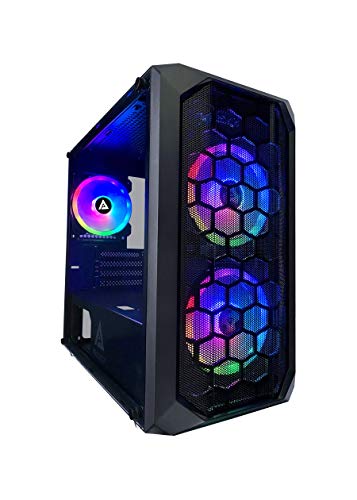
Apevia Prodigy Micro-ATX Case
Best for: Compact Micro-ATX builds with RGB focus
- Motherboard Support
- Micro-ATX, Mini-ITX
- Case Type
- Micro-ATX
- Side Panel
- Tempered Glass
- Included Fans
- 3x RGB
- Radiator Support
- 120mm
- Max GPU Length
- 350mm
View on Amazon: Apevia Prodigy Micro-ATX Case Affiliate link
The Apevia PRODIGY-BK is a compact Micro-ATX case with a tempered glass side panel and mesh front. It includes three pre-installed RGB fans and supports up to six 120mm fans for airflow. You get 350mm GPU clearance and 165mm CPU cooler height. The top I/O panel lets you cycle through 16 lighting modes. It suits builders needing a small footprint with customizable lighting.
Pros
- Tempered glass side panel
- Three pre-installed RGB fans
- Supports up to six 120mm fans
- 350mm GPU clearance
- 16 lighting modes via top I/O
Cons
- Only supports Micro-ATX and Mini-ITX motherboards
- Radiator support limited to 120mm size
- Proprietary fans restrict lighting customization options
Good fit if
- You need a compact case for small form factor builds
- You want pre-installed RGB lighting without extra cost
- You prefer manual control over fan and LED settings
Skip if
- You require ATX motherboard support
- You plan to use large 240mm or 360mm radiators
- You want smart app control for lighting
Verdict: Apevia PRODIGY Micro-ATX Case offers solid airflow and lighting in a small footprint, making it a practical option for compact gaming rigs that do not require ATX support or large radiator mounts.

Apevia Genesis Pro Mid Tower with 6 ARGB Fans
Best for: ATX builds needing dual glass and RGB
- Motherboard Support
- ATX, Micro-ATX, Mini-ITX
- Case Type
- Mid Tower
- Side Panel
- Tempered Glass
- Included Fans
- 6x ARGB
- Radiator Support
- 240mm
- Max GPU Length
- 350mm
View on Amazon: Apevia Genesis Pro Mid Tower with 6 ARGB Fans Affiliate link
This mid-tower case features dual tempered glass panels and six pre-installed ARGB fans. It supports ATX, Micro-ATX, and Mini-ITX motherboards. You get clearance for GPUs up to 350mm and CPU coolers up to 160mm. The top I/O panel controls 366 lighting modes. It fits 240mm radiators on the front or top. This build suits gamers who want visible internals and strong airflow.
Pros
- Six pre-installed ARGB fans
- Dual tempered glass windows
- Supports ATX, Micro-ATX, and Mini-ITX
- 350mm GPU clearance
- 366 customizable RGB lighting modes
Cons
- Heavier at 16 pounds
- Lighting controlled via physical button only
- No mention of USB-C connectivity
Good fit if
- You want a mid-tower with dual glass panels
- You need support for large GPUs and coolers
- You prefer pre-installed RGB fans
Skip if
- You need a Micro-ATX only case
- You want a lightweight portable build
- You require app-controlled lighting
Verdict: Apevia Genesis Pro Mid Tower offers extensive motherboard support and six fans for a complete RGB experience. It fits builders who want a spacious mid-tower with visible internals and physical lighting controls.
Specifications side by side
| Spec | Apevia Prodigy Micro-ATX Case | Apevia Genesis Pro Mid Tower with 6 ARGB Fans |
|---|---|---|
| Motherboard Support | Micro-ATX, Mini-ITX | ATX, Micro-ATX, Mini-ITX |
| Case Type | Micro-ATX | Mid Tower |
| Side Panel | Tempered Glass | Tempered Glass |
| Included Fans | 3x RGB | 6x ARGB |
| Radiator Support | 120mm | 240mm |
| Max GPU Length | 350mm | 350mm |
| Tower Size | not stated | Mid-Tower |
| Use | Gaming | Gaming |
| Lighting | RGB | ARGB |
| Connectivity | USB 3.0 | USB 3.0 |
| Dimensions | 16.1 × 7.95 × 15.6 inches | 15.9 × 7.91 × 17.1 inches |
| Weight | 13 pounds | 16 pounds |
| Size | PRODIGY BLACK | GENESIS PRO BLACK |
| Color | Black | Black |
| Model | PRODIGY-BK | G-PRO-BK |
Apevia PC Cases Compared
Apevia offers two distinct paths for builders. The Prodigy Micro-ATX Case targets compact gaming rigs. It measures 15.6 inches tall and supports Micro-ATX motherboards. This small footprint suits users who want RGB lighting without the bulk of a full tower. It is a practical choice for limited desk space.
The Genesis Pro Mid Tower serves a different need. It fits ATX boards and includes six ARGB fans. This spacious design appeals to those who want dual glass panels and extensive lighting control. You can choose the compact Prodigy for small builds or the Genesis Pro for a larger, more visible setup.
Where Apevia fits your build
Apevia targets two specific niches. The Prodigy serves compact Micro-ATX builders who want RGB lighting in a small footprint. The Genesis Pro caters to ATX users needing a mid-tower with extensive ARGB support and dual glass panels. You get clear choices between small form factor and spacious standard towers. Neither case supports full-size E-ATX boards. If you need extreme expandability or a mini-ITX footprint, this brand does not cover those sizes. Stick with Apevia if you want either a tight Micro-ATX rig or a well-lit ATX mid-tower.
Choosing the Right Apevia Case
-
Check Motherboard Support
Start by matching your motherboard size to the case. The Apevia Prodigy supports only Micro-ATX boards, making it ideal for compact builds. If you need space for a full ATX motherboard, the Genesis Pro is the better choice. Ensure your board fits the mounting holes before buying. Choosing the wrong size means you cannot install your components. Always verify the supported form factor in the specifications to avoid compatibility issues later.
-
Evaluate Tower Size
Consider the physical dimensions of the case for your desk space. The Prodigy stands 15.6 inches tall, offering a small footprint for tight setups. The Genesis Pro is taller at 17.1 inches, providing more internal volume for larger components. Measure your available space carefully. A taller case may not fit under some desks or shelves. Select the size that balances your component needs with your physical constraints for a stable build.
-
Assess Lighting Needs
Decide between RGB and ARGB lighting based on your aesthetic goals. The Prodigy features standard RGB lighting for a uniform glow. The Genesis Pro includes six ARGB fans, allowing for more complex color effects and patterns. ARGB offers greater customization for visible internals. If you prefer simple, consistent lighting, the Prodigy suffices. For dynamic, multi-zone effects, the Genesis Pro provides the necessary hardware for a more immersive visual experience.
-
Review Included Fans
Check the number of pre-installed fans for immediate airflow. The Genesis Pro comes with six fans, ensuring robust cooling out of the box. The Prodigy relies on its compact design for airflow, which may require you to add fans separately. More fans reduce the need for additional purchases. Evaluate your cooling requirements based on your CPU and GPU. Starting with a case that includes sufficient fans simplifies the initial build process and setup.
-
Verify Weight and Stability
Consider the weight of the case for stability and placement. The Prodigy weighs 13 pounds, making it easier to move. The Genesis Pro weighs 16 pounds, offering a sturdier feel. A heavier case may vibrate less during high-performance gaming. Ensure your surface can support the weight. Heavier cases often use thicker materials, which can improve durability. Choose a weight that matches your need for portability versus long-term stability.
Frequently asked questions
Is the Apevia Prodigy good for small gaming builds?
Yes, it is designed for compact Micro-ATX gaming rigs. The case measures 15.6 inches tall and weighs 13 pounds, making it easy to place on a desk. It includes RGB lighting to enhance the visual appeal of your components without taking up excessive floor space.
Does the Apevia Genesis Pro support ATX motherboards?
Yes, the Genesis Pro Mid Tower supports full ATX motherboards. It is ideal for builders who need more room for larger components. The case includes six ARGB fans and dual glass panels, providing both cooling performance and a clear view of your internal hardware.
What is the difference between RGB and ARGB in these cases?
RGB allows you to change the color of the lighting across the entire strip or fan. ARGB, or Addressable RGB, lets you control individual LEDs on a single strip. The Prodigy uses standard RGB, while the Genesis Pro features ARGB for more detailed lighting effects.
How heavy is the Apevia Prodigy case?
The Apevia Prodigy Micro-ATX Case weighs 13 pounds. Its dimensions are 16.1 inches in length, 15.6 inches in height, and 7.95 inches in width. This weight and size make it a stable yet portable option for users who want a compact gaming setup.
Can I see inside the Apevia Genesis Pro?
Yes, the Genesis Pro Mid Tower features dual glass panels. These panels allow you to view the interior of your build, including the six included ARGB fans. This design choice highlights your hardware and lighting setup for a more visually impressive desktop appearance.
Which Apevia case is best for Micro-ATX builds?
The Apevia Prodigy Micro-ATX Case is the best choice for Micro-ATX builds. It is specifically designed to fit smaller motherboards while offering solid airflow. Its compact footprint makes it suitable for users who do not require the larger space of an ATX mid-tower chassis.