Thermalright Fan ARGB HUB×8 Hub Review: Specs, Pros and Cons
As an Amazon Associate we earn from qualifying purchases. Links on this page are affiliate links.
This thermalright fan argb hub 8 hub review covers the Thermalright Fan ARGB Hub X8. It expands your system by supporting up to eight groups of fans and ARGB devices. The unit connects via SATA power for stable output. It syncs 3-pin 5V ARGB lighting and PWM fan speeds with your motherboard. The black hub features a compact design with engraved branding. It relies on double-sided stickers for secure mounting inside your case. This controller simplifies cable management while maintaining consistent performance under load.
What stands out
- Supports 8 groups of fans and ARGB strips
- Syncs 3-pin 5V ARGB lighting with motherboard
- Syncs PWM fan speeds via motherboard connection
- Direct SATA power output for stability
- Compact black design with double-sided adhesive
Who it fits
Good fit for
This hub suits builders with many fans who need a simple expansion solution. If you want to sync lighting and speeds without complex software, this fits your setup. The SATA power connection ensures stable operation. The included stickers make mounting easy in tight spaces. It is ideal for users who prefer hardware-level synchronization from their motherboard headers rather than dedicated control software.
Who should skip it
You should look elsewhere if you need manual control. This hub does not adjust fan speeds or light colors independently. It only expands connections for motherboard-led sync. If you want to change lighting effects or RPMs without a PC, this is not for you. Also, note that only one fan speed is recognized via the red PWM interface. Buyers seeking full manual adjustment capabilities will find this limited.
Verdict: This hub is a practical expansion tool for sync-focused builds. It offers stable connectivity but lacks manual control features.
Thermalright Fan ARGB Hub X8 Key Specs
Support 8 Groups of Fans
This hub allows you to connect up to eight fan groups to your system. You do not need to plug each fan directly into the motherboard. This simplifies cable management and frees up motherboard headers. It is useful if you have a case with many fans. You get more airflow control without using many motherboard ports.
SATA power supply
The hub draws power from a SATA connector on your power supply. This provides stable output even under high load. You do not need to use motherboard headers for power. SATA connectors are common and reliable. This ensures your fans and lights run consistently without voltage drops or instability during heavy use.
3PIN 5V light interfaces
The device supports 3-pin 5V ARGB lighting. You can sync the color effects of your fans and light strips with your motherboard. This requires a 5V 3-pin ARGB header on the motherboard. It does not work with 12V RGB. Check your motherboard specs to ensure compatibility with this specific voltage and pin configuration for proper lighting sync.
PWM fans
The hub supports PWM fan speed synchronization. You connect the fans to the hub, and the hub connects to a 4-pin PWM motherboard interface. This allows the motherboard to control fan speeds automatically. Note that the hub itself does not adjust speed. It passes the signal to the motherboard for control. This is standard for modern case fans.
black
The unit features a black color. This is a neutral finish that blends well with most PC cases. It helps the hub stay visually unobtrusive inside your build. You do not need to worry about it clashing with other components. A black finish is common for internal hardware and fits standard aesthetic themes.
Design and Build Quality
The listing describes the Thermalright Fan ARGB Hub X8 as a compact unit with a black finish. It features a Thermalright logo engraved on the top surface. The overall design prioritizes stable functionality under high load conditions. According to the listing, the device receives direct output from a SATA power supply. This connection method is intended to maintain stable power delivery for your connected fans and lighting strips. You do not need to worry about inconsistent power distribution when your system is under heavy use.
Installation is handled through strong double-sided stickers. This allows you to fix the hub to any appropriate chassis position based on your specific layout needs. The process is described as simple and safe, provided you follow the included manual. There are no screws or complex mounting brackets mentioned in the data. This adhesive approach keeps the setup minimal and unobtrusive within your case.
The hub supports both ARGB and PWM interfaces. It syncs 3-pin 5V light interfaces for lamp effects and manages the synchronous speed of PWM fans. However, the listing explicitly states that this product does not adjust fan speed or lighting colors. It serves only to expand your available interfaces. You must connect the power interface to a 4-pin PWM motherboard interface and the light interface to a 5V 3-pin ARGB header. Incorrect connections may cause damage to the hub.
Setup And Daily Operation Guide
Installing the Thermalright Fan ARGB Hub X8 requires connecting it to your system’s power and motherboard headers. You must plug the power interface into a 4-pin PWM header on your motherboard. This connection provides the necessary stable output under high load conditions. You also need to connect the lighting interface to a 5V 3-pin ARGB header. This specific connection enables synchronization for 3-pin 5V light interfaces. The listing warns that connecting to the wrong interface may cause damage to the hub. Please follow the manual for safe installation.
For fan speed control, you can use the included strong double-sided stickers to fix the hub to your chassis. The hub features a red interface for PWM speed recognition. However, the listing notes that due to motherboard IC reading limitations, only a single fan speed inserted into this red interface is recognized. This means you cannot adjust individual fan speeds through this hub. The device serves only to expand fan and lighting interfaces. It does not control speed or adjust lighting colors. Daily use involves trusting the motherboard to manage sync. You rely on the direct SATA power supply for stable operation. The compact black design with an engraved logo keeps the unit discreet. You simply connect your fans and ARGB strips. The hub handles the expansion without requiring additional software or complex configurations. Ensure all connections match the specified pin types to maintain functionality.
Before You Buy This Hub
You need to verify your motherboard headers before purchasing. This hub requires a 5V 3-pin ARGB header for lighting sync and a 4-pin PWM header for power. Connecting to the wrong interface may damage the unit. You must also check your case space. The listing notes strong double-sided stickers for mounting, but you should ensure the surface is clean and flat. This device only expands connections. It does not control fan speed or adjust lighting colors. You will still need motherboard software for those adjustments. Consider this alongside other hubs in your guide. If you need speed control, look for models with dedicated controllers. For pure expansion, this unit fits well. It keeps cables tidy and maintains stable output. Just remember that only one fan speed is recognized via the red interface. Plan your wiring carefully to avoid confusion during installation.
Check before you buy
- Verify you have a 5V 3-pin ARGB header on your motherboard.
- Confirm your case has a flat surface for the included adhesive stickers.
- Check that you do not need this hub to control fan speeds.
- Ensure you can connect a 4-pin PWM header for power input.
The product at a glance
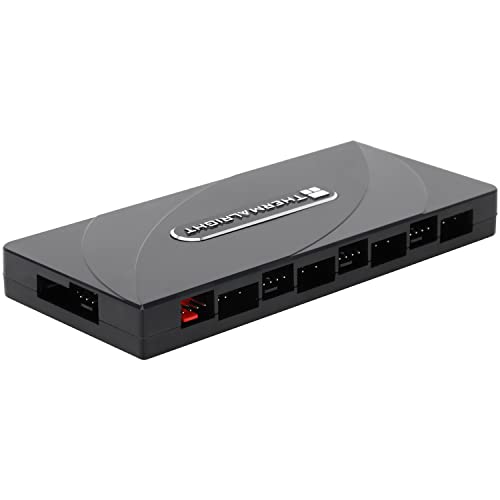
Thermalright Fan ARGB Hub X8
Best for: expanding fan and ARGB connections
- Lighting
- ARGB
- Connector Type
- 4-Pin
- Dimensions
- 5.51 × 2.52 × 0.63 inches
View on Amazon: Thermalright Fan ARGB Hub X8 Affiliate link
This Thermalright hub expands your case connections to support up to eight PWM fans and ARGB devices. It draws power directly from a SATA supply for stable output under load. The unit syncs 5V 3-pin ARGB lighting and PWM fan speeds via motherboard headers. It includes double-sided adhesive for flexible mounting. This controller is designed for users who need more ports without adding complexity to their build.
Pros
- Supports 8 groups of fans and ARGB devices
- Direct SATA power connection for stable output
- Syncs 5V 3-pin ARGB lighting with motherboard
- Includes double-sided stickers for easy installation
Cons
- Cannot adjust fan speed or lighting color manually
- Only recognizes single fan speed in the red PWM port
- Requires careful connection to avoid motherboard damage
Good fit if
- You need to connect more than four fans
- You want synchronized ARGB lighting across multiple devices
- You prefer a compact hub with SATA power
Skip if
- You need manual fan speed control
- You want to adjust lighting colors independently
- You prefer a hub with a display or remote
Verdict: Thermalright ARGB Fan Hub X8 is a straightforward expansion solution for builders who need more ports for fans and lighting. It fits users who rely on motherboard control for synchronization and do not need manual adjustment features.
Specifications side by side
| Spec | Thermalright Fan ARGB Hub X8 |
|---|---|
| Lighting | ARGB |
| Connector Type | 4-Pin |
| Dimensions | 5.51 × 2.52 × 0.63 inches |
| Color | black |
| Model | HUB X8 |
Frequently asked questions
Does the Thermalright Fan ARGB Hub X8 support RGB or only ARGB?
This hub supports ARGB, which stands for Addressable RGB. It does not support standard RGB. You must use 5V 3-pin ARGB devices. This ensures your lighting effects sync correctly with your motherboard. Standard RGB uses a different voltage and pin layout, so it is not compatible with this unit.
How many fans can this hub connect?
The hub supports up to eight groups of fans. You can connect multiple fans to each group. This reduces the number of cables you need to plug directly into your motherboard. It helps keep your case interior cleaner and improves airflow management.
What power source does the hub use?
The unit connects via SATA power for stable output. This provides reliable power to all connected fans and lighting. You do not need to use motherboard fan headers for power. This separation helps prevent voltage drops when running multiple high-speed fans simultaneously.
Is the hub compatible with all motherboards?
It requires a 5V 3-pin ARGB header for lighting sync. You also need a 4-pin PWM header for power control. Check your motherboard specifications before buying. Not all boards have these specific headers available. Using the wrong header may damage the unit or prevent it from working.
What color is the Thermalright Fan ARGB Hub X8?
The listing describes the hub as black. It features a Thermalright logo engraved on the top surface. The compact design fits easily into most PC cases. The black finish helps it blend in with other internal components.
Can I adjust fan speeds manually on the hub?
No, this hub does not have manual adjustment features. It relies on motherboard control for synchronization. You must adjust fan speeds through your BIOS or software. This is suitable for users who prefer centralized control rather than physical buttons on the hub itself.