Thermalright 120mm Slim ARGB Fan Review: Who It Fits and Who Should Skip It
As an Amazon Associate we earn from qualifying purchases. Links on this page are affiliate links.
This thermalright c12015w s CPU fan computer review focuses on the TL-C12015W-S, a 120mm slim fan designed for tight spaces. It measures just 15mm thick, making it ideal for low-profile coolers or tight cases. The fan runs at a maximum speed of 1500 RPM, delivering 52 CFM of airflow. It also features ARGB lighting with 17 modes. The unit uses a 4-pin PWM connector for automatic speed control based on motherboard temperatures. This combination of slim dimensions and quiet operation defines its niche.
What stands out
- 15mm slim profile fits low-profile coolers
- Max speed of 1500 RPM for quiet operation
- 52 CFM max airflow for adequate cooling
- ARGB lighting with 17 synchronized modes
- 4-pin PWM connector for automatic speed control
Who it fits
Good fit for
You should buy this fan if you are building a compact PC or using a low-profile CPU cooler. The 15mm thickness ensures it fits where standard 25mm fans cannot. It is also suitable for users who want subtle ARGB lighting that matches their case. The quiet operation, rated at 24.1 dBA, makes it a good choice for office builds or quiet rooms. If you need a fan that integrates seamlessly with motherboard lighting software, this unit supports that via its 4-pin ARGB connection.
Who should skip it
Skip this fan if you need high static pressure for dense radiators. The 1.24 mm H2O static pressure is moderate and may not push air through thick cooling blocks effectively. It is also not ideal if you require extreme airflow, as 52 CFM is standard rather than high-performance. Users who prefer non-RGB fans might find the ARGB feature unnecessary, though other non-ARGB variations exist. If you need a fan that exceeds 1500 RPM for maximum cooling, this slim model may not provide enough air movement.
Verdict: The Thermalright C12015W-S is a practical choice for compact builds and low-profile cooling setups. Its slim design and quiet operation make it a solid fit for specific use cases.
Key specs explained for this fan
Max Fan Speed: 1500RPM
This rating indicates the highest rotational speed the motor can achieve. At this rate, the fan moves air quickly to clear heat from components like CPUs or radiators. You will notice increased noise as speed rises, but the design includes damping pads to keep vibrations low. This speed is suitable for active cooling when your system is under load.
Max Airflow: 52CFM
CFM measures cubic feet per minute, showing how much air the fan pushes. A value of 52 provides strong ventilation for your case or cooler. This volume helps remove hot air from inside your PC. It is a solid figure for a slim fan, ensuring efficient heat exchange even when space is limited. You get reliable airflow for standard builds.
Noise Level: ≤24.1dBA
This decibel rating shows the maximum sound output during operation. A limit of 24.1 dBA is considered quiet for computer components. The fan uses vibration damping pads to reduce friction noise. This level allows for peaceful computing without distracting background hum. It is ideal for users who prioritize a silent environment while maintaining necessary cooling performance for their hardware.
Static Pressure: 1.24mm H2O
Static pressure measures the fan's ability to push air through resistance, like dense radiator fins or dust filters. This value indicates moderate pushing power. It is sufficient for slim radiators and standard case airflow. Higher pressure is needed for thick coolers, but this spec works well for thin setups. It ensures air moves effectively against minor obstructions in your build.
Connector Type: 4-pin PWM
This connector allows the motherboard to control fan speed automatically. The four pins include power, ground, tachometer, and pulse-width modulation signals. PWM enables precise speed adjustments based on temperature sensors. You can set custom curves in your BIOS for optimal balance between cooling and noise. This is the standard interface for modern PC cases and CPU coolers.
Design and build quality
According to the listing, this fan measures 120 by 120 by 15 millimeters. The slim 15-millimeter profile allows it to fit into tight spaces, such as low-profile CPU coolers or compact cases where standard fans would not clear surrounding components. The square frame design is intended to provide stable airflow and pressure, which is critical when mounting on radiators or tight heatsinks.
The unit weighs 3.53 ounces, a light weight that reduces stress on mounting points. The listing notes four vibration damping pads around the fan frame. These pads are designed to reduce vibration friction during rotation. This feature helps keep noise levels down, supporting the specified maximum of 24.1 dBA. The matte white finish on the frame and blades complements modern builds, while the atomizing ARGB blades help diffuse light evenly.
Controls are handled via a 4-pin PWM connector. This interface allows the motherboard to automatically adjust fan speed based on temperature. You can manage the ARGB lighting through a motherboard header, with up to 17 modes available. This setup ensures the fan integrates smoothly with existing cooling systems without requiring extra hubs or controllers. The design prioritizes silent operation and space efficiency, making it a practical choice for users with constrained internal dimensions.
Setup and everyday use guide
Setting up this fan is straightforward if your motherboard supports the necessary connections. The unit uses a standard 4-pin PWM connector. You plug this directly into a fan header on your motherboard. This link allows the system to control speed automatically. The fan adjusts its rotation based on motherboard temperature readings. You do not need separate software or hubs for basic operation. The speed ranges up to 1500 RPM. At this maximum rate, the fan delivers 52 CFM of airflow. It also provides 1.24 mm H2O of static pressure. This combination helps move heat away from components efficiently. Noise levels stay at or below 24.1 dBA. The listing notes vibration damping pads around the frame. These reduce friction noise during rotation. For lighting, the fan includes ARGB support. The blades feature high-brightness LED atomizing material. This design softens the light effect. You can sync colors with other components via a motherboard port. The listing mentions up to 17 light modes. This fan suits tight spaces well. Its 15mm thickness fits low-profile coolers. It also works as a case fan. The square frame directs air effectively. You can use it to remove dry heat from the case. It pairs well with CPU coolers to handle high temperatures. The slim profile ensures it does not interfere with surrounding parts. Daily use involves minimal maintenance. Just ensure the 4-pin connection is secure. The PWM feature handles speed adjustments without user input. This makes it a low-effort addition to your build.
Before You Buy This Fan
This fan is a 120mm slim unit, so you must verify your case or cooler supports the 15mm thickness. Standard 25mm fans will not fit here. The 4-pin PWM connector requires an available header on your motherboard for speed control. You need to check if your board has an ARGB header, as this model uses 5V 3-pin lighting. Without that header, the lights will not work. Keep the blades clean from dust to maintain the 52CFM airflow and quiet operation under 24.1dBA. This fan suits users with low-profile CPU coolers or compact cases where space is tight. It complements other options by offering a slim profile for tight builds. If you need high static pressure for thick radiators, this 1.24mm H2O rating may be limiting. It is best for general airflow in constrained spaces rather than heavy-duty cooling tasks.
Check before you buy
- Verify your cooler or case supports 15mm slim fans.
- Check for an available 4-pin PWM motherboard header.
- Confirm your motherboard has a 5V 3-pin ARGB header.
- Ensure the fan fits within your case dimensions.
The product at a glance
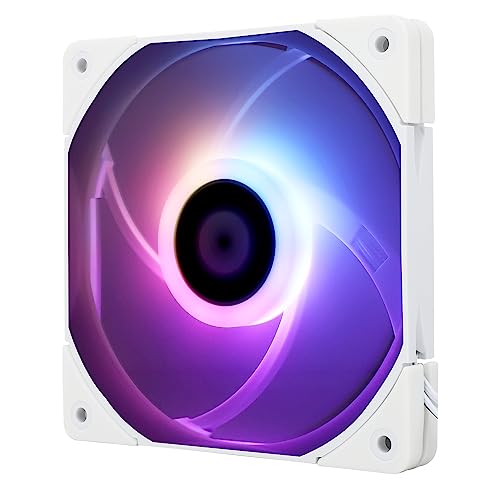
Thermalright 120mm Slim ARGB Fan
Best for: Slim CPU coolers and thin radiators
- Fan Size
- 120mm
- Max Fan Speed
- 1500RPM
- Max Airflow
- 52CFM
- Static Pressure
- 1.24mm H2O
- Noise Level
- ≤24.1dBA
- Connector Type
- 4-pin PWM
View on Amazon: Thermalright 120mm Slim ARGB Fan Affiliate link
This Thermalright C12015W-S is a 120mm slim fan designed for tight spaces like CPU coolers or thin radiators. It reaches 1500 RPM with 52 CFM airflow and 1.24 mm H2O static pressure. The 15mm thickness keeps it compact. You get 4-pin PWM control and 5V ARGB lighting with 17 modes. It operates quietly at under 24.1 dBA. This fan suits builds needing efficient cooling in constrained areas.
Pros
- Slim 15mm profile fits CPU coolers and thin radiators
- 4-pin PWM allows automatic speed control based on temperature
- 5V ARGB lighting offers 17 synchronized modes
- Low noise operation at 24.1 dBA max
- Vibration damping pads reduce friction noise
Cons
- Lower static pressure of 1.24 mm H2O limits use on dense filters
- Manual ARGB control requires motherboard header, no included controller
- Slim design offers less airflow than standard 25mm fans
Good fit if
- You need a fan for a slim CPU cooler or radiator
- You want ARGB lighting synchronized with your motherboard
- You prioritize low noise in a compact build
Skip if
- You require high static pressure for dense mesh filters
- You need a fan thicker than 15mm for maximum airflow
- You want plug-and-play lighting without motherboard configuration
Verdict: Thermalright 120mm Slim ARGB Fan fits users who need compact cooling with synchronized lighting. It is ideal for slim CPU coolers where space is tight.
Specifications side by side
| Spec | Thermalright 120mm Slim ARGB Fan |
|---|---|
| Fan Size | 120mm |
| Max Fan Speed | 1500RPM |
| Max Airflow | 52CFM |
| Static Pressure | 1.24mm H2O |
| Noise Level | ≤24.1dBA |
| Connector Type | 4-pin PWM |
| Lighting Type | ARGB |
| Lighting | ARGB |
| Compatible Device | CPU Cooler |
| Dimensions | 0.59 × 4.72 × 4.72 inches |
| Weight | 3.53 ounces |
| Model | TL-C12015W-S |
Frequently asked questions
Does the Thermalright TL-C12015W-S support ARGB lighting synchronization?
Yes, this fan features ARGB lighting. You can synchronize the effects with your motherboard if it supports 5-volt ARGB headers. The unit uses a 4-pin connector for power and speed control, while the lighting connection is typically handled separately. This allows for coordinated visual themes across compatible components in your build.
Is this fan suitable for standard 25mm thick radiators?
No, this fan is designed specifically for slim applications. It measures only 0.59 inches or 15 millimeters in thickness. Standard radiators usually require fans that are 25 millimeters thick. Using this slim fan on a standard radiator would leave a significant gap, potentially reducing airflow efficiency and aesthetic alignment.
What is the maximum speed of the TL-C12015W-S?
The fan reaches a maximum speed of 1500 RPM. This rotational speed helps move air quickly to clear heat from components. You will notice increased noise levels as the fan approaches this top speed. The 4-pin PWM connector allows your motherboard to adjust the speed dynamically based on thermal needs.
Can I use this fan with a slim CPU cooler?
Yes, this fan is ideal for slim CPU coolers. Its compact 120mm size and 15mm thickness allow it to fit into tight spaces where standard fans would not clear surrounding components. This makes it a practical choice for low-profile cooling solutions in compact cases or builds with limited vertical clearance.
What connector type does this fan use for speed control?
The fan uses a standard 4-pin PWM connector. You plug this directly into a fan header on your motherboard. This link allows the system to control speed automatically based on temperature. It ensures efficient cooling without requiring manual adjustments, provided your motherboard has an available PWM header.
How heavy is the Thermalright 120mm Slim ARGB Fan?
The unit weighs 3.53 ounces. This light weight is typical for slim fans designed to minimize strain on mounting points. The compact dimensions of 4.72 inches by 4.72 inches also contribute to its lightweight nature. This makes installation easy in tight spaces without adding significant bulk to your cooling setup.