Mid-Tower or Mini-Tower PC Cases? Compared by Specs
As an Amazon Associate we earn from qualifying purchases. Links on this page are affiliate links.
Choosing between a mid tower vs mini tower PC case depends on your build size. Both the Thermaltake Versa H21 and Cooler Master N200 offer mesh panels for airflow and USB 3.0 ports. The main difference lies in motherboard support. The Thermaltake fits standard ATX boards, while the Cooler Master supports smaller Micro-ATX and Mini-ITX formats. This affects overall case dimensions and component compatibility.
Key differences
| Aspect | Thermaltake Versa H21 ATX Mid Tower | Cooler Master N200 Mesh Mini-Tower |
|---|---|---|
| Tower Size | Mid Tower | Mini Tower |
| Motherboard Support | ATX | mATX, Mini-ITX |
| Height | 16.9 inches | 14.9 inches |
| Radiator Support | not listed | 240mm |
| Weight | 9.3 pounds | 9.5 pounds |
Which one should you choose?
Choose Thermaltake Versa H21 ATX Mid Tower if
- You need to install a full-size ATX motherboard for maximum expansion slots.
- You prefer a taller chassis that accommodates larger standard components.
Choose Cooler Master N200 Mesh Mini-Tower if
- You want a compact footprint that fits on smaller desks.
- You plan to use a 240mm liquid cooling radiator in the front.
Verdict: The Thermaltake Versa H21 suits builders who require standard ATX motherboard support. The Cooler Master N200 is better for compact builds using smaller motherboards. Your choice depends on whether you prioritize board size or chassis height.
Mid Tower vs Mini Tower Specs
motherboard support
The Thermaltake Versa H21 supports standard ATX motherboards. This allows you to use larger boards with more expansion slots and connectivity options. The Cooler Master N200 supports Micro-ATX and Mini-ITX boards. These smaller form factors save space but offer fewer PCIe slots. If you need a full-size board for multiple GPUs or heavy expansion, the Versa H21 is the better choice. The N200 is designed for compact builds where board size is a priority over expansion capacity.
tower size
The Thermaltake Versa H21 is a mid-tower case. It measures 16.9 inches in height, 18.7 inches in length, and 8.2 inches in width. The Cooler Master N200 is a mini-tower case. It measures 14.9 inches in height, 17.5 inches in length, and 7.9 inches in width. The N200 is noticeably shorter and narrower. This makes it easier to fit on a desk or in smaller spaces. The Versa H21 requires more vertical clearance and floor space. Choose the N200 if desk footprint is critical.
radiator support
The Cooler Master N200 explicitly supports a 240mm liquid CPU water cooling kit in the front. This allows for effective liquid cooling in a small chassis. The Thermaltake Versa H21 data does not list specific radiator support dimensions. It mentions support for a liquid cooling system generally but provides no size limits. If you plan to install a 240mm radiator, the N200 guarantees fitment. For the Versa H21, you must verify radiator compatibility with your specific cooler model separately.
gpu compatibility
The Cooler Master N200 supports graphics cards up to 355mm in length. This accommodates most standard and many high-end cards. The Thermaltake Versa H21 data does not list a maximum GPU length. It mentions support for long graphics cards but gives no specific measurement. You can install a wide range of cards in the N200 with confidence. For the Versa H21, you need to check your specific GPU length against the internal space, as the limit is not published in the provided specs.
storage capacity
The Cooler Master N200 supports up to three 3.5-inch HDDs and four 2.5-inch SSDs. This provides flexible storage options for both drives and solid-state storage. The Thermaltake Versa H21 data does not list specific storage drive limits. It mentions optimized ventilation and cable management but omits drive bay counts. The N200 offers clear storage capacity details. If you need multiple large hard drives, the N200 specifications confirm you can install them without guessing.
connectivity
Both cases offer USB 3.0 ports for high-speed data transfer. The Thermaltake Versa H21 includes one SuperSpeed USB 3.0 port and one standard USB 2.0 port. It also provides HD microphone and headset jacks on the top panel. The Cooler Master N200 supports SuperSpeed USB 3.0 but does not list audio jacks or the number of ports in the data. The Versa H21 offers more complete I/O options on the case itself. You get audio connectivity directly from the chassis with the Thermaltake.
Which Case Fits Your Build Needs
Users needing standard ATX motherboard support
The Thermaltake Versa H21 supports standard ATX motherboards. This gives you more expansion slots and connectivity options for larger builds. The mid-tower form factor provides ample internal space. You can install longer graphics cards and larger CPU coolers without fitting restrictions. This case is ideal if you prioritize maximum compatibility with standard components.
Users building compact mATX or Mini-ITX systems
The Cooler Master N200 supports Micro-ATX and Mini-ITX motherboards. Its mini-tower design saves desk space while still offering good expandability. You can install up to three 3.5-inch HDDs and four 2.5-inch SSDs. The case also supports high-end graphics cards up to 355mm long and 240mm liquid cooling kits, making it versatile for smaller builds.
Users wanting easy maintenance and dust filters
The Cooler Master N200 includes a removable dust filter under the power supply mount. This feature allows for easy cleaning and maintenance. The mesh front panel aids airflow while keeping dust out. If you want a compact case that is simple to maintain, this design offers practical benefits for long-term upkeep without requiring complex disassembly.
Users preferring tool-free installation and ventilation
The Thermaltake Versa H21 features tool-free installation for easier component mounting. The perforated metal mesh on the front and top panels promotes rapid air intake. Heightened foot stands at the bottom further enhance airflow. If you value straightforward assembly and optimized ventilation for maximum cooling performance, this mid-tower chassis provides a practical solution for your PC build.
Quick picks
| # | Product | Best for | Price |
|---|---|---|---|
| 1 | Thermaltake Versa H21 ATX Mid Tower | Standard ATX builds needing mesh airflow | Check price of Thermaltake Versa H21 ATX Mid Tower on Amazon |
| 2 | Cooler Master N200 Mesh Mini-Tower | Compact Micro-ATX builds with large coolers | Check price of Cooler Master N200 Mesh Mini-Tower on Amazon |
The products compared
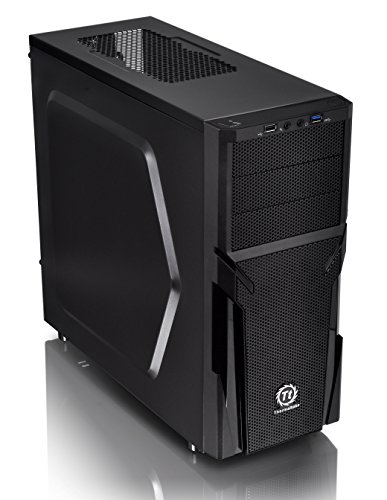
Thermaltake Versa H21 ATX Mid Tower
Best for: Standard ATX builds needing mesh airflow
- Tower Size
- Mid-Tower (what this guide is about)
- Motherboard Support
- ATX
- Case Type
- Mid Tower
- Dimensions
- 18.7 × 8.2 × 16.9 inches
- Weight
- 9.3 pounds
View on Amazon: Thermaltake Versa H21 ATX Mid Tower Affiliate link
The Thermaltake Versa H21 is a mid-tower case designed for ATX motherboards. It features a perforated metal mesh on the front and top for improved airflow. The chassis includes tool-free installation and optimized ventilation with heighten foot-stands. You get direct access to USB 3.0, USB 2.0, and audio jacks. This case supports long graphics cards and liquid cooling systems for standard builds.
Pros
- Perforated mesh front and top panel for ventilation
- Supports ATX motherboards and long graphics cards
- Tool-free installation for easier assembly
- USB 3.0 and USB 2.0 ports with audio jacks
Cons
- Only supports ATX motherboards, not E-ATX
- No mention of included case fans
- Standard ATX size limits extreme component builds
Good fit if
- You need a mid-tower case for an ATX build
- You want tool-free installation for easy assembly
- You prioritize front and top airflow ventilation
Skip if
- You require support for E-ATX motherboards
- You need a mini-tower for small spaces
- You want included pre-installed case fans
Verdict: Thermaltake Versa H21 Mid-Tower ATX Case is a practical mid-tower for standard ATX builds. It suits users who value mesh ventilation and tool-free assembly over extreme component support.

Cooler Master N200 Mesh Mini-Tower
Best for: Compact Micro-ATX builds with large coolers
- Tower Size
- Mini-Tower (what this guide is about)
- Motherboard Support
- mATX, Mini-ITX
- Case Type
- Mini Tower
- Radiator Support
- 240mm
- Max GPU Length
- 355mm (14 inches)
- Dimensions
- 17.5 × 7.9 × 14.9 inches
View on Amazon: Cooler Master N200 Mesh Mini-Tower Affiliate link
The Cooler Master N200 is a compact Mini Tower designed for Micro-ATX and Mini-ITX motherboards. It features a fully meshed front panel for airflow and supports CPU coolers up to 160mm tall. You can install a 240mm radiator in the front and fit graphics cards up to 355mm long. This case also includes USB 3.0 and space for multiple drives, making it a practical option for smaller builds.
Pros
- Supports Micro-ATX and Mini-ITX motherboards
- Accepts CPU coolers up to 160mm in height
- Fits graphics cards up to 355mm long
- Includes a removable dust filter under the power supply
- Supports a 240mm liquid cooling radiator in the front
Cons
- Limited to Micro-ATX and Mini-ITX motherboards
- No support for ATX motherboards
- Maximum GPU length is 355mm
Good fit if
- You are building a compact PC with a Micro-ATX motherboard
- You need support for large CPU air coolers up to 160mm
- You want to install a 240mm radiator in the front
Skip if
- You require an ATX motherboard
- You need to install a GPU longer than 355mm
- You prefer a Mid-Tower size
Verdict: Cooler Master N200 Mini Tower is a compact solution for Micro-ATX builds that need room for large coolers and a 240mm radiator. It fits users who prioritize a small footprint without sacrificing component compatibility.
Specifications side by side
| Spec | Thermaltake Versa H21 ATX Mid Tower | Cooler Master N200 Mesh Mini-Tower |
|---|---|---|
| Motherboard Support | ATX | mATX, Mini-ITX |
| Case Type | Mid Tower | Mini Tower |
| Radiator Support | not stated | 240mm |
| Max GPU Length | not stated | 355mm (14 inches) |
| Tower Size | Mid-Tower | Mini-Tower |
| Dimensions | 18.7 × 8.2 × 16.9 inches | 17.5 × 7.9 × 14.9 inches |
| Weight | 9.3 pounds | 9.5 pounds |
| Size | H21 | N200 |
| Color | Black | N200 |
| Model | CA-1B2-00M1NN-00 | NSE-200-KKN1 |
Frequently asked questions
Which case is smaller in physical dimensions?
The Cooler Master N200 Mini-Tower is more compact. It measures 7.9 inches wide, 14.9 inches high, and 17.5 inches long. The Thermaltake Versa H21 Mid-Tower is larger at 8.2 inches wide, 16.9 inches high, and 18.7 inches long. You should choose the N200 if your desk space is limited and you prefer a smaller footprint for your setup.
Can I use a standard ATX motherboard in both cases?
No, only the Thermaltake Versa H21 supports standard ATX motherboards. The Cooler Master N200 is designed for Micro-ATX boards. If you plan to use a full-size ATX board with more expansion slots, you must select the mid-tower option. The mini-tower will not physically accommodate the larger board dimensions.
Which case weighs less?
The Thermaltake Versa H21 is slightly lighter. It weighs 9.3 pounds. The Cooler Master N200 weighs 9.5 pounds. The difference is minimal, but the mid-tower is marginally lighter. This weight difference likely comes from the internal structure and panel materials used in each chassis design.
Do these cases support large CPU coolers?
The Cooler Master N200 is noted for handling large coolers. It fits a 240mm radiator, which is significant for a mini-tower. The Thermaltake Versa H21 supports standard ATX builds and mesh airflow but does not have specific large cooler claims in its data. Check your cooler height against the N200’s internal clearance if you prioritize cooling performance in a small space.
What is the main difference in airflow design?
Both cases feature mesh panels to promote airflow. The Thermaltake Versa H21 uses mesh ventilation as a key feature for standard ATX builds. The Cooler Master N200 also includes a mesh front panel. This design helps draw cool air into the case. You get good airflow in both options, but the mid-tower has more internal volume for air circulation.
Which case is better for future upgrades?
The Thermaltake Versa H21 offers more room for upgrades. It supports standard ATX motherboards, giving you more expansion slots. The mid-tower form factor provides ample internal space for larger components. The Cooler Master N200 is limited to Micro-ATX, which restricts expansion options. If you plan to add more cards or drives later, the mid-tower is the practical choice.