Tower Size Explained: What It Means for PC Cases
As an Amazon Associate we earn from qualifying purchases. Links on this page are affiliate links.
Tower Size Explained for You
Tower size explained helps you match a case to your build. This spec defines the physical volume and internal layout of a PC chassis. It dictates which components fit inside and how they are arranged. You should look at the labeled category on product listings to understand the space available.
Full-tower cases offer the most room. They typically support E-Extreme ATX motherboards and multiple graphics cards. These cases allow for extensive liquid cooling loops and high airflow. You need a large desk space for these units. They are best for enthusiasts who plan heavy upgrades.
Mid-tower cases are the standard choice. They fit standard ATX and Micro-ATX motherboards. Most air coolers and standard graphics cards fit here. This size balances component support with desk footprint. You get enough space for a solid cooling setup without taking up too much room.
Mini-tower cases are smaller versions of mid-towers. They often support Micro-ATX and Mini-ITX motherboards. The internal space is tighter. You must check clearance for CPU coolers and GPU length carefully. These cases are good for smaller desks or portable setups.
Small form factor cases are the most compact. They usually fit Mini-ITX boards. Internal space is very limited. You need specialized low-profile components. These cases require precise planning for cable management and airflow. They are ideal for users who prioritize portability or minimal visual footprint.
When you shop, check the motherboard compatibility list. Measure your graphics card length and CPU cooler height. Ensure the case dimensions fit your desk. Choosing the right tower size ensures your components fit properly and cool effectively. It prevents costly returns and build frustration.
Tower Size Categories Explained
Full-Tower
Full-tower cases offer the largest internal volume, supporting E-ATX motherboards and extensive expansion slots. This size suits builders who need multiple drive bays, complex liquid cooling loops, or high-end components that generate significant heat. The Phanteks Enthoo Pro provides ample space for hidden internals and robust cooling setups, ideal for users with large desks. However, the trade-off is substantial physical footprint. These cases require significant desk or floor space. They are heavier and harder to move. If your room is cramped or you prioritize a minimalist setup, a full tower may be impractical despite its superior expansion capabilities.
Small Form Factor
Small form factor cases prioritize compactness, often supporting Mini-ITX or Micro-ATX motherboards. These builds fit into tight spaces, making them perfect for portable setups or small desks. The Silverstone SG11B allows long GPUs in a small footprint, balancing performance with size. Assembly requires precision, as cable management is challenging in tight quarters. You must carefully select low-profile coolers and small power supplies. The trade-off involves limited airflow and reduced upgradeability. Adding more drives or components is difficult. This size suits users who value portability and aesthetics over raw expandability. It demands careful component selection to ensure everything fits correctly.
Mini-Tower
Mini-towers are compact mid-range cases, typically supporting Micro-ATX motherboards. They offer a balance between size and functionality. The Cooler Master N200 provides front airflow for compact builds, making it suitable for users who need Micro-ATX support without the bulk of larger cases. These cases are easier to fit on smaller desks. However, they lack standard ATX expansion slots. You cannot install full-size ATX boards. The trade-off is limited internal space for extensive cabling or large air coolers. If you need standard ATX support, this size is insufficient. Mini-towers are practical for budget builds or secondary PCs where space is at a premium but some performance is still required.
Mid-Tower
Mid-towers are the most common case size, supporting standard ATX motherboards. They offer a versatile balance of size, airflow, and expansion. The Thermaltake Versa H21 delivers solid airflow for standard builds, making it a practical choice for most users. These cases fit well on standard desks and provide enough room for decent air cooling and moderate cable management. The Fractal Design Meshify C enhances this with strong airflow and clean cable routing. The trade-off is less space for extreme liquid cooling or numerous drives compared to full towers. However, they are easier to move and assemble. Mid-towers suit the majority of builders who need standard ATX support without excessive bulk.
Is Tower Size Worth Your Attention
Who needs it
You should prioritize this spec if you are building a high-end workstation or a enthusiast gaming rig. Full-tower cases accommodate E-ATX motherboards and provide space for extensive liquid cooling loops. If you plan to install multiple graphics cards or require numerous drive bays, the internal volume of a mid or full tower is essential. These larger chassis also improve airflow for components that generate significant heat. Builders who value cable management and future upgrade flexibility will find the extra space in larger towers beneficial. The labeled category on product listings directly impacts your ability to fit specific hardware. Ignoring this spec may result in purchasing a case that cannot physically house your chosen components. This is critical for those with non-standard or oversized parts.
Who can skip it
You can likely ignore detailed tower size comparisons if you are building a standard desktop for office work or casual gaming. Small form factor and mini-tower cases often suffice for these tasks. If you are using a standard ATX motherboard and a single graphics card, the internal layout differences between mid and full towers matter less. You should prioritize compatibility with your specific motherboard form factor instead. Check the supported CPU cooler height and GPU length limits rather than focusing on the general tower category. Budget constraints and desk space limitations often dictate your choice more than raw volume. For most users, ensuring the case fits your desk and holds your specific components is the primary concern. The labeled category is less important than the precise internal dimensions listed in the specifications.
Tower Size Glossary
E-ATX Motherboard
An extended motherboard format larger than standard ATX. It requires a full-tower case for proper fit and airflow management.
ATX Motherboard
The standard form factor for most desktop PCs. Mid-tower cases typically support this size without requiring excessive internal space.
Micro-ATX
A smaller motherboard variant with fewer expansion slots. It fits comfortably in mid-tower and some mini-tower chassis designs.
Mini-ITX
The smallest common motherboard size. It allows for compact builds in mini-tower cases, prioritizing portability over expansion capability.
Expansion Slots
Slots on the rear panel for adding cards like GPUs. Full-towers offer more slots, supporting multiple graphics cards or specialized hardware.
Drive Bays
Spaces designed to hold storage drives such as SSDs or HDDs. Larger towers provide more bays for extensive storage arrays.
Radiator Support
The ability to mount liquid cooling radiators. Full-towers often support larger radiators, enhancing cooling performance for high-end components.
Quick picks
| # | Product | Best for | Price |
|---|---|---|---|
| 1 | Thermaltake Versa H21 ATX Mid Tower | Standard ATX builds needing airflow | Check price of Thermaltake Versa H21 ATX Mid Tower on Amazon |
| 2 | Phanteks Enthoo Pro Non-Window Full Tower | High-end liquid cooling builds | Check price of Phanteks Enthoo Pro Non-Window Full Tower on Amazon |
| 3 | SilverStone Micro-ATX Small Form Factor Case | Mini-ITX and Micro-ATX builds | Check price of SilverStone Micro-ATX Small Form Factor Case on Amazon |
| 4 | Cooler Master N200 Mesh Mini-Tower | compact Micro-ATX builds with front cooling | Check price of Cooler Master N200 Mesh Mini-Tower on Amazon |
| 5 | Fractal Design Meshify C ATX Mid Tower | ATX builders prioritizing airflow and cable management | Check price of Fractal Design Meshify C ATX Mid Tower on Amazon |
| 6 | ASUS TUF Gaming E-ATX Full-Tower Case | Large builds needing E-ATX support | Check price of ASUS TUF Gaming E-ATX Full-Tower Case on Amazon |
Our 6 picks
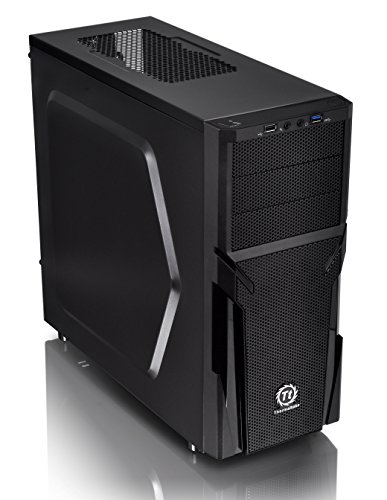
Thermaltake Versa H21 ATX Mid Tower
Best for: Standard ATX builds needing airflow
- Tower Size
- Mid-Tower (what this guide is about)
- Motherboard Support
- ATX
- Case Type
- Mid Tower
- Dimensions
- 18.7 × 8.2 × 16.9 inches
- Weight
- 9.3 pounds
View on Amazon: Thermaltake Versa H21 ATX Mid Tower Affiliate link
The Thermaltake Versa H21 is an ATX mid tower chassis designed for efficient airflow. It features a perforated metal mesh front and top panel to maximize ventilation. The case includes tool-free installation and pre-mounted holes for standard ATX motherboards and long graphics cards. It offers direct access to USB 3.0 and audio ports. This case suits builders who need reliable cooling and straightforward assembly for standard components.
Pros
- Perforated mesh front and top panels for rapid air intake
- Tool-free installation design for easy component mounting
- Supports standard ATX motherboards and long graphics cards
- Includes SuperSpeed USB 3.0 and USB 2.0 ports
Cons
- Limited to ATX motherboard support, excluding E-ATX boards
- No mention of included case fans in specifications
- Fixed height of 16.9 inches limits vertical expansion
Good fit if
- You are building with a standard ATX motherboard
- You prioritize airflow through mesh panels over solid fronts
- You want tool-free installation for quick assembly
Skip if
- You need support for E-ATX motherboards
- You require a case with pre-installed fans
- You are building a small form factor PC
Verdict: Thermaltake Versa H21 ATX Mid Tower is a practical mid tower for standard ATX builds. It delivers solid airflow and easy assembly for users who do not need extra-wide motherboard support.

Phanteks Enthoo Pro Non-Window Full Tower
Best for: High-end liquid cooling builds
- Tower Size
- Full-Tower (what this guide is about)
- Case Type
- Full Tower
- Included Fans
- 1x 200mm, 1x 140mm
- Dimensions
- 22 × 10 × 21 inches
- Weight
- 2.2 pounds
View on Amazon: Phanteks Enthoo Pro Non-Window Full Tower Affiliate link
This is a full-tower chassis designed for extensive cooling and component support. It includes a 200mm front fan and a 140mm rear fan. The case supports up to four radiator installation areas for liquid cooling. It features a PWM hub for fan control and USB-C Gen 2 connectivity. The brushed plastic exterior with aluminum appearance hides the power supply and hard drives. It measures 22 inches in length.
Pros
- Includes a 200mm front fan and 140mm rear fan
- Supports up to four radiator installation areas
- Features USB-C Gen 2 and two USB 3.0 ports
- PWM hub allows centralized fan control
Cons
- No tempered glass window included in this model
- Large dimensions require a spacious desk or floor
- Heavier build at 2.2 pounds compared to smaller cases
Good fit if
- You need extensive liquid cooling radiator support
- You want hidden cable management and PSU area
- You prefer a full-tower chassis for high-end builds
Skip if
- You require a tempered glass window for visibility
- You have limited space for a large chassis
- You prefer compact form factors like mini-tower
Verdict: Phanteks Enthoo Pro Full Tower fits builders who prioritize cooling capacity and hidden internals over aesthetic transparency. It is ideal for those with ample space and high-end liquid cooling needs.
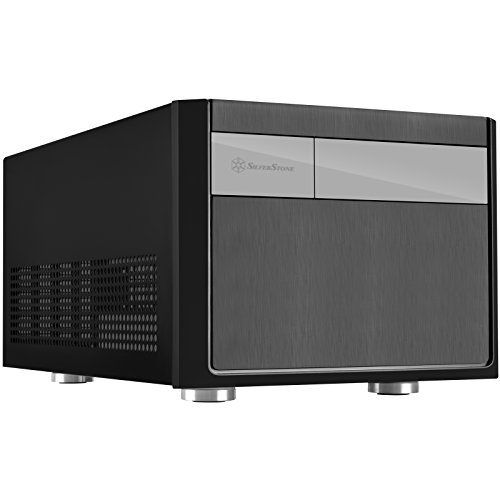
SilverStone Micro-ATX Small Form Factor Case
Best for: Mini-ITX and Micro-ATX builds
- Tower Size
- Small Form Factor (what this guide is about)
- Motherboard Support
- Micro-ATX, Mini-DTX, Mini-ITX
- Case Type
- SFF
- Max GPU Length
- Any length
- Dimensions
- 19 × 15 × 13 inches
- Weight
- 13.5 pounds
View on Amazon: SilverStone Micro-ATX Small Form Factor Case Affiliate link
The Silverstone SG11B is a small form factor case designed for Micro-ATX, Mini-DTX, and Mini-ITX motherboards. It measures 15 by 13 by 19 inches and weighs 13.5 pounds. The chassis supports graphics cards of any length and provides 82mm of CPU cooler height. It also offers significant capacity for 2.5-inch drives, making it a compact option for specific builds.
Pros
- Supports Micro-ATX, Mini-DTX, and Mini-ITX motherboards
- Accepts graphics cards of any length
- Provides 82mm of CPU cooler height clearance
- Offers ample capacity for 2.5-inch drives
Cons
- Only supports Micro-ATX and smaller form factors
- Does not support standard ATX motherboards
- Smaller internal volume limits component choices
Good fit if
- You are building with a Mini-ITX or Micro-ATX motherboard
- You need a compact chassis for a small desk
- You plan to use long graphics cards
Skip if
- You require support for standard ATX motherboards
- You need an E-ATX motherboard slot
- You prefer a full-tower or mid-tower size
Verdict: The Silverstone SG11B SFF Case is a compact solution for Mini-ITX and Micro-ATX builders who need to fit long GPUs into a small footprint.

Cooler Master N200 Mesh Mini-Tower
Best for: compact Micro-ATX builds with front cooling
- Tower Size
- Mini-Tower (what this guide is about)
- Motherboard Support
- mATX, Mini-ITX
- Case Type
- Mini Tower
- Radiator Support
- 240mm
- Max GPU Length
- 355mm (14 inches)
- Dimensions
- 17.5 × 7.9 × 14.9 inches
View on Amazon: Cooler Master N200 Mesh Mini-Tower Affiliate link
The Cooler Master N200 is a Mini Tower case with an asymmetrical mesh front. It supports Micro-ATX and Mini-ITX motherboards. You can install a 240mm radiator in the front. The case holds graphics cards up to 355mm long. It also fits up to three 3.5-inch drives. This compact build suits users needing small footprints with decent airflow.
Pros
- Supports Micro-ATX and Mini-ITX motherboards
- Full mesh front panel for airflow
- Fits 240mm front radiator
- Holds up to three 3.5-inch HDDs
Cons
- Limited to Mini-ITX and Micro-ATX boards
- Max GPU length is 355mm
- No mention of USB-C connectivity
Good fit if
- You need a small footprint for a desk
- You use Micro-ATX or Mini-ITX components
- You want front-mounted liquid cooling
Skip if
- You require full ATX motherboard support
- You need to install very long graphics cards
- You prefer a standard mid-tower size
Verdict: The Cooler Master N200 Mini Tower fits users who prioritize compact size and front airflow for Micro-ATX builds. It is not suitable for those needing standard ATX expansion slots.

Fractal Design Meshify C ATX Mid Tower
Best for: ATX builders prioritizing airflow and cable management
- Tower Size
- Mid-Tower (what this guide is about)
- Motherboard Support
- ATX
- Case Type
- Mid Tower
- Included Fans
- 2x 120mm
- Connectivity
- USB 3.0
- Dimensions
- 16.1 × 8.35 × 17.8 inches
View on Amazon: Fractal Design Meshify C ATX Mid Tower Affiliate link
The Fractal Design Meshify C is a compact mid tower that balances airflow and capacity. It supports ATX motherboards and includes two 120 mm pre-installed fans. The open interior layout ensures unobstructed airflow from front to rear. A full-length power supply shroud hides cables, leaving 35 mm of space for routing. This case suits builders who need efficient cooling in a smaller footprint without sacrificing drive options.
Pros
- Pre-installed 2x 120 mm fans for immediate airflow
- Open interior layout with unobstructed front-to-rear path
- Supports up to 5 drives with vibration-dampening trays
- 35 mm cable management space behind the motherboard plate
Cons
- Only supports ATX motherboards, excluding E-ATX builds
- No side window option in the base model
- Limited to USB 3.0 connectivity on the I/O panel
Good fit if
- You want high airflow in a compact mid tower
- You build with standard ATX motherboards
- You prefer cable management behind the motherboard plate
Skip if
- You need support for E-ATX motherboards
- You want a side window for aesthetics
- You require USB Type-C connectivity
Verdict: Fractal Design Meshify C Mid Tower delivers strong airflow and clean cable management for standard ATX builds. It fits users who prioritize cooling performance over expansive motherboard support or glass side panels.
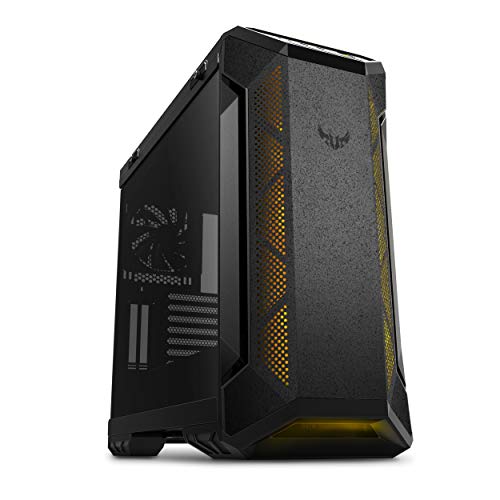
ASUS TUF Gaming E-ATX Full-Tower Case
Best for: Large builds needing E-ATX support
- Tower Size
- Full-Tower (what this guide is about)
- Motherboard Support
- E-ATX
- Case Type
- Full-Tower
- Side Panel
- Tempered Glass
- Radiator Support
- 360mm
- Max GPU Length
- 420mm
View on Amazon: ASUS TUF Gaming E-ATX Full-Tower Case Affiliate link
The ASUS TUF Gaming GT501 is a full-tower case designed for E-ATX motherboards. It features a metal chassis with a tempered glass side panel. You get three 120mm ARGB fans and one 140mm rear fan. The case supports up to 360mm radiators for liquid cooling. It includes woven-cotton handles for transport. This large chassis suits builders needing maximum expansion and cooling options.
Pros
- Supports E-ATX motherboards
- Includes three 120mm ARGB fans and one 140mm rear fan
- Supports 360mm top or front radiators
- Features 7mm smoked tempered glass side panel
- Includes woven-cotton carry handles
Cons
- Full-tower size requires significant desk or floor space
- Heavy at 26.2 pounds
- Dimensions listed in inches appear inaccurate for a PC case
Good fit if
- You need E-ATX motherboard support
- You want extensive liquid cooling radiator options
- You prefer a large chassis with pre-installed RGB fans
Skip if
- You have limited desk space
- You prefer a compact mid-tower design
- You want a lightweight case for frequent moving
Verdict: The ASUS TUF GT501 Full-Tower is a spacious option for builders requiring E-ATX support and robust cooling. It fits those with ample room and a need for vertical GPU slots.
Specifications side by side
| Spec | Thermaltake Versa H21 ATX Mid Tower | Phanteks Enthoo Pro Non-Window Full Tower | SilverStone Micro-ATX Small Form Factor Case | Cooler Master N200 Mesh Mini-Tower | Fractal Design Meshify C ATX Mid Tower | ASUS TUF Gaming E-ATX Full-Tower Case |
|---|---|---|---|---|---|---|
| Motherboard Support | ATX | not stated | Micro-ATX, Mini-DTX, Mini-ITX | mATX, Mini-ITX | ATX | E-ATX |
| Case Type | Mid Tower | Full Tower | SFF | Mini Tower | Mid Tower | Full-Tower |
| Side Panel | not stated | not stated | not stated | not stated | not stated | Tempered Glass |
| Included Fans | not stated | 1x 200mm, 1x 140mm | not stated | not stated | 2x 120mm | not stated |
| Radiator Support | not stated | not stated | not stated | 240mm | not stated | 360mm |
| Max GPU Length | not stated | not stated | Any length | 355mm (14 inches) | not stated | 420mm |
| Tower Size | Mid-Tower | Full-Tower | Small Form Factor | Mini-Tower | Mid-Tower | Full-Tower |
| Fan Size | not stated | not stated | not stated | not stated | not stated | 120mm, 140mm |
| Use | not stated | not stated | not stated | not stated | not stated | Gaming |
| Lighting | not stated | not stated | not stated | not stated | not stated | RGB |
| Connectivity | not stated | not stated | not stated | not stated | USB 3.0 | not stated |
| Compatible Device | not stated | not stated | not stated | not stated | not stated | Radiator |
| Dimensions | 18.7 × 8.2 × 16.9 inches | 22 × 10 × 21 inches | 19 × 15 × 13 inches | 17.5 × 7.9 × 14.9 inches | 16.1 × 8.35 × 17.8 inches | 215 × 98.8 × 217 inches |
| Weight | 9.3 pounds | 2.2 pounds | 13.5 pounds | 9.5 pounds | 13.6 pounds | 26.2 pounds |
| Size | H21 | not stated | not stated | N200 | not stated | EATX |
| Color | Black | BLACK NO WINDOW | Black (SG11) | N200 | Black | GT501|Grey |
| Model | CA-1B2-00M1NN-00 | PH-ES614PC_BK | SG11B | NSE-200-KKN1 | FD-CA-MESH-C-BKO | GT501/GRY/WITH HANDLE |
Frequently asked questions
What is the difference between a mid-tower and a full-tower case?
Mid-tower cases typically support ATX motherboards and offer a balance of size and airflow. The Thermaltake Versa H21 and Fractal Design Meshify C are examples that fit standard ATX builds. Full-tower cases provide larger internal volume, supporting E-ATX boards and extensive cooling loops. The ASUS TUF Gaming E-ATX and Phanteks Enthoo Pro cater to builders needing extra space for high-end components.
Which tower size is best for a standard ATX motherboard?
A mid-tower is the ideal choice for standard ATX motherboards. It provides sufficient space for cooling and component installation without excessive bulk. The Thermaltake Versa H21 and Fractal Design Meshify C are designed specifically for ATX builds. They deliver solid airflow and easy assembly for users who do not need the extra width or height of a full-tower chassis.
Can a small form factor case fit a long graphics card?
Yes, some small form factor cases are designed to accommodate long GPUs. The SilverStone SG11B is a compact solution for Mini-ITX and Micro-ATX builders who need to fit long graphics cards into a small footprint. You should check the specific length limits in the product specifications to ensure your GPU fits within the internal dimensions of the chassis.
Is a mini-tower suitable for Micro-ATX builds?
Mini-towers are well-suited for Micro-ATX builds that prioritize compact size. The Cooler Master N200 is an example that offers front airflow for Micro-ATX configurations. It is not suitable for those needing standard ATX expansion slots. If you require a balance between compactness and cooling performance, a mini-tower provides a practical form factor for smaller desktops.
Do full-tower cases support E-ATX motherboards?
Full-tower cases are designed to support E-ATX motherboards, which are larger than standard ATX. The ASUS TUF Gaming E-ATX case offers spacious internal volume for these large boards. This size also suits builders who need multiple drive bays or complex liquid cooling loops. The Phanteks Enthoo Pro is another option that fits builders prioritizing cooling capacity and hidden internals.
What dimensions should I check before buying a PC case?
You should check the internal width, height, and length to ensure your components fit. For example, the Thermaltake Versa H21 measures 8.2 inches wide, 16.9 inches high, and 18.7 inches long. The SilverStone SG11B measures 15 inches wide, 13 inches high, and 19 inches long. Verifying these dimensions against your GPU length and CPU cooler height prevents compatibility issues during assembly.
Which case offers the best airflow for ATX builds?
The Fractal Design Meshify C is designed for users prioritizing airflow and cable management. It delivers strong airflow for standard ATX builds. The Thermaltake Versa H21 also provides solid airflow for standard ATX builds. Both cases focus on cooling performance, making them suitable for users who want efficient heat dissipation without requiring the expansive support of a full-tower chassis.