Mid-Tower or Full-Tower PC Cases? Compared by Specs
As an Amazon Associate we earn from qualifying purchases. Links on this page are affiliate links.
Choosing between a mid tower vs full tower PC case depends on your build size and cooling needs. Both the Thermaltake Versa H21 and Phanteks Enthoo Pro support ATX motherboards. They share USB connectivity and tool-free installation features. The main difference is physical scale. The mid tower offers a compact footprint for standard builds. The full tower provides massive internal space for extensive cooling setups. Your choice hinges on whether you prioritize space efficiency or expansion capability.
Key differences
| Aspect | Thermaltake Versa H21 ATX Mid Tower | Phanteks Enthoo Pro Non-Window Full Tower |
|---|---|---|
| Tower Size | Mid-Tower | Full-Tower |
| Dimensions | 16.9" H x 8.2" W x 18.7" L | 21" H x 10" W x 22" L |
| Included Fans | Not listed | 1x 200mm, 1x 140mm |
| Radiator Support | Not listed | Up to 4 areas for single to triple radiators |
| Front Connectivity | 1x USB 3.0, 1x USB 2.0 | 2x USB 3.0, 1x USB-C Gen 2 |
Which one should you choose?
Choose Thermaltake Versa H21 ATX Mid Tower if
- You want a smaller footprint that fits easily on most desks.
- You are building a standard ATX system with moderate cooling needs.
- You prefer a lighter chassis that is easier to move.
Choose Phanteks Enthoo Pro Non-Window Full Tower if
- You need extensive space for large water cooling reservoirs and multiple radiators.
- You want pre-installed high-airflow fans and a PWM hub for cable management.
- You plan to install many storage drives and expansion cards.
Verdict: The Thermaltake Versa H21 suits users who need a compact, efficient mid tower for standard builds. The Phanteks Enthoo Pro is better for enthusiasts requiring maximum expansion room and advanced cooling infrastructure. Select the case that matches your motherboard size and thermal requirements.
Mid-Tower vs Full-Tower Spec Comparison
Tower Size
The Thermaltake Versa H21 is a Mid-Tower chassis, while the Phanteks Enthoo Pro is a Full-Tower. This difference defines the physical footprint of your build. The Mid-Tower offers a more compact footprint suitable for standard desks. The Full-Tower provides significantly more internal volume. This extra space allows for larger components and more extensive cable management. You will need more desk space for the Full-Tower option. The Mid-Tower fits easier into tighter spaces. Choose based on your available room and component count.
Dimensions
Physical measurements determine fit in your workspace. The Thermaltake Versa H21 measures 16.9 inches in height, 18.7 inches in length, and 8.2 inches in width. The Phanteks Enthoo Pro is larger at 21 inches in height, 22 inches in length, and 10 inches in width. The Full-Tower is taller and deeper. This adds bulk but increases internal air volume. The Mid-Tower is shorter and narrower. It is easier to move and position. Check your desk depth and clearance height before deciding. The size difference is substantial and impacts placement.
Included Fans
Cooling starts with pre-installed fans. The Phanteks Enthoo Pro includes two fans: one 200mm fan at the front and one 140mm fan at the rear. These are Phanteks SP series fans with PWM control via a hub. The Thermaltake Versa H21 data does not list included fans. You must check the box or buy separately. The Full-Tower comes ready for airflow with larger fans. The Mid-Tower may require additional purchases for similar cooling. The included fans in the Full-Tower provide immediate ventilation benefits.
Connectivity
Front panel ports affect daily convenience. Both cases offer USB connectivity. The Thermaltake Versa H21 includes one SuperSpeed USB 3.0 port and one USB 2.0 port. It also has HD microphone and headset jacks. The Phanteks Enthoo Pro offers two USB 3.0 ports and one USB-C GEN 2 port. It also includes Mic and Headphone jacks. The Full-Tower provides more high-speed USB options. The USB-C port is useful for modern devices. The Mid-Tower has standard USB 3.0 and 2.0. Both provide audio jacks for direct access.
Motherboard Support
Both cases support ATX motherboards. The Thermaltake Versa H21 is an ATX Mid-Tower. The Phanteks Enthoo Pro is an ATX Full-Tower. This means both will fit standard ATX boards. The Full-Tower offers more room around the motherboard for large coolers or multiple graphics cards. The Mid-Tower fits ATX boards snugly. If you use a standard ATX board, both work. If you plan to add many expansion cards, the Full-Tower offers more clearance. The motherboard support is equal in compatibility, but space differs.
Which Case Fits Your Build
Users with limited desk space
The Thermaltake Versa H21 measures 18.7 inches long and 8.2 inches wide. This compact footprint fits comfortably on standard desks. You get ATX motherboard support without requiring a large floor area. The mid-tower design prioritizes space efficiency while still offering tool-free installation and USB 3.0 connectivity for your peripherals.
Enthusiasts needing extensive cooling
The Phanteks Enthoo Pro supports up to four radiator installation areas for single or triple configurations. It includes a 200mm front fan and a 140mm rear fan. The PWM hub allows centralized fan control. This full-tower chassis provides the physical volume and airflow capacity required for extreme water cooling setups and high-performance components.
Builders wanting flexible storage
The Phanteks Enthoo Pro features a removable Drop-n-Lock SSD bracket that can be installed in two different locations. It also includes a closed HDD panel that strengthens chassis rigidity even when cages are removed. This design offers superior storage flexibility and structural stability for complex builds with multiple drives compared to the standard mid-tower layout.
Quick picks
| # | Product | Best for | Price |
|---|---|---|---|
| 1 | Thermaltake Versa H21 ATX Mid Tower | Standard ATX builds with good airflow needs | Check price of Thermaltake Versa H21 ATX Mid Tower on Amazon |
| 2 | Phanteks Enthoo Pro Non-Window Full Tower | extensive water cooling setups | Check price of Phanteks Enthoo Pro Non-Window Full Tower on Amazon |
The products compared
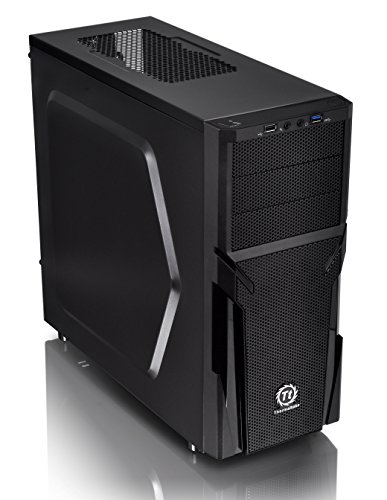
Thermaltake Versa H21 ATX Mid Tower
Best for: Standard ATX builds with good airflow needs
- Tower Size
- Mid-Tower (what this guide is about)
- Motherboard Support
- ATX
- Case Type
- Mid Tower
- Dimensions
- 18.7 × 8.2 × 16.9 inches
- Weight
- 9.3 pounds
View on Amazon: Thermaltake Versa H21 ATX Mid Tower Affiliate link
The Thermaltake Versa H21 is an ATX mid-tower chassis designed for straightforward builds. It features a perforated metal mesh front and top panel to support rapid air intake and heat dissipation. The case includes tool-free installation and optimized ventilation paths. You get direct access to USB 3.0, USB 2.0, and audio jacks. This mid-tower size suits standard ATX motherboards and fits well in most home setups.
Pros
- Perforated mesh front and top panel for airflow
- Tool-free installation design
- USB 3.0 and USB 2.0 ports on front panel
- Supports standard ATX motherboards
Cons
- Mid-tower size limits E-ATX motherboard support
- Only supports one standard ATX form factor
- Weight is 9.3 pounds, adding bulk
Good fit if
- You need a standard ATX mid-tower case
- You prefer tool-free assembly
- You want front-panel USB 3.0 access
Skip if
- You require E-ATX motherboard support
- You need a full-tower chassis
- You want a smaller micro-ATX form factor
Verdict: Thermaltake Versa H21 Mid-Tower is a functional mid-tower for standard ATX builds. It fits users who prioritize airflow and easy assembly over expansion room.

Phanteks Enthoo Pro Non-Window Full Tower
Best for: extensive water cooling setups
- Tower Size
- Full-Tower (what this guide is about)
- Case Type
- Full Tower
- Included Fans
- 1x 200mm, 1x 140mm
- Dimensions
- 22 × 10 × 21 inches
- Weight
- 2.2 pounds
View on Amazon: Phanteks Enthoo Pro Non-Window Full Tower Affiliate link
The Phanteks Enthoo Pro is a full tower chassis designed for extensive cooling and cable management. It includes one 200mm front fan and one 140mm rear fan. The case supports up to four radiator installation areas for single or triple setups. A PWM hub allows control of all connected fans through a single connector. It features a hidden PSU design and a brushed plastic finish with an aluminum appearance.
Pros
- Includes a 200mm front fan and a 140mm rear fan
- Supports up to four radiator installation areas
- PWM hub controls all connected fans via one connector
- Hidden PSU and HDD design for clean aesthetics
Cons
- No side window included in this model
- Heavier build at 2.2 pounds
- Larger footprint requires more desk space
Good fit if
- You need support for multiple large radiators
- You want a PWM hub for fan control
- You prefer a hidden PSU design
Skip if
- You want a side window for visibility
- You have limited desk space
- You prefer a lighter chassis
Verdict: Phanteks Enthoo Pro Full Tower is ideal for builders who need extensive radiator support and clean cable management. It suits those who prioritize cooling capacity over side visibility.
Specifications side by side
| Spec | Thermaltake Versa H21 ATX Mid Tower | Phanteks Enthoo Pro Non-Window Full Tower |
|---|---|---|
| Motherboard Support | ATX | not stated |
| Case Type | Mid Tower | Full Tower |
| Included Fans | not stated | 1x 200mm, 1x 140mm |
| Tower Size | Mid-Tower | Full-Tower |
| Dimensions | 18.7 × 8.2 × 16.9 inches | 22 × 10 × 21 inches |
| Weight | 9.3 pounds | 2.2 pounds |
| Size | H21 | not stated |
| Color | Black | BLACK NO WINDOW |
| Model | CA-1B2-00M1NN-00 | PH-ES614PC_BK |
Frequently asked questions
Is a mid tower case small enough for my desk?
Yes, the Thermaltake Versa H21 fits standard desks easily. Its dimensions are 18.7 inches long and 8.2 inches wide. This compact footprint saves valuable desktop space. You get full ATX motherboard support without needing a large floor area. It is ideal for users who prioritize airflow and easy assembly over extra expansion room.
Which case supports more radiator sizes for water cooling?
The Phanteks Enthoo Pro is better for extensive water cooling setups. As a Full-Tower, it offers more internal volume for radiators. It suits builders who prioritize cooling capacity over side visibility. The larger chassis allows for complex loops and multiple fans. This makes it the superior choice for high-end thermal management compared to mid-tower options.
What is the weight difference between mid and full towers?
The Thermaltake Versa H21 weighs 9.3 pounds. The Phanteks Enthoo Pro weighs 2.2 pounds. This significant difference affects how you move the chassis during assembly. The lighter Full-Tower is easier to reposition. The heavier Mid-Tower may feel more stable on a desk. Consider your strength and desk stability when choosing.
Do both cases support ATX motherboards?
Yes, both the Thermaltake Versa H21 and Phanteks Enthoo Pro support ATX motherboards. This is the standard size for most desktop PCs. You can install standard-sized boards in either chassis. The choice then comes down to physical scale and cooling needs. Both provide the necessary mounting points for mainstream components.
Which case is better for cable management?
The Phanteks Enthoo Pro is ideal for clean cable management. Its Full-Tower size provides ample room behind the motherboard tray. You have more space to route and hide cables. This is crucial for complex builds with many components. The extra depth helps keep airflow unobstructed. Mid-towers may require tighter cable routing.
Can I see inside the Phanteks Enthoo Pro?
No, the specific Phanteks Enthoo Pro listed is the Non-Window version. It does not feature a side panel window. This design suits users who prioritize cooling capacity over side visibility. You will not get a view of your internal components. If you want to showcase your build, you would need a different model with a glass side panel.