Cooler Master vs Thermaltake: Case Fans Compared by Specs
As an Amazon Associate we earn from qualifying purchases. Links on this page are affiliate links.
This guide compares the cooler master vs thermaltake case fan options to help you decide. Both products deliver cooling performance, but they target different build styles. The Cooler Master MF120 Halo focuses on 120mm airflow with addressable RGB lighting. The Thermaltake Pure 20 offers a larger 200mm footprint for high static pressure. You need to weigh lighting features against physical size and airflow metrics. These specs define which fan fits your chassis and aesthetic goals.
Key differences
| Aspect | Cooler Master MF120 Halo Dual-Ring ARGB Fan | Thermaltake Pure 20 200mm Case Fan |
|---|---|---|
| Fan Size | 120 mm | 200 mm |
| Lighting | Addressable RGB (Dual Ring) | Not listed |
| Max Airflow | 47.2 CFM | Not listed |
| Static Pressure | 1.6 mmH2O | Not listed |
| Noise Level | 30 dBA | Not listed |
| Bearing Type | Not listed | Long Life Sleeve Bearing |
Which one should you choose?
Choose Cooler Master MF120 Halo Dual-Ring ARGB Fan if
- You want individually controlled addressable RGB lighting effects.
- Your case only supports 120 mm fan mounts.
- You prioritize high airflow for case intake or exhaust.
Choose Thermaltake Pure 20 200mm Case Fan if
- You have a chassis that accommodates 200 mm fans.
- You prefer a traditional black aesthetic without visible LEDs.
- You value a sleeve bearing for long-term reliability.
Verdict: Choose the Cooler Master MF120 Halo if you need customizable lighting and standard 120mm compatibility. Pick the Thermaltake Pure 20 if your case supports larger 200mm fans and you prefer a simpler, unlit design. Your choice depends on your case dimensions and lighting preferences.
Cooler Master vs Thermaltake Fan Specs
Fan Size and Fit
The Cooler Master MF120 Halo measures 120 mm, making it a standard choice for most mid-tower and full-tower cases. It fits into common 120 mm mounting holes found in the majority of chassis. The Thermaltake Pure 20 is significantly larger at 200 mm. This size requires a case with specific 200 mm support, which is less common. You must check your case dimensions carefully before choosing the Thermaltake. The Cooler Master offers broader compatibility with standard PC cases, while the Thermaltake targets enthusiasts with larger chassis or specific ventilation needs.
Airflow Performance
Airflow is critical for moving heat out of your system. The Cooler Master MF120 Halo delivers 47.2 CFM of airflow, with a tolerance of plus or minus 10 percent. This is a robust figure for a 120 mm fan. The Thermaltake Pure 20 does not list a specific CFM value in its provided specifications. Without this number, it is difficult to compare raw air movement directly. However, the 200 mm size often allows for high airflow at lower RPMs. For buyers needing verified airflow numbers, the Cooler Master provides clear data, while the Thermaltake leaves this spec open.
Static Pressure
Static pressure pushes air through dense obstacles like radiators or dust filters. The Cooler Master MF120 Halo lists a static pressure of 1.6 mmH2O, with a plus or minus 10 percent variance. This rating helps it perform well in restricted airflow scenarios. The Thermaltake Pure 20 does not provide a static pressure figure in its key specs. It mentions high air pressure in its features, but no numerical value is given. This makes a direct comparison impossible. If you need a fan with known pressure for a radiator, the Cooler Master data is more complete and verifiable.
Lighting and Aesthetics
Visual customization is a major factor for many builders. The Cooler Master MF120 Halo features dual-ring Addressable RGB lighting with 24 individually controlled LEDs. This allows for complex color effects and patterns. It connects to motherboard ARGB software for synchronization. The Thermaltake Pure 20 is listed as black. Its features mention an LED version is available, but the specific product shown does not confirm ARGB support or LED type in the key specs. If you want detailed, addressable lighting out of the box, the Cooler Master is the clear choice.
Noise Levels
Quiet operation is important for a comfortable workspace. The Cooler Master MF120 Halo specifies a noise level of 6 to 30 dBA. It uses noise reduction materials to minimize vibration and clicking. The Thermaltake Pure 20 does not list a decibel rating in its specifications. It claims to balance silence and efficiency, but without a number, you cannot gauge its loudness. The Cooler Master provides a measurable range for noise, allowing you to plan for a quieter system. The Thermaltake lacks this specific data point for comparison.
Which Case Fan Should You Choose?
RGB enthusiasts wanting synchronized lighting effects
You should pick the Cooler Master MF120 Halo if lighting is your priority. It features dual-ring addressable RGB with 24 individually controlled LEDs. This allows for vibrant, synchronized color displays compatible with major motherboard software. The 120mm size fits standard cases, and the hybrid fan blades deliver 47.2 CFM airflow while keeping noise between 6 to 30 dBA.
Builders needing high static pressure for radiators
Choose the Cooler Master MF120 Halo for liquid cooling setups. Its air balance fan blades generate 1.6 mmH2O of static pressure, ideal for pushing air through dense radiators. The 120mm form factor is standard for most AIO mounts. The intelligent jam protection sensors safeguard the fan against cable snags, ensuring reliable operation during high-load cooling tasks without excessive vibration.
Users preferring large, quiet high-airflow fans
Select the Thermaltake Pure 20 if you want massive airflow from a single fan. The 200mm size moves significant air volume with reduced noise levels. Its 30mm thickness enhances air pressure capabilities. The long-life sleeve bearing ensures durability and reliability. This fan is best for chassis with 200mm mounting options, offering a balance of silence and efficiency for general case ventilation.
The products compared

Cooler Master MF120 Halo Dual-Ring ARGB Fan
Best for: High airflow cases with ARGB motherboard support
- Fan Size
- 120 mm
- Max Airflow
- 47.2 CFM ± 10%
- Static Pressure
- 1.6 mmH2O ± 10%
- Noise Level
- 30 dBA
- Lighting Type
- Addressable RGB
- Dimensions
- 4.72 × 4.72 × 0.98 inches
View on Amazon: Cooler Master MF120 Halo Dual-Ring ARGB Fan Affiliate link
This 120 mm fan combines cooling performance with dual-ring addressable RGB lighting. It delivers 47.2 CFM of airflow and 1.6 mmH2O of static pressure. The design includes noise reduction materials to keep operation between 6 and 30 dBA. Smart sensors protect against cable jams. You get individual LED control for vibrant color displays compatible with major motherboard software.
Pros
- Dual-ring addressable RGB with 24 individually controlled LEDs
- High airflow of 47.2 CFM ± 10 percent
- Smart fan sensor prevents cable jam damage
- Noise reduction materials ensure consistent RPM
Cons
- Maximum noise level reaches 30 dBA
- Static pressure is 1.6 mmH2O, lower than high-pressure alternatives
- Does not include a separate controller, relying on motherboard headers
Good fit if
- You want vibrant, customizable RGB lighting effects
- You need high airflow for case intake or exhaust
- Your motherboard supports addressable RGB headers
Skip if
- You require silent operation below 20 dBA
- You need high static pressure for dense radiators
- You prefer fans without any lighting
Verdict: Cooler Master MF120 Halo ARGB Fan suits builders who prioritize airflow and customizable lighting over ultra-quiet performance. It fits cases where motherboard ARGB headers are available and visual impact is a priority.
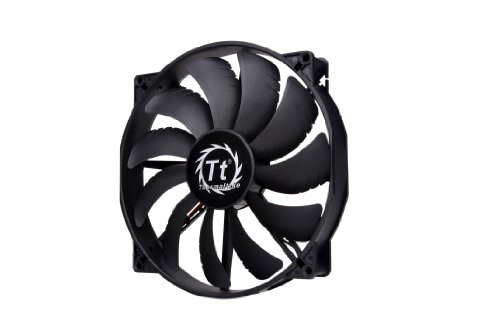
Thermaltake Pure 20 200mm Case Fan
Best for: Silent 200mm cooling builds
- Fan Size
- 200mm
- Bearing Type
- Long Life Sleeve Bearing
- Dimensions
- 11.4 × 10 × 12.6 inches
- Weight
- 15 ounces
View on Amazon: Thermaltake Pure 20 200mm Case Fan Affiliate link
This Thermaltake fan measures 200mm by 30mm thick. It uses a long life sleeve bearing for reliability. The blade design focuses airflow to reduce noise. You get high air pressure and efficient cooling. It fits well in cases that support 200mm mounts. The black finish keeps the look clean. You do not get addressable RGB lighting here.
Pros
- 200mm size for high airflow
- 30mm thick frame for pressure
- Long life sleeve bearing
- Black color option
Cons
- No ARGB lighting support
- Single pack only
- Standard PWM control only
Good fit if
- You need 200mm case fans
- You prefer silent black fans
- You want high static pressure
Skip if
- You want addressable RGB
- You only have 120mm slots
- You need bundled controllers
Verdict: Thermaltake Pure 20 200mm Black Fan delivers focused airflow for users who prioritize silence and capacity over lighting effects. It suits builders who need reliable cooling in larger cases without RGB distractions.
Specifications side by side
| Spec | Cooler Master MF120 Halo Dual-Ring ARGB Fan | Thermaltake Pure 20 200mm Case Fan |
|---|---|---|
| Fan Size | 120 mm | 200mm |
| Max Airflow | 47.2 CFM ± 10% | not stated |
| Static Pressure | 1.6 mmH2O ± 10% | not stated |
| Noise Level | 30 dBA | not stated |
| Bearing Type | not stated | Long Life Sleeve Bearing |
| Lighting Type | Addressable RGB | not stated |
| Lighting | ARGB | not stated |
| Dimensions | 4.72 × 4.72 × 0.98 inches | 11.4 × 10 × 12.6 inches |
| Weight | 6.35 ounces | 15 ounces |
| Size | 120 | 200mm |
| Color | ARGB | Black |
| Model | MFL-B2DN-18NPA-R1 | CL-F015-PL20BL-A |
Frequently asked questions
Can I use the Cooler Master MF120 Halo without ARGB lighting?
Yes, you can operate this fan without lighting effects. The product is designed for high airflow cases, so the fan blades and motor function independently of the addressable RGB system. You simply do not connect the ARGB cable to your motherboard. This allows you to prioritize cooling performance while keeping the installation simple.
Does the Thermaltake Pure 20 fit standard 120mm slots?
No, this fan measures 200mm, which is significantly larger than the standard 120mm size. It requires a chassis with dedicated 200mm mounting holes. You must check your case specifications to ensure it supports this larger form factor before purchasing. It is not compatible with standard 120mm bays found in most mid-tower cases.
Which fan is better for a quiet PC build?
The Thermaltake Pure 20 is the better choice for silence. It is specifically noted for delivering focused airflow while prioritizing quiet operation. The Cooler Master MF120 Halo is geared toward builders who prioritize airflow and visual impact over ultra-quiet performance. If noise reduction is your main goal, the Thermaltake option suits your needs better.
What is the weight difference between these two fans?
The Cooler Master MF120 Halo weighs 6.35 ounces. The Thermaltake Pure 20 weighs 15 ounces. The Thermaltake fan is more than twice as heavy due to its larger 200mm size and frame construction. This weight difference reflects the different materials and scale used in each product design.
Do I need a special motherboard header for the Cooler Master fan?
Yes, you need an ARGB motherboard header to use the lighting features. This fan uses addressable RGB technology, which requires specific 5V 3-pin headers on your motherboard. Without this connection, the dual-ring lighting will not function. Ensure your motherboard supports this type of lighting control before installation.
Can the Thermaltake fan be used in a small form factor case?
Likely not, due to its large 200mm size. The fan measures 10 inches in width and 12.6 inches in height. Most small form factor cases only accommodate 120mm or 140mm fans. You should verify your case dimensions carefully, as this fan is intended for larger chassis that can house 200mm cooling solutions.
Is the Cooler Master fan suitable for water cooling radiators?
Yes, its 120mm size makes it compatible with standard radiator mounts. Many AIO liquid coolers and custom loops use 120mm radiators. The fan is designed for high airflow, which helps dissipate heat efficiently from the radiator fins. It is a common choice for builders using standard-sized cooling components.