Best Cooler Master Case Fans Under $30 in 2026: 3 Picks
As an Amazon Associate we earn from qualifying purchases. Links on this page are affiliate links.
You need the best Cooler Master case fans under $30 that balance performance and lighting. We compared 3 models using only their published specifications to help you choose. The top pick is the Cooler Master MasterFan MF140 Halo ARGB Fan. It leads because its 140mm size delivers strong static pressure for radiator cooling. This guide helps you decide which fan fits your build based on size, lighting, and airflow specs.
Quick picks
| # | Product | Best for | Price |
|---|---|---|---|
| 1 | Cooler Master MasterFan MF140 Halo ARGB Fan Best overall | 140mm radiator cooling and RGB customization | Check price of Cooler Master MasterFan MF140 Halo ARGB Fan on Amazon |
| 2 | Cooler Master MF140 Halo² White 140mm ARGB Fan Best premium | 140mm bays needing bright white ARGB lighting | Check price of Cooler Master MF140 Halo² White 140mm ARGB Fan on Amazon |
| 3 | Cooler Master MF120 Lite 120mm ARGB Fan 3-Pack Best budget | 120mm builds needing easy ARGB daisy-chaining | Check price of Cooler Master MF120 Lite 120mm ARGB Fan 3-Pack on Amazon |
The best fit for you
- You need strong radiator cooling with 140mm mounts Cooler Master MasterFan MF140 Halo ARGB Fan This 140mm fan delivers strong static pressure and ARGB lighting for radiators.
- You want bright white ARGB for 140mm bays Cooler Master MF140 Halo² White 140mm ARGB Fan The white 140mm model provides bright ARGB effects and strong airflow.
- You need easy ARGB daisy-chaining for 120mm builds Cooler Master MF120 Lite 120mm ARGB Fan 3-Pack This 120mm fan includes splitter hardware for simple cable management.
Our 3 picks
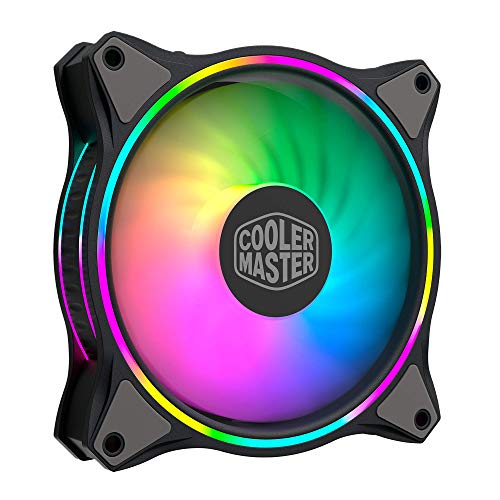
Cooler Master MasterFan MF140 Halo ARGB Fan
Best for: 140mm radiator cooling and RGB customization
- Fan Size
- 140mm
- Max Fan Speed
- 1500 rpm
- Lighting Type
- Addressable RGB
- Dimensions
- 5.51 × 5.51 × 0.98 inches
- Weight
- 7.58 ounces
View on Amazon: Cooler Master MasterFan MF140 Halo ARGB Fan Affiliate link
This 140mm fan features Duo-Ring Addressable RGB lighting with 24 individually controlled LEDs. It uses a hybrid static pressure blade design for radiators or mesh panels. PWM control adjusts speed from 650 to 1,500 rpm. Silent cooling technology includes sound absorbing materials. It connects via 3-pin ARGB headers compatible with major motherboard sync software.
Pros
- 140mm frame for high static pressure airflow
- 24 individually controllable ARGB LEDs
- PWM speed range of 650 to 1,500 rpm
- Sound absorbing materials for quieter operation
Cons
- 140mm size requires compatible case mounts
- Requires 3-pin ARGB motherboard header
- No included speed controller for manual adjustment
Good fit if
- You need high airflow for a 140mm radiator
- You want customizable RGB lighting effects
- Your motherboard supports 3-pin ARGB sync
Skip if
- Your case only supports 120mm fans
- You prefer non-RGB silent cooling
- Your motherboard lacks ARGB headers
Verdict: Cooler Master MF140 Halo 140mm ARGB Fan delivers strong static pressure and vibrant lighting for builders with 140mm mounting options. It suits those prioritizing visual customization and radiator performance over compact 120mm form factors.

Cooler Master MF140 Halo² White 140mm ARGB Fan
Best for: 140mm bays needing bright white ARGB lighting
- Fan Size
- 140mm
- Max Fan Speed
- 1,600 RPM
- Connector Type
- 4-pin PWM
- Lighting Type
- ARGB
- Dimensions
- 5.8 × 7.8 × 1.2 inches
- Weight
- 9.6 ounces
View on Amazon: Cooler Master MF140 Halo² White 140mm ARGB Fan Affiliate link
The Cooler Master MF140 Halo² White is a 140mm case fan featuring dual-loop ARGB rings and frosted blades for vibrant lighting. It reaches a maximum speed of 1,600 RPM via a 4-pin PWM connector, balancing airflow and noise. This white model suits builds requiring larger 140mm bays and customizable illumination, offering a hybrid frame design for stability.
Pros
- 140mm size with frosted blade design for enhanced light dispersion
- Dual-loop ARGB rings provide 50% brighter illumination
- Adjustable speed up to 1,600 RPM via 4-pin PWM
- Hybrid frame optimized for airflow and stability
Cons
- Limited to 140mm bay sizes, excluding 120mm slots
- ARGB lighting requires compatible motherboard headers
- White color may not match non-white builds
Good fit if
- You need 140mm fans for larger case bays
- You want bright, customizable ARGB lighting effects
- You are building a white-themed PC
Skip if
- You only have 120mm fan mounts available
- You prefer silent fans with lower max RPM
- You do not use ARGB lighting
Verdict: Cooler Master MF140 Halo² White 140mm ARGB delivers strong airflow and bright lighting for cases with 140mm openings. It fits users prioritizing visual impact and larger fan dimensions over compact 120mm options.

Cooler Master MF120 Lite 120mm ARGB Fan 3-Pack
Best for: 120mm builds needing easy ARGB daisy-chaining
- Fan Size
- 120mm
- Max Fan Speed
- 1,750 RPM
- Connector Type
- 4-pin PWM
- Lighting Type
- ARGB
- Dimensions
- 4.7 × 4.7 × 1 inches
- Weight
- 4.8 ounces
View on Amazon: Cooler Master MF120 Lite 120mm ARGB Fan 3-Pack Affiliate link
The Cooler Master MF120 Lite is a 120mm case fan designed for balanced airflow and customizable lighting. It features a dynamic PWM motor with adjustable speeds from 650 to 1,750 RPM, allowing you to manage noise levels effectively. The frosted blade design enhances the dispersion of its ARGB lighting. This 3-pack includes an ARGB header extender for easy daisy-chaining to your motherboard or a splitter, simplifying installation and cable management.
Pros
- Adjustable PWM speeds from 650 to 1,750 RPM
- Frosted blades improve ARGB light dispersion
- Includes ARGB header extender for daisy-chaining
- Optimized curved blade design for airflow
Cons
- Max speed of 1,750 RPM is lower than 140mm competitors
- ARGB requires motherboard connection, not wireless
- Only available in black or white color options
Good fit if
- You want customizable ARGB lighting for 120mm mounts
- You need a 3-pack for consistent airflow
- You prefer simplified daisy-chain cable management
Skip if
- You require 140mm fans for larger chassis
- You need high static pressure for radiators
- You prefer fans without lighting effects
Verdict: Cooler Master MF120 Lite 120mm ARGB Fan offers solid airflow and easy lighting control for builders who value cable management. It fits users who want a balanced 120mm fan with included splitter hardware.
Specifications side by side
| Spec | Cooler Master MasterFan MF140 Halo ARGB Fan | Cooler Master MF140 Halo² White 140mm ARGB Fan | Cooler Master MF120 Lite 120mm ARGB Fan 3-Pack |
|---|---|---|---|
| Fan Size | 140mm | 140mm | 120mm |
| Max Fan Speed | 1500 rpm | 1,600 RPM | 1,750 RPM |
| Connector Type | not stated | 4-pin PWM | 4-pin PWM |
| Lighting Type | Addressable RGB | ARGB | ARGB |
| Lighting | ARGB | ARGB | ARGB |
| Dimensions | 5.51 × 5.51 × 0.98 inches | 5.8 × 7.8 × 1.2 inches | 4.7 × 4.7 × 1 inches |
| Weight | 7.58 ounces | 9.6 ounces | 4.8 ounces |
| Size | 140mm ARGB | 140mm ARGB | Large |
| Color | Black | White | Black |
| Model | MFL-B4DN-15NPA-R1 | MFL-B4DW-16NP2-R2 | MFW-B2DN-17NPA-R1 |
Choosing Cooler Master Case Fans
-
Match Fan Size to Case
Verify your case supports the specific fan dimensions before purchasing. The top pick is a 140mm model, ideal for radiators. The budget option is also 140mm. The third pick is 120mm. Larger fans move more air at lower speeds. Smaller fans fit tighter spaces. Check your case specifications for available mounting points. Buying the wrong size leads to installation issues. Ensure your chassis has the correct holes for your selected fan size.
-
Check Motherboard ARGB Headers
All three models feature ARGB lighting. You need a motherboard header to control these effects. Standard 5V 3-pin headers work for most modern boards. Check your motherboard manual for available ARGB pins. If you lack headers, you may need a separate controller. The MF120 Lite includes splitter hardware for easier daisy-chaining. This helps manage cables when connecting multiple fans. Verify your system has the necessary connections for lighting control.
-
Prioritize Static Pressure for Radiators
Static pressure moves air through dense obstacles like radiators. The top pick delivers strong static pressure. It suits builders with 140mm mounting options. The budget white model also provides strong airflow. Check the specifications for static pressure ratings if available. Higher pressure pushes air through thick cooling blocks. This is critical for liquid cooling loops. Airflow fans are better for open mesh panels. Match the fan type to your cooling hardware.
-
Consider Cable Management Options
Cable clutter affects airflow and aesthetics. The MF120 Lite 3-Pack includes splitter hardware. This allows you to chain fans together. Fewer cables mean a cleaner build. Check the included accessories for each model. Some fans may require separate splitters. Plan your cable routes before installation. Use zip ties or Velcro straps to secure wires. Proper management prevents cables from blocking fan blades.
-
Verify Physical Dimensions
Fan thickness and width vary by model. The top pick is 0.98 inches thick. The budget option is 1.2 inches thick. The 120mm model is 1 inch thick. Ensure your case has enough depth. Thicker fans may not fit in tight spaces. Check the height and length specifications. Compare these numbers to your case limits. Incorrect dimensions prevent proper installation. Measure your available space before ordering.
Frequently asked questions
Which Cooler Master fan is best for 140mm radiators?
The Cooler Master MasterFan MF140 Halo ARGB Fan is the top choice for 140mm radiator cooling. It delivers strong static pressure suitable for dense radiator fins. The fan features ARGB lighting for visual customization. Its 140mm size allows it to move more air than smaller options, making it ideal for builders with 140mm mounting bays.
What is the best budget Cooler Master case fan?
The Cooler Master MF140 Halo² White 140mm ARGB Fan is the best budget option. It provides bright white ARGB lighting and strong airflow for cases with 140mm openings. This model suits users who prioritize visual impact and larger fan dimensions. It offers a cost-effective way to upgrade your case lighting while maintaining good performance.
Does the Cooler Master MF120 Lite come with a splitter?
Yes, the Cooler Master MF120 Lite 120mm ARGB Fan 3-Pack includes splitter hardware. This allows for easy ARGB daisy-chaining, which helps with cable management. The fans are designed for builders who value organized interiors. You can connect multiple fans to a single header without needing additional hubs, simplifying your build process.
What is the difference between the Halo and Halo² fans?
The primary difference is color and specific design updates. The Halo is black and serves as the best overall pick for strong static pressure. The Halo² is white and is the best budget option with bright lighting. Both are 140mm ARGB fans. The Halo² offers strong airflow, while the Halo focuses on radiator performance and visual customization.
Are these fans suitable for 120mm case bays?
Only the Cooler Master MF120 Lite is suitable for 120mm bays. The Halo and Halo² models are 140mm fans and will not fit in 120mm slots. You must verify your case supports the specific fan dimensions before purchasing. If your case only has 120mm mounts, the MF120 Lite is your only option among these picks.
How do I control the ARGB lighting on these fans?
These fans use ARGB technology, which allows for individual color control. The Halo and Halo² models provide vibrant lighting effects. The MF120 Lite includes splitter hardware to simplify daisy-chaining multiple fans for unified lighting. You connect these to your motherboard or a compatible controller to manage the colors and patterns according to your preference.