MUSETEX Compact ATX Air Cooling Review: Who It Fits and Who Should Skip It
As an Amazon Associate we earn from qualifying purchases. Links on this page are affiliate links.
This musetex m2 atx PC case review focuses on a compact tower built for entry-level builders who prioritize practicality over premium materials. It supports ATX, Micro-ATX, and Mini-ITX motherboards, making it versatile for various build sizes. The case includes one 120mm fan and features a mesh front panel for improved airflow. Its internal layout is optimized for air cooling, supporting CPU coolers up to 160mm in height. With a slim footprint, it aims to save desk space while maintaining sturdy functionality for everyday computing needs.
What stands out
- Supports ATX, Micro-ATX, and Mini-ITX motherboards
- Includes one 120mm non-RGB fan
- Side-panel vent dedicated to air cooler airflow
- Magnetic dust filter for easy cleaning
- Slim 12 x 7.28 x 16.77 inch dimensions
Who it fits
Good fit for
This case suits budget-conscious builders who need a straightforward, no-frills chassis for air-cooled systems. It is ideal for users with limited desk space who want a compact tower that fits standard ATX components. The dedicated side vent and mesh front make it a solid choice for those prioritizing basic airflow and easy maintenance without the complexity of liquid cooling support or RGB lighting.
Who should skip it
You should look elsewhere if you plan to use an AIO liquid cooler, as this case does not support them. It is also not suitable for builders who need extensive RGB lighting, as it includes only one non-RGB fan. If you require support for longer graphics cards beyond 265mm or larger power supplies than 160mm, this compact form factor will restrict your hardware choices significantly.
Verdict: The MUSETEX M2 is a practical, space-saving option for entry-level air-cooled builds. It delivers essential functionality without unnecessary features or costs.
Key specs explained
Motherboard Support: ATX, Micro-ATX, Mini-ITX
This case accommodates three standard motherboard form factors. You can install a full-sized ATX board, a smaller Micro-ATX, or a compact Mini-ITX. This flexibility allows you to choose a board based on your feature needs rather than being locked into one size. It suits builders who want room to upgrade their mainboard later without changing the chassis. Compare this versatility against single-form-factor cases that restrict your component choices.
Max GPU Length: 265mm
You can install graphics cards up to 265mm long. This limits you to standard and mid-range cards. High-end, triple-fan GPUs often exceed this length and will not fit. This spec is crucial for budget builders using entry-level or mid-range cards. Check your specific GPU dimensions before buying. If you plan to use a large graphics card, verify the length first to ensure compatibility with this compact interior.
Included Fans: 1x 120mm
The package includes one 120mm fan. This provides basic airflow for the rear exhaust. You may need to purchase additional fans for optimal cooling, especially if you plan to add more hardware later. The case supports up to three fans total. This single fan is sufficient for light usage. Compare this to cases that include multiple fans, which offer better out-of-the-box thermal performance for heavier workloads.
CPU Cooler Height Support: 160mm
Air coolers must be 160mm tall or shorter. This allows you to use most standard tower coolers. Large, high-performance air coolers often exceed this limit and will clash with the side panel. This restriction is common in compact cases. Verify your cooler dimensions before assembly. This spec ensures you pick a cooler that fits without blocking the side panel or requiring modifications.
Design and build quality
According to the listing, the MUSETEX M2 uses a slim and lightweight steel construction. The materials are not heavy-gauge steel, but the design prioritizes sturdy support for normal functionality. This choice keeps the overall footprint small, allowing the case to serve as a compact desktop centerpiece without taking up extra space. You get a rectangular tower structure that fits neatly on most desks.
The interior layout is rational and tailored for entry-level ATX users. It supports ATX, Micro-ATX, and Mini-ITX motherboards, giving you flexibility in board selection. The design includes a dedicated side-panel vent for air coolers, directing fresh air straight to the CPU heatsink. This specific airflow optimization means the case is designed strictly for air-cooling systems; liquid coolers are not supported. You can install CPU coolers up to 160mm in height, which covers most standard air coolers.
Perforations on multiple sides ensure full-system ventilation for optimal heat dissipation. The front panel is mesh, and a magnetic dust filter is included to block dust while remaining easy to clean. The I/O panel features one USB 3.0 port, one USB 1.0 port, audio jacks, and power and restart buttons. The finish is black, and the case includes one 120mm fan. These practical design choices mean the case is built for straightforward assembly and efficient cooling rather than premium aesthetics.
Setup and daily operation guide
Setting up this case involves matching your components to the listed clearance limits. You must ensure your CPU air cooler does not exceed 160mm in height. The listing specifies that liquid coolers are not supported, so you must stick to air-cooling solutions. Graphics cards must fit within the 265mm length limit. Power supplies are restricted to a maximum length of 160mm. Storage options include both 2.5-inch SSDs and 3.5-inch HDDs. You can install up to three fans in total, with two mounting points on the top panel and one at the rear. The included 120mm fan provides initial airflow, but you may add more to utilize all mounting slots.
Daily use is straightforward. The front panel offers a USB 3.0 port, a USB 2.0 port, and combined audio jacks for microphone and headphone use. You also have dedicated power and restart buttons. The magnetic dust filter on the front panel allows you to quickly remove and clean it without tools. This helps maintain cooling efficiency by blocking dust from entering the system. The side-panel vent is designed to direct fresh air straight to your CPU heatsink. This layout supports efficient heat dissipation for air-cooled builds. The compact dimensions help reclaim desk space, keeping your setup tidy. The case supports ATX, Micro-ATX, and Mini-ITX motherboards, giving you flexibility in choosing your main board. This design prioritizes practical functionality for entry-level builders who need a reliable, no-frills chassis for everyday computing tasks.
Who Should Buy This Case
You should verify that your graphics card fits within the 265mm length limit before purchasing. The case supports power supplies up to 160mm, so confirm your unit matches this constraint. Since liquid cooling is not supported, you must rely on air coolers no taller than 160mm. The included 120mm fan provides basic airflow, but you may want to add two more fans for optimal cooling, as the case supports up to three total. Regularly clean the magnetic dust filter to maintain performance. This model suits entry-level builders who value practicality and compact size over premium materials. It fits well alongside other budget-friendly ATX options if you prioritize a straightforward interior and easy maintenance. Avoid this if you need extensive customization or heavy-gauge steel construction. The design focuses on essential functionality rather than high-end aesthetics. Ensure your motherboard size aligns with the ATX, Micro-ATX, or Mini-ITX support listed. This case is ideal for users seeking a no-nonsense, space-saving solution for everyday computing needs.
Check before you buy
- Check GPU length does not exceed 265mm
- Confirm CPU cooler height is under 160mm
- Verify PSU length fits within 160mm limit
- Ensure motherboard matches ATX or smaller size
The product at a glance
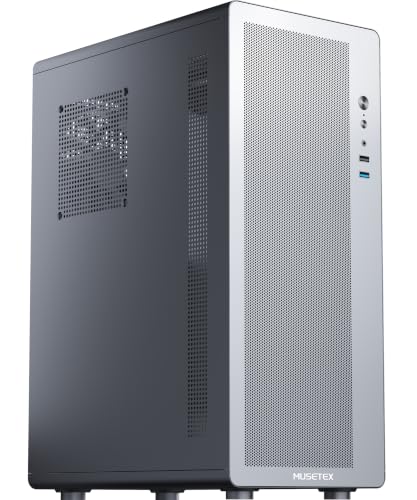
MUSETEX Compact ATX Air Cooling Case
Best for: Entry-level air-cooled ATX builds
- Motherboard Support
- ATX, Micro-ATX, Mini-ITX
- Included Fans
- 1x 120mm
- Max GPU Length
- 265mm
- Lighting
- RGB
- Dimensions
- 12 × 7.28 × 16.8 inches
View on Amazon: MUSETEX Compact ATX Air Cooling Case Affiliate link
The MUSETEX M2 is a slim ATX tower designed for entry-level builders who prioritize airflow and desk space. It supports ATX, Micro-ATX, and Mini-ITX motherboards, along with CPU coolers up to 160mm and GPUs up to 265mm. The case includes one 120mm fan and a dedicated side vent for air coolers. It features magnetic dust filters and a mesh front to maintain cooling efficiency without liquid cooling support.
Pros
- Supports ATX, Micro-ATX, and Mini-ITX motherboards
- Dedicated side-panel vent for air coolers
- Includes one 120mm fan and magnetic dust filter
- Slim dimensions save desktop space
Cons
- Does not support liquid coolers
- Only includes one fan in the box
- USB 1.0 port is included instead of USB 2.0
Good fit if
- You need a compact tower for small desks
- You plan to use air cooling only
- You want a straightforward build with easy maintenance
Skip if
- You require liquid cooling support
- You need multiple pre-installed fans
- You want modern USB 3.1 or Type-C connectivity
Verdict: The MUSETEX M2 ATX Compact Case fits users who need a slim, air-cooling-only chassis for standard ATX builds. It is best for entry-level builders who value compact size and straightforward airflow over advanced connectivity or liquid cooling options.
Specifications side by side
| Spec | MUSETEX Compact ATX Air Cooling Case |
|---|---|
| Motherboard Support | ATX, Micro-ATX, Mini-ITX |
| Included Fans | 1x 120mm |
| Max GPU Length | 265mm |
| Fan Size | 120mm |
| Lighting | RGB |
| Dimensions | 12 × 7.28 × 16.8 inches |
| Size | 12 x 7.28 x 16.77 inches |
| Color | Black |
Frequently asked questions
Does the MUSETEX M2 support liquid cooling?
No, this case does not support liquid cooling. The listing explicitly states that only air cooling is compatible. You must rely on air coolers that do not exceed 160mm in height. This limitation is important for builders who prefer the simplicity and reliability of traditional fan-based cooling solutions over complex liquid loops.
What motherboard sizes fit in this case?
The MUSETEX M2 supports ATX, Micro-ATX, and Mini-ITX motherboards. This versatility allows you to choose a board based on your feature needs rather than being restricted by the case size. You can install a full-sized ATX board for maximum expansion or a smaller form factor for a more compact build.
How many fans does the case include?
The case includes one 120mm fan. This single fan provides basic airflow for entry-level builds. You may need to purchase additional fans if you require more robust cooling for high-performance components. The included fan helps establish a baseline airflow path from front to rear.
Is there RGB lighting in the MUSETEX M2?
Yes, the case features RGB lighting. This adds visual appeal to your build without requiring complex setup. The lighting enhances the aesthetic of your PC, making it suitable for users who want a stylish look. It complements the black finish for a clean, modern appearance.
What is the maximum GPU length supported?
The case supports graphics cards up to 265mm in length. You must verify that your specific GPU fits within this limit before purchasing. This constraint ensures compatibility with mid-range cards, though larger enthusiast models may not fit. Always measure your existing hardware to avoid fitment issues.
What are the external dimensions of the case?
The external dimensions are 12 x 7.28 x 16.77 inches. The width is 7.28 inches, the height is 16.8 inches, and the length is 12 inches. These compact measurements make it suitable for small desks or tight spaces. The slim profile helps reduce the overall footprint of your setup.