DS leddess 120mm Static RGB Case Review: Who It Fits and Who Should Skip It
As an Amazon Associate we earn from qualifying purchases. Links on this page are affiliate links.
This ds leddess ds static RGB LED review covers a six-pack of 120mm case fans designed for standard PC chassis. The unit offers static white RGB lighting and uses a Molex connector for power. These fans measure 4.72 by 4.72 inches with a thickness of 0.98 inches. They are built for low-noise operation while maintaining airflow. You get eight LEDs per fan to illuminate your build. The kit includes white fans, though black options exist. This setup provides consistent lighting across your system without requiring complex controller integration. It is a straightforward solution for basic case ventilation and visual enhancement.
What stands out
- 120mm form factor fits most mid-tower and full-tower cases
- Eight ultra-bright static RGB LEDs per fan
- Molex connector for direct power supply connection
- White color option with black alternative available
Who it fits
Good fit for
You should choose these fans if you want a simple, no-fuss cooling solution for a standard PC build. The Molex connector makes installation easy if you do not have a fan controller or RGB hub. The static white lighting is ideal for builds that prefer a clean, uniform look over dynamic effects. Since they are tuned for low noise, they work well in quiet office PCs or home theater systems. The six-pack quantity allows you to cover multiple intake or exhaust positions effectively.
Who should skip it
Skip this product if you need PWM speed control or addressable RGB synchronization. The Molex connector means you cannot adjust fan speeds via software or BIOS. You also cannot change the color or create lighting effects, as the RGB is static white only. If your case requires 3-pin or 4-pin fan headers, these will not connect directly. You will need to use adapters or rely on the power supply's fixed speed output, which limits customization.
Verdict: This is a practical choice for users who prioritize easy installation and static lighting over advanced control. It delivers reliable airflow and consistent illumination for standard builds without extra complexity.
Key specs explained
Fan Size: 120mm
This dimension refers to the length of one side of the square fan frame. A 120mm size is the industry standard for most mid-tower and full-tower PC cases. You can easily mount these in standard 120mm slots on your case panels or radiators. This versatility allows you to use them for intake, exhaust, or CPU cooler mounting without needing adapters or custom brackets.
Lighting Type: Static RGB LED
These fans feature eight LEDs that emit a single, fixed color rather than changing patterns. This is ideal if you want a clean, uniform look across all six fans in your build. You control the color via your motherboard or a separate controller, but the lights themselves do not animate. This suits users who prefer a minimalist aesthetic over dynamic lighting effects.
Connector Type: Molex
The fans power through a standard Molex connector, which plugs directly into older power supply units. This ensures compatibility with legacy systems that lack modern fan headers. However, you lose the ability to adjust fan speeds or sync lighting with motherboard software. You will need to manage airflow manually or rely on the fan's inherent speed settings.
Color: White
The fan frame and blades are finished in white. This color helps the fans blend in with white-themed PC builds or light-colored case interiors. It creates a cohesive visual appearance when paired with white components. If your case is black, the white fans may stand out. Choose this option only if your chassis interior or theme matches this specific color.
Design and Build Quality
The listing describes these fans as having a white frame, though a black option is also available. According to the listing, the physical dimensions are 4.72 inches by 4.72 inches for the square footprint, with a thickness of 0.98 inches. This profile is standard for 120mm fans, allowing them to fit into most mid-tower and full-tower chassis without requiring special mounting hardware. You can install them in standard 120mm slots found on case panels, radiators, or CPU coolers.
The lighting system uses static RGB LEDs. The listing notes there are eight ultra-bright lights per fan. This type of lighting provides a solid, uniform color wash rather than animated patterns. It relies on your motherboard or a separate controller to change the hue. This setup is practical if you prefer a clean, consistent look across your build.
Power is delivered via a Molex connector. This is an older, simpler standard compared to modern 4-pin PWM headers. It means the fans run at a fixed speed determined by the motherboard’s voltage output. You cannot adjust the speed through software. This choice simplifies wiring but limits control. It suits builds where basic airflow is enough, or where you want to avoid using limited motherboard fan headers.
Setup And Daily Use Guide
Installation begins with connecting the power source. These fans use a Molex connector. You will need to plug this directly into a Molex header on your power supply unit. This method provides power without requiring a fan controller or motherboard header. It is a straightforward physical connection that does not involve software configuration.
The listing states the fans are tuned for low-noise operation. This suggests they are designed to move air efficiently while keeping sound levels down during normal use. You do not need to adjust settings to achieve this baseline performance. The fans run as soon as power is applied.
Lighting is static RGB. This means the color is fixed and does not change or pulse. The listing mentions eight ultra-bright LEDs per fan. You will see a constant white glow if you choose the white variant, or a constant black appearance with the black frame option. There is no dynamic lighting effect to configure.
These 120mm fans fit standard mid-tower and full-tower chassis. They are also compatible with CPU coolers and radiators. You can mount them in any standard 120mm slot. The six-pack kit allows you to cover multiple intake or exhaust points in your case. Setup is purely mechanical and electrical. There are no apps or complex wiring harnesses involved. You simply install the fans and connect the Molex plugs to your power supply. This makes the process accessible for builders who prefer simplicity over advanced control features.
Before you buy these fans
You should verify your case has standard 120mm mounting slots. These fans fit most mid-tower and full-tower chassis. Check your power supply for available Molex connectors. You will need to plug each fan into a separate header. This means you use multiple connectors from your PSU. You may need cable ties to manage the extra wires. Keep the fan blades clean from dust. Use a soft brush or compressed air. This maintains airflow and noise levels. These fans offer static lighting without complex software. They suit builds that prefer simple, reliable operation. If you want dynamic RGB effects, look elsewhere. These are best for users who value straightforward installation. They work well alongside other standard case fans. Ensure your case supports the 0.98-inch thickness. This dimension is standard, but double-check your specific model. The white frame matches many modern builds. A black option exists if you prefer darker aesthetics. These fans provide basic illumination and steady airflow.
Check before you buy
- Confirm your case has 120mm mounting holes.
- Check for available Molex connectors on your PSU.
- Verify your case supports 0.98-inch fan thickness.
- Ensure you have cable ties for wire management.
The product at a glance
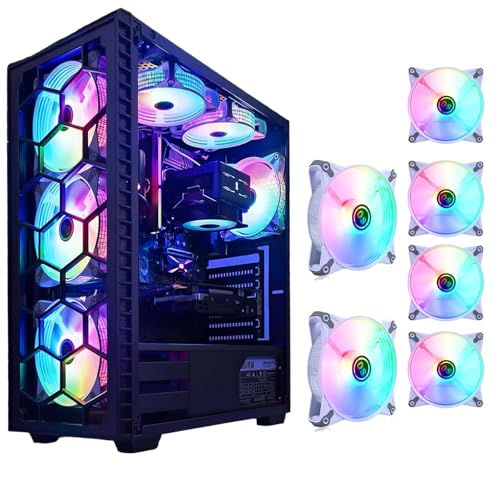
DS leddess 120mm Static RGB Case Fans (6-Pack)
Best for: Simple white RGB lighting builds
- Fan Size
- 120mm
- Connector Type
- Molex
- Lighting Type
- Static RGB LED
- Compatible Device
- Radiator, CPU Cooler
- Dimensions
- 4.72 × 0.98 × 4.72 inches
View on Amazon: DS leddess 120mm Static RGB Case Fans (6-Pack) Affiliate link
The DS leddess 120mm Static RGB fan offers white casing with eight ultra-bright LEDs. It measures 4.72 by 4.72 by 0.98 inches and connects via Molex. This kit includes six fans tuned for low-noise operation. It fits mid-tower and full-tower chassis. You get full lighting coverage for your build. It works with radiators and CPU coolers. This is a basic lighting solution for standard PC builds.
Pros
- Includes a 6-pack for full build lighting
- Eight ultra-bright RGB LEDs per fan
- Tuned for low-noise operation
- Standard 120mm size fits most chassis
Cons
- Uses Molex connector instead of PWM
- Static RGB only, no dynamic effects
- No software control for lighting
Good fit if
- You want a simple 6-pack of white fans
- You prefer low-noise operation without complex wiring
- You need standard 120mm fans for radiators
Skip if
- You need dynamic addressable RGB effects
- You want PWM speed control
- You require software-based lighting customization
Verdict: DS leddess 120mm Static RGB Fan is a straightforward lighting option for users who want basic white RGB fans with a Molex connection. It suits builders who prioritize simplicity and low noise over advanced lighting control.
Specifications side by side
| Spec | DS leddess 120mm Static RGB Case Fans (6-Pack) |
|---|---|
| Fan Size | 120mm |
| Connector Type | Molex |
| Lighting Type | Static RGB LED |
| Lighting | RGB |
| Compatible Device | Radiator, CPU Cooler |
| Dimensions | 4.72 × 0.98 × 4.72 inches |
| Color | White |
| Model | DS-E06 |
Frequently asked questions
Does this fan support motherboard sync?
No, it does not support motherboard sync. The DS leddess 120mm Static RGB Case Fans use a Molex connector for power. This means the lighting runs at a constant static white color. You cannot control brightness or change colors through your PC's BIOS or software. The lighting is fixed once installed.
How many fans come in the box?
The package includes a six-pack of fans. You receive six individual 120mm units. This quantity allows you to cover multiple intake or exhaust slots in a standard mid-tower case. Each fan operates independently via its own Molex connection to the power supply.
What color is the RGB lighting?
The lighting is a static white color. The product listing specifies the color as white. The term static RGB indicates the light does not cycle or change patterns. It provides a consistent, uniform white glow for your case interior without dynamic effects.
Can I use these fans on a radiator?
Yes, they are compatible with radiators. The specifications list radiator as a compatible device. You can mount these 120mm fans on AIO coolers or custom loop radiators. Just ensure your radiator has standard 120mm mounting holes that match the fan frame dimensions.
Is this fan quiet during operation?
The verdict suggests these fans prioritize low noise. They are designed for users who want basic lighting without excessive sound. While specific decibel ratings are not listed, the Molex connection often runs at a fixed speed that balances airflow and noise for general case ventilation.
What is the thickness of the fan?
The fan has a thickness of 0.98 inches. The dimensions are 4.72 inches by 4.72 inches with a depth of 0.98 inches. This standard thickness fits most standard 120mm fan mounts in PC cases. It is not a slim or thick variant.
Do I need a special controller?
No, you do not need a special controller. These fans connect directly to a Molex header on your power supply. This simple setup requires no additional hubs or controllers. It is ideal for builders who want a plug-and-play solution without extra wiring complexity.
Who is this fan best for?
This fan is best for builders who want simple white RGB lighting. It suits users who prioritize simplicity and low noise. If you want advanced lighting control or RGB cycling, this is not the right choice. It is perfect for basic, clean aesthetic builds.