ASUS ROG Strix Helios RGB vs ASUS ProArt Full-Tower Case: Spec Comparison
As an Amazon Associate we earn from qualifying purchases. Links on this page are affiliate links.
This comparison of the asus rog strix helios RGB vs proart pa602 e atx full tower PC case highlights two distinct builds from ASUS. Both enclosures support E-ATX motherboards and include built-in fan hubs for management. The primary difference lies in their form factors and intended use. The Helios RGB is a mid-tower designed for gaming aesthetics, while the ProArt is a full-tower focused on professional workflows and superior airflow. You need to weigh the size and feature sets to decide which fits your needs.
Key differences
| Aspect | ASUS ROG Strix Helios RGB Mid-Tower Case | ASUS ProArt Full-Tower Case |
|---|---|---|
| Tower Size | Mid-Tower | Full-Tower |
| Included Fans | 4x 140mm | 2x 200mm front, 1x 140mm rear |
| Side Panel | Tempered Glass | Tempered Glass |
| Lighting | RGB | Non ARGB Fans |
| Use Case | Gaming | Professional Workstation |
| I/O Features | GPU support brackets | USB Type-C 20Gbps, Power Lock, IR Dust Indicator |
Which one should you choose?
Choose ASUS ROG Strix Helios RGB Mid-Tower Case if
- You want a mid-tower chassis with a gaming aesthetic and RGB lighting.
- You prefer a design with a smoked tempered glass side panel for viewing components.
- You need support for multiple graphics card mounting options, including vertical setups.
Choose ASUS ProArt Full-Tower Case if
- You require a full-tower size for maximum internal space and component clearance.
- You prioritize superior airflow with a high-porosity front panel and larger 200mm fans.
- You need professional connectivity features like USB Type-C and a dust filter indicator.
Verdict: Choose the Helios RGB if you prioritize a compact mid-tower footprint with gaming-oriented lighting and glass aesthetics. Select the ProArt PA602 if you need a larger full-tower chassis with enhanced airflow and professional I/O features for heavy workloads.
Helios RGB vs ProArt Full Tower
Tower size
The ASUS ROG Strix Helios RGB is a mid-tower chassis with dimensions of 9.8 by 23.3 by 22.2 inches. It fits well in standard setups without taking up excessive floor space. The ASUS ProArt Full-Tower Case is significantly larger, measuring 9.65 by 22.1 by 23.4 inches. While the ProArt is wider and taller, it offers more internal volume for extreme builds. You should choose the Helios for compact efficiency or the ProArt for maximum internal capacity and airflow potential in a larger footprint.
Included fans
Airflow starts with the fans you get out of the box. The Helios includes four 140mm fans, providing robust intake and exhaust coverage for its mid-tower size. The ProArt comes with two extra-thick 200x38mm front fans and one 140mm rear exhaust fan. The ProArt’s front intake fans are notably larger in diameter, which can move more air at lower speeds. Both cases feature built-in fan hubs for easy management. The Helios offers more total fans, while the ProArt focuses on high-volume front intake.
Side panel
Visuals and maintenance matter when you want to see your components. The Helios features a 4mm-thick smoked tempered glass full-view side panel. This design allows you to see the interior clearly while reducing glare. The ProArt also uses tempered glass for its side panel, as indicated by the TG suffix in its size options. Both cases prioritize a clean aesthetic with glass panels. The Helios specifies the thickness and smoke tint, which may offer slightly better light diffusion for RGB lighting. The ProArt’s glass panel is standard tempered glass.
Radiator support
Both cases support large radiators for liquid cooling loops. The Helios supports radiators up to 420mm in length and 90mm thick, including the fans. It also includes a dedicated water pump and reservoir mounting bracket for custom loops. The ProArt supports one 420mm radiator for AIO or custom cooling. Both handle the same maximum radiator size. However, the Helios explicitly mentions the pump bracket, which is a key feature for custom water cooling enthusiasts. The ProArt focuses on airflow deflectors to manage heat from the radiators.
Connectivity
Front I/O ports determine how easily you connect devices. The ProArt includes a USB Type-C port with 20Gbps transfer speeds, along with a Power Lock Latch and 2-section PWM control. This provides modern connectivity and physical security for the power button. The Helios data does not specify the front I/O ports or their speeds. It mentions a translucent rear panel and pre-run chassis cables, which aid in cable management rather than direct user connectivity. The ProArt offers superior and more modern front panel connectivity options.
Lighting
RGB lighting adds visual flair to your build. The Helios is explicitly categorized with RGB lighting attributes and includes ARGB fan options in its variations. It is designed as a gaming case with a focus on aesthetics. The ProArt is listed with Non ARGB Fans in its color options and lacks any mention of RGB lighting in its attributes or features. It is designed for professional workstations where clean, neutral aesthetics are preferred. If you want customizable lighting effects, the Helios is the clear choice.
Which case fits your build needs
Gamers wanting RGB and GPU mounts
The ASUS ROG Strix Helios RGB offers dedicated support for up to two vertically mounted graphics cards or three horizontally mounted options. Its RGB lighting and smoked tempered glass side panel create a visual focal point. The included four 140mm fans and built-in hub provide immediate cooling without extra purchases.
Creators prioritizing airflow and I/O
The ASUS ProArt Full-Tower Case features a front panel with 45% porosity and two extra-thick 200mm fans for superior air intake. It includes a USB Type-C 20Gbps port and a front panel IR dust indicator. The design uses deflectors to direct air toward components, optimizing thermals for heavy workloads.
Users needing flexible drive space
The Helios RGB provides space for nine storage drives within its mid-tower chassis. It includes a GPU support bracket and pre-run chassis cables for cleaner cable management. The metal chassis and three easy-to-clean dust filters help maintain performance while accommodating multiple storage devices for large media libraries.
The products compared
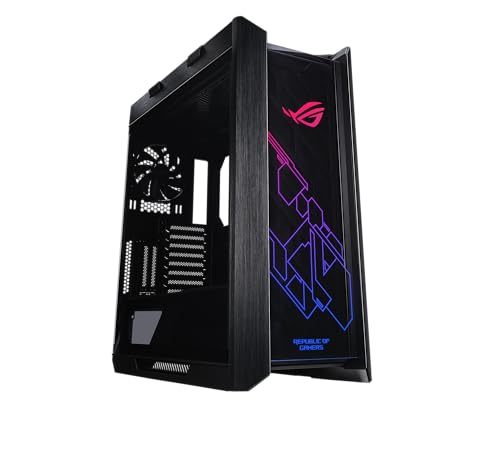
ASUS ROG Strix Helios RGB Mid-Tower Case
Best for: E-ATX builds with multi-GPU setups
- Motherboard Support
- EATX
- Case Type
- Mid-Tower
- Side Panel
- Tempered Glass
- Included Fans
- 4x 140mm
- Radiator Support
- 420mm
- Max GPU Length
- 450mm
View on Amazon: ASUS ROG Strix Helios RGB Mid-Tower Case Affiliate link
The ASUS ROG Strix Helios is a mid-tower case built for E-ATX motherboards. It includes four 140mm fans and supports radiators up to 420mm. The design features tempered glass side panels and space for up to nine storage drives. It also offers vertical GPU mounting options. This case suits gamers who need robust airflow and extensive expansion slots for high-end builds.
Pros
- Supports E-ATX motherboards in a mid-tower form factor
- Includes four 140mm fans and a built-in fan hub
- Accepts radiators up to 420mm in length
- Allows vertical or horizontal mounting for multiple graphics cards
- Features tempered glass side panels for visibility
Cons
- Weighs 39.7 pounds, making it heavy to move
- Limited to mid-tower size despite E-ATX support
- No mention of smart app control or digital displays
Good fit if
- You need a case for large E-ATX motherboards
- You plan to use multiple graphics cards
- You want extensive liquid cooling support up to 420mm
Skip if
- You prefer a full-tower chassis for maximum expansion
- You want a lightweight case for frequent transport
- You require smart home integration or app control
Verdict: ASUS ROG Strix Helios Mid-Tower fits builders who prioritize airflow and multi-GPU setups within a mid-tower footprint. It is ideal for those who value vertical mounting options and large radiator support.

ASUS ProArt Full-Tower Case
Best for: large E-ATX builds and heavy cooling setups
- Motherboard Support
- E-ATX
- Case Type
- Full-Tower
- Radiator Support
- 420mm
- Max GPU Length
- 440mm
- Fan Size
- 140mm, 200mm
- Compatible Device
- Radiator
View on Amazon: ASUS ProArt Full-Tower Case Affiliate link
The ASUS ProArt PA602 is an E-ATX full-tower case designed for high-end builds. It features a 420 mm radiator support and robust airflow with 45% front panel porosity. The case includes a built-in fan hub and IR dust indicator. At 35.5 pounds, it is a substantial build for users needing ample space for large components and extensive I/O options like USB Type-C.
Pros
- Supports E-ATX motherboards and 420 mm radiators
- 45% front panel porosity for superior airflow
- Built-in fan hub for easy management
- IR dust indicator for maintenance reminders
Cons
- Heavy at 35.5 pounds
- Non-ARGB fans included
- Large footprint requires significant desk or floor space
Good fit if
- You need space for E-ATX boards and large GPUs
- You prefer passive airflow design with thick front fans
- You want a sturdy build for heavy components
Skip if
- You have limited room for a full-tower chassis
- You require addressable RGB lighting from stock fans
- You prioritize lightweight portability
Verdict: ASUS ProArt PA602 Full-Tower is ideal for professionals requiring maximum internal volume and thermal headroom for E-ATX systems. It suits users who value structural rigidity and dedicated airflow management over compact dimensions.
Specifications side by side
| Spec | ASUS ROG Strix Helios RGB Mid-Tower Case | ASUS ProArt Full-Tower Case |
|---|---|---|
| Motherboard Support | EATX | E-ATX |
| Case Type | Mid-Tower | Full-Tower |
| Side Panel | Tempered Glass | not stated |
| Included Fans | 4x 140mm | not stated |
| Radiator Support | 420mm | 420mm |
| Max GPU Length | 450mm | 440mm |
| Tower Size | Mid-Tower | Full-Tower |
| Fan Size | not stated | 140mm, 200mm |
| Use | Gaming | not stated |
| Lighting | RGB | not stated |
| Compatible Device | Radiator, Graphics Card | Radiator |
| Dimensions | 22.2 × 9.8 × 23.3 inches | 23.4 × 9.65 × 22.1 inches |
| Weight | 39.7 pounds | 35.5 pounds |
| Size | GX601|Black | Black|TG |
| Color | Helios GX601|Black | Black|Non ARGB Fans |
| Model | 90DC0020-B39000 | PA602/BLK/TG |
Frequently asked questions
Does the ASUS ROG Strix Helios RGB support E-ATX motherboards?
Yes, the ASUS ROG Strix Helios RGB supports E-ATX motherboards. This allows you to install larger professional or enthusiast-grade boards within its mid-tower footprint. The case is designed to accommodate these larger form factors without requiring a full-tower chassis, making it suitable for high-end builds that still need to fit in standard spaces.
Which case is heavier, the Helios RGB or the ProArt Full-Tower?
The ASUS ROG Strix Helios RGB is heavier at 39.7 pounds. The ASUS ProArt Full-Tower Case weighs 35.5 pounds. This difference of 4.2 pounds reflects the structural materials used in each chassis. You should consider this weight if you plan to move the case frequently or install it on a shelf with limited load capacity.
What are the dimensions of the ASUS ProArt Full-Tower Case?
The ASUS ProArt Full-Tower Case measures 9.65 inches in width, 22.1 inches in height, and 23.4 inches in length. These dimensions define its full-tower form factor. You need to ensure your desk or floor space can accommodate this height and depth before purchasing, as it is larger than standard mid-tower options.
Can I mount graphics cards vertically in the ASUS ROG Strix Helios?
Yes, the ASUS ROG Strix Helios RGB supports vertical mounting options for graphics cards. This feature allows you to display your GPU hardware prominently through the tempered glass side panel. It is particularly useful for builders who want to showcase their components while maintaining good airflow around the card for optimal thermal performance.
Does the ASUS ProArt Full-Tower include RGB lighting?
The provided data indicates the ASUS ProArt Full-Tower Case comes with Non ARGB fans. It does not list built-in RGB lighting features for the chassis itself. If you prioritize custom RGB effects and illuminated components, the ASUS ROG Strix Helios RGB is the better choice as it explicitly includes RGB lighting in its specifications.
Is the ASUS ROG Strix Helios RGB suitable for gaming?
Yes, the ASUS ROG Strix Helios RGB is categorized for gaming use. Its design includes features like RGB lighting and support for multi-GPU setups that appeal to gamers. The mid-tower size also helps it fit well in typical gaming room setups while providing the necessary airflow and expansion slots for high-performance gaming hardware.