5 Best ASUS Mid-Tower PC Cases, Compared
As an Amazon Associate we earn from qualifying purchases. Links on this page are affiliate links.
Finding the best ASUS mid tower PC cases requires matching your hardware to the right chassis. We compared 5 models based strictly on published specifications. The top pick is the ASUS ROG Strix Helios RGB Mid-Tower Case. It leads because its E-ATX support accommodates large liquid cooling loops. The other options prioritize vertical GPU mounts, sustainable materials, or compact micro-ATX layouts. This guide helps you decide which case fits your specific build needs.
Quick picks
| # | Product | Best for | Price |
|---|---|---|---|
| 1 | ASUS ROG Strix Helios RGB Mid-Tower Case Best overall | E-ATX builds with large liquid cooling loops | Check price of ASUS ROG Strix Helios RGB Mid-Tower Case on Amazon |
| 2 | ASUS TUF Gaming GT502 Dual-Chamber Mid-Tower Case Best premium | Clean builds with vertical GPU mounts | Check price of ASUS TUF Gaming GT502 Dual-Chamber Mid-Tower Case on Amazon |
| 3 | ASUS A31 White Panoramic ATX Case Also great | White ATX builds with large coolers | Check price of ASUS A31 White Panoramic ATX Case on Amazon |
| 4 | ASUS ProArt PA401 Wood Edition Best budget | Sustainable ATX builds with glass panels | Check price of ASUS ProArt PA401 Wood Edition on Amazon |
| 5 | ASUS Prime AP202 ARGB White Best micro-atx | compact micro-ATX builds with a white theme | Check price of ASUS Prime AP202 ARGB White on Amazon |
The best fit for you
- You need space for E-ATX boards and large liquid cooling loops ASUS ROG Strix Helios RGB Mid-Tower Case It supports E-ATX motherboards and accommodates extensive liquid cooling setups.
- You want a vertical GPU mount for a clean aesthetic ASUS TUF Gaming GT502 Dual-Chamber Mid-Tower Case This dual-chamber design allows for vertical GPU mounting and clear tempered glass visibility.
- You are building a white ATX system with large coolers ASUS A31 White Panoramic ATX Case It features ARGB fans and supports large coolers in a white chassis.
- You prefer sustainable materials and tempered glass panels ASUS ProArt PA401 Wood Edition It combines wood front panels with tempered glass for a unique ATX build.
- You are building a compact micro-ATX system with a white theme ASUS Prime AP202 ARGB White It is designed specifically for micro-ATX boards and includes integrated ARGB lighting.
Our 5 picks
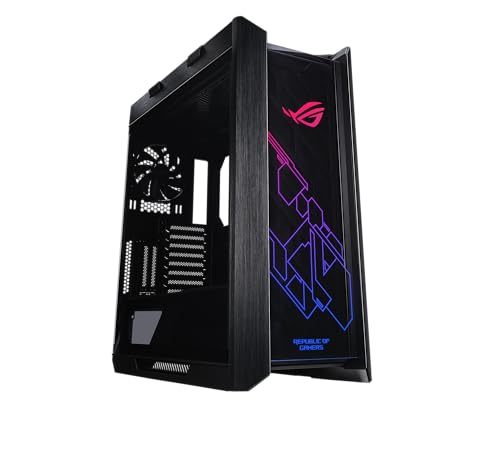
ASUS ROG Strix Helios RGB Mid-Tower Case
Best for: E-ATX builds with large liquid cooling loops
- Tower Size
- Mid-Tower (what this guide is about)
- Motherboard Support
- EATX
- Case Type
- Mid-Tower
- Side Panel
- Tempered Glass
- Included Fans
- 4x 140mm
- Radiator Support
- 420mm
View on Amazon: ASUS ROG Strix Helios RGB Mid-Tower Case Affiliate link
The ASUS ROG Strix Helios is a large mid-tower case designed for E-ATX motherboards. It includes four 140mm fans and supports radiators up to 420mm for custom liquid cooling. A full tempered glass side panel showcases your build. The chassis features a built-in fan hub and space for up to nine storage drives. This case suits users who need extensive expansion slots and robust airflow for high-end components.
Pros
- Supports E-ATX motherboards for maximum compatibility
- Includes four 140mm fans and a built-in hub
- Accepts radiators up to 420mm in length
- Features a full tempered glass side panel
- Space for up to nine storage drives
Cons
- Heavy build at 39.7 pounds
- Large footprint with a height of 23.3 inches
- Limited to black color option in this variation
Good fit if
- You plan to use an E-ATX motherboard
- You want to install a large 420mm radiator
- You need vertical GPU mounting options
Skip if
- You use a Micro-ATX or Mini-ITX motherboard
- You have limited desk or floor space
- You prefer a lighter, more portable case
Verdict: The ASUS ROG Strix Helios E-ATX Mid-Tower fits enthusiasts building large systems with E-ATX boards and extensive liquid cooling loops. It offers ample space for GPUs and storage but requires a sturdy surface due to its weight.

ASUS TUF Gaming GT502 Dual-Chamber Mid-Tower Case
Best for: Clean builds with vertical GPU mounts
- Tower Size
- Mid-Tower (what this guide is about)
- Motherboard Support
- ATX
- Case Type
- Mid Tower
- Side Panel
- Tempered Glass
- Radiator Support
- 360mm
- Max GPU Length
- 400mm
View on Amazon: ASUS TUF Gaming GT502 Dual-Chamber Mid-Tower Case Affiliate link
The ASUS TUF Gaming GT502 White Edition is an ATX mid-tower case with a dual-chamber design. It features tempered glass on the front and side for a clear view of your build. The case includes a vertical GPU mount and a support bracket to prevent sag. It offers USB 3.2 Gen 2 Type-C and USB 3.0 ports on the front. This model arrives without fans included.
Pros
- Dual-chamber design separates CPU and GPU cooling zones
- Tempered glass panels on front and side
- Includes vertical GPU mount and support bracket
- Tool-free side panel removal via rear button
Cons
- Sold without case fans included
- Heavier build at 28 pounds
- No mention of included RGB lighting kits in this SKU
Good fit if
- You want a clean cable management layout
- You plan to mount your GPU vertically
- You prefer a white color scheme
Skip if
- You need pre-installed case fans
- You prefer a compact Micro-ATX form factor
- You want a black chassis color
Verdict: ASUS TUF GT502 White Mid-Tower suits builders who value internal airflow separation and vertical GPU mounting. It is ideal for those who prioritize a clean aesthetic with tempered glass visibility.

ASUS A31 White Panoramic ATX Case
Best for: White ATX builds with large coolers
- Tower Size
- Mid-Tower (what this guide is about)
- Motherboard Support
- ATX
- Case Type
- Mid-Tower
- Side Panel
- Tempered Glass
- Included Fans
- 4x ARGB
- Radiator Support
- 360mm
View on Amazon: ASUS A31 White Panoramic ATX Case Affiliate link
The ASUS A31 Plus White Edition is an ATX mid-tower case featuring dual tempered glass panels for a panoramic view. It includes four pre-installed ARGB fans and supports up to 360mm radiators. The design accommodates GPUs up to 380mm long and CPU coolers up to 165mm tall. An 8-degree angled base improves airflow and viewing angles. It is built for motherboards with hidden connectors to streamline cable management.
Pros
- Includes 4 pre-installed ARGB fans
- Dual tempered glass side and front panels
- Supports 360mm radiators and 380mm GPUs
- 8-degree angled base for better airflow
Cons
- Heavier at 18 pounds compared to standard cases
- Fixed 8-degree base angle limits placement options
- No mention of front I/O port count or types
Good fit if
- You want a white ATX case with ARGB lighting
- You need support for large 360mm radiators
- You prefer a panoramic view of your components
Skip if
- You require a micro-ATX or mini-ITX motherboard
- You need a case with a flat base for easy movement
- You prefer a black color scheme
Verdict: The ASUS A31 Plus White ATX Mid-Tower suits builders who want a white chassis with strong cooling support and a clear view of their hardware. It is ideal for those prioritizing aesthetics and airflow over compact portability.

ASUS ProArt PA401 Wood Edition
Best for: Sustainable ATX builds with glass panels
- Tower Size
- Mid-Tower (what this guide is about)
- Motherboard Support
- ATX
- Case Type
- Mid-Tower
- Side Panel
- Tempered Glass
- Radiator Support
- 240mm
- Max GPU Length
- 315mm
View on Amazon: ASUS ProArt PA401 Wood Edition Affiliate link
This ASUS ProArt PA401 Wood Edition is an ATX mid-tower case featuring a tempered glass side panel. It includes dual 160 x 32mm front fans for up to 138cfm airflow. The front panel uses FSC-certified wood for a distinct look. It offers USB Type-C 20Gbps I/O and assembly-friendly features like a detachable PSU bracket. It suits users who want sustainable materials and clear interior visibility.
Pros
- Tempered glass side panel for interior visibility
- Dual 160 x 32mm front fans with 138cfm airflow
- FSC-certified wood front panel
- USB Type-C 20Gbps port
Cons
- Non-ARGB fans limit lighting customization
- ATX support excludes E-ATX motherboards
- No mention of rear fan support
Good fit if
- You want a tempered glass side panel
- You prefer sustainable wood materials
- You need USB Type-C connectivity
Skip if
- You require E-ATX motherboard support
- You want ARGB fan lighting
- You need a mesh front panel
Verdict: The ASUS ProArt PA401 Wood Edition fits builders who value sustainable design and clear interior views. Its tempered glass and wood front offer a unique aesthetic for ATX builds.

ASUS Prime AP202 ARGB White
Best for: compact micro-ATX builds with a white theme
- Tower Size
- Mid-Tower (what this guide is about)
- Motherboard Support
- Micro-ATX
- Case Type
- Mid Tower
- Side Panel
- Tempered Glass
- Radiator Support
- 360mm
- Max GPU Length
- 420mm
View on Amazon: ASUS Prime AP202 ARGB White Affiliate link
The ASUS Prime AP202 is a white mid-tower case built for micro-ATX motherboards. It features a curved tempered glass side panel that offers a clear view of your build. The chassis includes an integrated ARGB light band compatible with Aura Sync. Its compact dimensions make it suitable for smaller desks. You get easy panel removal via detachable rails. This case focuses on clean aesthetics and efficient airflow for compact systems.
Pros
- Curved tempered glass side panel for panoramic component visibility
- Integrated ARGB lighting band with Aura Sync support
- Patented slot vent design for optimized graphics card cooling
- Easy-detach rails simplify side panel installation and removal
Cons
- Limited to micro-ATX motherboards, excluding larger ATX builds
- Curved glass panel may restrict fit for very wide GPUs
- No mention of front I/O port configuration or quantity
Good fit if
- You are building a compact system with a micro-ATX motherboard
- You prefer a white aesthetic with subtle RGB lighting
- You want a mid-tower size that fits on smaller desks
Skip if
- You need to install a full-size ATX motherboard
- You require extensive front panel connectivity options
- You prefer a mesh front panel for maximum airflow
Verdict: ASUS Prime AP202 ARGB White Micro-ATX is a compact white case ideal for users building with micro-ATX boards who value clean lines and integrated lighting.
Specifications side by side
| Spec | ASUS ROG Strix Helios RGB Mid-Tower Case | ASUS TUF Gaming GT502 Dual-Chamber Mid-Tower Case | ASUS A31 White Panoramic ATX Case | ASUS ProArt PA401 Wood Edition | ASUS Prime AP202 ARGB White |
|---|---|---|---|---|---|
| Motherboard Support | EATX | ATX | ATX | ATX | Micro-ATX |
| Case Type | Mid-Tower | Mid Tower | Mid-Tower | Mid-Tower | Mid Tower |
| Side Panel | Tempered Glass | Tempered Glass | Tempered Glass | Tempered Glass | Tempered Glass |
| Included Fans | 4x 140mm | not stated | 4x ARGB | not stated | not stated |
| Radiator Support | 420mm | 360mm | 360mm | 240mm | 360mm |
| Max GPU Length | 450mm | 400mm | 380mm | 315mm | 420mm |
| Tower Size | Mid-Tower | Mid-Tower | Mid-Tower | Mid-Tower | Mid-Tower |
| Use | Gaming | Gaming | not stated | not stated | not stated |
| Lighting | RGB | not stated | ARGB | not stated | ARGB |
| Connectivity | not stated | Type-C | not stated | Type-C | not stated |
| Compatible Device | Radiator, Graphics Card | Radiator | Radiator | Radiator | Radiator |
| Dimensions | 22.2 × 9.8 × 23.3 inches | 17.6 × 11.2 × 17.7 inches | 20 × 17.1 × 9.4 inches | 19.8 × 8.86 × 16.2 inches | 17.4 × 9.29 × 18.1 inches |
| Weight | 39.7 pounds | 28 pounds | 18 pounds | not stated | 20.1 pounds |
| Size | GX601|Black | White|w/o Fans | White|4x ARGB Fans|BTF | Black|TG|Wood | Curved Glass|White |
| Color | Helios GX601|Black | GT502|White | WHITE | Black|Non ARGB Fans | WHITE |
| Model | 90DC0020-B39000 | GT502/WHT/TG// | ASUS A31 PLUS WHITE | PROART PA401 WOOD TG PWM BLACK | PRIME AP202 TG ARGB WHITE |
Choosing the Right ASUS Mid-Tower Case
-
Check Motherboard Compatibility
Your motherboard size determines which case fits your build. The ASUS ROG Strix Helios supports E-ATX boards, making it ideal for large enthusiast systems. Most other options, such as the TUF GT502 and A31, are limited to standard ATX. If you are using a smaller micro-ATX board, the Prime AP202 is a compact choice. Always verify the motherboard support spec before purchasing to ensure your mainboard fits securely without obstruction.
-
Consider Weight and Stability
Mid-tower cases can be heavy, affecting desk stability. The ROG Strix Helios weighs 39.7 pounds, requiring a sturdy surface to prevent tipping. Lighter options like the A31 weigh 18 pounds, offering easier handling. The TUF GT502 sits at 28 pounds. Heavier cases often use more steel, providing rigidity. Ensure your desk can support the weight. This is especially important for large builds with heavy GPUs and liquid cooling loops that add further mass to the system.
-
Evaluate Side Panel Material
Side panel material impacts aesthetics and durability. The ProArt PA401 features tempered glass for a clear view of internal components. This allows you to showcase your hardware and lighting. The Prime AP202 also uses curved glass for a modern look. Plastic or metal panels offer different visual styles. Tempered glass is prone to shattering if dropped. Choose glass for visibility and metal for durability. Match the panel type to your desired display style and handling preferences.
-
Plan for Lighting Integration
Lighting specs define your case's visual profile. The ROG Strix Helios includes RGB lighting for customizable effects. The A31 and Prime AP202 feature ARGB fans, allowing individual LED control. The ProArt PA401 comes with non-ARGB fans, offering simpler illumination. Check the lighting type in the attributes. ARGB requires specific headers on your motherboard. RGB is often simpler to manage. Select a case with lighting that matches your motherboard's capabilities and your aesthetic goals.
-
Assess Internal Dimensions
Internal dimensions dictate component compatibility. Measure your GPU length and CPU cooler height against the case specs. The ROG Strix Helios is 22.2 inches long, accommodating large graphics cards. The TUF GT502 is 17.6 inches long, which may limit very large GPUs. The A31 is 20 inches long. Verify these measurements before buying. Incompatibility leads to installation issues. Use the published length and width specs to ensure your hardware fits without blocking airflow or other components.
Frequently asked questions
Does the ASUS ROG Strix Helios support E-ATX motherboards?
Yes, the ASUS ROG Strix Helios supports E-ATX motherboards. This allows you to install larger enthusiast-grade boards that require more space. It also accommodates extensive liquid cooling loops. The case measures 23.3 inches in height and 22.2 inches in length. Be aware that it weighs 39.7 pounds, so ensure your desk is sturdy enough to hold it.
Can I mount my GPU vertically in the ASUS TUF GT502?
Yes, the ASUS TUF Gaming GT502 features a dual-chamber design that supports vertical GPU mounting. This setup helps create a clean aesthetic by separating the power supply from the main component area. The case supports ATX motherboards and includes tempered glass panels for clear visibility. It measures 17.7 inches in height and weighs 28 pounds.
Is the ASUS A31 Plus suitable for large CPU coolers?
Yes, the ASUS A31 Plus is suitable for large CPU coolers. It is designed for builders who prioritize airflow and aesthetics. The case supports ATX motherboards and comes with four ARGB fans pre-installed. It measures 20 inches in length and 9.4 inches in height. The white finish and panoramic glass provide a clear view of your hardware components.
What material is the front panel of the ASUS ProArt PA401?
The front panel of the ASUS ProArt PA401 Wood Edition combines tempered glass with wood. This design offers a unique aesthetic for sustainable builds. The case supports ATX motherboards and features tempered glass side panels. It measures 19.8 inches in length and 16.2 inches in height. The black color scheme includes non-ARGB fans for a subtle look.
Does the ASUS Prime AP202 support micro-ATX boards?
Yes, the ASUS Prime AP202 ARGB White supports micro-ATX motherboards. It is a compact case ideal for users building smaller systems. The chassis features curved glass and integrated ARGB lighting. It measures 17.4 inches in length and 18.1 inches in height. The white color scheme provides a clean look for compact builds that still require mid-tower dimensions.
Which ASUS mid-tower case is the lightest?
The ASUS A31 Plus White is the lightest option at 18 pounds. It is designed for ATX builds with a focus on airflow and aesthetics. The case includes four ARGB fans and supports large coolers. It measures 20 inches in length and 17.1 inches in width. Its lighter weight makes it easier to position compared to heavier enthusiast models like the Helios.