The Best ASUS PC Cases in 2026: 6 Picks
As an Amazon Associate we earn from qualifying purchases. Links on this page are affiliate links.
These are the best ASUS PC cases for 2026. We compared 6 models based on their published specifications. ASUS offers a range of sizes from compact Micro-ATX to massive Full-Tower enclosures. Options include mesh designs for airflow, tempered glass for visibility, and RGB lighting for aesthetics. The top pick is the ASUS TUF Gaming E-ATX Full-Tower Case. It leads because it supports large E-ATX builds and includes convenient carry handles for transport.
Quick picks
| # | Product | Best for | Price |
|---|---|---|---|
| 1 | ASUS TUF Gaming E-ATX Full-Tower Case Best overall | large E-ATX builds and transport | Check price of ASUS TUF Gaming E-ATX Full-Tower Case on Amazon |
| 2 | ASUS ROG Strix Helios RGB Mid-Tower Case Also great | E-ATX builds requiring strong cooling and cable management | Check price of ASUS ROG Strix Helios RGB Mid-Tower Case on Amazon |
| 3 | ASUS Prime AP201 Mesh Micro-ATX Case Best budget | compact Micro-ATX builds with high airflow needs | Check price of ASUS Prime AP201 Mesh Micro-ATX Case on Amazon |
| 4 | ASUS ROG Hyperion E-ATX Full-Tower Case Best premium | E-ATX builds with large liquid cooling setups | Check price of ASUS ROG Hyperion E-ATX Full-Tower Case on Amazon |
| 5 | ASUS ProArt Full-Tower Case Best 200mm | E-ATX builders needing maximum airflow and space | Check price of ASUS ProArt Full-Tower Case on Amazon |
| 6 | ASUS A31 Panoramic ATX Case Best atx | ATX builds with hidden connector motherboards | Check price of ASUS A31 Panoramic ATX Case on Amazon |
Our 6 picks
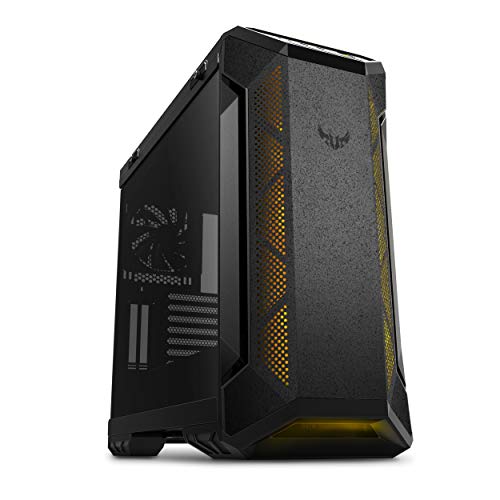
ASUS TUF Gaming E-ATX Full-Tower Case
Best for: large E-ATX builds and transport
- Motherboard Support
- E-ATX
- Case Type
- Full-Tower
- Side Panel
- Tempered Glass
- Radiator Support
- 360mm
- Max GPU Length
- 420mm
- Fan Size
- 120mm, 140mm
View on Amazon: ASUS TUF Gaming E-ATX Full-Tower Case Affiliate link
The ASUS TUF Gaming GT501 is a full-tower case built for E-ATX motherboards. It features a 4mm-thick smoked tempered glass side panel and a metal chassis. The case includes three 120mm RGB fans and one 140mm rear PWM fan. It supports up to seven fan mounts and 360mm radiators. Ergonomic handles allow transport of units up to 65lbs. This design suits builders needing ample space for large components and liquid cooling setups.
Pros
- Supports E-ATX motherboards in a full-tower chassis
- Includes three 120mm RGB fans and one 140mm rear PWM fan
- Features a 4mm-thick smoked tempered glass side panel
- Supports 360mm radiators on top or front
- Has ergonomic woven-cotton carry handles for transport
Cons
- Heavy build at 26.2 pounds
- Large dimensions may not fit smaller desks
- No mention of included front USB-C ports
Good fit if
- You need space for E-ATX motherboards
- You want pre-installed RGB fans
- You plan to move the case often
Skip if
- You prefer a compact micro-ATX form factor
- You need a lightweight case under 20 pounds
- You only support ATX motherboards
Verdict: The ASUS TUF GT501 E-ATX Full-Tower offers robust support for large builds and includes convenient carry handles. It is ideal for enthusiasts who prioritize expandability and transportability for their high-end gaming rigs.
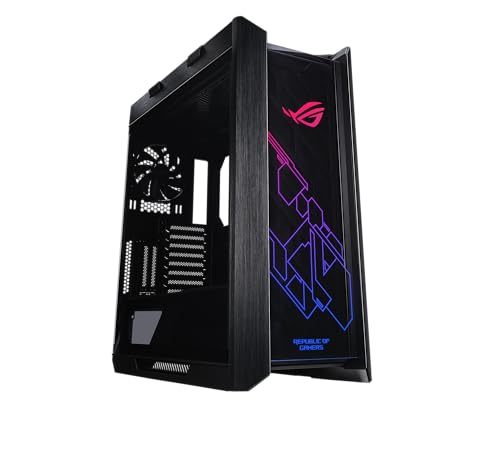
ASUS ROG Strix Helios RGB Mid-Tower Case
Best for: E-ATX builds requiring strong cooling and cable management
- Motherboard Support
- EATX
- Case Type
- Mid-Tower
- Side Panel
- Tempered Glass
- Included Fans
- 4x 140mm
- Radiator Support
- 420mm
- Max GPU Length
- 450mm
View on Amazon: ASUS ROG Strix Helios RGB Mid-Tower Case Affiliate link
The ASUS ROG Strix Helios is a mid-tower case supporting E-ATX motherboards. It includes four 140mm fans and supports radiators up to 420mm. The design features 4mm-thick smoked tempered glass side panels. It offers space for up to nine storage drives. This case suits builders needing robust cooling and premium cable management options.
Pros
- Supports E-ATX motherboards in a mid-tower form factor
- Includes four 140mm fans and a built-in fan hub
- Supports liquid cooling radiators up to 420mm in length
- Features 4mm-thick smoked tempered glass side panels
- Allows vertical mounting for up to two graphics cards
Cons
- Heavier at 39.7 pounds compared to standard mid-towers
- Limited to mid-tower size despite E-ATX support
- No mention of smart control or app integration
Good fit if
- You need E-ATX motherboard support in a mid-tower chassis
- You prefer built-in fan hubs for easier cable management
- You want smoked tempered glass for a subtle aesthetic
Skip if
- You require a full-tower case for maximum expansion
- You need smart app control for RGB lighting
- You prefer a lighter case for easier transport
Verdict: ASUS ROG Strix Helios Mid-Tower is a solid choice for enthusiasts building with E-ATX boards who value robust cooling options and premium build quality. It fits those who want a mid-tower with full-featured cable management and liquid cooling support.
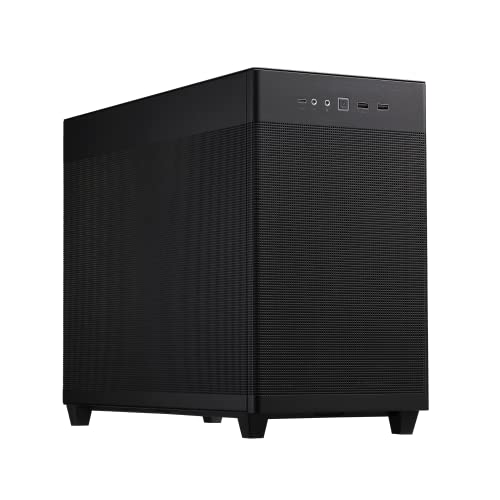
ASUS Prime AP201 Mesh Micro-ATX Case
Best for: compact Micro-ATX builds with high airflow needs
- Motherboard Support
- Micro-ATX
- Side Panel
- Mesh
- Radiator Support
- 360mm
- Max GPU Length
- 338mm
- Case Volume
- 33L
- Compatible Device
- Radiator
View on Amazon: ASUS Prime AP201 Mesh Micro-ATX Case Affiliate link
The ASUS Prime AP201 is a compact Micro-ATX case with a 33L volume. It features mesh panels with over 57,000 holes for airflow. The chassis supports 360mm radiators and graphics cards up to 338mm long. It includes tool-free side panels and extensive cable management. This case suits builders who need efficient cooling in a small footprint.
Pros
- Mesh side panels with 57,000 holes
- Supports 360mm radiators
- Fits GPUs up to 338mm long
- Tool-free side panel clips
Cons
- Limited to Micro-ATX motherboards
- Max GPU length is 338mm
- Weight is 12.7 pounds
Good fit if
- You are building a compact Micro-ATX system
- You need strong airflow in a small chassis
- You want tool-free panel access
Skip if
- You require E-ATX motherboard support
- You plan to use a GPU longer than 338mm
- You prefer a full-tower design
Verdict: ASUS Prime AP201 Micro-ATX Case offers dense airflow and compact dimensions for small builds. It fits users who prioritize spatial efficiency and cooling performance in a Micro-ATX form factor.
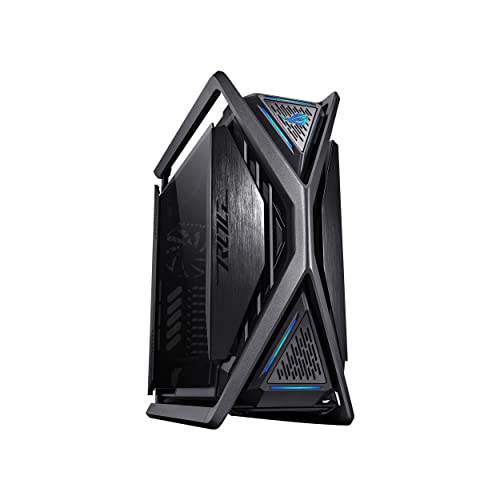
ASUS ROG Hyperion E-ATX Full-Tower Case
Best for: E-ATX builds with large liquid cooling setups
- Motherboard Support
- E-ATX
- Case Type
- Full-Tower
- Included Fans
- Four 140mm
- Radiator Support
- 420mm
- Max GPU Length
- 460mm
- Use
- Gaming
View on Amazon: ASUS ROG Hyperion E-ATX Full-Tower Case Affiliate link
The ASUS ROG Hyperion GR701 is a full-tower case built for E-ATX motherboards. It features a semi-open structure for improved airflow, supporting up to two 420mm radiators for large AIOs or custom water cooling. The sturdy diecast aluminum-alloy frame includes top bars that function as carry handles. You get a hinged tool-free side panel, a built-in storage drawer, and an integrated graphics card holder. Two front USB Type-C ports offer 60W fast charge support.
Pros
- Supports E-ATX motherboards in a full-tower chassis
- Semi-open structure allows up to two 420mm radiators
- Diecast aluminum-alloy frame with top carry handles
- Hinged tool-free side panel and built-in storage drawer
- Integrated graphics card holder for vertical or horizontal installs
Cons
- Large footprint at 25.9 inches in length
- Heavy at 55 pounds
- No mention of cable management channels or hidden connectors
Good fit if
- You need a full-tower for E-ATX motherboards
- You plan to use large 420mm radiators
- You want a sturdy frame with carry handles
Skip if
- You have limited desk or floor space
- You prefer a mid-tower size
- You want a lightweight case
Verdict: The ASUS ROG Hyperion Full-Tower is a massive, sturdy enclosure for builders who need E-ATX support and extensive cooling options. It fits users who prioritize airflow and build convenience over compactness.

ASUS ProArt Full-Tower Case
Best for: E-ATX builders needing maximum airflow and space
- Motherboard Support
- E-ATX
- Case Type
- Full-Tower
- Radiator Support
- 420mm
- Max GPU Length
- 440mm
- Fan Size
- 140mm, 200mm
- Compatible Device
- Radiator
View on Amazon: ASUS ProArt Full-Tower Case Affiliate link
The ASUS ProArt PA602 is a full-tower case supporting E-ATX motherboards. It features a 15.5 mm front grill with 45% porosity and two 200 mm front fans for strong airflow. You get ample space for a 420 mm radiator and large graphics cards. The case includes a USB Type-C port and an IR dust indicator. It weighs 35.5 pounds and measures 22.1 inches tall.
Pros
- Supports E-ATX motherboards in a full-tower chassis
- Fits up to a 420 mm radiator for cooling
- Includes two 200 mm front fans for high intake
- Features a USB Type-C 20Gbps port on the I/O panel
Cons
- Heavy build at 35.5 pounds makes moving difficult
- Large footprint requires significant desk or floor space
- Fans are non-ARGB, limiting aesthetic customization
Good fit if
- You need space for E-ATX motherboards and large components
- You prefer high static pressure fans for dense radiators
- You want a USB Type-C port for modern peripherals
Skip if
- You have limited space for a full-tower chassis
- You require RGB lighting synchronization for your fans
- You prioritize a lightweight case for easy transport
Verdict: The ASUS ProArt PA602 E-ATX Full-Tower is ideal for builders needing maximum expansion room and robust cooling support for E-ATX systems. It suits professionals who value airflow efficiency and durable construction over compact size or lighting effects.

ASUS A31 Panoramic ATX Case
Best for: ATX builds with hidden connector motherboards
- Motherboard Support
- ATX
- Side Panel
- Tempered Glass
- Included Fans
- 4x ARGB
- Radiator Support
- 360mm
- Max GPU Length
- 380mm
- Compatible Device
- Radiator
View on Amazon: ASUS A31 Panoramic ATX Case Affiliate link
The ASUS A31 PLUS is an ATX case designed for motherboards with hidden connectors. It includes four pre-installed ARGB fans and dual tempered glass panels. The 8° angled base improves airflow and viewing angles. It supports 360mm radiators and 380mm graphics cards. This mid-tower fits builders who want clean cable management and visible lighting without a full-tower footprint.
Pros
- Supports motherboards with hidden connectors
- Includes four pre-installed ARGB fans
- Dual tempered glass side and front panels
- Fits 360mm radiators and 380mm GPUs
Cons
- Smaller ATX form factor limits E-ATX support
- Weight of 18.1 pounds reduces portability
- No mention of included cable management tools
Good fit if
- You use ATX motherboards with hidden connectors
- You want pre-installed ARGB lighting
- You prefer an angled base design
Skip if
- You need E-ATX motherboard support
- You require a full-tower chassis
- You want a compact micro-ATX build
Verdict: The ASUS A31 PLUS ATX Case is a solid mid-tower for ATX builders using hidden connector motherboards. It offers strong cooling support and a clean aesthetic, but its size restricts larger components.
Specifications side by side
| Spec | ASUS TUF Gaming E-ATX Full-Tower Case | ASUS ROG Strix Helios RGB Mid-Tower Case | ASUS Prime AP201 Mesh Micro-ATX Case | ASUS ROG Hyperion E-ATX Full-Tower Case | ASUS ProArt Full-Tower Case | ASUS A31 Panoramic ATX Case |
|---|---|---|---|---|---|---|
| Motherboard Support | E-ATX | EATX | Micro-ATX | E-ATX | E-ATX | ATX |
| Case Type | Full-Tower | Mid-Tower | not stated | Full-Tower | Full-Tower | not stated |
| Side Panel | Tempered Glass | Tempered Glass | Mesh | not stated | not stated | Tempered Glass |
| Included Fans | not stated | 4x 140mm | not stated | Four 140mm | not stated | 4x ARGB |
| Radiator Support | 360mm | 420mm | 360mm | 420mm | 420mm | 360mm |
| Max GPU Length | 420mm | 450mm | 338mm | 460mm | 440mm | 380mm |
| Case Volume | not stated | not stated | 33L | not stated | not stated | not stated |
| Tower Size | Full-Tower | Mid-Tower | not stated | Full-Tower | Full-Tower | not stated |
| Fan Size | 120mm, 140mm | not stated | not stated | 140mm | 140mm, 200mm | not stated |
| Use | Gaming | Gaming | not stated | Gaming | not stated | not stated |
| Lighting | RGB | RGB | not stated | ARGB | not stated | ARGB |
| Connectivity | not stated | not stated | not stated | Type-C | not stated | not stated |
| Compatible Device | Radiator | Radiator, Graphics Card | Radiator | Radiator | Radiator | Radiator |
| Dimensions | 215 × 98.8 × 217 inches | 22.2 × 9.8 × 23.3 inches | 18.1 × 8.07 × 13.8 inches | 25.9 × 10.6 × 25.2 inches | 23.4 × 9.65 × 22.1 inches | 20.1 × 9.37 × 17.1 inches |
| Weight | 26.2 pounds | 39.7 pounds | 12.7 pounds | 55 pounds | 35.5 pounds | 18.1 pounds |
| Size | EATX | GX601|Black | Mesh|Black | GR701|Black | Black|TG | Black|4x ARGB Fans|BTF |
| Color | GT501|Grey | Helios GX601|Black | AP201/BLK/MESH// | Hyperion GR701|Black | Black|Non ARGB Fans | Black |
| Model | GT501/GRY/WITH HANDLE | 90DC0020-B39000 | TB305FU | GR701 ROG HYPERION | PA602/BLK/TG | ASUS A31 PLUS BLACK |
ASUS PC Case Lineup Guide
ASUS offers cases spanning Micro-ATX to Full-Tower sizes. The ASUS Prime AP201 Mesh Micro-ATX Case provides compact dimensions for smaller builds. In contrast, the ASUS TUF Gaming E-ATX Full-Tower Case supports large E-ATX motherboards and includes carry handles for transport. The ASUS ROG Strix Helios RGB Mid-Tower Case fits E-ATX boards while offering premium cable management and RGB lighting. These options suit users prioritizing either spatial efficiency or robust expansion capabilities.
For maximum airflow and space, the ASUS ROG Hyperion E-ATX Full-Tower Case and ASUS ProArt Full-Tower Case are ideal. The ASUS A31 Panoramic ATX Case targets ATX builders using hidden connector motherboards. Shoppers should compare tower size and motherboard support to match their specific component requirements. Each model balances cooling performance with physical constraints.
Who ASUS Cases Suit Best
ASUS covers a wide size range, from the compact AP201 Micro-ATX to the massive Hyperion Full-Tower. You can choose mesh for airflow or tempered glass for visibility. Most models support E-ATX boards, though the A31 targets standard ATX with hidden connectors. Lighting varies, with some units including ARGB fans while others remain plain. The lineup lacks Mini-ITX options entirely. If you need a tiny case for a minimalist desktop, ASUS does not currently offer a fit. This range is best for enthusiasts building larger, high-performance systems that require ample space and robust cooling support.
How to Choose the Right ASUS Case
-
Check Motherboard Support
Match the case to your motherboard size. The ASUS TUF Gaming E-ATX Full-Tower Case supports large E-ATX boards, offering maximum expansion room. If you use a standard ATX board, the ASUS A31 Panoramic ATX Case is a better fit. For smaller builds, the ASUS Prime AP201 Mesh Micro-ATX Case accommodates Micro-ATX boards. Choosing the wrong size limits your component options. Verify the supported form factor before purchasing to ensure compatibility with your specific build plans.
-
Assess Tower Size
Tower size dictates internal space and desk footprint. Full-tower cases like the ASUS ROG Hyperion and ASUS TUF GT501 are massive, weighing up to 55 pounds. They suit enthusiasts needing extensive cooling and expansion. Mid-tower options like the ASUS ROG Strix Helios balance size and capacity. Compact Micro-ATX cases like the ASUS Prime AP201 save space. Consider your desk dimensions and component length. Larger cases accommodate longer graphics cards and bigger coolers. Smaller cases fit tighter spaces but restrict component choices.
-
Evaluate Airflow Needs
Mesh panels provide superior airflow compared to solid panels. The ASUS Prime AP201 Mesh Micro-ATX Case features a mesh front for dense airflow, ideal for cooling performance. The ASUS ProArt Full-Tower Case also prioritizes airflow efficiency for professional builds. If you prioritize quiet operation or aesthetics, tempered glass sides offer visibility without compromising internal airflow structure. Check if the case includes pre-installed fans. More fans generally improve heat dissipation. Ensure your components do not overheat in the chosen enclosure.
-
Consider Transportability
If you move your PC often, built-in handles are essential. The ASUS TUF Gaming E-ATX Full-Tower Case includes convenient carry handles for transport. This feature is rare in full-tower enclosures. Heavy cases like the ASUS ROG Hyperion weigh 55 pounds, making manual handling difficult without assistance. For stationary setups, handles are less critical. However, if you attend LAN events or relocate frequently, prioritize cases with ergonomic carrying solutions. This ensures safe movement of your expensive hardware without risk of damage.
-
Review Lighting Options
Lighting adds visual appeal but impacts power and control. The ASUS ROG Strix Helios RGB Mid-Tower Case includes RGB lighting for aesthetic customization. The ASUS A31 Panoramic ATX Case supports ARGB fans for synchronized effects. The ASUS ProArt Full-Tower Case focuses on function, lacking ARGB fans for a professional look. Decide if lighting is a priority. RGB control requires compatible motherboard headers or controllers. Ensure your motherboard supports the lighting protocol. Otherwise, you may need separate hubs for proper synchronization and control.
Frequently asked questions
Which ASUS case supports the largest motherboards?
The ASUS TUF Gaming E-ATX Full-Tower Case and the ASUS ROG Hyperion E-ATX Full-Tower Case both support E-ATX motherboards. These full-tower enclosures provide maximum expansion room for large builds. The TUF GT501 includes carry handles for transport, while the Hyperion offers extensive cooling options for liquid setups.
What is the most compact ASUS case available?
The ASUS Prime AP201 Mesh Micro-ATX Case is the most compact option in this lineup. It measures 13.8 inches in height and supports Micro-ATX motherboards. This design prioritizes spatial efficiency and dense airflow, making it ideal for users who need a small footprint without sacrificing cooling performance.
Does the ASUS ROG Strix Helios have RGB lighting?
Yes, the ASUS ROG Strix Helios RGB Mid-Tower Case features RGB lighting. It is designed for enthusiasts who want premium build quality and robust cooling options. This mid-tower supports E-ATX boards and includes full-featured cable management, combining visual customization with practical interior organization for high-end gaming rigs.
Which ASUS case is best for hidden connector builds?
The ASUS A31 Panoramic ATX Case is designed for ATX builds using hidden connector motherboards. It supports standard ATX boards and includes ARGB fans for lighting. This mid-tower offers strong cooling support and a clean aesthetic, though its internal dimensions may restrict the use of larger components.
Is there an ASUS case with carry handles?
The ASUS TUF Gaming E-ATX Full-Tower Case includes convenient carry handles. This feature makes it ideal for enthusiasts who need to transport their high-end gaming rigs. The full-tower design supports large E-ATX motherboards, combining robust structural support with portability for users who prioritize expandability and easy movement.
Which ASUS case offers the best airflow?
The ASUS Prime AP201 Mesh Micro-ATX Case offers dense airflow through its mesh design. It is optimized for users who prioritize cooling performance in a compact form factor. The mesh front panel facilitates efficient air intake, ensuring that Micro-ATX builds remain cool under load without requiring excessive fan noise.