ASUS Prime AP201 Mesh Micro-ATX or ASUS A31 Panoramic ATX Case? Which ASUS Model to Buy
As an Amazon Associate we earn from qualifying purchases. Links on this page are affiliate links.
The asus prime ap201 micro atx PC case vs a31 plus black atx PC case comparison helps you choose the right chassis for your build. Both models support 360mm radiators and come in black. The main difference lies in their form factor and panel material. The AP201 is a compact Micro-ATX case with mesh panels for airflow. The A31 is a larger ATX case featuring dual tempered glass panels for a panoramic view of your components.
Key differences
| Aspect | ASUS Prime AP201 Mesh Micro-ATX Case | ASUS A31 Panoramic ATX Case |
|---|---|---|
| Motherboard Support | Micro-ATX | ATX |
| Side Panel | Mesh | Tempered Glass |
| Max GPU Length | 338 mm | 380 mm |
| Included Fans | Not listed | 4x ARGB |
| Case Volume | 33L | Not listed |
| Weight | 12.7 pounds | 18.1 pounds |
Which one should you choose?
Choose ASUS Prime AP201 Mesh Micro-ATX Case if
- You need a compact Micro-ATX chassis for a smaller desk or office setup.
- You prioritize maximum airflow and component visibility through a dense mesh design.
- You prefer a lighter case that is easier to move and install.
Choose ASUS A31 Panoramic ATX Case if
- You require full ATX motherboard support for more expansion slots.
- You want a panoramic view of your build with dual tempered glass panels.
- You need pre-installed ARGB fans to simplify initial cooling and lighting setup.
Verdict: Choose the AP201 if you value compactness and airflow for a Micro-ATX build. The A31 is the better option if you need ATX compatibility and a showcase-ready glass design. Your choice depends on your motherboard size and aesthetic preferences.
AP201 Mesh vs A31 Panoramic
Motherboard support
The ASUS Prime AP201 Mesh is built specifically for Micro-ATX motherboards. This smaller form factor keeps the chassis compact and efficient for tight spaces. In contrast, the ASUS A31 Panoramic supports full-size ATX motherboards. This gives you more room for additional expansion slots and larger boards. If you need a Micro-ATX build, the AP201 is the direct fit. For standard ATX setups, the A31 provides the necessary compatibility. You must choose based on your motherboard size to ensure the case fits your core component properly.
Side panel material
The AP201 features a mesh side panel. This design prioritizes airflow by allowing air to pass through the chassis directly. It helps keep internal components cool during heavy loads. The A31 uses tempered glass panels on the front and side. This offers a clear, unobstructed view of your internal hardware and lighting. Glass does not provide the same passive airflow as mesh. You should pick mesh if cooling is your priority. Choose glass if you want to showcase your build’s aesthetics and RGB lighting effects clearly.
Graphics card length
The ASUS A31 supports graphics cards up to 380mm in length. This extra space accommodates larger, high-end video cards without modification. The AP201 supports cards up to 338mm long. This is sufficient for most standard and mid-range GPUs. If you are using a very large, triple-fan graphics card, the A31 offers more clearance. The AP201 may require careful planning for longer cards. Check your specific GPU dimensions against these limits to ensure a proper fit inside the chassis.
Included fans
The ASUS A31 comes pre-installed with four ARGB fans. These fans provide immediate cooling and add visual appeal with customizable lighting effects. This saves you the cost and effort of buying fans separately. The data for the AP201 does not list any included fans. You will likely need to purchase fans separately to achieve adequate airflow. The AP201 supports up to six fans total, but they are not included. If you want a ready-to-cool setup with lighting, the A31 is the better choice.
Chassis dimensions
The AP201 is significantly smaller, measuring 13.8 inches in height and 18.1 inches in length. It has a 33L case volume, making it ideal for desks with limited space. The A31 is larger, standing 17.1 inches high and 20.1 inches long. It weighs 18.1 pounds compared to the AP201’s 12.7 pounds. The A31 requires more floor or desk space. If you have a compact desk or want a portable build, the AP201 is more suitable. For a standard desktop setup, the A31 fits easily.
Which Case Fits Your Build
Compact micro-ATX builders with limited space
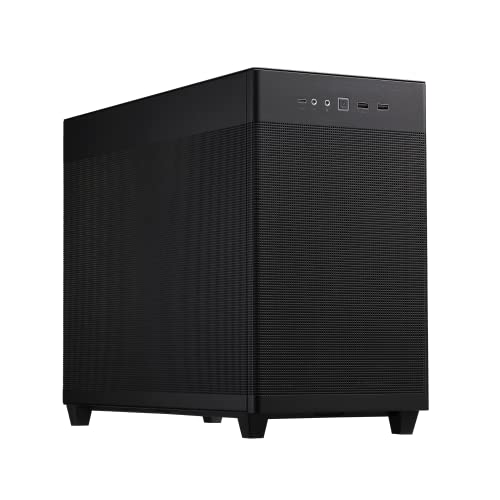
The ASUS Prime AP201 Mesh uses a Micro-ATX form factor to keep your footprint small. It fits in tighter spaces while still supporting 360mm radiators and graphics cards up to 338mm long. The mesh side panel provides airflow without adding bulk, making it ideal for efficient, smaller builds.
Users wanting panoramic views of components
The ASUS A31 features dual tempered glass panels on the front and side for an unobstructed view of your hardware. It includes four pre-installed ARGB fans for lighting and cooling. The 8-degree angled base widens the viewing angle, ensuring you can see your entire build clearly from most positions.
Builders using hidden connector motherboards
The ASUS A31 is specifically designed for motherboards with hidden connectors to optimize cable management. It supports full-size ATX boards and graphics cards up to 380mm long. This setup helps you achieve a clean, clutter-free interior by routing cables behind the motherboard tray effectively.
The products compared
ASUS Prime AP201 Mesh Micro-ATX Case
Best for: Compact Micro-ATX builds needing strong airflow
- Motherboard Support
- Micro-ATX
- Side Panel
- Mesh
- Radiator Support
- 360mm
- Max GPU Length
- 338mm
- Case Volume
- 33L
- Compatible Device
- Radiator
View on Amazon: ASUS Prime AP201 Mesh Micro-ATX Case Affiliate link
The ASUS Prime AP201 is a Micro-ATX case with a mesh front panel. It offers 33L of volume and supports 360mm radiators. The chassis fits GPUs up to 338mm long and PSUs up to 180mm. You get tool-free side panels and a spacious motherboard tray for cable management. This model suits builders prioritizing airflow in a compact footprint.
Pros
- Mesh side panels with over 57,000 holes for high airflow
- Supports 280mm and 360mm radiators
- Fits graphics cards up to 338mm long
- Tool-free clip mechanism for side panel removal
Cons
- Micro-ATX form factor limits motherboard compatibility
- 33L volume is smaller than standard ATX cases
- Mesh panels may let in more dust than solid panels
Good fit if
- You need a compact case for Micro-ATX motherboards
- You want strong airflow for high-performance hardware
- You prefer tool-free assembly for side panels
Skip if
- You require full-size ATX motherboard support
- You want a tempered glass side panel for visibility
- You need support for GPUs longer than 338mm
Verdict: The ASUS Prime AP201 Mesh Micro-ATX Case is a practical choice for builders who need compact airflow. It fits Micro-ATX systems with large coolers and GPUs. You should buy it if you value space efficiency over maximum expansion room.

ASUS A31 Panoramic ATX Case
Best for: Panoramic ATX builds with hidden connectors
- Motherboard Support
- ATX
- Side Panel
- Tempered Glass
- Included Fans
- 4x ARGB
- Radiator Support
- 360mm
- Max GPU Length
- 380mm
- Compatible Device
- Radiator
View on Amazon: ASUS A31 Panoramic ATX Case Affiliate link
The ASUS A31 Plus is an ATX case with a panoramic design featuring dual tempered glass panels. It includes four pre-installed ARGB fans and supports 360mm radiators and 380mm graphics cards. The 8-degree angled base improves airflow and viewing angles. This model is built for motherboards with hidden connectors to streamline cable management. It suits users who want a clean, visible build.
Pros
- Dual tempered glass panels for panoramic viewing
- Four pre-installed ARGB fans for cooling and lighting
- Supports 360mm radiators and 380mm graphics cards
- Optimized for hidden-connector motherboards
Cons
- Heavier at 18.1 pounds compared to standard cases
- Limited to ATX motherboard support only
- No mention of USB-C connectivity on the I/O panel
Good fit if
- You prefer a panoramic view of your components
- You use a motherboard with hidden connectors
- You need support for large 360mm radiators
Skip if
- You need Micro-ATX or Mini-ITX compatibility
- You want a lightweight case under 15 pounds
- You prefer a solid front panel for dust reduction
Verdict: ASUS A31 Plus ATX Panoramic Case fits builders who want a clean, hidden-connector setup with a clear view of their hardware. It is ideal for those prioritizing aesthetics and large component support.
Specifications side by side
| Spec | ASUS Prime AP201 Mesh Micro-ATX Case | ASUS A31 Panoramic ATX Case |
|---|---|---|
| Motherboard Support | Micro-ATX | ATX |
| Side Panel | Mesh | Tempered Glass |
| Included Fans | not stated | 4x ARGB |
| Radiator Support | 360mm | 360mm |
| Max GPU Length | 338mm | 380mm |
| Case Volume | 33L | not stated |
| Lighting | not stated | ARGB |
| Compatible Device | Radiator | Radiator |
| Dimensions | 18.1 × 8.07 × 13.8 inches | 20.1 × 9.37 × 17.1 inches |
| Weight | 12.7 pounds | 18.1 pounds |
| Size | Mesh|Black | Black|4x ARGB Fans|BTF |
| Color | AP201/BLK/MESH// | Black |
| Model | TB305FU | ASUS A31 PLUS BLACK |
Frequently asked questions
Does the ASUS Prime AP201 Mesh fit standard ATX motherboards?
No, the ASUS Prime AP201 Mesh is designed strictly for Micro-ATX motherboards. This form factor keeps the chassis compact, measuring 18.1 inches in length. If you need support for full-size ATX boards, this model will not work for your build.
What are the exact dimensions of the ASUS A31 Panoramic case?
The ASUS A31 Panoramic measures 20.1 inches in length, 17.1 inches in height, and 9.37 inches in width. These larger dimensions accommodate full-size ATX motherboards and provide ample space for large components and cooling solutions within the chassis.
Does the ASUS A31 include pre-installed fans?
Yes, the ASUS A31 Panoramic comes with four ARGB fans pre-installed. This feature supports immediate airflow and aesthetic lighting out of the box. The included fans help maintain cooling performance while showcasing your internal hardware through the panoramic design.
Which case is heavier, the AP201 or the A31?
The ASUS A31 Panoramic is heavier at 18.1 pounds. The ASUS Prime AP201 Mesh weighs 12.7 pounds. The A31’s increased weight correlates with its larger ATX form factor and additional included components like the four ARGB fans.
Can I install a 360mm radiator in the ASUS Prime AP201?
Yes, the ASUS Prime AP201 Mesh supports 360mm radiators. Despite its compact Micro-ATX footprint, it is designed to handle large cooling solutions. This makes it suitable for builders who need strong airflow without sacrificing too much desk space.
Is the ASUS A31 suitable for BTF motherboards?
Yes, the ASUS A31 Panoramic is compatible with BTF motherboards. Its specifications list BTF support, which allows for a cleaner build by hiding connectors behind the motherboard. This feature aligns with its goal of providing a clean, hidden-connector setup.
Which case offers a better view of the internal components?
The ASUS A31 Panoramic is designed for visibility. It features a panoramic design that highlights your hardware. In contrast, the ASUS Prime AP201 Mesh focuses on practical airflow and space efficiency. Choose the A31 if aesthetics and component visibility are your priorities.