4-Pin or 3-Pin Case Fans? Compared by Specs
As an Amazon Associate we earn from qualifying purchases. Links on this page are affiliate links.
Choosing between a 4-Pin vs 3-Pin case fan depends on your cooling needs. Both products provide airflow for computer components. The main difference lies in connector type and performance. One unit offers high-speed PWM control with dual-ball bearings. The other provides quiet operation with sleeve bearings. You must match the connector to your motherboard headers. This guide compares their specifications to help you decide.
Key differences
| Aspect | Wathai 120mm High-Airflow 4-Pin PWM Fan | GDSTIME 70mm 3-Pin Cooling Fan 2-Pack |
|---|---|---|
| Fan Size | 120 mm | 70 mm |
| Connector Type | 4-pin PWM | 3-pin DC |
| Max Airflow | 230 CFM | 18.7 CFM |
| Max Fan Speed | 5300 RPM | 2500 RPM |
| Noise Level | 60 dBA | 25.8 dBA |
| Bearing Type | Dual Ball | Sleeve Bearing |
Which one should you choose?
Choose Wathai 120mm High-Airflow 4-Pin PWM Fan if
- You need high airflow for intensive cooling tasks
- Your motherboard supports PWM speed control
- You require a longer bearing lifespan for 24/7 operation
Choose GDSTIME 70mm 3-Pin Cooling Fan 2-Pack if
- You are cooling a small CPU cooler or tight space
- You prioritize quiet operation over raw airflow
- Your system uses standard 3-pin fan headers
Verdict: The 4-pin fan suits users needing maximum airflow and intelligent speed control. The 3-pin fan is better for small spaces where silence is key. Choose based on your specific case size and noise tolerance.
4-Pin vs 3-Pin Fan Specs
Connector Type
The Wathai fan uses a 4-pin PWM connector, which allows your motherboard to control fan speed via a pulse-width modulation signal. This enables automatic speed adjustments based on system temperature. The GDSTIME fan uses a 3-pin connector, which relies on direct current voltage control. While 3-pin fans can vary speed, they lack the precise PWM signaling found in the Wathai unit. If your motherboard supports PWM, the 4-pin connector offers more granular control over airflow and noise levels. The GDSTIME 3-pin design is standard for many older or budget cooling setups.
Fan Size
Physical dimensions dictate where you can install these fans. The Wathai fan measures 120mm by 120mm with a thickness of 38mm. This is a standard size for many PC case exhaust and intake positions. The GDSTIME fan is significantly smaller at 70mm by 70mm with a thin 15mm profile. Its compact size makes it suitable for tight spaces, such as inside CPU coolers or small form factor cases. You cannot swap these fans without checking mounting hole compatibility. The Wathai fits standard 120mm mounts, while the GDSTIME requires 70mm spacing.
Airflow Performance
Airflow determines how much air moves through your case. The Wathai fan delivers 230 CFM at its maximum speed. This high volume is ideal for moving large amounts of air quickly. The GDSTIME fan provides 18.7 CFM, which is much lower due to its smaller size and lower speed. The Wathai is built for high-performance cooling needs, such as gaming rigs or mining rigs. The GDSTIME is designed for low-airflow applications, like cooling specific small components rather than entire chassis volumes. The difference in CFM is substantial between the two units.
Noise Level
Noise output varies with fan speed and bearing type. The Wathai fan reaches up to 60 dBA at its top speed of 5300 RPM. This level is quite loud and may be noticeable in a quiet room. The GDSTIME fan operates at a maximum of 25.8 dBA, which is very quiet. This low noise level is due to its slower 2500 RPM speed and sleeve bearing design. If you prioritize silence, the GDSTIME is the clear choice. The Wathai sacrifices quietness for raw airflow capacity, making it better for performance over comfort.
Bearing Type
Bearings affect fan longevity and stability. The Wathai fan uses dual-ball bearings, which are rated for 67,000 hours of operation. This type of bearing is durable and can handle various mounting orientations, including vertical or flat positions. The GDSTIME fan uses a sleeve bearing, rated for 35,000 hours. Sleeve bearings are common in smaller fans but may wear out faster under high heat or continuous use. The Wathai offers a longer lifespan and better durability for heavy-duty applications compared to the GDSTIME sleeve bearing.
Which fan fits your build?
High-performance cooling needs
You need maximum airflow for demanding tasks. This 120mm fan delivers 230 CFM at 5300 RPM. The 4-pin PWM connector lets your motherboard adjust speed based on temperature. Dual-ball bearings support high speeds and offer a 67,000-hour lifespan, ensuring reliability under heavy load.
Quiet small fan replacement
You require a quiet replacement for a CPU cooler. This 70mm fan operates at just 25.8 dBA. It provides 18.7 CFM of airflow, which is sufficient for smaller heatsinks. The 3-pin connector is standard for many older or specific cooler mounts, keeping noise levels low.
Standard case ventilation
You want to improve airflow in a standard 120mm fan slot. This unit offers a balance of high static pressure and airflow. The intelligent speed regulation allows you to set trigger temperatures in your BIOS. It fits most standard cases and provides efficient cooling for general computing tasks.
Quick picks
| # | Product | Best for | Price |
|---|---|---|---|
| 1 | Wathai 120mm High-Airflow 4-Pin PWM Fan | High-airflow mining and server cooling | Check price of Wathai 120mm High-Airflow 4-Pin PWM Fan on Amazon |
| 2 | GDSTIME 70mm 3-Pin Cooling Fan 2-Pack | small 70mm CPU heatsinks with 3-pin headers | Check price of GDSTIME 70mm 3-Pin Cooling Fan 2-Pack on Amazon |
The products compared
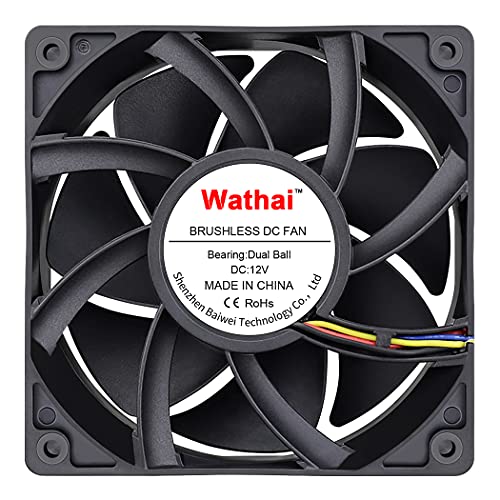
Wathai 120mm High-Airflow 4-Pin PWM Fan
Best for: High-airflow mining and server cooling
- Connector Type
- 4-Pin (what this guide is about)
- Fan Size
- 120mm
- Max Fan Speed
- 5300 RPM
- Max Airflow
- 230 CFM
- Static Pressure
- 1.17 inH2O
- Noise Level
- 60 dBA
View on Amazon: Wathai 120mm High-Airflow 4-Pin PWM Fan Affiliate link
This is a 120mm x 38mm case fan with a 4-pin PWM connector. It moves 230 CFM of air at up to 5300 RPM. The dual-ball bearings last 67,000 hours. You get intelligent speed control via BIOS. The 60 dBA noise level is high at max speed. It suits miners and high-airflow builds.
Pros
- 4-pin PWM connector for BIOS speed control
- 230 CFM max airflow
- Dual-ball bearings rated for 67,000 hours
- 38mm thickness for high static pressure
Cons
- 60 dBA noise level at maximum speed
- 38mm thickness may not fit standard 120mm mounts
- High speed may be too loud for quiet builds
Good fit if
- You need high airflow for mining rigs
- You use BIOS to manage fan speeds
- You have space for 38mm thick fans
Skip if
- You need quiet operation under 40 dBA
- You only have 3-pin fan headers
- You need standard 25mm thickness
Verdict: Wathai 120mm 38mm 4-Pin PWM Fan offers high airflow and bearing longevity for demanding cooling tasks. It fits miners and server chassis where noise is secondary to ventilation.

GDSTIME 70mm 3-Pin Cooling Fan 2-Pack
Best for: small 70mm CPU heatsinks with 3-pin headers
- Connector Type
- 3-Pin (what this guide is about)
- Fan Size
- 70mm
- Max Fan Speed
- 2500 RPM
- Max Airflow
- 18.7CFM
- Noise Level
- 25.8dBA
- Bearing Type
- Sleeve Bearing
View on Amazon: GDSTIME 70mm 3-Pin Cooling Fan 2-Pack Affiliate link
This GDSTIME fan is a 70mm unit designed for CPU cooling. It uses a 3-pin DC connector, which means it runs at a fixed speed rather than adjusting via motherboard PWM signals. The rated speed is 2500 RPM, moving 18.7 CFM of air. It operates at 25.8 dBA and uses a sleeve bearing rated for 35,000 hours. You should buy this if you need a small fan for a specific heatsink that requires a 3-pin connection.
Pros
- 70mm frame size fits small CPU coolers
- 3-pin connector for direct DC power
- 18.7 CFM airflow at 2500 RPM
- Sleeve bearing rated for 35,000 hours
Cons
- No PWM speed control via motherboard
- 70mm size is smaller than standard case fans
- Sleeve bearing has lower lifespan than fluid dynamic bearings
Good fit if
- You need a 70mm fan for a CPU heatsink
- Your cooler requires a 3-pin DC connection
- You are building a small form factor PC
Skip if
- You want variable fan speeds controlled by the motherboard
- You need a standard 120mm or 140mm case fan
- You require high static pressure for dense radiators
Verdict: GDSTIME 70mm 3-Pin CPU Fan is a specialized component for small CPU coolers. It fits builders who need a compact 70mm unit with a 3-pin connector and do not require PWM speed adjustment.
Specifications side by side
| Spec | Wathai 120mm High-Airflow 4-Pin PWM Fan | GDSTIME 70mm 3-Pin Cooling Fan 2-Pack |
|---|---|---|
| Fan Size | 120mm | 70mm |
| Max Fan Speed | 5300 RPM | 2500 RPM |
| Max Airflow | 230 CFM | 18.7CFM |
| Static Pressure | 1.17 inH2O | not stated |
| Noise Level | 60 dBA | 25.8dBA |
| Connector Type | 4-pin PWM | 3-Pin |
| Bearing Type | Dual Ball | Sleeve Bearing |
| Use | Server | not stated |
| Compatible Device | not stated | CPU Cooler |
| Dimensions | 1.5 × 4.72 × 4.72 inches | 2.76 × 2.76 × 0.59 inches |
| Weight | not stated | 1.29 ounces |
| Color | 120x38mm 12V Ball 4P | not stated |
| Model | 12038B12V4P2A | GDT7015S12V3P |
| Size | not stated | 70x15mm |
Frequently asked questions
Can I plug a 4-pin fan into a 3-pin motherboard header?
Yes, you can physically connect a 4-pin fan to a 3-pin header. The fourth pin for PWM signals will simply remain unconnected. The fan will run at a constant speed determined by the voltage supplied. You lose automatic speed control, but the unit still functions for cooling.
What does the extra pin on a 4-pin fan do?
The fourth pin carries a pulse-width modulation signal. This signal allows your motherboard to precisely adjust fan speed based on real-time temperature. A 3-pin fan receives constant voltage and runs at a fixed speed. The 4-pin design offers better thermal management for varying system loads.
Which connector type is better for server or mining rigs?
The 4-pin PWM connector is generally better for demanding environments. The Wathai 120mm fan uses this type to support high airflow and dual-ball bearings. This setup handles continuous high-speed operation well. It prioritizes ventilation over noise, making it suitable for miners who need consistent cooling performance.
Do I need a 4-pin fan for my CPU cooler?
Not always. If your cooler supports it, a 3-pin fan works fine. The GDSTIME 70mm fan uses a 3-pin connector and fits small CPU heatsinks. It provides quiet operation without needing PWM adjustment. Choose 4-pin only if your motherboard requires it or you want automatic speed scaling.
Are 3-pin fans quieter than 4-pin fans?
Not necessarily. Quietness depends on bearing type and RPM, not just the connector. The GDSTIME 3-pin fan offers quiet operation for its size. However, the Wathai 4-pin fan uses dual-ball bearings for longevity, which may produce more noise at high speeds. Check the bearing type for noise expectations.
Can I use a 3-pin fan if my motherboard only has 4-pin headers?
Yes, you can plug a 3-pin fan into a 4-pin header. The missing PWM pin is ignored by the motherboard. The fan runs at full speed or a fixed voltage setting. You will not get automatic speed control. This is a common and safe workaround for older fans.
What is the main difference between 3-pin and 4-pin case fans?
The key difference is speed control capability. A 4-pin fan uses PWM for precise, automatic speed adjustments. A 3-pin fan runs at a fixed speed based on voltage. Both provide airflow. Your choice depends on whether you need dynamic cooling adjustments or simple, constant ventilation for your case.