Best Case Fans with 4-Pin in 2026: 15 Picks Ranked by Specs
As an Amazon Associate we earn from qualifying purchases. Links on this page are affiliate links.
Choosing the right case fan with 4-Pin connectivity allows your system to regulate motor speed automatically based on thermal demands. The Wathai 120mm High-Airflow 4-Pin PWM Fan earns the top position because its 230 CFM airflow specification delivers maximum cooling volume for high-heat enclosures.
We evaluated 15 products strictly using the technical specifications published on their listings. This guide helps you determine the correct fan dimensions, mounting thickness, and connector setup for your chassis cooling needs.
Quick picks
The best fit for you
- You need maximum airflow for high-heat enclosures. Wathai 120mm High-Airflow 4-Pin PWM Fan It delivers 230 CFM airflow through a deep 38mm frame with 4-pin PWM control.
- You have limited clearance for standard 120mm fans. Scythe Wonder Tornado 120 Slim Fan Its slim 15mm low-profile frame fits restricted clearances while running up to 2000 RPM.
- You want quiet cooling for compact NAS enclosures. Noctua 80mm PWM Case Fan Its 80mm frame operates at a quiet 17.7 dBA with 4-pin PWM speed control.
- You must connect multiple fans to one header. Thermaltake Commander FP 10-Port Fan Hub It expands your motherboard header into 10 dedicated 4-pin PWM ports using SATA power.
Our 15 picks

Wathai 120mm High-Airflow 4-Pin PWM Fan
Best for: maximum airflow in server and high-heat enclosures
- Connector Type
- 4-Pin (what this guide is about)
- Fan Size
- 120 mm
- Max Fan Speed
- 5300 RPM
- Max Airflow
- 230 CFM
- Static Pressure
- 1.17 In H2O
- Noise Level
- 60 dBA
This 120mm by 38mm cooling fan features a standard 4-pin connector with PWM speed control, allowing your motherboard BIOS to adjust speeds dynamically. It delivers up to 230 CFM of airflow at 5300 RPM, paired with 1.17 in-H2O static pressure. Because of its 22.8W power draw and 60 dBA maximum noise level, it suits you if you prioritize raw cooling output for high-heat chassis, server racks, or mining rigs over silent operation.
Pros
- Pushes up to 230 CFM of airflow at 5300 RPM
- 4-pin PWM header supports automated motherboard BIOS speed regulation
- Dual-ball bearings rated for a 67,000-hour lifespan in horizontal or vertical orientation
- Includes fan grill, mounting screws, and nuts in the box
Cons
- Generates up to 60 dBA of noise at maximum operating speed
- Requires 38mm of clearance, which is thicker than standard 25mm case fans
- Consumes 22.8W at 2.0A, requiring adequate header power capacity
Good fit if
- You need maximum airflow up to 230 CFM for server chassis or high-heat enclosures.
- You have 38mm of mounting clearance and a fan header that supports 2.0A power draw.
Skip if
- You require quiet operation, as this unit reaches up to 60 dBA.
- You only have clearance for standard 25mm thick case fans.
Verdict: Wathai 120mm High-Airflow 4-Pin PWM Fan delivers massive 230 CFM airflow and BIOS-level PWM control for extreme cooling setups. Its high 60 dBA noise output and 38mm thickness make it strictly suited for ventilation performance over acoustics.

Scythe Wonder Tornado 120 Slim Fan
Best for: compact cases requiring low-profile 120mm cooling
- Connector Type
- 4-Pin (what this guide is about)
- Fan Size
- 120mm
- Max Fan Speed
- 2000RPM
- Bearing Type
- Fluid Dynamic Bearing
- Dimensions
- 4.72 × 0.59 × 4.72 inches
The Scythe Wonder Tornado is a slim 120mm case fan designed for compact builds. It features a 15mm depth, a 4-pin PWM connector, and speeds up to 2000 RPM. Inside, a fluid dynamic bearing offers a lifespan rating of up to 120,000 hours with compressed metal construction. If you need standard 120mm mounting with reduced clearance, this fan provides precise speed control and durable hardware for your setup.
Pros
- Slim 15mm profile fits restricted clearance spaces
- Fluid dynamic bearing rated for up to 120,000 hours
- 4-pin PWM control with speeds up to 2000 RPM
- Compressed metal bearing and pressure shaft construction
Cons
- No RGB or LED lighting included
- Single fan pack without included splitters or hubs
Good fit if
- You need a 120mm fan that fits within a narrow 15mm clearance.
- You want a fluid dynamic bearing rated for 120,000 hours of operation.
- You require 4-pin PWM motherboard control up to 2000 RPM.
Skip if
- You want addressable RGB lighting for your case setup.
- You have clearance for thicker standard 25mm or 38mm fans.
Verdict: Scythe Wonder Tornado 120mm Slim Fan delivers 2000 RPM PWM cooling within a low-profile 15mm frame. Its 120,000-hour fluid dynamic bearing makes it a dependable choice for space-constrained cases.

Noctua 80mm PWM Case Fan
Best for: compact PC cases and NAS cooling
- Connector Type
- 4-Pin (what this guide is about)
- Fan Size
- 80mm
- Max Fan Speed
- 2200 RPM
- Noise Level
- 17.7 dB(A)
- Dimensions
- 3.15 × 0.98 × 3.15 inches
- Weight
- 8 ounces
The Noctua 80mm 4-Pin PWM Fan is a compact cooling solution built for small chassis, HTPCs, and NAS enclosures. It operates across a 450 to 2200 RPM speed range controlled via standard 4-pin PWM headers, reaching a maximum noise level of 17.7 dB(A). If you need reliable airflow in tight spaces, this fan includes anti-vibration mounts, an extension cable, and a low-noise adaptor to cap speeds at 1750 RPM.
Pros
- Wide 450 to 2200 RPM operating range via 4-pin PWM control
- Low acoustic output rated at a maximum of 17.7 dB(A)
- Rated for greater than 150,000 hours MTTF
- Includes low-noise adaptor, y-cable, extension cable, and anti-vibration mounts
Cons
- Standard 25mm thickness does not fit ultra-slim 15mm mounting locations
- Brown color scheme does not match all chassis aesthetics
- Does not include integrated RGB or LED lighting
Good fit if
- You need an 80mm cooling fan for an HTPC, ITX, or NAS system.
- You want automatic 4-pin PWM speed adjustments down to 450 RPM.
- You need included extras like anti-vibration mounts and a y-cable.
Skip if
- You require a slim 15mm fan profile for tight clearances.
- You want built-in RGB lighting for your build.
- You need a larger 120mm fan mount.
Verdict: Noctua 80mm 4-Pin PWM Fan delivers quiet 17.7 dB(A) operation and flexible speed control for small form factor systems. Its bundled adapter cables and mounting hardware make it a dependable choice for compact chassis.

Thermaltake Commander FP 10-Port Fan Hub
Best for: powering high-count 4-pin PWM fan setups
- Connector Type
- 4-Pin (what this guide is about)
- Dimensions
- 3.2 × 1.7 × 0.7 inches
The Thermaltake Commander FP is a dedicated 10-port expansion hub for 4-pin PWM fans. It measures 3.2 by 1.7 by 0.7 inches and draws direct SATA power to run your cooling array without overloading motherboard headers. It includes a PWM signal cable, five reusable beaded cable ties, and two velcro mounting tabs. This unit suits you if you need to run multiple 4-pin fans from a single motherboard PWM control source.
Pros
- Connects up to 10 independent 4-pin PWM fans
- Uses dedicated SATA power directly from the PSU
- Includes five reusable beaded ties and two velcro tabs
- Small footprint measuring 3.2 by 1.7 by 0.7 inches
Cons
- SATA input powers up to 9 fans simultaneously
- Does not include case fans in the package
Good fit if
- You manage up to 10 4-pin PWM case fans.
- You need SATA power delivery to run chassis fans.
Skip if
- You need a cooling fan rather than a hub.
- You need integrated RGB or lighting headers.
Verdict: Thermaltake Commander FP 10-Port Fan Hub provides 10 4-pin PWM ports powered by direct SATA connection. It is built to coordinate high-density PC cooling arrays within a compact footprint.

GDSTIME 80mm High Static Pressure Server Fan
Best for: 4U server racks and high-resistance cooling setups
- Connector Type
- 4-Pin (what this guide is about)
- Fan Size
- 80mm
- Max Fan Speed
- 5800 RPM
- Max Airflow
- 78.9 CFM
- Static Pressure
- 0.77 In H2O
- Noise Level
- 51dBA
View on Amazon: GDSTIME 80mm High Static Pressure Server Fan
This is an 80mm by 38mm high-pressure cooling fan designed for server enclosures and dense equipment. It uses a 4-pin PWM connector to regulate speed up to 5,800 RPM, pushing 78.9 CFM of airflow against 0.77 In H2O of static pressure. If you need powerful directional ventilation for a 4U server chassis and can manage louder operation, this dual-ball bearing fan fits your setup.
Pros
- High static pressure of 0.77 In H2O and airflow of 78.9 CFM
- 5,800 RPM maximum speed managed via 4-pin PWM control
- Dual-ball bearings rated for up to 50,000 hours of operation
- Includes a metal fan grill for blade and hand protection
Cons
- High noise output rated at 51 dBA at peak operation
- Thick 38 mm frame requires more clearance than standard 25 mm fans
- Draws 0.8A of current and consumes 8W of power
Good fit if
- You need high static pressure and strong airflow for a 4U server chassis or dense heatsink.
- You have clearance for a 38mm deep frame and can accommodate 51 dBA noise levels.
- You require dual-ball bearings rated for long-term continuous operation.
Skip if
- You are building a quiet desktop PC where 51 dBA is too loud.
- You have a compact case limited to standard 25mm or slim 15mm fan mounts.
Verdict: GDSTIME 80x38mm 4-Pin PWM Server Fan delivers high airflow and static pressure for 4U servers and dense enclosures where cooling performance outweighs noise. Its dual-ball bearing assembly and included guard make it a durable pick for heavy-duty 12V ventilation.

SilverStone 8-Port 4-Pin PWM Fan Hub
Best for: multi-fan builds needing eight 4-pin PWM ports
- Connector Type
- 4-Pin (what this guide is about)
- Dimensions
- 2.13 × 0.75 × 1.57 inches
This SilverStone unit expands a single motherboard connection into eight 4-pin PWM fan ports. It features a built-in 2200µF capacitor designed to deliver stable voltage across connected fans and supports speed detection for RPM control. Measuring 54mm wide, 19mm high, and 40mm deep, it includes 3M adhesive tape for mounting. It suits you if you need to run multiple 4-pin fans from one header inside your computer case.
Pros
- Splits one signal into eight 4-pin PWM fan headers
- Integrated 2200µF capacitor provides stable voltage
- Supports speed detection for accurate fan control
- Compact dimensions of 54mm x 19mm x 40mm with included 3M adhesive
Cons
- Speed control is unsupported for 3-pin fans
- Connected 3-pin fans run only at maximum RPM
Good fit if
- You need to power and synchronize up to eight 4-pin PWM fans.
- You want a compact hub that mounts anywhere using adhesive tape.
- You require voltage stabilization via an integrated capacitor.
Skip if
- You need variable speed control for 3-pin fans.
- You have a small setup that does not require eight fan ports.
Verdict: SilverStone 8-Port 4-Pin PWM Fan Hub centralizes up to eight 4-pin fans onto one system header while maintaining voltage stability through its onboard capacitor. It mounts easily via the included adhesive pad, though attached 3-pin fans will only operate at full speed.

PANO-MOUNTS 1-to-5 PWM Fan Splitter Cable 2-Pack
Best for: expanding motherboard fan headers without screws
- Connector Type
- 4-Pin (what this guide is about)
- Dimensions
- 13 × 0.19 × 0.17 inches
- Weight
- 1.44 ounces
View on Amazon: PANO-MOUNTS 1-to-5 PWM Fan Splitter Cable 2-Pack
This two-pack includes 1-to-5 fan splitter cables designed for 4-pin PWM and 3-pin 12V connections. Each unit turns a single motherboard header into five fan ports. You get a 35-centimeter nylon-braided cable with tinned copper cores and an adhesive backing for mounting inside your chassis. This setup suits you if you need to power multiple case fans from limited motherboard headers without mounting screws.
Pros
- Expands a single 4-pin motherboard header to five fan ports
- Works with both 3-pin and 4-pin 12V fans
- 35 cm nylon-braided cable with tinned copper cores
- Comes in a two-pack with adhesive backing for tool-free mounting
Cons
- Splitter accessory only, does not include cooling fans
- Uses adhesive tape rather than screw-in chassis mounts
Good fit if
- You need to connect up to five fans to a single 4-pin motherboard header.
- You want a 35 cm braided extension that mounts without tools.
Skip if
- You need actual cooling fans rather than a wiring splitter.
- You prefer screw-secured hub brackets over adhesive tape.
Verdict: PANO-MOUNTS 1-to-5 PWM Fan Splitter Cable 2-Pack expands single motherboard headers into five ports using 35-centimeter braided cables. It provides a simple tool-free solution for multi-fan setups lacking native motherboard connections.

Wathai 80mm High-Airflow 38mm PWM Fan
Best for: high-airflow cooling in 80mm fan mounts
- Connector Type
- 4-Pin (what this guide is about)
- Fan Size
- 80mm
- Max Fan Speed
- 5500RPM
- Max Airflow
- 72.6CFM
- Noise Level
- 47dBA
- Bearing Type
- Ball Bearing
The Wathai 80mm High CFM Fan is a compact 80mm by 38mm cooling fan built for high-resistance setups. It features a 4-pin PWM connector that lets your motherboard adjust speeds between 1,600 and 5,500 RPM. Delivering up to 72.6 CFM of airflow and using a ball bearing, it suits you if you need intense ventilation for dense server racks, 3D printer enclosures, or compact PC cases.
Pros
- Delivers up to 72.6 CFM of airflow
- Wide 4-pin PWM speed range from 1,600 to 5,500 RPM
- Ball bearing design supports operation from -10 to 75℃
Cons
- High noise output rated at 47 dBA at full speed
- Thick 38mm profile requires more clearance than standard 25mm fans
Good fit if
- You need high static pressure and up to 72.6 CFM in an 80mm mount.
- You have clearance for a 38mm-deep cooling fan.
- You want motherboard PWM speed control down to 1,600 RPM.
Skip if
- You require silent operation, as noise reaches 47 dBA at maximum speed.
- You only have clearance for a standard 25mm or slim fan.
Verdict: Wathai 80mm High CFM 4-Pin PWM Fan delivers powerful 72.6 CFM airflow and focused static pressure for tight, heat-intensive installations. Its 38mm depth and 47 dBA noise rating make it built strictly for performance cooling rather than quiet office use.

Cooler Master MF120 Halo 120mm ARGB Fan
Best for: balanced PWM airflow with dual-ring ARGB lighting
- Connector Type
- 4-Pin (what this guide is about)
- Fan Size
- 120mm
- Max Fan Speed
- 1,800 rpm
- Lighting Type
- 5V 3-Pin ARGB
- Dimensions
- 0.98 × 4.72 × 4.72 inches
- Weight
- 7.05 ounces
This 120mm case fan combines a 4-pin PWM connection with duo-ring addressable RGB lighting. You get dynamic speed adjustment ranging from 650 RPM to 1,800 RPM to balance noise and airflow across standard mounts, radiators, or mesh panels. With 24 individual LEDs and sound-absorbing rubber pads, it suits you if you want variable-speed cooling alongside custom lighting configured directly through a compatible 5V motherboard header.
Pros
- Dynamic PWM speed range from 650 RPM to 1,800 RPM
- Duo-ring ARGB lighting with 24 individually controlled LEDs
- Hybrid static pressure blade design for radiators or mesh panels
- Sound-absorbing rubber pads for noise reduction
Cons
- ARGB controller is not included in the package
- Requires a 5V 3-pin header and does not support standard 12V 4-pin RGB
- Certain Gigabyte motherboards require a separately sold adapter cable
Good fit if
- You want PWM fan speeds that scale from 650 RPM to 1,800 RPM.
- You have an open 5V 3-pin ARGB header on your motherboard.
- You mount fans against liquid cooling radiators or mesh case intakes.
Skip if
- You only have 12V 4-pin non-addressable RGB headers available.
- You need an included physical hardware controller to adjust lighting.
Verdict: Cooler Master MasterFan MF120 Halo 120mm Fan delivers dynamic 650 to 1,800 RPM PWM control and 24-LED dual-ring addressable lighting. It provides balanced airflow and static pressure for systems with compatible 5V ARGB motherboard headers.
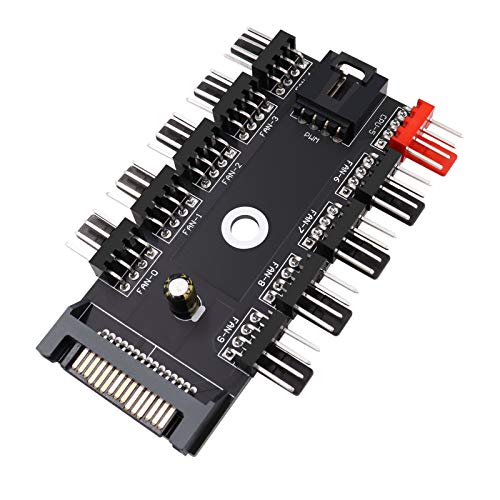
Fancasee 10-Port 4-Pin PWM Fan Hub
Best for: multi-fan ATX setups needing SATA power expansion
- Connector Type
- 4-Pin (what this guide is about)
- Dimensions
- 3.94 × 1.97 × 0.39 inches
- Weight
- 0.71 ounces
This Fancasee fan hub is a 1-to-10 splitter that expands a single motherboard fan header to power up to ten fans. It draws dedicated power via a 15-pin SATA connector and connects to your motherboard CPU_FAN header with an included PWM cable. The unit supports both 4-pin PWM and 3-pin case fans. It measures 3.94 inches long and 0.39 inches thick, making it suitable if you manage extensive cooling setups in ATX cases.
Pros
- Connects up to ten 4-pin PWM or 3-pin case fans
- Draws dedicated power via a 15-pin SATA interface
- Includes dedicated cable for motherboard CPU_FAN header connection
- Low profile at 0.39 inches high and 3.94 inches long
Cons
- Requires a spare 15-pin SATA power connection
- Requires using the motherboard CPU_FAN header for PWM signals
- Contains no included cooling fans
Good fit if
- You need to run up to ten 4-pin or 3-pin fans from one header.
- You have an open 15-pin SATA power lead inside your case.
- You need a compact hub under 0.4 inches thick for cable routing.
Skip if
- You are shopping for actual cooling fans rather than a hub.
- You lack a free 15-pin SATA power connector from your power supply.
Verdict: Fancasee 10-Port 4-Pin PWM Fan Hub centralizes power distribution for up to ten 3-pin or 4-pin cooling fans via a 15-pin SATA connection. It provides an efficient expansion option when your motherboard lacks enough 4-pin PWM headers.
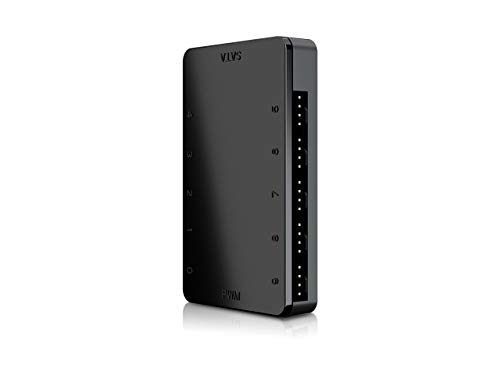
Shaking Tank 10-Port 4-Pin PWM Magnetic Fan Hub
Best for: high-density multi-fan setups needing magnetic mounting
- Connector Type
- 4-Pin (what this guide is about)
- Dimensions
- 3.07 × 1.91 × 0.63 inches
View on Amazon: Shaking Tank 10-Port 4-Pin PWM Magnetic Fan Hub
This Shaking Tank unit is a 10-port 4-pin PWM fan hub designed for centralized cooling control. It connects up to ten 4-pin PWM fans simultaneously, split evenly with five ports on each side. A dedicated SATA cable powers the unit directly. The casing measures 3.07 by 1.91 by 0.63 inches and includes built-in magnets for mounting directly to steel case panels. You will find it useful if you run multi-fan setups requiring clean cable routing.
Pros
- Connects up to ten 4-pin PWM fans at once
- Direct SATA power connection
- Magnetic backing mounts directly to metal chassis panels
- Compact dimensions of 3.07 x 1.91 x 0.63 inches
Cons
- Hub only; does not include cooling fans
- Magnetic mount does not adhere to non-metal chassis panels
Good fit if
- You need to power up to ten 4-pin PWM fans from a single hub.
- You want a magnetic base to position the hub anywhere on a steel chassis.
- You prefer five fan ports per side for balanced wire routing.
Skip if
- You need actual cooling fans included in the package.
- You have an aluminum or non-metal chassis that cannot hold magnets.
Verdict: Shaking Tank 10-Port 4-Pin PWM Magnetic Fan Hub consolidates power for up to ten PWM fans via direct SATA input. Its magnetic mounting and split five-port layout keep internal cabling organized.

Thermalright 92mm Slim PWM Fan
Best for: compact builds with 15mm mounting clearance limits
- Connector Type
- 4-Pin (what this guide is about)
- Fan Size
- 92mm
- Max Fan Speed
- 2700RPM
- Max Airflow
- 42.58CFM
- Static Pressure
- 1.33mm H2O
- Noise Level
- ≤22.4dBA
This is a compact 92mm cooling fan measuring 15mm thick. It uses a 4-pin PWM interface for automated motherboard speed control up to 2700 RPM. Delivering up to 42.58 CFM of airflow at 22.4 dBA or lower, it suits space-constrained PC cases and downward CPU heatsinks where standard 25mm fans cannot fit. You also get liquid bearings and integrated corner vibration pads.
Pros
- Slim 15mm profile fits restricted clearance areas
- 4-pin PWM control scales speeds up to 2700 RPM
- Maximum noise level rated at or below 22.4 dBA
- Includes four corner vibration damping pads
Cons
- Maximum airflow reaches 42.58 CFM
- Static pressure limited to 1.33mm H2O
Good fit if
- You need a 92mm fan with a low-profile 15mm thickness.
- You want automated speed adjustments via a 4-pin PWM header.
Skip if
- You need high static pressure exceeding 1.33mm H2O for dense cooling setups.
- You have enough clearance to install standard 25mm thick fans.
Verdict: Thermalright 92mm Slim PWM Fan provides automated speed control and quiet operation for compact cases with limited mounting depth.
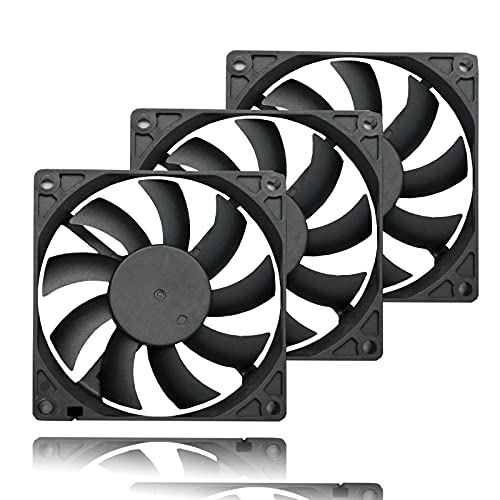
PANO-MOUNTS 80mm Slim PWM Fan 3-Pack
Best for: tight ITX cases needing slim cooling fans
- Connector Type
- 4-Pin (what this guide is about)
- Fan Size
- 80mm
- Max Fan Speed
- 2200RPM
- Max Airflow
- 22.8CFM
- Noise Level
- 26.8dBA
- Bearing Type
- Hydraulic
The PANO-MOUNTS 80mm Slim PWM Fan 3-Pack gives you three low-profile cooling fans measuring 15mm thick. Each fan features a 4-pin PWM connector that operates from 800 to 2200 RPM, delivering up to 22.8 CFM of airflow at 26.8 dBA. With 40-centimeter cables and hydraulic bearings rated for 40,000 hours, this pack fits your small form factor builds, ITX cases, and compact brackets where standard 25mm fans cannot fit.
Pros
- Slim 15mm profile fits tight clearances
- 4-pin PWM speed regulation from 800 to 2200 RPM
- Hydraulic bearing with 40,000-hour rated lifespan
- Includes three fans with 40 cm power cables
Cons
- Maximum airflow tops out at 22.8 CFM
- No integrated RGB or LED lighting
Good fit if
- You need low-profile 80mm fans for tight ITX enclosures.
- You want 4-pin PWM speed regulation with long 40 cm cables.
- You need a multi-fan bundle for compact cooling setups.
Skip if
- You need high static pressure or airflow above 22.8 CFM.
- You want integrated RGB or ARGB lighting.
Verdict: PANO-MOUNTS 80mm Slim PWM Fan 3-Pack provides a space-saving multi-pack solution for small cases needing 4-pin PWM speed control. Its 15mm thickness enables installation in tight clearances where standard cooling fans cannot go.

PANO-MOUNTS 120mm x 38mm 4-Pin PWM Fan 2-Pack
Best for: high-airflow cooling in spacious enclosures
- Connector Type
- 4-Pin (what this guide is about)
- Fan Size
- 120mm
- Max Fan Speed
- 5000RPM
- Max Airflow
- 175CFM
- Noise Level
- 58 dBA
- Bearing Type
- Dual Ball
View on Amazon: PANO-MOUNTS 120mm x 38mm 4-Pin PWM Fan 2-Pack
This package gives you two 120mm by 38mm cooling fans equipped with standard 4-pin PWM connectors. Operating between 3,000 and 5,000 RPM, each unit moves up to 175 CFM of air using dual ball bearings rated for 50,000 hours. The 38mm depth exceeds standard 25mm case fan sizing. This set fits you if your enclosure has clearance for extra-thick frames and demands heavy industrial-grade airflow.
Pros
- Delivers up to 175 CFM airflow per fan
- 4-pin PWM control across 3,000 to 5,000 RPM range
- Dual ball bearings rated for up to 50,000 hours
- Includes two metal finger guards and eight mounting screws
Cons
- 38mm thickness requires more clearance than standard 25mm mounts
- Noise level reaches 58 dBA at high speed
- Minimum speed is high at 3,000 RPM
Good fit if
- You need high airflow up to 175 CFM for heavy cooling loads.
- You have chassis space to accommodate 38mm thick fans.
- You want a dual-fan pack with included metal protective guards.
Skip if
- You require quiet operation below 58 dBA.
- You only have clearance for standard 25mm or slim 15mm fans.
- You need integrated RGB or lighting features.
Verdict: PANO-MOUNTS 120mm x 38mm 4-Pin PWM Fan 2-Pack delivers extreme airflow up to 175 CFM with dual ball bearings. Its 38mm thickness and 58 dBA sound output make it suited strictly for high-load systems with ample clearance.
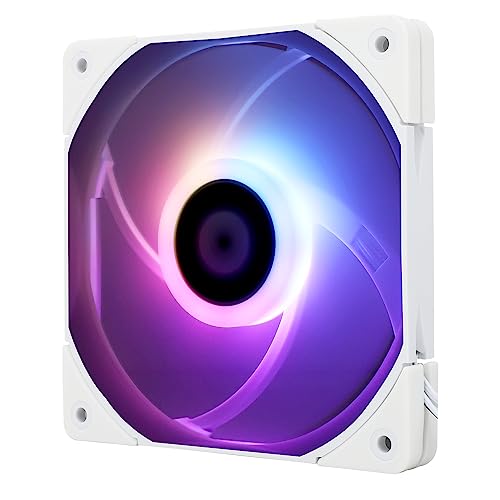
Thermalright 120mm Slim ARGB Fan
Best for: tight PC cases needing slim ARGB cooling
- Connector Type
- 4-Pin (what this guide is about)
- Fan Size
- 120mm
- Max Fan Speed
- 1500RPM
- Max Airflow
- 52CFM
- Static Pressure
- 1.24mm H2O
- Noise Level
- ≤24.1dBA
This is a 120mm slim cooling fan with a 15mm thickness designed for tight clearances. It connects using a 4-pin PWM header to regulate speeds up to 1500 RPM based on system temperatures. The unit delivers up to 52 CFM of airflow and 1.24 mm H2O static pressure with noise rated under 24.1 dBA. It suits you if you need low-profile cooling with addressable RGB lighting.
Pros
- Slim 15mm thickness fits compact chassis and tight clearances
- 4-pin PWM header enables dynamic speed control up to 1500 RPM
- ARGB lighting supports 17 modes and motherboard synchronization
- Four vibration-damping corner pads reduce operating noise
Cons
- Maximum airflow caps at 52 CFM
- Static pressure reaches a maximum of 1.24 mm H2O
Good fit if
- You have limited clearance that cannot fit standard 25mm thick fans.
- You want 4-pin PWM speed control combined with motherboard-synced ARGB lighting.
- You need a quiet fan with noise levels rated at or below 24.1 dBA.
Skip if
- You need static pressure higher than 1.24 mm H2O for dense cooling setups.
- You build in a standard chassis with room for thicker, higher-airflow fans.
Verdict: Thermalright 120mm Slim ARGB Fan delivers 4-pin PWM regulation and customizable lighting within a low-profile 15mm frame. It provides a practical cooling solution when regular 120mm fans exceed your clearance limits.
Specifications side by side
| Spec | Wathai 120mm High-Airflow 4-Pin PWM Fan | Scythe Wonder Tornado 120 Slim Fan | Noctua 80mm PWM Case Fan | Thermaltake Commander FP 10-Port Fan Hub | GDSTIME 80mm High Static Pressure Server Fan | SilverStone 8-Port 4-Pin PWM Fan Hub | PANO-MOUNTS 1-to-5 PWM Fan Splitter Cable 2-Pack | Wathai 80mm High-Airflow 38mm PWM Fan | Cooler Master MF120 Halo 120mm ARGB Fan | Fancasee 10-Port 4-Pin PWM Fan Hub | Shaking Tank 10-Port 4-Pin PWM Magnetic Fan Hub | Thermalright 92mm Slim PWM Fan | PANO-MOUNTS 80mm Slim PWM Fan 3-Pack | PANO-MOUNTS 120mm x 38mm 4-Pin PWM Fan 2-Pack | Thermalright 120mm Slim ARGB Fan |
|---|---|---|---|---|---|---|---|---|---|---|---|---|---|---|---|
| Fan Size | 120 mm | 120mm | 80mm | not specified | 80mm | not specified | not specified | 80mm | 120mm | not specified | not specified | 92mm | 80mm | 120mm | 120mm |
| Max Fan Speed | 5300 RPM | 2000RPM | 2200 RPM | not specified | 5800 RPM | not specified | not specified | 5500RPM | 1,800 rpm | not specified | not specified | 2700RPM | 2200RPM | 5000RPM | 1500RPM |
| Max Airflow | 230 CFM | not specified | not specified | not specified | 78.9 CFM | not specified | not specified | 72.6CFM | not specified | not specified | not specified | 42.58CFM | 22.8CFM | 175CFM | 52CFM |
| Static Pressure | 1.17 In H2O | not specified | not specified | not specified | 0.77 In H2O | not specified | not specified | not specified | not specified | not specified | not specified | 1.33mm H2O | not specified | not specified | 1.24mm H2O |
| Noise Level | 60 dBA | not specified | 17.7 dB(A) | not specified | 51dBA | not specified | not specified | 47dBA | not specified | not specified | not specified | ≤22.4dBA | 26.8dBA | 58 dBA | ≤24.1dBA |
| Connector Type | 4-pin PWM | 4-Pin PWM | 4-pin PWM | not specified | 4-pin PWM | not specified | not specified | 4Pin PWM | not specified | not specified | not specified | 4-pin PWM | 4-Pin PWM | 4-Pin PWM | 4-pin PWM |
| Bearing Type | Dual Ball | Fluid Dynamic Bearing | not specified | not specified | Dual-ball | not specified | not specified | Ball Bearing | not specified | not specified | not specified | Liquid | Hydraulic | Dual Ball | not specified |
| Lighting Type | not specified | not specified | not specified | not specified | not specified | not specified | not specified | not specified | 5V 3-Pin ARGB | not specified | not specified | not specified | not specified | not specified | ARGB |
| Use | not specified | not specified | not specified | not specified | Server | not specified | not specified | not specified | not specified | not specified | not specified | not specified | not specified | not specified | not specified |
| Lighting | not specified | not specified | not specified | not specified | not specified | not specified | not specified | not specified | ARGB | not specified | not specified | not specified | not specified | not specified | ARGB |
| Compatible Device | not specified | not specified | not specified | not specified | not specified | not specified | not specified | not specified | not specified | not specified | not specified | CPU Cooler | not specified | not specified | CPU Cooler |
| Dimensions | 1.5 × 4.72 × 4.72 inches | 4.72 × 0.59 × 4.72 inches | 3.15 × 0.98 × 3.15 inches | 3.2 × 1.7 × 0.7 inches | 3.15 × 3.15 × 1.5 inches | 2.13 × 0.75 × 1.57 inches | 13 × 0.19 × 0.17 inches | 3.15 × 3.15 × 1.5 inches | 0.98 × 4.72 × 4.72 inches | 3.94 × 1.97 × 0.39 inches | 3.07 × 1.91 × 0.63 inches | 3.62 × 0.59 × 3.62 inches | 3.15 × 3.15 × 0.59 inches | 4.72 × 4.72 × 1.5 inches | 0.59 × 4.72 × 4.72 inches |
| Weight | not specified | not specified | 8 ounces | not specified | 5.2 ounces | not specified | 1.44 ounces | 2.1 ounces | 7.05 ounces | 0.71 ounces | not specified | 1.6 ounces | not specified | not specified | 3.53 ounces |
| Color | 120x38mm 12V Ball 4P | not specified | Brown | not specified | 8038 PWM FAN | CPF04-USA | BLACK | not specified | MF120 HALO | Black | CoolerMaster | Grey | 80mm PWM Fan 3-Pack | Black | not specified |
| Model | 12038B12V4P2A | WT1215FD20-P | NF-A8 PWM | AC-023-AN1NAN-A1 | GDT8038B12V4P | SST-CPF04-USA | FANHUB-5 | not specified | MFL-B2DN-18NPA-R1 | US-CAB-81 | MFX-MHHN-10NN1-R1 | TL-9015 | 8015PWM | HH12038PWM | TL-C12015W-S |
| Size | not specified | 2000RPM | 1 Count (Pack of 1) | not specified | 80x38mm | 2200µF | 12.99 inches | not specified | 120mm MF120 | not specified | not specified | 92x92x15mm | not specified | 120x38mm | not specified |
Choosing the Right 4-Pin Case Fan
-
Check Fan Diameter Sizing
Check your PC case mounting points before selecting a fan diameter. Standard enclosures usually accommodate 120mm fans for intake and exhaust positions. Smaller form factor builds, server chassis, and compact NAS enclosures often require 80mm or 92mm fan mounts. Choosing an 80mm fan like the Noctua 80mm PWM Case Fan fits restricted rear or internal brackets where larger frames cannot align. Always verify the screw hole spacing on your chassis specification sheet so you do not buy a fan diameter that fails to mount securely to your chassis frame.
-
Evaluate Acoustic Noise Ratings
Review the published decibel ratings if you operate your computer in a quiet room or office environment. Fans engineered for extreme ventilation output can reach 47 to 60 dBA, which creates noticeable motor and airflow noise under load. High-velocity units like the GDSTIME 80mm High Static Pressure Server Fan suit isolated server racks or high-heat enclosures where sound output is secondary to cooling output. If you sit next to your desktop, select fans engineered for lower acoustic outputs around 17 to 25 dBA to keep daily computer tasks comfortable and quiet.
-
Select Fan Expansion Hardware
Count the cooling fans in your layout against the number of available 4-pin PWM headers on your motherboard. If you plan to run five or more cooling fans from one system header, use a dedicated powered hub rather than basic passive cables. A powered unit like the Thermaltake Commander FP 10-Port Fan Hub pulls operational electricity directly from your power supply via a SATA connection. This design prevents overloading motherboard header circuits while distributing identical PWM speed signals across every connected fan in your multi-fan cooling setup.
-
Match Bearing Type to Use
Inspect the bearing specification to ensure it matches your system runtime and orientation requirements. Dual-ball bearings tolerate continuous operation and high temperatures, making them dependable for high-demand server deployments. Fluid dynamic bearings utilize pressurized lubricant to reduce mechanical friction during operation. A model featuring a fluid dynamic bearing, such as the Scythe Wonder Tornado 120 Slim Fan with its 120,000-hour rating, provides sustained operational life alongside quiet performance. Choose fluid dynamic designs for quiet desktop workstations and dual-ball assemblies for continuous enterprise or high-load industrial use.
-
Verify Motherboard Lighting Headers
Confirm your motherboard supports addressable RGB illumination before picking fans with integrated lighting features. A fan equipped with illumination, such as the Cooler Master MF120 Halo 120mm ARGB Fan, requires a dedicated 5V 3-pin ARGB header on your motherboard in addition to the standard 4-pin PWM speed connector. Standard 4-pin fan headers only deliver motor power and speed telemetry. Connecting a 5V addressable lighting lead to an incompatible header can cause hardware damage. If your motherboard lacks 5V ARGB connectors, select unlit 4-pin cooling models to avoid unused wiring clutter.
-
Plan Hub Mounting and Routing
Consider how you will secure fan management hardware inside your chassis interior. Fan hubs with magnetic backing, such as the Shaking Tank 10-Port 4-Pin PWM Magnetic Fan Hub, attach directly to steel chassis panels without tools, allowing you to reposition the unit as cable routing needs change. Other hubs rely on double-sided adhesive pads, which require clean, flat surfaces for a permanent hold. If your case has tight rear clearance or aluminum panels, check hub dimensions and mounting styles beforehand to keep fan wiring clean and clear of rotating blades.
Frequently asked questions
What does the fourth pin do on a 4-pin case fan?
The fourth pin transmits a pulse-width modulation (PWM) control signal directly from your motherboard. This signal adjusts fan motor speed dynamically without altering electrical voltage. You get fine RPM management across specific operational ranges, such as the 650 to 1,800 RPM band found on the Cooler Master MF120 Halo.
Can you plug a 3-pin fan into a 4-pin fan hub?
Yes, you can plug a 3-pin fan into a 4-pin hub, but it will generally run at maximum speed. Fan hubs like the SilverStone 8-Port supply continuous 12-volt power and rely on the fourth pin for regulation commands. Without that dedicated PWM signal line, 3-pin motors cannot adjust their speed.
How do you power multiple 4-pin PWM fans from one motherboard header?
You can use multi-port splitters or powered hubs to connect several fans to a single header. Splitters like the PANO-MOUNTS 1-to-5 cable route power directly from the board. High-capacity options like the Thermaltake Commander FP or Fancasee hub use dedicated SATA power connections to prevent overloading motherboard circuits while distributing BIOS control.
Why do high-airflow server fans produce higher noise levels?
Server fans prioritize raw cubic feet per minute and static pressure over quiet operation, utilizing deep frames and high-speed motors. Units like the Wathai 120mm and 80mm produce between 47 dBA and 60 dBA. Their dual-ball bearing assemblies move high air volumes, suiting high-heat racks rather than low-noise desktop environments.
When should you choose a 92mm fan over standard sizes?
You choose a 92mm fan when your chassis or CPU cooler has mounting brackets that cannot fit 120mm frames. Models like the Thermalright 92mm Slim provide automated PWM speed control at a 15mm depth. This makes them practical for compact CPU heatsinks and small cases with restricted mounting space.
Do 4-pin ARGB fans manage lighting and motor speed through one cable?
No, the 4-pin fan connector manages motor power, tachometer feedback, and PWM speed regulation exclusively. Addressable RGB illumination requires a separate connection, typically via a 5V motherboard header. Fans such as the Cooler Master MF120 Halo and Thermalright 120mm Slim ARGB include independent wiring leads for lighting control alongside their 4-pin plugs.
What is the advantage of a fluid dynamic bearing in a PWM fan?
Fluid dynamic bearings use pressurized lubricant between moving surfaces to reduce friction, rotational vibration, and internal wear. On models like the Scythe Wonder Tornado 120 Slim, this mechanism supports an operational lifespan of 120,000 hours. The internal fluid layer keeps the assembly stable even when operating at speeds up to 2000 RPM.