4-Pin vs 2-Pin Case Fans in 2026: Key Differences
As an Amazon Associate we earn from qualifying purchases. Links on this page are affiliate links.
You need to choose the right connector for your cooling setup. This 4-Pin vs 2-Pin case fan comparison highlights two distinct options. Both products provide airflow and operate at 12V. The main difference lies in their connection method and physical scale. One uses a standard motherboard header for speed control, while the other relies on a simple two-wire plug. Understanding these specs helps you match the fan to your system requirements.
Key differences
| Aspect | Wathai 120mm High-Airflow 4-Pin PWM Fan | WINSINN 30mm 12V Hydraulic Bearing Fan |
|---|---|---|
| Fan Size | 120 mm | 30 mm |
| Connector Type | 4-pin PWM | XH2.54-2PIN |
| Max Airflow | 230 CFM | 3.46 CFM |
| Bearing Type | Dual Ball | Hydraulic |
Which one should you choose?
Choose Wathai 120mm High-Airflow 4-Pin PWM Fan if
- You need high airflow for a standard 120mm computer case.
- You want automatic speed control via motherboard PWM headers.
- You require a bearing type rated for 67,000 hours.
Choose WINSINN 30mm 12V Hydraulic Bearing Fan if
- You are cooling a small 30mm space like a router or mini PC.
- You need a compact fan with a short 30cm cable.
- You prefer a quieter operation at 28dBA for sensitive environments.
Verdict: Choose the 4-Pin fan if you are building or upgrading a standard PC case and need robust, controllable airflow. Pick the 2-Pin fan only if you have a specific need for a tiny 30mm fan in a small electronic device. The two serve completely different physical and functional niches.
Connector Type: 4-Pin vs 2-Pin
Motherboard Support
The Wathai 120mm High-Airflow 4-Pin PWM Fan uses a standard 4-pin connector. This allows direct connection to motherboard headers. You gain intelligent speed regulation based on temperature. The BIOS controls the fan percentage operation automatically. The WINSINN 30mm 12V Hydraulic Bearing Fan uses an XH2.54-2PIN connector. This is a small, proprietary connector type. It does not plug directly into standard motherboard fan headers. You likely need a separate adapter or a specialized controller. The 4-pin option offers broader compatibility with typical PC builds without extra hardware.
Airflow Performance
Airflow is measured in cubic feet per minute, or CFM. The Wathai fan delivers 230 CFM. This is substantial airflow for a 120mm size. It is designed for high-velocity cooling in cases or mining rigs. The WINSINN fan delivers 3.46 CFM. This is very low airflow, suitable only for tiny spaces. The Wathai fan moves nearly 66 times more air. If you need to cool a large component or a full case, the Wathai fan is the clear choice. The WINSINN fan is for microscopic cooling tasks.
Fan Size
Physical dimensions dictate where a fan can fit. The Wathai fan is a standard 120mm square, measuring 4.72 by 4.72 inches. It is 1.5 inches thick. This fits standard case mounts and radiator slots. The WINSINN fan is extremely small. It measures only 30mm square, or 1.18 inches. It is also much thinner at 0.39 inches. You cannot swap these fans. They serve entirely different physical spaces. The Wathai fits standard PC cases. The WINSINN fits embedded systems or small electronics.
Noise Level
Noise is measured in decibels, or dBA. The Wathai fan reaches 60 dBA at maximum speed. This is quite loud, comparable to a vacuum cleaner. The data notes it can be too loud for some applications. The WINSINN fan reaches 28 dBA. This is very quiet, similar to a whisper. The WINSINN fan is better for environments where silence matters. The Wathai fan prioritizes raw cooling power over quiet operation. Choose the WINSINN if you need low noise. Choose the Wathai if you need maximum airflow regardless of sound.
Bearing Lifespan
Bearings affect how long the fan lasts. The Wathai fan uses dual-ball bearings. The data states a lifespan of 67,000 hours. This is a high durability rating for continuous use. The WINSINN fan uses a hydraulic bearing. The data states a lifespan of 35,000 hours. It also recommends no more than 8 hours of daily use for optimal durability. The Wathai fan has a longer rated lifespan and no usage restriction mentioned. It is built for heavier, continuous duty cycles compared to the WINSINN fan.
Choose Your Fan Connector Type
PC builders needing high airflow cooling
You need maximum air movement for intensive cooling tasks. This 120mm fan delivers 230 CFM and 1.17 in H2O static pressure. The 4-pin PWM connector allows BIOS-controlled speed regulation. You get intelligent thermal management up to 5300 RPM, making it ideal for dense computer cases or mining rigs.
Users of small electronic devices
You require cooling for compact automotive or appliance electronics. This 30mm fan fits tight spaces with a 30x10mm footprint. It uses a 2-pin XH2 connector for simple integration. The hydraulic bearing ensures smooth operation, while the low 28 dBA noise level keeps quiet performance in small enclosures.
DIYers seeking simple direct wiring
You want straightforward installation without motherboard headers. The 2-pin connector simplifies wiring for custom projects. This fan operates at 9000 RPM with 3.46 CFM airflow. Its hydraulic bearing offers maintenance-free reliability. You avoid complex BIOS settings, making it a practical choice for non-standard computer systems or specialized hardware.
Quick picks
| # | Product | Best for | Price |
|---|---|---|---|
| 1 | Wathai 120mm High-Airflow 4-Pin PWM Fan | High airflow needs with 38mm clearance | Check price of Wathai 120mm High-Airflow 4-Pin PWM Fan on Amazon |
| 2 | WINSINN 30mm 12V Hydraulic Bearing Fan | tight electronics cooling with 2-pin connectors | Check price of WINSINN 30mm 12V Hydraulic Bearing Fan on Amazon |
The products compared
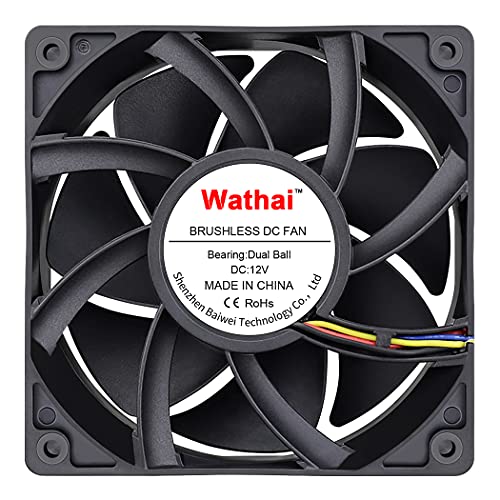
Wathai 120mm High-Airflow 4-Pin PWM Fan
Best for: High airflow needs with 38mm clearance
- Connector Type
- 4-Pin (what this guide is about)
- Fan Size
- 120mm
- Max Fan Speed
- 5300 RPM
- Max Airflow
- 230 CFM
- Static Pressure
- 1.17 inH2O
- Noise Level
- 60 dBA
View on Amazon: Wathai 120mm High-Airflow 4-Pin PWM Fan Affiliate link
This Wathai 120mm fan uses a 4-pin PWM connector for speed control. It reaches 5300 RPM with 230 CFM airflow. The 38mm thickness helps move more air than standard 25mm fans. Dual-ball bearings support 67,000 hours of use. You get mounting hardware and a grill. It suits high-heat builds needing strong airflow.
Pros
- 4-pin PWM connector for BIOS speed control
- High 230 CFM airflow at 5300 RPM
- 38mm thickness for increased air volume
- Dual-ball bearings rated for 67,000 hours
Cons
- 60 dBA noise level is loud at max speed
- 22.8W power draw is high for a 120mm fan
- No included hub or splitter for multiple fans
Good fit if
- You need high static pressure for dense radiators
- You want 4-pin PWM temperature control
- You have 38mm clearance in your case
Skip if
- You need quiet operation below 30 dBA
- Your case only supports 25mm thick fans
- You require a 2-pin connector for older boards
Verdict: Wathai 120mm 38mm 4-Pin PWM Fan delivers high airflow for demanding cooling tasks. It fits builders who prioritize performance over silence and have the necessary case depth.

WINSINN 30mm 12V Hydraulic Bearing Fan
Best for: tight electronics cooling with 2-pin connectors
- Connector Type
- 2-Pin (what this guide is about)
- Fan Size
- 30mm
- Max Fan Speed
- 9000 RPM
- Max Airflow
- 3.46 CFM
- Static Pressure
- 0.23 in H₂O
- Noise Level
- 28dBA
View on Amazon: WINSINN 30mm 12V Hydraulic Bearing Fan Affiliate link
This WINSINN fan is a compact 30x10mm unit designed for tight spaces. It uses a 2-pin connector, meaning it runs at full speed without motherboard speed control. The hydraulic bearing supports up to 9000 RPM, delivering 3.46 CFM of airflow. It operates at 28 dBA. You should choose this if you need a small, high-speed fan for electronics or systems that do not require variable speed control.
Pros
- 30mm size fits tight spaces
- Hydraulic bearing for smooth operation
- High 9000 RPM speed
- Low 28 dBA noise level
Cons
- 2-pin connector lacks PWM speed control
- Very small 30mm frame size
- Short 10mm thickness limits airflow
Good fit if
- You need a fan for a 30mm slot
- Your device requires a 2-pin connection
- You want high speed in a small space
Skip if
- You need variable fan speed control
- You require a standard 120mm case fan
- You need a 4-pin PWM connector
Verdict: WINSINN 30mm 12V 2-Pin Fan is a high-speed solution for tight electronics cooling. It fits users who need a small fan with a 2-pin connector and do not require speed adjustment.
Specifications side by side
| Spec | Wathai 120mm High-Airflow 4-Pin PWM Fan | WINSINN 30mm 12V Hydraulic Bearing Fan |
|---|---|---|
| Fan Size | 120mm | 30mm |
| Max Fan Speed | 5300 RPM | 9000 RPM |
| Max Airflow | 230 CFM | 3.46 CFM |
| Static Pressure | 1.17 inH2O | 0.23 in H₂O |
| Noise Level | 60 dBA | 28dBA |
| Connector Type | 4-pin PWM | XH2.54-2PIN |
| Bearing Type | Dual Ball | Hydraulic |
| Use | Server | not stated |
| Dimensions | 1.5 × 4.72 × 4.72 inches | 1.18 × 1.18 × 0.39 inches |
| Weight | not stated | 3.52 ounces |
| Color | 120x38mm 12V Ball 4P | Black |
| Model | 12038B12V4P2A | FAN301012VH |
| Size | not stated | 30x10mm |
Frequently asked questions
Can I use a 4-pin fan on a 2-pin header?
Yes, you can physically connect a 4-pin fan to a 2-pin header. The fan will run at full speed since it cannot receive PWM signals. This matches the WINSINN 30mm 12V Hydraulic Bearing Fan approach, which uses a simple 2-pin connector for direct power without speed adjustment capabilities.
What is the main advantage of a 4-pin fan connector?
The primary advantage is intelligent speed regulation via Pulse Width Modulation. The motherboard controls the fan percentage operation automatically based on temperature. This allows for quieter operation during low loads, unlike the WINSINN 30mm 12V 2-Pin Fan, which lacks this feature and runs at a fixed high speed.
Which connector is better for a quiet PC build?
A 4-pin connector is generally better for quiet builds. It allows the BIOS to adjust fan speed based on thermal needs. The Wathai 120mm High-Airflow 4-Pin PWM Fan supports this, letting you balance performance and noise. In contrast, the 2-pin WINSINN fan runs at full speed, which may increase noise levels.
Do 2-pin fans support speed control?
No, 2-pin fans typically do not support speed control. They receive constant voltage and run at their maximum rated speed. The WINSINN 30mm 12V Hydraulic Bearing Fan is designed for tight electronics cooling where users need a small fan with a 2-pin connector and do not require speed adjustment.
Can I use a 2-pin fan on a 4-pin header?
Yes, you can plug a 2-pin fan into a 4-pin header. The fan will run at full speed because the extra pins are unused. This setup works for the WINSINN 30mm 12V Hydraulic Bearing Fan if you have extra motherboard headers, but you lose the ability to regulate its speed automatically.
What size fans typically use 2-pin connectors?
Smaller fans often use 2-pin connectors due to space constraints. The WINSINN 30mm 12V Hydraulic Bearing Fan measures only 30x10mm. This compact size is ideal for tight electronics cooling. Larger fans like the Wathai 120mm High-Airflow 4-Pin PWM Fan usually include 4-pin connectors for better motherboard integration and control.
Is PWM necessary for all case fans?
PWM is not necessary for all case fans. It is useful when you need variable speeds. The Wathai 120mm fan uses 4-pin PWM for high airflow needs with clearance. However, the WINSINN 30mm fan uses a 2-pin connector, proving that fixed-speed fans are sufficient for specific tasks like tight electronics cooling where adjustment is not needed.