Zalman S3 Compact ATX Mid-Tower vs Zalman Compact ATX Mid-Tower Dual: Spec Comparison
As an Amazon Associate we earn from qualifying purchases. Links on this page are affiliate links.
This guide compares the zalman s3 compact atx mid tower desktop PC case vs s4 compact atx mid tower options. Both are ATX mid-tower cases from Zalman featuring acrylic side panels and 120mm fan support. They share a similar compact footprint for standard builds. The main difference lies in airflow design and included hardware. The S3 includes three fans and specific radiator support, while the S4 uses a unique bezel for airflow and comes with two fans. You need to weigh these cooling features against your specific component needs.
Key differences
| Aspect | Zalman S3 Compact ATX Mid-Tower Case | Zalman Compact ATX Mid-Tower with Dual Fans |
|---|---|---|
| Included Fans | 3x 120mm | 2x 120mm |
| Radiator Support | Front 120mm | not listed |
| Max GPU Length | 330mm | not listed |
| Front Panel Design | Dual intake with metal finish | Optimized bezel design |
| Weight | 8.38 pounds | 7.9 pounds |
Which one should you choose?
Choose Zalman S3 Compact ATX Mid-Tower Case if
- You want three 120mm fans included out of the box for better initial airflow
- You plan to install a 120mm radiator in the front of the case
- You have a graphics card up to 330mm long and need confirmed clearance
Choose Zalman Compact ATX Mid-Tower with Dual Fans if
- You prefer a lighter case chassis at 7.9 pounds
- You are drawn to the unique bezel design intended to enhance airflow
- You want a simpler setup with two included 120mm fans
Verdict: Choose the S3 if you need more included fans and explicit radiator support for your cooling setup. Pick the S4 if you prefer a lighter chassis and are satisfied with the included dual-fan configuration. Both cases offer solid ATX mid-tower foundations for your build.
S3 vs S4 Spec Comparison
Included Fans
The Zalman S3 Compact ATX Mid-Tower Case includes three 120mm fans out of the box. This provides immediate airflow for your components without needing extra purchases. The Zalman Compact ATX Mid-Tower with Dual Fans comes with two 120mm fans. While both cases support 120mm fan sizes, the S3 offers an extra intake unit. More pre-installed fans can help reduce initial costs and simplify your build process. You get better immediate cooling coverage with the S3 configuration.
Radiator Support
The Zalman S3 Compact ATX Mid-Tower Case supports a maximum radiator size of 120mm. This allows for basic liquid cooling integration on the front panel. The Zalman Compact ATX Mid-Tower with Dual Fans does not list specific radiator support dimensions in its published specifications. You must check the manual for exact clearance if you plan to use liquid cooling. The S3 provides clear data for small radiator installations, ensuring compatibility before you buy.
GPU Compatibility
The Zalman S3 Compact ATX Mid-Tower Case supports graphics cards up to 330mm in length. This accommodates most standard and many high-end GPUs. The Zalman Compact ATX Mid-Tower with Dual Fans does not specify a maximum GPU length in the provided data. You may need to verify clearance separately for large cards with the S4. The S3 offers a defined limit that helps you choose compatible hardware with confidence.
Weight
The Zalman S3 Compact ATX Mid-Tower Case weighs 8.38 pounds. The Zalman Compact ATX Mid-Tower with Dual Fans weighs 7.9 pounds. The S4 is slightly lighter by less than half a pound. This difference is minimal for desktop use but might matter if you move the system often. Both cases use steel construction for durability. The weight difference does not significantly impact stability or airflow performance in a standard setup.
Connectivity
The Zalman S3 Compact ATX Mid-Tower Case features a convenient interface with USB 3.0, USB 2.0, and a reset button. This provides modern connectivity options for peripherals. The Zalman Compact ATX Mid-Tower with Dual Fans mentions user-friendly case I/O but does not list specific ports. You cannot confirm if it includes USB 3.0 or other modern standards. The S3 offers transparent details about its connection capabilities for your devices.
Which Zalman Case Fits You
Users wanting maximum airflow now
The S3 includes three 120mm fans out of the box. This gives you immediate airflow for your components. You get better cooling performance from the start. The case supports up to eight fans total. This allows for further expansion later. You save money on extra fans. The dual intake design helps move air efficiently through the chassis.
Users prioritizing GPU clearance
The S3 supports graphics cards up to 330mm in length. This provides ample space for larger modern GPUs. The S4 data does not list a specific maximum GPU length. You avoid compatibility issues with long cards. The S3 also supports a 120mm radiator at the front. This adds flexibility for liquid cooling setups in a compact mid-tower form factor.
Users seeking a lighter case
The S4 weighs 7.9 pounds. This is lighter than the S3, which weighs 8.38 pounds. The lower weight makes the case easier to handle during installation. It is simpler to move into your desk setup. The compact dimensions also help fit into smaller spaces. You get a sturdy chassis with a premium black coating for durability.
The products compared
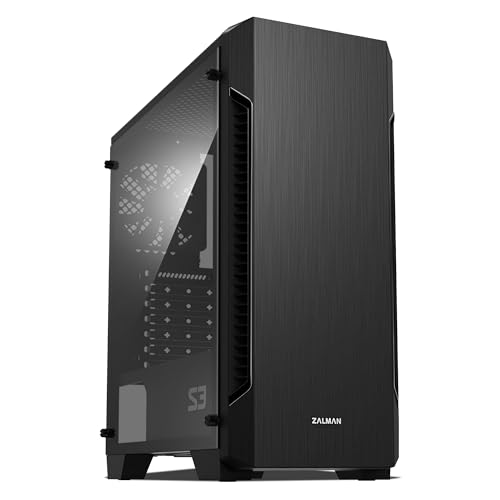
Zalman S3 Compact ATX Mid-Tower Case
Best for: Compact builds with GPUs under 330mm
- Motherboard Support
- ATX
- Case Type
- Mid-Tower
- Side Panel
- Acrylic
- Included Fans
- 3x 120mm
- Radiator Support
- 120mm
- Max GPU Length
- 330mm
View on Amazon: Zalman S3 Compact ATX Mid-Tower Case Affiliate link
The Zalman S3 is a compact ATX mid-tower case featuring a hairline front panel and full acrylic side window. It includes three 120mm fans and supports up to eight total fans for optimized cooling. The interior accommodates GPUs up to 330mm long and radiators up to 120mm. You get USB 3.0 and 2.0 ports plus a reset button on the top I/O panel. This setup suits users wanting solid airflow in a smaller footprint.
Pros
- Includes three 120mm fans for immediate airflow
- Supports up to eight fans total for expanded cooling
- Full acrylic side window for visibility
- Top and bottom dust filters protect internal components
- Convenient top I/O with USB 3.0 and 2.0
Cons
- Max GPU length is 330mm, which is shorter than many competitors
- Radiator support is limited to 120mm only
- Weight is 8.38 pounds, adding bulk to the compact design
Good fit if
- You need a compact case with strong stock fan support
- You prefer acrylic windows over tempered glass
- You plan to use GPUs under 330mm in length
Skip if
- You require support for larger 240mm or 360mm radiators
- You need a tempered glass side panel
- You are building with GPUs longer than 330mm
Verdict: The Zalman S3 Compact ATX Case offers reliable airflow with three included fans and a compact footprint. It fits builders who prioritize acrylic aesthetics and moderate GPU sizes over large radiator support.

Zalman Compact ATX Mid-Tower with Dual Fans
Best for: Compact ATX builds with tinted panels
- Motherboard Support
- ATX
- Case Type
- Mid-Tower
- Side Panel
- Tinted Acrylic
- Included Fans
- 2x 120mm
- Radiator Support
- 240mm
- Max GPU Length
- 315mm
View on Amazon: Zalman Compact ATX Mid-Tower with Dual Fans Affiliate link
The Zalman S4 is a compact ATX mid-tower case with a tinted acrylic side panel and a bezel optimized for airflow. It includes two 120mm fans to help keep components cool. The chassis features a premium black coating for durability. You will find the I/O panel easy to access. This case suits builders who want a sleek look without excessive bulk.
Pros
- Includes two 120mm fans for cooling
- Tinted acrylic side panel for component visibility
- Optimized bezel design for improved airflow
- Premium black coating for durability
Cons
- Comes with only two included fans
- Mid-tower size may limit large GPU clearance
- No mention of front USB-C port
Good fit if
- You need a compact ATX case
- You prefer a tinted acrylic side panel
- You want included 120mm fans
Skip if
- You require three or more included fans
- You need E-ATX motherboard support
- You prefer a solid metal side panel
Verdict: Zalman S4 Compact ATX Mid-Tower offers a compact build with a tinted acrylic panel and two included 120mm fans. It fits users who want a sleek, space-saving case with decent airflow.
Specifications side by side
| Spec | Zalman S3 Compact ATX Mid-Tower Case | Zalman Compact ATX Mid-Tower with Dual Fans |
|---|---|---|
| Motherboard Support | ATX | ATX |
| Case Type | Mid-Tower | Mid-Tower |
| Side Panel | Acrylic | Tinted Acrylic |
| Included Fans | 3x 120mm | 2x 120mm |
| Radiator Support | 120mm | 240mm |
| Max GPU Length | 330mm | 315mm |
| Tower Size | Mid-Tower | Mid-Tower |
| Fan Size | 120mm | 120mm |
| Connectivity | USB 3.0 | USB 3.0 |
| Compatible Device | not stated | Radiator |
| Dimensions | 16.2 × 7.44 × 17.8 inches | 8.11 × 18 × 15 inches |
| Weight | 8.38 pounds | 7.9 pounds |
| Size | 16.22 x 7.44 x 17.76 inches | Mid Tower |
| Color | Acrylic | S4 |
| Model | not stated | S4 |
Frequently asked questions
Which Zalman case is better for small form factor builds?
The Zalman S3 Compact ATX Mid-Tower Case is the better choice for smaller spaces. It measures 16.2 inches in length and 7.44 inches in width. This compact footprint allows it to fit in tighter areas than the S4. The S4 is wider at 18 inches, making the S3 more suitable for limited desk space.
Does the Zalman S3 support larger graphics cards?
Yes, the Zalman S3 is designed for GPUs under 330mm. This length support allows you to install most standard mid-range and high-end graphics cards. The case prioritizes moderate GPU sizes over massive radiator support. You can check your specific card length against this 330mm limit to ensure compatibility.
What is the main difference in included cooling between the two cases?
The primary difference is the number of fans included. The S3 comes with three 120mm fans out of the box. The S4 includes only two 120mm fans. This means the S3 provides immediate airflow for your components without needing extra purchases right away. You get more cooling capacity from the start with the S3.
Are both cases ATX mid-tower designs?
Yes, both the S3 and S4 are ATX mid-tower cases. They share the same motherboard support standard and tower size classification. This means they both accommodate standard ATX motherboards. You do not need to worry about motherboard compatibility differences between these two specific models from Zalman.
How do the weights of these cases compare?
The Zalman S3 is slightly heavier than the S4. The S3 weighs 8.38 pounds, while the S4 weighs 7.9 pounds. This difference is minimal but noticeable if you plan to move the case frequently. The weight difference likely comes from the additional fan included with the S3 and slight structural variations.
Which case has a tinted acrylic panel?
The Zalman S4 Compact ATX Mid-Tower features a tinted acrylic panel. This design choice offers a sleek, space-saving look with a darker aesthetic. The S3 also uses acrylic but focuses on reliability and airflow rather than tinted aesthetics. If you prefer a darker side panel view, the S4 is the appropriate choice.
Can I install radiators in these cases?
The S3 supports moderate radiator sizes but prioritizes GPU length over large radiators. The S4 also supports standard cooling setups but has a wider profile. Both cases are mid-towers, so they can handle standard ATX cooling solutions. You should verify your specific radiator size against the internal dimensions provided in the full spec sheet.