Zalman S3 Compact ATX Mid-Tower or Zalman Mid-Tower ATX RGB Case? Which Zalman Model to Buy
As an Amazon Associate we earn from qualifying purchases. Links on this page are affiliate links.
You are looking at the zalman s3 compact atx mid tower desktop PC case vs i3 neo atx mid tower. Both are mid-tower ATX cases designed for desktop builds. They share a similar focus on airflow and component compatibility. The main difference lies in their design philosophy. The S3 Compact uses a hairline metal front with a tempered glass side panel. The i3 Neo features a full tempered glass front and pre-installed RGB lighting. You need to decide which aesthetic and feature set fits your build.
Key differences
| Aspect | Zalman S3 Compact ATX Mid-Tower Case | Zalman Mid-Tower ATX RGB Case |
|---|---|---|
| Side Panel | Acrylic | Tempered Glass |
| Included Fans | 3x 120mm | 4x Static LED |
| Radiator Support | 120mm | 360mm |
| Weight | 8.38 pounds | 12.5 pounds |
| Lighting | not listed | RGB |
Which one should you choose?
Choose Zalman S3 Compact ATX Mid-Tower Case if
- You prefer a lighter case that is easier to move.
- You want a metal hairline front panel design.
- You are building a compact system with a smaller radiator.
Choose Zalman Mid-Tower ATX RGB Case if
- You want pre-installed RGB fans for immediate visual flair.
- You plan to use a large 360mm radiator in the front.
- You prefer a full tempered glass front panel to showcase components.
Verdict: The S3 Compact is a practical choice for builders who value a lighter weight and a traditional metal aesthetic. The i3 Neo suits those who want a showier build with RGB lighting and support for larger radiators. Your choice depends on whether you prioritize portability and simplicity or visual impact and cooling capacity.
Zalman S3 vs i3 Neo Specs
Side panel material
The Zalman S3 Compact uses a full acrylic side panel. Acrylic is lighter than glass but can scratch more easily over time. The Zalman i3 Neo features a full tempered glass side panel. Tempered glass is more durable and resists scratches better. It also provides a clearer view of your internal components. If you want a premium look that withstands daily wear, the glass panel on the i3 Neo is the better choice. Acrylic is a budget-friendly alternative but lacks the same longevity and visual clarity.
Included fans
The S3 Compact comes with three 120mm fans pre-installed. This setup provides decent airflow for standard builds. The i3 Neo includes four static LED fans. It has one more fan than the S3, which can improve airflow and cooling efficiency. The i3 Neo fans also feature static LED lighting, adding visual flair to your build. If you want more airflow out of the box and some lighting effects without buying extra parts, the i3 Neo offers more value with its four included fans.
Radiator support
The S3 Compact supports a maximum radiator size of 120mm at the front. This limits your liquid cooling options to smaller radiators. The i3 Neo supports a 360mm radiator in the front position. It also allows for a 240mm radiator on top and a 120mm unit in the rear. This gives you much more flexibility for high-performance cooling setups. If you plan to use large liquid coolers, the i3 Neo is the only viable option here.
Dimensions and weight
The S3 Compact measures 16.2 inches in length, 7.44 inches in width, and 17.8 inches in height. It weighs 8.38 pounds. The i3 Neo is larger at 16.6 inches long, 8.62 inches wide, and 19.1 inches tall. It weighs 12.5 pounds. The S3 is more compact and lighter, making it easier to move and fit in smaller spaces. The i3 Neo requires more desk space and is heavier due to its larger frame and glass panel.
Front panel design
The S3 Compact features a hairline front panel with a metal finish and dual intake design. This gives it a sleek, professional look. The i3 Neo has a full tempered glass front panel. This design allows you to see the fans and lighting inside from the front. It offers a more modern and customizable aesthetic. If you prefer a subtle, metallic look, choose the S3. If you want to showcase your internal components and RGB lighting from the front, the i3 Neo is the better fit.
Which Zalman Mid-Tower Case Fits You
Builder needing large radiator support
The i3 Neo supports a 360mm radiator in the front. This allows for more effective liquid cooling loops compared to the S3 Compact, which only accepts a 120mm radiator at the front. If you plan to use a large AIO cooler, the i3 Neo provides the necessary space and mounting options for better thermal performance.
User preferring lightweight and compact size
The S3 Compact weighs 8.38 pounds and measures 16.2 inches in length. This makes it significantly lighter and shorter than the i3 Neo, which weighs 12.5 pounds and is 16.6 inches long. If you move your PC often or have limited desk space, the smaller dimensions and lower weight of the S3 Compact are practical advantages.
Gamer wanting pre-installed RGB lighting
The i3 Neo comes with four pre-installed static LED fans. This adds immediate visual flair without requiring you to purchase additional fans separately. The S3 Compact includes three standard 120mm fans without specified RGB lighting. If your priority is an illuminated interior straight out of the box, the i3 Neo offers this aesthetic feature by default.
The products compared
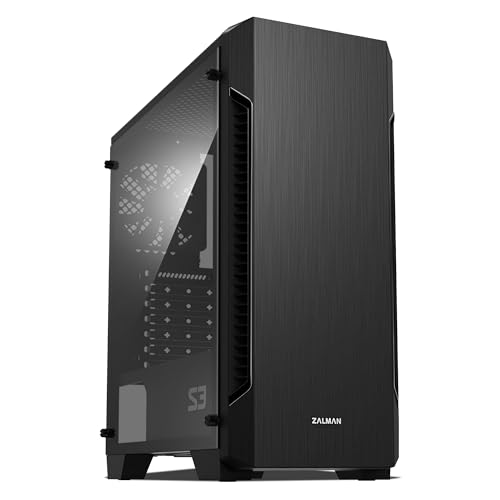
Zalman S3 Compact ATX Mid-Tower Case
Best for: Compact ATX builds with standard GPUs
- Motherboard Support
- ATX
- Case Type
- Mid-Tower
- Side Panel
- Acrylic
- Included Fans
- 3x 120mm
- Radiator Support
- 120mm
- Max GPU Length
- 330mm
View on Amazon: Zalman S3 Compact ATX Mid-Tower Case Affiliate link
The Zalman S3 Compact is an ATX mid-tower case featuring a full acrylic side panel and a hairline front design. It includes three 120mm fans and supports up to eight total fans for optimized cooling. The case accommodates GPUs up to 330mm long and radiators up to 120mm. You get a convenient I/O panel with USB 3.0 and 2.0 ports. This build suits users who want solid airflow and a clean aesthetic without excessive bulk.
Pros
- Includes three 120mm fans for immediate airflow
- Full acrylic side panel for visibility
- Supports up to eight fans for enhanced cooling
- Top and bottom dust filters for maintenance
- USB 3.0 and 2.0 front I/O ports
Cons
- Limited radiator support to 120mm only
- Acrylic side panel is less durable than tempered glass
- Max GPU length of 330mm restricts large cards
Good fit if
- You need a compact ATX case with good airflow
- You prefer an acrylic side panel over glass
- You plan to use smaller graphics cards
Skip if
- You require support for large 240mm or 360mm radiators
- You want a tempered glass side panel
- You need to install GPUs longer than 330mm
Verdict: Zalman S3 Compact ATX Mid-Tower is a practical choice for builders prioritizing airflow and compact dimensions. It fits users who value acrylic aesthetics and standard ATX components over large radiator support.
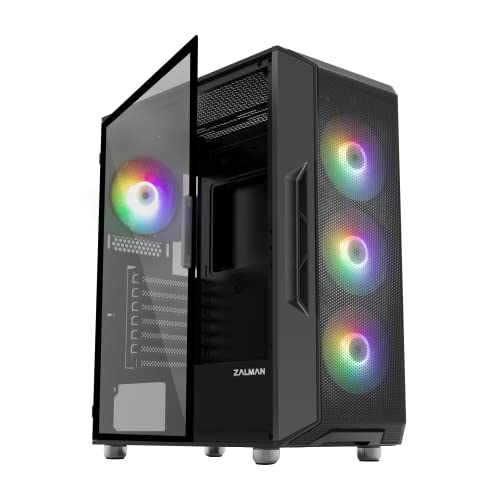
Zalman Mid-Tower ATX RGB Case
Best for: ATX builds needing four included LED fans
- Motherboard Support
- ATX
- Case Type
- Mid-Tower
- Side Panel
- Tempered Glass
- Included Fans
- 4x Fixed RGB Fans
- Radiator Support
- 360mm
- Max GPU Length
- 355mm
View on Amazon: Zalman Mid-Tower ATX RGB Case Affiliate link
This mid-tower ATX case gives you four pre-installed static rainbow LED fans and liquid cooling clearance for up to a 360mm radiator in front. You get dual USB 3.0 ports on top, a magnetic top dust filter, and vibration-absorbing rubberized feet. It suits builders seeking out-of-the-box airflow with pre-fitted fans who want room for standard ATX motherboards.
Pros
- Four pre-installed static rainbow LED fans provide immediate airflow
- Supports up to a 360mm liquid cooling radiator in the front
- Magnetic top dust filter and detachable bottom filter for maintenance
- Top panel features two USB 3.0 ports alongside audio jacks
Cons
- Fan lighting is fixed static LED rather than addressable RGB
- Top radiator clearance maxes out at 240mm
Good fit if
- You want four pre-installed LED fans included right out of the box
- You plan to mount a 360mm liquid cooling radiator in the front panel
Skip if
- You require customizable, addressable RGB lighting rather than static LEDs
- You intend to install a 280mm or 360mm radiator along the top panel
Verdict: Zalman i3 Neo ATX Mid-Tower Case suits builders who want four pre-installed LED fans and support for a 360mm front radiator in a standard ATX layout.
Specifications side by side
| Spec | Zalman S3 Compact ATX Mid-Tower Case | Zalman Mid-Tower ATX RGB Case |
|---|---|---|
| Motherboard Support | ATX | ATX |
| Case Type | Mid-Tower | Mid-Tower |
| Side Panel | Acrylic | Tempered Glass |
| Included Fans | 3x 120mm | 4x Fixed RGB Fans |
| Radiator Support | 120mm | 360mm |
| Max GPU Length | 330mm | 355mm |
| Tower Size | Mid-Tower | Mid-Tower |
| Fan Size | 120mm | not stated |
| Use | not stated | Gaming |
| Lighting | not stated | RGB |
| Connectivity | USB 3.0 | not stated |
| Compatible Device | not stated | Radiator |
| Dimensions | 16.2 × 7.44 × 17.8 inches | 16.6 × 8.62 × 19.1 inches |
| Weight | 8.38 pounds | 12.5 pounds |
| Size | 16.22 x 7.44 x 17.76 inches | not stated |
| Color | Acrylic | Black |
Frequently asked questions
Which Zalman case is smaller for tight spaces?
The Zalman S3 Compact is the smaller option. Its dimensions are 16.2 by 7.44 by 17.8 inches. It weighs 8.38 pounds. The i3 Neo measures 16.6 by 8.62 by 19.1 inches and weighs 12.5 pounds. Choose the S3 if you need a lower profile or lighter build for your desk setup.
Does the S3 Compact support large graphics cards?
The S3 Compact is designed for standard GPUs in compact builds. The data does not list a specific maximum GPU length for this model. You should check your specific graphics card dimensions against the internal clearance. The i3 Neo offers more internal space, which may accommodate larger cards more easily due to its wider chassis.
Can I install a 360mm radiator in the S3 Compact?
No, the S3 Compact does not support a 360mm radiator. It only accepts a 120mm fan or radiator at the front. If you require large liquid cooling solutions, the i3 Neo is the better choice. It supports a 360mm radiator in the front position for enhanced thermal performance.
Which case has better airflow for gaming?
The i3 Neo is better for gaming airflow. It is explicitly designed for gaming use and supports larger radiators. The S3 Compact prioritizes compact dimensions over massive airflow capacity. While both are mid-towers, the i3 Neo's larger volume and radiator support provide more robust cooling options for high-performance gaming rigs.
Is the side panel made of glass or acrylic?
The S3 Compact features a full acrylic side panel. Acrylic is lighter but can scratch more easily. The i3 Neo uses a full tempered glass side panel. Glass offers a clearer view and better scratch resistance. Choose based on whether you prefer the lighter weight of acrylic or the durability of tempered glass.
Which case includes RGB lighting?
The i3 Neo includes RGB lighting. It is listed with visible static lighting features for aesthetics. The S3 Compact does not have RGB lighting in its specifications. If you want illuminated components to show through the side panel, the i3 Neo is the appropriate model for your build.