Zalman S3 Compact ATX Mid-Tower Review: Specs, Pros and Cons
As an Amazon Associate we earn from qualifying purchases. Links on this page are affiliate links.
This zalman s3 compact atx mid tower desktop PC case review focuses on a compact chassis designed for standard ATX builds. It features a full acrylic side panel and includes three 120mm intake fans for immediate airflow. The case supports motherboards up to ATX size and accommodates GPUs up to 330mm in length. Its compact footprint measures approximately 16.2 by 7.4 by 17.8 inches. You get a metal-finish front panel with dual ventilation lines and a convenient I/O panel with USB 3.0 and 2.0 ports. This setup prioritizes essential cooling and clean aesthetics within a smaller form factor.
What stands out
- Includes three 120mm fans for immediate airflow.
- Full acrylic side panel for clear interior visibility.
- Supports ATX motherboards and GPUs up to 330mm.
- Top and bottom dust filters for easier maintenance.
- Front I/O panel with USB 3.0 and 2.0 ports.
Who it fits
Good fit for
This case suits builders who want a straightforward ATX mid-tower without complex cable management challenges. It is ideal for users who prefer acrylic over tempered glass and want included fans to save on initial parts costs. The compact dimensions fit well in smaller desks or tight spaces. If you need support for standard ATX boards and mid-length graphics cards, this chassis provides a clean, functional foundation. The dual intake design and dust filters make it a practical choice for everyday computing setups.
Who should skip it
You should look elsewhere if you plan to install large E-ATX motherboards, as this case only supports ATX formats. Users requiring extensive radiator support for liquid cooling will find the 120mm front limit restrictive. If you prefer tempered glass for its durability and scratch resistance, note that this specific model uses acrylic. Builders needing multiple high-speed fans beyond the included three may find expansion options limited. Those wanting extensive front panel I/O or USB-C ports will also need to consider other options.
Verdict: The Zalman S3 Compact offers a no-frills ATX mid-tower solution with included fans and an acrylic window. It is a practical choice for standard builds that prioritize simplicity and compact dimensions.
Key specs explained for this case
Case Type: Mid Tower
This size offers a balance between compactness and expandability. You get enough room for standard ATX motherboards and decent airflow without taking up excessive desk space. It fits well in most home offices or gaming setups where floor space is limited but you still want room for a few cables and components.
Motherboard Support: ATX
This case accommodates standard ATX motherboards, which are the most common size for desktop PCs. You can install mainstream processors and graphics cards without worrying about fit. If you are building a standard gaming or workstation PC, this support ensures compatibility with the majority of available boards on the market today.
Included Fans: 3x 120mm
Three 120mm fans are pre-installed to provide immediate airflow. This setup helps move air across your components right out of the box. It reduces the need for immediate additional purchases, though you may still want to add more for optimal cooling. Check your fan layout to ensure proper intake and exhaust positioning.
Max GPU Length: 330mm
You can install graphics cards up to 330mm long. This covers most standard and some high-end models, ensuring your video card fits without crowding other parts. Always measure your specific GPU before buying, as this limit prevents clearance issues with the front panel or drive bays inside the chassis.
Side Panel: Acrylic
The side panel is made of full acrylic, offering a clear view of your internal components. It is lighter than tempered glass but may scratch more easily. This material allows you to showcase your build and RGB lighting while keeping the weight of the case manageable during installation or transport.
Build Quality and Physical Layout
The listing describes a luxurious hairline front panel with a dual intake design and metal finish. This aesthetic choice suggests a focus on visual appeal alongside functional airflow. The side panel is made of full acrylic, offering a clear view of internal components without the fragility of tempered glass. You get a distinct look that differs from standard plastic panels, though it may require more careful handling to prevent scratches. The case includes dual line front ventilation with metallic decoration, which aligns with the overall premium finish described in the product details.
According to the listing, the chassis measures 16.2 inches in length, 7.44 inches in width, and 17.8 inches in height. It weighs 8.38 pounds, providing a solid feel without being overly heavy for desk placement. The compact mid-tower form factor allows it to fit in most home offices or gaming setups. You can install up to eight fans for optimized cooling, with three 120mm fans included for immediate airflow. The front panel supports a maximum radiator size of 120mm, while the interior accommodates graphics cards up to 330mm in length. This layout ensures compatibility with standard ATX motherboards and mid-range hardware.
Convenience is addressed through a front interface featuring USB 3.0, USB 2.0, and a reset button. Top and bottom dust filters are included to maintain smooth air circulation and protect internal components from debris. These filters are easy to access for regular cleaning, helping to sustain performance over time. The design prioritizes practical maintenance alongside aesthetic appeal, making it suitable for users who want a clean, efficient build without complex setup procedures.
Setup and Daily Use Guide
Setting up this Zalman case begins with placing the unit on a stable surface. The dimensions are 16.2 inches in length, 7.44 inches in width, and 17.8 inches in height. At 8.38 pounds, the chassis is manageable but requires care during installation. You will need to remove the acrylic side panel to access the interior. The case supports standard ATX motherboards, which determines your initial component layout. Ensure your graphics card does not exceed 330mm in length. This limit is critical for compatibility with larger video cards. The listing includes three 120mm fans. These provide immediate airflow without needing additional purchases. You can install up to eight fans total for optimized cooling. The front panel features a convenient interface with USB 3.0 and USB 2.0 ports. You also have access to a reset button for system control. Dust management is handled by filters on the top and bottom. These help maintain smooth air circulation and protect internal components from debris. The front panel supports a 120mm radiator if you choose to add liquid cooling. Daily use involves managing cable routing within the mid-tower space. The hairline finish on the front panel may show fingerprints, so regular cleaning is advisable. The dual intake design aids in drawing cool air into the system. You benefit from the metal finish on the ventilation areas for durability. The acrylic side panel allows you to view your hardware setup clearly. This design choice keeps the interior visible while maintaining a sleek exterior profile. The compact form factor fits well in most home office environments. You can easily access the I/O ports from the top of the chassis. The overall design prioritizes functional airflow alongside a clean aesthetic. This makes it suitable for users who want a tidy build without excessive bulk.
Before You Buy This Case
Before you finalize your purchase, verify that your graphics card fits within the 330mm length limit. This constraint is critical for modern high-end GPUs. You must also confirm your motherboard is ATX, as the case does not support smaller form factors like Micro-ATX or Mini-ITX. The listing notes support for up to eight fans, but only three 120mm units are included. You may need to purchase additional fans for optimal cooling, especially if you plan to install a larger CPU cooler or multiple storage drives. Regular maintenance involves cleaning the top and bottom dust filters to ensure smooth air circulation. Keep the acrylic side panel free of scratches by using a microfiber cloth. This compact mid-tower option sits alongside other Zalman models like the S2 and S3 variations with tempered glass. Choose this specific black hairline version if you prefer a subtle aesthetic over transparent side panels. Ensure your power supply length does not exceed the internal clearance before buying.
Check before you buy
- Check your GPU length is under 330mm.
- Confirm your motherboard is ATX size.
- Plan for extra 120mm fans for better airflow.
- Verify power supply length fits inside.
- Clean dust filters regularly for performance.
The product at a glance
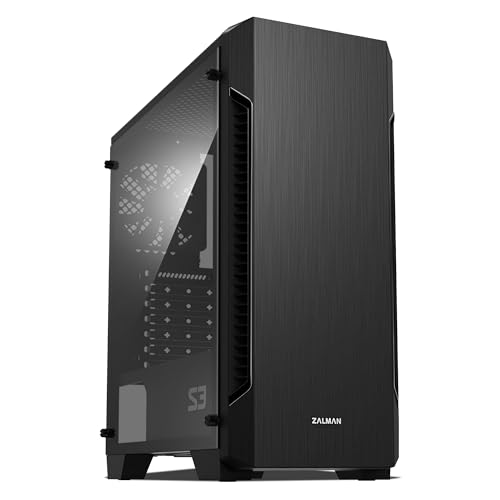
Zalman S3 Compact ATX Mid-Tower Case
Best for: Compact builds with GPUs under 330mm
- Motherboard Support
- ATX
- Case Type
- Mid-Tower
- Side Panel
- Acrylic
- Included Fans
- 3x 120mm
- Radiator Support
- 120mm
- Max GPU Length
- 330mm
View on Amazon: Zalman S3 Compact ATX Mid-Tower Case Affiliate link
The Zalman S3 is a compact ATX mid-tower case featuring a hairline front panel and a full acrylic side window. It includes three 120mm fans and supports up to eight total. You get USB 3.0 and 2.0 ports on the top I/O panel. With dust filters on the top and bottom, it manages airflow for builds needing a GPU up to 330mm long. It suits users wanting a small footprint with visible internals.
Pros
- Includes three 120mm intake fans
- Full acrylic side window
- Supports up to eight fans
- Top and bottom dust filters
- USB 3.0 and 2.0 ports
Cons
- Max GPU length is 330mm
- Radiator support limited to 120mm
- Acrylic panel scratches easier than glass
Good fit if
- You need a compact ATX case
- You want a visible acrylic side panel
- You are building with a GPU under 330mm
Skip if
- You require tempered glass
- You need a larger radiator than 120mm
- Your GPU exceeds 330mm length
Verdict: The Zalman S3 Compact ATX Mid-Tower is a space-saving option for builders prioritizing a small footprint and acrylic visibility. It fits users with compact graphics cards who do not need extensive fan or radiator mounting space.
Specifications side by side
| Spec | Zalman S3 Compact ATX Mid-Tower Case |
|---|---|
| Motherboard Support | ATX |
| Case Type | Mid-Tower |
| Side Panel | Acrylic |
| Included Fans | 3x 120mm |
| Radiator Support | 120mm |
| Max GPU Length | 330mm |
| Tower Size | Mid-Tower |
| Fan Size | 120mm |
| Connectivity | USB 3.0 |
| Dimensions | 16.2 × 7.44 × 17.8 inches |
| Weight | 8.38 pounds |
| Size | 16.22 x 7.44 x 17.76 inches |
| Color | Acrylic |
Frequently asked questions
Does the Zalman S3 Compact fit standard ATX motherboards?
Yes, this mid-tower chassis is designed to support standard ATX motherboards. It does not accommodate smaller form factors like Micro-ATX or Mini-ITX. You must ensure your motherboard matches the ATX specification before installation to guarantee proper fitment within the internal layout.
What is the maximum graphics card length supported?
The case accommodates graphics cards up to 330mm in length. This limit is critical for builders using modern high-end GPUs. You should measure your specific card to ensure it does not exceed this dimension, as larger cards will not fit inside the chassis.
How many fans come included with the case?
The listing indicates the unit includes three 120mm intake fans. These fans provide immediate airflow upon installation. You get a functional cooling setup right out of the box without needing to purchase additional fans for basic ventilation requirements.
What material is used for the side panel?
The side panel is constructed from full acrylic. This material offers a clear, unobstructed view of your internal components. It allows you to showcase your build aesthetics while maintaining the structural integrity expected from a mid-tower desktop case design.
What are the external dimensions of this chassis?
The case measures 16.2 inches in length, 7.44 inches in width, and 17.8 inches in height. These compact dimensions make it suitable for desks with limited space. You can place it in most home offices or tight gaming setups without overwhelming the area.
How much does the empty case weigh?
The chassis weighs 8.38 pounds. This weight makes it manageable for moving and setup but requires care during handling. You should place the unit on a stable surface to prevent tipping, ensuring the structure remains secure during component installation.