Thermaltake vs upHere Case Fans: Which Brand Fits You?
As an Amazon Associate we earn from qualifying purchases. Links on this page are affiliate links.
When you compare thermaltake vs upHere case fan options, you face distinct design choices. Both brands prioritize airflow and quiet operation for your PC build. The main difference lies in scale and illumination. Thermaltake offers a large 200mm fan focused on high pressure and efficiency. upHere provides 120mm fans with RGB lighting and hydraulic bearings. Your choice depends on whether you need massive air movement or aesthetic customization.
Key differences
| Aspect | Thermaltake Pure 20 200mm Case Fan | upHere 120mm RGB Case Fan 3-Pack |
|---|---|---|
| Fan Size | 200mm | 120mm |
| Bearing Type | Long Life Sleeve Bearing | Hydraulic |
| Lighting | LED version available | RGB |
| Pack Quantity | Single unit | 3-Pack |
Which one should you choose?
Choose Thermaltake Pure 20 200mm Case Fan if
- You need high static pressure for dense radiators or filters.
- You prefer a non-RGB aesthetic with a black finish.
- You are building a chassis that supports 200mm mounts.
Choose upHere 120mm RGB Case Fan 3-Pack if
- You want customizable RGB lighting effects for your case.
- You need multiple fans included in a single purchase.
- You prefer hydraulic bearings for potentially smoother operation.
Verdict: The Thermaltake Pure 20 suits builders prioritizing raw airflow capacity and large format compatibility. upHere is better for those seeking visual flair and a multi-pack value for standard 120mm slots. Choose based on your case size and lighting preferences.
Size and Lighting Comparison
Fan Size and Build
Thermaltake offers a substantial 200mm Pure 20 Series fan. This thick 30mm design focuses on high air pressure and airflow. It is built for larger chassis spaces. upHere provides a standard 120mm fan. This size is common for many PC cases. The 120mm model comes in a 3-pack. This allows you to cover more intake or exhaust points. The 200mm fan is a single unit. You must check your case compatibility carefully. The 120mm fan offers easier installation in standard towers. Choose based on your case dimensions and airflow needs.
Bearing and Noise
Thermaltake uses a Long Life Sleeve Bearing. This bearing type is known for reliability and extended lifespan. It helps balance silence with efficiency. upHere employs a Hydraulic Bearing. This type works with rubber pads to reduce operating noise. The hydraulic design aims to improve efficiency while lowering sound levels. Both brands prioritize quiet operation for your build. The sleeve bearing in Thermaltake emphasizes long-term durability. The hydraulic bearing in upHere focuses on immediate noise reduction. Your choice depends on whether you value lifespan or initial quietness more.
Lighting Options
upHere includes RGB lighting in their 120mm fans. The 6-pin interface provides safe and reliable power for the lights. This creates bright and colorful illumination for your case. Thermaltake offers an LED version of the Pure 20 series. This adds cooling aesthetics to your chassis. The LED option is available in colors like Blue, Red, and White. RGB allows for customizable color effects. LED provides a static color choice. upHere wins for dynamic lighting control. Thermaltake offers a simpler aesthetic option. Consider your case window and lighting preferences.
Installation Flexibility
Thermaltake features a shaved frame design. This allows for more installation options, especially in Thermaltake chassis. It helps fit into tighter spaces. upHere supports two-way installation. You can blow warm air out or draw cool air in. This flexibility helps with case airflow direction. Thermaltake focuses on physical fitment. upHere focuses on airflow direction. Both approaches help you manage heat. The shaved frame aids in physical compatibility. The two-way design aids in airflow strategy. Choose based on your case layout and airflow goals.
Packaging and Value
upHere sells its 120mm fans in a 3-pack. This provides multiple fans for a single purchase. It is useful for building multiple intake or exhaust points. Thermaltake lists the Pure 20 as a single fan. The variations show single pack options. This means you buy one fan at a time. The 3-pack from upHere offers more units per box. Thermaltake requires separate purchases for multiple fans. This affects your total count of fans. upHere is better for bulk needs. Thermaltake is better for single large fan needs.
Which case fan fits your build
You need large case airflow
The Thermaltake Pure 20 measures 200mm with a 30mm thickness. This size delivers high air pressure and airflow for larger chassis. It uses a long life sleeve bearing for reliability. The design focuses on moving air efficiently without excess noise, making it ideal for spacious cases requiring substantial cooling power.
You want RGB lighting effects
The upHere fan features RGB lighting for visual customization. It includes a 6-pin interface for safe and reliable power output. The hydraulic bearing ensures quiet operation while maintaining high airflow. This 120mm fan allows two-way installation, letting you direct air flow exactly where you need it in your case.
You prefer quiet standard fans
The upHere fan uses a hydraulic bearing and rubber pads to reduce operating noise. This design improves efficiency while keeping sound levels low. The 120mm size is standard for many cases. It provides high airflow for volume cooling without the bulk of larger fans, ensuring your build stays cool and quiet.
The products compared
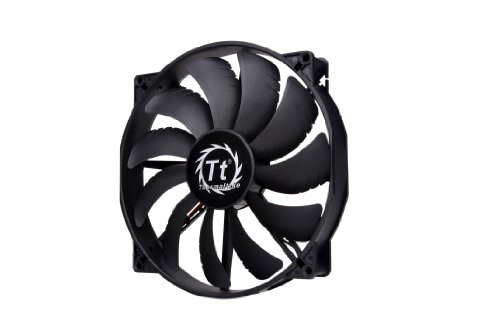
Thermaltake Pure 20 200mm Case Fan
Best for: 200mm mounts needing high static pressure
- Fan Size
- 200mm
- Bearing Type
- Long Life Sleeve Bearing
- Dimensions
- 11.4 × 10 × 12.6 inches
- Weight
- 15 ounces
View on Amazon: Thermaltake Pure 20 200mm Case Fan Affiliate link
This Thermaltake fan measures 200mm by 30mm thick. It uses a long life sleeve bearing for reliability. The design focuses airflow to reduce noise while maintaining high air pressure. It is available in black. You can find it in single packs. This fan suits builds needing larger diameter cooling options. It balances silence and efficiency for your chassis.
Pros
- 200mm diameter for high airflow
- 30mm thick for high air pressure
- Long life sleeve bearing
- Shaved frame for easier installation
Cons
- No RGB lighting on this black model
- Only available as a single pack
- No PWM speed control mentioned
Good fit if
- You need a 200mm fan for your case
- You want a thick 30mm blade for pressure
- You prefer a quiet black fan
Skip if
- You only have 120mm or 140mm slots
- You want RGB lighting effects
- You need a multi-pack bundle
Verdict: Thermaltake 200mm Pure 20 Case Fan fits builders who need large diameter cooling with high static pressure. It is a solid choice for cases supporting 200mm mounts.

upHere 120mm RGB Case Fan 3-Pack
Best for: Quiet high airflow cooling
- Fan Size
- 120mm
- Bearing Type
- Hydraulic
- Lighting Type
- RGB
- Dimensions
- 4.72 × 0.98 × 4.72 inches
View on Amazon: upHere 120mm RGB Case Fan 3-Pack Affiliate link
This 120mm fan from upHere focuses on high airflow and quiet operation. It uses a hydraulic bearing and rubber pads to reduce noise. The RGB lighting connects via a 6-pin interface for safe power. You can install it to exhaust warm air or intake cool air. It comes in a black 3-pack. This fan suits builds where cooling efficiency and low noise are priorities.
Pros
- 120mm size for high airflow
- Hydraulic bearing reduces noise
- RGB lighting via 6-pin interface
- Flexible intake or exhaust installation
Cons
- Requires 6-pin RGB connection
- Hydraulic bearing may have shorter lifespan than fluid dynamic bearings
- No PWM speed control mentioned
Good fit if
- You need quiet cooling for a gaming PC
- You want RGB lighting without complex controllers
- You prefer high airflow fans
Skip if
- You require PWM fan speed control
- You need ARGB synchronization with motherboard software
- You prefer 140mm fans for lower noise
Verdict: upHere 120mm RGB Quiet Case Fan delivers steady airflow and low noise for standard 120mm slots. It fits users who value simple RGB lighting and quiet operation over advanced speed control.
Specifications side by side
| Spec | Thermaltake Pure 20 200mm Case Fan | upHere 120mm RGB Case Fan 3-Pack |
|---|---|---|
| Fan Size | 200mm | 120mm |
| Bearing Type | Long Life Sleeve Bearing | Hydraulic |
| Lighting Type | not stated | RGB |
| Lighting | not stated | RGB |
| Dimensions | 11.4 × 10 × 12.6 inches | 4.72 × 0.98 × 4.72 inches |
| Weight | 15 ounces | not stated |
| Size | 200mm | RGB123 |
| Color | Black | BLACK 3-PACK |
| Model | CL-F015-PL20BL-A | 8541605634 |
Frequently asked questions
Can I use Thermaltake fans in a case made for upHere fans?
Compatibility depends on your case mounting holes. The Thermaltake Pure 20 is a 200mm fan, which requires specific large mounts. Most cases support standard 120mm slots for upHere fans. You cannot fit the larger Thermaltake unit into a standard 120mm opening. Check your chassis specifications before buying.
Does the upHere fan come with RGB lighting?
Yes, the upHere 120mm RGB Case Fan 3-Pack includes lighting. It features RGB illumination for aesthetic customization. This allows you to match your build theme. The Thermaltake Pure 20 focuses on performance and does not mention lighting in its specs. Choose upHere if you want visible effects.
Which fan is better for high static pressure?
The Thermaltake Pure 20 is designed for high static pressure. It is a 200mm fan built to push air through dense radiators or filters. The upHere 120mm RGB fan prioritizes quiet airflow over pressure. If you need to move air through resistance, the Thermaltake option is the stronger choice.
How loud are these case fans during operation?
Both brands target quiet operation for your build. The upHere fan is described as delivering low noise with steady airflow. The Thermaltake Pure 20 uses a sleeve bearing for reliable, quieter performance. Neither product lists decibel ratings in the provided data. You can expect standard quiet operation for both.
What is the difference in fan size between the two?
The size difference is significant. The Thermaltake Pure 20 measures 200mm in diameter. The upHere fan measures 120mm in diameter. This means the Thermaltake unit covers more area and moves more air. You must ensure your case supports the larger 200mm mount for the Thermaltake fan.
Does the upHere fan include multiple units in the box?
Yes, the upHere product is sold as a 3-Pack. You receive three 120mm fans in one package. This is useful for building complete airflow setups. The Thermaltake listing shows a single Pure 20 fan. You would need to purchase additional units separately if you want more fans.
Which fan is best for standard PC cases?
The upHere 120mm RGB fan fits standard cases best. Most mid-tower and full-tower chassis have 120mm mounting points. The Thermaltake 200mm fan is for specialized cases with larger mounts. If your case only supports 120mm fans, the upHere option is the correct choice for compatibility.