NZXT H510 ATX Mid-Tower Case Review (2026): A Spec-Based Look
As an Amazon Associate we earn from qualifying purchases. Links on this page are affiliate links.
This nzxt h510 review examines the NZXT H510 ATX Mid-Tower Case, a compact gaming chassis designed for clean builds. It features a tempered glass side panel for visibility and a front I/O USB Type-C port for modern connectivity. The case supports Mini-ITX, MicroATX, and ATX motherboards, offering flexibility for various component sizes. With included Aer F120mm fans and removable filters, it aims to streamline cooling and cable management. This spec-based look helps you determine if its dimensions and features match your current hardware needs.
What stands out
- Tempered glass side panel with single screw installation for easy access.
- Front I/O USB Type-C port for high-speed device connectivity.
- Supports motherboards up to ATX size with flexible layout options.
- Includes two Aer F120mm fans for immediate airflow setup.
- GPU clearance up to 381mm without a front water cooler installed.
Who it fits
Good fit for
This case suits builders who want a clean, minimalist aesthetic with visible internals. The USB-C port is ideal for users with newer peripherals that require it. The tempered glass panel appeals to those who want to showcase their hardware. It works well for ATX and smaller builds, especially when using standard air cooling or closed-loop water cooling with a 240mm radiator. If you value organized cable management with pre-installed channels, this mid-tower fits your workflow.
Who should skip it
You should look elsewhere if you need extensive front panel connectivity without adapters, as this model only lists the USB-C port. Users requiring support for radiators larger than 240mm will find the front bracket limited. If you plan to use very long graphics cards with a front-mounted water cooler, clearance drops to 325mm, which may restrict your choices. Those who prefer a solid side panel over glass for durability or sound dampening will not find that option here.
Verdict: The NZXT H510 is a well-organized mid-tower case that balances modern connectivity with a clean look. It is a solid choice for ATX builders who prioritize cable management and USB-C access.
Key specs explained for NZXT H510
Case Type: Mid Tower
This size offers a balance between compact footprint and expandability. You get enough room for standard ATX motherboards and decent airflow without taking up excessive desk space. It is ideal for users who want a manageable chassis that still accommodates standard components and moderate cooling solutions.
Side Panel: Tempered Glass
Tempered glass provides a clear, unobstructed view of your internal hardware. It is stronger than standard acrylic and resists scratching better over time. This feature is best for builders who prioritize aesthetics and want to showcase their RGB lighting and cable management from the side.
Max GPU Length: Up to 381mm
This clearance allows you to install large, high-performance graphics cards without crowding other components. You can fit most modern enthusiast GPUs. Check your specific card dimensions before buying, as this limit ensures adequate space for airflow and prevents physical interference with other internal parts.
Radiator Support: 240mm
The case supports liquid cooling radiators up to 240mm in size. This allows for effective heat dissipation for mid-to-high-end CPUs. You can mount these radiators in the front or top, depending on the specific bracket configuration. This option is suitable for users seeking quieter operation than air cooling.
Motherboard Support: Mini-ITX, MicroATX, and ATX
This versatility means you can build with various motherboard sizes. ATX offers the most expansion slots, while Mini-ITX saves space. This flexibility lets you choose the form factor that best fits your budget and performance needs without being locked into a single motherboard standard.
Design and build details
The NZXT H510 is a mid-tower chassis with a compact footprint. Its dimensions are 8.27 inches wide, 18.1 inches high, and 16.9 inches long. The case weighs 14.6 pounds. This size balances a small desk presence with room for standard ATX motherboards. You get enough space for decent airflow without taking up excessive room. It suits users who want a tidy setup that fits easily on most desks.
The side panel is made of tempered glass. It uses a single screw for installation. This allows you to view your internal components clearly. The front I/O panel includes a USB Type-C port. This provides modern connectivity for newer devices. The listing notes a front panel filter and a PSU intake filter. Both are removable for cleaning. This helps maintain airflow over time.
The finish comes in White, Black, or Black/Red. The cable management system features pre-installed channels and straps. This design makes wiring intuitive. You can route cables through dedicated spaces behind the motherboard tray. The case supports GPUs up to 381mm long. CPU coolers must fit within 165mm. These limits define the build scope. You must check component sizes before purchasing. The streamlined design simplifies assembly. It focuses on clean aesthetics and practical airflow.
Setup and everyday use
Setting up the NZXT H510 involves leveraging its patented cable routing kit. This system includes pre-installed channels and straps, which make wiring intuitive. You can route cables through designated spaces to keep the interior tidy. The tempered glass side panel uses a single screw installation, allowing you to remove it easily for access without needing multiple fasteners. This design simplifies the initial build process and future component upgrades.
For compatibility, the case supports Mini-ITX, MicroATX, and ATX motherboards. You have up to 381mm of GPU clearance without a front water cooler, or 325mm with one installed. The CPU cooler height limit is 165mm. The front panel features a USB Type-C port, providing modern connectivity for peripherals and devices. The internal layout includes a removable bracket designed for radiators up to 240mm, which simplifies the installation of closed-loop or custom-loop water cooling systems.
In daily use, the case includes two Aer F120mm fans for optimal internal airflow. The front panel and power supply intakes have removable filters, which you can take out for cleaning. This maintenance routine helps sustain airflow performance over time. The compact mid-tower form factor fits well on standard desks, offering a balance between a small footprint and expandability. The tempered glass panel allows you to view your components while protecting them from dust and physical contact. The white color option provides a clean aesthetic for gaming setups.
Before you buy the NZXT H510
You need to verify that your graphics card fits within the 381mm clearance limit, or 325mm if you install a front radiator. The case includes two Aer F120mm fans, but you may want additional intake or exhaust options for your specific airflow needs. Check your CPU cooler height against the 165mm maximum to ensure it clears the side panel. Since the front panel supports radiators up to 240mm, confirm your cooling loop or AIO fits that space. The tempered glass panel requires a single screw for removal, so keep that tool handy for maintenance. Dust filters on the front and PSU intakes are removable, making regular cleaning straightforward. This mid-tower option sits alongside other compact ATX cases in our guide, offering a balance of visibility and cable management for users who prioritize a clean aesthetic without sacrificing standard motherboard support.
Check before you buy
- Check GPU length against the 381mm limit.
- Verify CPU cooler height under 165mm.
- Confirm front radiator fits the 240mm bracket.
- Ensure you have the single screw for the glass panel.
The product at a glance
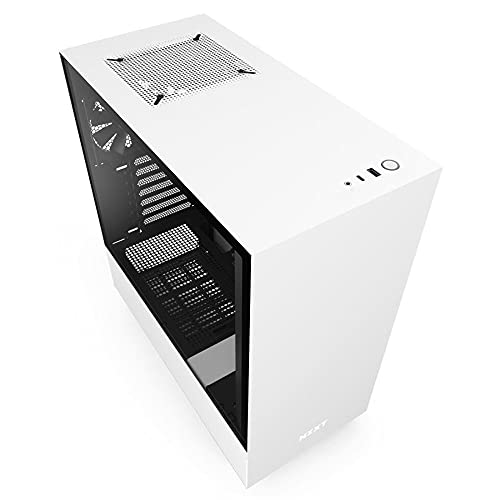
NZXT H510 ATX Mid-Tower Case with USB-C
Best for: White ATX builds with USB-C needs
- Motherboard Support
- Mini-ITX, MicroATX, ATX
- Case Type
- Mid Tower
- Side Panel
- Tempered Glass
- Radiator Support
- 240mm
- Max GPU Length
- Up to 381mm
- Use
- Gaming
View on Amazon: NZXT H510 ATX Mid-Tower Case with USB-C Affiliate link
The NZXT H510 is a white ATX mid-tower case with a tempered glass side panel. It includes two 120mm fans and a front USB Type-C port. The case supports motherboards up to ATX size and GPUs up to 381mm long. A removable bracket allows for 240mm radiators. It features pre-installed cable management channels. This build suits you if you want a clean look with modern connectivity.
Pros
- Front I/O includes a USB Type-C port
- Tempered glass side panel with single screw installation
- Patented cable routing kit with pre-installed channels and straps
- Supports motherboards up to ATX size
- Includes two 120mm fans for airflow
Cons
- Radiator support is limited to 240mm
- GPU clearance drops to 325mm if a front water cooler is installed
- CPU cooler height limit is 165mm
Good fit if
- You want a white mid-tower case with a glass side panel
- You need a front USB Type-C port for your peripherals
- You plan to use a GPU up to 381mm in length
Skip if
- You require support for larger 280mm or 360mm radiators
- You need to install a CPU cooler taller than 165mm
- You prefer a case without a tempered glass side panel
Verdict: The NZXT H510 White ATX Mid-Tower offers clean cable management and a USB Type-C port for modern builds. It fits you if you prioritize a tidy interior and a white aesthetic with a glass side panel.
Specifications side by side
| Spec | NZXT H510 ATX Mid-Tower Case with USB-C |
|---|---|
| Motherboard Support | Mini-ITX, MicroATX, ATX |
| Case Type | Mid Tower |
| Side Panel | Tempered Glass |
| Radiator Support | 240mm |
| Max GPU Length | Up to 381mm |
| Tower Size | Mid-Tower |
| Use | Gaming |
| Connectivity | Type-C |
| Dimensions | 16.9 × 8.27 × 18.1 inches |
| Weight | 14.6 pounds |
| Size | base |
| Color | White |
| Model | CA-H510B-W1 |
Frequently asked questions
Does the NZXT H510 support ATX motherboards?
Yes, the NZXT H510 supports ATX motherboards. It is classified as a mid-tower case, which provides enough internal space for standard ATX boards. This allows you to build a full-sized gaming PC without needing a larger chassis. The design balances compactness with necessary expandability for common components.
Is there a USB-C port on the NZXT H510?
Yes, the NZXT H510 includes a USB Type-C port on the front I/O panel. This feature supports modern connectivity needs for newer devices and peripherals. It ensures you can connect high-speed accessories without relying solely on older USB-A ports, keeping your setup current and functional.
What material is the side panel made of?
The side panel is made of tempered glass. This material offers clear visibility into the interior of your build. It allows you to showcase your components and lighting effects while maintaining structural strength. The glass panel contributes to the clean aesthetic often desired in modern gaming setups.
What are the dimensions of the NZXT H510?
The NZXT H510 measures 8.27 inches in width, 18.1 inches in height, and 16.9 inches in length. These dimensions define its mid-tower form factor. The size is designed to fit comfortably on most desks while providing adequate room for standard ATX motherboards and typical graphics cards.
How much does the NZXT H510 weigh?
The NZXT H510 weighs 14.6 pounds. This weight reflects the materials used in its construction, including the tempered glass panel and metal frame. The heft suggests a sturdy build that remains stable during transport and daily use, providing a solid foundation for your internal hardware components.
Is the NZXT H510 suitable for gaming builds?
Yes, the NZXT H510 is designed for gaming use. Its mid-tower size accommodates the components typically found in gaming PCs, such as ATX motherboards and large graphics cards. The tempered glass side panel also allows you to display your custom builds, which is a popular choice for gaming enthusiasts.
What color options are available for the NZXT H510?
The NZXT H510 is available in white. This color option provides a clean and modern look for your desktop setup. The white aesthetic pairs well with the tempered glass side panel, creating a cohesive appearance that highlights the internal components and contributes to a tidy overall build presentation.