HYXN H2 vs HYXN H3 HYXN ATX PC Case: Spec Comparison
As an Amazon Associate we earn from qualifying purchases. Links on this page are affiliate links.
This hyxn h2 vs h3 hyxn atx PC case guide compares two dual-chamber mid-towers. Both use tempered glass and separate components for better airflow. The H2 offers larger internal space and more pre-installed fans. The H3 is a compact option with a different fan layout. You need to check your hardware dimensions before buying either.
Key differences
| Aspect | HYXN H2 ATX Case with 8 Fans | HYXN H3 Dual-Chamber Mid-Tower |
|---|---|---|
| Included Fans | 8 fans (6x140mm, 2x120mm) | 6 fans (5x120mm reverse, 1x120mm forward) |
| Max GPU Length | 455mm | 400mm |
| Radiator Support | 420mm | 360mm |
| Motherboard Support | E-ATX, ATX, M-ATX, ITX | ATX, M-ATX, ITX |
| SSD Support | 3x SSD | 2x SSD |
Which one should you choose?
Choose HYXN H2 ATX Case with 8 Fans if
- You plan to use a graphics card longer than 400mm.
- You need support for E-ATX motherboards.
- You want more pre-installed airflow with larger 140mm fans.
Choose HYXN H3 Dual-Chamber Mid-Tower if
- You prefer a more compact case footprint.
- You are using an ATX or smaller motherboard.
- You want a simpler cable management partition design.
Verdict: The H2 suits builders needing maximum compatibility for large GPUs and E-ATX boards. The H3 is a tighter fit for standard ATX builds with smaller graphics cards. Choose based on your longest component.
H2 vs H3 Spec Comparison
Motherboard support
The HYXN H2 accommodates E-ATX, ATX, M-ATX, and ITX motherboards. This wider range allows you to install larger enthusiast boards that do not fit standard ATX footprints. The HYXN H3 supports ATX, M-ATX, and ITX. It explicitly notes B-mode compatibility for M-ATX with dual fans, but does not list E-ATX support. If you plan to use an E-ATX motherboard, the H2 is the necessary choice. The H3 is sufficient for standard ATX and smaller form factors.
Fan configuration
The H2 comes with eight pre-installed fans: six 140mm reverse rotation and two 120mm forward rotation. The larger 140mm fans move more air at lower speeds for quieter operation. The H3 includes six Infinity Mirror PWM ARGB fans, all 120mm, with five reverse and one forward. While both offer ARGB lighting, the H2 provides greater airflow potential due to the higher fan count and larger 140mm size. The H3 fans are PWM controlled, which is a specific feature not detailed for the H2 fans in the provided data.
Radiator support
The HYXN H2 supports large 420mm radiators and can accommodate either two 420mm units or three 360mm units simultaneously. This flexibility allows for extensive cooling setups. The HYXN H3 supports 360mm radiators. It does not mention support for 420mm units. If you require a 420mm radiator for high-end liquid cooling, the H2 is the only option. The H3 is limited to 360mm maximum radiator length, which is standard for many mid-tower builds.
GPU compatibility
Graphics card length is a critical factor for many builds. The H2 supports GPUs up to 455mm (17.91 inches). The H3 supports GPUs up to 400mm (15.75 inches). The H2 offers 55mm more clearance, which is significant for large triple-fan graphics cards. If your GPU exceeds 400mm, the H3 will not fit it. The H2 provides more room for modern, oversized video cards without requiring you to remove fans or compromise on card size.
Storage options
The H2 provides space for two hard disk drives and three solid-state drives. The H3 supports one hard disk drive and two solid-state drives. The H2 offers more total storage bays, giving you additional flexibility for installing multiple drives for media or backups. The H3 has slightly fewer drive options, which may be a constraint if you need extensive local storage. Both cases support SSDs and HDDs, but the H2 has the higher capacity.
Dimensions and weight
The H2 measures 19.7 x 11.2 x 19.1 inches and weighs 11 pounds. The H3 measures 16.5 x 11.2 x 14.6 inches and weighs 15 pounds. The H2 is physically larger in length and height, offering more internal volume. The H3 is more compact, making it easier to fit in smaller desks or tight spaces. Despite being smaller, the H3 is heavier, likely due to denser materials or construction. You should choose based on your available desk space and weight tolerance.
Which HYXN case fits your build
You need space for large GPUs and E-ATX boards
The HYXN H2 supports E-ATX motherboards, which the H3 does not. It also accommodates GPUs up to 455mm, providing 55mm more clearance than the H3's 400mm limit. If you plan to use a large graphics card or a bigger motherboard, the H2's expanded internal dimensions are necessary for a proper fit without modification.
You want maximum airflow from pre-installed fans
The HYXN H2 comes with eight pre-installed fans, including two larger 140mm units. The H3 includes only six 120mm fans. The additional fan count and the ability to mount 420mm radiators in the H2 offer superior cooling potential. This setup reduces the need for you to purchase and install extra fans separately.
You prefer a compact build with PWM control
The HYXN H3 features six Infinity Mirror PWM ARGB fans, allowing for direct speed control via your motherboard. While the H2 has more fans, they are standard LEDs. The H3's compact dual-cavity design is suitable for ATX, M-ATX, and ITX boards, offering a smaller footprint if you do not require E-ATX support.
The products compared

HYXN H2 ATX Case with 8 Fans
Best for: High airflow builds with large radiators
- Motherboard Support
- E-ATX, ATX, M-ATX, ITX
- Case Type
- ATX Mid-Tower
- Included Fans
- 6x 140mm, 2x 120mm
- Radiator Support
- 420mm
- Max GPU Length
- 455mm
- Use
- Gaming
View on Amazon: HYXN H2 ATX Case with 8 Fans Affiliate link
The HYXN H2 is a dual-chamber ATX mid-tower case featuring a fully tempered glass side panel. It comes pre-installed with eight fans, including six 140mm and two 120mm units, rather than the ARGB infinity mirror setup found on the H3. The design supports large 420mm radiators and GPUs up to 455mm. This layout separates components to improve airflow and cable management for your build.
Pros
- Pre-installed with 8 non-ARGB fans (6x140mm, 2x120mm)
- Dual-chamber design for improved airflow and cable management
- Supports up to 420mm radiators and 455mm GPUs
- Includes USB 3.2 Type-C on the front I/O panel
Cons
- Fans are not ARGB or infinity mirror style
- Heavier at 11 pounds compared to lighter alternatives
- Limited to standard LED lighting without RGB customization
Good fit if
- You prefer high airflow over flashy lighting effects
- You need support for large 420mm radiators
- You want a dual-chamber layout for easier cable management
Skip if
- You specifically want pre-installed ARGB infinity mirror fans
- You prefer a lighter case under 10 pounds
- You require RGB lighting control for your fans
Verdict: The HYXN H2 ATX Case is a practical choice for builders who prioritize cooling performance and cable management over decorative lighting. It fits users who need space for large radiators and GPUs without the distraction of ARGB effects.
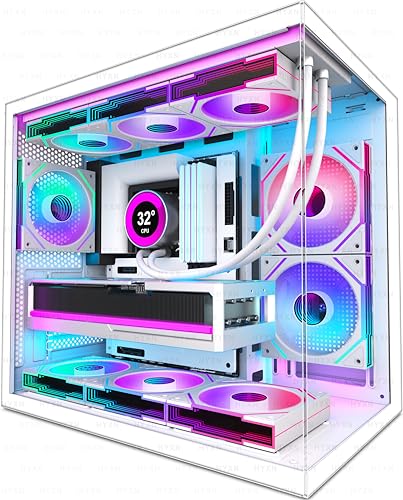
HYXN H3 Dual-Chamber Mid-Tower
Best for: Dual-chamber builds with large radiators
- Motherboard Support
- ATX, M-ATX, ITX
- Case Type
- Mid-Tower
- Side Panel
- Tempered Glass
- Included Fans
- 6x 120mm ARGB PWM
- Radiator Support
- 360mm
- Max GPU Length
- 400mm
View on Amazon: HYXN H3 Dual-Chamber Mid-Tower Affiliate link
The HYXN H3 is a compact dual-chamber mid-tower designed for clean cable management and thermal efficiency. It comes with six pre-installed Infinity Mirror PWM ARGB fans and supports 360mm radiators. You get a fully tempered glass side panel and a front I/O panel with USB Type-C. This case fits ATX, M-ATX, and ITX motherboards, accommodating GPUs up to 400mm long.
Pros
- Pre-installed 6x 120mm ARGB PWM fans
- Dual-chamber design for better airflow
- Supports 360mm radiators and GPUs up to 400mm
- Front I/O includes USB Type-C 3.2
Cons
- Heavier at 15 pounds compared to lighter alternatives
- No mention of app-based RGB control
- Only includes one forward fan among six
Good fit if
- You want pre-installed ARGB lighting
- You need support for large 360mm radiators
- You prefer a dual-chamber layout
Skip if
- You need app-controlled lighting features
- You prefer a lighter case under 10 pounds
- You only want forward-facing fans
Verdict: The HYXN H3 ATX Case with 6 ARGB Fans is a solid option for builders who value airflow and aesthetics without the hassle of installing fans separately. It suits those who want a clean, dual-chamber build with strong cooling support.
Specifications side by side
| Spec | HYXN H2 ATX Case with 8 Fans | HYXN H3 Dual-Chamber Mid-Tower |
|---|---|---|
| Motherboard Support | E-ATX, ATX, M-ATX, ITX | ATX, M-ATX, ITX |
| Case Type | ATX Mid-Tower | Mid-Tower |
| Side Panel | not stated | Tempered Glass |
| Included Fans | 6x 140mm, 2x 120mm | 6x 120mm ARGB PWM |
| Radiator Support | 420mm | 360mm |
| Max GPU Length | 455mm | 400mm |
| Tower Size | Mid-Tower | Mid-Tower |
| Use | Gaming | Gaming |
| Lighting | ARGB | ARGB |
| Connectivity | Type-C | Type-C |
| Compatible Device | Radiator | Radiator |
| Dimensions | 16.5 × 11.2 × 17.3 inches | 16.5 × 11.2 × 17.3 inches |
| Weight | 11 pounds | 15 pounds |
| Size | H2 | H3 |
| Color | Black | White |
Frequently asked questions
Does the HYXN H3 come with fans included?
Yes, the HYXN H3 includes six ARGB fans. These pre-installed fans provide immediate airflow for your build. This setup saves you the hassle of purchasing and installing fans separately. You get a complete cooling solution right out of the box without extra assembly steps.
What is the weight difference between the two cases?
The HYXN H2 weighs 11 pounds, while the HYXN H3 weighs 15 pounds. The H3 is four pounds heavier than the H2. This difference likely stems from the H3's dual-chamber design and additional pre-installed components. You should account for this extra weight when moving the case.
Which case supports larger graphics cards?
The HYXN H2 supports larger graphics cards. It accommodates GPUs up to 455mm in length. The HYXN H3 has a limit of 400mm. If you plan to use a very long high-end GPU, the H2 provides 55mm more clearance. This extra space ensures better compatibility with large components.
Are both cases compatible with 360mm radiators?
Yes, both cases support 360mm radiators. The HYXN H3 explicitly lists 360mm radiator support in its attributes. The HYXN H2 is also described as compatible with radiators for high airflow builds. You can install large liquid cooling loops in either case without worrying about physical clearance issues.
Does the HYXN H2 support E-ATX motherboards?
Yes, the HYXN H2 supports E-ATX motherboards. The HYXN H3 only supports ATX, M-ATX, and ITX boards. If you are building with a large enthusiast motherboard, the H2 is the necessary choice. The H3 will not physically fit an E-ATX board due to its smaller internal footprint.
What connectivity ports are available on the front?
Both the HYXN H2 and H3 feature Type-C connectivity. This USB Type-C port is located on the front panel for easy access. You can connect high-speed devices directly without reaching behind the desk. This modern interface is standard on both models for current hardware compatibility.