darkFlash vs NZXT: PC Cases Compared by Specs
As an Amazon Associate we earn from qualifying purchases. Links on this page are affiliate links.
Choosing between a darkFlash vs NZXT PC case depends on your cooling and layout priorities. Both are mid-tower ATX enclosures featuring tempered glass side panels and USB Type-C connectivity. The darkFlash model emphasizes high airflow with four included PWM ARGB fans and support for larger 360mm radiators. In contrast, the NZXT H510 focuses on streamlined cable management and supports smaller 240mm radiators while including only two fans. This guide compares these specifications to help you decide.
Key differences
| Aspect | darkFlash ATX Mid-Tower Dual Glass Case | NZXT H510 ATX Mid-Tower Case with USB-C |
|---|---|---|
| Included Fans | 4x PWM ARGB | 2x Aer F120mm |
| Radiator Support | 360mm | 240mm |
| Motherboard Support | ATX | Mini-ITX, MicroATX, ATX |
| Lighting | ARGB | not listed |
Which one should you choose?
Choose darkFlash ATX Mid-Tower Dual Glass Case if
- You want pre-installed RGB lighting and higher fan count for airflow.
- You plan to use a 360mm radiator for advanced cooling.
- You prefer a case with magnetic dust filters at the top.
Choose NZXT H510 ATX Mid-Tower Case with USB-C if
- You need support for Mini-ITX or MicroATX motherboards.
- You value streamlined cable routing with pre-installed channels and straps.
- You prefer a slightly narrower chassis footprint for smaller desks.
Verdict: The darkFlash case is better for builders who prioritize immediate airflow and RGB aesthetics with a 360mm radiator setup. The NZXT H510 suits those who need flexibility for smaller motherboards and cleaner cable management. Choose based on whether you value pre-installed cooling or modular size support.
darkFlash vs NZXT Spec Comparison
Included Fans
The darkFlash DS900 ships with four PWM ARGB fans pre-installed, providing immediate airflow and lighting for your build. This setup allows you to see your hardware through the tempered glass right out of the box. In contrast, the NZXT H510 includes only two Aer F120mm fans. While the NZXT case is designed for streamlined cooling, you would need to purchase additional fans separately to match the airflow capacity of the darkFlash. If you want more cooling components included in the base price, the darkFlash offers a clear advantage with its higher fan count.
Radiator Support
Cooling capacity differs significantly between these two enclosures. The darkFlash DS900 supports radiators up to 360mm, allowing you to install larger liquid cooling loops for high-performance components. The NZXT H510 supports radiators up to 240mm. This limitation means you cannot fit a 360mm radiator in the NZXT case without modification or choosing a different model. For builders planning to use extensive liquid cooling solutions, the darkFlash provides greater flexibility and support for larger radiators, making it the better choice for high-heat dissipation needs.
Motherboard Support
Both cases are designed around the ATX form factor, but the NZXT H510 offers broader compatibility. It supports Mini-ITX, MicroATX, and ATX motherboards, giving you options for smaller builds or budget upgrades. The darkFlash DS900 is listed specifically as an ATX Mid-Tower, and the data does not explicitly confirm support for smaller Mini-ITX or MicroATX boards. If you plan to use a smaller motherboard or want the flexibility to switch sizes, the NZXT H510 is the more versatile option. Otherwise, both handle standard ATX boards well.
GPU Clearance
Graphics card compatibility is a key factor for many builders. The NZXT H510 supports GPUs up to 381mm in length when no front water cooler is installed. This generous clearance allows you to use large, high-end graphics cards without fitting issues. The darkFlash DS900 data does not specify a maximum GPU length. Without this specific measurement, you cannot be certain if it accommodates the same size cards as the NZXT. For guaranteed support for large graphics cards, the NZXT H510 provides the safer, documented option.
Lighting Features
Visual aesthetics play a major role in case selection. The darkFlash DS900 features ARGB (Addressable RGB) fans, which allow for customizable color effects and lighting synchronization. This is ideal if you want a vibrant, dynamic look inside your case. The NZXT H510 includes standard fans without ARGB support. While the NZXT case has a clean, minimalist design, it lacks the programmable lighting features found in the darkFlash. If lighting customization is important to you, the darkFlash provides the necessary ARGB infrastructure out of the box.
Which PC Case Suits Your Build Best
Users wanting maximum pre-installed airflow and RGB
The darkFlash DS900 includes four PWM ARGB fans out of the box, giving you immediate cooling and lighting. It supports up to a 360mm radiator, allowing for larger cooling loops. The dual tempered glass panels offer a clear view of your components, making it ideal for builds where visual appeal and high airflow are top priorities.
Builders prioritizing clean cable management and compact size
The NZXT H510 features a patented cable routing kit with pre-installed channels and straps, simplifying wiring. Its compact design supports Mini-ITX, MicroATX, and ATX motherboards. While it includes only two fans and supports up to a 240mm radiator, the streamlined layout makes it a practical choice for those who value organized internals and a smaller footprint.
Users needing flexible motherboard support including Mini-ITX
The NZXT H510 supports Mini-ITX, MicroATX, and ATX boards, offering more flexibility for smaller builds. The darkFlash DS900 is strictly ATX. If you plan to use a Mini-ITX motherboard, the NZXT case is the only viable option. It also includes removable dust filters on the front and PSU intakes for easier maintenance.
The products compared

darkFlash ATX Mid-Tower Dual Glass Case
Best for: Gamers wanting ARGB fans and glass views
- Case Type
- Mid-Tower
- Side Panel
- Tempered Glass
- Included Fans
- 4x PWM ARGB
- Radiator Support
- 360mm
- Motherboard Support
- ATX
- Use
- Gaming
View on Amazon: darkFlash ATX Mid-Tower Dual Glass Case Affiliate link
This darkFlash mid-tower case features a 270-degree panoramic tempered glass side panel for clear hardware visibility. It includes four pre-installed PWM ARGB fans and supports up to ten fans or a 360mm radiator. The front I/O offers USB 3.0 and Type-C ports. Magnetic dust filters help maintain internal cleanliness. It suits builders wanting strong airflow and aesthetic appeal without extra controller hardware.
Pros
- Pre-installed 4x PWM ARGB fans
- Supports up to 10 fans or 360mm radiator
- 270-degree panoramic tempered glass side panel
- Front I/O includes USB Type-C port
Cons
- RGB hub controller not included
- Heavy at 15 pounds
- No mention of front mesh airflow design
Good fit if
- You want pre-installed ARGB fans
- You need Type-C connectivity
- You prefer a glass side panel view
Skip if
- You need an included RGB controller
- You want a compact ITX build
- You prefer minimal glass exposure
Verdict: The darkFlash DS900 ATX Mid-Tower delivers strong cooling options and a glass showcase for your components. It is a solid fit for gamers who want pre-installed lighting and modern ports.
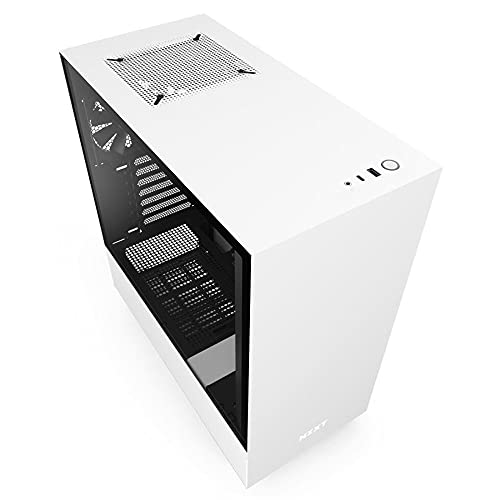
NZXT H510 ATX Mid-Tower Case with USB-C
Best for: Compact ATX builds with USB Type-C needs
- Motherboard Support
- Mini-ITX, MicroATX, ATX
- Case Type
- Mid Tower
- Side Panel
- Tempered Glass
- Radiator Support
- 240mm
- Max GPU Length
- Up to 381mm
- Use
- Gaming
View on Amazon: NZXT H510 ATX Mid-Tower Case with USB-C Affiliate link
The NZXT H510 is a compact ATX mid-tower case featuring a tempered glass side panel. It includes two 120mm Aer F fans and a front I/O USB Type-C port. The design supports motherboards up to ATX size, with GPU clearance up to 381mm and radiator support up to 240mm. Its streamlined cable management system aids in clean builds. This case suits users who value organized wiring and modern connectivity in a compact footprint.
Pros
- Front I/O USB Type-C port
- Tempered glass side panel
- Two 120mm Aer F fans included
- Patented cable routing kit with pre-installed channels
- Supports radiators up to 240mm
Cons
- GPU clearance drops to 325mm with front watercooler installed
- CPU cooler height limit is 165mm
- No mention of included rear exhaust fan
Good fit if
- You need a USB Type-C port for quick connectivity
- You prefer a clean aesthetic with a tempered glass panel
- You are building with standard ATX or smaller motherboards
Skip if
- You require extensive rear exhaust fan support
- You plan to use a large air cooler over 165mm
- You need GPU clearance exceeding 381mm
Verdict: NZXT H510 White ATX Mid-Tower offers solid cable management and a USB Type-C port for compact builds. It fits users who prioritize organized wiring and a glass side panel over maximum component clearance.
Specifications side by side
| Spec | darkFlash ATX Mid-Tower Dual Glass Case | NZXT H510 ATX Mid-Tower Case with USB-C |
|---|---|---|
| Motherboard Support | not stated | Mini-ITX, MicroATX, ATX |
| Case Type | Mid-Tower | Mid Tower |
| Side Panel | Tempered Glass | Tempered Glass |
| Included Fans | 4x PWM ARGB | not stated |
| Radiator Support | 360mm | 240mm |
| Max GPU Length | not stated | Up to 381mm |
| Tower Size | Mid-Tower | Mid-Tower |
| Use | Gaming | Gaming |
| Lighting | ARGB | not stated |
| Connectivity | Type-C | Type-C |
| Compatible Device | Radiator | not stated |
| Dimensions | 8.6 × 17.8 × 17 inches | 16.9 × 8.27 × 18.1 inches |
| Weight | 15 pounds | 14.6 pounds |
| Size | 17.1''L x 8.5''W x 17.8'H | base |
| Color | Black | White |
| Model | DS900 | CA-H510B-W1 |
Frequently asked questions
Which case is better for a compact ATX build?
The NZXT H510 is the better choice for compact builds. It measures 16.9 inches in length, making it slightly shorter than the darkFlash DS900. Its width of 8.27 inches also offers a narrower footprint. This design helps you save desk space while still supporting standard ATX motherboards and tempered glass visibility.
Does the darkFlash case include fans for immediate airflow?
Yes, the darkFlash DS900 includes four PWM ARGB fans pre-installed. This provides immediate cooling and lighting when you first assemble your PC. You do not need to purchase additional fans to get started. The fans also highlight your components through the tempered glass side panel right out of the box.
Can I use a USB Type-C device with the NZXT case?
Yes, the NZXT H510 features a USB Type-C port on the top I/O panel. This allows you to connect modern peripherals quickly without searching for older USB ports. It supports ATX motherboards and includes a tempered glass side panel for showcasing your internal hardware layout.
What motherboard form factors do these cases support?
Both the darkFlash DS900 and the NZXT H510 support ATX motherboards. They are classified as mid-tower cases, which is the standard size for most gaming builds. This ensures compatibility with standard graphics cards and CPU coolers, provided they fit within the specified internal dimensions of each chassis.
Which case weighs more?
The darkFlash DS900 weighs 15 pounds, while the NZXT H510 weighs 14.6 pounds. The darkFlash model is slightly heavier, which may provide a more stable base during heavy component installation. Both cases use tempered glass for their side panels, adding to their overall structural weight and durability.
Do both cases offer a glass side panel?
Yes, both enclosures feature a tempered glass side panel. This design choice allows you to showcase your internal components and RGB lighting. It is a common feature in modern gaming cases, ensuring your build looks presentable from the side while maintaining structural integrity and airflow for your hardware.